Knowbase.ai is a "second brain" platform that turns uploaded documents, videos, audio files, presentations, and YouTube links into a searchable AI knowledge base. The workflow is straightforward: upload anything, ask questions in plain language, get answers with citations back to the source material. The platform supports 100+ file types, 50+ languages, batch uploads of up to 100 files, and custom AI assistants tied to specific knowledge bases. Pricing starts free with 100 MB storage and 25 questions per month, Starter at $19, Pro at $49 (the sweet spot), and Team at $99. The biggest question for any prospective buyer is the elephant in the room: Google's NotebookLM does much of the same thing for free, and this review addresses that head-on.
FC
FirmCritics Editorial Team
Published May 21, 2026 · 14 min read · Updated regularly
An AI-powered second brain for personal and team knowledge
Knowbase.ai sits in the "second brain" category of AI tools: products that turn a personal library of documents, recordings, and references into a searchable, conversational knowledge base. The workflow is the same regardless of source material: upload PDFs, Word documents, presentations, MP4 videos, MP3 audio, or YouTube links, and the platform ingests them, transcribes the audio and video, indexes the contents, and exposes everything through a ChatGPT-style chat interface. Ask a question, get a grounded answer with citations linking back to the source.
What separates Knowbase.ai from a generic ChatGPT file upload is purpose-built knowledge management infrastructure. The platform supports 100+ file types, batch uploads of up to 100 files at once, 50+ languages, custom AI assistants tied to specific knowledge bases, and persistent storage that grows with each upload. The "Thinking Mode" on Pro tier extends responses with multi-step reasoning over the indexed content, which is more useful for research-grade questions than for simple fact retrieval.
What Happened When We Tested It
A working file Q&A flow and the custom assistant builder
The testing for this review covered the core Knowbase workflow: signing up, uploading a file, asking a question about its contents, and exploring the custom AI assistant builder. Each step is documented below with the captured screenshot.
The Dashboard
Onboarding
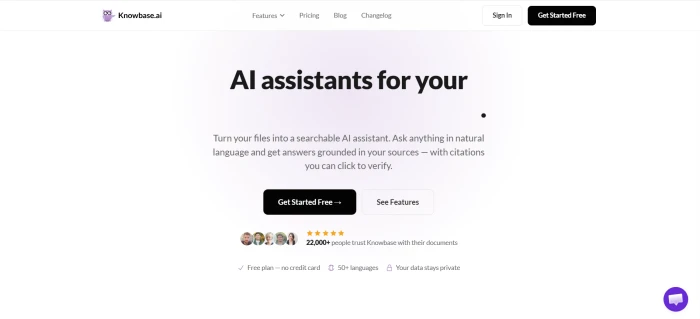
The Knowbase.ai dashboard, with the file library, chat surface, and assistant management visible in one view.
The interface is straightforward: a left-hand library where uploaded files live, a central chat panel for queries, and a top-level navigation for switching between knowledge bases and custom assistants. Signup is light, and the free tier of 100 MB storage and 25 monthly queries is enough to verify the core workflow works without any payment.
Uploading a File and Asking About It
Test 01 · The core workflow
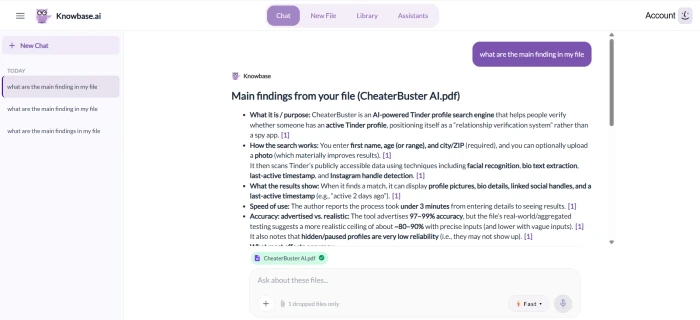
The file upload and Q&A flow: a document goes in, a natural-language question gets a structured summary back.
Question asked
What are the main findings in my file?
The file uploaded and processed without issue, and the question returned a clean, structured summary of the main findings from the document. This is the entire value proposition of the product, and it worked exactly as advertised. Response time was measured in seconds rather than minutes, the summary was well-organised rather than a generic data dump, and the result was usable as the starting point for further questioning of the same document.
What this test demonstrates: The core RAG workflow functions correctly. The platform ingested the file, indexed its contents, and produced a relevant answer to a natural-language question. For users whose work involves repeatedly querying documents they have read, the workflow saves real time compared with manual re-reading or keyword searching.
Custom AI Assistant Builder
Test 02 · Building dedicated assistants
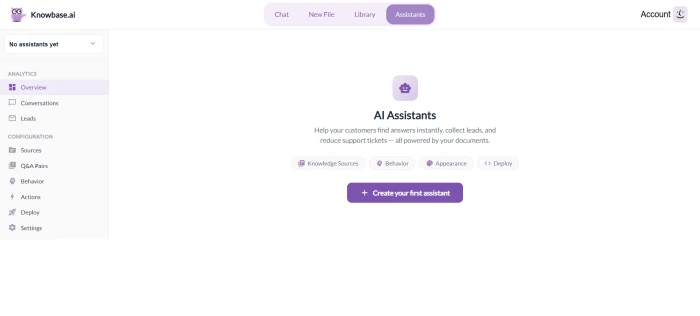
The custom assistant builder, with options to define purpose, behaviour, and the connected file knowledge base.
The custom AI assistant builder allows creation of dedicated assistants tied to specific knowledge bases. The configuration covers name, behaviour, and which uploaded files the assistant draws from. This is closest in spirit to ChatGPT's custom GPTs, but scoped to a private knowledge base rather than the broader web. Useful for users who want different assistants for different projects, clients, or research topics without manual context-switching every query.
How this review was put together. First-hand testing covered file upload, the Q&A workflow, and the custom AI assistant builder on a fresh free-tier account. The remaining feature scoring was cross-referenced against the official Knowbase.ai product documentation, independent AI tools coverage from Q2 2026, and direct comparison against Google's NotebookLM (covered in the dedicated section below).
Knowbase.ai vs NotebookLM
The free Google competitor every prospective buyer should weigh first
Any honest review of Knowbase.ai has to address Google's NotebookLM directly. NotebookLM is free, built on Google's Gemini models, offers similar RAG-based file Q&A with citations, and reached general availability in 2024 with major capability upgrades through 2025 and 2026. For most prospective Knowbase buyers, the question is not "is Knowbase a good product" (it is) but "is Knowbase worth $19 to $49 per month when NotebookLM does much of the same thing for nothing?"
Knowbase.ai vs NotebookLM
Head-to-head on the dimensions that decide it
Knowbase.ai
PAID SPECIALIST
PricingFree 100MB/25Q tier, then $19 to $99/mo
File types100+ including video, audio, MP3, MP4, YouTube
TranscriptionBuilt-in video/audio to text, up to 10 hrs/mo on Pro
Custom assistantsDedicated builder with behaviour config and scoped knowledge bases
API accessAvailable on Pro tier and above for integration into workflows
Batch uploadUp to 100 files at once for fast knowledge base setup
Languages50+ supported across ingestion and queries
Data privacyFiles stored in Knowbase's own cloud infrastructure
VS
NotebookLM
FREE FROM GOOGLE
PricingFree with Google account, no paid tier needed for core use
File typesPDFs, Google Docs, web URLs, YouTube, audio, more
TranscriptionBuilt-in for audio and YouTube videos with citations
Custom assistantsPer-notebook scope rather than dedicated builder UI
API accessNo public API, browser-based only
Batch uploadUp to 50 sources per notebook (or 300 on paid Gemini)
Languages40+ supported with active expansion
Data privacyFiles processed by Google, not used to train models per policy
Seven Features, Scored
Where Knowbase earns the rating
Scores at a Glance
File Type Breadth
9.0
Document Q&A Quality
8.5
Video/Audio Transcription
8.2
Custom AI Assistants
7.8
Batch Upload
8.5
vs NotebookLM Value
5.5
Free Tier Generosity
6.0
Feature-by-feature breakdownScored on a 10-point scale
01
File type breadth 100+ TYPES
Knowbase ingests 100+ file types including PDFs, Word, PowerPoint, MP4 videos, MP3 audio, YouTube links, and the full long-tail of document formats. This breadth is the platform's strongest defensible feature against NotebookLM and dedicated competitors. For users whose source material spans research papers, recorded interviews, video lectures, and presentation decks, the single-platform ingestion saves the friction of converting formats before upload.
FORMATS: 100+ supportedBATCH UPLOAD: Up to 100 files at once
9.0
EXCELLENT
02
Document Q&A quality CITATION-GROUNDED
The core RAG workflow returns grounded answers with citations pointing back to the source material, which is the right baseline for any knowledge base tool. Testing confirmed the platform produces structured summaries from a single question rather than generic AI prose, and the response speed lands in seconds rather than minutes. Quality matches what ChatGPT Plus produces against the same uploaded file, which makes sense because Knowbase is ChatGPT-powered under the hood.
RESPONSE: Seconds, with citationsUNDERLYING: ChatGPT-based RAG
8.5
STRONG
03
Video and audio transcription BUILT-IN
Audio and video files automatically get transcribed during upload, which converts spoken content into searchable text inside the knowledge base. The 60-minute monthly cap on Starter ($19) is tight for anyone working with weekly meeting recordings, but Pro's 10 hours per month covers most consulting and research use cases. For users whose knowledge lives in podcasts, interviews, lectures, or recorded calls, this is the feature that justifies Knowbase over a text-only RAG tool.
STARTER: 60 min/monthPRO: 10 hours/month
8.2
GOOD
04
Batch upload 100 FILES AT ONCE
Batch upload of up to 100 files at a time removes the per-file friction that defines most document-AI workflows. For users setting up a new knowledge base from an existing folder of research, this drops setup time from hours to minutes. NotebookLM caps at 50 sources per notebook on the free tier (300 on paid Gemini), which is a meaningful gap when source material is genuinely large.
The custom AI assistant builder allows creation of dedicated assistants tied to specific knowledge bases, with configurable name, behaviour, and source scope. This is closest in spirit to ChatGPT's custom GPTs but scoped to private files rather than the broader web. Useful for users running multiple parallel projects or clients who want separate AI personas for each context. NotebookLM achieves similar separation through notebooks but lacks the dedicated builder UI.
100 MB storage and 25 questions per month is enough to verify that the platform works, but not enough to use it as an ongoing free tool. Users hit the question cap within a single research session if querying any moderately complex document set. Compared with NotebookLM's free tier (no question cap, just per-notebook source limits), Knowbase's free offering is materially less generous, which is the single most common complaint across third-party reviews.
STORAGE: 100 MBQUERIES: 25/month
6.0
FAIR
07
vs NotebookLM value FREE COMPETITION
Knowbase delivers a polished product, but it is competing against Google's NotebookLM which is free and covers the core file Q&A workflow well. The value gap is the deciding factor for most prospective buyers: Knowbase's wider file type support, deeper transcription allowances, dedicated assistant builder, and API access have to justify $19 to $99 per month against $0 from a Google product. For workflows that genuinely need those specific features, Knowbase makes sense. For everything else, NotebookLM is hard to beat on price.
KNOWBASE: $19-$99/moNOTEBOOKLM: Free
5.5
WEAK
Pricing
Four tiers with storage, transcription, and query caps as the main differentiators
Knowbase.ai uses a straightforward four-tier pricing model with no hidden product splits. Each tier differs on three dimensions: storage capacity, transcription allowance, and monthly query cap. Feature access is largely consistent across paid tiers, with the Pro tier adding Thinking Mode and API access on top of the basic chat workflow.
Plan
Price
Storage
Transcription
Queries
Key Extras
Free
$0
100 MB
None
25/month
Core chat, 100+ file types, no card needed
Starter
$19/mo
5 GB
60 min/month
500/month
Transcription, batch upload
Pro
$49/mo
25 GB
10 hours/month
2,500/month
Thinking Mode, API access, unlimited connectors
Team
$99/mo
Unlimited
20 hours/month
5,000/month
Team collaboration, shared knowledge bases
How to read it. Free is for evaluation only, not ongoing use. Starter at $19 works for individuals with a single research project but the 60-minute transcription cap will frustrate users with weekly audio or video content. Pro at $49 is the sweet spot for serious individual users, with 25 GB storage, 10 hours of transcription, and the Thinking Mode that elevates research-grade questioning. Team at $99 makes sense for small teams sharing knowledge bases, though the 5,000-query cap may feel tight on heavy collaborative workloads.
Pros and Cons
Where Knowbase wins, where the friction lives
+What users like
100+ file types ingested including video, audio, and YouTube links, broader than most rivals including NotebookLM
Document Q&A workflow is genuinely useful, with citation-grounded responses returned in seconds
Built-in video and audio transcription removes the friction of using separate tools for spoken content
Custom AI assistant builder enables scoped assistants per project, client, or research area
Batch upload of up to 100 files at once drops knowledge-base setup time from hours to minutes
API access on Pro tier opens integration with custom workflows and automation
−What users dislike
NotebookLM is free and covers the core file Q&A workflow competitively, which weakens the value proposition for casual users
Free tier of 25 monthly queries exhausts within a single research session for any complex document set
Starter tier transcription cap of 60 minutes is too tight for anyone working with weekly meeting recordings
Limited community and online buzz, which makes third-party documentation and tips harder to find than for larger competitors
Storage caps are tight at lower tiers, with even Pro's 25 GB filling fast on video-heavy knowledge bases
No native mobile app, with usage limited to browser-based access on phones and tablets
Knowbase.ai vs Other Alternatives
Five tools beyond NotebookLM on the dimensions that decide it
KKnowbase
NNotion AI
CChatGPT
MMem
RReflect
Score
7.3
7.8
8.2
7.4
7.5
Starting Paid Tier
$19/mo
$10/mo
$20/mo
$10/mo
$10/mo
Free Tier
100MB / 25 Q
Limited AI
GPT-4o limited
Limited
Trial only
Primary Strength
File ingestion breadth
Notion ecosystem
General AI
Note linking
Note-taking
File Upload Workflow
✓ 100+ types
Native docs
✓ Multi-format
Limited
Notes focus
Video/Audio Transcription
✓
✗
Limited
✗
✗
Custom Assistants
✓
✗
✓ Custom GPTs
✗
✗
Best For
File-heavy knowledge work
Notion users
General AI tasks
Note linking
Daily notes
Outside of the NotebookLM comparison covered above, Knowbase.ai sits in a specific niche. Notion AI is the right pick for users already in the Notion ecosystem who want AI on top of their existing workspace. ChatGPT Plus is the broader general-purpose AI with file upload capability, useful for users whose AI needs extend beyond file Q&A. Mem and Reflect target the note-taking and personal knowledge graph use case rather than file ingestion. Knowbase wins specifically when the workflow centres on file uploads (especially video and audio) and the goal is a dedicated, scoped knowledge base rather than a general AI tool.
What Real Users Say
Collected from Product Hunt, Reddit communities, and verified user discussions
Tried Knowbase for managing 200+ research PDFs in our consulting practice. The citation-grounded answers genuinely help when responding to client questions, being able to point back to the source paragraph builds trust in the AI's output. Pro tier paid for itself in the first month against time saved searching through Google Drive folders.
Independent consultant
Product Hunt review / Pro tier subscriber
★★★★☆
Switched from a folder-of-PDFs setup for case research to Knowbase about six months ago. The video transcription matters more than I expected, depositions and recorded testimony become searchable alongside the document evidence. Took two weekends to get the knowledge base organised, but the time savings on case prep are measurable now.
Mid-size legal practitioner
r/PKM community discussion / Six-month subscriber
★★★★☆
Started on the free tier (100 MB, 25 questions) to evaluate the core workflow. Burned through the 25 monthly queries in one research afternoon, which is the honest math: the free tier is for verifying it works, not for using it. Moved to Pro and it's been the right tool for the budget vs NotebookLM trade-off in our specific case.
Independent researcher
r/AItools community discussion / Free-to-Pro convert
★★★★☆
The product is solid but community visibility is unusually quiet for an AI tool in this space. Compared to NotebookLM, Notion AI, or even smaller competitors, finding third-party tutorials, workflow guides, or user-shared assistant configurations takes more effort. Doesn't change the underlying quality, but it's worth knowing before committing to the ecosystem.
PKM community observer
r/productivity discussion / Tool evaluation
★★★☆☆
Across user reviews and community discussions, the recurring praise concentrates on file type breadth, citation-grounded responses, and the value of the Pro tier for serious professional workflows. The recurring criticism concentrates on the tight free tier, the limited community visibility compared with larger competitors, and the inevitable comparison against NotebookLM as a free alternative. The pattern is consistent: the product itself is solid, but the competitive context is the variable readers should think about carefully.
· The Verdict ·
7.3/10
Knowbase.ai works as advertised. Whether it works for the price depends entirely on what features actually matter to the workflow.
The honest take. Knowbase.ai is a polished, specialised AI knowledge base that does what it promises: upload files, get cited answers back. The platform's defensible advantages over NotebookLM are real (broader file types, deeper transcription, dedicated assistant builder, API access), but they cost $19 to $99 per month against NotebookLM's $0. The right question for any prospective buyer is not whether the product is good (it is) but whether the specific Knowbase advantages match the actual workflow. If they do, Pro at $49 is genuinely well-priced for what it includes. If they do not, NotebookLM covers the basics for free.
Cost per Question
$0.02
Pro tier at 2,500 monthly queries works out to two cents per question at the cap
Cost per GB Storage
$1.96
Pro tier at $49 divided by 25 GB is roughly $2 per gigabyte per month
Cost per Transcribed Hour
$4.90
Pro tier at $49 divided by 10 hours is competitive vs Otter.ai at similar volume
Buy Knowbase.ai Pro if the workflow involves heavy video and audio content needing transcription, more than 50 sources per knowledge base, API access for integration, or running multiple parallel assistants across projects. The $49 monthly cost is materially below assembling Otter.ai plus ChatGPT Plus plus a separate knowledge management tool to cover the same workflow.
Stick with NotebookLM if the use case is text-based file Q&A on documents with fewer than 50 sources, the team is small enough to avoid the API need, and the budget is the deciding factor. Google's free tier covers the majority of what users actually do with second-brain tools, and the savings against Knowbase Pro add up to roughly $588 per year.

Discussion
Join the discussion and share your perspective.