Leonardo AI is a multi-tool AI creative platform combining image generation, video creation, canvas editing, a blueprint workflow builder, and sketch-to-image under one login. This review covers five tested workflows — image generation with a detailed scene prompt, the canvas editor, video generation validated end-to-end with a shareable output, the blueprint dashboard, and the draw tool — and surfaces a documented prompt adherence gap and free-tier privacy limitation.
Leonardo AI is a web-based creative platform that runs image generation, video creation, canvas editing, blueprint workflow automation, and sketch-to-image conversion under one account. Image generation supports multiple first-party models — including Phoenix, Kino XL, Leonardo Diffusion XL, and Alchemy — alongside third-party integrations such as Flux and Stable Diffusion variants. Video generation produces short cinematic clips from text prompts or existing images.
The Canvas editor supports inpainting, outpainting, and element-level manipulation of generated images. Blueprint is a node-based workflow builder that chains AI operations into automatable pipelines. The Draw tool converts hand-drawn sketches into realistic images via a text prompt layered over the sketch input. All tools operate on a token system: free accounts receive 150 tokens per day with generations published publicly, while paid plans ($12–$60/month) unlock private generations, more monthly tokens, and token rollover.
What Happened When We Tested It
02 . Six tests across homepage, image generation, editor, video generation, blueprint, and draw
Testing ran on Leonardo AI in June 2026 across the homepage and post-login dashboard, image generation with a detailed scene prompt, the canvas editor, video generation validated with a shareable output link, the blueprint dashboard, and the draw sketch-to-image tool. The video output is publicly shareable and embedded below. A prompt adherence gap was documented in image generation: rain specified in the prompt did not appear in the output.
Homepage and Post-Login Dashboard
Test 01 . Platform entry
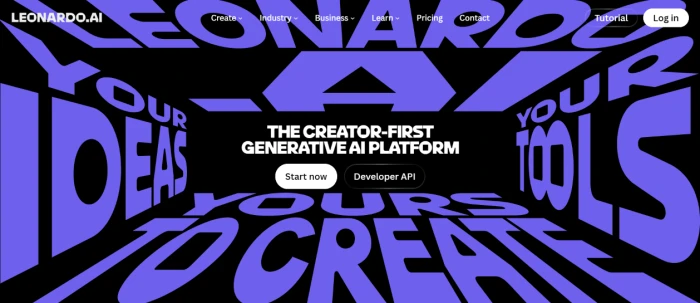
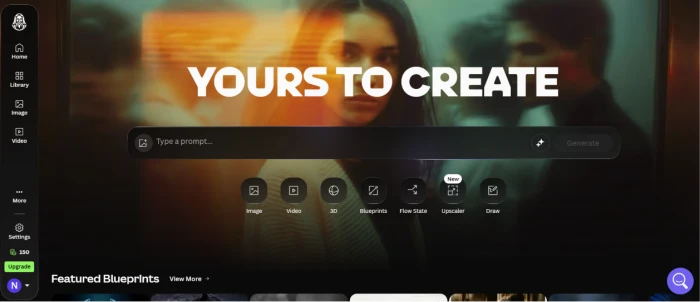
The Leonardo AI homepage before login.The dashboard after login with all tools accessible.
What we observed: The homepage communicates the platform's multi-tool scope clearly. Post-login, the dashboard surfaces all five core tools from a unified left navigation panel — image generation, video, editor, blueprint, and draw — without requiring separate logins or plan upgrades to see what exists. The dashboard layout is clean and does not overwhelm new users with feature density on entry.
Image Generation — Prompt Adherence Finding
Test 02 . Image output validated
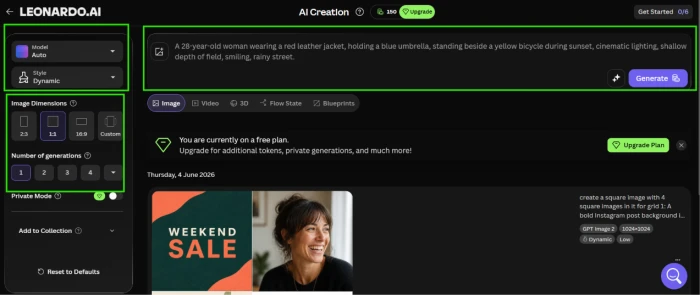
Input Prompt
"A 28-year-old woman wearing a red leather jacket, holding a blue umbrella, standing beside a yellow bicycle during sunset, cinematic lighting, shallow depth of field, smiling, rainy street."
The image generation dashboard with the prompt entered.The generated output — rain specified in prompt is absent from the result.
The finding: The generated image renders the red leather jacket, blue umbrella, yellow bicycle, and sunset lighting accurately. However, "rainy street" — an explicit prompt element — is completely absent from the output. No rain, no wet pavement, no puddles. The remaining scene elements are well-rendered, but the missing weather condition is a direct prompt adherence failure on a clearly specified detail. This is not a minor stylistic interpretation gap; rain was a named element that did not transfer to the output.
Canvas Editor Dashboard
Test 03 . Post-generation editing
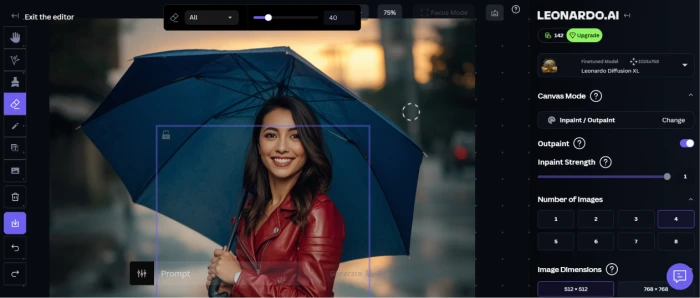
The canvas editor with inpainting, outpainting, and manipulation tools.
What this shows: The canvas editor provides inpainting (editing within selected regions), outpainting (extending the image beyond its original borders), element selection, and layer-level controls. For users who want to correct prompt adherence gaps — such as adding rain to the Test 02 output — the editor provides the toolset to do it manually. This positions the canvas as a practical correction layer over generation, not just an add-on feature.
Video Generation — Validated with Shareable Output
Test 04 . Video output validated
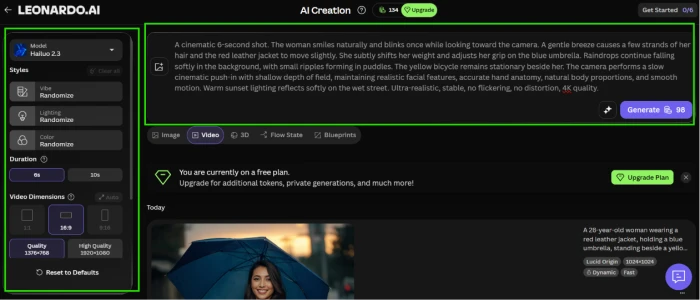
Input Prompt
"A cinematic 6-second shot. The woman smiles naturally and blinks once while looking toward the camera. A gentle breeze causes a few strands of her hair and the red leather jacket to move slightly. She subtly shifts her weight and adjusts her grip on the blue umbrella. Raindrops continue falling softly in the background, with small ripples forming in puddles. The yellow bicycle remains stationary beside her. The camera performs a slow cinematic push-in with shallow depth of field, maintaining realistic facial features, accurate hand anatomy, natural body proportions, and smooth motion. Warm sunset lighting reflects softly on the wet street. Ultra-realistic, stable, no flickering, no distortion, 4K quality."
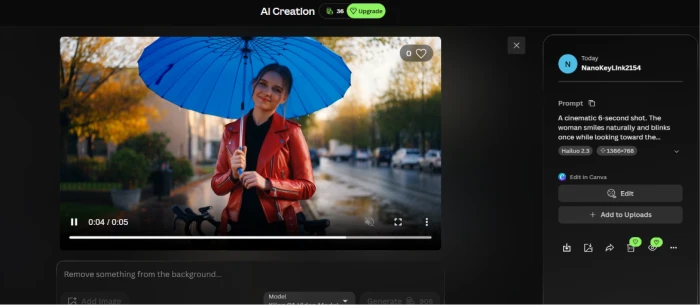
The video generation dashboard with prompt entered.The generated video ready for playback and sharing.
The validation: Video generation completed end-to-end and the output is publicly shareable via the link above. The platform generates a short cinematic clip from the text prompt, processes it within the same dashboard, and provides a direct share link without additional steps. Video prompts consume significantly more tokens than image generation — relevant to users on the free or entry paid tier who want to use video regularly.
★
Five Creative Tools Under One Login
Leonardo AI consolidates image generation, video creation, canvas editing, blueprint workflow automation, and sketch-to-image conversion without requiring separate accounts or subscriptions for each tool. The canvas editor functions as a correction and refinement layer over image generation — inpainting and outpainting let users fix prompt adherence gaps or extend compositions post-generation. Blueprint chains AI operations into pipelines. The draw tool converts rough sketches into photorealistic scenes via prompt overlay. The multi-tool consolidation is the platform's structural advantage over single-purpose image generators.
Blueprint Dashboard
Test 05 . Workflow automation
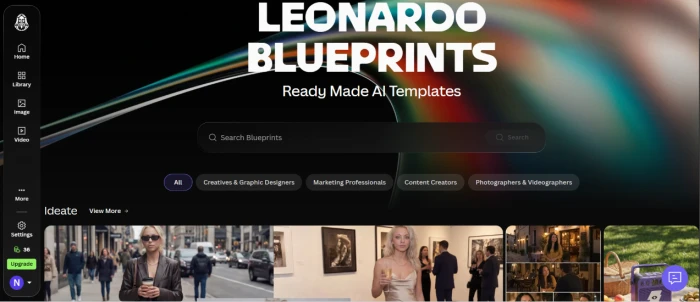
The Blueprint node-based workflow builder dashboard.
What this shows: Blueprint presents a node-based interface where AI operations — image generation, style transfer, upscaling, and others — are connected into visual pipelines. Users build repeatable workflows rather than re-entering prompts and settings manually for each generation run. For creators with recurring production patterns (consistent character styles, batch asset generation, multi-step image pipelines), Blueprint reduces repetitive setup time. This is a differentiated feature not present in most competing image generation platforms.
Draw — Sketch-to-Image
Test 06 . Sketch conversion validated
Sketch + Prompt Used
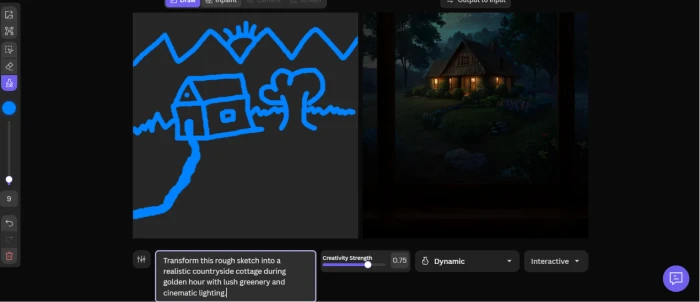
Rough sketch: hut, tree, mountain · Prompt overlay: "Transform this rough sketch into a realistic countryside cottage during golden hour with lush greenery and cinematic lighting."
The draw dashboard — rough sketch with prompt overlay for realistic conversion.
What this shows: The draw tool accepts a rough hand-drawn sketch as structural input and applies a text prompt over it to generate a realistic image that follows the sketch's composition. A simple hut-tree-mountain sketch with a golden hour prompt produced a landscape that preserved the spatial layout while rendering realistic materials and lighting. For concept artists and designers who think in rough structural sketches rather than text descriptions alone, this is a meaningful workflow — the sketch controls composition while the prompt controls style and realism.
!
Prompt Adherence Gap and Free Tier Public Generation Limits
Two structural concerns surfaced in testing. First, the prompt adherence gap documented in Test 02: a named scene element (rain) was completely absent from the generated image despite explicit inclusion in the prompt. Users who require precise scene accuracy should treat generation as a starting point requiring canvas editor correction, not a single-pass faithful output. Second, the free tier publishes all generations to the community gallery — there are no private generations without a paid plan starting at $12/month. Users generating work for clients, personal projects, or commercial use on the free tier are exposing that work publicly by default.
How this review was put together. First-hand testing on Leonardo AI in June 2026 covered the homepage and post-login dashboard, image generation with a detailed multi-element scene prompt, the canvas editor dashboard, video generation with a cinematic prompt validated end-to-end with a publicly shareable output link, the blueprint workflow builder dashboard, and the draw sketch-to-image tool with a rough sketch and realistic-conversion prompt — evaluated under the FirmCritics AI Creative Platform Methodology spanning multi-tool scope, image generation quality and prompt fidelity, video generation capability, editor depth, workflow automation, model variety, token economy transparency, free tier limitations, and privacy practices.
10-Point Feature Review
03 . Honest scoring across capabilities and friction
Feature Scores at a Glance
Multi-Tool Creative Suite
8.5
AI Model Variety
8.0
Canvas & Editor Tools
7.5
Blueprint Workflow Builder
7.5
Sketch-to-Image (Draw)
7.0
Video Generation
7.0
Prompt Adherence Accuracy
5.5
Free Tier (Public-Only Limit)
5.5
Token Economy Transparency
5.5
Privacy + Data Handling
5.5
Feature-by-feature breakdownScored on a 10-point scale, honest evidence-driven distribution
01
Multi-tool creative suite PLATFORM DIFFERENTIATOR
Five distinct creative tools under one account: image generation, video creation, canvas editor, blueprint workflow builder, and sketch-to-image draw. Users do not need separate subscriptions, logins, or platforms to access each capability. The canvas editor functions as a direct correction layer over image generation — inpainting lets users fix missed prompt elements like the rain gap documented in Test 02. Blueprint chains operations for repeatable production workflows. No comparable single-platform offering in the direct AI image generator competitive set matches this breadth.
TOOLS: Image, Video, Editor, Blueprint, DrawADVANTAGE: Single login consolidation
8.5
STRONG
02
AI model variety BROAD MODEL ACCESS
First-party models include Phoenix, Kino XL, Leonardo Diffusion XL, and Alchemy, each optimised for different output styles — photorealism, cinematic, artistic, and game-asset respectively. Third-party integrations include Flux variants, Stable Diffusion models, and for premium tiers, access to models like Veo, Kling, and Sora. This model breadth means users can switch between generation styles without leaving the platform. The variety meaningfully exceeds single-model platforms and gives users more creative control than default model choices alone.
The canvas editor supports inpainting (masking and regenerating specific regions), outpainting (extending images beyond their original frame), element-level selection, and layer controls. Practically, this means a prompt adherence failure like the missing rain in Test 02 can be corrected post-generation without re-running the full image. Outpainting extends compositions for banner or wider-format applications. The editor's integration within the same platform — rather than requiring export to Photoshop or a separate tool — reduces workflow friction for users who generate and then refine.
CAPABILITIES: Inpaint, outpaint, element controlUSE CASE: Correction and extension of generated images
7.5
GOOD
04
Blueprint workflow builder DIFFERENTIATED FEATURE
Blueprint is a node-based visual pipeline builder for chaining AI operations — generation, style transfer, upscaling, masking — into repeatable automated workflows. For creators with recurring production patterns (consistent character styles across campaign assets, batch game asset generation, multi-step image pipelines), Blueprint reduces manual re-entry of settings for every run. This feature has no direct equivalent in Midjourney, DALL-E, or Adobe Firefly, making it a genuine differentiator for production-scale users rather than casual creators.
The draw tool takes a hand-drawn sketch as structural input and applies a text prompt over it, generating a realistic image that follows the sketch's spatial composition. Validated in Test 06 with a hut-tree-mountain sketch converted to a golden-hour countryside scene, preserving the layout while applying realistic materials and cinematic lighting from the prompt. For users who think compositionally in rough structures rather than pure text description, this gives compositional control that text-only prompts cannot replicate. Character posing and scene layout are more precise with sketch input than language alone.
INPUT: Hand-drawn sketch + text promptOUTPUT: Realistic image following sketch composition
7.0
GOOD
06
Video generation MOTION VALIDATED
Video generation completed end-to-end in Test 04 with a detailed cinematic prompt and produced a publicly shareable output link. The platform handles text-to-video and image-to-video generation within the same dashboard as image tools. The shareable link format makes it easy to share outputs without downloading and re-uploading. The primary constraint is token cost — video generation consumes significantly more tokens than image generation, meaning free tier users will exhaust their 150 daily tokens quickly on even short clips. Third-party video models (Sora, Veo, Kling) require additional tokens beyond first-party allocations.
VALIDATION: Test 04 shareable output confirmedCONSTRAINT: High token cost per video
7.0
GOOD
07
Prompt adherence accuracy GAP DOCUMENTED
The Test 02 finding is the primary editorial concern: "rainy street" was an explicit prompt element that did not appear in the generated output. The red jacket, blue umbrella, yellow bicycle, and sunset lighting were all present — but rain, wet pavement, and puddles were absent. This is not a stylistic interpretation; it is a named condition that was not rendered. Users relying on specific scene conditions for brand work, concept illustration, or controlled creative output should budget for canvas editor correction time rather than expecting single-pass prompt fidelity on complex multi-element scenes.
FINDING: Rain absent from Test 02 outputMITIGATION: Canvas inpainting to correct post-generation
5.5
FAIR
08
Free tier — public-only limit PRIVACY GAP
Free plan generations are published to Leonardo's community gallery by default. There is no private generation on the free tier — all outputs are publicly visible. This means users generating concepts for clients, unreleased projects, or personal-use images on the free tier are exposing that work to the public without a paid plan. Private generations require upgrading to Essential ($12/month) at minimum. The 150 tokens/day allowance is more generous than most competitors' free tiers, but the public-only constraint is a structural limitation that competitors with no free tier do not carry the same way.
Token costs vary by model, resolution, quality setting, and feature type — but Leonardo does not show a clear token cost per action before generation runs. Users discover the token cost after it is deducted. Video costs significantly more than images; third-party models cost more than first-party; higher quality settings cost more than basic. This variability makes it genuinely difficult to predict how many generations a monthly token allocation will support without running experiments. Failed or unsatisfactory generations still consume tokens, which is a recurring complaint across user communities.
Free tier images are public and may be used by the platform and other users per the terms of service. Paid plan private images are not used for training by default, with users retaining full ownership and commercial rights on paid tiers. However, the intersection of free public generation and community gallery visibility means content shared on the free plan has broad usage rights granted to the platform. Users working on proprietary concepts, client briefs, or commercially sensitive imagery should not use the free tier and should review current paid-tier data handling terms before generating work they intend to keep private or commercially protect.
FREE: Public · platform usage rights applyPAID: Private · commercial rights retained
5.5
FAIR
Pros and Cons
04 . What works and what to weigh
+What users like
Five creative tools under one account — image, video, editor, blueprint, draw without separate logins
Largest free tier in the image generation category — 150 tokens/day compared to Midjourney's $0 free option
Multiple first-party AI models covering photorealism, cinematic, artistic, and game-asset generation styles
Canvas editor for post-generation correction — inpainting and outpainting fix prompt failures without re-running
Blueprint workflow builder chains AI operations into repeatable production pipelines
Sketch-to-image gives compositional control that text-only prompts cannot replicate for layout precision
Shareable video output links generated directly from the platform without downloading and re-uploading
−What users dislike
Prompt adherence gap documented — explicit scene element (rain) missing from validated test output
Free tier generates publicly — no private generations without a paid plan from $12/month
Token costs not shown before generation runs — deducted after the fact, failed generations still consume tokens
Video generation burns tokens fast — 150 free daily tokens exhausted quickly on even short clips
Third-party premium models cost extra tokens on top of base plan allocation
Commercial rights require paid plan — free tier grants broad platform usage rights to generated content
Pricing Breakdown
05 . Token-based freemium with four tiers
Feature
Free
Essential · $12/mo
Premium · $30/mo
Ultimate · $60/mo
Tokens
150/day
8,500/month
25,000/month
60,000/month
Private Generations
✗ Public only
✓
✓
✓
Commercial Rights
✗ Platform rights apply
✓ Full ownership
✓ Full ownership
✓ Full ownership
Token Rollover
n/a
Limited
✓
✓
Relaxed Generation
✗
First-party only
✓ First-party only
✓ First-party only
Canvas Editor
✓
✓
✓
✓
Blueprint + Draw
✓
✓
✓
✓
Annual Billing Saving
n/a
~17% off
~20% off
~20% off
The pricing reality: The free tier is the most accessible entry point in the category but the public-generation constraint is a meaningful limitation for anyone with proprietary work. Essential at $12/month is the minimum for private outputs and commercial rights — the decision point most serious users hit quickly. Token costs vary by model and quality settings, so actual image volume per plan depends on how the tokens are spent. Verify current token costs per action on Leonardo's pricing page before committing to a tier based on monthly image estimates.
Leonardo AI vs the Top 4 Alternatives
06 . How it compares in the AI image generation category
LLeonardo AI
MMidjourney
AAdobe Firefly
DDALL-E 3
IIdeogram
Score
6.8
8.0
7.2
7.0
6.5
Free Tier
150 tokens/day
None
25 credits/month
Via ChatGPT Free
Limited free
Video Generation
Integrated · validated
✗
✗
✗
✗
Canvas Editor
Inpaint + outpaint
Basic editor
✓ Generative fill
Via ChatGPT
Limited
Sketch-to-Image
Draw tool · validated
✗
Structure reference
✗
✗
Workflow Automation
Blueprint builder
✗
Firefly API only
API only
✗
Prompt Adherence
Gap documented
Strong
Strong
Strong
Strong (text)
Commercial Rights
Paid plans only
Paid plans
All plans
Paid plans
Paid plans
Best For
Multi-tool creative suite
Top image quality
Adobe ecosystem users
ChatGPT integration
Text-in-image accuracy
The picture: Leonardo AI is the only platform in this comparison set offering video generation, sketch-to-image, canvas editing, and workflow automation together. Midjourney leads on raw image quality and prompt fidelity but has no free tier, no video, and no workflow tools. Adobe Firefly integrates better with Creative Cloud. For users who need multi-tool scope under one platform and can accept prompt adherence requiring canvas correction, Leonardo is the most consolidated option in the category.
What Users Are Saying
07 . Community feedback patterns from across user communities
The multi-tool scope is the reason I stayed. Image generation, video, and the canvas editor under one account saves switching between three different subscriptions. Prompt adherence is the weak spot — I regularly get outputs missing specific scene conditions I've described. The canvas editor fixes most of it but it's extra work. Blueprint is genuinely useful for batch production once you set it up.
r/StableDiffusion user
Multi-tool workflow perspective
★★★★☆
r/StableDiffusion
For a free tier it's the most generous I've used. 150 tokens per day is actually usable for personal projects. The problem is everything is public — learned that the hard way when a client concept ended up in the community gallery. Essential at $12/month fixed the privacy issue immediately. Should be clearer upfront that free means public.
r/AIArt user
Free vs paid tier comparison
★★★☆☆
r/AIArt
Midjourney still wins on pure image quality. But Leonardo is the only platform where I can generate an image, edit it in the canvas, animate it as a video, and build a repeatable pipeline for it — all without leaving one dashboard. The token system is confusing at first because costs change by model and quality setting. Factor in buffer for failed generations consuming tokens.
Trustpilot reviewer
Platform breadth vs specialist quality
★★★★☆
trustpilot.com
The Draw tool is underrated. I can sketch a rough character pose or scene layout and the prompt fills in the realism while preserving my composition. Text-only prompts can't control spatial layout the way a rough sketch can. Prompt adherence on specific details is inconsistent though — I've had weather, lighting conditions, and background elements drop out of complex prompts.
Product Hunt reviewer
Sketch-to-image and prompt accuracy
★★★★☆
producthunt.com
· The Verdict ·
6.8/10
Should you use Leonardo AI? Here is who it is for.
Use Leonardo AI if the multi-tool scope — image generation, video creation, canvas editor, blueprint automation, and sketch-to-image under one account — fits your workflow better than a specialist single-tool; the canvas editor's inpainting capability as a correction layer over prompt adherence gaps is an acceptable workflow step; Blueprint's repeatable pipeline builder serves a production-scale batch generation need; and the free tier's 150 daily tokens are sufficient for evaluation or personal casual use where public generation is acceptable.
Skip Leonardo AI if precise prompt adherence to all specified scene conditions on a single generation pass is required — the documented rain gap in Test 02 shows named elements can be dropped; if the free tier's public-generation constraint creates IP or confidentiality exposure for your work; if top-tier image quality is the priority over tool breadth (Midjourney still leads on output quality); or if the opaque token cost structure — variable by model, quality, and action type, deducted after generation — creates unacceptable budget unpredictability for your production volume.


Discussion
Join the discussion and share your perspective.