getliner.com · Research, cite and draft in one workspace
Liner is an AI research assistant that shows its working: you watch it run searches, see which pages it actually opened, and get an answer with numbered citations next to each claim. Around that it wraps a writing workspace with an Add Citations skill that formats references in a chosen style, which is the part that sets it apart from a plain AI search box. It fits students and researchers who need sourced, citable answers, less so business users and anyone who wants to trial it properly before paying.
Liner is an AI research tool that answers a question by searching the web, reading the pages it finds, and writing back a structured answer with numbered citations tied to each claim. Unlike a chatbot that hands you prose and hopes you trust it, Liner keeps its sources visible, so you can check where every statement came from.
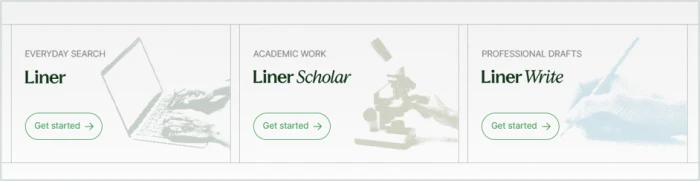
The brand splits into three products that share one account: Liner for everyday search, Liner Scholar for academic work, and Liner Write for professional drafts. A single workspace ties them together, with skill cards for finding related papers and formatting citations in a style you pick. Liner positions itself as the path from a research question to a finished, sourced draft without leaving the page, and it runs in the browser with a free tier that lets you sample before the paywall arrives.
What Happened When We Tested It
02 . 6 tests from product choice through sign-up, onboarding, a real query, and the paywall
I signed up with a Google account, went through the full onboarding as a digital-marketing user, ran a real research query, and hit the upgrade screen. Here is every screen in order, with what held up and what did not.
Choosing a Product
Test 01 . Homepage
Three cards, three illustrations, three identical Get started buttons.
First impression: The homepage splits Liner into three products, each with a one-line job description and its own halftone illustration. The muted green palette and serif wordmarks look closer to a publishing brand than a typical AI startup, calm and premium. The catch is that all three buttons just say Get started, with no features, limits or prices, so I could not tell what each product adds. Nothing said the three share one account and credit pool either, which I only learned at the paywall.
Signing Up
Test 02 . Sign-up
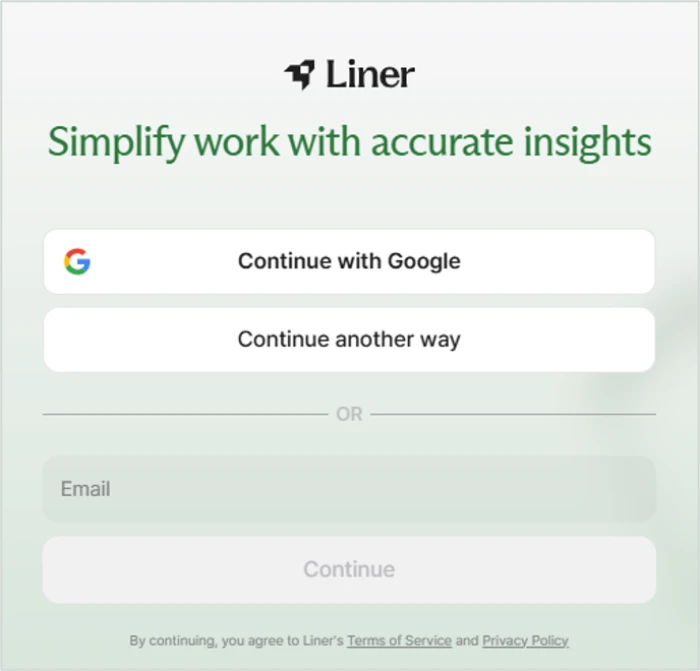
A clean sign-in panel with Google and email options, plus policy links.
What stood out: One-click Google sign-in got me in within seconds, no long form and no card. Terms and Privacy are linked right on the panel, and the layout is uncluttered with one obvious primary action. Two small snags: Continue another way and the email field sit on the same screen, which is redundant, and the greyed-out Continue button is so faint it looks broken until you type an email.
Onboarding, Built for Academics
Test 03 . Onboarding
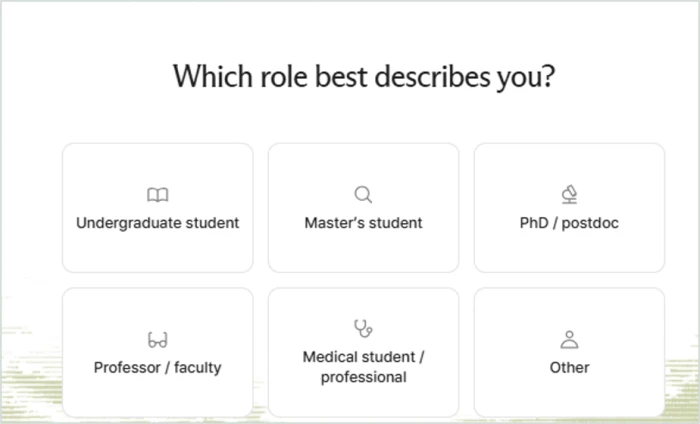
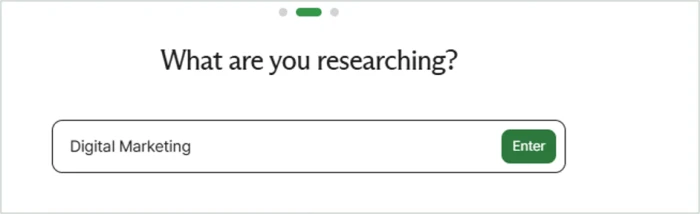
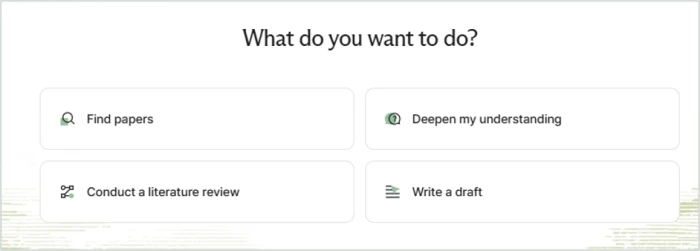
Step one: six role tiles, every one academic or medical.Step two: a free-text research topic, with progress dots.Step three: four goals, all mapped to academic work.
Where it lands: Onboarding is three quick steps with big tiles and clear progress dots, and the free-text topic field means any niche fits. The problem is who it is built for. Every role tile is academic or medical, so as a marketer my only option was Other. The goal screen offers find papers, deepen understanding, run a literature review or write a draft, with nothing resembling market research or competitor analysis. For a brand that sells Liner Write to professionals, the setup has no seat for them.
The Workspace
Test 04 . Workspace
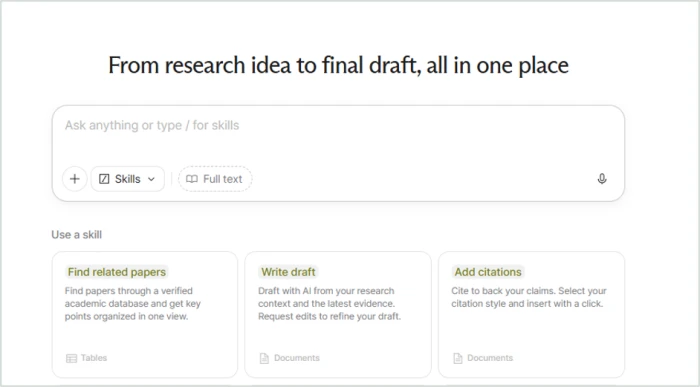
The workspace, with a prompt box and skill cards for each task.
What clicked: The main screen is well organised. Skill cards spell out what each action does and what you get back, a table or a document, which helps a first-timer, and typing a slash pulls up skills for power users. Add Citations with a chosen style is the standout, practical for anyone writing papers or reports. Voice input and file attachments sit right in the prompt box. The rough edges: the Full text toggle is unexplained, the skill cards run off the bottom of the screen, and nothing shows how many credits you hold or what an action costs.
Running a Real Query
Test 05 . Live search
★ Query Used
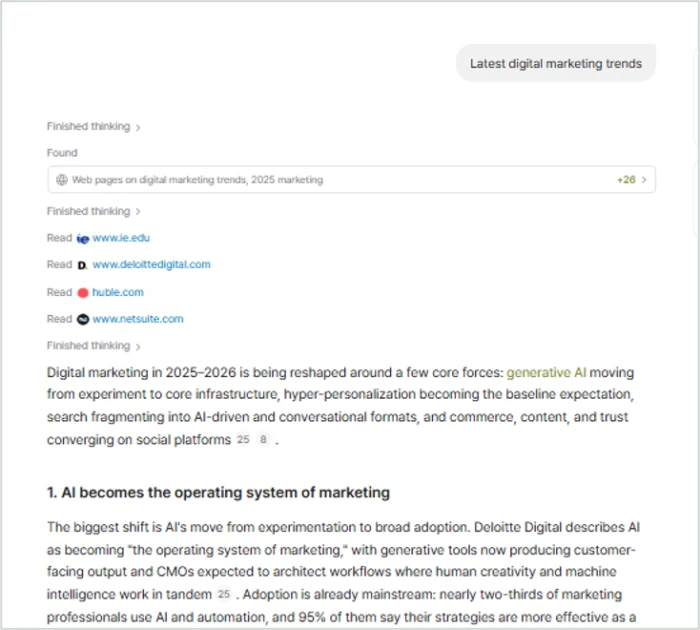
"Latest digital marketing trends"
Liner shows its searches and the exact sites it read, with inline citations.
The real story: Liner showed its work as it went: thinking steps, a web search that found 26 or more pages, and the exact sites it opened. The answer led with a summary, then clear numbered sections with inline citation markers, and it surfaced concrete figures rather than vague generalities. Two caveats. The search line read "2025 marketing" although I tested in October 2026, so I checked how current the results were. And the sources were mostly vendor blogs and a consultancy, not academic papers, which is fine for everyday search but not what a Scholar workspace implies.
The Paywall
Test 06 . Upgrade screen
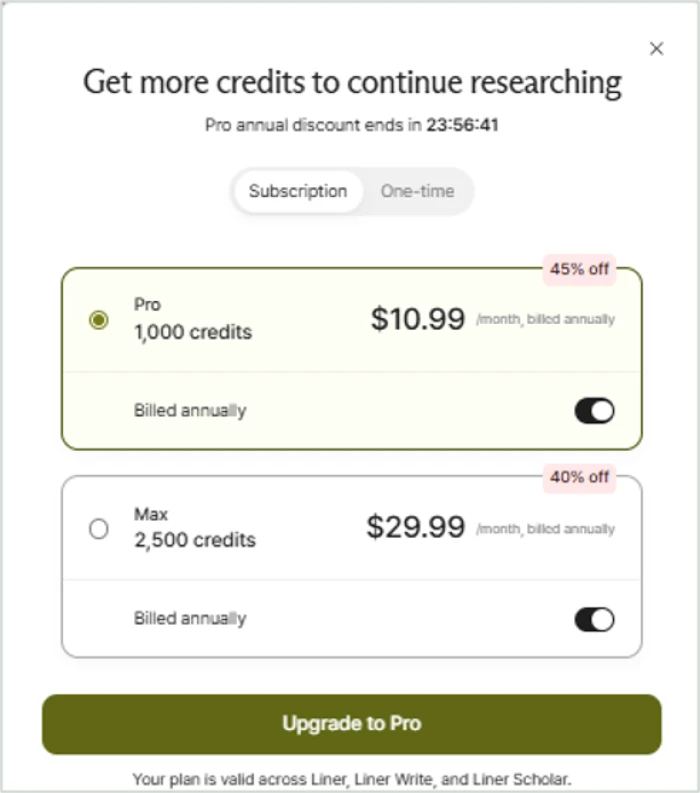
The upgrade pop-up, with discount badges and a 24-hour timer.
What this confirms: About twelve seconds after my first full answer, a "Get more credits to continue researching" pop-up appeared, so the free tier felt like a brief demo. The pricing itself is simple to read, two tiers with one plan covering all three and a one-time option for people who avoid subscriptions. The pressure tactics undercut it: a countdown timer that made me trust the discount less, and monthly-looking prices that are actually billed annually with the annual toggle on by default.
★
Transparent research with citations built for writing
The core experience is strong. You watch Liner search and see exactly which pages it read, every claim carries an inline numbered citation, and the Add Citations skill formats references in your chosen style. For turning a question into a sourced draft, the workflow is well thought out and the interface stays calm throughout.
!
The free tier is a brief demo
Free usage ran out roughly twelve seconds after my first full answer, behind a timed upgrade prompt with annual billing pre-selected. Nowhere could I find how many credits an action costs, so the allowance is impossible to plan against, and the onboarding has no seat for marketers, analysts or other business users.
How this review was put together. Testing ran on October 15, 2026 across product selection, Google sign-up, the three-step onboarding, the workspace, a live web query, and the upgrade pop-up. Pricing was confirmed from the official pricing page at getliner.com and cross-checked against the in-app upgrade screen, with competitor prices taken from each vendor's own site the same day. The answer was judged against the sources Liner itself cited.
10-Point Feature Review
03 . Scored against the full sign-up to paywall run
Feature Scores at a Glance
Citation Tools
9.0
Interface & Design
8.5
Answer Quality & Transparency
8.0
Onboarding & Sign-up
8.0
Workspace & Skills
7.5
Source & Research Depth
7.0
Audience Fit
6.0
Free Tier
5.5
Pricing & Value
5.5
Billing Trust
5.0
Feature-by-feature breakdownReconciled to the supplied overall of 7.5, weighted toward core research
01
Citation Tools Standout
The top mark, a 9.0, because this is what separates Liner from a plain AI search box. Every claim carries an inline numbered citation, and the Add Citations skill formats a reference list in the style you choose. For writing a paper or a sourced report, that closes the loop from research to draft in one place, which few rivals do as cleanly.
Inline cites: yesStyles: selectable
9.0
Standout
02
Interface & Design Strong
An 8.5. The muted green palette, serif wordmarks and halftone illustrations give it a calm, premium feel closer to a publishing brand than an AI startup, and the workspace stays uncluttered under real use. Held under 9.0 by a handful of unexplained controls, the Full text toggle chief among them, and illustrations so low-contrast they fade on a bright screen.
Feel: calm, premiumClutter: low
8.5
Strong
03
Answer Quality & Transparency Strong
An 8.0. The answer led with a summary, broke into clear numbered sections, and surfaced concrete figures rather than generalities, all while showing each search and the pages it opened. It does not go higher because the search string referenced the prior year during an October 2026 test, which is enough to make you double-check how current the results actually are.
Pages found: 26+Structure: summary + sections
8.0
Strong
04
Onboarding & Sign-up Strong
An 8.0 for a fast, friendly Google sign-up and a three-step onboarding with clear progress dots and no card required. It is capped there by the redundant sign-in controls and a faint Continue button that reads as broken until you type, small friction on an otherwise smooth path in.
Sign-in: Google, one tapSteps: 3
8.0
Strong
05
Workspace & Skills Capable
A 7.5. Skill cards describe what each action does and what it returns, the slash shortcut suits power users, and voice input and attachments sit in the prompt box. Held to a 7.5 because the skill cards run off-screen so more are easy to miss, and the Full text toggle ships without any explanation of what it changes.
A 7.0. For everyday search the sourcing is solid and transparent. It loses ground against its own Scholar positioning: my query returned mostly vendor blogs and a consultancy rather than academic papers, so the depth a researcher expects from a scholarly workspace was not there in my test.
Web sources: strongAcademic depth: thin here
7.0
Capable
07
Audience Fit Narrow
A 6.0. The whole flow is tuned for students and researchers, which serves that group well. It drops here because a marketer, analyst or other professional has no real seat: every role tile is academic or medical, and the goals are all scholarly, despite Liner Write being pitched at exactly those professionals.
Academic fit: strongBusiness fit: weak
6.0
Narrow
08
Free Tier Weak
A 5.5. The free allowance does let you run a genuine query and see the full output quality, which keeps it off the floor. It cannot score higher because mine ran out almost immediately after that first answer, too short to judge the product properly before deciding whether to pay.
Free searches: 3 / dayRan out: 1 query
5.5
Weak
09
Pricing & Value Mixed
A 5.5. The headline rates are fair and one plan covers everything, which is good value on paper. It is pulled down by a countdown timer, an annual toggle pre-selected so monthly-looking prices bill for a year, and no visible per-action credit cost, so you cannot tell what your allowance actually buys.
Covers: all 3 productsCredit cost: hidden
5.5
Mixed
10
Billing Trust Concern
The lowest mark, a 5.0, and it comes from the public record rather than my own run. Independent reviews cluster hard on billing: people report being charged after they upgraded, and struggling to cancel or get a refund, often enough to be a pattern. A polished product does not cancel out a checkout people say they struggled to get out of.
Complaint theme: billingTrustpilot: 2.6
5.0
Concern
Pros and Cons
04 . What holds up and what does not
+What Works
Transparent research: you watch it search and see exactly which pages it read
Citations built for writing: inline markers plus an Add Citations skill in your chosen style
Calm, premium interface: uncluttered, well organised, and easy on the eye under real use
Low-friction sign-up: one-tap Google sign-in with no card and a short onboarding
One account, three products: Liner, Scholar and Write share a single plan and pool
Structured answers: a summary first, then numbered sections with concrete figures
−What Falls Short
Free usage ends fast: mine ran out after a single full query
Pushy upgrade: a countdown discount with annual billing pre-selected
No seat for business users: onboarding routes only academics and medics
Opaque credit costs: nothing shows what a search or draft actually consumes
Billing reputation: independent reviews report cancellation and refund trouble
Pricing Breakdown
05 . What the plans cost and where the surfaces disagree
Plan
Free$0
Pro$15 /mo annualMost Popular
Advanced searches
3 / day
Unlimited
Research reports
3 / month
25 / month
File questions
1 / day, 25MB
20 / day, 100MB
Covers all three products
✓
✓
In-app promo seen
n/a
$10.99 / mo
Where the surfaces disagree: Liner's two official price surfaces do not match, and the gap is worth knowing before you buy. The public pricing page lists Pro at $15 a month and Max at $30 a month, both billed annually, and meters usage in searches and research reports. The in-app upgrade pop-up I hit during testing showed something different: Pro at $10.99 and Max at $29.99, framed as 1,000 and 2,500 credits, wrapped in 45%-off and 40%-off badges and a 24-hour countdown. So the money metering you see depends on where you land, a feature table on the website or a credit promo inside the app. Across both, two things stay constant: one plan covers Liner, Scholar and Write, and the annual toggle is pre-selected, so a monthly-looking figure commits you to a year. There is also a one-time credit option for anyone who would rather not subscribe.
Pricing verified October 15, 2026 from the official pricing page and the in-app upgrade screen, which did not agree. Promotions and timers rotate, so check the current rate on the official site before you subscribe.
Liner vs the Top 2 Alternatives
06 . How it compares to the research tools a buyer would shortlist
LLiner
EElicit
CConsensus
Entry Paid Price
$15/mo annual
$11/mo annual
$8.99/mo annual
Free Tier
3 searches / day
Yes, limited
Yes, limited
Main Sources
Web plus papers
125M+ papers
Scientific papers
Citation Export
Yes, styled
Yes
Limited
Writing Workspace
Yes
Narrower
No
Best For
Cited answers plus drafting
Systematic literature review
Quick evidence-based answers
Picking between them: Liner is the choice when you want cited answers and a place to turn them into a draft, with web and academic sources in one workspace. Elicit is the specialist for systematic literature review, pulling structured data from a library of more than 125 million papers, and it costs a little less. Consensus is the cheapest of the three and the quickest for a straight evidence-based answer from scientific papers, though it does less on the writing side. All three undercut Liner's standard Pro price, so Liner has to earn its premium on the breadth of its workspace rather than on cost.
What Users Are Saying
07 . Where the product and its reputation diverge
This is the sharpest split in the review. The product itself tested well, but Liner's independent reputation is weak where it counts: its Trustpilot profile sits at 2.6 out of 5, and the written reviews are dominated by one theme my walk-through never reached, billing. Surprise charges and trouble cancelling or getting a refund recur across the record. The quotes below, all from Trustpilot, show what happens after the polished free trial ends.
"Even after upgrading to Premium, I kept being charged to use the product in $10 increments."
A polished, well-cited research assistant with a trust problem at the checkout
Use Liner if you are a student or researcher who needs sourced answers and formatted citations, or a professional writing reports who wants quick, cited background. The transparent search and the citation workflow are the strongest reasons to pick it, and the interface stays a pleasure to work in.
Skip Liner if you want to trial a tool properly before paying, or the billing complaints give you pause. Consensus at $8.99 a month answers evidence questions for less, and Elicit at $11 a month is the stronger fit for literature review.


Discussion
Join the discussion and share your perspective.