
Home / Reviews / AI Social Media Tools / Linkrify
Linkrify logo
Free Online Tools Utility Suite

Linkrify Review

linkrify.co · 28 free tools, no account

Linkrify puts 28 web utilities behind a single page with no account and no paywall on the parts you came for. The strongest of them are the image compressor and the JSON formatter, and the compression runs inside the browser, so a file never leaves the device. It suits bloggers, students, developers, and small teams that want a fast one-off fix instead of another subscription.

Reviewer Score
6.1
/10
Mixed Results
Two tools worth a bookmark.
Two you should not trust.
No-signup access8.5
JSON formatting7.5
Image compression6.0
PDF fidelity5.0
Backlink accuracy5.0
Platform
Browser based
Tools
28 free
Account
None required
Image Cap
10 MB per file
Cost
Free ad-supported
PDF Output
.doc format

What Linkrify Does

01 . Overview

Linkrify is a free online toolbox at linkrify.co, built around a three-word tagline the homepage repeats: "Check. Analyze. Convert." It collects 28 utilities that span writing help, SEO checks, image handling, and file conversion, and it aims them at people who reach for one tool, use it once, and leave. Nothing on the page asks for payment, and the FAQ says the whole thing runs on advertising rather than subscriptions.

The positioning is deliberately narrow. Linkrify is not trying to be a dashboard a marketer lives inside all day. It reads more like a bookmark folder of quick fixes, the kind of page a student opens to compress one screenshot or a developer opens to tidy one block of JSON. Who it serves follows from that: light, occasional use across a broad set of small tasks, with the depth tradeoff that breadth implies.

What Happened When We Tested It

02 . 4 tests on four of the 28 tools

I ran four of the 28 tools myself and recorded exactly what each one returned, saving the files and screenshots as I went. The point was to see whether the tools behave the way the page implies, not to take the marketing at its word. Two held up cleanly. Two did not, and one of those fails in a way that should make you distrust its output entirely.

The image compressor does what it claims

Test 01 . Image compression
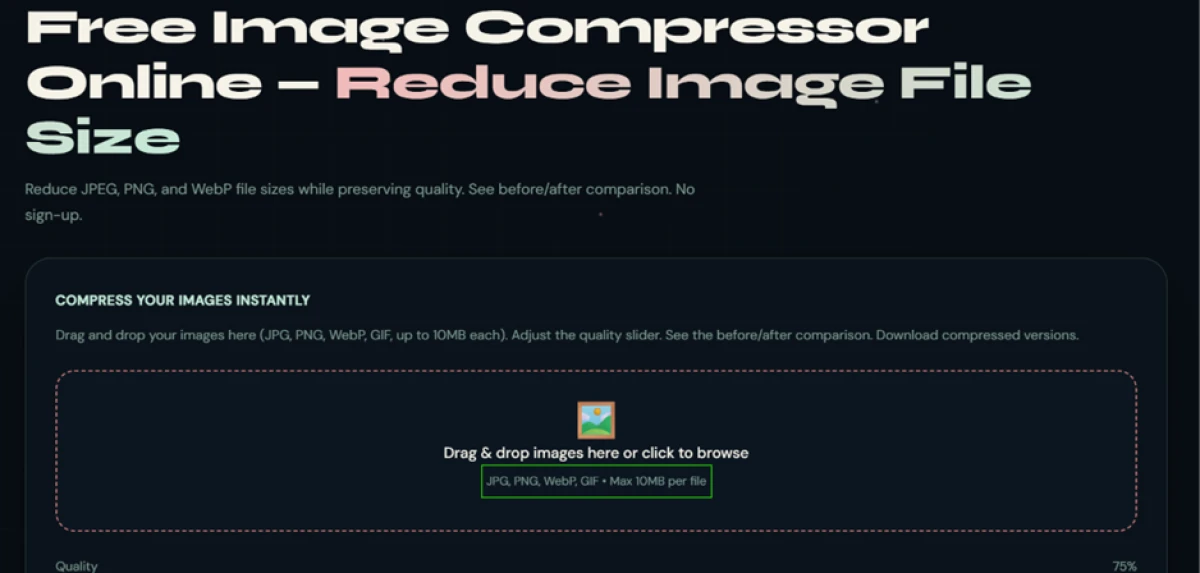
Linkrify image compressor upload box accepting JPG, PNG, WebP and GIF with a 10 MB per file limit
The compressor upload box, capped at 10 MB per file.
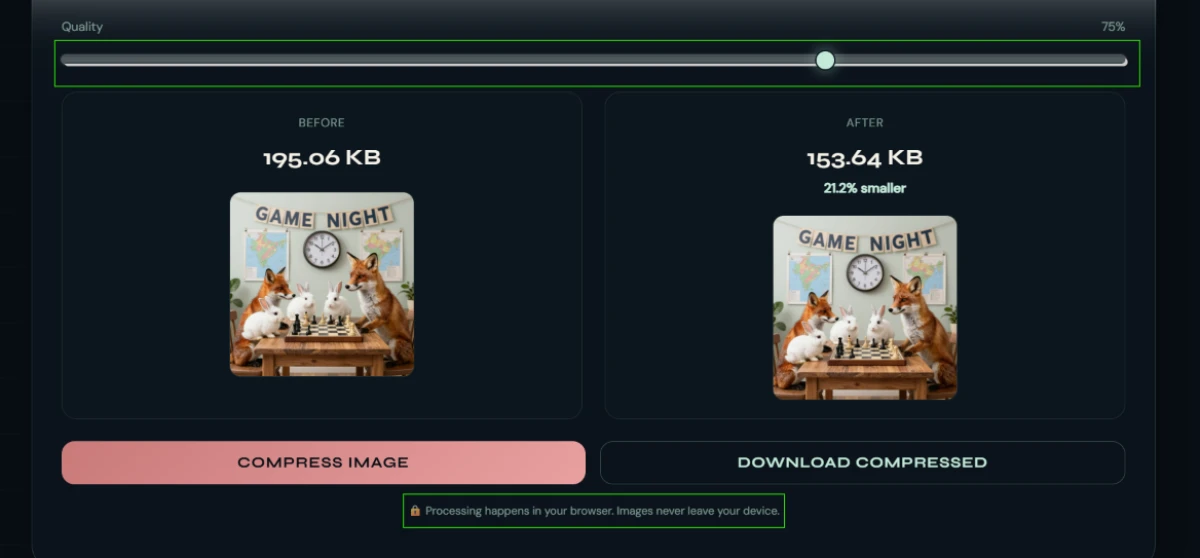
Compression result showing a 195.06 KB image reduced to 153.64 KB at 75 percent quality with before and after previews
A 195.06 KB test image came back at 153.64 KB, processed in the browser.
What we observed: A 195.06 KB image dropped to 153.64 KB at the 75 percent quality setting, a 21.2 percent reduction, with before and after previews side by side. A line under the result confirmed the work happens inside the browser, so the file never uploads. The saving is modest at 75 percent and grows as you pull the slider lower.

The JSON formatter cleans and validates in one click

Test 02 . JSON formatting
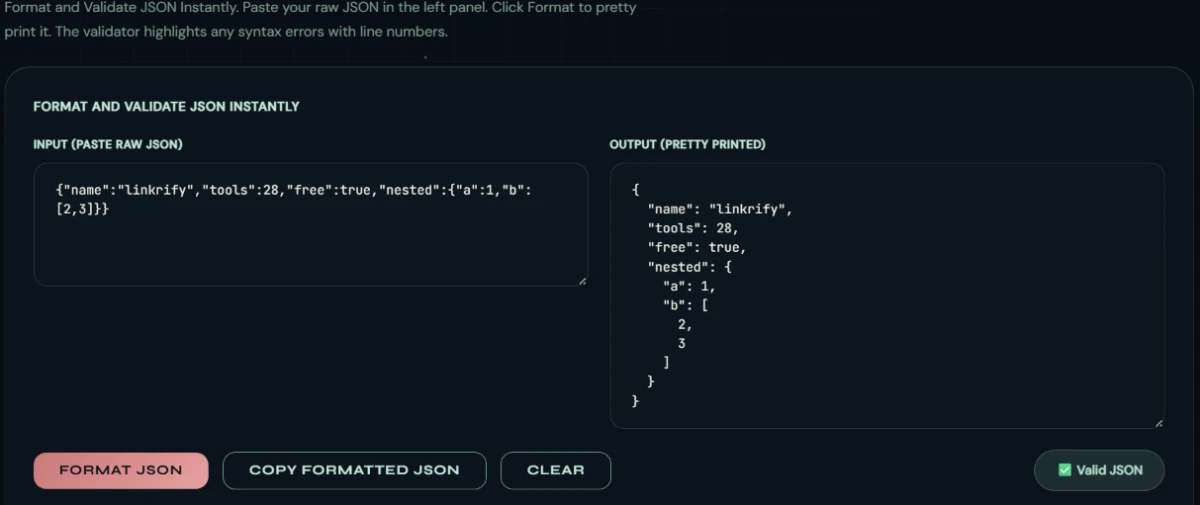
Linkrify JSON formatter output panel showing clean indented JSON with a green Valid JSON badge
Raw input cleaned up and marked valid in a single click.
The validation: A deliberately messy object came back clean and indented with the nesting intact, and a green Valid JSON badge appeared the moment I clicked Format. The copy button grabbed the output without dragging along stray characters. For a quick sanity check on a payload, that is enough.

The PDF converter strips the document bare

Test 03 . PDF conversion
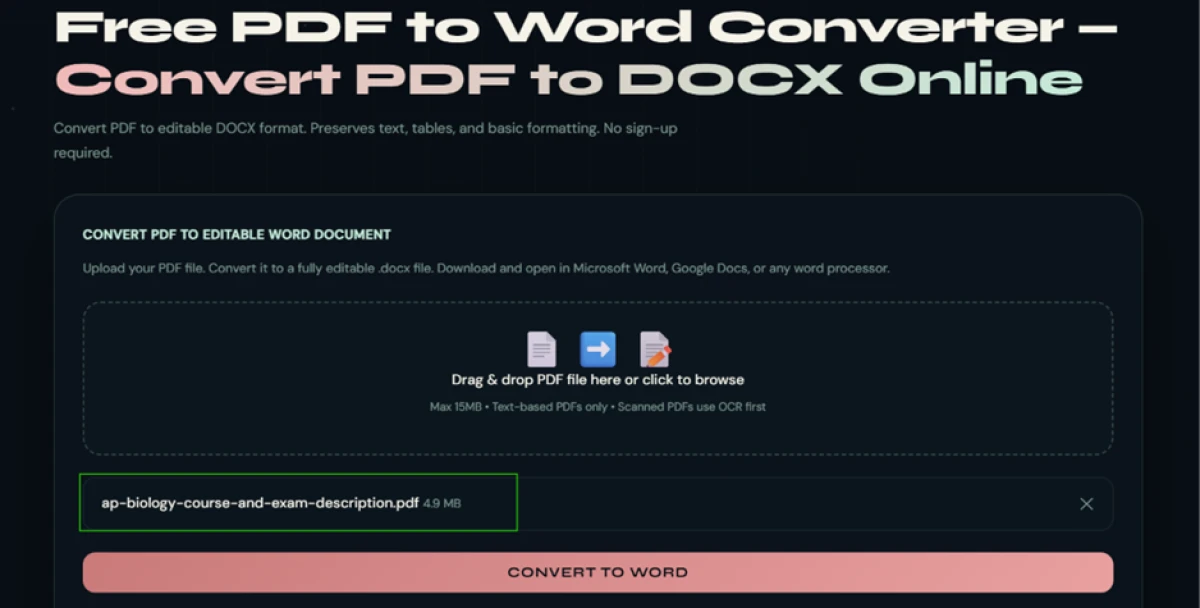

Uploading a 4.9 MB AP Biology PDF full of colour tables to the Linkrify PDF to Word converter
A 4.9 MB AP Biology PDF going into the converter.
Converter result showing the original PDF at 4.9 MB against a converted file of just 357.45 KB
The output collapsed to 357.45 KB and arrived as a .doc, not the promised .docx.
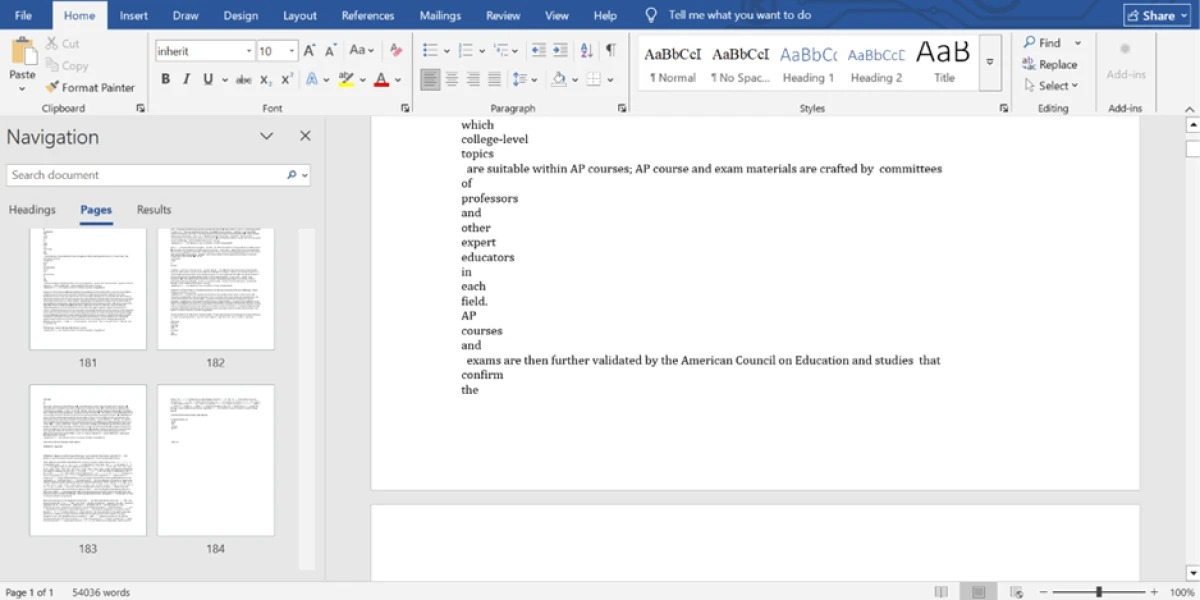
The converted file opened in Word with every image and table gone and the text broken onto one word per line
Opened in Word: images and tables gone, text broken to one word per line.
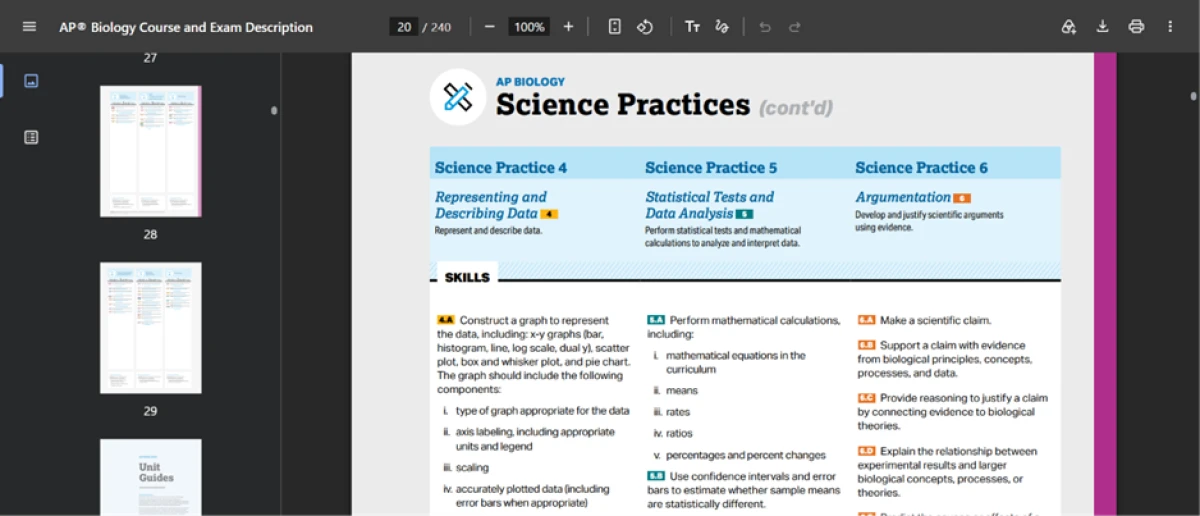
The source AP Biology PDF showing the structured colour tables and layout the converter discarded
The source PDF, with the tables and layout the converter threw away.
Where it lands: A 4.9 MB AP Biology PDF full of colour tables came back as a 357.45 KB file, and that collapse told the story before I opened it. Every image and table was gone. The surviving text was broken onto one word per line and padded to 54,036 words, and the download arrived as a .doc even though the page promised .docx. Rebuilding the layout by hand would take longer than retyping the document from scratch.

The backlink checker reports numbers that are not real

Test 04 . Backlink data
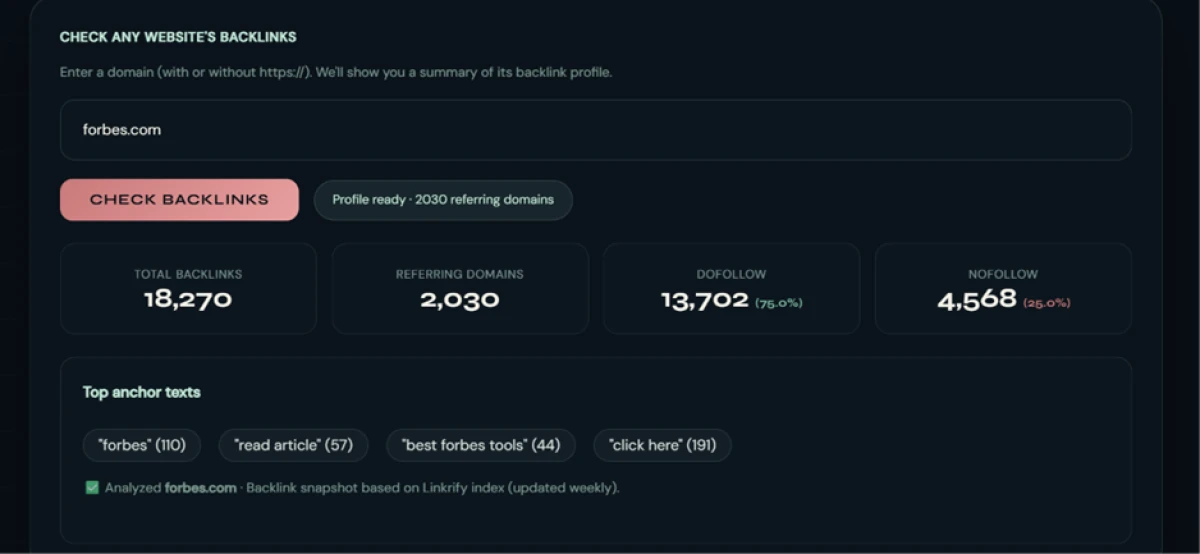
Linkrify backlink checker reporting 18,270 backlinks and only 2,030 referring domains for forbes.com
The checker reported only 2,030 referring domains for forbes.com.
The real story: Run on forbes.com, the checker returned 18,270 backlinks and 2,030 referring domains with a 75 to 25 dofollow split. Forbes is one of the most linked domains on the web, and genuine indexes put its referring domains in the hundreds of thousands. Even the Polish edition on its own is linked by roughly 11,000 sites. A sample anchor reading "best forbes tools" looks like filler a template generated. The shape is right and the data is fiction.
★
Two tools that earn a bookmark

The image compressor and the JSON formatter both did their jobs with no friction and no upload. The compressor handled a real image with an honest size readout, and the formatter validated structure in the same click it tidied it. For those two tasks, Linkrify is a legitimate quick stop.

!
The data tools cannot be trusted

The backlink checker handed back a referring-domain count for Forbes that is wrong by two orders of magnitude, and the PDF converter discarded every image and table while mislabeling its own output format. A tool that reports confident, wrong numbers is worse than one that reports nothing, because you might act on it.

How this review was put together. Vivek tested four of Linkrify's 28 tools in November 2026, running real files through each one and saving the before and after states shown above. The free status and the advertising model were confirmed on the official site at linkrify.co, which lists no pricing page and no paid tier. Competitor details in the comparison were checked against each rival's own site on the day of writing. No account was created, because none is required.

10-Point Feature Review

03 . Where the 28-tool suite earns and loses points
Feature Scores at a Glance
No-signup access
8.5
JSON formatting
7.5
Image privacy
7.0
Compression output
6.0
Ease of use
6.0
Tool breadth
5.5
File handling
5.5
Output honesty
5.0
PDF fidelity
5.0
Backlink accuracy
5.0

Pros and Cons

04 . What stands out, and what to watch
+What works
  • Nothing between you and the tool: every utility runs the instant you open it.
  • Local image compression: files process on your device, so private images stay private.
  • Honest size readouts: the compressor shows real before and after numbers, not a vague "optimized".
  • Breadth for small jobs: a single page covers an odd mix of writing and image tasks.
−What drags
  • Fragile converters: the PDF tool destroys layout and misnames its own output.
  • Fabricated data: the backlink checker reports numbers that do not match reality.
  • No batching: the converter takes one file and quietly drops the previous one.
  • Ads in the workflow: advertising sits inside the interface while you work.
  • Uneven quality: reliability swings sharply from one tool to the next.

Pricing Breakdown

05 . What free actually costs here

What you're actually paying: Linkrify has no paid tier and no pricing page. The homepage calls the tools "always free" and the FAQ says the site runs on advertising rather than subscriptions, so the sticker price is zero and stays there. The cost shows up elsewhere. Ads share the screen while you work. There is no support channel or uptime promise behind a free utility, and the backlink test showed that nothing guarantees a tool's output is accurate.

For a one-off image compression or a JSON tidy, that trade is easy to accept. For a number you plan to make a decision on, the absence of any accountability is the real price, and it is higher than it looks.

Free status verified November 19, 2026. Linkrify lists no paid plan, so check the official site for any change before you depend on it.

Linkrify vs the Top 4 Alternatives

06 . Four free tool suites a reader would weigh
LLinkrify TTinyWow SSmallpdf PPrepostseo SSmallSEOTools
Free to useFully freeFree, paid PremiumFree tier, paid ProFree, paid PremiumFree, paid Pro
Tool count28200+PDF core150+110+
AccountNoneOptionalFor limitsOptionalOptional
Best ForQuick no-login fixesBulk PDF and image jobsPolished PDF workWriting and plagiarismDeeper SEO checks

How to choose: Linkrify's edge is friction, not depth. TinyWow covers far more ground and handles the file conversions Linkrify fumbled, at the cost of occasional ads and upsells. Smallpdf is the one to reach for when a PDF has to come out clean, since that is its whole business. Prepostseo and SmallSEOTools both run deeper on writing and SEO analysis, and their backlink and plagiarism tools are the ones to trust over Linkrify's. Linkrify wins only on the smallest jobs, where a login screen elsewhere is the main annoyance and accuracy is not on the line.

· The Verdict ·
6.1/10
A free grab-bag where half the tools earn trust

Use Linkrify if you want a fast, login-free image compress or a quick JSON tidy, and you are happy to judge each tool on its own merits rather than trusting the suite as a whole.

Skip Linkrify if you need the PDF converter to keep tables and images, or a backlink count you can act on. TinyWow and Smallpdf handle conversions properly, and a dedicated suite like SmallSEOTools gives you backlink data worth reading.

Category RankMixed Results
Compared To4 Alternatives
Entry PriceFree
Free TierFull access

Discussion

Join the discussion and share your perspective.