


What LongHair AI Does
LongHair AI is a virtual try-on site for long hairstyles. The workflow is deliberately short. You upload a clear, front-facing photo and choose a cut from the thumbnail strip, then download the generated preview. According to the site's FAQ, photos are deleted from the servers within 24 hours and are not used to train the model.
Beyond the main try-on, the site stacks on a long list of extras: a hair design grid, a color changer, a skin tone changer, a facial analysis feature and a run of novelty filters. It positions itself as a free way to test a look before a real appointment, with no app to install and no account needed to begin. There are no paid plans here. Usage runs on free credits, with an optional HD upgrade for higher-resolution downloads.
What Happened When We Tested It
We ran LongHair AI the way a regular user would, on the free plan with no paid top-up, using the same clear front-facing photo for every tool so each result could be judged against one face. The site gives you no box to type a request into. You upload a photo and pick a style or tool, so the only inputs were the photo and whichever option we clicked.
The Long Hair Try-On
Test 01 . Core preview

The Hair Design Tool
Test 02 . Variation grid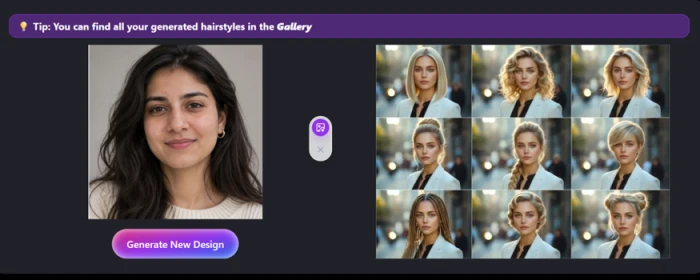
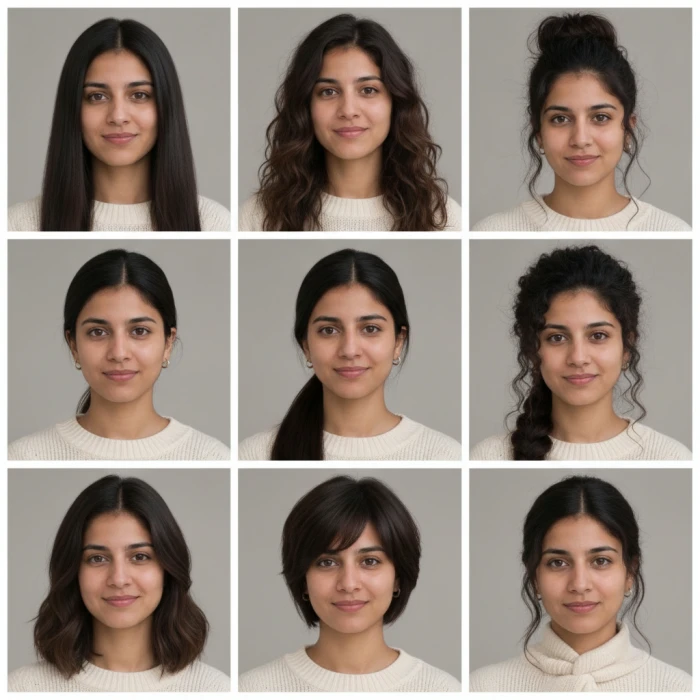
The Hair Color Changer
Test 03 . Color realism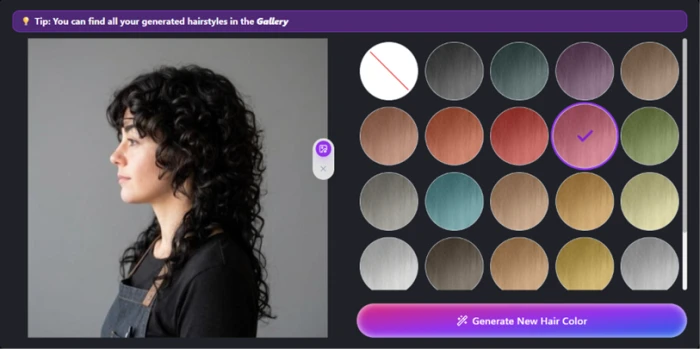

Facial Analysis
Test 04 . Free-tier claim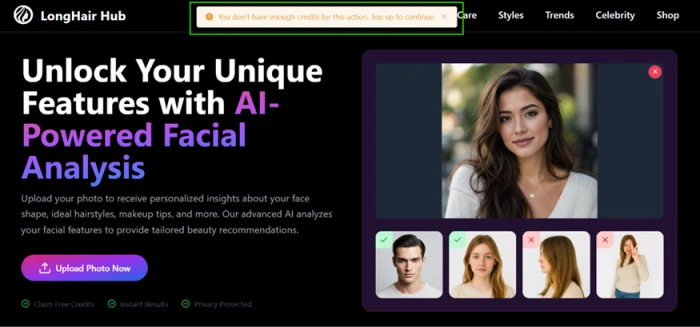
The Skin Color Changer
Test 05 . Detail retention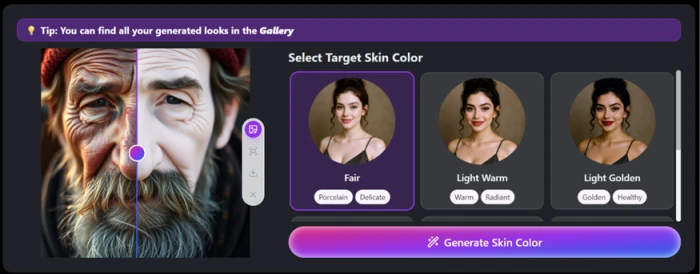
Two tools carried the session. The main try-on returned a natural preview with face-shape fit and upkeep timing, backed by side and back angles, and the design grid produced nine looks with the face intact across every tile. For planning a long-hair cut and gathering ideas to show a stylist, that pairing is genuinely useful, and it is free.
The color changer laid flat paint over the photo and skipped a patch at the back, and the skin tool smoothed the face into plastic. If you need accurate hair color or anything beyond a basic style swap, the output is not reliable enough to trust.
10-Point Feature Review
Pros and Cons
- Fast, usable previews: a long style renders on your own face in seconds
- Built-in cut guidance: each style lists the face shapes it suits, plus effort and upkeep
- Extra viewing angles: front, side and back views arrive together
- Easy way to experiment: with new looks before visiting a salon.
- Hair texture may not match your natural hair.
- Results may vary depending on photo quality.
- Fine details like bangs and layers can appear inaccurate.
- Limited accuracy in predicting how a style looks in real life.
LongHair AI vs the Top 3 Alternatives
| LLongHair AI | HHairstyle AI | YYouCam | MMyEdit | |
|---|---|---|---|---|
| Access model | Free, credit-based | Paid generations | Freemium | Free plus credits |
| Scope | Long-hair try-on plus face and skin tools | Hairstyle generation | Full makeup and hair suite | Photo editor with AI hairstyle |
| Platform | Web | Web | Web, iOS, Android | Web and app |
| Multi-angle preview | Front, side and back | Front only | Front only | Front only |
| Best For | A long cut previewed with upkeep notes | A single high-fidelity render | Hair and makeup in one app | Prompt-driven custom edits |
How to choose: Pick by the job in front of you. LongHair AI is the one to open for a free, no-login look at a long cut, and the face-shape notes with the side and back angles make it easy to commit. When you want the single most realistic render of one style, a dedicated generator such as Hairstyle AI leans that way, at a price. YouCam earns its place when hair is only part of a wider makeup and selfie routine you want on a phone. MyEdit fits the person who would rather describe a look in words and edit it inside a full photo editor. On the areas where LongHair AI stumbles, color accuracy and anything touching skin, any of these three is likely to hold detail better.
Discussion
Join the discussion and share your perspective.