

Home / Reviews / AI Detector / Lynote
Lynote logo
AI Detector AI Humanizer Study Tools Web App

Lynote Review

Lynote puts an AI detector and a humanizer on the same screen, so a draft can be scored and rewritten, then scored again, without opening another site. The detector grades text sentence by sentence instead of handing back one number, and the humanizer rewrites in more than 80 languages. It is built for students and content writers who start from AI drafts and need to know what still reads as machine-made.

FirmCritics Score
7.1
Capable Pick
Sentence-Level Reports8.5
Onboarding and Access8.5
Workflow Design8.0
Free Tier Clarity5.5
Meaning Preservation5.0
Try Lynote → Jump to the Tests
Platform
Web · Chrome extension
Core Tools
2 detector + humanizer
Detection Languages
50+
Humanizer Languages
80+
Paid Run Limit
3,000 words per run
Paid From
$4.92/mo, billed yearly

What Lynote Does

01 . Overview

Anyone drafting with ChatGPT or Claude ends up with two chores before a piece goes out: finding the passages that read as machine-written, then fixing them. Lynote, a browser workspace at lynote.ai, folds both chores into one screen, with a single toggle switching between its AI Detector and AI Humanizer.

The detector separates AI-written and human-written text from a blended middle band, then flags individual sentences. The humanizer rewrites at sentence level, with adjustable readability and rewrite strength. Around those two sit study utilities, among them a YouTube transcript generator and a document translator.

What Happened When We Tested It

02 . Five tests covering both core tools plus sign-up

Every run below happened on a free account. The detector got a block of polished product copy; the humanizer got a short app description.

Both tools on the landing page

Test 01 . First contact
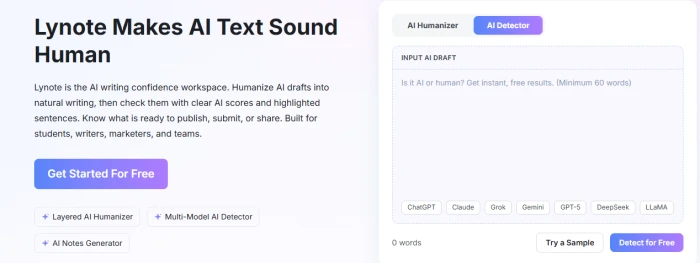
Lynote homepage headline Lynote Makes AI Text Sound Human beside an input box with AI Humanizer and AI Detector tabs, a 60-word minimum placeholder and model chips for ChatGPT, Claude, Grok, Gemini, GPT-5, DeepSeek and LLaMA
The homepage drops you straight into the detector input.
First impression: No menus to dig through. The landing page opens on an input box with Humanizer and Detector tabs above a row of model chips running from ChatGPT to LLaMA. The placeholder sets a 60-word minimum. Anyone hoping to check a caption or a short email will hit that floor on the first paste.

Feeding the detector Lynote's own sales copy

Test 02 . Detector input

For the sample we picked the kind of text every detector should catch: Lynote's own feature description, packed with phrases like "cutting-edge tool" and "high precision and reliability." It even carries a typo ("LtAI Detector") that a human editor would have fixed.
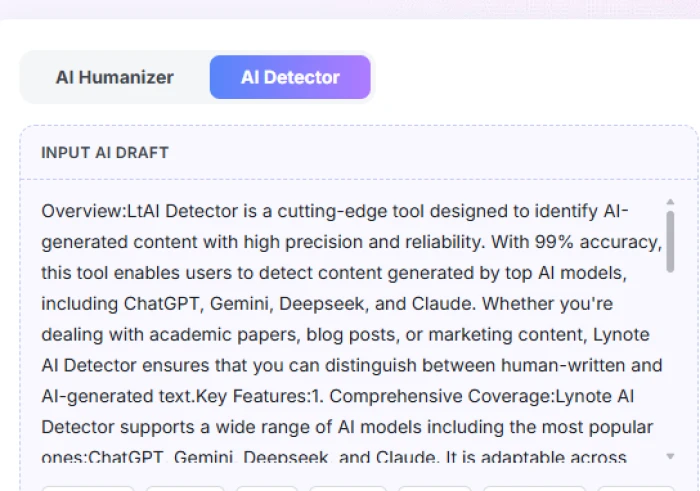
Lynote AI Detector tab selected with the Input AI Draft box holding an overview of LtAI Detector describing 99 percent accuracy and support for ChatGPT, Gemini, Deepseek and Claude
The test sample pasted into the detector.
What stood out: Using the company's marketing text as bait set a fair bar. Had the detector passed this as human, nothing it reported afterward would carry weight.

The sign-up modal and its starter bonus

Test 03 . Account creation
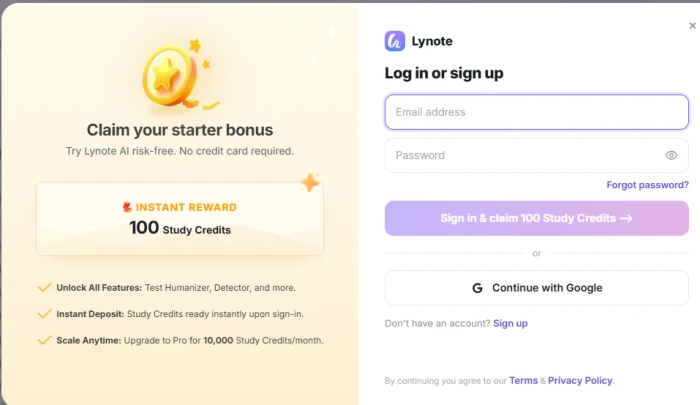
The signal here: Two ways in, an email and password or a Google account. The modal promises 100 study credits on sign-in with no card requested, then pitches the 10,000-credit monthly upgrade in the next line, so the sales push starts before you have run a single scan.
Lynote log in or sign up modal offering 100 study credits as an instant reward with no credit card required, email and password fields and a Continue with Google button
Lynote's sign-in modal with the starter credit offer.

A full-confidence verdict with line scores

Test 04 . Detection report
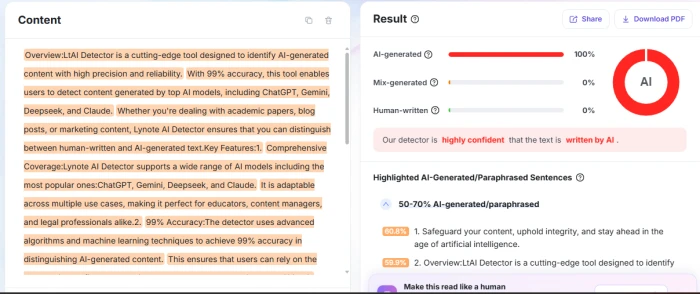
Lynote detection result showing 100 percent AI-generated with mixed and human bars at zero, a highly confident banner, Share and Download PDF buttons, and highlighted sentences scored 60.8 and 59.9 percent
The report: headline split on top, flagged sentences below.
The evidence: 100% AI-generated, with the mixed and human bars both at zero and a "highly confident" banner on top. Below it, flagged lines sit in confidence bands with a percentage beside each one. One oddity: the first band shown covered 50 to 70 percent and held lines scored 60.8% and 59.9%, which reads strangely under a flat 100% headline. Share and Download PDF buttons sit in the corner for anyone who needs to hand the report to a tutor or editor.

Rewriting a Gauth app description

Test 05 . Humanizer output

We expected the same pitch in a looser voice. Here is exactly what went in:

Input we gave it

Snap or type a problem and Gauth answers in seconds. Its real pitch is range: one app that both solves problems across subjects and builds full guided lessons, with a 24/7 tutor a tap away. It is aimed at students from middle school to early college who want fast homework help and a path to actually learning the material.
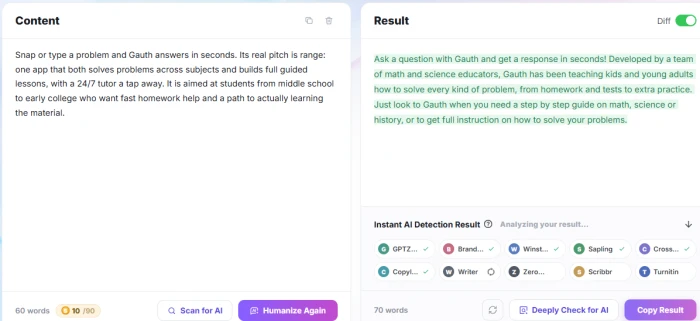
Lynote AI Humanizer with the 60-word Gauth description on the left and a 70-word green-highlighted rewrite on the right, Diff toggle on, and an Instant AI Detection Result panel listing GPTZero, Copyleaks, Turnitin and other detectors
Input on the left, rewrite on the right with Diff turned on.
The real story: The output grew from 60 to 70 words and now reads like a cheerful app-store blurb, exclamation mark included. The Diff toggle shades every changed passage, which makes review fast. Tone moved the right way. The content did not survive intact.
!
The rewrite added facts nobody supplied

Our input said nothing about who built Gauth, yet the rewrite claims it was developed by a team of math and science educators and has been teaching kids and young adults. History appeared in the subject list from nowhere. Meanwhile the 24/7 tutor vanished, and so did the middle-school-to-college audience. In an essay or client copy, that is the worst kind of error: fluent and plausible, yet false. Every humanized passage needs a line-by-line check against its source.

+
Score, rewrite and cross-check without changing tabs

The detector's banded line scores and exportable report pair with a humanizer that automatically queues its output against ten named third-party detectors, GPTZero, Copyleaks, Winston AI and Turnitin among them. If your routine involves pasting a draft into four separate checkers, that panel replaces most of the busywork.

How we tested. Hands-on runs took place on October 17, 2026, in the Lynote web app on a free account. We ran one detection on AI-written product copy and one humanizer pass on a short app description, then reviewed the sign-up flow. Plan figures come from Lynote's in-app plan screen and the official pricing page; language and word-limit claims come from Lynote's own detector and humanizer pages.

10-Point Feature Review

03 . Where the detector earns its keep and the humanizer slips
Feature Scores at a Glance
Sentence-Level Reports
8.5
Onboarding and Access
8.5
Workflow Design
8.0
Detection Accuracy
7.5
Detector Cross-Check
7.5
Language and File Support
7.5
Rewrite Readability
7.0
Humanizer Controls
7.0
Free Tier Clarity
5.5
Meaning Preservation
5.0
Where the scores come fromSix items with direct evidence
01
Sentence-level reports STRONGEST FEATURE
Per-line percentages grouped into confidence bands tell you which sentences to rewrite first, and the PDF export turns the result into something a teacher or client can file. That pairing goes well past a single score readout, hence 8.5 rather than 8.0. It stops short of 9.0 because band order versus the headline figure took a second look to make sense of.
OUTPUT: Line scores + PDFSEEN IN: Test 04
8.5
GREAT
02
Detection accuracy
The call on our sample was unambiguous and correct, which lifts it above 7.0. One obvious AI sample proves the easy case, though. Lightly edited drafts and formal human writing are where detectors misfire, and Lynote's own FAQ concedes that short or highly structured text can trigger false positives. Without testing those cases, 8.0 would overstate what we know.
SAMPLES: 1 AI-writtenRESULT: Correct, full confidence
7.5
GOOD
03
Detector cross-check panel
After a rewrite, Lynote lines up ten outside detectors and ticks them off one by one. When we captured the screen, six showed checkmarks while three, Turnitin among them, were still pending. Saving four or five manual pastes is worth more than 7.0. Holding it below 8.0: these are Lynote's readouts of other tools, which we could not confirm against the tools themselves, and Turnitin is not something individuals can usually run on demand.
DETECTORS LISTED: 10STATUS AT CAPTURE: Partly loaded
7.5
GOOD
04
Rewrite readability
Sentence length varied more after the pass, and the voice loosened up. The register it landed on, though, is ad copy ("Just look to Gauth when you need..."), which suits a product blurb and would look out of place in an essay. Better than 6.5 for the rhythm; short of 7.5 because the default voice leans promotional.
LENGTH: 60 to 70 wordsREGISTER: Promotional
7.0
GOOD
05
Free tier clarity CONFLICTING LIMITS
Ask Lynote how much free text the humanizer takes and you get three answers. The plan screen caps it at 300 words. The humanizer page's FAQ promises 2,000 words per run with no sign-up, while a feature block on that same page says "no word limits." Paid limits, by contrast, are stated the same way everywhere, which is the only reason this sits at 5.5 and not 5.0.
ANSWERS FOUND: 3SOURCES: Lynote's own pages
5.5
FAIR
06
Meaning preservation CORE PROMISE MISSED
Lynote's humanizer page says your meaning and facts "stay exactly where you put them." In our run they did not: the rewrite invented an origin story and lost two concrete selling points. The product name and the broad pitch survived, which keeps the score at the floor of our scale instead of below it.
DETAILS ADDED: Unsupported claimsDETAILS LOST: 2
5.0
WEAK

Pros and Cons

04 . What helps and what gets in the way
+What works
  • Check and fix in one place, with no copying drafts between sites
  • Reports that point at specific lines, so edits start where they matter most
  • Quick to get going, with Google sign-in and tools usable from the homepage
−What gets in the way
  • Rewrites need a fact check, because new claims can slip in unnoticed
  • Short text is off-limits for the detector, which ignores tweets and captions
  • Cross-check results trickle in, with some detectors still loading after the rewrite lands
  • Little public user feedback yet, so long-term reliability is hard to judge

Pricing Breakdown

05 . Three plans, shown with yearly billing
PlanFree$0 /foreverStarter$4.92 /moPro Yearly$10.75 /moMost Popular
BilledNo credit card required$59 yearly$129 yearly
Struck-through list price·$155.88$359.88
Study credits1003,000/mo10,000/mo
AI Detect and HumanizeHumanizer ≤300 words≤3,000 words≤3,000 words
Translate documents≤3 pages≤300 pages≤300 pages
YouTube transcriptionNo access for videos without subtitlesNo-limitNo-limit
AI Q&ANo access to all essential AI toolsAdvanced AI Q&AAdvanced AI Q&A + priority support

Where the value sits: Starter and Pro Yearly accept the same document length per run, so the higher plan buys a bigger credit pool and priority support, not longer drafts. Most writers working on essays or blog posts will not outgrow Starter on length alone.
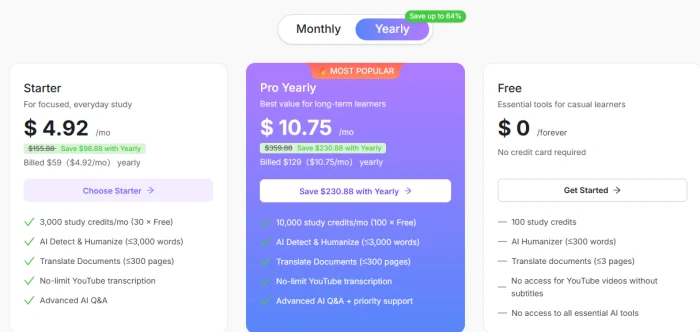
Lynote plan screen with yearly billing selected showing Starter at 4.92 dollars a month, Pro Yearly at 10.75 dollars a month marked most popular, and a free plan at 0 dollars forever
Lynote's plan screen with the yearly toggle selected.

Plans checked against Lynote's own pricing screen on October 17, 2026. Prices shift, so confirm them on the official pricing page before you pay.

Lynote vs the Top 3 Alternatives

06 . Detectors and humanizers a buyer would shortlist
LLynote UUndetectable AI OOriginality.ai QQuillBot
Lowest Paid Price$4.92/mo, billed yearly$5.00/mo, billed yearly$12.95/mo, billed yearly$8.33/mo, billed annually
Free OptionFree plan, no cardTrial capped at 250 wordsAI scans only, 3 per dayHumanize up to 100 words
AI Humanizer✓✓✗✓ Full on Premium
AI Detector✓ Line-level bands✓ Unlimited on paid plans✓ Core product✓ Full on Premium
Notable ExtraTranscripts, translationRefund if output is flaggedFact checker, site scansParaphraser, grammar checker
Best ForStudents fixing AI draftsHigh-volume humanizingPublishers vetting writersEveryday writing help

Picking between them: Choose by what you are checking. If the text is yours and you want to find and fix weak passages, Lynote's line-level report earns its place. Undetectable AI is the one to weigh if rewriting volume is the whole job and you want a refund promise behind it. An editor reviewing freelancers needs Originality.ai, which skips humanizing entirely. QuillBot makes sense when detection is a minor errand inside a broader writing routine.

· The Verdict ·
7.1/10
Should you use Lynote? Here is who it suits.

Use Lynote if you draft with AI and want to see which sentences still read as machine-written before you submit or publish. The banded report tells you where to start editing, and the humanizer gets you a looser first pass, provided you proofread every rewrite against your source before it goes anywhere.

Skip Lynote if you need rewrites you can paste without checking, or if you screen other people's writing at scale. For screening, Originality.ai is built for that job, with team management and site-wide scans. If humanizing volume is all you need, Undetectable AI backs its output with a refund when a detector flags it.

Verdict BandCapable Pick
Tests Run5
Compared To3 Rivals
Features Scored10 Points

Discussion

Join the discussion and share your perspective.