


What Mage Space Does
Mage Space is a browser-based generation platform built on the open Stable Diffusion ecosystem. Instead of installing models locally, you pick from a large, style-filtered catalog of base models, community checkpoints and the LoRAs that steer them, then generate straight from a prompt bar. Over time it has grown past still images into video, character creation and upscaling, all run on a single credit called Gems.
The platform aims at Stable Diffusion hobbyists and creators who want that ecosystem without the hardware. It has long carried a reputation for looser content rules than the big hosted generators, though an on-site filter still governs what you see. Paid plans sell "unlimited generations" and premium or video models on top, and the Gems balance is what you spend on the heavier models. Membership runs four monthly tiers, from Basic at $10 to Max at $200, with the mid plans carrying most of the video and premium-model unlocks.
What Happened When We Tested It
I ran Mage Space on a new free account for a full session, start to finish, spending the opening Gem balance across the things a new user actually tries first. No paid upgrade, and defaults left alone wherever possible. Every image and the one video below came from that account, with the prompts shown exactly as typed.
Sign-up and the first free image
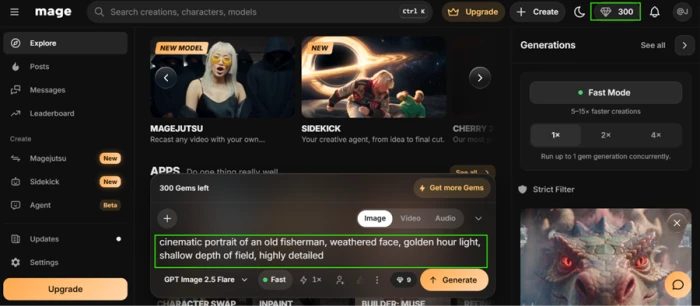
Test 01 . Onboarding"cinematic portrait of an old fisherman, weathered face, golden hour light, shallow depth of field, highly detailed"

Text inside the picture
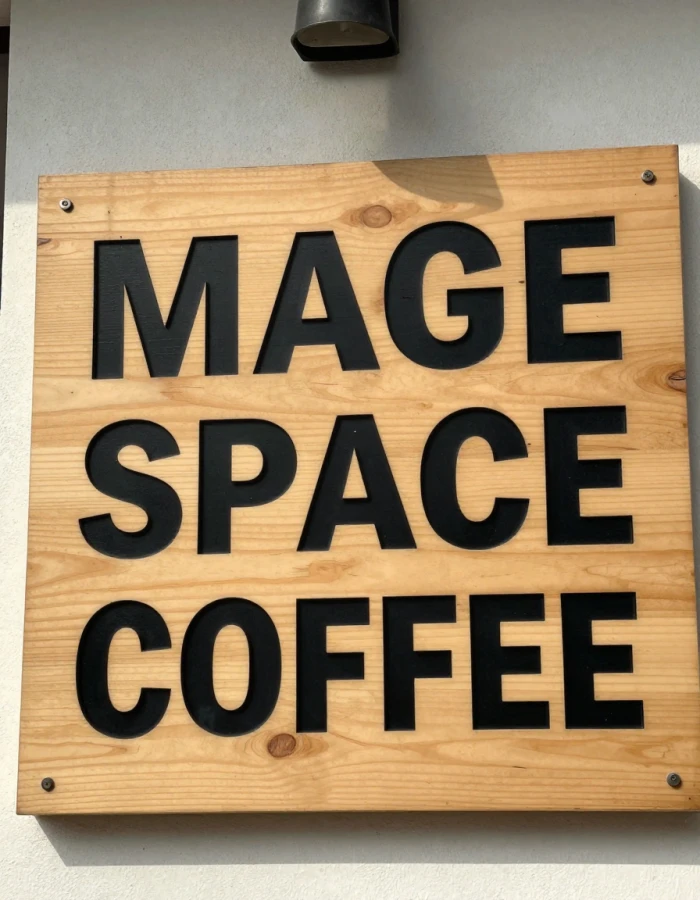
Test 02 . Typography"a wooden cafe signboard with the bold text MAGE SPACE COFFEE"

The hands test
Test 03 . Anatomy"close-up photo of two hands holding a coffee cup, all five fingers clearly visible"

Borrowing prompts from Explore
Test 04 . Learning curve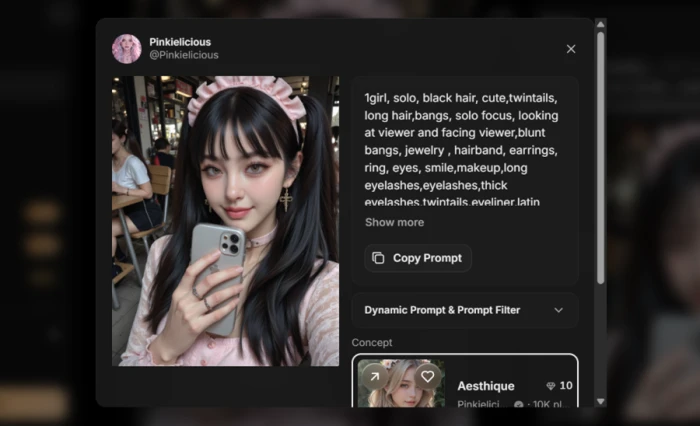
Moving to video
Test 05 . Video pricing"Create a cinematic, ultra-realistic video with smooth camera movements, stunning visuals, dramatic lighting, and professional 4K quality"

|

|
The filter blurred my own clip
Test 06 . Content filter

|

|

The model library and what free costs
Test 07 . Library and credits
A 10-Gem model spelled a multi-word sign correctly and drew ten clean fingers on the first attempt. Those are the two things most generators fail. The budget lane here is not a compromise, it is where the strongest results came from.
A plain video of a woman in a blazer came back blurred and tagged Suggestive, viewable only after an age confirmation and a Mature content toggle. A buyer who generates safe-for-work material will still trip this on a first video, which erodes trust in the moderation.
10-Point Feature Review
Pros and Cons
- Text renders correctly: a multi-word sign came out in clean capitals on the first attempt
- Deep model menu: filter by Photorealism, Anime, Art or Portrait with dozens under each
- Clean downloads: generated files carry no watermark
- The filter over-flags: a corporate-style clip came back blurred and hidden behind a Mature toggle
- Most free models are Slow: only a narrow set carries the Fast tag
- Age wall on your own work: viewing a flagged clip needs an age confirmation first
- Premium video queues slowly: the heavier video models sit in a slow lane without a subscription
Pricing Breakdown
| Feature | Basic$10/month | Pro$30/monthMost Popular | Pro Plus$60/month | Max$200/month |
|---|---|---|---|---|
| Monthly Gems | 500 | 1,500 | 3,500 | 15,000 |
| Unlimited generations | ✓ | ✓ | ✓ | ✓ |
| Premium base models | ✗ | ✓ | ✓ | ✓ |
| Unlimited video generation | ✗ | ✓ | ✓ | ✓ |
| Enhance upscaling | ✗ | 2K | 4K | 4K |
| Multiple LoRAs per generation | Base | 2x | 5x | 5x |
| Custom model import | ✗ | ✗ | ✓ | ✓ |
| Premium and HD video models | ✗ | ✗ | ✓ | HD, more |
| Unlimited flagship model | None | Mango | None | Cherry 2 Pro |
Where the value sits: Everything is billed monthly, so there is no annual rate to chase and no lock-in. Pro is the real inflection point: it unlocks premium base models, unlimited video and 2K Enhance, and bundles unlimited Mango, which is why it wears the popular badge. Pro Plus is the tier for people who import their own checkpoints or need 4K and premium video models. Max, at $200, is built for heavy video with HD premium models and an unlimited flagship video model, and most creators will not need it. The one thing the table cannot show is the free account: those opening Gems are a single grant that never refills, so the free tier is a trial of the models rather than a standing way to create.

Pricing verified November 4, 2026. Mage adjusts its models and Gem costs often, so check the official pricing page before you subscribe.
Mage Space vs the Top 3 Alternatives
| MMage Space | PPixAI | SSeaArt | TTensor.Art | |
|---|---|---|---|---|
| Free access | One-time Gem grant | Daily credits, ongoing | Daily free stamina | Free daily credits |
| Model library | Deep, multi-style | Large community | Large community | Large community |
| Video generation | Yes, Gem-priced | Yes | Paid tiers | Credit-limited |
| Own models and LoRAs | Import on higher tiers | LoRA training | LoRA training | LoRA training |
| Best For | Widest browser model menu | Anime art with guided prompting | Highest free daily volume | ControlNet and model training |
How to choose: The difference a buyer feels first is the free model. Mage hands you a one-time Gem grant, while PixAI, SeaArt and Tensor.Art all refill credits daily, so casual users who dip in now and then get further on the other three. PixAI starts paid plans at $10 a month, the same as Mage's Basic, and leans anime. Mage's own case is the model menu and the cheap-model output: if you want the broadest browser catalog of Stable Diffusion models with text and hands that actually hold together, it is the stronger pick, provided you will pay monthly rather than live on the free grant.
What Users Are Saying
We hold user quotes to a strict standard: a named reviewer with a working link to the post on an approved public platform. For mage.space, that bar is not met right now. The Trustpilot entries that surface for "Mage" belong to unrelated companies, a game-currency store and a Magento host, not the image generator. The product's G2 listing carries no reviews yet, and there is no mobile app, so no App Store or Google Play ratings exist either.
Rather than pad this section with quotes lifted from affiliate pages or anonymous directories, we have left it empty on purpose. The most honest public signal for Mage Space is its own Explore feed, where the volume of shared work and copied prompts shows an active base. If you have used it, a review on Trustpilot or G2 would help the next buyer more than any roundup can.
Discussion
Join the discussion and share your perspective.
david_cooper101
Nov 7, 2026Phoenix is one of the hardest places in the country to own an HVAC system. Our units run six to eight months a year, and summer temperatures push equipment way past what it was designed for. So when your AC dies in July, you need a company that actually knows desert conditions, not a national chain reading from a script. A few things worth checking before you hire anyone here: 1. Licensing. Arizona requires an ROC license for HVAC work. Ask for the number and look it up on the Arizona Registrar of Contractors site. Takes two minutes. 2. Same-season experience. Companies that handle monsoon-season breakdowns and pre-summer tune-ups know Phoenix. Ask how long they've worked in the Valley specifically. 3. Upfront pricing. Get a written quote before work starts. Reputable companies don't surprise you with the bill. 4. Response time. In June through September, a broken AC isn't a comfort issue, it's a safety issue, especially with kids or elderly folks at home. One local option I've had good experience with is Abeja A/C HVAC Services Phoenix (A.b.e.j.a A/c Heating LLC). They do installation, maintenance, and repair on both residential and commercial systems, and they work with a lot of brands and models, which matters when you've got an older unit. What stands out is the personalized service — they actually explain what's wrong instead of upselling you a whole new system — and their prices are competitive for the area. They're at 4406 W Whitton Ave, Phoenix, AZ 85031, open Monday through Saturday, 7am to 5pm. Their site is https://abejaacservicesllc.com and you can reach them at +1 602 362 4855. Whatever company you pick, get on a maintenance schedule. Two service calls a year costs a fraction of a compressor replacement, and in this heat, your system earns every bit of care you give it.