MagicLight AI does something no competitor matches: it generates complete animated story videos up to 50 minutes long where characters stay visually consistent across every scene. Paste a script, and the AI handles storyboarding, image generation, animation, lip-sync voiceover, subtitles, and background music in one workflow. With 20M+ creators and 30M+ videos generated, it has become the go-to platform for faceless YouTube channels and kids' story content. The catch sits at 2.2 stars on Trustpilot with 80%+ negative reviews, driven by a credit system that burns far faster than advertised and support that is hard to reach. This review documents what the full pipeline actually delivers, with first-hand testing across the 6-step story-to-video flow and the character creation workflow.
FC
FirmCritics Editorial Team
Published May 21, 2026 · 19 min read · Updated regularly
MagicLight AI is an end-to-end story-to-video platform designed for one specific job: turning text scripts into complete, multi-scene animated videos where characters look the same from the first frame to the last. While Runway, Pika, and Sora measure output in seconds, MagicLight measures in minutes, up to 50 minutes per video with consistent characters, auto lip-sync, and cinematic scene transitions.
The platform handles the entire pipeline. The user provides a script or story concept, and the AI manages storyboarding, character design (with "Character Lock" for visual consistency), scene generation, voice narration, subtitle creation, and background music. It supports 10+ visual styles (Zootopia, Disney, Pixar, Realistic, Comic, Illustration, 3D Cartoon, Picture Book) and integrates AI models like Gemini 3, Sora 2, Veo 3, Nano Banana 2, Seedance 2.0, Kling 3.0, and Hailuo 2.3.
MagicLight claims 20M+ creators, 30M+ videos generated, and 50M+ minutes of video created. The platform is available on web, iOS, and Android. Support operates via email, Telegram, and Discord. The company identity beyond the @Magiclight0926 Twitter handle is not prominently disclosed.
What Happened When We Tested It
02 . Three tests, ten screenshots, one playable video output
The testing for this review covered three workflows: the homepage and dashboard onboarding, the complete 6-step story-to-video pipeline (with the actual generated video link at the end), and the character creation flow. The story-to-video pipeline is documented step-by-step below because most readers have never seen what this category of tool actually looks like end-to-end. Each screenshot is captured from the live platform during the test session.
Homepage and Dashboard
Onboarding
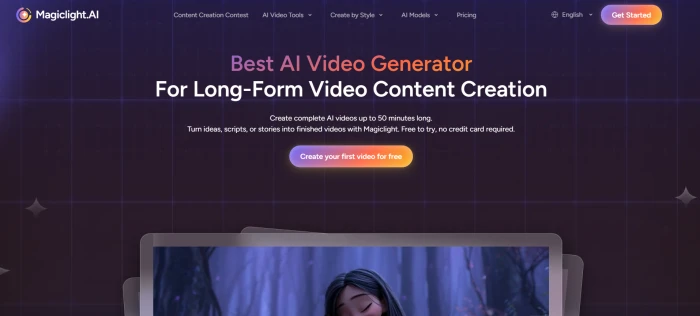
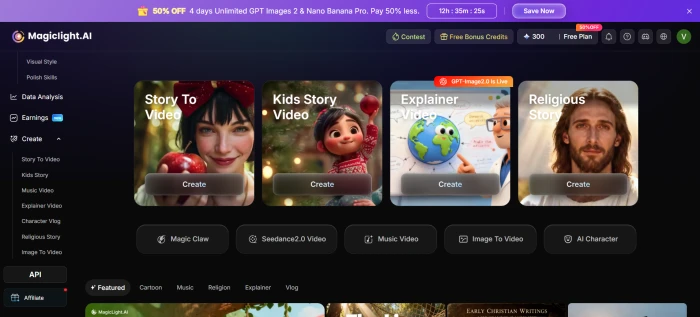
Homepage: the marketing surface with the story-to-video positioning.Dashboard: the post-login surface with project tools surfaced.
The homepage is purpose-built around the long-form story-to-video positioning, with the 50-minute capability called out prominently. Post-login, the dashboard surfaces the main project entry points: Story-to-Video (the flagship workflow), Character Creation, Music-to-Video, and the editor. The interface is clean and the workflow choices are clear, which makes the next step (entering the actual story-to-video pipeline) feel like a single obvious click.
Story-to-Video: The Full 6-Step Pipeline
Test 01 . Script to playable output
Prompt entered
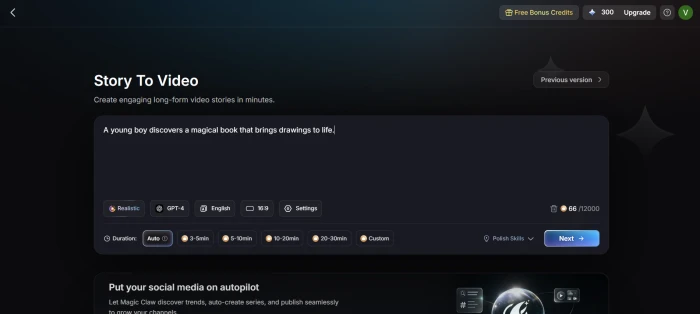
A young boy discovers a magical book that brings drawings to life.
What follows is the complete MagicLight workflow, captured step by step, from entering the prompt through to the playable video output. Each step is a distinct stage in the pipeline that the user reviews and approves before moving forward.
01
Story-to-Video Dashboard
Entry point
The story-to-video entry surface, where the user enters the story prompt, chooses a visual style (Zootopia, Disney, Pixar, Realistic, Comic, etc.), and selects target video length. This is where the 50-minute capability gets configured.
02
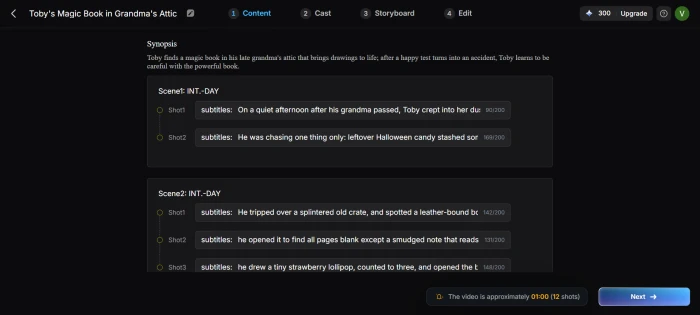
Content Creation
AI writes the script from the prompt
The AI expands the one-line prompt into a structured story script with multiple scenes, character dialogue, and narrative arc. The user can edit the generated script before continuing, which is the right design choice for creators who want to control the narrative.
03
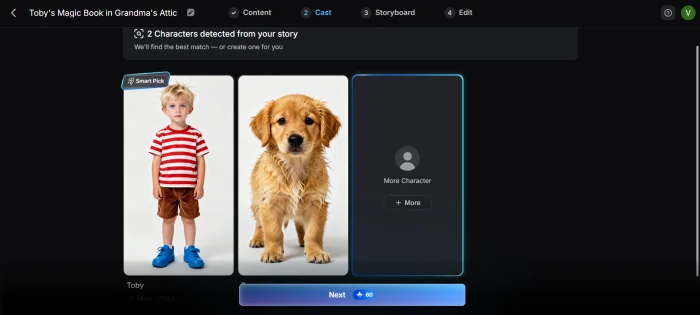
Cast Selection
Character Lock setup
The cast selection step is where Character Lock gets configured. Each character in the story gets a visual definition (face, style, clothing) that the AI then locks across every subsequent scene. This is the feature that solves the biggest problem in AI video storytelling and the reason MagicLight has a defensible niche.
04
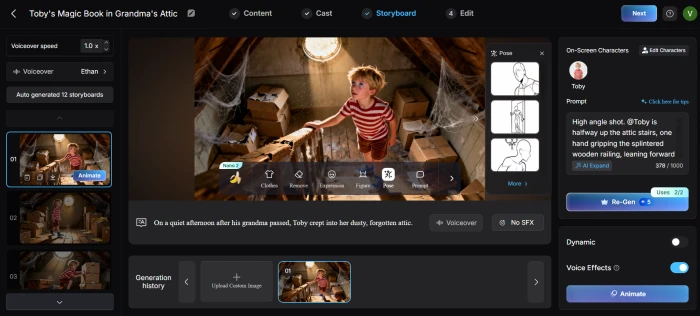
Storyboard Review
Scene-by-scene approval
The storyboard view shows every scene as a separate panel with its generated image, dialogue, and timing. Users can regenerate individual scenes that did not land well rather than restarting the entire project, which is genuinely useful and also the correct way to manage credits efficiently.
05
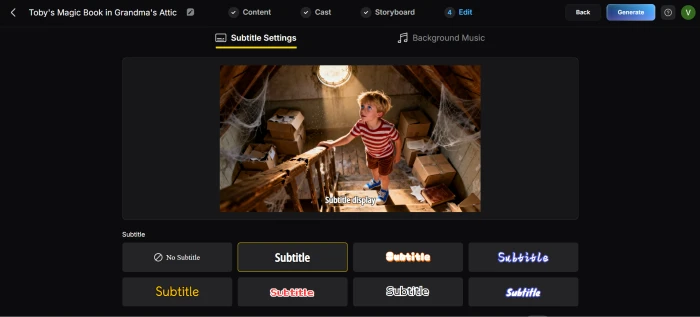
Edit Board
Subtitles, music, voice, final polish
The edit board adds subtitles, background music, and finalises the voice narration. Voice cloning is available on paid tiers (clone the creator's own voice from a sample). Subtitle styling, music selection, and per-scene timing all happen here before the final render.
06
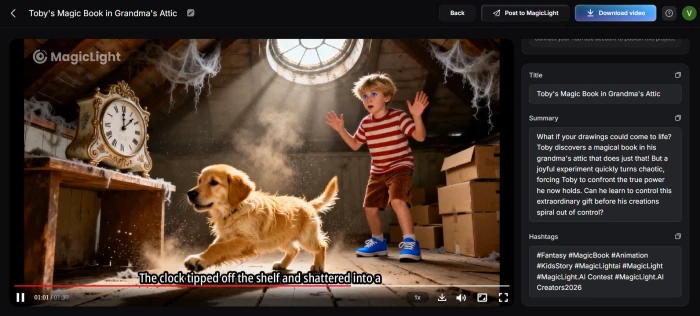
Video Generated
Final output ready to play and export
The final video lands in the project library, ready to play, share, or export to 1080p HD. The pipeline from prompt entered to playable video output took under an hour for this short story test, with the bulk of the time spent on scene generation rather than user input.
What this pipeline reveals: The entire end-to-end story-to-video workflow runs inside MagicLight without needing any external tools, video editing skill, or asset library. The 6-step structure is well-designed: each stage is a distinct decision point the user reviews before moving forward, which is the right design pattern for an AI workflow where the user wants to maintain editorial control rather than trust a single black-box generation. Credit consumption is heaviest at stages 4 and 5 (scene generation and final render), so understanding the cost dynamics before committing to a full-length project is essential.
Character Creation
Test 02 . Custom character generation
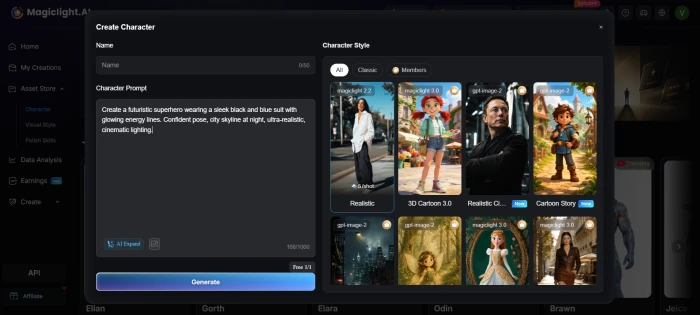
The character creation dashboard, with prompt input and style controls.
Character prompt entered
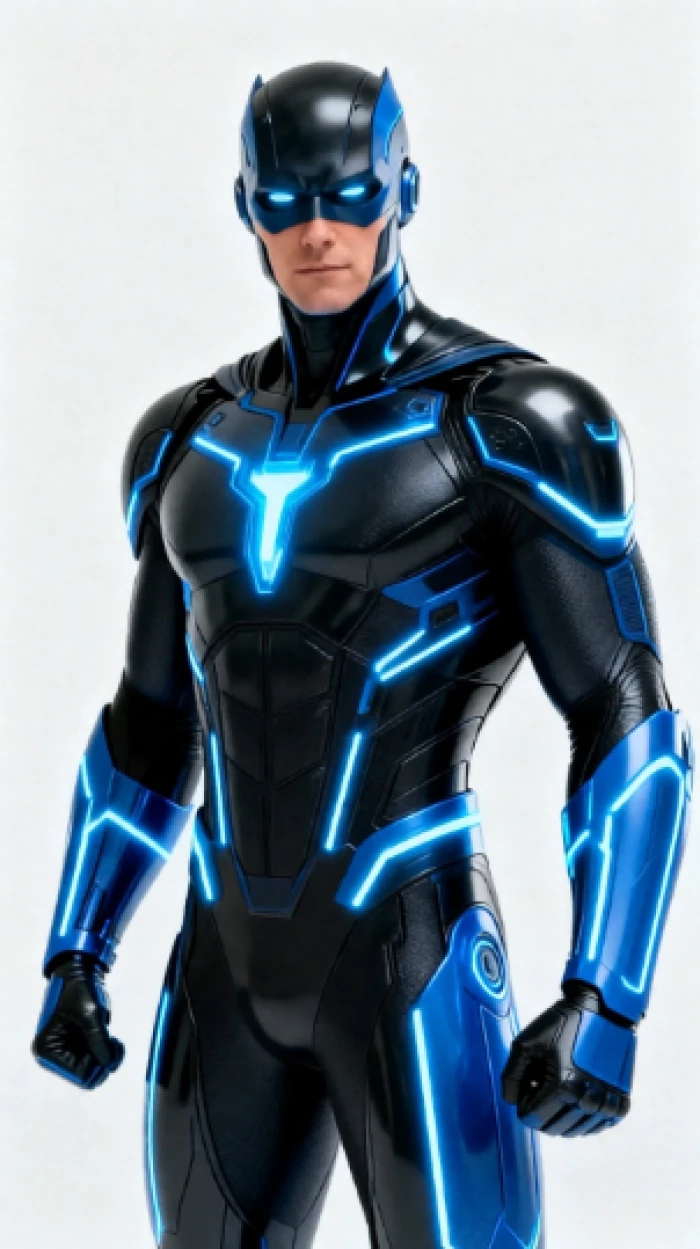
Create a futuristic superhero wearing a sleek black and blue suit with glowing energy lines. Confident pose, city skyline at night, ultra-realistic, cinematic lighting.
The generated character: futuristic superhero in black and blue suit, night city skyline.
The character creation flow operates independently from the story-to-video pipeline and produces standalone character renders that can later be saved and reused as locked characters in story projects. Prompt adherence on this test was strong: the suit colours, energy lines, confident pose, and cinematic night-city setting all rendered as requested. The output reads as a polished concept art piece rather than a typical generative AI render. The cinematic-lighting modifier in the prompt clearly carried through to the result.
What this demonstrates: Character creation works as a dedicated tool, not just an embedded step in the story-to-video flow. For creators building a recurring cast across multiple videos (faceless YouTube channels with mascot characters, kids' story series with returning protagonists), this lets them generate characters once and reuse them across many projects, which is the right design pattern for series-based content workflows.
How this review was put together. First-hand testing covered the dashboard onboarding, the complete 6-step story-to-video pipeline with prompt entered and actual video output published to a MagicLight project URL, and the character creation flow with a custom prompt. The remaining feature scoring cross-references the Trustpilot rating (2.2 stars from 84 reviews with 80%+ negative), the discrepancy with MagicLight's self-reported "4.7 stars from 2,000+ reviews" claim, multiple independent user reports on credit consumption versus advertised video minutes, and direct comparison against Runway, HeyGen, Pictory, and DiGen at equivalent feature points.
10-Point Feature Review
03 . Where the magic works and where the credits disappear
Feature Scores at a Glance
Long-Form Video
9.0
Character Lock
8.5
End-to-End Workflow
8.0
Style Library
7.8
Template Value
7.5
Ease of Use
7.6
Animation Quality
6.0
Voice Quality
5.8
Credit Transparency
3.5
Support & Trust
3.8
Feature-by-feature breakdownScored on a 10-point scale
01
Long-form video generation ONLY ONE DOING THIS
Up to 50 minutes of coherent video from a single project. While Runway caps at approximately 10 seconds and Pika at approximately 5 seconds per clip, MagicLight generates multi-scene narratives measured in minutes. This is the platform's fundamental differentiator and the reason it exists. For faceless YouTube creators who need 5 to 30-minute videos, there is no real alternative at this price point.
MAX: 50 min/projectCOMPETITORS: None match
9.0
EXCELLENT
02
Character Lock (visual consistency) GAME-CHANGER
Define a character once (face, style, clothing) and it appears correctly across every scene in the video. One tester reported 90% consistency across 15 generated scenes. This feature alone solves the biggest problem in AI video storytelling, characters that change appearance between clips. It is not perfect (hands and complex poses still struggle), but for illustrated and animated styles it is remarkably reliable.
CONSISTENCY: ~90% across scenesDEFINE ONCE: Use everywhere
8.5
GREAT
03
End-to-end production workflow COMPLETE
Script writing (via DeepSeek/ChatGPT integration), storyboarding, image generation, animation, voice narration with lip-sync, subtitle generation, background music selection, and 1080p HD export, all in one platform. No switching between tools. The 6-step pipeline documented in the testing section above demonstrates how someone with zero video editing experience can produce a publish-ready video by writing a script and clicking generate.
STEPS: Script to exportEDITING SKILL: None needed
8.0
GREAT
04
Animation quality KEN BURNS, NOT PIXAR
The "animation" is often a subtle camera pan on a static image (Ken Burns effect) rather than true character motion. Some scenes show genuine movement, but most are closer to animated slideshows than fluid animation. Multiple reviewers describe the motion as a "slide show feel." AI hands remain problematic across all styles. If expectations are set to Pixar-level motion, disappointment follows; if expectations are set to illustrated storytelling with gentle motion, it delivers.
MOTION: Pan/zoom dominantTRUE ANIMATION: Limited
6.0
FAIR
05
Voice and lip-sync FUNCTIONAL
30+ emotional voiceover options in 10+ languages with automatic lip-sync to character mouth movements. Voice cloning is available (clone a creator's own voice from a sample). The voices are functional but some still sound artificial, with reviewers describing them as "decent for YouTube but not broadcast quality." Lip-sync accuracy varies by scene complexity.
VOICES: 30+ optionsCLONING: Available
5.8
WEAK
06
Credit system transparency BIGGEST COMPLAINT
This is the #1 issue driving the 2.2 Trustpilot score. The Pro plan advertises "up to 780 minutes of video generation" but delivers 45,000 credits at $0.039/100 credits. A 1-minute video consumes roughly 1,200 credits. That means the Pro plan produces approximately 37 minutes of video, not 780. Image-to-video animation costs 100 credits per scene. Failed or bad generations still consume credits with no refund mechanism. One user paid for a full year and was blocked after just 17 minutes of video.
STATED: "780 min" (Pro)ACTUAL: ~37 min (by credit math)
3.5
POOR
07
Support and customer trust UNRELIABLE
Trustpilot: 2.2 stars from 84 reviews, 80%+ negative. The most common complaints: no response to support emails (multiple users waited 2+ weeks), credits consumed on failed generations with no recourse, and plan descriptions that do not match delivered output. MagicLight does respond to some Trustpilot reviews directing users to Telegram/Discord support, which is reportedly more responsive than email. The disconnect between the self-reported "4.7 stars from 2,000+ reviews" and the 2.2 Trustpilot score is notable.
10+ animation styles: Zootopia, Disney, Pixar, Realistic, Comic, Animals, Illustration, Suspense, 3D Cartoon, Picture Book. Purpose-built templates for kids' stories, faith lessons, historical explainers, comedy skits, and educational content. The templates give genuine structural starting points rather than just aesthetic filters. This library is a real time-saver for creators who know what format they need.
STYLES: 10+TEMPLATES: Kids, faith, edu, comedy
7.8
GOOD
09
Ease of use STRAIGHTFORWARD
The script-to-video workflow is genuinely simple: paste text, select style, choose characters, generate. The learning curve is mainly around understanding how credits are consumed and how to optimise prompts for better scene generation. Multiple reviewers confirm beginners can produce their first video within an hour. The interface is clean and the one-click generation option works as advertised for simple projects.
TIME TO FIRST VIDEO: ~1 hourCOMPLEXITY: Low
7.6
GOOD
10
Template variety NICHE-FOCUSED
Templates for kids' bedtime stories, religious narratives, historical explainers, science lessons, Jingles (musical videos), and comedy sketches. Each provides a working structure with scene breakdowns, character slots, and timing guides. The kids' story and religious content templates are particularly well-developed, and these are the use cases where MagicLight has the strongest community traction.
USE CASES: Kids, faith, edu, comedyCOMMUNITY: Active for these niches
7.5
GOOD
Pros and Cons
04 . What works and what burns the credits
+What users like
Only platform producing 50-minute coherent AI videos, no competitor comes close on length
Character Lock maintains ~90% visual consistency across scenes, a genuine differentiator
Full production pipeline from script to export with no editing skills required
10+ animation styles including Disney, Pixar, Zootopia, and realistic options
Native mobile apps on iOS and Android with full generation capability
Commercial license included on all paid plans, monetise on YouTube immediately
−What users dislike
Advertised video minutes do not match credit reality, Pro says "780 min" but credits produce ~37 min
Credits consumed on failed generations with no refund or regeneration option
2.2-star Trustpilot with 80%+ negative reviews, persistent billing and support complaints
Animation is mostly camera pan/zoom on static images, not true character motion
Email support unresponsive, Telegram/Discord required for actual help
Cannot import custom images or voiceovers on lower tiers, locked to AI-generated assets
Pricing Breakdown
05 . What is advertised versus what actually delivers
Plan
Annual Price
Credits/Mo
Advertised Video
Realistic Output
Cost/100 Credits
Free
$0
Limited
·
1-2 short clips
Free
Standard
$6/mo ($72/yr)
7,000
"130 min"
~6 min
$0.086
Pro
$17.50/mo ($210/yr)
45,000
"780 min"
~37 min
$0.039
Ultra
$45/mo ($540/yr)
150,000
"2,500 min"
~125 min
$0.030
Ultimate
$75/mo ($900/yr)
280,000
"3,670 min"
~233 min
$0.027
The credit math: Based on reviewer reports, a 1-minute video consumes roughly 1,200 credits. Image-to-video animation costs 100 credits per scene. The "Advertised Video" column shows what the pricing page states; the "Realistic Output" column estimates actual production based on the ~1,200 credits/minute rate reported by users. The gap between these two columns is the core complaint across Trustpilot. Verify current credit consumption rates on a personal account before committing to an annual plan.
Our take: Start with the free tier to understand how credits actually get consumed on the intended content type. When upgrading, go directly to Pro at $17.50/mo annual as the minimum viable plan for regular creators, since Standard at $6/mo runs out too fast for anything beyond a few short clips. Budget for regenerating bad scenes (tip: regenerate individual scenes rather than scrapping entire projects). Use Telegram or Discord for support, not email.
MagicLight vs the Top 5 Alternatives
06 . How it compares for AI video creation
MMagicLight
RRunway
HHeyGen
PPictory
DDiGen
Score
6.5
9.0
8.5
7.5
7.2
Starting Price
Free / $6 mo
$15/mo
$29/mo
$23/mo
Free / $9.99
Max Video Length
50 minutes
~10 seconds
5+ minutes
25 minutes
Short clips
Character Lock
✓ ~90%
Limited
✓ Avatars
✗
Basic
Script to Video
✓ Full pipeline
✗
Scripts only
✓
Basic
Animation Type
Pan/zoom
True motion
Avatar motion
Slideshow
Variable
Lip Sync
✓
✗
✓ Best
✗
✓
Mobile App
✓
✓
Web
Web
✓
Trustpilot
2.2 stars
3.8 stars
4.5 stars
3.5 stars
~3.0 stars
Best For
Long stories
Pro clips
Avatars
Blog-to-video
Model hub
The picture: MagicLight is the only platform here that produces multi-scene narrative videos up to 50 minutes. That niche is genuinely uncontested. But on every other metric (animation quality, trust, support, pricing transparency), competitors score higher. Runway produces vastly better motion quality in short clips. HeyGen leads on avatar-based content. Pictory handles blog-to-video workflows more reliably. For long-form illustrated storytelling specifically, MagicLight is the only option. For everything else, alternatives are safer bets.
What Users Are Saying
07 . Collected from Trustpilot and Reddit creator communities
I've been on MagicLight since the beginning of the year and it's become part of my regular workflow. The interface is simple, the animations feel natural, and support on Telegram has been excellent. The desktop version is smooth especially for longer scripts and bigger projects.
Regular creator
Trustpilot reviewer / Long-term user
★★★★★
The website claims the Plus subscription includes "up to 420 minutes of video generation." After creating only 17 minutes of video, I was suddenly blocked from generating more. It kept telling me to buy more credits. I genuinely feel misled and deceived by the promises on their website.
Annual subscriber
Trustpilot reviewer / Blocked after 17 min
★☆☆☆☆
I paid for a Pro plan, it says 580 minutes of video creation. Absolute BS! I created a 6-minute video and to animate my video used ALL my credits. 100 credits per image animation, they animate the image, not creating full video at once. The result wasn't like what I wanted either.
Pro subscriber
Trustpilot reviewer / Credits depleted
★☆☆☆☆
MagicLight is the only tool I've found that handles 20+ minute videos with consistent characters. The Character Lock feature genuinely works. But the gap between the pricing page minutes and what credits actually deliver is the biggest issue, you have to budget by credits, not by the marketing copy. Use it for the long-form niche, ignore the minutes claims.
Faceless YouTube creator
r/youtubers community discussion / Pro subscriber
★★★☆☆
The pattern: Users who understand the credit system, use Telegram support, and work within the animated storytelling niche genuinely love MagicLight. Users who trust the pricing page's "minutes of video" claims and expect that to translate directly into output are consistently angry and feel deceived. The platform's core capability (long-form character-consistent video) is real and unmatched. The trust damage comes entirely from how it is marketed and priced, the gap between what is promised on the pricing page and what the credit math actually delivers.
· The Verdict ·
6.5/10
Should you use MagicLight AI? Here is who it is for.
Use MagicLight AI if the requirement is long-form animated story videos with consistent characters, this is the only tool that does this in 2026. Start with the free tier to learn exactly how credits are consumed. When upgrading, go directly to Pro ($17.50/mo annual), since Standard does not produce enough. Use Telegram or Discord for support, not email. Regenerate individual bad scenes rather than restarting projects. Set expectations for illustrated pan/zoom animation, not fluid motion. Best for faceless YouTube channels, kids' stories, educational content, religious narratives.
Skip MagicLight AI if the requirement is realistic or photorealistic video (try Runway at $15/mo), reliable avatar-based presentations (try HeyGen at $29/mo), the expectation is that pricing page "minutes" will be accurate (they are not, calculate by credits instead), or responsive email support matters. Also skip if the 2.2 Trustpilot score is a concern, since 80% of reviews are negative and the credit transparency issue is well-documented and unresolved as of May 2026.

Discussion
Join the discussion and share your perspective.