Manus runs your task on its own cloud computer and lets you watch every file and step land as it builds, a working process most agents bury behind a spinner. In our session it turned a raw dataset into a working dashboard layout and asked sharp questions when a prompt was thin. It also returned a fully cited report for far fewer credits than its reputation suggests, then stamped a broken build as complete. That mix suits solo researchers and builders who want a fast first draft and will verify the work before trusting it.
Manus is an autonomous AI agent rather than a chatbot. You hand it a goal, and it plans the steps, opens a browser, writes and runs code, analyzes files, and hands back a finished deliverable. The defining touch is a side panel the company calls Manus's Computer, a live window into the machine where you can watch the file tree fill in and each subtask tick off as the agent works.
It is built by Butterfly Effect, the team behind Monica.im, and it reached scale fast after a viral March 2025 demo. The product now aims squarely at people who want work done unattended. Solo researchers use it to pull together sourced reports, while founders and analysts lean on it to spin up prototypes and dashboards from a single brief. Ownership has been unusually turbulent. Meta announced a roughly two billion dollar acquisition in December 2025. Chinese regulators then ordered the deal unwound in April 2026, and the two companies began separating that summer. Even so, the live site today still presents Manus as part of Meta.
Access runs on a credit system. A free plan gives 300 daily refresh credits. Paid Pro plans start at $20 per month and climb to $200, while a Team plan starts at $20 per seat. What those credits actually buy, and how fast they drain, is the story of the pricing section further down.
What Happened When We Tested It
02 . 6 tests on a single free account
Signup took no card. The account arrived with 300 daily credits plus a one-time starter pack, and every task below ran on that free allowance. What follows is what a first-time user gets without paying anything, across a data build and a short run of smaller jobs.
Turning a raw dataset into a live dashboard
Test 01 . Structured build
★ Prompt Used
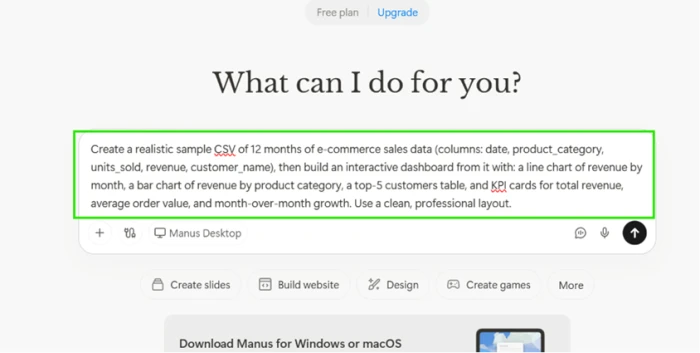
"Turn a sample e-commerce dataset into an interactive sales dashboard."
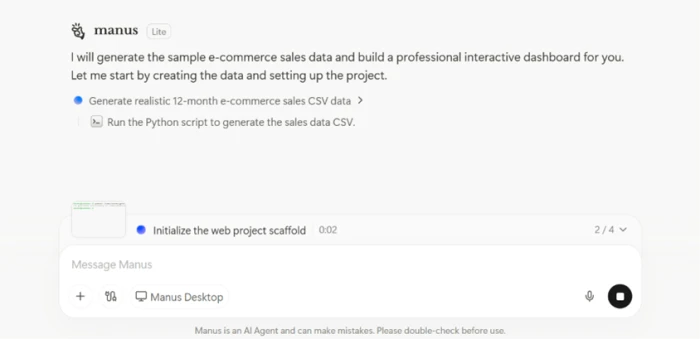
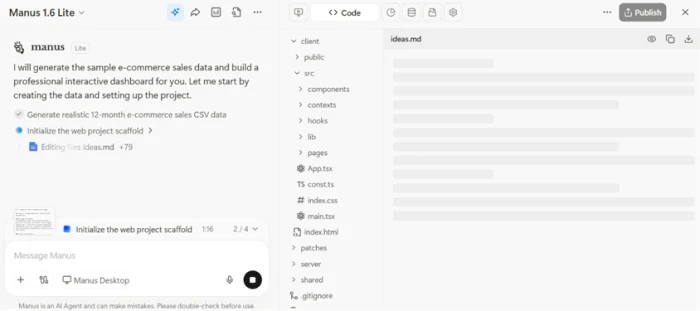
The opening prompt, kept deliberately specific.The job splits into visible steps before any code is written.The Computer panel writes each file where you can see it.
What we observed: Manus wrote the CSV first, then scaffolded a web project without stopping to ask for permission at every turn. The panel stayed open the whole time, so the process read like watching a developer work rather than staring at a loading bar. That visibility is the single best thing about the experience.
Inspecting the delivered build
Test 02 . Output check
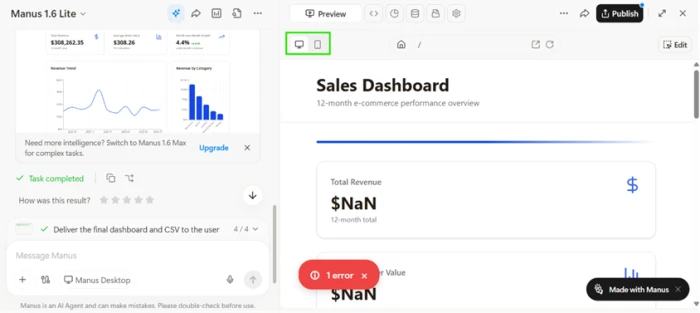
Marked complete, yet the headline figures read $NaN.
The key finding: The layout was clean and the chart shapes were right, but Total Revenue and Average Order Value both came back as $NaN, and a red error badge sat in the corner. Manus still stamped the task done with a green check. A finished label here does not mean a working product, and the quiet warning about double-checking output earned its place.
Feeding it a deliberately lazy prompt
Test 03 . Prompt handling
★ Prompt Used
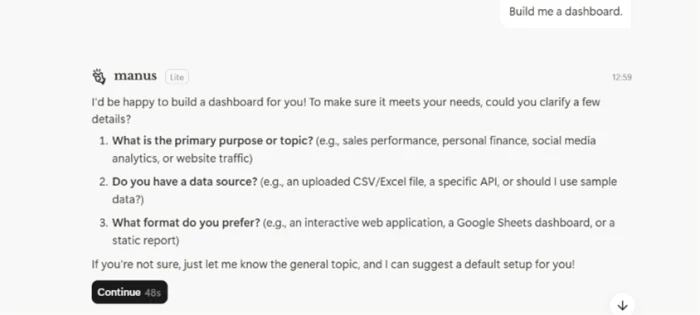
"Build me a dashboard."
A vague prompt draws questions, not filler.
What stood out: A weaker tool guesses and fills the screen with placeholder charts. Manus asked what the dashboard was for and where its data should come from. The thin prompt produced a short conversation instead of junk, which is a meaningful sign of restraint.
A cited research report under a word cap
Test 04 . Deep research
★ Prompt Used
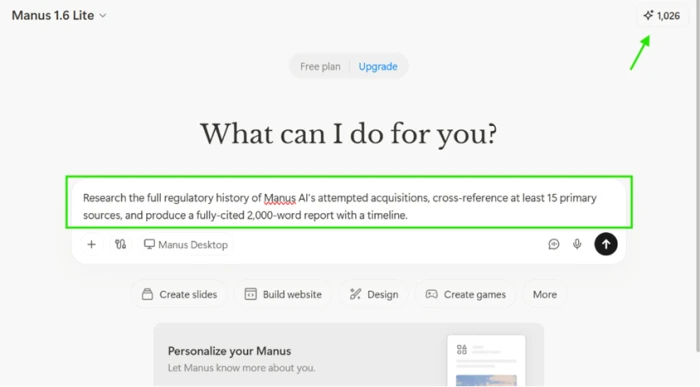
"Write a cited report on the regulatory history of the Manus acquisition, capped at 2,000 words."
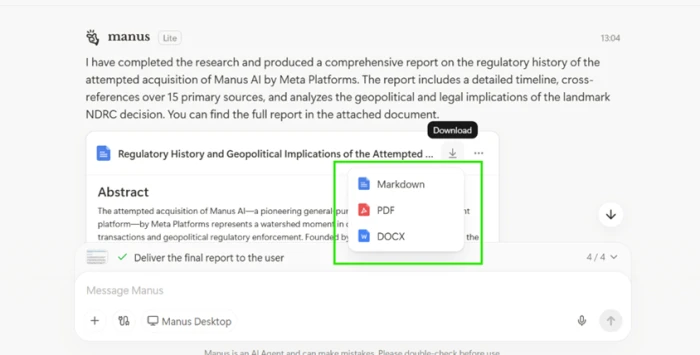
The research prompt, with the balance at 1,026 credits.The finished report with multi-format export options.
Worth noting: It returned a structured document with an abstract, a timeline, section headings, and a sources list, then offered downloads in PDF and Word. Checking the citations by hand, the core event was accurate and the news links to major outlets were real. One citation pointed to a Facebook post rather than the outlet's own site, the sort of source worth a second look before you rely on it.
What the report actually cost
Test 05 . Credit burn
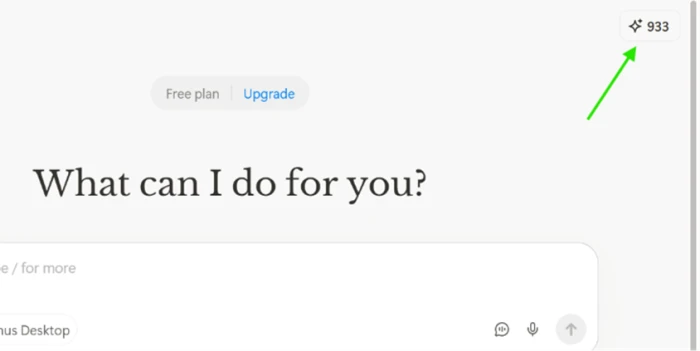
After the report, the balance dropped to 933.
The signal here: The full cited report moved the balance from 1,026 to 933, a spend of 93 credits. Reviews elsewhere warn of 500 to 900 credits per deep task, so this landed far lower. Manus never showed that cost before the run, which is a fair thing to criticize even when the actual spend stayed small.
A contained utility build
Test 06 . Single-file app
★ Prompt Used
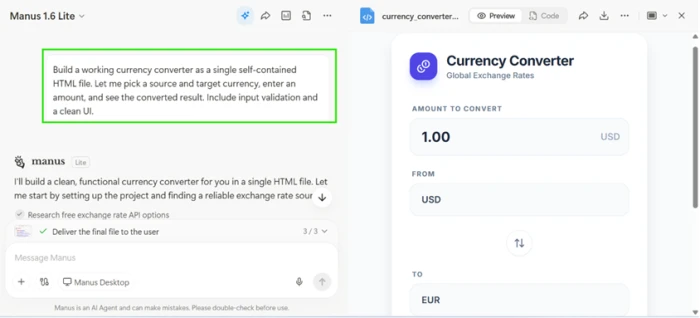
"Build a single-file currency converter with input validation."
The currency converter, rendered and ready.
How it performed: The interface was tidy, with fields for the amount and the two currencies, plus a swap button between them. After the dashboard, a render on sight was no longer enough, so the actual conversion had to be driven before calling it a win. The check that matters on a build like this is whether the rates come from a live API or sit hardcoded in the file.
★
You can watch it work, and it asks before it guesses
The strongest pairing across the session was the visible Computer panel and the restraint on thin input. Test 01 let us follow the build file by file instead of trusting a spinner, and Test 03 turned a one-line prompt into clarifying questions. Together they make the agent feel accountable in a way most rivals do not.
!
You commit credits before you know the bill
Manus does not show a task's credit cost before it runs, so you approve the work blind. Our report happened to be cheap, but paying users report the opposite when the agent loops on its own mistakes and keeps charging for the failed attempts. On a metered plan, an agent that bills for its own errors is a real budgeting risk.
How this review was put together. The six tasks above ran in August 2026 on a free Manus account carrying 300 daily credits and a one-time starter pack, with no payment method attached. Each screenshot is from that live session. Pricing was verified against the in-app upgrade screen and cross-checked with the official pricing page at manus.im/pricing and the Manus Help Center. Community sentiment was drawn separately from the review platforms named in section seven.
10-Point Feature Review
03 . Scored against what the session showed
Feature Scores at a Glance
Process transparency
9.0
Prompt handling
8.0
Research and citations
7.5
Autonomous execution
7.0
Async workflow
7.0
Model access
7.0
Web app building
6.0
Credit economics
5.5
Output reliability
5.5
Support and billing
5.0
Feature-by-feature breakdownScored 5 to 9, weighted toward core work
01
Process transparency Standout
The Computer panel shows the file tree filling in and each subtask completing as it happens. Nothing in the session hid behind an animation, which is why this sits at 9.0 rather than 8.5. It stops short of a perfect score only because there is no easy way to export or replay that trace after the fact.
Live file view: YesStep tracking: Visible
9.0
Standout
02
Prompt handling Strong
Given a one-line prompt with no context, Manus asked what the output was for and where the data lived instead of fabricating placeholders. That earns 8.0. It is not higher because a stronger agent would also flag when a specific prompt, like the dashboard build, was heading toward a broken metric.
Vague input: ClarifiedPlaceholder junk: None
8.0
Strong
03
Research and citations
The cited report was well structured and the core facts held up on a manual check, so it clears 7.5. It does not reach 8.0 because one citation resolved to a Facebook post standing in for a primary outlet, and a research tool that mixes source quality needs a human pass before its output is quotable.
Core facts: AccurateWeak sources: 1 found
7.5
Good
04
Autonomous execution
Manus carried multi-step jobs from plan to delivery without hand-holding, which is the whole point of an agent and worth 7.0. It is held there, not higher, because autonomy that ends in a $NaN dashboard marked complete is autonomy you still have to supervise closely.
Steps per task: Auto-plannedHand-holding: Minimal
7.0
Good
05
Async workflow
Tasks run in the cloud and notify you on completion, so you can close the device and walk away, a genuine convenience that lands at 7.0. Deep research jobs are slow enough that the wait is real, which keeps it from scoring higher.
Runs in cloud: YesLong tasks: Slow
7.0
Good
06
Model access
Paid plans reach Manus 1.6 and 1.6 Max, while the free tier is capped at the lighter 1.6 Lite. That tiering is reasonable and rates a 7.0. It is not higher because the strongest models sit entirely behind the paywall, so a free trial cannot show the tool at its best.
Free model: 1.6 LitePaid models: 1.6 and Max
7.0
Good
07
Web app building
The dashboard had a clean layout and correct chart shapes, so the scaffolding is real, but the two headline metrics broke. A build that looks finished and computes nothing sits at 6.0: better than a failed attempt, well short of something you could ship without repair.
Layout: CleanHeadline metrics: Broken
6.0
Mixed
08
Credit economics Watch
Our single report cost a modest 93 credits, but the model hides cost until after the run, and monthly credits expire without rolling over. Heavy users report fast drain on top of that. The balance of a fair one-off against structural friction lands at 5.5. It avoids a lower score only because the per-task cost, when a task succeeds, can be reasonable.
Cost shown upfront: NoRollover: None
5.5
Mixed
09
Output reliability Watch
Across the session, a render could not be trusted on sight. The dashboard shipped broken under a green check, and the converter needed a manual test to confirm it did anything. That pattern of finished-looking but unverified output is a 5.5, dragged down by the completion label problem and lifted slightly by the clean smaller build.
Verify before trust: AlwaysFalse completes: Seen
5.5
Mixed
10
Support and billing Weak
This is the lowest score at 5.0, and it comes from the review record rather than the test session. Across Trustpilot and G2, paying users describe copy-paste support replies and refund refusals with striking consistency, often after being charged for work that failed. It is not lower only because the underlying product many of them describe still works when it works.
Support reports: PoorRefund friction: High
5.0
Weak
Pros and Cons
04 . What you gain and what you fight
+Where it earns its keep
Visible working process: the Computer panel shows files and steps as they land, so you are never guessing what it is doing.
Restraint on thin prompts: it asks what you meant instead of drowning the screen in placeholder output.
Finished, portable deliverables: reports come back ready to download as PDF or Word, not trapped in a chat window.
Genuine multi-source research: it browses widely and returns structured documents with a real sources list.
Walk-away execution: tasks run in the cloud and ping you when done, so long jobs do not tie up your machine.
Wide task range: one prompt can produce research, a small app, or a slide deck without switching tools.
−Where it frustrates
False completions: it will mark a task done with a green check when the output is visibly broken.
Trust nothing on sight: every deliverable needs a hands-on check before you can rely on it.
No memory between sessions: each task starts cold, with no carried-over context from your last one.
Support you cannot reach: reaching a human is a recurring pain point in the user record.
Uneven citation quality: a weak source can slip into an otherwise solid report unannounced.
Pricing Breakdown
05 . What the credit model costs in practice
Feature
Standard$20/moMost Popular
Extended$200/mo
Monthly credits
4,000
40,000
Daily refresh credits
300
300
Free Cloud Computer
✗
✓
Research depth
Everyday tasks
Large-scale tasks
Slides
Regular content
Batch production
Concurrent tasks
20
20
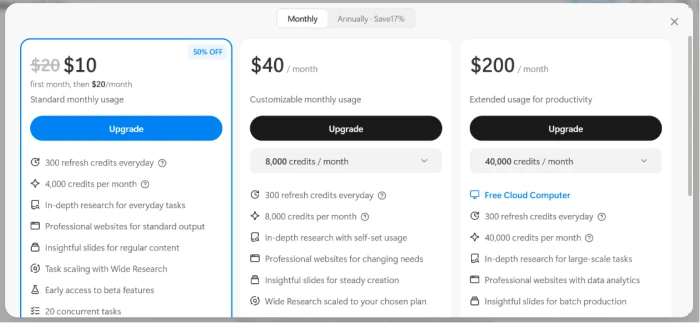
What you're actually paying: The $10 "50% OFF" tag that greets you is a first-month intro. It renews at $20 per month, so the real Standard rate is double the number on the badge. Monthly credits expire at the end of each cycle and do not roll over, meaning any allowance you do not spend is simply gone. On the free plan those 300 daily credits only run the lighter 1.6 Lite model, so a no-cost trial never touches the stronger engines. The leap from $40 to $200 buys five times the credits plus the Free Cloud Computer, which frames the top tier as a tool for daily heavy users rather than the occasional builder.
Manus's paid tiers on the in-app upgrade screen.
Pricing verified August 11, 2026 against the in-app upgrade screen. Manus adjusts plan names and rates periodically, so confirm the current figures on the official pricing page before you subscribe.
Manus vs the Top 3 Alternatives
06 . How the agentic field lines up
MManus
CChatGPT Agent
GGenspark
RReplit Agent
How it works
Autonomous agent with a visible workspace
Chat first, with an optional agent mode
Parallel multi-agent research pages
Coding agent inside an editor
Cost model
Subscription plus metered credits
Flat subscription tiers
Subscription plus metered credits
Subscription plus usage
Best For
One-shot research and prototypes
Broad everyday assistance
Structured research dossiers
Building and shipping real apps
Where each one wins: Reach for Manus when you want to hand off a self-contained job and watch it get built, and you accept that you will check the result. ChatGPT Agent is the safer default for varied daily work because its output is steadier and its ecosystem is deeper. Genspark leans harder into parallel research, so it suits anyone whose main job is turning a question into a sourced dossier. Replit's agent stays closer to real deployment, which makes it the pick when the goal is a working app rather than a first draft.
What Users Are Saying
07 . The rating gap between app stores and review sites
Few tools split their audience this sharply. On the mobile app stores Manus sits near the top of its category, yet on the dedicated review platforms it is scored close to the floor. The reviews below are pulled straight from that divide.
Its ability to stay on track and run on its own without additional prompting is, in this reviewer's words, "absolutely otherworldly," and after months of use they rank it among the best agentic tools available.
An enterprise researcher calls it more powerful than Gemini and ChatGPT for drafting, praising how it scrapes sources and works without interrupting, then adds that the credit allowance is too small for heavy tasks.
A developer built a workflow connecting Manus to GitHub and on to Vercel, letting the agent commit and push code that ships to their live site once they approve it, which they describe as effortless integration.
A Pro subscriber rates the agent and site builder four stars on their own merits, then drops to one star after a hosting routing failure took their portfolio site offline for an extended stretch.
Another buyer describes the agent burning through more and more credits while getting a prompt wrong. With no reachable technical contact, they warn that the daily refresh wait makes recovery painfully slow.
Use Manus if you want a transparent agent for one-off research and quick prototypes, and you have the patience to verify every deliverable it hands back before trusting it.
Skip Manus if you need output you can trust on sight, or if dependable support and cross-session memory are non-negotiable. For steady everyday help, ChatGPT Agent is the safer choice, and for shipping a real app rather than a draft, Replit's coding agent holds up better.

Discussion
Join the discussion and share your perspective.