


Home / Reviews / AI Image Generator / Meigen ai
MeiGen logo
AI Prompt Gallery Multi-Model Generator

MeiGen Review

meigen.ai · MeiGen Creative LLC

MeiGen is a prompt gallery that doubles as a generator. Every image and video in the feed comes with the exact prompt that made it, and one tap loads that prompt into a built-in generator with the right model already set. Browsing costs nothing. Signing in once releases a batch of free daily credits.

Reviewer Score
7.5
/10
Capable Pick
Strong at prompt discovery
Thin on deep editing
Prompt Gallery9.0
One-Click Reuse8.5
Model Range8.0
Credit Clarity5.5
Editing Depth5.0
Format
Gallery + generator
Engines
5+ image & video
Free Credits
20 per day
Max Resolution
4K paid tiers
Entry Price
$9.90 1,000 credits
Mobile Apps
iOS & Android

What MeiGen Does

01 . Overview

MeiGen is built on one bet: the prompt matters more than the button. Rather than open to a blank text box, it opens to a feed of finished images and videos gathered from community creators and trending posts, each one still attached to the instructions that produced it. Those instructions range from a single sentence to a full structured block that spells out model, ratio, quality and scene. You pick a look, push its recipe into the generator, and the matching engine runs it. A reverse tool handles the opposite case, taking a reference image you upload and returning a prompt you can rework.

That setup points the tool at people who publish often and want a head start over blank-page prompting. Designers and marketers lean on it to skip the trial and error of writing prompts from scratch. Sellers and social teams reach for its preset jobs when the work is repetitive rather than creative. It fits anyone who would rather adapt a proven recipe than invent one, and less so anyone after a full-featured editor. MeiGen Creative LLC launched it in 2026 and runs it on the web plus iOS and Android, so the gallery stays with you from desk to phone.

What Happened When We Tested It

02 . 5 tests covering sign-up, the gallery and the Skills workflows

We opened MeiGen on the web with a fresh account, browsed the gallery without signing in, then signed in to reach the credit-gated features and the Skills panel. Here is what each step turned up.

The gallery is the front door

Test 01 . Gallery layout
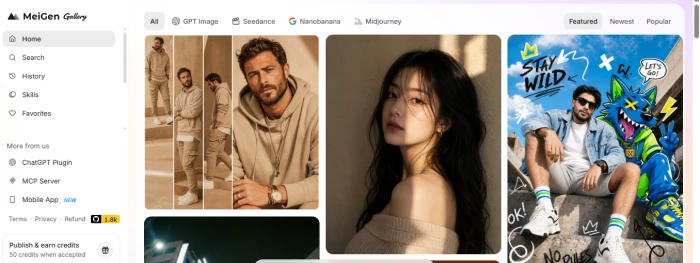
MeiGen gallery home page showing a masonry grid of AI images with a left sidebar listing Home, Search, Skills and Favorites and engine filter tabs across the top
The landing view: gallery first, filters on top.
First impression: There is no marketing homepage to click through. MeiGen drops you straight onto the gallery, with engine filters along the top for GPT Image, Seedance, Nanobanana and Midjourney, and a sidebar holding search, history, boards and favorites. A card in the corner offers 50 credits for any creation the community features. The whole layout treats browsing as the main event, which fits a tool built around discovery.

Browsing is free, creating is not

Test 02 . Sign-in and credits
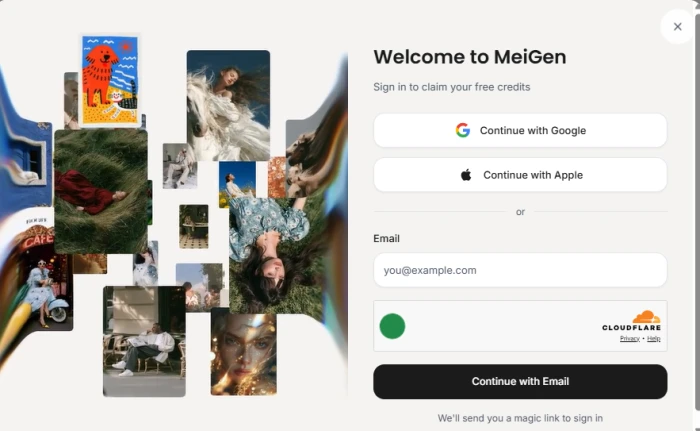
MeiGen sign-in panel offering Continue with Google and Continue with Apple buttons plus an email field behind a Cloudflare verification check
The sign-in wall that stands between browsing and generating.
Where it lands: You can scroll the feed and copy any card's prompt without an account. The moment you try to generate, MeiGen asks you to sign in. Google and Apple are one tap each; an emailed magic link is the fallback, gated behind a Cloudflare check. Signing in is also what releases the free daily credits, so the wall doubles as the credit faucet. For a quick copy-and-paste user that is a short detour, but anyone wanting to generate on the spot meets a commitment first.

The prompt comes with the picture

Test 03 . Prompt transparency
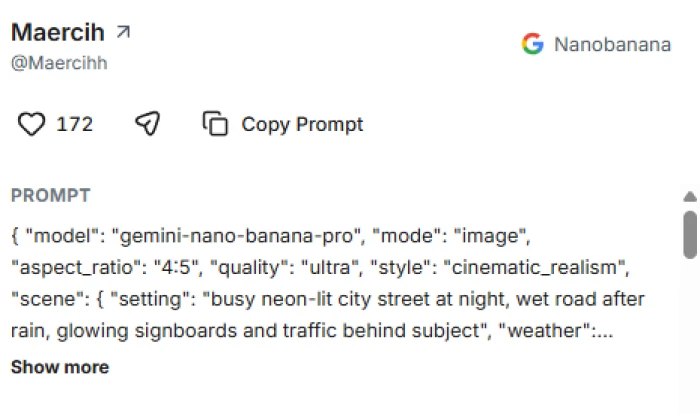
A MeiGen gallery entry by creator Maercih tagged Nanobanana with 172 likes and a Copy Prompt button, showing a structured JSON prompt
A gallery card with its full prompt, here written as structured JSON.
What stood out: Most prompt sites give you a sentence. This card handed over a structured JSON block: model, aspect ratio, quality, style and a nested scene description, all copyable in one click. That level of detail is the reason to reach for MeiGen over a plain inspiration feed. It also means the output depends on your access to the same engine the creator used, since the recipe is only as good as the model running it.

Skills turn prompts into fixed workflows

Test 04 . AI Skills
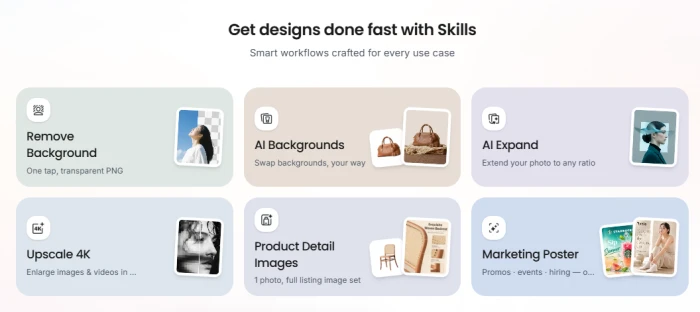
MeiGen Skills grid titled Get designs done fast with Skills, showing cards for Remove Background, AI Backgrounds, AI Expand, Upscale 4K, Product Detail Images and Marketing Poster
The Skills panel: preset jobs that skip prompt writing.
Worth noting: Beyond the open-ended generator, MeiGen bundles fixed workflows it calls Skills. Six of them cover common jobs: stripping a background, swapping one in, expanding a photo to a new ratio, upscaling to 4K, building a full set of product-listing images from one photo, and laying out a marketing poster. These are the parts aimed at sellers and social teams rather than prompt hobbyists, and they draw on the same credit balance as everything else.

Credits tick down inside the tool

Test 05 . Skill output
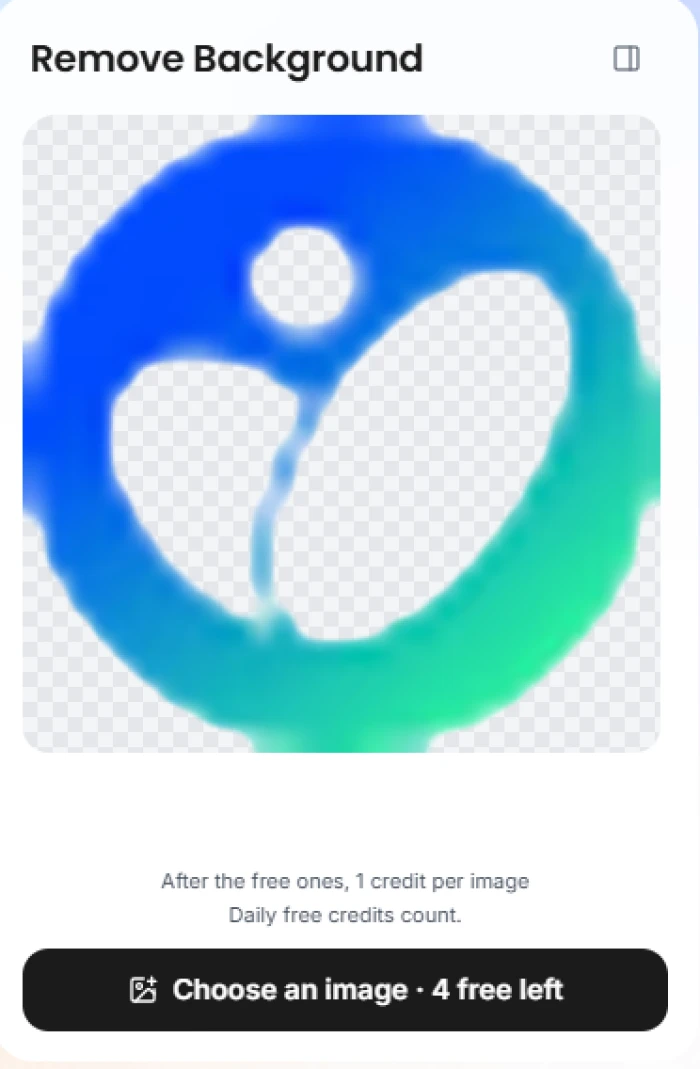
MeiGen Remove Background result showing a logo mark cut out onto a transparent checkerboard, with a button reading Choose an image, 4 free left
Remove Background output, with the running free-credit count under it.
How it performed: Running Remove Background showed where the cost actually lives. The result came back clean on a transparent checkerboard, but the button underneath spelled out the economics: four free images left, then one credit each. You do not see that per-image price on the Skills grid or anywhere earlier. It appears only once you are inside the specific tool, which makes planning a budget harder than it should be.
★
The prompt and the model travel together

The strongest thing MeiGen does is keep the full recipe attached to the result and wire it to the engine that made it. Open a card, read the structured prompt, tap Use Idea, and you are generating with the matching model in two steps. Nothing has to be pasted into a separate app.

!
The real price hides until you are mid-task

Per-image credit costs do not appear on the gallery or the Skills grid. Remove Background reveals its one-credit-per-image rate only once you open it, and different engines burn credits at different rates with no table shown first. Budgeting means learning the costs tool by tool.

How this review was put together. We tested MeiGen on the web in October 2026 using a new account, browsing the gallery unsigned and then signing in to reach generation, the Skills panel and the credit-gated flows. Pricing was checked against the in-app purchase screen on meigen.ai and cross-referenced with the credit packs listed on the MeiGen app in the Apple App Store. Every screenshot above comes from that session.

10-Point Feature Review

03 . Scored against what the session showed
Feature Scores at a Glance
Prompt gallery & discovery
9.0
One-click prompt reuse
8.5
Multi-model range
8.0
Image-to-prompt converter
7.5
Mobile apps
7.5
AI Skills workflows
7.0
Characters & boards
7.0
Output resolution & quality
6.5
Credit transparency
5.5
Editing depth
5.0

Pros and Cons

04 . What stands out in daily use
+What works
  • Full recipe on every card: the complete prompt sits with each image, structured JSON included
  • One-tap reuse: Use Idea loads the prompt and preselects the model that made it
  • Reverse lookup: upload a reference and get a prompt back to adapt
  • Preset Skills: background removal, expand, upscale and product shots without writing a prompt
  • Commercial rights included: you can use what you generate for commercial work
−What grates
  • Not an editor: no layers or fine retouching beyond the presets
  • Moderation can block: a prompt or upload may be refused before anything generates
  • Quality is model-dependent: results swing with the engine you pick, not with MeiGen
  • Young and unproven: little independent track record to lean on yet

Pricing Breakdown

05 . Credits, not subscriptions
Feature Free$0 daily credits Starter$9.90 one-time Pro$19.90 one-timeMost Popular Ultimate$49.90 one-time
Credits 20 / day 1,000 6,000
Max resolution 2K 4K 4K
Concurrent tasks 1 4 4
Credits never expire ✗ ✓ ✓
Commercial license ✓ ✓ ✓

What you're actually paying: Two things the grid does not tell you. First, the paid packs are one-time buys, not subscriptions, so there is no renewal date and the credits you purchase never expire. That removes the usual trap where a cheap first month doubles later. Second, where you buy matters: the same packs cost more inside the iOS app than on the website, where the 1,000-credit pack rings up at $11.99 against $9.90 on the site, because MeiGen passes Apple's cut along. The Pro and Ultimate packs also sit below a higher list price, so the number you see is already the discount. For free users, the real limiter is the 2K cap and a single job at a time, which pushes anyone doing volume toward a pack quickly.
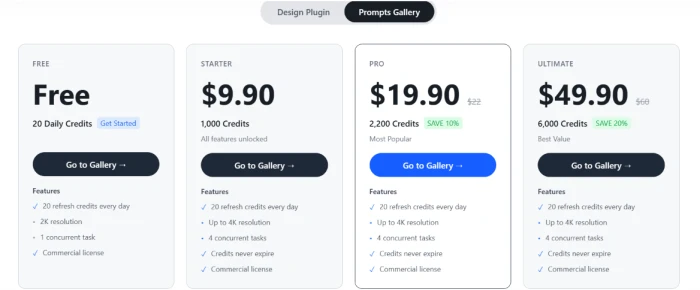
MeiGen Prompts Gallery pricing showing Free, Starter at $9.90, Pro at $19.90 and Ultimate at $49.90 credit tiers with features listed under each
MeiGen's credit tiers on the Prompts Gallery plan.

Pricing verified October 22, 2026. Credit costs differ between the app and the website, so check the official pricing page before buying.

MeiGen vs the Top 3 Alternatives

06 . Where it fits against the shortlist
MMeiGen PPromptHero KKrea AI MJMidjourney
TypePrompt gallery + generatorPrompt library + generatorMulti-model studioSingle-model generator
Pricing modelOne-time creditsSubscription + packsSubscription + packsSubscription only
Entry price$9.90 / 1,000 credits$16/mo billed yearly$9/mo$10/mo
Free tier20 credits/dayYes, public only100 units/dayNone
Best ForCopying a proven prompt and generating cheaplySearching a huge multi-model prompt libraryHands-on generation and upscaling across many modelsTop-tier single-model image quality

Where it fits: MeiGen wins on getting from a proven prompt to a finished image for the least money, since you buy credits once and keep them. PromptHero is the move if you want the largest searchable prompt library and do not mind a subscription. Krea AI is the heavier studio, stronger when you want to generate across dozens of models and upscale or iterate in the same place. Midjourney stays the pick when raw single-model image quality outweighs breadth or price. Choose MeiGen to copy and go cheaply; choose the others when depth or library size outranks cost.

· The Verdict ·
7.5/10
Who should actually buy MeiGen credits?

Use MeiGen if you want trending, copy-ready prompts and one-tap generation across several engines without a subscription, and you value credits that never expire. It fits designers, marketers, sellers and social teams who start from a proven recipe rather than a blank box.

Skip MeiGen if you need deep image editing or the largest prompt library, where PromptHero (a subscription prompt vault) or Krea AI (a full multi-model studio at $9 a month) serve you better, or if raw single-model quality from Midjourney matters most.

Category RankCapable Pick
Compared To3 Alternatives
Entry Price$9.90
Free Tier20 credits/day

Discussion

Join the discussion and share your perspective.