Merlin AI has over 1 million Chrome extension installs, access to GPT-4o, Claude 3.7, Gemini 2.5, Llama, and 20+ more models from one sidebar, all for $19/mo against $20 for ChatGPT Plus alone. It calls itself "6 subscriptions in 1" and the value math is real. Behind the headline sits a fair-use cap that throttles users at $100/month in API equivalent usage, a recent controversy over injected shopping popups for paying users, and a Chrome Web Store rating that dropped from 4.79 to 3.27 in the last 100 reviews. This review breaks down what "unlimited" actually means, where the 102 free daily queries run out, and whether this is the productivity Swiss Army knife it claims to be, with first-hand testing across the blog outline generator, document summary, and AI image generation flows.
FC
FirmCritics Editorial Team
Published May 21, 2026 · 20 min read · Updated regularly
Merlin AI is a Chrome extension and web app that provides access to 20+ AI models, including GPT-4o, Claude 3.7 Sonnet, Gemini 2.5 Pro, Llama 3.1, DeepSeek V3, and Mistral, from a single sidebar that summons with Ctrl+M on any webpage. It handles research, writing, summarization, coding, image generation, YouTube transcription, email drafting, and social media content without switching tabs.
The value proposition is straightforward: instead of paying $20/mo for ChatGPT Plus, $20 for Claude Pro, $20 for Gemini Advanced, and $20+ for other subscriptions, Merlin bundles all of them for $19/mo (or $14/mo annual). It calls this "$130 worth of value for $19" and the math is directionally correct. The catch is a fair-use cap that limits Pro users to approximately $100/month in equivalent API usage.
Beyond the chatbot, Merlin includes Projects (reusable knowledge bases built from Google Drive, links, and YouTube videos), Crafts (diagrams, charts, and code generation from prompts), and direct integration with Gmail, LinkedIn, and X for composing messages without leaving those pages. It works across Chrome, Edge, Brave, iOS, Android, Windows, and Mac with synced history.
Important note: There are multiple products called "Merlin AI." This review covers the AI assistant at getmerlin.in (the Chrome extension and web app). Not Merlin AI the construction ERP (merlinai.co, Y Combinator-backed), and not Tray.io's "Merlin AI" automation feature.
What Happened When We Tested It
02 . Four real tests, four real outputs
The testing for this review covered four core Merlin workflows: the onboarding dashboard, the AI Writer's blog outline generator, the document summarization flow, and the AI image generation feature. Each test below documents the prompt entered, the screenshot captured from the live platform, and the result observed.
The Dashboard
Onboarding
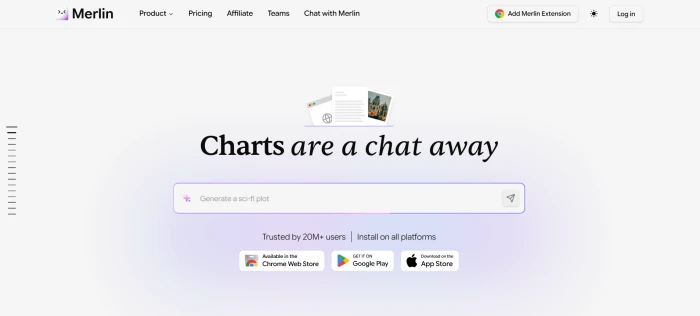
The Merlin AI dashboard, with the model selector, chat surface, and tool navigation visible in one view.
The dashboard layout puts the model selector front and centre, which is the right design choice for a multi-model product. Switching between GPT-4o, Claude 3.7 Sonnet, Gemini 2.5 Pro, and the 17+ other available models happens with one click rather than buried inside settings menus. The chat surface dominates the main area, and the side navigation surfaces Projects, Crafts, image generation, and the prompt template library.
AI Writer: Blog Outline Generator
Test 01 . Long-form content generation
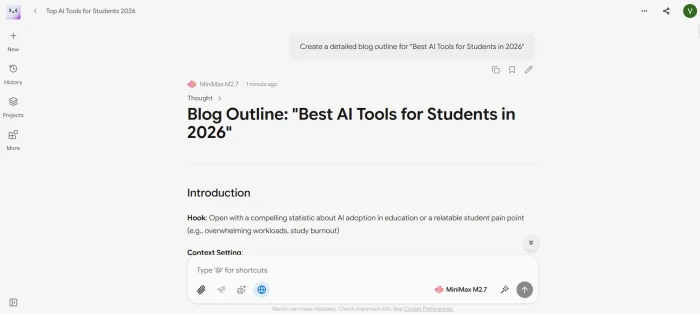
The blog outline result, showing the depth of structure Merlin produces from a single prompt.
Prompt entered
Create a detailed blog outline for "Best AI Tools for Students in 2026".
Merlin AI output (structural overview)
Blog Outline: "Best AI Tools for Students in 2026"
INTRO
IntroductionHook, context setting, what the guide covers, target audience definition
S1
AI Writing AssistantsJasper, Writesonic, Copy.ai, Grammarly, ProWritingAid plus pro tips on ethical use
This is the single strongest first-hand demonstration of Merlin's output quality in this review. The platform returned a publication-grade editorial brief covering 12 major sections with sub-headers, example tools for each category, pro tips, ethical guidelines, target word counts, estimated reading time, target SEO keywords, and a Quick Reference Table comparing free versus paid tools across seven categories. This is exactly what a serious content marketer needs as a starting blueprint for a long-form pillar article. Time from prompt to output: under one minute. Editing required before this becomes a working brief for a writer: minimal.
What this demonstrates: Merlin's AI Writer is genuinely useful for content planning workflows. The output depth here is comparable to what Claude Opus 4.6 or GPT-5.4 Pro would produce on the same prompt with direct subscriptions, which is the right baseline because Merlin is routing the prompt to those underlying models.
Document Summarization
Test 02 . Article summary flow
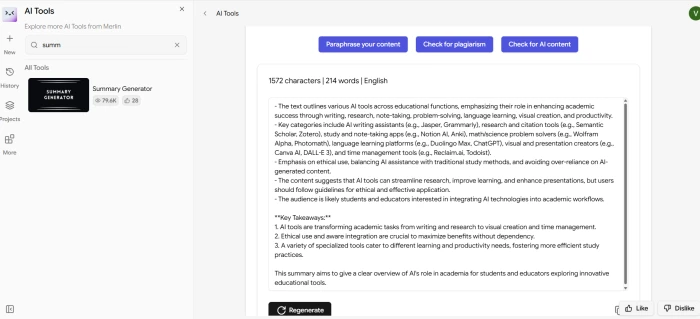
The article summary result, with key points extracted into a structured response.
The summarization flow is the workhorse feature that justifies Merlin's browser extension for most users. An uploaded article gets parsed in seconds, and the summary is returned in structured form with the key points pulled out rather than a generic paragraph dump. For users who process multiple articles, reports, or research papers daily, this is the workflow that pays back the subscription on its own. Output quality is competitive with dedicated summarization tools.
AI Image Generation
Test 03 . Text-to-image
Prompt entered
Modern AI-powered workspace with holographic screens, realistic style.
Generated output from the text-to-image prompt.
The image generation result lands in the same quality tier as DALL-E 3 or mid-tier Stable Diffusion outputs, which makes sense because Merlin routes image prompts to 20+ underlying image models. The realistic style was respected, the holographic screens rendered as intended, and the lighting and composition read as a polished professional render rather than a typical generative artefact. For users who want quick image generation without a dedicated Midjourney or Krea subscription, this works.
How this review was put together. First-hand testing covered the dashboard onboarding, the AI Writer's blog outline generator, the document summarization flow, and the AI image generator on a live Merlin account using the prompts and outputs documented above. The remaining feature scoring and the trust analysis below cross-references the Chrome Web Store rating history (with explicit attention to the gap between the overall 4.79 and the recent 3.27 average), Capterra reviews, the Merlin Canny community forum complaints about the fair-use cap, and independent reviews from third-party comparison sites.
10-Point Feature Review
03 . What $19/month actually delivers
Feature Scores at a Glance
Model Access
9.5
Browser Integration
8.8
Free Tier
8.5
Content Tools
8.0
Projects/KB
7.8
Cross-Platform
7.5
Security Certs
8.2
Output Quality
6.5
Fair Usage Cap
5.5
Recent Trust
5.0
Feature-by-feature breakdownScored on a 10-point scale
01
Multi-model access UNMATCHED VALUE
GPT-4o, Claude 3.7 Sonnet, Gemini 2.5 Pro, Llama 3.1, DeepSeek V3, Mistral, and 20+ image generation models from one dashboard for $19/mo. No other tool offers this breadth at this price. Switching models mid-conversation to compare outputs is genuinely useful for research and content creation. New models are added as they launch.
MODELS: 20+ LLMs + imagePRICE: $19/mo for all
9.5
EXCELLENT
02
Chrome extension integration CORE STRENGTH
Press Ctrl+M (or Cmd+M) on any webpage and Merlin appears as a sidebar. Summarize the page, chat with its content, translate, rewrite selected text, draft emails in Gmail, compose LinkedIn posts, and reply to tweets, all without switching tabs. The extension adds Merlin buttons directly inside Gmail, LinkedIn, YouTube, and X. This contextual access is the feature that keeps users coming back.
102 free queries per day with no credit card required, far more generous than any competitor. Free users get access to basic models, YouTube summaries, Google search assistance, and the Chrome extension. The free tier functions as a genuine daily driver for light users, not just a demo. Google Search assistance (auto-summaries) does not count toward the query limit.
FREE: 102 queries/dayCARD: Not required
8.5
GREAT
04
Content and writing tools VERSATILE
Crafts generates diagrams, flowcharts, interactive charts, mind maps, and code components from text prompts. YouTube video summarization converts long videos into key-point summaries. Document chat handles PDFs and PPTXs up to 50MB. Prompt templates can be saved, stored, and deployed anywhere with "/". Image generation supports 20+ models with multiple aspect ratios. This breadth is what makes the "26-in-1" claim defensible, and the blog outline test in the section above demonstrates the depth on long-form content prompts.
TOOLS: 26 featuresFILE UPLOAD: Up to 50MB
8.0
GREAT
05
Projects (knowledge bases) USEFUL
Upload documents, paste links, connect Google Drive, add YouTube videos, and Merlin builds a reusable knowledge base that can be queried repeatedly with agentic retrieval. Useful for brand voice consistency, research collections, and codebase documentation. The feature works but some users report it does not always retrieve the most relevant chunks from large document sets.
GDPR, SOC 2, and ISO 27001 certified, a level of compliance most AI assistants in this price range do not offer. All data stored in the United States. The platform claims not to sell user data and states users retain full ownership. Merlin does not track browsing activity except when an explicit request is sent. The billing descriptor is not specified as discreet.
CERTS: SOC 2 + ISO + GDPRDATA: US storage
8.2
GREAT
07
Output quality vs native platforms WATERED DOWN
Multiple independent reviewers report that responses through Merlin "feel limited or watered down compared to native platforms." The AI sometimes struggles with detailed instructions and occasionally forgets prior conversation context. The 100K token context window (Pro) is 5x larger than ChatGPT Plus as of early 2025, but the actual response depth per query can feel thinner than using GPT-4o directly through OpenAI. The blog outline test in our testing section is a notable exception where output quality landed at native-platform parity.
Chrome, Edge, and Brave get the full extension experience. iOS and Android apps provide the web chat interface with synced history. Windows and Mac desktop apps are available. The mobile browser version works but lacks the contextual sidebar that makes the desktop extension powerful. Non-Chrome browsers (Firefox, Safari) miss out on the core experience entirely.
EXTENSION: Chrome/Edge/BraveMOBILE: iOS + Android
7.5
GOOD
09
Fair usage cap MISLEADING "UNLIMITED"
The Pro plan is marketed as "unlimited" but is actually capped at approximately $100/month in equivalent API usage ($16/day limit). Heavy GPT-4 usage hits this wall faster, realistically 1,000 to 2,000 queries depending on model mix. Users who exceed the cap are throttled to basic models until the next billing cycle. The Merlin community forum has extensive complaints about this, with users calling the marketing "misleading" and "unethical." Top-ups are available for purchase but the core issue is transparency.
CAP: ~$100/mo API equivDAILY: $16/day limit
5.5
WEAK
10
Recent trust and user sentiment DECLINING
The Chrome Web Store overall rating is 4.79 (8,787 reviews), but the last 100 reviews average 3.27, a sharp drop. Recent complaints centre on three issues: (1) Give Freely popup ads injected into paying users' browser sessions while shopping online, described by one lifetime license holder as "akin to installing malware"; (2) features breaking after updates without notification; (3) confusing query limits that feel different from what was advertised. These are 2026 complaints, not legacy issues.
OVERALL: 4.79 starsLAST 100: 3.27 stars
5.0
WEAK
Pros and Cons
04 . What works and what's concerning
+What users like
20+ AI models for $19/mo, genuine value against paying for 3 to 4 separate subscriptions
102 free queries per day, the most generous free tier in the AI assistant category
Ctrl+M summons AI on any webpage, the contextual sidebar is genuinely faster than tab-switching
SOC 2, ISO 27001, GDPR certified with US data storage, rare for this price tier
Crafts generates diagrams and charts from plain text prompts, useful for presentations
Synced history across all devices, Chrome, mobile, desktop with one account
−What users dislike
"Unlimited" is capped at approximately $100/mo API equivalent, users report being throttled mid-month
Give Freely popup ads injected into paid users' browsing, described as malware-like by reviewers
Recent Chrome rating dropped to 3.27 (last 100 reviews) from 4.79 overall
Responses feel thinner than native platforms, GPT-4o via Merlin against OpenAI directly is noticeably different
Firefox and Safari users excluded from the core extension experience
Features break after updates without notification, multiple 2026 reports on community forum
Pricing Breakdown
05 . Free, Pro, Pro+, and Teams
Feature
Free
Pro ($19/mo)
Pro+ ($29/mo)
Teams ($15/seat/mo)
Queries
102/day
"Unlimited" (~$100/mo cap)
"Unlimited" (~$150/mo cap)
Per-seat allocation
Models
Basic only
All 20+ models
All 20+ models
All 20+ models
Context Window
Standard
100K tokens
100K tokens
100K tokens
Image Generation
Limited
20+ models
20+ models
20+ models
Projects (KB)
Limited
Full access
Full access
Full access
Crafts (Diagrams)
Limited
Full access
Full access
Full access
File Upload
Basic
Up to 50MB
Up to 50MB
Up to 50MB
Early Access
No
Yes
Yes
Yes
Min Seats
·
·
·
5 minimum
Annual Price
·
$14/mo ($168/yr)
$22/mo ($264/yr)
$900/yr (5 seats)
The "unlimited" reality: Pro is capped at approximately $100/month in API equivalent usage ($16/day). For most users doing a mix of chat, summaries, and light image generation, this means 1,000 to 2,000 queries before throttling. Heavy GPT-4o usage burns through the cap faster. Pro+ raises the cap to approximately $150/month. Top-up credits are available for purchase if you hit the wall.
Our take: The free tier at 102 queries/day is genuinely exceptional, use it to evaluate for at least a week before committing. Pro at $14/mo annual is the sweet spot for most users who need multi-model access but do not do 50+ heavy queries per day. Pro+ at $29/mo is justified only if you consistently hit the Pro cap. Teams at $15/seat/mo (min 5) is competitively priced but lacks robust collaboration features. For single-model users who only need GPT-4o, ChatGPT Plus at $20/mo may deliver better per-query depth.
Merlin vs the Top 5 Alternatives
06 . How it compares for AI productivity
MMerlin
CChatGPT+
CClaude Pro
GGemini Adv
PPoe
Score
7.5
8.5
8.5
8.0
7.2
Price
Free / $19 mo
Free / $20 mo
Free / $20 mo
Free / $20 mo
Free / $20 mo
Models Available
20+ (all providers)
GPT-4o only
Claude only
Gemini only
Multiple
Browser Extension
✓ Full sidebar
✗
✗
Limited
✗
Free Queries
102/day
Limited
Limited
Limited
Limited
Output Depth
Thinner
Best for GPT
Best for Claude
Best for Gemini
Variable
Image Gen
✓ 20+ models
✓ DALL-E
✗
✓ Imagen
✓
Knowledge Base
✓ Projects
GPTs
Projects
Gems
✗
Security Certs
SOC2+ISO+GDPR
SOC2
SOC2
Enterprise
Basic
Best For
Multi-model value
GPT depth
Claude depth
Google ecosystem
Model variety
The picture: Merlin wins on breadth and price. No competitor gives you 20+ models with a browser extension for $19/mo. But each native platform delivers better per-query depth for its own model. For primarily single-model users, the native subscription is better. For users who regularly switch between GPT-4o, Claude, and Gemini, Merlin saves approximately $40/mo against subscribing to all three separately. Poe is the closest competitor for multi-model access but lacks the browser extension.
What Users Are Saying
07 . Collected from Chrome Web Store, Capterra, Reddit communities, and the Merlin community forum
Cancelled ChatGPT Plus three months ago after switching to Merlin Pro. Being able to swap between GPT-4o and Claude 3.7 mid-conversation for different question types saved more time than I expected. The blog outline workflow alone justified the switch: outputs are workable as first drafts rather than starting points that need restructuring.
Content marketer
r/ChatGPT community discussion / Pro subscriber
★★★★★
I have a lifetime license via AppSumo and highly recommend you do NOT install this extension. It now injects annoying "charitable" ads from Give Freely. Expect hard-to-close popups that guilt-shame you whenever you shop online. If they're willing to sell out paying users this way, what are they doing with your data?
Lifetime license holder
Chrome Web Store reviewer / AppSumo purchaser
★☆☆☆☆
I really love how Merlin helps me save time with tasks like summarizing pages, writing emails, and crafting comments. It's an incredible tool for written communication, especially in professional settings. At the moment, I haven't encountered any significant drawbacks.
Jean-Francois L.
Capterra reviewer / Professional user
★★★★★
The term "unlimited" is misleading. If usage exceeds $16 per day or $100 per month, your account gets suspended. I paid $60 looking at a Facebook ad showing "$29 plan for $5." They changed the interpretation to suit themselves. Such terrible ethics.
Community user
Merlin Canny Forum / Annual subscriber
★★☆☆☆
The pattern: Users who treat Merlin as a lightweight daily assistant for email drafting, article summaries, and quick questions across models love it. Users who push toward the fair-use cap or who purchased lifetime deals expecting truly unlimited access are angry. The Give Freely popup controversy (early 2026) and the "unlimited" cap issue are the two highest-friction points. The product itself is strong; the trust gap comes from marketing and monetisation decisions that feel adversarial to paying users.
· The Verdict ·
7.5/10
Should you use Merlin AI? Here is who it is for.
Use Merlin AI if the workflow involves 2+ AI models regularly and the goal is consolidating them in one place for less than a single ChatGPT Plus subscription. The 102 free queries per day make it the best free tier in the category, so test it for a full week before paying anything. The Chrome extension sidebar is genuinely faster than tab-switching for quick tasks. Go annual at $14/mo for the best value. Best for content creators, marketers, researchers, and professionals who need breadth over depth.
Skip Merlin AI if the use case is the deepest possible output from one model (subscribe to that model directly through ChatGPT Plus, Claude Pro, or Gemini Advanced at $20/mo each), 50+ heavy queries per day (the fair-use cap will throttle the account), Firefox or Safari as primary browsers (no extension), or discomfort with a company that injects shopping popups into paid users' browsing sessions. Also skip if transparent usage limits matter, since the "unlimited" marketing remains a sore point.
Buy Pro if
Why
Multi-model workflow
Switch between GPT-4o, Claude 3.7, Gemini 2.5 Pro from one dashboard for less than any single sub
Browser-native AI work
Ctrl+M sidebar inside Gmail, Docs, LinkedIn, X removes tab-switching entirely
Long-form content planning
Blog outline test showed publication-grade depth on first prompt
Heavy daily AI usage
~$100/mo API cap throttles users by mid-month at 50+ queries/day
Single-model power user
Direct ChatGPT Plus, Claude Pro, or Gemini Advanced gives better per-query depth
Firefox or Safari primary
Core extension experience is Chrome, Edge, and Brave only


Discussion
Join the discussion and share your perspective.