
What Muke AI Does
Muke AI is a browser-based photo editor built around a single text box. You upload an image, describe the change you want, pick an aspect ratio, and press generate. There are no brushes, no masks, no layer panel, and no selection tools of any kind. The homepage promotes six capabilities, giving the most space to object removal, headshot generation, background replacement, and batch processing.
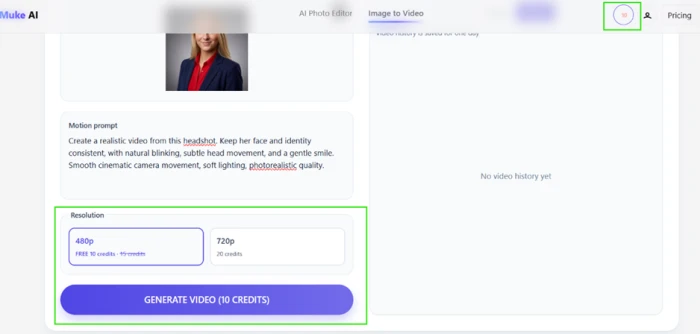
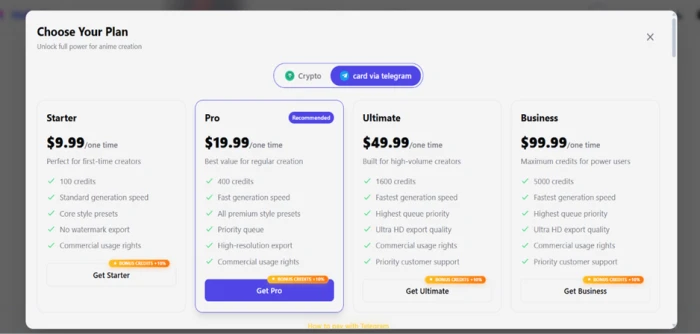
The target is someone who does not own Photoshop and has no intention of learning it. A separate Image to Video page extends the same idea to motion, taking a still plus a movement prompt and returning a short clip. Registration hands over 10 credits at no charge. Past that, four one-time credit packs run from $9.99 up to $99.99.
What Happened When We Tested It
Testing ran on two fresh accounts, both starting from the free allowance of 10 credits. The first covered three image tasks. The second existed only because the first ran dry, and it went straight to the video tool.
Throughout, I watched the credit counter. The interface never states what an action will cost before you commit to it, so the counter is the only feedback available.
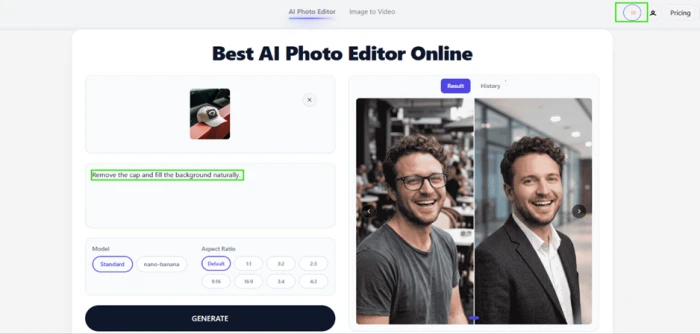
Object Removal Returns a Different Photograph
Test 01 . Localized editing"Remove the cap and fill the background naturally."

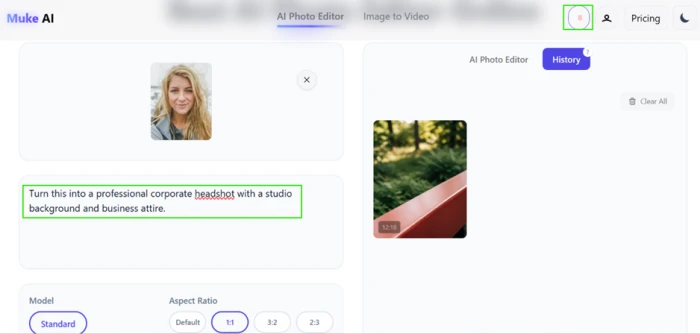
The Headshot Is the Reason the Product Exists
Test 02 . Portrait generation"Turn this into a professional corporate headshot with a studio background and business attire."

A Contained Color Change That Was Not Contained
Test 03 . Instruction adherence"Change only the shirt color to red. Do not change anything else."
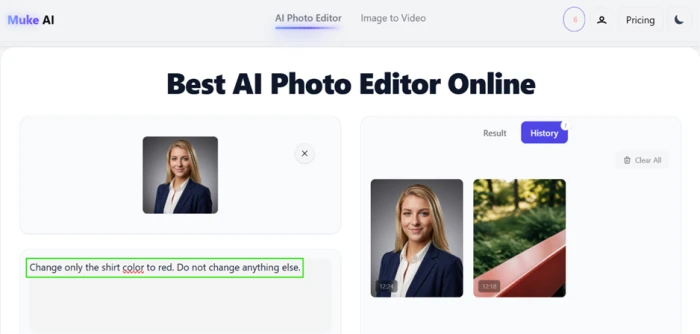

Image to Video Stops at an Upgrade Wall
Test 04 . Paywall mechanics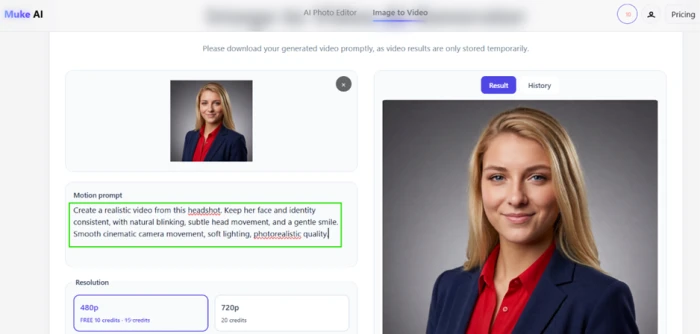
The one combination that delivered every time it was asked. A front-facing selfie at a 1:1 ratio, with a prompt naming the lighting and the wardrobe, produced a portrait carrying the subject's own face for 2 credits. That is the cheapest generation the platform sells, and it is also the best thing it makes.
Ten credits granted at signup. Ten credits quoted for a 480p clip. A generate button printing the same number. It still refused. Anyone who registers for the reason the homepage gives them will hit a paid wall on their first attempt, and the only routes past it are a crypto transfer or a Telegram checkout.
10-Point Feature Review
Pros and Cons
- Portrait quality: studio lighting and wardrobe replacement that hold up at full size
- Likeness retention: the thing most rival headshot tools lose is the thing this one keeps
- No learning curve: nothing to configure between opening the page and generating
- Framing presets: eight aspect ratios applied during generation rather than by cropping after
- Second engine: a higher-fidelity model available when the default result disappoints
- No localized editing: every prompt returns a newly invented image instead of your file changed
- Instruction drift: a "change only this" prompt still rerenders the face and lighting around it
- Silent consumption: nothing states what an action will cost until after it has run
- Video output unreachable: the image-to-video tool would not return a clip during testing
- Templated build showing through: an upgrade headline advertises anime creation on a photo editor
- No public track record: no listing on any major review platform to weigh your own results against
Pricing Breakdown
| Feature | Starter$9.99 one time | Pro$19.99 one timeRecommended | Ultimate$49.99 one time | Business$99.99 one time |
|---|---|---|---|---|
| Credits included | 100 | 400 | 1600 | 5000 |
| Cost per credit | $0.100 | $0.050 | $0.031 | $0.020 |
| Standard edits covered | 50 | 200 | 800 | 2500 |
| 480p clips covered | 10 | 40 | 160 | 500 |
| Generation speed | Standard | Fast | Fastest | Fastest |
| Premium style presets | ✗ | ✓ | ✓ | ✓ |
| Queue priority | ✗ | Priority | Highest | Highest |
| Export quality | No watermark | High resolution | Ultra HD | Ultra HD |
| Priority support | ✗ | ✗ | ✓ | ✓ |
| Commercial usage rights | ✓ | ✓ | ✓ | ✓ |
The tier math: a Starter buyer pays five times as much per credit as a Business buyer for output from the same model. That spread is the sharpest decision on this screen, and it is invisible until you divide the numbers yourself. Nothing renews, so credits carry no monthly expiry, though the vendor publishes no expiry policy in either direction.
One contradiction sits on the purchase screen itself. Each plan card lists a fixed credit total, while the button directly beneath that card advertises a 10% bonus on top of it. The two figures are never reconciled anywhere in the checkout flow. Figures in the table above follow the plan cards, since those are what the vendor states as the plan contents.
There is also no pricing page to link to. Requesting the pricing path on mukeai.app returns a 404, and the only place these numbers appear is a modal you open from inside the app after logging in.
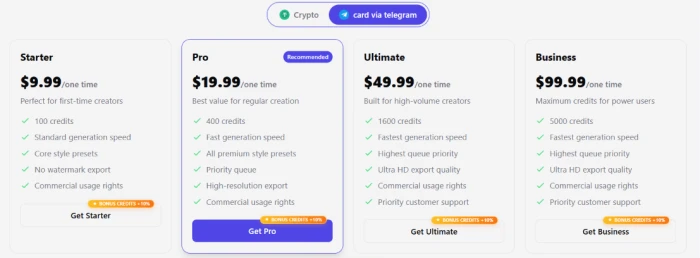
Pricing verified September 2, 2026. These packs are sold from an in-app modal that can change without notice, so open mukeai.app and read the current screen before buying.
Muke AI vs the Top 4 Alternatives
| MMuke AI | RRemaker AI | PPixNova AI | CCutout Pro | HHotpot AI | |
|---|---|---|---|---|---|
| Score | 6.3 | 7.5 | 6.8 | 5.8 | 5.5 |
| Core approach | Prompt-driven regeneration | Prompts plus effect presets | All-in-one image and video suite | Automated cutout and restoration | Headshots plus graphics templates |
| Best For | A one-off portrait from a selfie | Face swaps and photo restoration | Breadth of tools behind one login | Batch background removal | Marketing graphics beside headshots |
Where the shortlist splits: Remaker AI scores a full point higher and covers the same portrait ground inside a wider toolset, which makes it the safer default for anyone expecting to come back a second time. Cutout Pro scores lower overall yet is the only tool here built specifically around removing things from an image you already have, so it wins the exact job Muke AI advertises hardest and cannot perform. Hotpot AI is the closest match on headshot ambition and the furthest behind on output quality.
Discussion
Join the discussion and share your perspective.