


Home / Reviews / NSFW AI / MyImg AI
MyIMG AI logo
NSFW Image & Video Browser-Based Editor

MyIMG AI Review

myimg.ai · Anonymous operator, Cloudflare-hosted

MyIMG is one of the few adult AI suites that puts undress, face swap, NSFW image generation, and short video under a single browser tab with a one-time payment model instead of a monthly subscription. The pitch is strong and the plan structure is unusual for the category, but the free tier that the ads promise does not survive two clicks. This is a tool for adult creators who already know they want to buy credits and are comfortable with a vendor that hides who runs it.

Reviewer Score
5.4
/10
Hard Pass
Clean pricing idea,
shaky engine underneath
Pricing Model7.5
Tool Range7.0
Free Tier Honesty3.0
Undress Accuracy4.0
Stability3.5
Platform
Web browser only
Entry Price
$9.99 one-time
Starting Credits
0 on free account
Undress Cost
10 credits per job
Free Video Cap
3s maximum length
Data Retention
24h auto-delete

What MyIMG Does

01 . Overview

MyIMG is a browser-based adult AI studio. Open a tab, upload a photo or type a prompt, and the platform points you at clothing removal, NSFW image generation, photo and video face swap, and a set of short animation effects like AI Dance and image-to-video. There is nothing to install and no desktop client. Everything runs through the site, and the whole catalog sits behind a single login.

The platform aims squarely at adult content creators and people who want uncensored output that mainstream generators refuse to make. It leans on three promises in its marketing: results it calls lifelike and anatomically accurate, processing that finishes in seconds, and a privacy policy that deletes uploads within 24 hours. Payment is a one-time purchase rather than a subscription, with plans running from $9.99 to $399.99.

What Happened When We Tested It

02 . 5 tests covering sign-up, credits, undress accuracy, stability, and text to image

I ran the session on a fresh free account, starting exactly where a new visitor would: the AI Clothes Remover page, which the ad copy frames as uncensored, signup-free, and free to try. I used a clothed male photo as a neutral test subject and worked through the core tools in order, documenting each wall as I hit it.

The "No Signup" Promise Ends at the First Generate

Test 01 . Sign-up gate
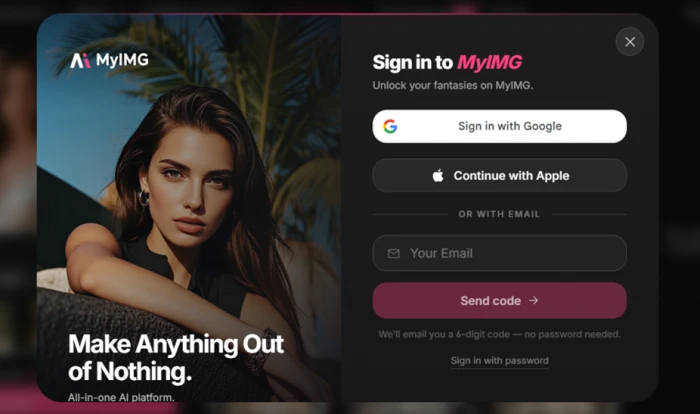
MyIMG login window prompting the user to sign in with Google or email before a generation can run
The login wall that appears the moment you press Generate.
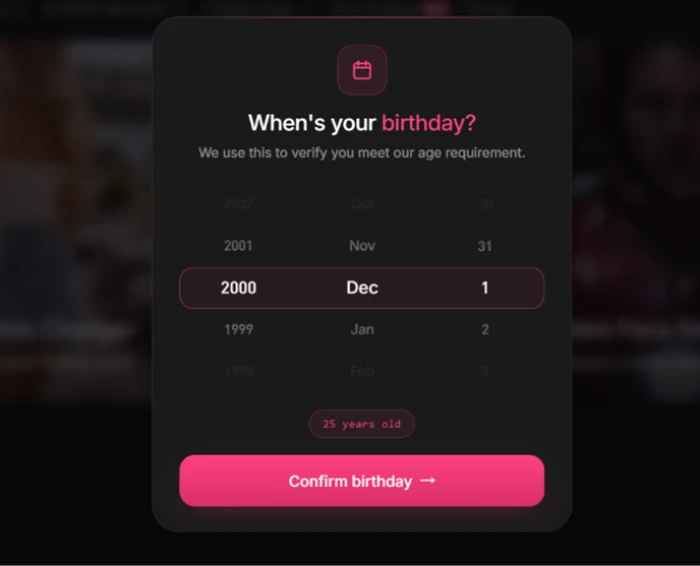
MyIMG date-of-birth entry screen asking the user to confirm they meet the age requirement
A second gate asks for date of birth before the tool will continue.
What we observed: One tap on Generate killed the "no signup" claim. A login window blocked the job until I signed in, then a date-of-birth check followed and tagged my account as 25. Two clicks turned a headline that read "no signup, 100% free" into a mandatory account plus an age wall. If the ad copy is what brought you here, this is the first thing that does not hold.

Zero Credits, and Every Button Spends Them

Test 02 . Paywall mechanics
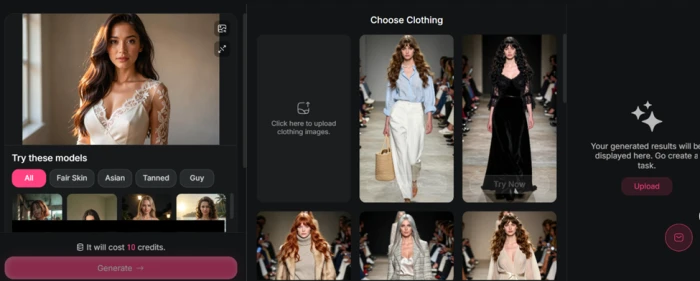
MyIMG clothes swap panel showing a job cost of 10 credits against a balance of zero
The job costs 10 credits. The account balance reads 0.
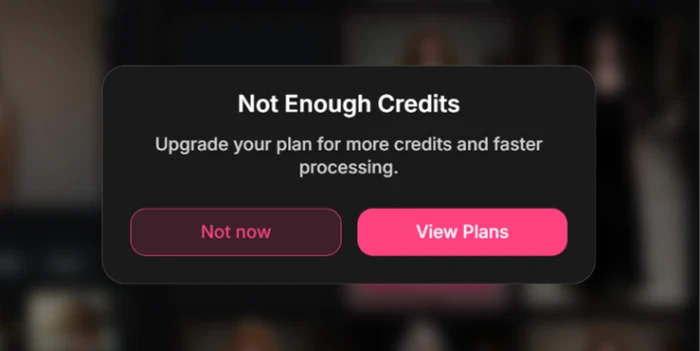
MyIMG Not Enough Credits dialog pointing the user to the View Plans button
Pressing Generate opens a "Not Enough Credits" box that routes straight to pricing.
Where it lands: After logging in, the clothes swap screen loaded cleanly and the model templates appeared without fuss. Then the bottom of the panel showed the real price: 10 credits for the job, against a balance of 0. Generate pulled up a "Not Enough Credits" prompt pointing at View Plans. You can open any tool, pick your options, and queue a job, but the final button is a checkout. The FAQ calls free usage "limited." In practice, limited meant I could not finish one generation without buying credits.

The Clothes Remover Misreads the Body

Test 03 . Undress accuracy
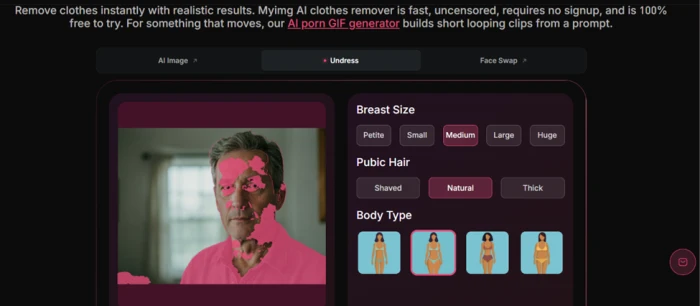
MyIMG clothes remover detection overlay in pink smeared across a clothed man's face and hand instead of his shirt
The pink detection overlay lands on the face and a hand, not the clothing.
The evidence: I wanted to watch the core engine attempt something, so I ran the AI Clothes Remover on a clothed man. The pink detection overlay, which is supposed to mark clothing, smeared across his face and one hand instead of sitting on his shirt. That runs against a homepage that advertises anatomically accurate output. A model that cannot separate a face from a collar will not deliver it, and the miss showed up before a single paid credit changed hands. The breast-size and body-type sliders next to the preview all assume a clean read of the body that the overlay never got.

The Same Crash, Over and Over

Test 04 . Stability
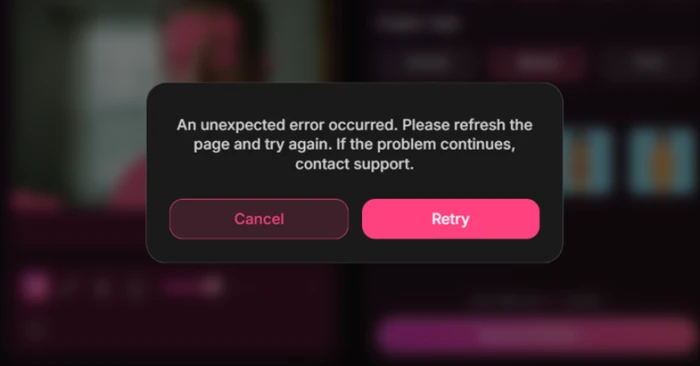
MyIMG generic error reading An unexpected error occurred, please refresh the page and try again
The same generic error returned at the same step on every attempt.
What this shows: Stability was the other soft spot. Across three to four attempts I hit the identical wall: "An unexpected error occurred. Please refresh the page and try again." Same message, same point in the flow, no error code, no detail past a generic retry. One stumble is forgivable. A failure that repeats at the exact same step points to something unsteady underneath.

Text to Image Runs, but the Helper Pads the Box

Test 05 . Prompt quality
★ Prompt Used

"Create a stunning, ultra-realistic 4K image with cinematic lightning, vibrating colors, intricate details, professional composition, and a beautiful atmosphere"
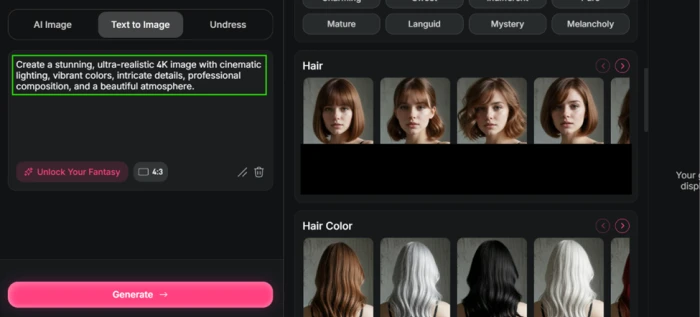
MyIMG Text to Image tab with the Unlock Your Fantasy helper filling the prompt box with canned text about ultra-realistic 4K output and cinematic lighting
The "Unlock Your Fantasy" helper stuffs the box with generic quality boilerplate.
Worth noting: The Text to Image tab was the only part of the session that did not crash. When I typed my own prompt, the "Unlock Your Fantasy" helper padded the box with a canned line about ultra-realistic 4K, cinematic lighting, vibrant color, and a flattering atmosphere. That is generic filler, not anything shaped around what I asked for. The credit ceiling still applied, since generating drew from the same empty balance, so the free run ended the way every other attempt did.
★
A genuinely broad toolset under one login

The range held up even when the output did not. Undress, NSFW image generation, photo and video face swap, and short animation effects all sit behind a single account, and the interface never asked me to learn anything. For someone who wants several adult tools in one place without juggling logins, the breadth is real, and it is the clearest thing MyIMG has going for it.

!
You cannot evaluate quality before you pay

The free tier lets you reach the Generate button and no further. Combined with a detection overlay that missed its target and a repeating crash, that means a buyer commits $9.99 or more with no finished output to judge. You are paying to find out whether the engine works, not because you have seen that it does.

How this review was put together. I tested MyIMG on October 27, 2026, on a newly created free account, running the AI Clothes Remover, clothes swap, and Text to Image tools with a neutral clothed photo. Pricing was verified the same day on the official pricing page at myimg.ai/pricing and cross-checked against the in-app purchase screen. Every screenshot in this section comes from that session.

10-Point Feature Review

03 . Scored against what the tool actually delivered, not what it advertises
Feature Scores at a Glance
Tool Breadth
8.0
Interface & Ease
7.5
Pricing Model
7.5
Processing Speed
7.0
Privacy Policy
6.0
Prompt Assist
5.0
Undress Accuracy
4.0
Stability
3.5
Free Tier Honesty
3.0
Operator Transparency
2.5

Pros and Cons

04 . What a real user feels using it
+What Works
  • One roof for many tools: undress, face swap, NSFW generation, and short video effects all sit behind a single account.
  • Nothing to install: it runs entirely in a browser on phone, tablet, or desktop with no app download.
  • Low-friction interface: templates load fast and a new user reaches the controls without a tutorial.
  • Uncensored by design: it will attempt adult prompts that mainstream generators refuse outright.
  • Stated privacy posture: the site commits to deleting uploads within 24 hours with no backups retained.
−What Grates
  • No output before you pay: the free tier stops at the Generate button, so you cannot judge quality first.
  • Shaky core engine: the undress overlay misread a clothed body and the tool crashed repeatedly at the same step.
  • Hollow prompt helper: the assist pastes generic quality text instead of expanding what you actually asked for.
  • Anonymous operator: no named company, masked WHOIS, and low third-party trust scores for a site that handles sensitive uploads.

Pricing Breakdown

05 . Four one-time plans, verified on the official page
Feature Basic$9.99 one-time Standard$49.99 one-time Premium$99.99 one-timeMost Popular Unlimit$399.99 one-time
Credits included 1,050 6,250 Unlimited + 15,000
Benefits valid for 30 days 365 days 365 days
Video face swap length 60s 200s 300s
AI video generation up to 5s up to 8s up to 8s
Unlimited undress ✗ ✗ ✓
Credits expire ✗ ✗ ✗

What the numbers mean: The credits never expire, but the premium benefits do, and that gap is where the Basic plan bites. At $9.99 you get 30 days of benefits and the shortest video caps in the lineup, a 60-second face swap and 5-second generation against the 8 seconds every higher tier gets. The jump from Basic to Standard buys a year of benefits and better credit value, which is why the entry tier reads more like a trial than a plan. At the top, Unlimit lists at $399.99 for unlimited undress and image generation, but its headline unlimited extras for video face swap and AI image generation are each gated behind a separate $200 add-on, so the true ceiling runs well past the sticker.
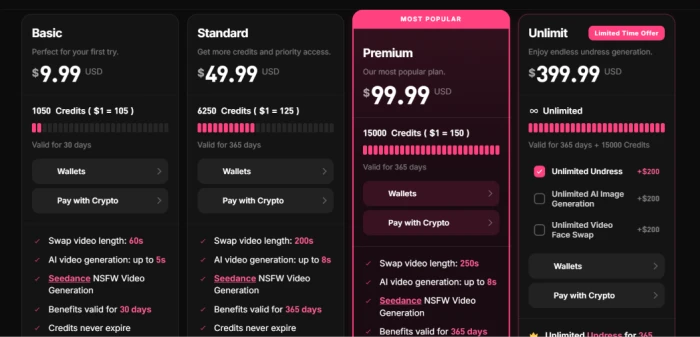
MyIMG pricing page showing Basic at $9.99, Standard at $49.99, Premium at $99.99 marked Most Popular, and Unlimit at $399.99 with paid add-ons
The four plan cards as they appear at checkout, with Unlimit and its add-ons on the right.

Pricing verified October 27, 2026. These plans shift and run limited-time offers, so confirm the current figures on the official pricing page before you buy.

MyIMG vs the Top 3 Alternatives

06 . How it sits against the undress tools buyers actually shortlist
MMyIMG UUndress.app CClothoff
Pricing modelOne-time creditsSubscriptionCoin bundles
Credits expireNeverMonthly resetNo, coin-based
Tool rangeWide: undress, swap, videoUndress-focusedUndress plus video
Operator namedNoNoNo
Best ForOne-time buyers wanting many toolsPure undress on a monthly planTelegram and app-based undress

How to read this: The honest split is about how you want to pay and how much you want in one place. MyIMG is the pick if a single up-front payment and a broad toolset matter more to you than a polished single feature, since the credits sit in your account until you spend them. Undress.app suits anyone who only wants clothing removal and does not mind a recurring bill for a more focused engine. Clothoff appeals to users already living in Telegram and mobile workflows. None of the three tells you who runs it, so that concern does not break the tie, and MyIMG's edge is purely structural rather than a quality win.

· The Verdict ·
5.4/10
A tidy pricing idea wrapped around an engine that is not ready

Use MyIMG if you specifically want a one-time payment instead of a subscription, you need several adult tools under one login, and you accept that you are buying credits before you have seen a finished result from an unnamed operator.

Skip MyIMG if undress accuracy is the whole point for you, if a forced paywall before any usable output is a dealbreaker, or if you will not upload sensitive photos to a site whose owner is hidden and whose trust scores run low.

Category RankHard Pass
Compared To3 Alternatives
Entry Price$9.99
Free TierPaywalled

Discussion

Join the discussion and share your perspective.