Online business calculators are everywhere, and most of them either hide the math or ask for an email before showing a single number. So my approach here was simple: open the toolkit, plug in realistic numbers a small agency or freelancer would actually use, and check every result by hand before forming an opinion.
Below is each screen exactly as I saw it, with a different angle under each one: first impression, what I understood, what I liked, my take, what I didn’t like, and what surprised me.
Device: Desktop browser at default zoom.
Tools tested in depth: SEO Cost Calculator and Freelancer Hourly Rate Calculator.
Inputs: Realistic numbers for a small local business and a part-time freelancer, not extreme edge cases.
Verification: Every output was cross-checked with manual calculations.

Homepage hero with audience badge, headline and value proposition
|
My First Impression Within five seconds, the page tells me who it is for and what it does. The pill badge naming freelancers, agencies, startups, marketers, consultants and small businesses in the USA does the targeting work before the headline even registers. The calm mint background, oversized headline and single line of supporting copy keep things uncluttered. My only hesitation was the word “Best” in the headline: at this point the page hasn’t earned that claim yet, so it reads more like an SEO title than a promise. |
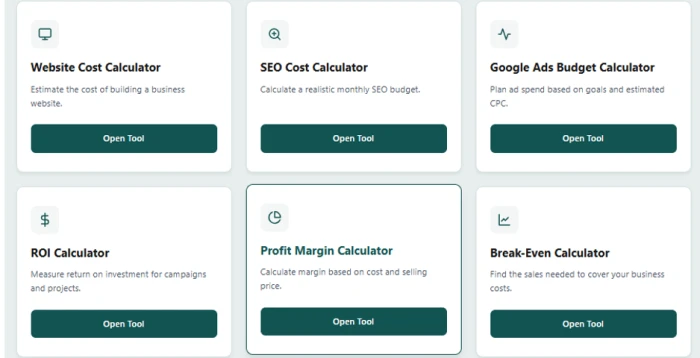
Tool grid: Website Cost, SEO Cost, Google Ads Budget, ROI, Profit Margin and Break-Even calculators
|
What I Understood Looking at this grid, the toolkit isn’t a random collection of calculators. It follows the full life of a small business money decision: Build: Website Cost Calculator for what the site itself will cost. Market: SEO Cost and Google Ads Budget calculators for what it takes to get traffic. Measure: ROI, Profit Margin and Break-Even calculators for whether the spend actually pays off. So the site works best when tools are used together, for example estimating an SEO budget first and then plugging that number into the ROI calculator. |
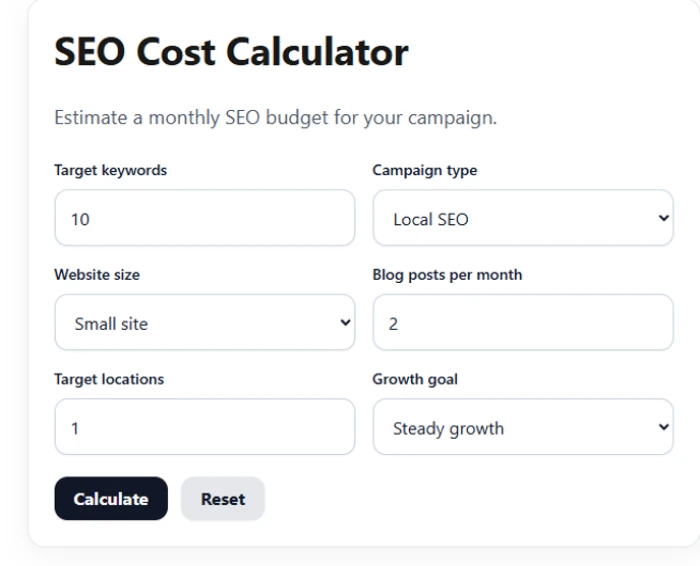
SEO Cost Calculator inputs: 10 keywords, Local SEO, small site, 2 posts/month, 1 location, steady growth
Inputs I used: 10 target keywords, Local SEO, Small site, 2 blog posts per month, 1 target location, Steady growth.
|
What I Liked The six questions match what an agency asks on a real discovery call: keywords, campaign type, site size, content volume, locations and growth pace. Every field comes pre-filled, so hitting Calculate on first load already gives a sensible result. Number boxes and dropdowns are mixed well; nothing needs typing that could simply be picked. A Reset button sits right next to Calculate, which made running several scenarios quick. |
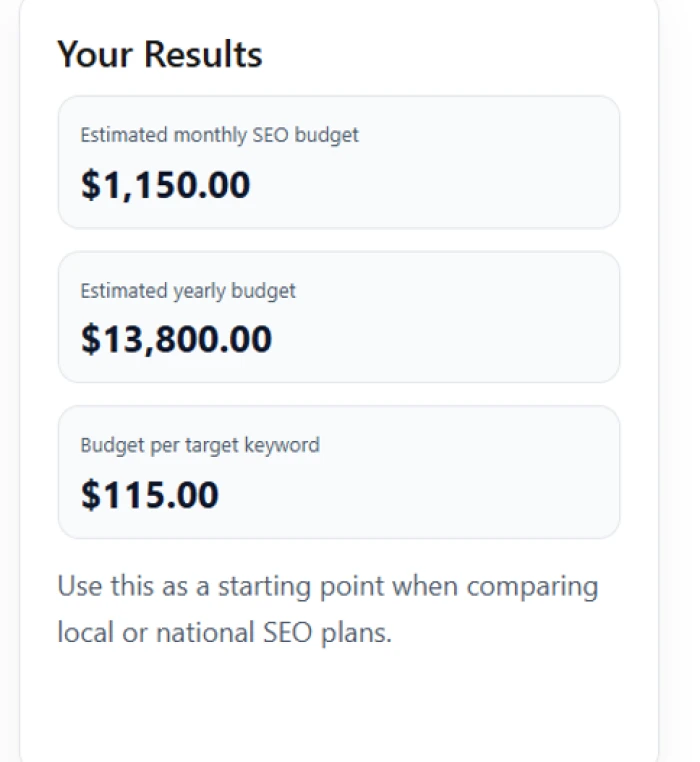
SEO results: $1,150 per month, $13,800 per year, $115 per keyword
|
My Take Math check: $1,150 × 12 = $13,800 per year ✔ | $1,150 ÷ 10 keywords = $115 per keyword ✔ The numbers are internally consistent, and $1,150 a month sits within the range I’d expect for a small, single-location campaign with two blog posts a month in the US. The per-keyword figure is the most useful of the three, since it makes comparing agency quotes simple. Still, a single figure down to the cent suggests more precision than any estimate can have. A low-to-high range, plus a split between content, technical work and local listings, would make this result far easier to defend in front of a client. |
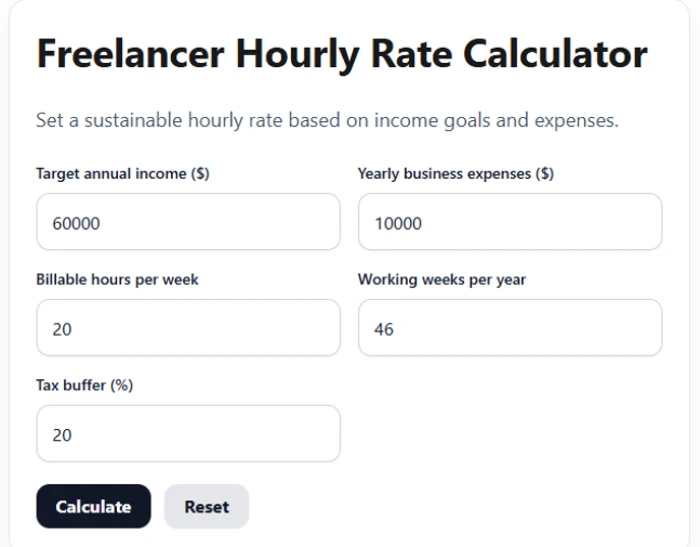
Freelancer inputs: $60,000 income, $10,000 expenses, 20 billable hours/week, 46 weeks, 20% tax buffer
Inputs I used: $60,000 target annual income, $10,000 yearly business expenses, 20 billable hours per week, 46 working weeks, 20% tax buffer.
|
What I Didn’t Like • No explanation of how the tax buffer is applied: to income only, or to income plus expenses. That detail changes the final rate. • No field for a profit or savings margin on top of personal income, which most established freelancers build in. • No tooltips. Someone new to freelancing may not know that “billable hours” should exclude admin, sales and emails. • No way to save or compare two scenarios side by side, so testing different weekly hours meant overwriting the previous run. |
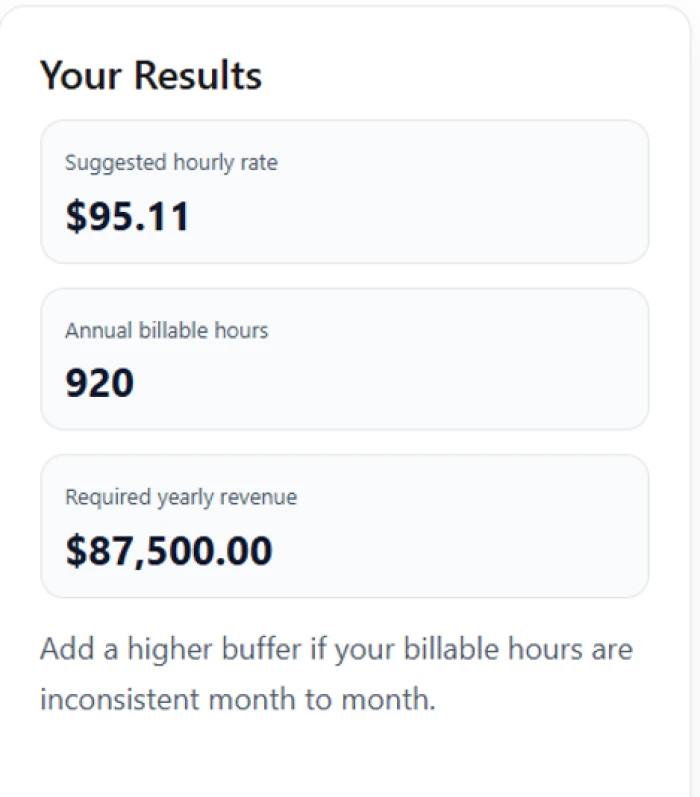
Freelancer results: $95.11 per hour, 920 billable hours, $87,500 required revenue
|
What Surprised Me Math check: 20 hrs × 46 weeks = 920 hours ✔ | ($60,000 + $10,000) ÷ (1 − 0.20) = $87,500 ✔ | $87,500 ÷ 920 = $95.11 ✔ Seeing a $60,000 income goal turn into $87,500 of required revenue was the real eye-opener. That gap is exactly why so many new freelancers underprice themselves at $40 or $50 an hour. Working the formula backwards revealed something the page never mentions: the 20% tax buffer is applied to business expenses as well as income. Since expenses are usually tax-deductible, the suggested rate runs slightly conservative. Taxing only the income would give roughly $92.39 an hour, about $2.70 less. Not a bad thing for a safety margin, but it deserves a line of explanation. |
After running both calculators with real numbers and checking every result by hand, the accuracy impressed me. Not a single figure was off. Where the toolkit falls short is explaining itself: it gives trustworthy answers without showing the reasoning, and that gap is what keeps it from being great.
As a free, no-friction starting point, this toolkit earns a solid 8 out of 10. Adding formula breakdowns, cost ranges and a share or export button would push it much closer to the “Best” its headline promises.

Discussion
Join the discussion and share your perspective.