NightCafe puts a long roster of image models behind one free daily habit, and on the free tier it earned that reputation. A neon diner scene came back looking like a night photograph, a poster spelled DINER without a slip, and placement prompts landed object after object. The limits were just as plain: it painted five birds when I asked for three, put a coffee cup in the wrong hand, garbled the small print inside a shop window, and locked video behind a PRO wall.
Flux, DALL-E 3, Ideogram plus SDXL, Imagen 4 and more
Free Tier
Daily credits, public earned by activity and streaks
Entry Plan
$7.49 per month, billed annually
Video
Kling, Runway, Luma PRO plans only
Community
25M+ users challenges, chat rooms, galleries
What NightCafe Does
01 . Overview
NightCafe is a text-to-image platform built around two ideas most generators treat as afterthoughts: give people a lot of models in one place, and give them a reason to come back every day for free. You type a prompt, pick a model and a style, and spend credits to generate. The twist is where those credits come from, because a steady drip of them is handed out for simply showing up.
Angus Russell launched NightCafe from his bedroom in Sydney in 2019, well before the current image-generation boom, and it has grown into one of the largest AI art communities online, with a user base the platform now counts in the tens of millions and more than a billion images generated. The product itself is a browser app with matching iOS and Android apps, wrapped around a menu of models the company licenses or runs on its own servers. Under the hood it layers a single interface on top of engines from outside vendors, so one account reaches Flux, SDXL, DALL-E 3, Ideogram, Google Imagen, Nano Banana, and a set of community fine-tunes, alongside video models like Kling, Runway, and Luma. The social layer is the real differentiator: daily challenges, chat rooms, public galleries, and a gamified credit system that rewards participation.
It runs on a freemium credit model. A free tier sits below four paid PRO plans, which run from AI Hobbyist through AI Artist, each billed monthly or discounted heavily on an annual term, with one-time credit packs sold on top. This review is based on hands-on testing of the free tier in a desktop browser, which is where most new users meet the tool.
What Happened When We Tested It
02 . 6 tests, from a neon diner to a bird count
I ran NightCafe on its free tier in a desktop browser. My credit counter started at 5, the first creation of the day carried a Create FREE button, and I worked through photorealism, in-image text, tight prompt-adherence prompts, the model picker, and the walls the free plan puts up. The results split the way the marketing hints they will: image quality and object placement were better than I expected, while exact counts, small text, handedness, and anything to do with video showed the edges fast.
★
The free plan is a habit, not a trial
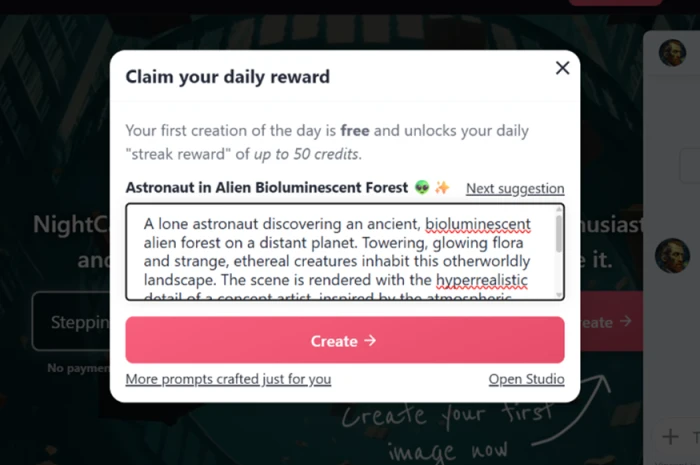
The first screen pushed a daily reward and a streak worth up to 50 credits, and the opening creation each day was free. One or two images a day is a routine you can keep without ever paying, which is a different proposition from the demo-grade free tiers most rivals ship.
A free daily reward, and 5 credits to start
Test 01 . Free credits and onboarding
The opening screen leads with a daily reward and a streak reward worth up to 50 credits.
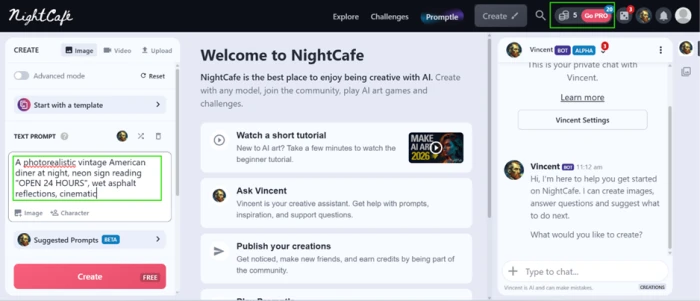
What stood out: NightCafe opens by handing you something rather than asking for a card. My counter started at 5 credits, and the generation panel showed a Create FREE button, so the first image of the day cost nothing. Free credits keep arriving through daily logins, challenge entries, badge rewards, and login streaks, which turns the free tier into a place you can return to daily instead of a one-time sample. For a US hobbyist testing the water, that is the single most persuasive thing about the platform.
A diner that passed for a photograph
Test 02 . Photorealism and headline text
★ Prompt Used
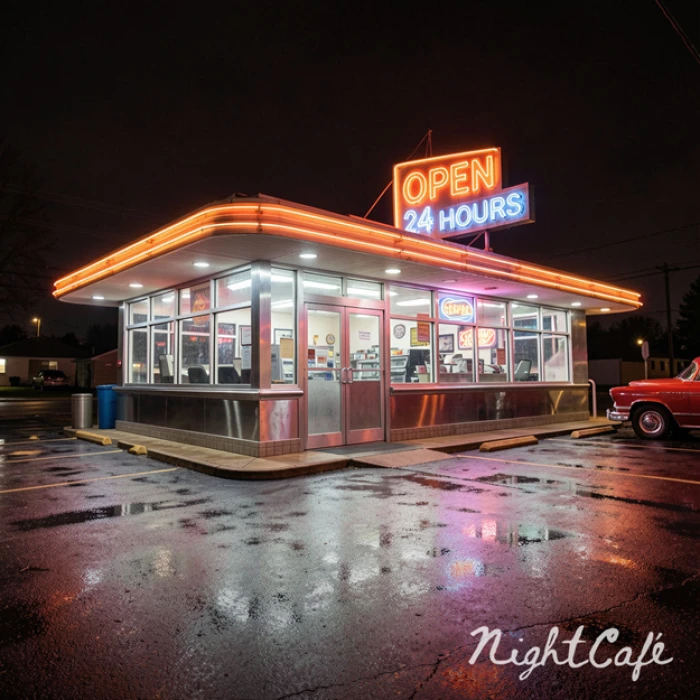
"a vintage American diner at night with a neon sign reading OPEN 24 HOURS"
The neon sign came through sharp and the wet asphalt sold the late-night mood.Big headline text is dependable; the smaller signs in the windows collapse into garbled shapes.
The evidence: The output impressed me. The neon OPEN 24 HOURS sign came through sharp and readable, the wet asphalt reflections carried the late-night mood, and at a glance the frame passed as a photograph rather than an AI render. There was one clear limit. The large focal text rendered correctly, but the smaller signs inside the diner windows fell apart into garbled shapes. The rule that came out of this test held across later runs: big headline text is reliable now, small background text is not.
Three of four instructions, one hand wrong
Test 03 . Prompt adherence
★ Prompt Used
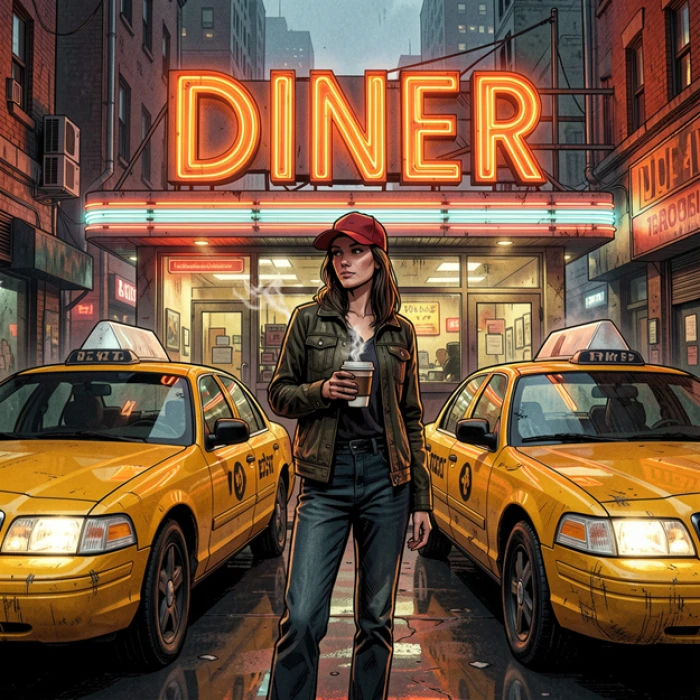
"a woman holding a coffee cup in her left hand, wearing a red baseball cap, standing in front of exactly two yellow taxis, with the word DINER spelled correctly on a sign behind her"
Three of four cues landed correctly here; only the coffee cup, in the wrong hand, missed.
Where it slipped: Three of the four instructions landed cleanly. The red cap was there. The taxi count came out at exactly two. The neon DINER sign was spelled right. The coffee cup was the miss, placed in her right hand rather than her left. Counting and spelling held up in the same frame, yet left versus right stayed unreliable. Handedness and other spatial cues are still where the model guesses.
Every placement right, the count wrong
Test 04 . Object placement and counting
★ Prompt Used
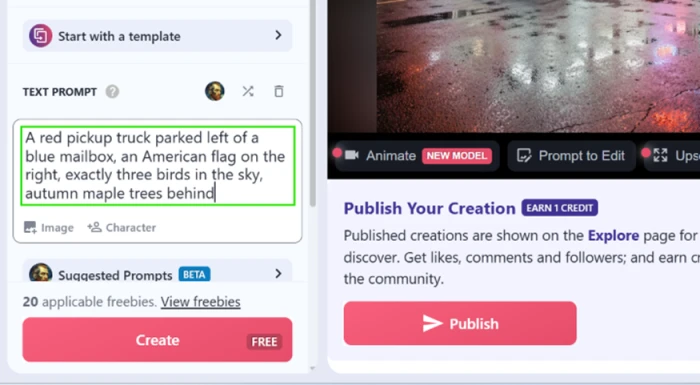
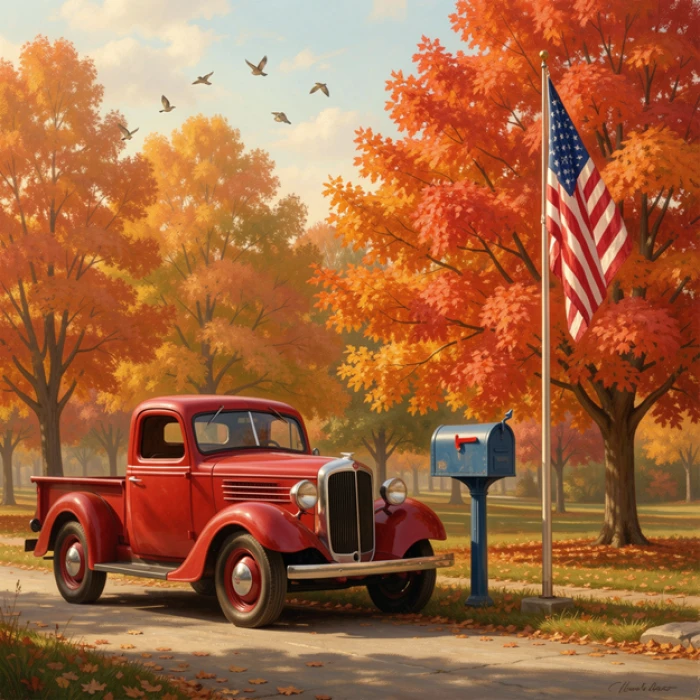
"a red pickup truck to the left of a blue mailbox, an American flag on the right, exactly three birds in the sky, with autumn maple trees behind"
Every object matched the prompt: left, right, and the maples behind, all in place.The prompt asked for three birds. Five came back.
The pattern, confirmed: Every placement was correct. The pickup sat to the left of the mailbox. The flag stood on the right. The autumn maples filled the background as asked. The count was not. I requested three birds and got five. Across both adherence tests the takeaway was consistent: NightCafe gets composition and object relationships right, then slips on exact quantities and handedness. If your prompt hinges on a precise number, plan to regenerate or crop.
A long model list with the cost shown up front
Test 05 . Models and credit costs
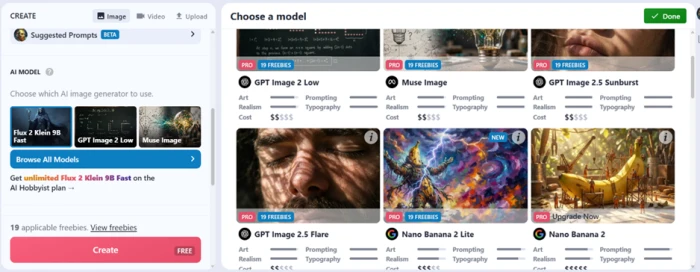
Free models sit at the top; PRO-only models carry an upgrade prompt, and dollar markers flag credit cost.
Worth the free plan: The model picker is one of the strongest parts of the free experience. I found a long list of options, each tagged with a cost indicator. Free models such as Flux 2 Klein 9B Fast sat at the top, while PRO-only models carried an upgrade prompt. The dollar-sign markers next to each model let me see which ones would burn credits faster before I committed, which matters on a metered plan where a wrong pick spends a generation you cannot get back.
Where the free plan stops you
Test 06 . Video wall and watermark
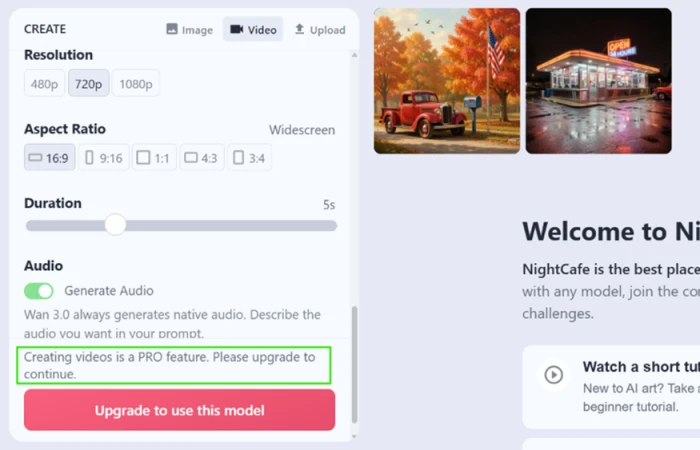
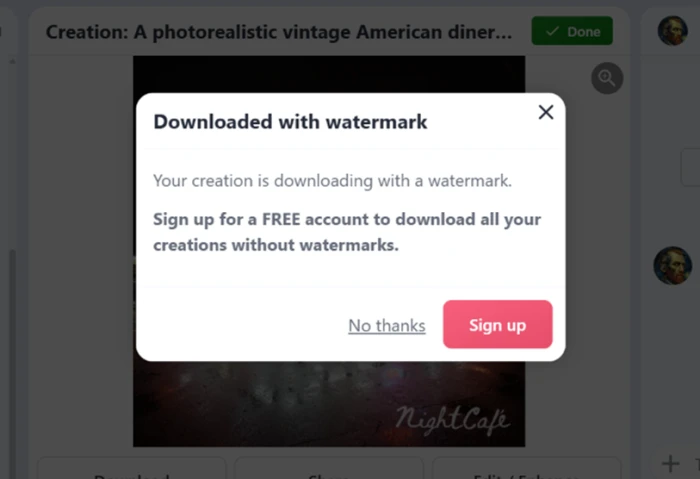
Set a resolution and duration for video and the free plan answers with a PRO-only message.A logged-out download arrives stamped with a NightCafe watermark.
!
Video is a hard wall on the free plan
I opened the video panel, set a resolution and a duration, and hit a message telling me that creating videos is a PRO feature. There is no free route to video, so anyone signing up mainly for image-to-video will not get it here without paying.
Worth noting: Downloads had one more catch. My first save, before I logged in, arrived with a NightCafe watermark stamped across the picture. Creating a free account cleared it, and every image I downloaded after logging in came out clean. The watermark works as a sign-up prompt for logged-out visitors rather than a penalty on free accounts, so the practical cost is one free registration.
10-Point Feature Review
03 . Scored on what it did, not what it claims
Feature Scores at a Glance
Free-tier access and daily credits
8.5
Model selection and breadth
8.0
Photorealism
7.5
Focal and headline text
7.0
Object placement and composition
6.5
Per-model cost transparency
6.0
Onboarding and gamification
5.5
Downloads and watermarking
5.0
Exact counts and fine detail
4.5
Free-tier video access
4.0
01
Free-tier access and daily credits Standout
This is the reason NightCafe keeps millions of casual users, and testing bore it out. My counter opened at 5 credits, the first daily creation was free, and the reward screen dangled a streak worth up to 50 credits. Free credits keep landing through logins, challenge entries, badges, and streaks, so the plan behaves like a daily habit rather than a trial. It sits at 8.5 rather than higher only because premium models drain that free balance quickly.
Starting credits: 5, plus a Create FREE dailyEarn more: Logins, challenges, badges
8.5
Excellent
02
Model selection and breadth Broad
One account reaches Flux, SDXL, DALL-E 3, Ideogram, Google Imagen, Nano Banana, and a shelf of community fine-tunes, with video models layered on top. That one-roof breadth lets you run the same prompt across engines to find the look you want. It scores 8.0 because the depth is real and well ahead of single-model rivals, held just short of the top because the newest models sit on paid tiers rather than the free plan I tested.
Image engines: Flux, DALL-E 3, Ideogram, moreRun style: Same prompt, many models
8.0
Excellent
03
Photorealism Strong
The night-diner prompt returned a frame that passed for a photograph, with a sharp neon sign, believable wet-asphalt reflections, and a convincing sense of late-night light. Base image quality on the free models is a strength, not a compromise. It lands at 7.5 rather than higher because complex detail inside the same scene, the small window signage, fell apart, so realism holds at the headline level more than in the fine print.
Diner scene: Reads as a photoLighting: Convincing night mood
7.5
Strong
04
Focal and headline text Reliable
Big in-image text is dependable now. The neon OPEN 24 HOURS sign was crisp and readable, and a separate prompt spelled DINER correctly on a sign behind the subject. Short, punchy copy is where the model is safe. It scores 7.0 because the moment text shrinks into background signage it collapses, so headline typography works while dense or small copy does not.
Headline text: Sharp and correctSmall text: Garbles
7.0
Strong
05
Object placement and composition Reliable
Placement was the quiet win across both adherence tests. A pickup sat to the left of a mailbox, a flag stood on the right, autumn maples filled the background, and in the diner prompt exactly two taxis appeared where asked. It scores 6.5 rather than higher because the same frames that nailed layout still missed the exact bird count and the cup handedness, so relationships are trustworthy while precise details are not.
Left / right / behind: CorrectObjects requested: Present
6.5
Capable
06
Per-model cost transparency Clear
The model picker tags every option with a dollar-sign cost indicator, so I could see which engines would burn credits faster before committing a generation. That candor is welcome on a metered plan. It scores 6.0 because while per-model cost is visible up front, the credits-per-image math still shifts with resolution and settings, so predicting a day's output remains fuzzy.
Cost markers: Shown per modelStill variable: Cost per image shifts
6.0
Fair
07
Onboarding and gamification Smooth
The first run needs no card, the generation panel is uncluttered, and daily rewards, challenges, streaks, and badges pull you back. For a newcomer it is one of the least intimidating ways into AI art. It scores 5.5 because prompt writing still carries a learning curve, and the gamified drip that makes the tool sticky is also what nudges lighter users toward a subscription.
First run: No card neededHooks: Rewards, challenges, streaks
5.5
Fair
08
Downloads and watermarking Minor
A save made while logged out arrived stamped with a NightCafe watermark, and creating a free account cleared it on every download after. The watermark reads as a sign-up nudge for anonymous visitors, not a tax on free accounts. It scores 5.0 because the clean-download path is one free registration away, a small but real step between a first image and a usable file.
Ask for a precise number and the model treats it as a suggestion. Three birds became five. A coffee cup landed in the wrong hand. Small window text turned to mush. It scores 4.5 because these are the failures a paying user feels most on a metered plan, where a miscounted scene means spending another generation to try again.
Three birds: Rendered as fiveHandedness: Wrong hand
4.5
Weak
10
Free-tier video access Locked
Video is fenced off entirely on the free plan. I set a resolution and a duration, then hit a message telling me creating videos is a PRO feature, with no free route around it. It scores 4.0 because for anyone drawn in by image-to-video the free tier offers nothing, and the models behind the wall, Kling, Runway, and Luma among them, cost credits even after you pay.
Free video: NoneBehind PRO: Kling, Runway, Luma
4.0
Weak
Pros and Cons
04 . What you feel using it day to day
+What Works
A free tier you can live in: daily credits, a Create FREE first image, and streak rewards make it a habit, not a sample.
Models under one roof: Flux, DALL-E 3, Ideogram, SDXL, and community fine-tunes all sit behind a single prompt box.
Photo-grade output: the night diner passed for a real photograph, neon sign and wet-asphalt reflections included.
Headline text that holds: bold in-image copy came out sharp and correctly spelled across runs.
Placement you can trust: objects landed exactly where the prompt placed them, on both sides and in the background.
Costs shown before you spend: every model in the picker carries a cost marker, so no generation is a blind gamble.
−What Grates
Counts drift: three birds came back as five, so any prompt that hinges on a number needs a retry.
Spatial cues wobble: the coffee cup landed in the wrong hand despite a clear left-hand instruction.
Small text breaks: shrink the copy into background signage and it collapses into garbled shapes.
Video is PRO-only: the free plan has no route to video at all, just an upgrade wall.
Premium credits vanish fast: the good models drain a free balance in a handful of generations.
Pricing Breakdown
05 . Free through AI Artist, and where the credits bite
Feature
Free$0
AI Hobbyist$7.49/mo billed annually
AI Enthusiast$14.99/mo billed annuallyMost Popular
AI Creator$23.99/mo billed annually
AI Artist$37.49/mo billed annually
Fast Credits per month
Daily free credits
200
500
850
1,400
Access all AI image models
Wide selection
✓
✓
✓
✓
AI video models
✗
Basic models
All models
All models
All models
Unlimited base generation (curated models)
✗
✓
✓
✓
✓
Fast Credits roll over month to month
✗
✓
✓
✓
✓
Watermark-free downloads
After sign-up
✓
✓
✓
✓
Community, challenges, print store
✓
✓
✓
✓
✓
Best suited to
Casual daily creators
Regular hobbyists
Daily creators using video
High-volume creators
Power users
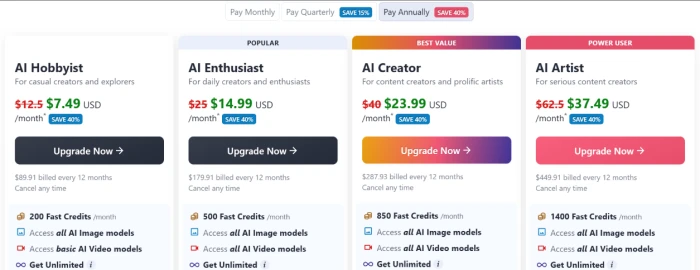
What you're actually paying: The green figures above are the annual-billing rate, which NightCafe promotes as 40 percent off the month-to-month price, so paying monthly raises every tier. In the app the same plans list at roughly $12.50 for Hobbyist up to $62.50 for Artist per month before that annual discount, with a quarterly option sitting in between at 15 percent off. What a plan buys is Fast Credits, spent per generation, and because a single image can cost anywhere from a fraction of a credit on a light model to several credits on DALL-E 3 or a Flux variant, the same allowance stretches to widely different image counts depending on how you generate. Fast Credits roll over and do not expire, higher tiers unlock the more powerful image and video models, and the top plans layer on unlimited base generation for a curated model set. The free tier remains the one to start on: the daily drip and the public gallery make it a real place to create, just not a place to reach video or to lean on the premium models for long.
NightCafe's four PRO tiers on the annual billing view, where the app flags Enthusiast as Popular and Creator as Best Value.
Pricing taken from NightCafe's in-app upgrade screen on September 18, 2026. Plans and credit counts change on a rolling basis, and so do the models behind each tier, so confirm the current numbers on the official pricing page before you subscribe.
NightCafe vs the Top 4 Alternatives
06 . Where it wins and where a rival fits better
NNightCafe
IIdeogram
LLeonardo
DDeepAI
CCraiyon
Models in one place
30+ image and video
In-house family
Own model plus SDXL
A few options
Single model
Free tier
Daily credits, public
Yes, slow queue
Daily free tokens
Yes, limited
Yes, ad-supported
In-image text
Model-dependent
Best in class
Passable
Weak
Weak
Video generation
Yes, PRO only
No
Yes
No
No
Community and social
Large, central
Light
Active
None
None
Best For
Model variety and a free daily habit
Text-heavy posters and logos
All-round creation with controls
Quick, cheap image runs
Fast free doodles, no sign-up
Where to land: If you want a menu of models under one login and a free tier you can return to daily, NightCafe (7.1 in our testing) is the natural home base, and its community pulls further ahead of everything here. Reach for Ideogram (7.1) when the words inside a poster are the whole job and its typography edge matters more than model choice. Leonardo AI (6.8) is the closer pick when you want finer control and built-in video on a comparably generous free plan. DeepAI (7.0) suits quick, low-cost image runs without the social layer, and Craiyon (7.3) is the zero-friction option for fast free doodles with no account at all. Any hobbyist who values variety and a daily creative routine over pinpoint prompt control should start with NightCafe.
What Users Are Saying
07 . Real users on the parts we could not test
Sentiment leans warm across a large base, roughly 4.3 on G2 and a mid-range TrustScore built on several hundred reviews. The praise clusters on model variety, the free credit system, a friendly community, and the daily challenges that keep people posting. The complaints cluster too: premium credits drain fast on the better models, and a recurring thread describes accounts closed abruptly with little explanation. Read both sides before you commit to a paid term.
There are a lot of free models which make formidable images.
Is NightCafe worth it for AI art on a free-first plan?
Use NightCafe if you want a lot of image models behind one login and a free tier that behaves like a daily habit rather than a trial. In testing it paired that with photo-grade output, headline text that held, object placement that landed prompt after prompt, and a steady stream of free credits, which makes it the strongest home base here for hobbyists who value variety and a creative routine.
Skip NightCafe if you need exact counts, precise spatial control, dependable handedness, or free image-to-video, since it painted five birds for three, dropped the cup into the wrong hand, then walls video off behind PRO. If typography inside the image is the whole job, Ideogram (7.1 in our testing) edges it, and Leonardo AI (6.8) fits better when you want tighter controls with video on a free plan.


Discussion
Join the discussion and share your perspective.