Home / Reviews / AI Video Generator / OpenArt AI
OpenArt logo
AI Image + Video Multi-Model Studio

OpenArt AI Review

openart.ai · All-in-one AI creative studio

OpenArt puts more than 100 image and video models behind one credit balance, so you can line up engines like Nano Banana and GPT Image and compare them side by side without juggling separate subscriptions. Its headline trick is character consistency: build a reusable figure once, then drop it into any prompt by name. It targets creators who would rather run a whole visual pipeline in one browser tab than stitch several single-purpose tools together.

Reviewer Score
7.2
/10
Capable Pick
The creative tools impress.
The free plan and credit maths do not.
Character Consistency9.0
Model Selection8.5
Prompt Enhance8.0
Credit Transparency5.0
Free Plan Limits5.0
Type
Image + video studio
Models
100+ compare 4
Free Tier
Yes limited
Per Image
5 credits model tested
Entry Paid
$13 /seat annual
Free Storage
7 days

What OpenArt Does

01 . Overview

OpenArt is an all-in-one AI creation platform that bundles image generation, video generation, editing and character tools into one workspace. Instead of backing a single engine, it aggregates more than 100 models and lets you pick among them from one screen, all drawing on a shared credit balance. Founded by two former Google engineers, it has grown into a broad creator studio rather than a one-trick generator.

The target user is a creator or marketer who currently pays for several separate AI tools and wants to consolidate. Character consistency is the hook OpenArt leads with, backed by community remixing, a Brand Kit and a video agent called Director. The platform runs on a free plan plus four paid tiers, with headline pricing that starts around $13 per seat a month on annual billing.

What Happened When We Tested It

02 . 6 tests covering creation, paywall, brand tools and characters

We worked through OpenArt on a logged-in free account in November 2026, starting from the Create screen and moving into the paid-gated tools to see how far the free experience actually reaches. The split that emerged was sharp: the creative tooling is clearly strong, while the path to a first generation is not.

The create screen and model compare

Test 01 . Creation
★ Prompt Used

"a cat astronaut"

OpenArt create screen with the model panel listing Nano Banana 2.1, GPT Image 2.5, GPT Image 2 and Nano Banana 2 Lite, allowing up to four to be compared
The model panel lets you pick up to four engines to compare at once.
First impression: I typed a deliberately bare prompt and clicked Enhance. OpenArt rewrote it into a long brief that filled in the subject, the pose, the lighting and the lens on its own. The model panel beside it listed current engines, Nano Banana 2.1 and GPT Image 2.5 among them, and let me line up to four for a direct comparison. For anyone who does not write prompts for a living, Enhance alone is the most useful control on the page.

Hitting the paywall before a single image

Test 02 . Paywall
OpenArt upgrade popup headed You've hit the free limit, shown after clicking Generate with a zero credit balance
Clicking Generate with no credits produced an upgrade popup, not an image.
OpenArt credit history showing 0 trial credits remaining and an empty Spent tab
The credit history confirmed zero trial credits and an empty Spent tab.
What this shows: The Generate button quoted 5 credits per image. My balance was zero, so instead of a cat astronaut I got a popup headed "You've hit the free limit." Opening my credit history confirmed it: 0 trial credits and an empty Spent tab, with Purchase Credits the only live button. Most write-ups mention trial credits on signup. This account started on nothing.

Free work expires in seven days

Test 03 . Retention
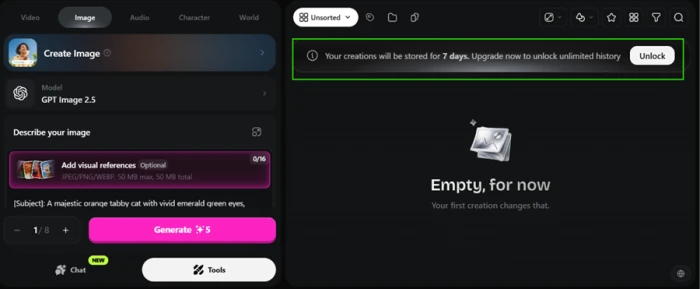
Banner across the OpenArt gallery stating that free-plan creations are stored for 7 days before an upgrade is needed to keep them
A gallery banner sets a seven-day shelf life on free creations.
Worth noting: A banner across the gallery sets the next limit. Creations on the free plan are stored for seven days, after which upgrading is the only way to keep them. The gallery clears itself after a week whether you are ready or not, which turns any free output into something you have to rescue quickly.

Building a Brand Kit

Test 04 . Brand tools
OpenArt Brand Kit setup screen with slots for a logo, colour palette, typography, brand rules, style references and brand assets
The Brand Kit setup takes a logo, palette, typography and brand rules.
The signal here: OpenArt includes a Brand Kit to tie outputs to one visual identity. The setup accepts a logo, a colour palette, typography and brand rules, with extra slots for style references and assets. I could build the whole kit for free. Applying it to a generation, though, needed credits I did not have, so it sat ready but unusable.

Remixing a community creation

Test 05 . Discover
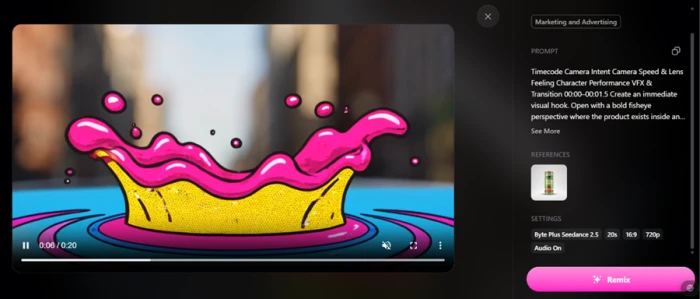
An OpenArt community video in the Discover section exposing its prompt, reference image, model Byte Plus Seedance 2.5 and 720p 16:9 20-second settings with a Remix button
A community video with its full recipe on view and a Remix button.
What clicked: The Discover section earns its place. I opened one community video and everything behind it was visible: the prompt, the reference image, the model it ran on, and the 720p 16:9 20-second settings. A Remix button drops all of that straight into my own editor, which turns someone else's result into a working template and cuts the guesswork out of settings.

Building a reusable character

Test 06 . Characters
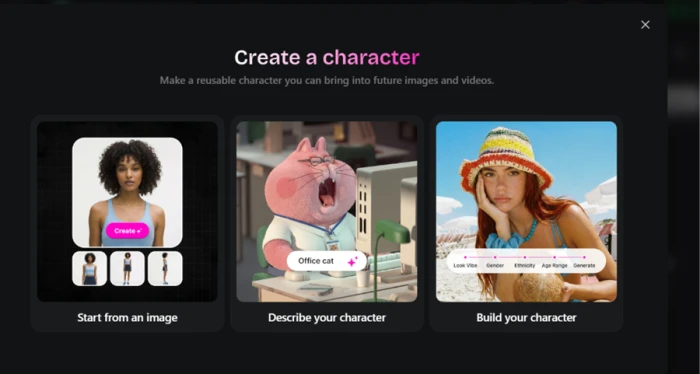
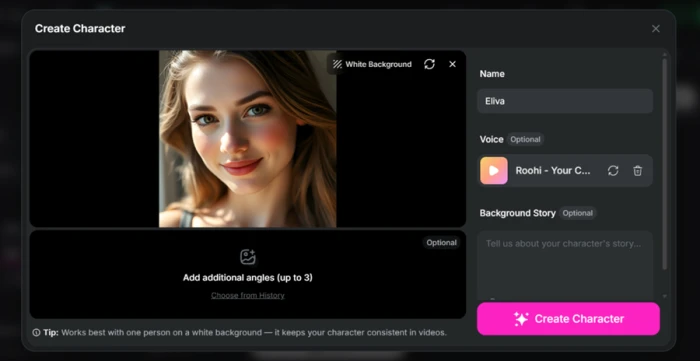
OpenArt character creation screen where a character named Eliva is built from an uploaded image and given a voice
Starting a character named Eliva from an uploaded image.
OpenArt character create screen accepting up to three extra angles and an optional background story, with a note that one person on a plain white background works best
The create screen takes extra angles and an optional background story.
The key finding: Character consistency is the feature OpenArt leads with, and it was the one studio-grade tool that worked for me on the free plan. I uploaded an image, named the character Eliva, then gave it a voice. The screen takes up to three extra angles and an optional background story, with a note that one person on a plain white background gives the most reliable result. Once saved, the character drops into any prompt by typing @ and its name. It cost nothing to set up.
★
The creative tooling is the real draw

Three tools landed without friction. Enhance turned a three-word idea into a full brief. Remix exposed a community video's entire recipe and loaded it into my editor, and the character builder let me save Eliva and recall her by @name, all on the free plan.

!
You can hit a wall before your first image

On the engine I picked, Generate quoted 5 credits per image against a balance of zero. The account carried no trial credits and no way to earn one in the flow, so the only path forward was Purchase Credits. A new user can reach that wall before producing a single result.

How this review was put together. We tested OpenArt in November 2026 on a logged-in free account, covering the Create screen and Enhance, model comparison, the generation paywall, free-plan storage, the Brand Kit, community Remix and the character builder. Each screenshot above comes from that session. Pricing was verified on OpenArt's own pricing page at openart.ai and cross-checked against the in-app upgrade panel.

10-Point Feature Review

03 . Ten weighted scores
Feature Scores at a Glance
Character consistency
9.0
Model selection and compare
8.5
Prompt Enhance
8.0
Community Remix and Discover
7.5
Breadth of tools
7.5
Interface and onboarding
7.0
Brand Kit
6.5
Free-plan output retention
5.5
Free plan generosity
5.0
Credit and pricing transparency
5.0

Pros and Cons

04 . Where it shines and where it frustrates
+What works
  • Character consistency that holds: build a figure once and reuse it by @name across prompts
  • Side-by-side model testing: line up to four engines on a single screen
  • Prompt Enhance: a short idea is rewritten into a detailed, usable brief
  • Community Remix: open any public creation and load its exact settings into your editor
−What frustrates
  • Disappearing work: free creations are cleared after a week unless you act fast
  • Unpredictable output: reviewers report it often ignores detailed prompts and alters reference images
  • Occasional instability: the app can glitch or break mid-task, a recurring complaint
  • Hard-to-read usage: nothing tells you how much a generation will consume before you run it

Pricing Breakdown

05 . A free plan and four paid tiers
Feature Starter$13/seat annual Plus$27/seat annual Pro$44/seat annualMost Popular Wonder$175/seat annual
Billed monthly $14 $34 $240
Credits per month 4,000 12,000 106,000
Images (approx) ~4,000 ~12,000 ~106,000
Videos (approx) ~50 ~150 ~1,300

How the tiers break down: The free plan is the catch, not the gift. In my account it held no generation credits, so the first real cost is a paid tier. Read the image counts with suspicion too. The Create screen quoted 5 credits per image for the engine I chose, yet Starter advertises roughly 4,000 images from its 4,000 credits, a figure that only works on the cheapest model, so premium-model output lands nearer 800 images. Video is the deeper sink, with reviewers reporting a single short clip burning thousands of credits. Annual billing shaves up to 27% off, but there is no middle commitment: the discount only arrives when you pay for a full year.
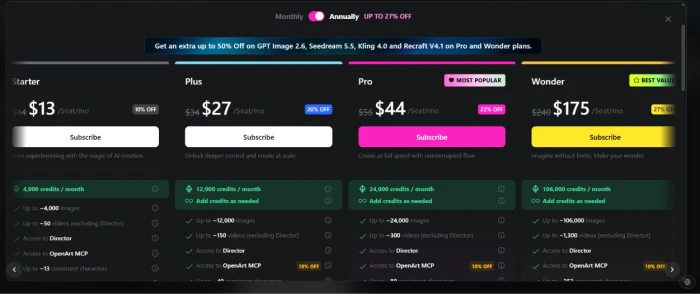
OpenArt pricing modal on the annual toggle showing Starter $13, Plus $27, Pro $44 marked Most Popular, and Wonder $175 per seat per month with monthly prices struck through
The four paid tiers shown on the annual billing toggle.

Pricing verified November 10, 2026. OpenArt lists these rates on its own pricing page, which toggles between monthly and annual, so check the current figure before you subscribe.

OpenArt vs the Top 3 Alternatives

06 . How OpenArt stacks up
OOpenArt MMidjourney LLeonardo AI IIdeogram
Entry Paid Price$13/mo$10/mo$12/mo$20/mo
Free TierYesNoYesYes
Character ConsistencyBuilt-inLimitedBuilt-inLimited
Video GenerationYesYesYesNo
Best ForMulti-model studio with video and charactersTop-tier single-image aestheticsAsset creation with fine controlAccurate in-image text

Picking between them: OpenArt is the broadest of the four, trading a little polish for the ability to run images, video and characters in one place. Midjourney is the pick when a single beautiful image matters more than range, though it has no free tier to test first. Leonardo AI overlaps most directly, pairing a usable free plan with its own character engine and tighter creative control. Ideogram is the odd one out, specialised for text inside images. Its cheaper Basic tier is now closed to new sign-ups, so new users start at the $20 plan.

What Users Are Saying

07 . Verified Trustpilot reviews
Easy to use and snappy, generally my go to for creating AI videos.
DAVID
On ease of use
★★★★☆
trustpilot.com
Great platform! Great customer service!
Jay Verweij
On support
★★★★★
trustpilot.com
Powerful and useful tools, but the app is often buggy or broken.
Jason Frederick
On reliability
★★★★☆
trustpilot.com
Generating a single, short, low-resolution video costs upwards of 3,000 credits.
Skyhook SE
On credit cost
★★★☆☆
trustpilot.com
The biggest issue is that the software consistently fails to follow clear and detailed instructions.
Ian Mbugua
On output quality
★☆☆☆☆
trustpilot.com
I had explained my position to support and they don't offer money refunds.
Leyton Smith
On refunds
★☆☆☆☆
trustpilot.com
· The Verdict ·
7.2/10
A strong studio held back by a stingy free plan

Use OpenArt if you want a single studio to compare many image and video models and build reusable characters you can recall by name, and you are ready to buy credits rather than rely on the free plan.

Skip OpenArt if you mostly need one clean image at a time, where Midjourney starts at $10 a month, or a usable free tier to learn on, where Leonardo AI is free with paid plans from $12. Weigh the billing complaints above before committing to a year.

Category RankCapable Pick
Compared To3 Alternatives
Entry PriceFree
Free TierYes

Discussion

Join the discussion and share your perspective.