
Home / Reviews / AI Text To Speech / OpenAI Fm
Logo
Text to Speech Demo Developer Playground

OpenAI Fm Review

openai.fm · OpenAI

OpenAI.fm is a free browser playground for OpenAI's latest speech model, and its one trick is plain-English direction. Type something like "tired late-night radio host, slow and low" into the instruction box and the voice actually follows it. It is built for developers and creators who want to audition a voice and copy the matching API code, not for anyone who needs a saved workspace.

Reviewer Score
7.3
/10
Capable Pick
Brilliant demo,
deliberately not a tool
Instruction Following9.0
Developer Export8.5
Pronunciation8.5
Character Limit5.0
Saved History5.0
Platform
Web browser
Named Voices
11 in the picker
Script Cap
999 characters
Code Export
3 Python, JS, cURL
Account
None no login
Site Cost
Free API key for builds

What OpenAI.fm Does

01 . Overview

OpenAI.fm is OpenAI's own showcase for its newest text-to-speech model. You land on a single page with a script box, a row of named voices, a field for plain-English direction, and a play button. There is no sign-up and no menu to learn. You type what you want said, describe how you want it said, and listen.

The headline idea is that you steer the delivery with language rather than dials. Instead of nudging a pitch slider, you tell it to sound like a bedtime story or a sports coach, and the model interprets the intent. OpenAI ships a set of preset vibes for people who would rather pick than write, alongside the eleven voices in the picker.

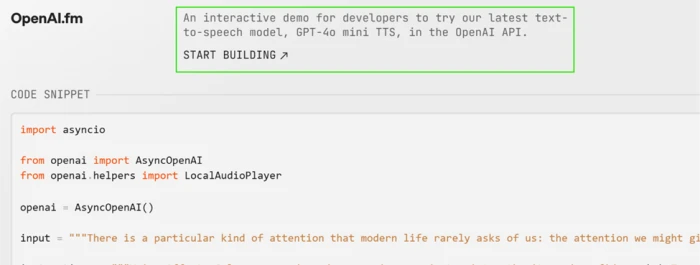
The second audience is developers. A toggle flips the page into a code view that hands you the exact request as Python, JavaScript or a cURL command, ready to drop into a project. That dual purpose, a toy for creators and a copy-paste starting point for builders, is what OpenAI.fm is positioned as.

What Happened When We Tested It

02 . 6 tests covering voice control, sharing, code export, pronunciation and hard limits

We ran OpenAI.fm the way a working creator would, not as a spec sheet. The questions were practical. Does the instruction box actually change anything? Does it handle messy business copy? And what happens when you push past what a demo is built to do? We wrote our own scripts and directions throughout rather than leaning on the presets.

Voice choice and custom style control

Test 01 . Instruction box
★ Instruction Used

"a tired late-night radio host, slow and low, with long pauses and an almost-whispered last word"
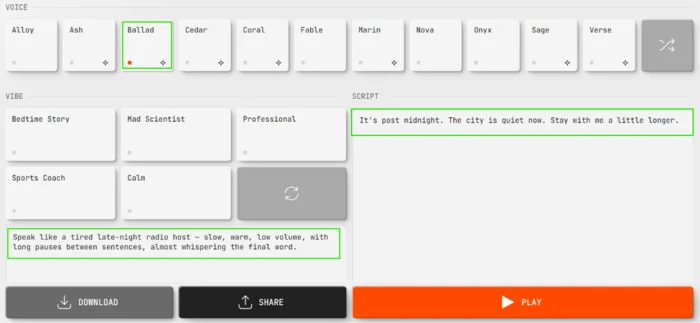
OpenAI.fm editor with the Ballad voice selected, a custom instruction describing a tired late-night radio host, and a short two-line script typed into the script box
Ballad voice selected, with a custom instruction and script entered by hand.
What clicked: The output matched the brief closely. Pacing slowed, the tone turned soft and intimate, and the last word of each sentence trailed off exactly as written. This is the capability OpenAI.fm is famous for, and it holds up. The picker also carries eleven named voices in one row, from Alloy and Ballad to the newer Cedar and Marin.

Sharing a result

Test 02 . Share link
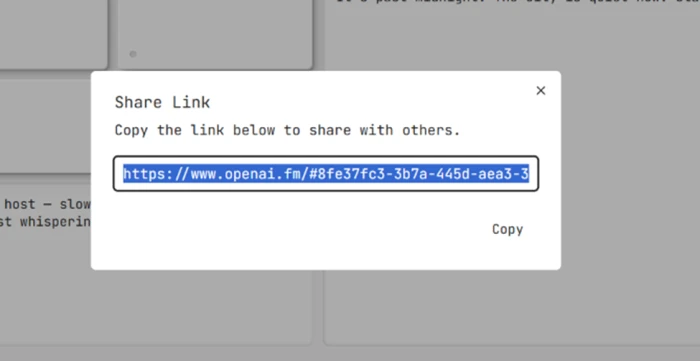
OpenAI.fm Share Link popup showing a generated URL that reloads the exact voice, instruction and script configuration
The Share Link popup, producing a URL that reloads the exact preset.
Worth noting: Clicking Share generated a direct link to the exact setup, voice and instruction and script bundled together, so a colleague opening it lands on the same configuration instead of a blank editor. It is a clean way to hand a voice direction to a teammate. The catch surfaces later: this link is the only thing that makes your work survive.

Developer mode and code export

Test 03 . Code export
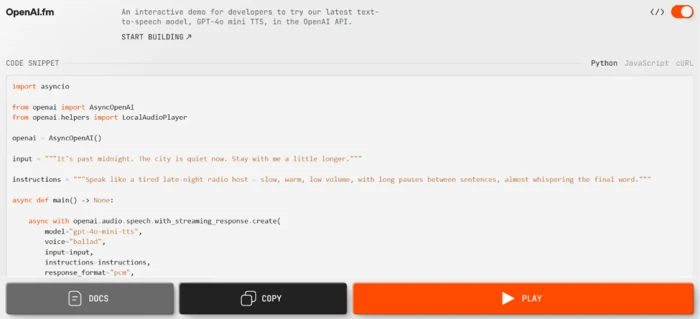
OpenAI.fm in developer mode showing the editor settings exported as a ready-to-run code snippet with Python, JavaScript and cURL options
Developer mode: the editor settings exported as a ready-to-run code snippet.
The real story: A toggle at the top right flips the page into developer mode, and this is where the tool shows who it is built for. The exact configuration appeared as runnable code, with a switcher for Python, for JavaScript, or for a raw cURL command, and the Ballad choice and the instruction text baked straight in. Copying it into a project needs almost no editing. The snippet calls the API with your own key, so the site is free to play with while anything you ship runs on paid usage.

Pronunciation of tricky text

Test 04 . Stress test
★ Script Used

A deliberately hostile line mixing a brand name, a domain, the year 2024, the acronyms ROI and SMBs, and the decimal 37.5%
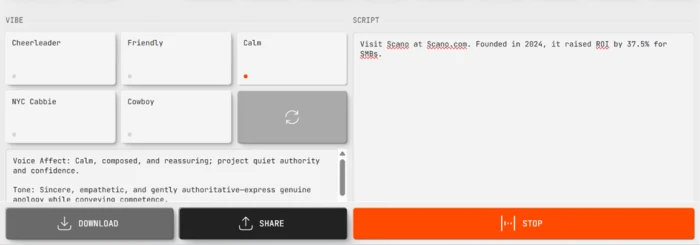
OpenAI.fm script box holding a stress-test sentence that combines a domain name, the year 2024, ROI, 37.5 percent and SMBs
A stress-test script combining a domain, a year, ROI, 37.5%, and SMBs.
What stood out: It read the whole line correctly. The domain came out clean, 2024 as a year rather than digit by digit, ROI and SMBs as spelled-out letters, and 37.5% as "thirty-seven point five percent." For the kind of copy that fills product pages and ads, that is a strong result and the opposite of what we expected walking in.

The 999-character ceiling

Test 05 . Hard limit
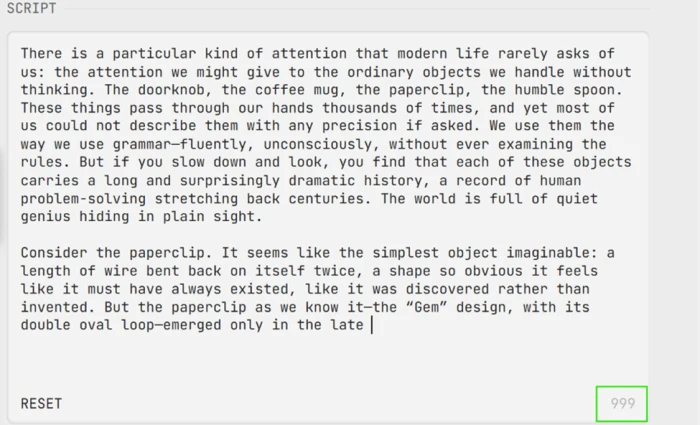
OpenAI.fm script box capped at 999 characters, showing a long pasted passage cut off mid-sentence with the counter reading 999
The script box caps at 999 characters and cuts off mid-sentence.
Where it lands: The hardest wall has nothing to do with sound quality. The script box stops accepting input at 999 characters, cutting off mid-word once it fills. That is roughly 150 to 170 words, enough for a single ad read or an intro line and nothing longer. The underlying API allows far more per request, so the demo is deliberately tighter than the model it showcases.

No saved history

Test 06 . Persistence
OpenAI.fm developer mode showing the exported input string inheriting the same 999-character truncated text rather than the full passage
In developer mode, the exported input inherits the same truncated text.
The signal here: We built a take we liked and reloaded the page. Everything snapped back to the default script and voice, with nothing surviving the refresh. The truncation follows you into developer mode too, where the exported input carries only the text that fit under the cap. Unless you download the audio or grab a Share link in the moment, the work is gone.
★
Plain-English direction that the voice obeys, then exports as code

The strongest thing we confirmed is the loop from intent to output to deployable snippet. A written instruction changed the pacing and the warmth in a way we could hear, the pronunciation of awkward business copy came out accurate, and the exact setup dropped into a Python or cURL call with the voice and direction already filled in. For auditioning a delivery and lifting it into real code, nothing in the flow fought us.

!
The 999-character cap plus zero persistence

Two limits compound. A 999-character script box forces long-form work into chunks you stitch together afterward, and nothing you make is saved once you refresh. A creator treating OpenAI.fm as a workspace rather than a sketchpad will lose takes and hit the ceiling fast.

How this review was put together. We tested OpenAI.fm on October 28, 2026, in a desktop browser with no account, writing our own scripts and instructions across voice control, sharing, code export, a pronunciation stress test, and the character and persistence limits. Because the site runs as a free demo on top of OpenAI's own speech model, there is no plan to verify. We confirmed the free-to-use nature and the own-API-key requirement directly in the editor and its developer mode during the session.

10-Point Feature Review

03 . Scored against hands-on behaviour in the editor
Feature Scores at a Glance
Instruction Following
9.0
Pronunciation Accuracy
8.5
Developer Export
8.5
Voice Variety
8.0
Ease of Use
8.0
Share Links
7.5
Production Readiness
6.0
Fine-Grained Control
5.5
Character Limit
5.0
Saved History
5.0

Pros and Cons

04 . Where the demo shines and where it stops
+What works
  • Direction by plain language: a written vibe genuinely changes pacing, warmth and emphasis
  • Handles messy copy: domains, acronyms, years and decimals all read correctly
  • Code you can lift: your exact setup exports as Python, JavaScript or cURL
  • Instant start: no account, one screen, audio in seconds
  • Current voice set: eleven named voices including the newer Cedar and Marin
  • Clean handoffs: a Share link reopens the full voice and script for a teammate
−What stops you
  • Short script box: input cuts off at 999 characters, mid-word
  • Nothing is saved: a refresh wipes your voice, instruction and script
  • No numeric controls: no slider for speed, pitch or volume, only words
  • Loose repeatability: the same instruction can land at slightly different paces
  • Not a standalone service: the page is a demo, so shipping real output happens elsewhere

Cost and Access

05 . A free demo with a paid dependency

OpenAI.fm has no plans, no tiers and no checkout. The site is free to use as much as you like, with no account and no card. That is unusual enough to state plainly, because most tools in this space put their best voices behind a wall.

Where the value sits: The free part is the playground. The moment you want to generate audio inside your own product, you leave the site and call OpenAI's speech model with your own API key, which is metered, paid usage billed by OpenAI separately. So the honest framing is that OpenAI.fm is a free front door to a paid engine. For auditioning voices and grabbing starter code it costs nothing, and for shipping anything it costs whatever your API consumption runs to.

There is no discount, no renewal and no upsell on the page itself, so there is nothing to budget for until you move to the API. The practical cost to watch is the one the demo hides from you: a free take on the site becomes metered output the instant it runs through your key in production.

Access details checked October 28, 2026. The site carries no pricing, and any build cost is set by OpenAI's current API pricing, which can change.

OpenAI.fm vs the Top 3 Alternatives

06 . How the free demo compares to full platforms
OOpenAI.fm EElevenLabs PPlayHT
What it isFree demo of one modelFull TTS platformFull TTS platform
Style controlPlain-English instructionPresets plus some directionPresets and voice settings
Saved projectsNone, no accountYes, with libraryYes, with library
Voice cloningNoYesYes
Long-form inputCapped at 999 charsLong documentsLong documents
Best ForAuditioning a voice and lifting the API codeProducing and storing long-form voiceover at scaleCloning a voice and keeping a reusable project library

Where it lands: OpenAI.fm is not trying to be either of these. Reach for it to test how OpenAI's model sounds and to walk away with working code. Choose ElevenLabs when you need to produce long voiceovers and keep them in a real library with cloning on tap. Choose PlayHT when a reusable project workspace and voice cloning are the point rather than a one-off audition. The split is simple: OpenAI.fm is a starting line, the other two are the track.

· The Verdict ·
7.3/10
Is OpenAI.fm the right place to meet OpenAI's voice model?

Use OpenAI.fm if you want to hear how the model handles a specific direction, test it against awkward copy, and copy the exact Python or cURL call into your own project. For auditioning and prototyping it is excellent and costs nothing.

Skip OpenAI.fm if you need long-form voiceover, a saved project library, voice cloning or precise numeric timing, where a full platform like ElevenLabs or PlayHT is built for the job and this demo is not.

Category RankCapable Pick
Compared To3 Alternatives
Site CostFree
AccountNone

Discussion

Join the discussion and share your perspective.