Parakeet AI builds its whole pitch on one promise: get an answer while you are still talking. Around that real-time call assistant it stacks a mock interviewer, a company-by-company question bank, and a resume maker with a sharp ATS score. It aims at job seekers who want live support in interviews and a prep toolkit in the same account, and the polish of the onboarding sets a high first impression.
Parakeet AI is an interview-assistance platform built around a real-time Call Assistant that listens to a live interview or call and suggests answers as the conversation happens. It works alongside Zoom, Microsoft Teams and Google Meet, transcribes the questions, and generates responses shaped by your resume and the role.
The product wraps three prep tools around that core. A Mock Interview mode lets you practice against an AI interviewer, a Question Bank surfaces real questions organized company by company, and a Resume Maker builds and exports a resume while scoring it against applicant tracking systems. Parakeet positions itself as one account for the whole job hunt, from preparing a resume through practicing to live support in the interview itself, and runs as a desktop app with a mobile companion.
What Happened When We Tested It
02 . 4 tests covering the landing page, sign-in, onboarding, and the resume scorer
I walked Parakeet from its first impression through account creation and into the Resume Maker, watching how it frames itself and where it starts steering you toward payment. Here is what each step actually delivered.
The First Impression
Test 01 . Landing page
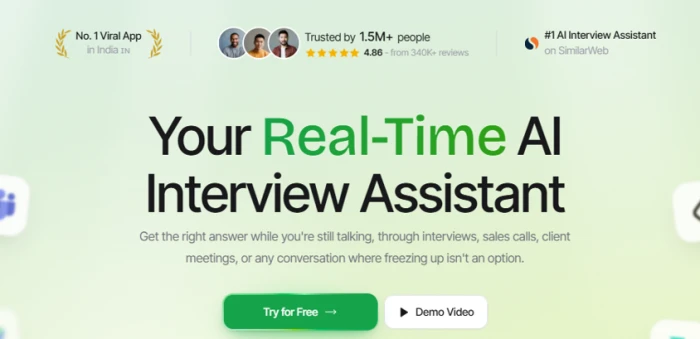
The landing page leads with the real-time promise and a stacked social-proof bar.
First impression: The page loads fast and sells the core promise in three seconds: a big green-and-black "Real-Time" headline and two clear buttons, Try for Free and Demo Video. The social proof is piled on right at the top, with claims of 1.5M+ users, a 4.86 rating from 340K+ reviews, and top rankings in India and on SimilarWeb. The flip side is that the claims arrive fast with nothing to click through and verify, so it tips a little salesy before you have seen the product work.
Creating an Account
Test 02 . Sign-in
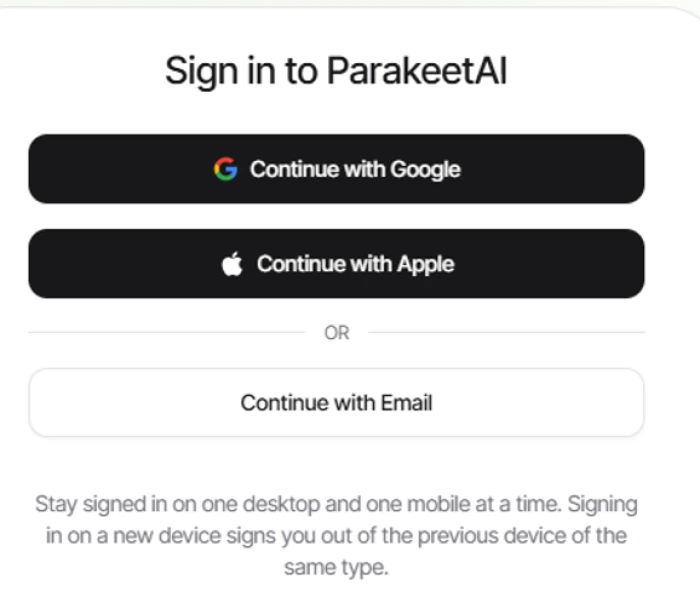
Sign-in offers Google, Apple or email, with the device limit stated up front.
What stood out: Three ways in, and Google was a one-tap, no-password affair. The notable touch is the device notice sitting right under the buttons: one desktop and one mobile signed in at a time, and logging into a new device of the same type kicks out the old one. Disclosing that rule before you commit is the honest move, even if the limit itself stings for anyone who bounces between a work laptop and a home machine.
A Two-Step Onboarding
Test 03 . Onboarding
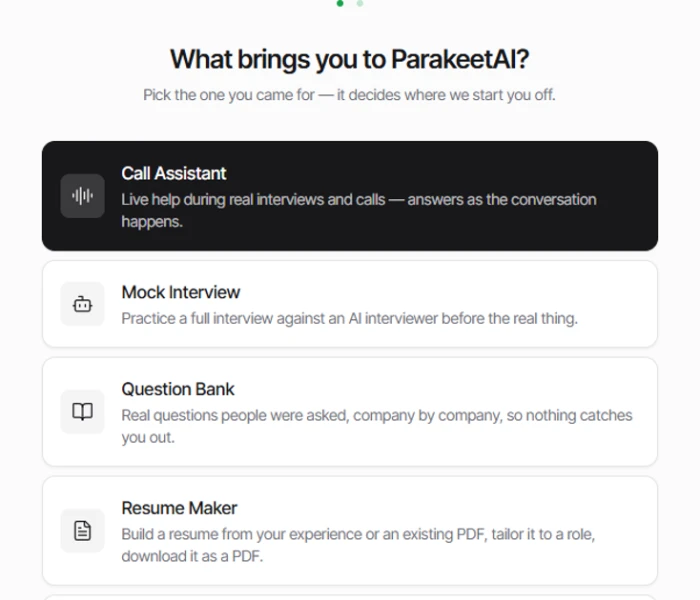
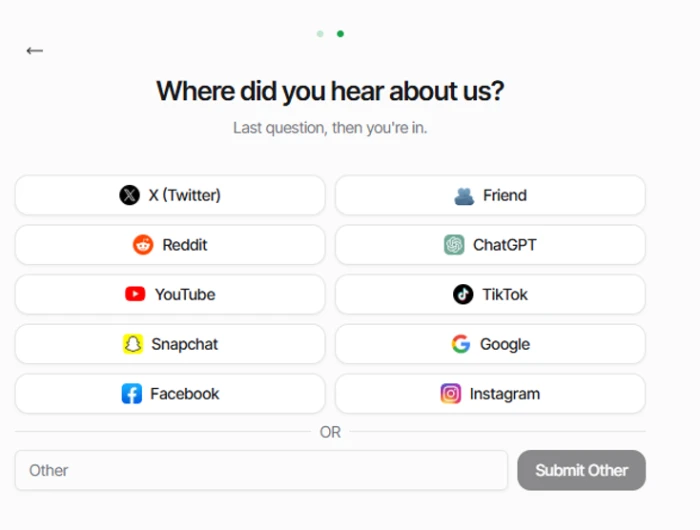
Step one routes you by intent into one of the four core tools.Step two is a one-question attribution survey before you are in.
What this shows: Setup is two steps and no more. The first asks what you came for and drops you straight into the matching tool, each option carrying a one-line explainer, so there is no guessing and no generic dashboard to decode. The second is a standard "where did you hear about us" survey, with ChatGPT sitting in the source list as a sign of the times. The catch is that you can only pick one lane at the start, and the survey has no visible skip, so the data grab is mandatory before you reach the product.
Resume Maker and ATS Scoring
Test 04 . Resume scorer
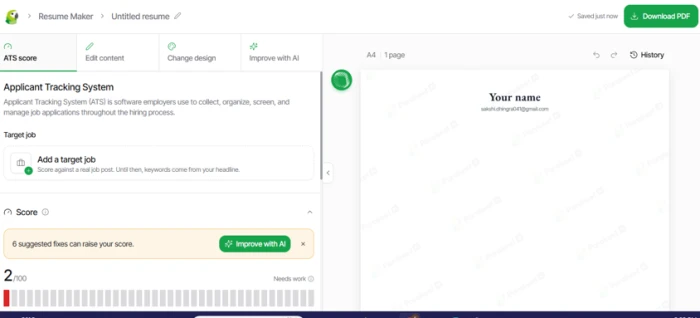
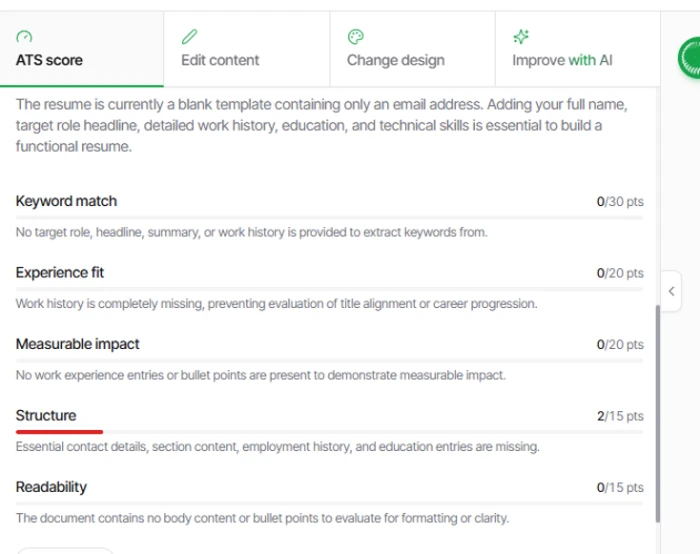
A brand-new empty resume is scored 2/100 with six fixes flagged.The ATS breakdown, scored across five categories with reasons.
The key finding: This is the part that earns its place. Opening a fresh, empty resume, the tool scored it 2/100 and flagged six fixes, with a live A4 preview on the right and an ATS breakdown on the left split across five categories: keyword match, experience fit, measurable impact, structure and readability. Each score comes with a plain-English reason, and you can add a target job to score against a real posting or hit Improve with AI. Two things undercut it: the preview carries a Parakeet AI watermark, and scoring a blank document that low reads as engineered to push you toward the paid Improve-with-AI button.
★
A polished funnel with a standout resume scorer
The parts I tested hands-on were strong. Onboarding is a crisp flow that routes you by intent, the device policy is disclosed before you commit, and the ATS scorer gives itemized, plain-English feedback with target-job matching that is actually useful for tuning a resume before you apply.
!
The marketing leans harder than the proof
Unverifiable headline claims, a mandatory data-grab survey with no skip, a watermarked resume preview, and a blank document graded near-zero all point the same way: toward the upgrade button. The live Call Assistant, the headline feature, also needs a real interview to judge, which a quick walk-through cannot provide.
How this review was put together. Testing ran on October 13, 2026 across the landing page, account creation, the onboarding flow, and the Resume Maker with its ATS scoring. The real-time Call Assistant, Mock Interview and Question Bank are described from the product surface and corroborated against published user reviews, not exercised in a live interview here. Pricing was verified from the official pricing page at parakeet-ai.com, and competitor prices from each vendor's own site the same day.
10-Point Feature Review
03 . Scored against what the walk-through and the record support
Feature Scores at a Glance
Onboarding & Setup
8.5
Resume & ATS Feedback
8.0
Sign-In Experience
7.5
Real-Time Assistant
7.0
Platform & Stealth
7.0
Trust Signals
6.5
Mock Interview
6.0
Question Bank
5.5
Pricing Transparency
5.5
Value for Money
4.5
Feature-by-feature breakdownScored toward the tools we exercised, measured on the rest
01
Onboarding & Setup Standout
The high mark, an 8.5, because the two-step, intent-based flow is close to best in class. It asks what you came for and drops you into the right tool instead of a generic dashboard. It stops short of 9.0 only because the second step is a mandatory attribution survey with no visible skip, so a marketing data-grab is stitched into an otherwise clean setup.
Steps: 2Routing: by intent
8.5
Standout
02
Resume & ATS Feedback Strong
An 8.0. The ATS scorer breaks a resume across five weighted categories, each with a plain-English reason, and lets you score against a real job posting. That is real, usable tuning before you apply. Held under 8.5 by the watermark on the preview and by the blank-resume score, which reads as a nudge toward the paid fix more than a neutral readout.
Categories: 5 scoredTarget job: yes
8.0
Strong
03
Sign-In Experience Capable
A 7.5 for one-tap Google sign-in and, more unusually, a device policy disclosed up front rather than buried. It does not go higher because the policy itself is restrictive: one desktop and one mobile at a time, with a new login of the same type evicting the old session.
Methods: Google, Apple, emailDevices: 1 + 1
7.5
Capable
04
Real-Time Assistant Capable
A 7.0, and this one is measured rather than tested. The live Call Assistant is the headline feature, and user reviews lean positive on its speed and its calm-under-pressure support. The score sits in the middle because a walk-through cannot confirm live accuracy, and reviewers note that answer speed depends heavily on your own connection.
Works with: Zoom, Teams, MeetTested live: no
7.0
Capable
05
Platform & Stealth Capable
A 7.0. The product runs across the major meeting platforms and markets a stealth mode that stays off a screen share, and reviewers confirm the desktop overlay does stay hidden. It is held to the middle because a hidden overlay is only as good as the answers it feeds you, which circles back to the live-accuracy question above.
Stealth: confirmed by usersDesktop app: yes
7.0
Capable
06
Trust Signals Mixed
A 6.5. Third-party ratings are real and strong, with a 4.7 on Trustpilot and a 4.4 on G2 across hundreds of reviews each. The score is pulled down because the landing-page numbers, 1.5M+ users and a 4.86 from 340K+, carry no path to verify them, and a large share of the positive written reviews are short, recent one-liners.
Trustpilot: 4.7G2: 4.4
6.5
Mixed
07
Mock Interview Unproven
A 6.0. Practicing against an AI interviewer is the right companion to a live assistant, and reviewers single it out as helpful prep. The midpoint score reflects that I did not run a full mock session here, so its depth and the quality of its feedback remain unconfirmed in this test.
Mode: AI interviewerTested here: no
6.0
Unproven
08
Question Bank Unproven
A 5.5. A library of real questions organized company by company is a strong idea for targeted prep. It scores low here because its value rests entirely on coverage and freshness, neither of which a surface look confirms, and stale or thin company data would hollow out the feature.
Organized by: companyCoverage: unverified
5.5
Unproven
09
Pricing Transparency Mixed
A 5.5. The official pricing page does list every number, which beats the hidden-price rivals. It loses ground for sheer complexity: a flat subscription sits beside a separate pay-as-you-go credit system and a set of individually priced prep tools, and the figures are quoted inconsistently enough that you have to work to total up your real monthly cost.
Prices shown: yesModels stacked: 3
5.5
Mixed
10
Value for Money Weak
The lowest mark, a 4.5. At $149.90 a month the Unlimited plan costs roughly six times Final Round AI's $25 Pro tier for the same core live-copilot job, and a single call credit runs $38 for an hour of help. The free ten-minute session and bulk credit discounts soften it a little, but the headline economics are hard to defend against cheaper rivals.
Unlimited: $149.90/moSingle credit: $38
4.5
Weak
Pros and Cons
04 . What holds up and what does not
+What Works
Slick, intent-based onboarding: it routes you straight into the tool you came for, no generic dashboard
Genuinely useful ATS scorer: itemized, plain-English resume feedback across five categories with target-job matching
One-tap sign-in: Google, Apple or email, with the device policy disclosed before you commit
Everything in one account: live assistance, mock practice, a question bank and a resume builder under one login
Hidden overlay works: reviewers confirm the desktop assistant stays off a screen share as advertised
Strong third-party ratings: hundreds of reviews averaging high on both Trustpilot and G2
−What Falls Short
Marketing outruns the proof: headline user and rating claims come with no way to verify them
Engineered upsell cues: a blank resume graded near-zero and a watermarked preview both push toward the paid button
Mandatory data grab: the attribution survey has no visible skip, so you answer to get in
Restrictive device policy: one device of each type at a time, with new logins evicting old sessions
Pricing Breakdown
05 . What the plans cost and where the catch hides
Plan
Free$0
Unlimited$149.90 /monthFull Access
Live call sessions
10-min session
Unlimited
Yearly option
n/a
$599.90 / yr
Weekly option
n/a
$78.00 / wk
Pay-as-you-go credits
From $11.80 / credit
Not needed
Prep tools (each)
$22.90 / mo
Included
What you are actually paying: Parakeet runs three pricing models at once, and untangling them is the real work. The subscription is the headline: Unlimited is $149.90 a month, or $599.90 a year, which works out to $49.99 a month if you commit for twelve. If you would rather not subscribe, call sessions are sold as credits, where half a credit buys a 30-minute session and the per-credit price falls from $38 for one to about $11.80 in the largest pack. On top of that, the three Prepare tools, the resume maker, the question bank and headshots, are each sold separately at $22.90 a month if you do not take Unlimited. The number that matters for comparison shopping is the subscription, and it is steep: at that rate, Parakeet asks roughly six times what Final Round AI charges for its $25 live-copilot tier.
Pricing verified October 13, 2026 on the official pricing page. Parakeet runs frequent promotions and mixes billing periods, so confirm your real total at checkout on the official site before you buy.
Parakeet AI vs the Top 2 Alternatives
06 . How it compares to the interview copilots a buyer would shortlist
PParakeet AI
FFinal Round AI
LLockedIn AI
Entry Paid Price
$149.90/mo unlimited
$25/mo Pro
Credits, money-back
Free Option
10-min session
Yes, no live copilot
Money-back guarantee
Live Copilot
Yes
Yes
Yes
Coding Interviews
Yes
Yes
Technical focus
Prep Toolkit
Mock, bank, resume
Resume, goals, prep
Narrower
Best For
All-in-one prep plus live
Cheapest live copilot
Technical and coding rounds
Picking between them: Parakeet makes sense if you want the whole job hunt under one login and the resume and prep tools matter as much to you as the live assistance. Final Round AI is the obvious value play, delivering the same core live copilot and stealth mode for a fraction of Parakeet's subscription, so it is the first stop for anyone focused purely on in-interview support. LockedIn AI leans hardest into technical and coding rounds and sells credits that never expire with a money-back guarantee, which suits occasional users prepping for engineering interviews. Parakeet's edge is breadth and polish; its weakness is a price that its rivals badly undercut.
What Users Are Saying
07 . The verdict from people who used it in anger
Parakeet's third-party ratings are strongly positive, averaging 4.7 on Trustpilot across more than 500 reviews and 4.4 on G2 across more than 200. Two caveats are worth keeping in mind: many of the written reviews are short, recent and enthusiastic in a way that is common for tools with an active referral program, and G2's full review text sits behind a login. The quotes below come from Trustpilot, the one approved platform carrying open written reviews, and they reach angles a walk-through cannot.
"Wonderful experience, really fast transcriptions of voice into text and fast answers, but only if you got real fast speed."
A polished, capable toolkit asking a premium price in a cheaper market
Use Parakeet AI if you want the whole job hunt in one account and you value the resume ATS scorer and prep tools as much as the live assistance. The onboarding is excellent and the resume feedback is the standout, strong enough to justify a look on its own.
Skip Parakeet AI if you only want in-interview support, where the price is hard to justify. Final Round AI delivers the same core live copilot and stealth mode for about a sixth of the cost, and LockedIn AI is the better fit for technical and coding rounds.


Discussion
Join the discussion and share your perspective.