Home / Reviews / AI Image Generator / Perchance AI
AI Image Generator Community Generator Platform

Perchance Review

perchance.org · Free generator platform, no sign-up

Perchance is a generator-hosting platform where the AI image tool is itself a community-built page anyone can open and rewrite. Clicking edit drops its real source into a live editor with an AI build assistant sitting beside it. Image quality holds up for stylized work and falls apart the moment a prompt asks for readable text. Best suited to hobbyists and tinkerers who would rather fork a tool than rent one.

Reviewer Score
7.2
/10
Capable Pick
Unmatched on openness.
Unreliable on precision.
Zero-Friction Access9.0
Generator Editing9.0
Style Consistency8.0
Text Inside Images5.0
Content Safeguards5.0
Access
No login browser only
Price
$0 no paid tier
Batch Output
4 images per prompt, tested
Generator Code
Editable on every page
Output Rights
Commercial attribution not required
Minimum Age
18 per terms of service

What Perchance Does

01 . Overview

Perchance began as a toolkit for random text generators and grew sideways into something harder to categorize. The site hosts community-authored pages, and the AI image tool most visitors arrive for is one of those pages rather than a product built by a company.

Every page on the site descends from another one. The platform's own terms describe it that way, tracing all generators back to a single blank ancestor. That inheritance model shapes how Perchance presents itself. Less a product with a roadmap. More a public workshop where the tools belong to whoever wants to remix them.

The audience skews toward writers, tabletop game runners, character artists, and people building small browser toys for their friends. Positioning is blunt to the point of being funny. The official image generator page is titled "AI Image Generator (free, no sign-up, unlimited)", and the description underneath promises no daily credit limits and no gimmicks. There is one tier and it costs nothing. An account exists for a single reason, which is to let you author and keep generators of your own.

What Happened When We Tested It

02 . Four tests across output quality and platform architecture

Testing ran across separate browser sessions with no Perchance account attached, using whatever settings each generator loads with by default. Screenshots are unedited and appear in the order they were generated. What the session exposed was a gap between the tool people think they are using and the platform actually running underneath it.

A Five-Word Prompt in Painted Anime

Test 01 . Prompt adherence
★ Prompt Used

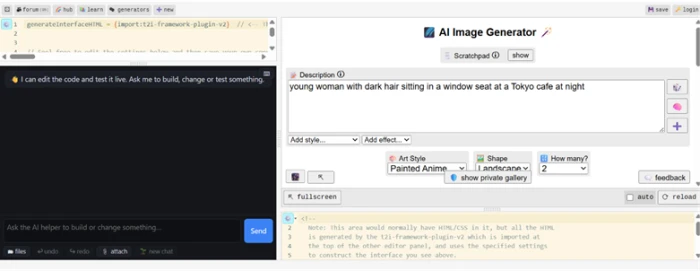
"young woman with dark hair sitting in a window seat at a Tokyo cafe at night"
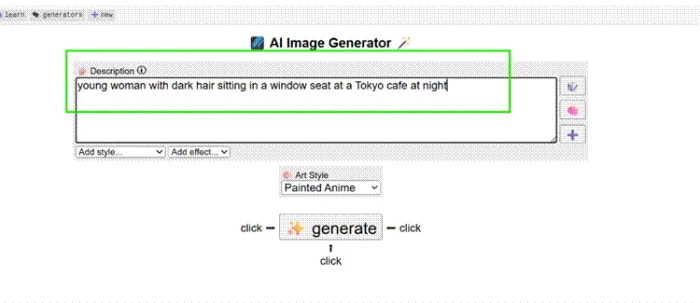
The Perchance AI Image Generator prompt field with the Tokyo cafe prompt typed in and Painted Anime selected as the art style
The prompt as entered, before generating.
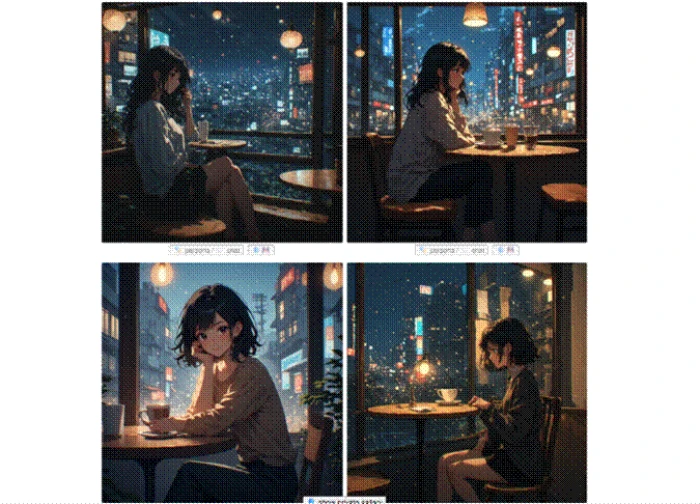
Four anime-style images of a dark-haired woman in a Tokyo cafe window at night, returned together in one batch
All four returns from a single batch.
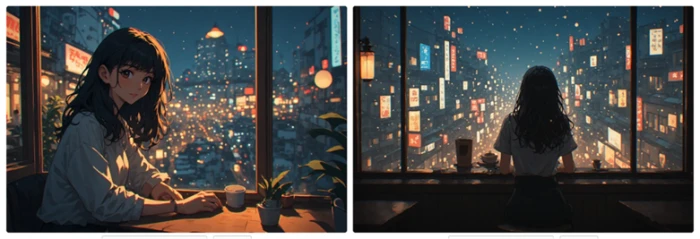
Two landscape images from the same Tokyo cafe prompt run in a later session, one framed at a table and one shot from behind the subject
The identical prompt, rerun days later in landscape.
What we observed: Four returns from one batch agreed on the scene without agreeing on the shot. Warm interior light sat against a cold night sky with neon bleeding through the glass. Every figure held the same solitary posture. None of the four read as a rushed draft, which is where thin prompts usually land. Rerunning the identical wording in a fresh session kept that mood and threw the framing out entirely.

Readable Text on a Storefront Sign

Test 02 . Text rendering
★ Prompt Used

"a bakery storefront sign that says Fresh Bread Daily"
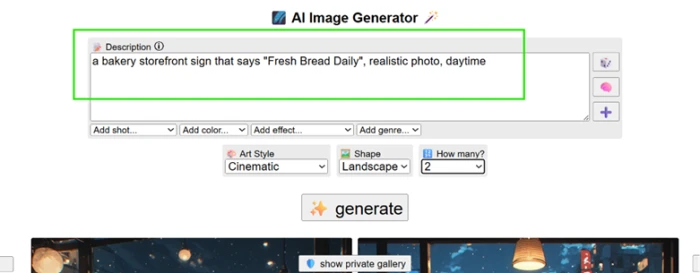
The Perchance prompt field showing the bakery sign request with Cinematic style, landscape shape, and two images selected
Cinematic style, landscape shape, two images requested.
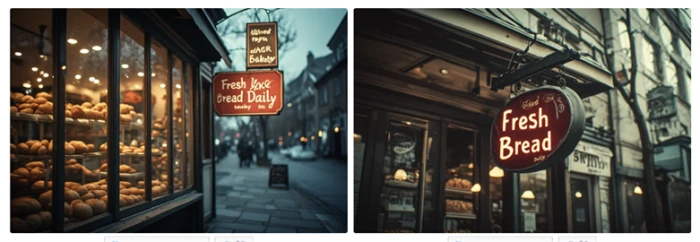
Two generated bakery storefronts side by side, one with a legible script sign and one with distorted lettering that does not spell words
Both returns from the same batch.
The key finding: One image rendered Fresh Bread cleanly in script, with Daily set small enough underneath to strain at. The other invented a second sign nobody asked for and dissolved its wording into shapes that stop just short of letters. Same prompt, same batch, one pass and one failure.

What Sits Under the Interface

Test 03 . Platform architecture
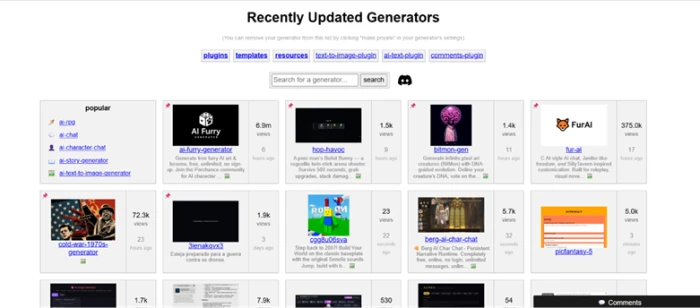
The Perchance Generators hub listing community-built tools sorted by recent activity, including chat, art, and game generators
A slice of the Generators hub, sorted by recent activity.
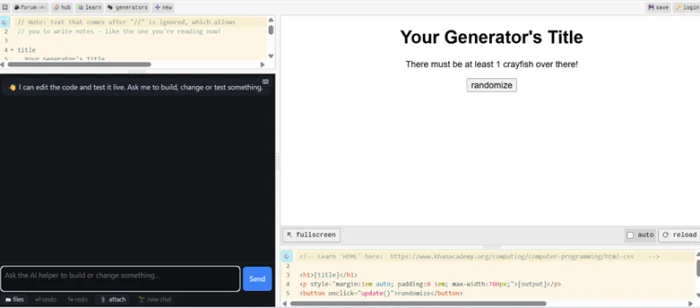
A blank Perchance generator page showing an empty code editor next to a chat panel with the AI build assistant open
A new generator, with the build assistant open alongside the code.
The AI Image Generator's own source code open for editing, showing a single import of the t2i-framework-plugin-v2 plugin
The generator's own source, open for editing.
Under the surface: Clicking the new-generator button does not open a template picker. It opens a live code editor with a chat panel beside it, where an assistant writes and tests the page's HTML while you describe what you want built. The image generator running every test above is assembled the same way. Its source is a single import of a plugin called t2i-framework-plugin-v2, the same building block handed to anyone starting from a blank page.

Photorealism, and Then the Hands

Test 04 . Realism limits
★ Prompt Used

"a photorealistic portrait of a woman holding a coffee cup with both hands, natural lighting, DSLR photo"
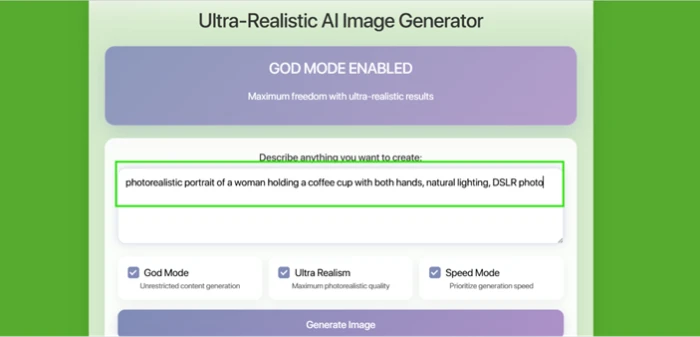

A community Ultra-Realistic AI Image Generator on Perchance loading with three toggles already switched on, including one labeled God Mode
The realism generator's prompt screen, as it loads.
A generated photorealistic portrait of a woman holding a coffee cup with both hands under soft natural lighting
The portrait at full size.
A close crop on the same portrait's hands, showing one correctly rendered hand and one where fingers blur together at the knuckle
A close crop on the hands from that same image.
Where it lands: At full size the portrait convinces. Soft studio-style light carries the shot and the skin tone reads as skin rather than plastic. Zoom to the hands and the picture splits. The right hand survives inspection with fingers that stay separate and proportions that look correct, while two or three fingers on the left blur together at the knuckle with no line between them. This is not the famous six-fingered failure. It is the quieter one, where a single image contains a hand that renders correctly and a hand that renders almost correctly.
The generator and the blank page run on the same plugin

The interface producing every image above is not a finished product handed down from a vendor. Any visitor can read its code and publish a changed version at a new address without asking anyone. Free image tools rarely hand over the tool itself.

!
God Mode ships switched on

The realism generator loaded with three toggles already enabled, one of them labeled unrestricted content generation. Nothing about that state was chosen during testing. No vendor moderation layer stands behind a community page, and the platform's terms set the site at eighteen and over, which tells you plainly who it expects to show up. Anyone producing work for a client or a public brand needs a review step of their own before publishing anything made here.

How this review was put together. Four tests ran across separate browser sessions in August 2026, covering prompt adherence inside a stylized preset, text rendering, the generator-building layer beneath the interface, and a community realism page. Every screenshot came from those sessions and none were edited. Cost and rights claims were checked against the official generator page at perchance.org/ai-text-to-image-generator and the terms of service, last updated July 18, 2026.

10-Point Feature Review

03 . Scored against what the sessions actually produced
Feature Scores at a Glance
Zero-friction access
9.0
Generator editing
9.0
Style consistency
8.0
Breadth of the hub
8.0
Batch variation
7.5
Output rights clarity
7.0
Repeatability
6.5
Realism and anatomy
6.0
Text inside images
5.0
Content safeguards
5.0
Feature-by-feature breakdownScored on observed behavior, four sessions
01
Zero-friction access Class leading
Nothing stood between the prompt box and the first batch. No account, and no credit meter counting down in a corner. It stops half a point short of perfect for the same reason it earns the score: the site asks nothing of you and therefore gives nothing back, so no history and no saved settings survive a closed tab unless you sign up.
Account required: NoSessions run: 4
9.0
Excellent
02
Generator editing Class leading
Every page carries an edit control that opens its real source, and a fresh page opens that same editor with a build assistant attached. Even the flagship image tool amounts to one import line. Half a point comes off because the assistant's first draft eventually needs correcting by hand, and that hand needs to know HTML.
Editable source: Every pageBuild assistant: Included
9.0
Excellent
03
Style consistency Strength
A five-word prompt produced four returns that agreed on lighting and atmosphere while disagreeing on composition, which is the right failure mode for early ideation. It does not reach 8.5 because that agreement arrived with a strong house look attached, one the prompt never asked for and could not easily talk out of the frame.
Preset tested: Painted AnimeMood drift: None observed
8.0
Strong
04
Breadth of the hub Strength
The hub runs well past image generation, into character chat, story tools, arena shooters, and pixel creatures with evolving DNA. Quality varies enormously by author, which is what holds this under 9.0. Finding the good page is entirely on you, and recent activity is the only signal the listing offers.
Sort available: Recent activityQuality rating: None
8.0
Strong
05
Batch variation
Asking for four images returned four compositions rather than four crops of one idea, and switching to two landscape returns changed the shape without collapsing the variety. It settles at 7.5 rather than 8.0 because the spread is unsteered. You take the range you are handed instead of asking for a specific kind of difference.
Batch size: 4 imagesShapes tested: Square, landscape
7.5
Solid
06
Output rights clarity Caveat
The terms answer the commercial question in plain language near the top: use what you generate however you like, attribution not required, no copyright claimed by the platform. The boilerplate further down the same document then limits the Services to personal, non-commercial use, and the author instructs readers to ignore that part. Clear intent, messy instrument. Call it a 7.0.
Attribution: Not requiredTerms updated: July 18, 2026
7.0
Solid
07
Repeatability Weak point
The identical prompt run in a later session held its mood and dropped its framing. One return centered the subject at a small table, the other pulled behind her toward a wall of signage. For exploration that is a feature. For anyone who needs the same output twice, 6.5 is generous, and it clears 6.0 only because the style preset itself stayed put.
Mood held: YesFraming held: No
6.5
Mixed
08
Realism and anatomy Weak point
A community realism page produced a portrait that survives a full-size look, with lighting and skin tone doing genuine work. Hands broke it. One rendered correctly and one blurred at the knuckle inside the same frame, a ten-second fix in an editor and a fatal flaw if you publish straight from the batch. One good hand out of two is a 6.0.
Portrait at full size: ConvincingHands correct: 1 of 2
6.0
Mixed
09
Text inside images Weak point
A two-image batch returned one legible sign and one field of letter-shaped noise, and even the passing result set its third word too small to read comfortably. A fifty percent hit rate on three words rules out signage and packaging work entirely. Nothing below 5.0 felt fair, because the legible attempt was properly legible.
Words requested: 3Clean returns: 1 of 2
5.0
Weak
10
Content safeguards Weak point
A community realism page opened with unrestricted content generation already active, a default nobody selected. The platform sets an eighteen-and-over floor in its terms and leaves everything downstream of that to whoever wrote the page. The setting is at least visible and reversible, which is better than hidden, and that is the whole of the case for 5.0 over something lower.
Default state: EnabledEnforcement: Page author
5.0
Weak

Pros and Cons

04 . What a week with it leaves you with
+What works
  • Source you can actually read: any generator opens in the same editor its author used
  • A build assistant on the blank page: describe a tool in chat and it writes a working first version
  • Nothing to configure first: the prompt box is usable the second the page loads
  • Stylized output that holds together: a preset keeps its look across a whole batch
  • Range past image generation: the hub carries chat, story, and game pages built the same way
  • Rights answered in plain English: the commercial question gets a direct answer, not a maze
What frustrates
  • Words inside images are a coin flip: signage and labels need a second tool
  • Close crops betray the realism pages: what convinces at full size can fall apart zoomed in
  • No way to get a result back: the same prompt later hands you something else
  • Unsafe defaults on community pages: a generator can arrive with its content controls already off

Pricing Breakdown

05 . One tier, and what an account actually buys
Feature Anonymous$0 forever Free Account$0 foreverAuthoring
Generate images on any AI page
Use every community generator
Open and edit a generator's source
Publish a generator at your own URL
Rename, duplicate, download, or delete it
Backup and revision history

What you're actually paying: Nothing, and the thing standing in for a subscription is a banner ad. The terms carve out a section for advertisers and describe the arrangement as space on the page and no relationship beyond it. The absence of an upgrade path cuts both ways. No renewal jump is waiting for you at month thirteen, and no support contract exists either, so a generator that breaks becomes a forum post rather than a ticket. Signing up is worth the two minutes for one reason: it moves you from borrowing other people's tools to keeping your own, with revision history sitting behind them when a save goes wrong.

Verified August 13, 2026. Perchance publishes no paid plans at all, so the terms of service are the document to read before you rely on it for client work.

Perchance vs the Top 3 Alternatives

06 . Where a free generator sits against paid and gated rivals
PPerchance CCraiyon BBing Image Creator MMidjourney
Free tier ceilingUnlimited, no sign-upFree with watermark15 fast creations dailyNone
Entry paid priceNo paid tier$120 billed yearlyRewards points, not cash$10 monthly or $96 yearly
Commercial useUnrestricted, no attributionAllowed, free users must creditGoverned by Microsoft termsIncluded with any subscription
Editing tools on the outputWhatever the page author builtRetouch, upscale, vectorizeImage editing via GPT-4oNo built-in retouching
Best ForForking the generator itselfCleaning up what you generatedFrontier models inside a daily capArt direction where cost is secondary

How to choose: The split comes down to what you are optimizing for. If the answer is control over the tool, Perchance is the only name here that hands you the source. If it is a usable image on the first or second attempt, Midjourney's floor sits higher than anything free will reach, and Bing lands in the middle with strong models behind a daily allowance and an account requirement. Craiyon is closest to Perchance in spirit and pulls ahead the moment you want to fix an image rather than roll the dice again.

· The Verdict ·
7.2/10
Who should actually open Perchance?

Use Perchance if you want to fork or build a generator instead of renting one, or you are producing stylized character and scene work where a strong house look counts as a feature. It also earns its place for high-volume exploration, since nothing meters how many attempts a good idea takes.

Skip Perchance if your images carry readable text, or a client will open them at full resolution. Bing Image Creator puts DALL-E 3 and GPT-4o behind a daily allowance for the same zero dollars, and Midjourney's entry plan buys the consistency Perchance never sets out to offer.

Category RankCapable Pick
Compared To3 Alternatives
Entry Price$0
Free TierUnlimited

Discussion

Join the discussion and share your perspective.