


What Pika Does
Pika began as the home of Pikaffects, the one-tap physics tricks that melt, inflate, explode and crush whatever you feed them, and that viral library made Pika Labs, a company started in 2023 by two Stanford researchers, a name in short-form AI video. In 2026 the product looks different. Pika now runs as an idea-to-video workspace that hosts a rotating bench of outside models next to its own Pika 2.5 engine, so a single account reaches Seedance, MiniMax, Wan, Kling and more through one credit wallet.
The pitch is breadth without a stack of separate subscriptions. Instead of paying each video model on its own, you buy Pika credits and spend them across whichever engine fits the shot, in the browser, with nothing to install. Pika aims this at social creators and the marketers who need fast, on-brand clips without a production team. It sells four individual plans, a Free tier, Starter, a Creator plan flagged as Best Value, and a sliding Fancy tier, with paid access opening at $8 a month on annual billing.
What Happened When We Tested It
We signed in to a brand-new free account at create.pika.art and tried to carry one project from prompt to downloaded file. That single run showed how Pika handles model choice and how its free plan behaves at the Generate button. It also showed what the finished file does once it lands on a stock Windows PC. Here is each step, in order.
The model picker is a shelf, not one house engine
Test 01 . Model selection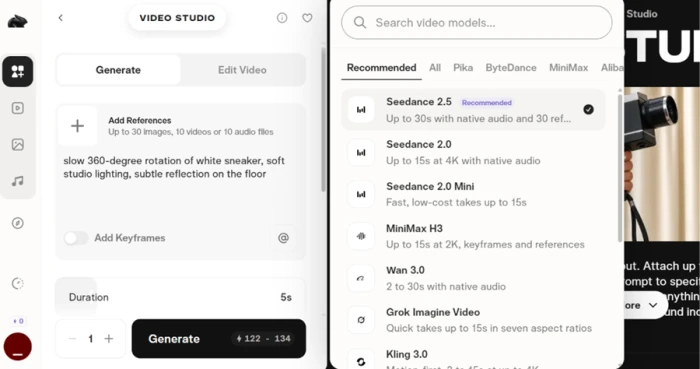
The free plan stops dead at the Generate button
Test 02 . Paywall mechanics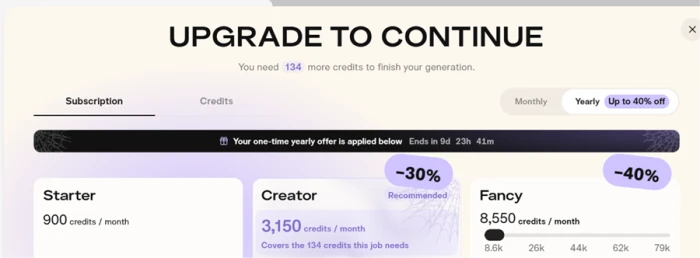
One workaround through ChatGPT unlocked 250 free credits
Test 03 . Free credit route
Image Studio returned a clean, unwatermarked product shot
Test 04 . Image output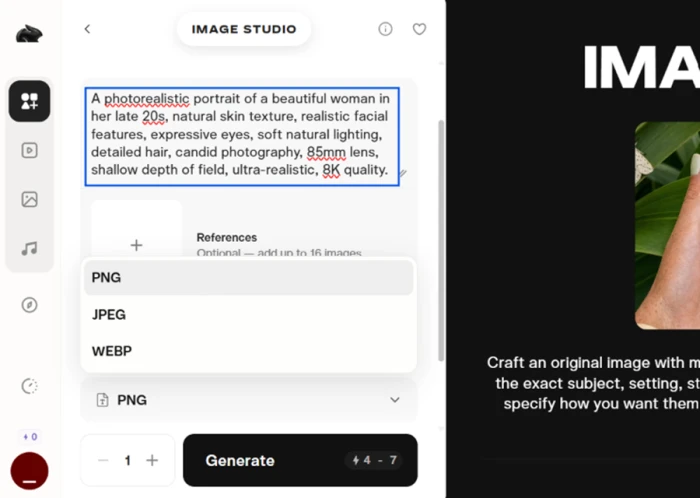

The hosted engines reach 20 to 30 seconds, not five
Test 05 . Clip length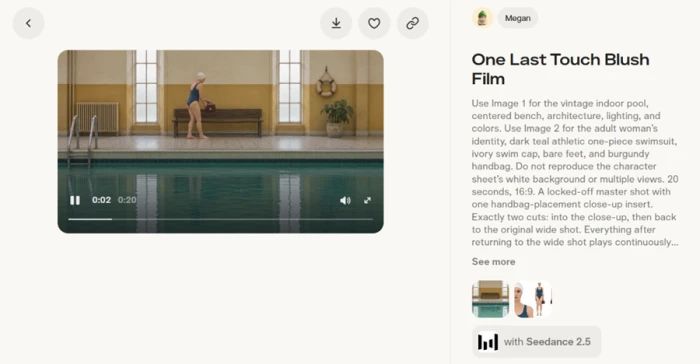
The finished file would not play without a paid codec
Test 06 . Export format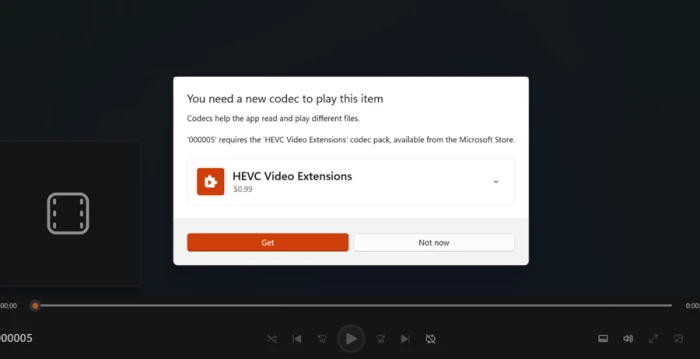
The combination that actually worked at no cost was the 250 ChatGPT bonus credits spent inside Image Studio, where a single export runs 4 to 7 credits rather than the 120-plus a video eats. That stretches the bonus into dozens of clean, unwatermarked stills instead of one unfinished clip.
A new account cannot render anything until you find the ChatGPT bonus or pay, and the video you do get back is HEVC that a stock Windows PC will not open without buying a codec. For a first-time user, that is two separate tolls before a single clip plays.
10-Point Feature Review
Pros and Cons
- Model choice per shot: swap between hosted engines inside one project instead of committing to a single house model
- Clean exports: downloads arrive without a watermark, free tier included
- Accurate on-image text: short labels and sign text render sharp and correctly spelled
- Fast image studio: stills generate in seconds and come out clean enough for product shots
- A feed that teaches: Discover shows the prompt and model behind every public clip, so you can see what actually works
- Playback toll on Windows: HEVC downloads need a paid codec before a stock PC will open them
- Churning model roster: the hosted engines on the menu change without notice, so today's pick may be gone tomorrow
- Buried free path: the ChatGPT bonus is the only real no-cost route, and the interface never points you to it
Pricing Breakdown
| Feature | FreeFree | Starter$8/mo annual | Creator$24.5/mo annualBest Value | Fancy$57/mo annual |
|---|---|---|---|---|
| Monthly credits | 0 · packs only | 900 | 3,150 | 8,550 and up |
| Parallel video jobs | 2 | 2 | 8 | Unlimited |
| Parallel image + audio | 2 | 8 | 32 | Unlimited |
| No watermark | ✓ | ✓ | ✓ | ✓ |
| Commercial license | ✗ | ✓ | ✓ | ✓ |
| Priority queue | ✗ | ✗ | ✗ | ✓ |
| Early model access | ✗ | ✗ | ✗ | From $440/mo |
What you're actually paying: The non-obvious part is that the surfaces disagree. Pika's own pricing page lists Creator at $28 and Fancy from $76 a month on standard annual billing, while the in-app upgrade screen we hit runs a seasonal promo that drops those to $24.5 and $57, both checked on the same day. The struck-through monthly rates run higher than the annual prices on every tier, so committing for a year is where the saving sits. Underneath all of it is the credit meter. Free ships no monthly credits at all. Starter's 900 cover only about seven Seedance clips, and the long, high-quality generations that make Pika worth using drain a plan the fastest.
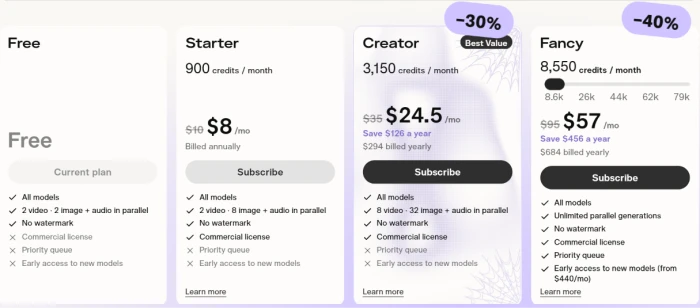
Pricing verified October 23, 2026. Pika runs frequent promos and reshuffles its tiers often, so confirm the live numbers on the official pricing page before you subscribe.
Pika vs the Top 2 Alternatives
| PPika | RRunway | LLuma | |
|---|---|---|---|
| Model approach | Hosts many engines next to its own Pika 2.5 | Own Gen-4.5 plus hosted models | Own Ray and Dream Machine plus hosted |
| Free tier | 0 credits, packs only | 125 one-time credits | No free tier |
| Entry price, annual | $8/mo | $12/mo | $25/mo |
| Watermark-free | All tiers | Paid tiers | Paid only |
| Best For | Model choice and playful effects on a budget | Cinematic control and studio export formats | High-fidelity, physics-accurate clips |
How to choose: The split is about what you are buying. Pika is the cheapest way in and the only one here that hands you a shelf of swappable engines plus its signature one-tap effects, which is why it fits social creators chasing reach over realism. Reach for Runway when a client needs cinematic polish and studio export formats, and for Luma when physical accuracy and high-fidelity motion matter more than price. Runway and Luma also host some of the same third-party models Pika does, so the real question is which workspace and credit math you prefer to live inside.
Discussion
Join the discussion and share your perspective.