

Home / Reviews / AI Presentation Maker / Pitch AI
Pitch logo
AI Presentation Maker Team Collaboration

Pitch Review

Pitch turns one prompt into a complete, on-brand deck in under a minute, and its comment that pins to the exact element you clicked, then pushes replies into Slack, is the sharpest team workflow in this category. The catch arrives fast: the AI fills your slides with numbers it invented. It suits startup teams who draft and review decks together, not anyone who expects the first draft to be true.

Reviewer Score
6.9
/10
Mixed Results
Best-in-class collaboration
AI that invents your data
Collaboration9.0
Generation Speed8.5
Template Design8.0
AI Data Accuracy5.0
Free Export Fidelity5.0
Platform
Web plus desktop & mobile apps
Free AI Credits
100 one-time
Free Members
5 seats
Cheapest Paid
$10 /seat/mo
Free Export
PDF only, branded
Free Storage
10 GB total

What Pitch Does

01 . Overview

Pitch is a presentation tool built for teams rather than lone slide-makers. You describe the deck you want, it drafts one from a template, and from there the work happens together: people edit the same file at once, pin comments to individual elements, share the finished deck through links, and track it through rooms.

The company behind it came out of the team that built Wunderlist, and that lineage shows in where the product spends its effort. Design and collaboration are the core, with an AI Generator bolted on to skip the blank-canvas problem. It aims at startup and agency teams building decks on a deadline, and at sales teams reusing one house template across many prospects.

Positioning puts it squarely against PowerPoint and Google Slides, with the pitch being speed and live teamwork instead of a desktop file passed around over email. How well that holds up depends on what you ask the AI to do, which is where the testing starts.

What Happened When We Tested It

02 . 6 tests covering generation, data accuracy, collaboration, media, and export

I ran these on a fresh free account, which is where most people start and where the limits bite hardest. The goal was to see how far the AI Generator could carry a real brief and how the team features held up in practice, then what actually came out the other end when I tried to export. Here is what each test turned up.

A full deck from one sentence

Test 01 . AI generation
★ Prompt Used

"Create a 10-slide investor pitch deck for a food-delivery startup in India, with problem, solution, market size, and business model slides"
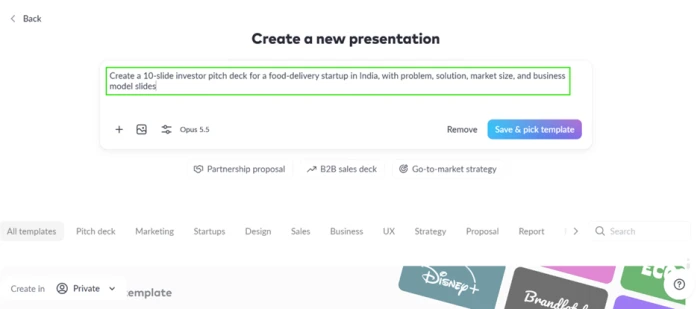
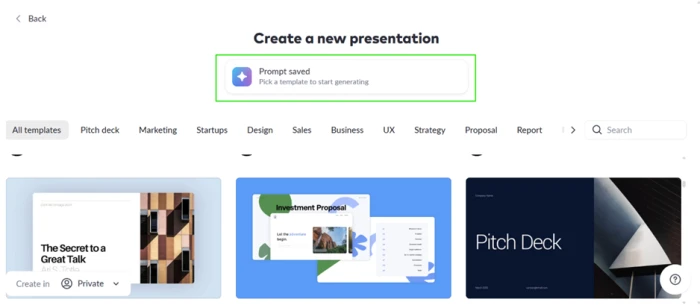
Pitch AI Generator asking the user to choose a template before generating the deck from the prompt
Pitch held the prompt and made me pick a template before it would build anything.
The generated ten-slide deck titled Thali: Seed Round with a slide built for each part of the brief
The result: a deck titled "Thali: Seed Round" with a slide per brief item.
The validation: Once I chose a template, a complete ten-slide deck landed in under a minute, with distinct problem, solution, market-size, and business-model slides exactly as asked. The speed Pitch markets is real. The template-first gate is a small friction, not a blocker.

Every figure on the slides was made up

Test 02 . Data accuracy
Pitch assistant side panel warning that every number in the deck is a placeholder it invented and should be replaced with real data
Pitch's own assistant admitted the numbers were placeholders it had invented.
The key finding: The deck looked investor-ready and read as fact. It claimed 70% of urban Indians live outside the top eight metros, set delivery-app markups at 35%, and sized my raise at ₹40 Cr. Pitch's own side-panel assistant then told me every one of those figures was a placeholder it had fabricated, to be checked and replaced before anyone saw the deck. The Generator builds layouts, not research. Trust the output as fact and you hand investors fiction.

Comments that stick to the element, not the slide

Test 03 . Collaboration
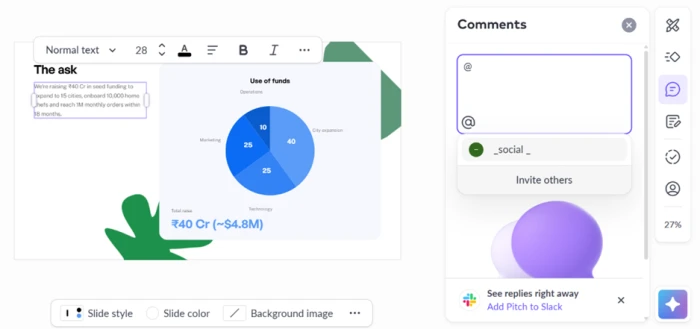
A Pitch comment attached to a specific selected element on the slide with an @mention and a Slack push option
The comment pinned to the exact element I selected, with an @mention and a Slack push.
What this confirms: This is the part Pitch gets right. A comment attached to the exact element I had selected rather than the slide as a whole, I could @mention a teammate from inside the box, and Pitch offered to push replies into Slack so the team would see them without opening the deck. Set against a PowerPoint file emailed back and forth, the gap is wide.

Live video that plays while you edit

Test 04 . Media embeds
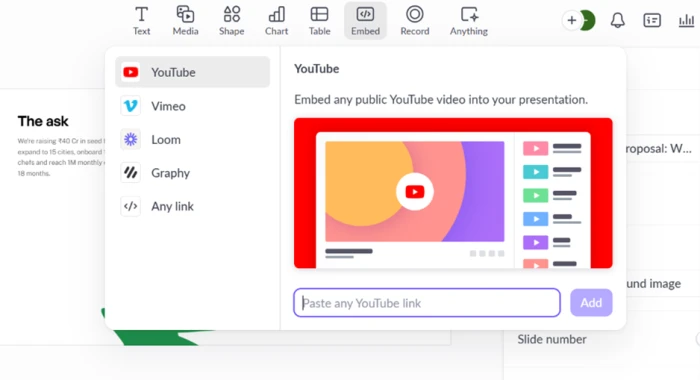
Pitch embed menu offering video from YouTube, Vimeo, Loom, Graphy, or any link
The embed menu covered YouTube, Vimeo, Loom, Graphy, and any pasted link.
A YouTube video playing inside a Pitch slide with a side panel to adjust scale and set the start time
A pasted YouTube link played inside the slide, with scale and start-time controls.
How it performed: Adding media was quick, and the embed played inside the slide while I kept editing, with a side panel to set its scale and start time. Inside the editor, the feature does what it promises. Whether that survives leaving the editor is a separate question, answered below.

The export shipped Pitch's advertising inside my deck

Test 05 . Free export
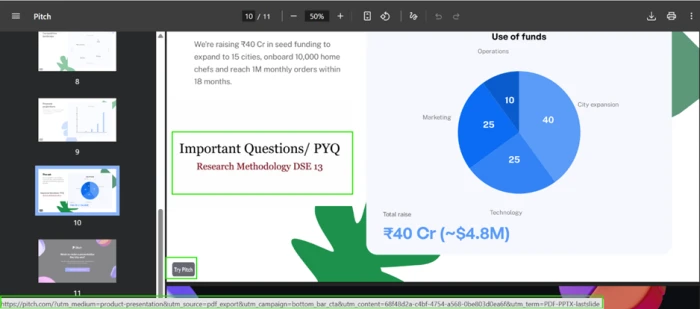
Exported PDF showing a Try Pitch badge on every page and a Pitch promotional link along the bottom
Every exported page carried a "Try Pitch" badge and a promo link.
The embedded video reduced to a static thumbnail in the exported PDF with no playback and no link to the source
In the PDF, the embedded video dropped to a dead thumbnail with no link.
The takeaway: PDF was my only complete export; PowerPoint sat behind an upgrade wall. The download arrived with a "Try Pitch" badge on every page, a promo link along each footer, and an extra Pitch advertising slide appended to the end. I exported a deck for my own company and shipped free marketing for Pitch inside it. The embedded video made it worse: it became a static thumbnail with no playback and, tellingly, no link back to the source, though Pitch found room for its own tracking link on the same page.

The free plan is a demo of the paid one

Test 06 . Free-tier ceiling
Pitch upgrade screen listing PowerPoint export, analytics, video uploads, extra AI credits, pitch rooms, custom domains, and high-resolution images behind payment
Hitting the PowerPoint wall surfaced the full list of what payment unlocks.
What matters here: The upgrade prompt laid out everything held back: clean PowerPoint export, presentation analytics, video uploads, extra AI credits, shared pitch rooms, custom domains, and high-resolution images. On the free plan, Pitch runs as a working demo of the paid product. The moment you need an unbranded export or your own identity in place of theirs, the free tier runs out.
★
One-minute drafts plus element-level team review

The workflow that earned its keep paired a deck drafted from a single prompt in under a minute with comments that pinned to the exact element and pushed into Slack. For a team that builds and critiques decks together, that loop is faster and cleaner than anything the desktop tools offer, and it is the real reason to pick Pitch.

!
The AI invents the facts it puts on your slides

Every statistic in the generated deck was a number the AI made up, confirmed by Pitch's own assistant. The layout looks authoritative, which is exactly the danger: a founder who skims the draft and presents it is quoting fiction to investors. Treat the Generator as a design starting point and replace every figure with sourced data before the deck leaves your hands.

How this review was put together. Testing ran on a fresh free account in November 2026, covering AI deck generation from a written brief, element-level commenting with Slack routing, live media embedding, and both the PDF export and the paid-feature wall. All pricing was verified the same month against the official plans page at pitch.com/pricing. Screenshots capture the exact sessions described above.

10-Point Feature Review

03 . Scored against what the free account actually delivered
Feature Scores at a Glance
Real-Time Collaboration
9.0
Generation Speed
8.5
Template Design Quality
8.0
In-Editor Media Embeds
7.5
Interface & Onboarding
7.5
Pricing Transparency
7.0
Branding Control
6.0
Free-Tier Usefulness
5.5
AI Data Accuracy
5.0
Free Export Fidelity
5.0

Pros and Cons

04 . What a real session rewards and what it punishes
+What Works
  • Element-level comments: feedback pins to the exact object you selected, not the whole slide, so notes land where they belong.
  • Slack-routed replies: comment threads reach your team in Slack without anyone reopening the deck.
  • One-minute drafts: a full multi-slide deck appears from a single written brief, faster than starting cold.
  • Live media in the editor: pasted video from several sources plays inside the slide while you work.
  • Brief-aware structure: the Generator builds a distinct slide for each section you name in the prompt.
−What Grates
  • Invented statistics: the AI fills slides with fabricated figures that read as researched fact.
  • Rigid for complex decks: reviewers find the layouts limiting once a presentation moves past the templates.
  • Media dies on export: embedded video drops to a static, unlinked thumbnail in the exported file.
  • Learning curve: new users report a ramp before the editor feels natural.

Pricing Breakdown

05 . One free plan, three paid tiers, and an enterprise tier
Feature Free$0 Plus$10 /mo Team$15 /seat/moMost Popular Business$20 /seat/mo EnterpriseCustom
Seats 1 to 5 1 1 to 200 Custom
AI credits 100 one-time 6,000/yr 9,000/seat/yr Custom
External guests 2 5 Unlimited Unlimited
Remove Pitch branding ✗ ✓ ✓ ✓
Shared pitch rooms ✗ ✗ Unlimited Unlimited
SAML SSO & SCIM ✗ ✗ ✗ ✓

What you're actually paying: The paid rates shown are the yearly-billed prices, where Pitch lists a 17% saving over paying monthly. Two things are worth catching before you commit. The currency moves with your region, so the same plan that reads $10 in the US shows as €10 elsewhere, and the figure is not converted, it is a different list price. And Pitch's own pricing surfaces disagree on PowerPoint export: the Plus plan card lists it, while the detailed comparison table grants it only from Team upward. If clean PowerPoint output is the reason you are paying, confirm it on the plan you pick rather than the summary card. Extra AI credits run $0.004 each on top of any plan.
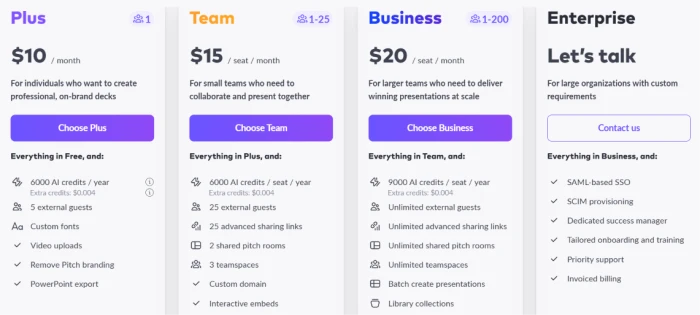
Pitch pricing page showing Plus at $10 per month, Team at $15 per seat per month, Business at $20 per seat per month, and a custom Enterprise tier
The four named tiers, from Plus through the custom Enterprise plan.

Pricing verified November 5, 2026, and shown in US dollars; your region may display another currency. Confirm the current plans on the official pricing page before subscribing.

Pitch vs the Top 3 Alternatives

06 . How it stacks up against the deck tools buyers weigh
PPitch PPowerPoint BBeautiful.ai VVisme
Entry Price$10/seat/mo$9.99/mo$14.50/mo$12.25/mo
Free TierYesWeb versionNoYes
Live Co-EditingStrongVia Microsoft 365LimitedYes
Offline UseWeakFull desktop appBrowser onlyBrowser only
Best ForStartup teams drafting and reviewing decks togetherUniversal compatibility and offline workDesign automation that keeps slides on-brandVisual content beyond slides, like infographics

Choosing between them: Pitch wins on the live-teamwork loop, so a team that drafts and critiques together in the browser has the clearest reason to pick it. PowerPoint remains the safe default when you need a file that opens anywhere and works offline, and its web tier costs nothing. Beautiful.ai suits a solo operator who wants smart templates to keep every slide on-brand, at the cost of no free tier to test first. Visme casts the widest net, handling infographics and other visual assets a pure deck tool skips, with a free plan to try before paying.

What Users Are Saying

07 . Verified reviews from G2 and Trustpilot

Pitch holds a 4.3 out of 5 across 69 reviews on G2 and a lower 2.8 across 16 on Trustpilot, and the split between those two scores tells the story. The product earns praise for how it feels to use and criticism for how hard it is to leave. The quotes below surface angles my own testing did not reach: template flexibility, the newcomer ramp, offline work, and billing.

"The interface is highly intuitive, and the templates have a modern feel without being overly complex."
Michael H.
Digital Marketing Strategist
★★★★★
g2.com
"Pitch can feel quite limiting when working on more complex presentations."
Jakob K.
Founder
★★
g2.com
"One thing I'd say could be improved is the learning curve for new users."
Janhvi P.
Revenue Operations Analyst
★★★★
g2.com
"Offline access leaves room for improvement."
Priti S.
Co-Founder
★★★★
g2.com
"Service works but frustratingly hard to unsubscribe. Be careful!"
Kristjan Lind
Trustpilot reviewer
★★★
trustpilot.com
"It is extremely easy and intuitive to use."
Resad Zacina
Trustpilot reviewer
★★★★★
trustpilot.com

The pattern is consistent across both platforms. People like the editor and the templates, and the recurring complaint is less about the slides than about Pitch as a vendor: a learning curve at the start and a cancellation process that several reviewers call hard to escape at the end.

· The Verdict ·
6.9/10
A superb team editor wrapped around an AI you cannot trust with facts

Use Pitch if your team drafts and reviews decks together, you value element-level comments and Slack-routed feedback over a desktop file, and you will treat the AI draft as a layout to fill with your own verified numbers.

Skip Pitch if you work offline or need a file that opens anywhere, where PowerPoint on Microsoft 365 at $9.99 a month fits better, or you want slides that stay on-brand without much fuss, where Beautiful.ai at $14.50 a month is the cleaner tool.

Category RankMixed Results
Compared To3 Alternatives
Entry Price$10/seat/mo
Free TierYes

Discussion

Join the discussion and share your perspective.