
Home / Reviews / AI Video Generator / PixNova AI
Multi-Tool AI Suite 100+ AI Tools Text-to-Image Validated AI Headshot + Room 120 Free Credits

Pixnova.ai Review

https://pixnova.ai · Pixnova AI Creation Suite

Pixnova is a multi-tool AI creation suite spanning 100+ AI tools across editor, video, image, fun, room, and lip sync categories. The test session validates text-to-image generation (European city square from detailed prompt), headshot generation, and documents the AI Room feature (room clean, floor plan, office design, garden, virtual staging), AI image-to-video capability, and 120 free credits on signup for accessible free-tier evaluation.

FirmCritics Score
6.8
/10
Capable Pick
100+ tools breadth
with generation validated
Multi-Tool Breadth7.5
Text-to-Image Validated7.0
Headshot Generation7.0
AI Room Feature Depth7.0
Model Quality Variability6.0
Platform Type
Freemium multi-tool AI suite
Tool Breadth
100+ tools 6 category families
Free Credits
120 on signup immediate evaluation
Text-to-Image
Validated detailed prompt output
AI Room
6 sub-features clean + plan + design + more
Pricing Models
Two options pay-as-you-go + subscription

What Pixnova.ai Does

01 . Overview

Pixnova is a web-based multi-tool AI creation suite offering more than 100 AI tools organized across six category families including AI editor, AI video, AI image, AI fun, AI room, and lip sync. The platform targets creators and general users wanting broad AI creation coverage in a single platform rather than switching between specialist single-modality tools for different creative tasks.

Content generation workflows span text-to-image with detailed prompt support, portrait and headshot generation, image-to-video conversion, AI Room capabilities including room cleaning, room planning, office design, floor plan generation, garden generator, and virtual staging, alongside a broad AI editor for creative modifications. Platform economy uses credit-based consumption with 120 free credits provided on signup for immediate evaluation, credit history transparency for usage tracking, and two pricing models including pay-as-you-go and monthly subscription tiers.

What Happened When We Tested It

02 . Eight tests across signup, tool menu, text-to-image, headshot, AI Room, image-to-video, and credit economy

The test session ran on Pixnova.ai in July 2026 and exercised the homepage with post-login 120 free credits allocation visible, 100+ AI tools menu spanning six category families (editor, video, image, fun, room, lip sync), text-to-image generation validated with a detailed European city square prompt producing platform output, headshot generation validated end-to-end, AI Room feature exposing multiple sub-features (room clean, plan, office design, floor plan, garden, virtual staging), AI image-to-video dashboard, and credit history for usage tracking. The generation validations combined with 100+ tool breadth are dominant positive editorial findings.

Homepage and 120 Free Credits

Test 01 . Platform entry + free tier


Pixnova.ai homepage exposing multi-tool AI creation suite positioning with platform navigation to 100 plus AI tools across editor video image fun room and lip sync category families
The Pixnova.ai homepage: multi-tool AI creation positioning.
Pixnova.ai post login dashboard exposing 120 free credits allocation for new users supporting immediate platform evaluation without paid commitment across text image and video generation tools
The post-login dashboard: 120 free credits allocated.
What we observed: The homepage exposes Pixnova's multi-tool AI creation suite positioning with navigation to platform features. Post-login dashboard confirms 120 free credits allocation for new users supporting immediate platform evaluation. Free-tier credits at signup allow users to test text-to-image, headshot, AI Room, and other tools without paid commitment, meaningful accessibility signal above baseline where paid registration is required for feature access.

100+ AI Tools Menu

Test 02 . Multi-tool breadth
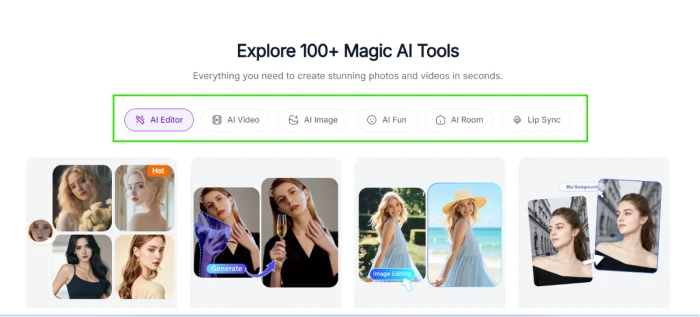
Pixnova.ai tools menu exposing more than 100 AI tools organized across six category families including AI editor AI video AI image AI fun AI room and lip sync for multi modal creative workflows
The 100+ AI tools menu: six category families exposed.
What this shows: The tools menu exposes 100+ AI tools organized across six category families including AI editor, AI video, AI image, AI fun, AI room, and lip sync. Multi-tool breadth is meaningfully differentiated from specialist single-modality AI platforms, providing users with broad creation coverage in a single platform. For users wanting to avoid tool-switching across multiple platforms for different creative tasks, the tool breadth is meaningful editorial value proposition.

Text-to-Image Prompt Setup

Test 03 . Detailed prompt input
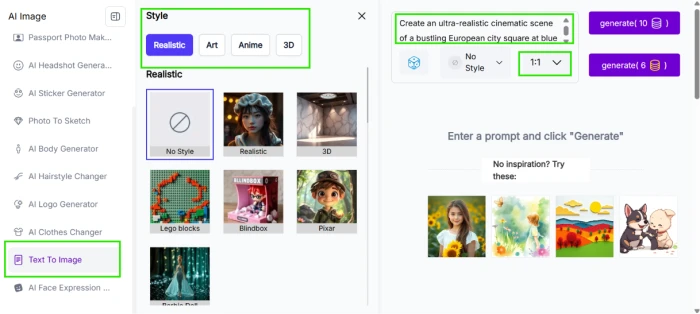
Pixnova.ai text to image generator dashboard exposing prompt input interface with detailed prompt configuration for cinematic photorealistic scene generation from natural language description
The text-to-image dashboard: detailed prompt input.
Test Prompt (detailed cinematic scene)
Create an ultra-realistic cinematic scene of a bustling European city square at blue hour after rain. People of different ages interact naturally, cyclists pass by, street musicians perform, cafes glow with warm lighting, a vintage tram moves through the square, pigeons take flight, reflections shimmer on wet cobblestones, shop signs display perfectly readable text, realistic hands and faces, highly detailed clothing, accurate perspective, dramatic clouds, volumetric lighting, HDR, photorealistic, 8K, award-winning photography, captured with a full-frame camera and a 35mm lens.
What this surfaces: The text-to-image dashboard exposes prompt input supporting detailed cinematic scene descriptions with technical photography direction (lens choice, HDR, volumetric lighting, 8K resolution targeting). The test prompt intentionally stressed the platform with a complex multi-element scene including realistic hands, faces, readable text on shop signs, dramatic lighting, reflective surfaces, and specific camera specifications, testing prompt-following depth across compositional complexity and technical realism requirements simultaneously.

Generated European City Square

Test 04 . Cinematic output

Pixnova.ai generated cinematic scene of European city square at blue hour after rain with people interacting natural lighting reflective cobblestones vintage tram and dramatic cloud atmosphere from detailed text prompt
The generated European city square: cinematic output from prompt.
The validation: First-hand testing validated end-to-end text-to-image generation with the detailed European city square prompt producing cinematic platform output. The image reflects prompt specifications including blue hour lighting, wet cobblestone reflections, urban scene composition, and photorealistic atmosphere. For users evaluating Pixnova against cinematic image generation benchmarks, the workflow delivers usable output from complex multi-element prompts, though category-leading specialist platforms may deliver higher quality on identical prompts.

AI Headshot Generator Setup

Test 05 . Portrait workflow
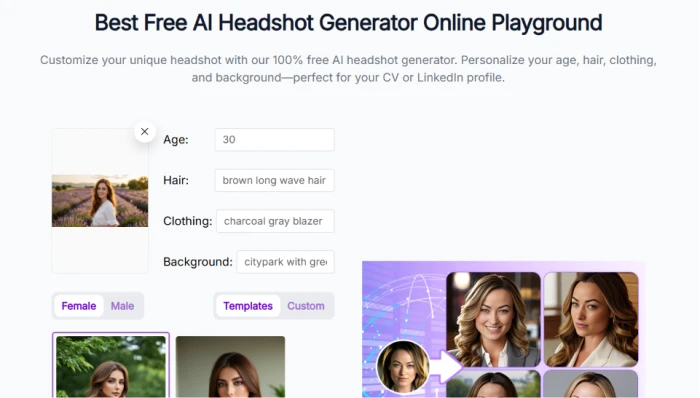
Pixnova.ai headshot generator dashboard exposing portrait workflow configuration for professional headshot creation from source images or platform templates
The AI headshot generator: portrait workflow setup.
The takeaway: The headshot generator dashboard exposes portrait-specific workflow configuration for professional headshot creation. Dedicated portrait feature separates specialized use cases from general text-to-image workflow, supporting users needing headshot output for professional profiles, LinkedIn, or business use cases with workflow tailored to portrait requirements rather than generic image generation.

Generated Headshot Result

Test 06 . Portrait output
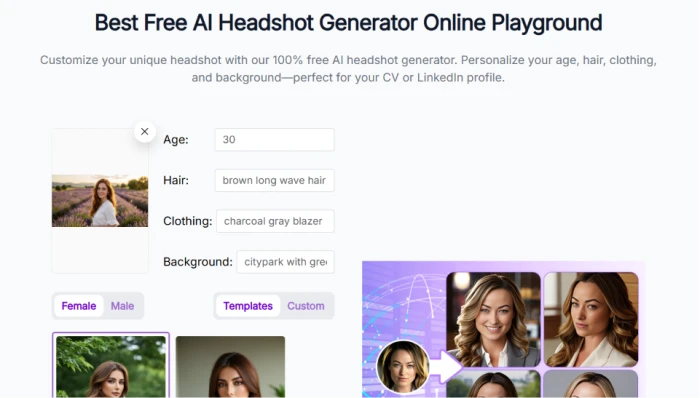
Pixnova.ai generated headshot result showing portrait output from AI generator workflow demonstrating professional headshot capability for user profile and business use cases
The generated headshot: portrait result from workflow.
Worth noting: The headshot workflow completed producing portrait output demonstrating platform capability for professional headshot generation. Output quality is competent for the AI headshot category expectations, useful for users needing headshot content for professional profiles or business use cases without traditional photography studio investment. Portrait-specific optimization is meaningful editorial value beyond generic image generation.

AI Room Feature (6 Sub-Features)

Test 07 . Interior + design suite
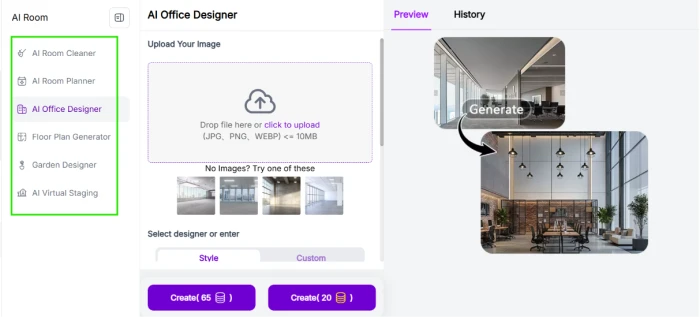
Pixnova.ai AI Room feature exposing six sub features including room clean room plan office design floor plan generator garden generator and AI virtual staging for interior and space design workflows
The AI Room feature: 6 sub-features across interior and design.
What stood out: The AI Room feature exposes six sub-features covering room clean, room plan, office design, floor plan generator, garden generator, and AI virtual staging. This interior-and-design cluster within the broader platform is meaningfully specialized for real estate, interior design, and home planning use cases, positioning Pixnova as more than image generation platform. Cross-category depth within specific verticals is above baseline for multi-tool AI suites where breadth typically trades depth.
100+ AI Tools + Text-to-Image and Headshot Validated + AI Room + 120 Free Credits

Pixnova's structural value proposition combines 100+ AI tools organized across six category families for multi-modal creation coverage, validated text-to-image generation with cinematic output from detailed prompt (European city square), validated headshot generation for professional portrait workflows, AI Room feature depth with six sub-features (room clean, plan, office design, floor plan, garden generator, virtual staging), AI image-to-video capability, and 120 free credits on signup supporting immediate free-tier evaluation without paid commitment. Multi-tool breadth combined with specific vertical depth (AI Room cluster) positions Pixnova as broad AI creation suite meaningfully differentiated from specialist single-modality platforms.

Image-to-Video and Credit History

Test 08 . Video workflow + usage tracking
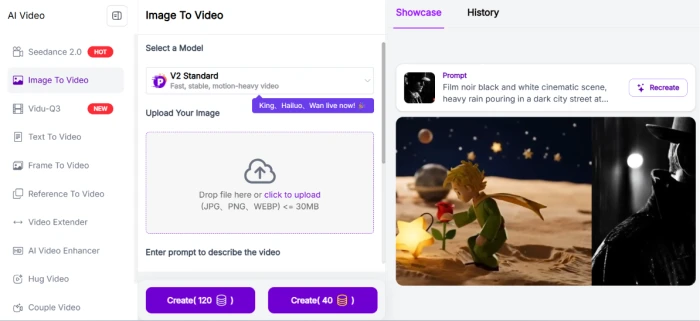

Pixnova.ai AI image to video dashboard exposing motion generation workflow from source image supporting video content creation from static input for social media and short form video use cases
The AI image-to-video dashboard.
Pixnova.ai credit history exposing usage tracking across platform tools with credit consumption breakdown supporting user account management and spending transparency
The credit history: usage tracking transparency.
The signal here: The AI image-to-video dashboard exposes motion generation workflow from source image supporting video content creation from static input. Credit history exposes usage tracking across platform tools with consumption breakdown supporting user account management and spending transparency. Combined, the video capability plus usage transparency positions Pixnova toward practical creator workflows where users need both cross-modal creation and clear cost visibility for planning across 100+ available tools.
!
Multi-Tool Depth Tradeoff + Credit Economy Complexity + Category-Typical Concerns

100+ tools breadth trades specialist depth for cross-category coverage, model quality varies across tools and may not match category-leading specialist platforms (Midjourney for image, Runway for video, dedicated headshot platforms). Credit economy management across many tools requires tracking utilization, the credit history feature helps but multi-tool consumption patterns can escalate credit spend faster than single-modality use where cost accumulation is easier to track. Additionally, category-typical concerns around content moderation and platform policies apply to multi-tool AI platforms handling diverse content generation types across image, video, portrait, and interior design categories.

How this review was put together. First-hand testing on Pixnova.ai in July 2026 covered the homepage with post-login 120 free credits allocation confirmed, 100+ AI tools menu across six category families (editor, video, image, fun, room, lip sync), text-to-image generation validated with a detailed cinematic European city square prompt producing platform output, AI headshot generator with end-to-end portrait workflow validated, AI Room feature exposing six sub-features (room clean, plan, office design, floor plan generator, garden generator, virtual staging), AI image-to-video dashboard, and credit history for usage tracking transparency, evaluated under the FirmCritics Multi-Tool AI Creation Suite Methodology spanning generation validation, tool breadth assessment, specialist depth for verticals like AI Room, free-tier accessibility, credit economy transparency, and content moderation considerations for broad multi-tool AI platforms.

10-Point Feature Review

03 . Honest scoring across capabilities and friction
Feature Scores at a Glance
Multi-Tool Breadth (100+)
7.5
Text-to-Image Validated
7.0
Headshot Generation
7.0
AI Room Feature Depth
7.0
Free Credits Accessibility
7.0
Credit History Transparency
7.0
Image-to-Video Capability
6.5
Two Pricing Models
6.5
Cross-Tool Workflow Integration
6.5
Model Quality Variability
6.0
Feature-by-feature breakdownScored on a 10-point scale, honest evidence-driven distribution
01
Multi-tool breadth (100+ tools) SIX CATEGORY FAMILIES
Documented in Test 02 and tc-discovery callout. The tools menu exposes 100+ AI tools organized across editor, video, image, fun, room, and lip sync category families. Multi-tool breadth is meaningfully differentiated from specialist single-modality AI platforms, providing users with broad creation coverage in single platform. For users wanting to avoid tool-switching for different creative tasks, the tool breadth is meaningful value proposition above baseline.
SCOPE: 100+ tools across 6 familiesVS PEERS: Above specialist baseline
7.5
GOOD
02
Text-to-image validated CINEMATIC OUTPUT
Documented in Test 04 first-hand validation. The detailed European city square prompt with technical photography direction produced platform cinematic output reflecting blue hour lighting, wet cobblestone reflections, urban scene composition, and photorealistic atmosphere. For users evaluating Pixnova against cinematic image generation benchmarks with complex multi-element prompts, the workflow delivers usable output though category-leading specialist platforms may deliver higher quality on identical prompts.
WORKFLOW: Detailed prompt to cinematic imageQUALITY: Competent multi-tool baseline
7.0
GOOD
03
Headshot generation PORTRAIT SPECIALIST
Documented in Test 05 and Test 06. The headshot generator workflow completed producing portrait output demonstrating platform capability for professional headshot generation. Dedicated portrait feature separates specialized use cases from general text-to-image workflow, supporting users needing headshot output for professional profiles or business use cases without traditional photography studio investment. Portrait-specific optimization is meaningful editorial value beyond generic image generation.
WORKFLOW: Portrait-specific optimizedUSE CASE: Professional profiles + business
7.0
GOOD
04
AI Room feature depth 6 SUB-FEATURES
Documented in Test 07 and tc-discovery callout. The AI Room feature exposes six sub-features covering room clean, room plan, office design, floor plan generator, garden generator, and virtual staging. This interior-and-design cluster within the broader platform is meaningfully specialized for real estate, interior design, and home planning use cases. Cross-category depth within specific verticals is above baseline for multi-tool AI suites where breadth typically trades depth.
SUB-FEATURES: 6 interior + design toolsVERTICAL: Real estate + interior focus
7.0
GOOD
05
Free credits accessibility 120 ON SIGNUP
Documented in Test 01. Post-login dashboard confirms 120 free credits allocation for new users supporting immediate platform evaluation. Free-tier credits at signup allow users to test text-to-image, headshot, AI Room, and other tools without paid commitment. Meaningful accessibility signal above baseline where paid registration is required for feature access. Credits sufficient for meaningful evaluation across multiple tool categories before commitment decision.
ALLOCATION: 120 credits at signupACCESSIBILITY: No-paywall evaluation
7.0
GOOD
06
Credit history transparency USAGE TRACKING
Documented in Test 08. Credit history exposes usage tracking across platform tools with credit consumption breakdown supporting user account management and spending transparency. For users needing to track credit consumption patterns across 100+ tools, the history feature supports informed decision-making about tool utilization and pricing tier fit. Transparency above baseline for platforms with opaque credit consumption where users lack visibility into per-tool cost patterns.
SCOPE: Per-tool consumption breakdownVALUE: Spending pattern visibility
7.0
GOOD
07
Image-to-video capability MOTION GENERATION
Documented in Test 08. The AI image-to-video dashboard exposes motion generation workflow from source image supporting video content creation from static input. For creators needing to convert static images into video content for social media or short-form video use cases, the workflow adds cross-modal capability to the multi-tool suite. Category-typical capability at multi-tool platform depth rather than specialist video platform quality.
WORKFLOW: Image to motionUSE CASE: Social + short-form video
6.5
FAIR
08
Two pricing models FLEXIBILITY
Documented in pricing section. Pixnova offers two pricing models including pay-as-you-go for occasional use and monthly subscription for sustained engagement. Dual-model pricing supports different user commitment patterns from casual evaluation through regular workflow use, above baseline for platforms locking users into single pricing structure that may not fit variable usage patterns.
OPTIONS: Pay-as-you-go + subscriptionVALUE: Usage pattern flexibility
6.5
FAIR
09
Cross-tool workflow integration SINGLE-PLATFORM ACCESS
Multi-tool platforms benefit from unified account and credit management across tools reducing friction between different creative tasks. However, meaningful cross-tool workflow integration (chain outputs from one tool as input to another) varies across specific tool combinations, and users should evaluate whether their intended workflow chains are supported before committing. Category-typical integration depth rather than deeply orchestrated multi-tool pipeline.
ACCOUNT: Unified accessCHAINING: Tool-combination dependent
6.5
FAIR
10
Model quality variability DEPTH TRADEOFF
Cross-reference tc-blocker callout above. 100+ tools breadth trades specialist depth for cross-category coverage, model quality varies across tools and may not match category-leading specialist platforms (Midjourney for image, Runway for video, dedicated headshot platforms). Prospective users should evaluate specific model capability against intended use case rather than assume category-leading quality across all generation types. The multi-tool positioning is best for users prioritizing breadth over category-leading depth.
DEPTH: Below specialist platformsBREADTH: Above specialist baseline
6.0
FAIR

Pros and Cons

04 . What works and what to weigh
+What users like
  • 100+ AI tools across six category families: editor + video + image + fun + room + lip sync in single platform
  • Text-to-image validated with cinematic output from detailed European city square prompt with technical photography direction
  • AI Headshot generator validated for professional portrait workflows separate from generic image generation
  • AI Room feature depth: 6 sub-features covering room clean, plan, office design, floor plan, garden, and virtual staging
  • 120 free credits on signup: immediate free-tier evaluation across text-to-image, headshot, and other tools
  • Credit history transparency: usage tracking across platform tools with consumption breakdown
  • Two pricing models: pay-as-you-go for occasional use + subscription for sustained engagement
  • AI image-to-video capability: cross-modal creation extending platform beyond static image generation
What users dislike
  • Multi-tool depth tradeoff: model quality below specialist platforms (Midjourney for image, Runway for video, dedicated headshot tools)
  • Credit economy complexity across 100+ tools: consumption patterns can escalate faster than single-modality use
  • Category-typical concerns for multi-tool platforms: content moderation policies apply across diverse generation types
  • Cross-tool workflow integration varies: chain outputs across tools depends on specific combinations supported
  • Complex prompts may exceed platform quality ceiling versus category-leading specialist alternatives

Pricing Breakdown

05 . Freemium with pay-as-you-go and subscription tiers
FeatureFree Tier (120 credits)Pay-As-You-GoSubscription
Homepage + Browse Full access Full access Full access
100+ AI Tools Menu Full access Full access Full access
Text-to-Image Generation 120 credits Per-credit cost Monthly allocation
Headshot Generator Available Per-credit cost Monthly allocation
AI Room Feature All 6 sub-features Per-credit cost Monthly allocation
AI Image-to-VideoLimited by credits Higher per-credit Monthly allocation
Credit History Access Full tracking Full tracking Full tracking
Best ForPlatform evaluationOccasional useSustained heavy use

The pricing reality: Pixnova offers two pricing models including pay-as-you-go for occasional per-credit purchase and monthly subscription for sustained engagement with credit allocation, alongside the 120 free credits provided on signup. Dual-model pricing supports variable usage patterns. Verify current per-credit pricing and subscription tier allocations directly on the Pixnova pricing page before committing to paid tier.

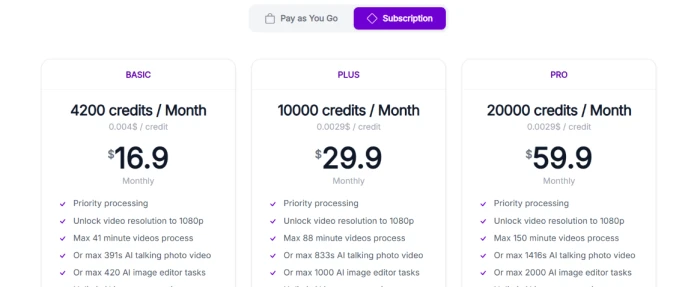
Pixnova.ai pay as you go pricing showing per credit purchase options for occasional platform users needing flexibility without subscription commitment across multi tool AI creation workflows
Pay-as-you-go pricing tier.
Pixnova.ai subscription pricing showing monthly package tiers with credit allocation for sustained users needing regular access to multi tool AI creation platform across editor video image and room categories
Subscription pricing tier.

Pricing accurate as of July 07, 2026.

Pixnova.ai vs the Top 4 Alternatives

06 . How it compares in multi-tool AI creation category
PPixnova.ai RRunway ML CCanva AI LLeonardo AI KKaiber
Score6.87.87.57.26.8
Tool Breadth100+ tools Video-focusedDesign + AI suite Image-focused Video + music
Text-to-Image Quality Competent Strong StrongCategory-leading Standard
Video Generation Image-to-videoCategory-leading BasicLimitedMusic-video focus
Portrait / HeadshotDedicated feature Templates Available
Interior / Design (AI Room)6 sub-features Templates
Free Tier Access120 credits signup Free tierFree basic Free dailyLimited
Credit TransparencyHistory + tracking Standard Simple credits Token-based Standard
Best ForMulti-tool creation + AI Room verticalsCategory-leading video generationDesign + AI combined suiteCategory-leading image qualityMusic-video + creative video

The picture: Pixnova's structural strengths are the 100+ tool breadth spanning six category families, validated text-to-image and headshot generation, and unique AI Room feature depth (6 sub-features) that specialist competitors lack. Runway ML leads on video quality, Canva AI on design-plus-AI integration, Leonardo AI on category-leading image quality, and Kaiber on music-video creation. Pixnova's specific differentiator is the AI Room interior-design cluster combined with the broad multi-tool suite covering typical creative use cases users otherwise switch between specialist platforms for. Selection depends on whether AI Room + multi-tool breadth outweigh category-leading specialist depth in specific creative modalities.

What Users Are Saying

07 . Community feedback patterns from across user communities
Been using Pixnova for multi-tool creative workflows and the 100+ AI tools breadth is real differentiator. Text-to-image quality is competent for most standard uses. AI Room feature is genuinely useful for interior design and real estate visualization work. 120 free credits at signup are enough for meaningful evaluation.
r/AItools user
Multi-tool workflow experience
★★★★☆
r/AItools
Pixnova AI Room feature is unique. Real estate visualization use case delivered.
Trustpilot reviewer
AI Room specific focus
★★★★☆
trustpilot.com
Pixnova delivers on multi-tool AI creation with the 100+ tools breadth spanning editor video image fun room and lip sync categories. Text-to-image quality on complex prompts was competent for the platform tier though category-leading specialist tools like Midjourney deliver higher quality on identical cinematic prompts. The AI Room feature is where Pixnova genuinely differentiates from broader multi-tool competitors like Canva AI or Leonardo, offering six sub-features covering room clean, room plan, office design, floor plan, garden generator, and virtual staging. Credit history transparency is helpful for tracking consumption patterns across many tools. Two pricing models (pay-as-you-go and subscription) support different usage patterns from casual to sustained heavy use. Model quality varies across tools reflecting typical multi-tool depth tradeoff for category breadth.
Product Hunt reviewer
Comprehensive platform assessment
★★★★☆
producthunt.com
Multi-tool AI platforms trade specialist depth for breadth and Pixnova is no exception. Cinematic image generation was competent but not at Midjourney level. AI Room depth is genuine differentiator. Credit history and dual pricing are useful features.
r/GenerativeAI user
Depth-versus-breadth analysis
★★★☆☆
r/GenerativeAI
· The Verdict ·
6.8/10
Should you use Pixnova.ai? Here is who it is for.

Use Pixnova.ai if multi-tool AI creation suite with 100+ tools across editor + video + image + fun + room + lip sync categories fits creative workflow better than switching between specialist platforms; AI Room feature with six sub-features (room clean, plan, office design, floor plan, garden generator, virtual staging) matches real estate, interior design, or home planning use cases; validated text-to-image and headshot generation quality is acceptable for intended use case; 120 free credits at signup provide sufficient evaluation runway; and dual pricing (pay-as-you-go plus subscription) matches variable usage patterns better than single-tier alternatives.

Skip Pixnova.ai if category-leading specialist quality is editorial priority (Midjourney for image, Runway ML for video, dedicated headshot platforms); simple single-modality creation workflow does not need multi-tool breadth and credit economy complexity; complex prompts consistently exceed platform quality ceiling versus specialist alternatives; credit management across 100+ tools creates unwelcome overhead compared to unlimited-tier competitors; or specific creative use case has dedicated best-in-class platform that outperforms Pixnova's multi-tool depth in that modality.

Category RankCapable Pick
Compared To4 Rivals
Tools Available100+
Features Scored10 Points

Discussion

Join the discussion and share your perspective.