QuillBot rewrites text better than it does anything else. Feeding it a 98 word passage returned 97 words with the meaning intact and the clauses reordered, which is a different class of output from thesaurus swapping. The rest of the suite is thinner than the shortcut buttons suggest, and the free tier is built to stop you at the moment a task becomes useful. Best suited to writers who rewrite existing drafts rather than generate new ones.
QuillBot is a rewriting tool that grew a suite around itself. The paraphraser came first and still anchors the product. Around it sit a grammar checker, an AI detector, a humanizer, a plagiarism scanner, a summarizer, a translator and a citation generator, all reachable from one writing box. The company positions this as a single place to finish a draft rather than start one, and the marketing leans on a claim of 35 million writers.
The audience is visible in the design. Students, non-native English speakers and content teams get shortcut buttons for the four tasks they perform most, while everything else is folded into a More menu. Distribution follows the same logic: browser extensions for Chrome and Edge, a Word add-in, a macOS app, and keyboards on Android and iOS.
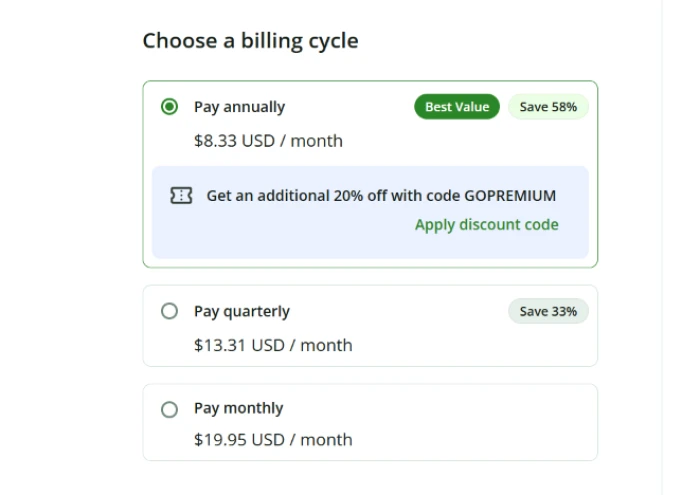
Two plans carry the product. Free costs nothing and Premium starts at $8.33 per month on annual billing, with shorter commitments priced higher.
What Happened When We Tested It
02 . 5 tests covering rewriting, grammar, detection and originality
Testing ran on a signed-in free account from India, which matters because the pricing shown in the dashboard was localised. Every limit described below was hit on that account and then checked against QuillBot's own published plan comparison. The session was designed to find the point where each tool stops rather than to confirm that each tool starts.
The Dashboard Puts Four Tools Forward and Hides the Rest
Test 01 . Navigation
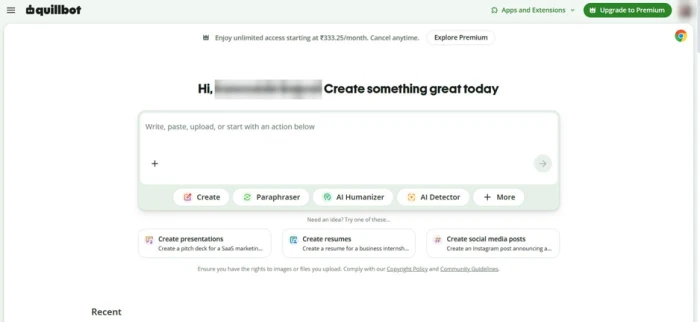
The signed-in dashboard, with the localised upgrade banner running across the top.
First impression: One writing box, four shortcuts, one More menu holding everything else. The layout made sense on the first visit with no hunting, which matters for a product whose core audience includes students working to a deadline. The commercial push arrives before you type: a green upgrade button in the top right and a banner quoting ₹333.25 per month on the India account.
98 Words In, 97 Words Out, Meaning Intact
Test 02 . Paraphraser
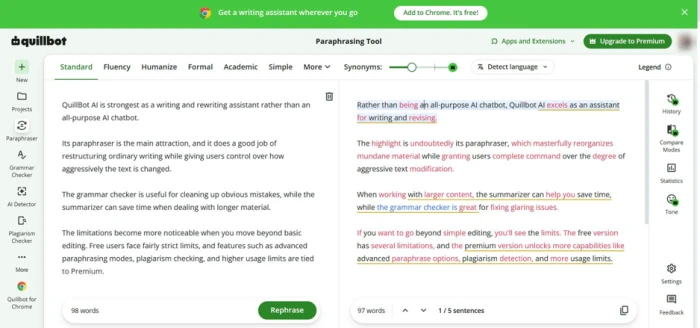
Source on the left, rewrite on the right, every substitution marked.
What this shows: Standard mode returned 97 words across five sentences and held the argument. It reordered clauses and reached for stronger verbs rather than dropping in thesaurus picks, which is where cheaper rewriting tools come apart. Colour coding separated substituted words from restructured phrases, so edits could be accepted or rejected sentence by sentence. A synonym slider governs how far the output drifts, and the middle setting produced copy worth publishing after light touch-ups. Six modes run along the top and two of them are open on the free plan.
★
A language detector living inside the paraphraser
A Detect language dropdown sits in the paraphrasing toolbar rather than in a separate translation area, so a passage in another language can be rewritten without leaving the screen. None of the shortcut buttons advertise it. It surfaced only because the toolbar was being examined rather than the text, and it changes what the paraphraser is for anyone drafting outside English.
!
Humanize returned one sentence, then asked for money
Pushing the freshly paraphrased passage through Humanize produced a single rewritten sentence followed by an upgrade prompt. One line is enough to demonstrate the style shift, so it works as a preview. It does not work as a tool. Nobody humanises one sentence of a 1,000 word article and then pays by the paragraph for the remainder.
78 Corrections Found, Bulk Acceptance Withheld
Test 03 . Grammar checker
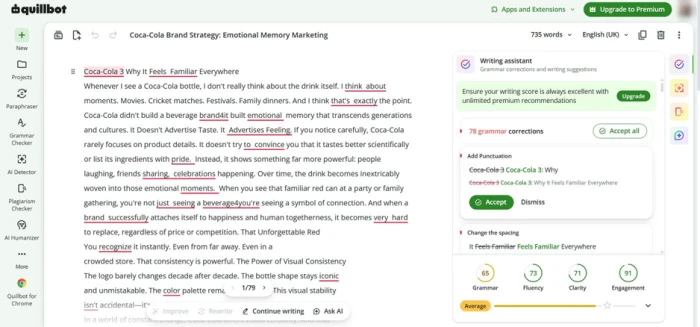
An uploaded marketing file, opened in the editor with its four readability scores.
The key finding: A 735 word marketing file went in as a direct upload rather than a paste, and the editor opened it with formatting intact. The writing assistant counted 78 corrections and scored the document at 65 for grammar, 73 for fluency, 71 for clarity and 91 for engagement. Detection was accurate: missing punctuation in a heading, doubled spacing between words, plus a run of small mechanical slips that had already survived two manual passes. Accepting corrections one at a time works. Accepting all of them does not, because the free plan applies bulk changes to a short stretch and then hands the rest to Premium. On one paragraph that limit never bites. On a client deliverable it converts a five second fix into manual labour.
The Detector Flagged Formatting as Machine Writing
Test 04 . AI detection
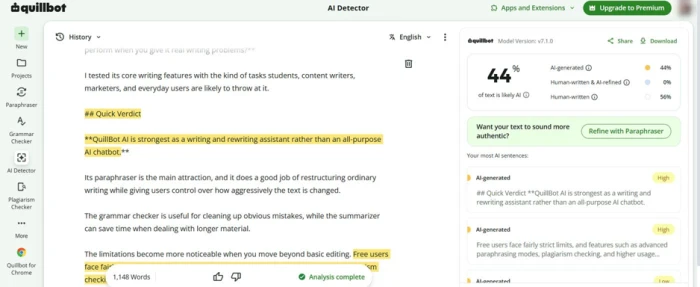
The detector verdict, with the sentences it rates most machine-like listed on the right.
Under the surface: A 1,148 word draft came back at 44 percent likely AI, split into 44 percent AI generated, zero percent human written and AI refined, and 56 percent human written. Listing the individual sentences it rates as most machine-like earns its place, because a flagged sentence can be edited while a bare percentage tells you nothing about where to start. Then came the highest-confidence hits. Two of them were a markdown heading and a bolded verdict line, both formatting rather than prose. A detector reading hash symbols as evidence of machine authorship is measuring layout. QuillBot publishes the ceiling too: free scans stop at 1,200 words and six per day, so a 2,000 word post gets halved and scored twice, and two percentages cannot be averaged into anything meaningful.
The Plagiarism Scan Completed, Then Blurred the Result
Test 05 . Originality
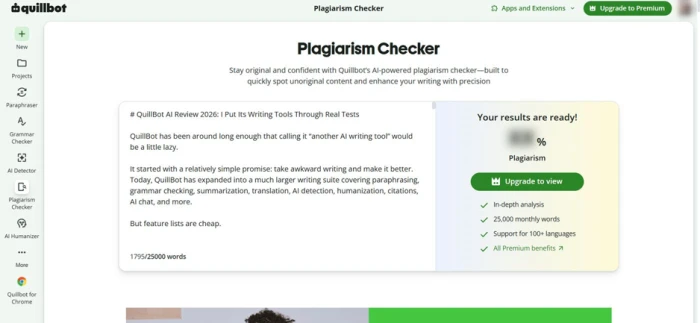
The scan completes, the score stays hidden until the account upgrades.
Where it lands: A 1,795 word draft went in without complaint against a stated 25,000 word monthly allowance. The scan ran to completion. The results panel then announced the report was ready and blurred the percentage behind an Upgrade to view button. Letting the entire scan finish before disclosing that the number costs money is an aggressive piece of design. Treat plagiarism checking as a Premium feature when you compare the plans, because that allowance belongs to Premium and the free account only gets to watch the progress bar.
How this review was put together. Testing took place on September 9, 2026 across a signed-in free account, covering the paraphraser, the grammar checker on a document upload, the humanizer, the AI detector and the plagiarism scanner. Every plan limit quoted here was read from QuillBot's published feature comparison rather than inferred from the paywall. Pricing was verified the same day at quillbot.com/premium, with seat rates taken from the Teams checkout and the discounted academic rate from the student page. Competitor prices were pulled from each vendor's own site on the same date.
10-Point Feature Review
03 . Scored against what the session produced
Feature Scores at a Glance
Paraphrasing Quality
9.0
Interface Clarity
8.5
Language Coverage
8.2
Grammar Checking
8.0
Integrations and Reach
7.8
Document Handling
7.0
Pricing Transparency
6.0
Free Tier Usefulness
5.5
Plagiarism Access
5.2
AI Detector Accuracy
5.0
Feature-by-feature breakdownWeighted toward rewriting, which is the reason to buy this product
01
Paraphrasing Quality Best in class
Clause reordering and verb substitution instead of word swapping, with a synonym slider that actually changes the aggression of the rewrite. Not a 9.5, because the output still needs a human pass on anything nuanced and reviewers working in literary and technical registers report the same flattening. Not an 8.5, because a near-identical word count with the meaning preserved is the hard part and this cleared it on the first attempt.
Input: 98 wordsOutput: 97 words, 5 sentences
9.0
Excellent
02
Interface Clarity Win
One writing box, four shortcuts, no orientation period. Losing half a point because a translator and a citation generator sit two clicks deep when many users would reach for them daily, and the upgrade banner occupies prime space before any work begins.
Surfaced tools: 4Time to first task: Under a minute
8.5
Strong
03
Language Coverage Win
Paraphrasing runs in 23 languages, translation reaches beyond 40, and the in-toolbar language detector removes a step for anyone drafting outside English. Held below 8.5 because grammar correction covers only six languages, so a French draft gets rewritten well and proofread thinly.
Paraphrase languages: 23Grammar languages: 6
8.2
Strong
04
Grammar Checking Win
78 corrections on a 735 word file with no false alarms worth arguing about, including doubled spacing and heading punctuation that two manual passes had missed. Capped at 8.0 rather than 8.5 because the four-part scoring readout tells you a document rates 65 for grammar without explaining what would move it, and editors already running a modern word processor will find much of this duplicated.
Corrections: 78Engagement score: 91
8.0
Strong
05
Integrations and Reach Solid
Chrome, Edge, a Word add-in, a macOS app and keyboards on both mobile platforms cover the places writing actually happens. Not higher, because reviewers report the Safari extension misfiring and the Word add-in behaving inconsistently, and a 10 device ceiling will pinch anyone who works across a phone, a tablet and several machines.
Surfaces: 6 plus webDevice ceiling: 10 concurrent
7.8
Solid
06
Document Handling Mixed
A direct upload opened with formatting preserved, which beats pasting into a box and losing structure. Pulled down to 7.0 because every tool applies its own ceiling to the same document: the summarizer takes 1,200 words free against 6,000 on Premium, and there is no single place to see which limit you are about to hit.
Upload tested: 735 wordsSummarizer cap: 6,000 words paid
7.0
Mixed
07
Pricing Transparency Flag
Every billing cycle is published with its effective monthly rate, which is more than most competitors manage. Dropped to 6.0 because the premium page's own data payload carries several alternate price sets alongside the one served, the seat rate only appears after clicking into the Teams checkout, and the dashboard quoted a localised figure that no public page displays.
Published cycles: 5Alternate price sets in payload: Present
6.0
Weak
08
Free Tier Usefulness Flag
125 words of paraphrasing and two of nine modes is enough to evaluate the rewriting engine honestly, which is why this is not a 5.0. It stays below 6.0 because the humanizer stops after one sentence and bulk grammar acceptance is withheld. The caps are set just under the length of a real task rather than at a round demonstration figure.
Paraphrase cap: 125 wordsHumanizer: 6 uses per day
5.5
Weak
09
Plagiarism Access Flag
The engine accepted 1,795 words and finished the comparison, so the capability is real and that keeps it above 5.0. It cannot rise further while the free account watches a scan complete and then meets a blurred percentage, which spends a user's time to manufacture a purchase decision.
Scan accepted: 1,795 wordsResult shown free: None
5.2
Weak
10
AI Detector Accuracy Flag
Sentence-level highlighting is the right design and stops this falling below 5.0, because a writer can act on a flagged line. It goes no higher after two of the highest-confidence hits turned out to be a markdown heading and a bolded line. Add a 1,200 word free ceiling and a documented inability to judge passages under roughly 80 words, and the verdict becomes unusable at both ends of the length range.
Scan length: 1,148 wordsVerdict: 44 percent likely AI
5.0
Weak
Pros and Cons
04 . What holds up and what gets in the way
+What Works
Rewrites that survive review: output you can publish after a light pass rather than a rebuild
Change tracking you can act on: colour coding separates swapped words from restructured phrases
Adjustable rewrite aggression: the synonym slider moves between light polish and heavy rework
No orientation period: the main tasks are one click from the writing box
Multilingual rewriting in place: language detection sits in the toolbar instead of a separate screen
Uploads keep their structure: documents open in the editor with formatting intact
−What Gets in the Way
Detector confuses layout with authorship: headings and bold text register as machine writing
Originality results arrive blurred: the scan completes before you learn the number is withheld
Humanizer functions as a preview: one sentence back, then a wall
Corrections apply one at a time: bulk acceptance stops partway through a long document
Scoring without direction: the grammar readout rates a document but never says what would raise it
Pricing Breakdown
05 . Free against Premium, verified from the official plan page
Feature
Free$0 per month
Premium$8.33 per month, billed annuallyBest Value
Paraphrase word limit
Up to 125 words
Full access
Built-in paraphrasing modes
Standard and Fluency
9 modes plus custom
Humanize text
125 words, 6 uses per day
Full access
AI detector scan
1,200 words, 6 per day
No word limit
Summarizer input
1,200 words
6,000 words
Plagiarism checker
✗
25,000 words per month
AI chat
20 chats
Higher usage
AI image generation
3 per day
300 per month
Document storage in Flow
10 MB
100 MB
The tier math: Paying by the month costs $19.95, so the headline rate is a reward for a twelve month commitment rather than a discount off a real monthly price. Two mid-length options sit almost on top of each other: quarterly works out at $13.31 a month and semi-annual at $13.33, which makes the six month commitment pointless. Stretch to two years and the rate falls to $6.66. The odd result is at the top of the range. A lone Premium seat costs $99.95 a year, while a two-person Teams account bills $89.95 per seat, so a second writer lowers the per-head price below what one writer pays alone. Students with verified credentials pay $74.96 a year. One caution on all of it: the plan page ships several alternate price sets in its own data payload, so the figure a given visitor is shown is not guaranteed to be the figure above.
The billing cycle selector inside the upgrade flow.
Pricing verified September 9, 2026. QuillBot runs promotions continuously, so open the official pricing page and confirm what your account is offered before committing.
QuillBot vs the Top 4 Alternatives
06 . Entry prices confirmed on each vendor's own site today
QQuillBot
GGrammarly
WWordtune
SScribbr
SStealthWriter
Score
7.3
7.2
7.2
7.2
5.1
Entry Paid Price
$8.33 per month, annual
$12 per month
$4.89 per month, annual
$19.95 per document
$20 per month
Free Tier
125 word rewrites
Yes, limited
Yes, limited
Free tools, paid reports
Yes, limited
Core Strength
Rewriting that holds meaning
Correctness and tone
Sentence-level alternatives
Academic originality reports
Detector evasion
Billing Model
Subscription
Subscription
Subscription
Pay per document
Subscription
Best For
Reworking drafts you already have
Catching errors everywhere you type
Choosing between phrasings as you write
A one-off originality check with no plan
Pushing machine text past detectors
How to choose between them: The decision turns on whether you are fixing text or producing it. Grammarly at 7.2 wins if most of your day is typing into other people's interfaces and you want errors caught in place; it costs more and rewrites less ambitiously. Wordtune, also 7.2, undercuts everything here on annual billing and suits writers who want a menu of alternative sentences rather than a finished rewrite. Scribbr makes sense for a student who needs one originality report and does not want a subscription attached to it. StealthWriter sits at 5.1 for reasons worth reading before you buy. QuillBot earns its place when the job is taking a draft that already exists and making it read better, which it does more reliably than anything else on this list.
What Users Are Saying
07 . Six accounts covering ground the session could not reach
"the grammar checker is the feature that contributes the least value"
Marcos P.
Product manager at a digital newsroom using the paraphraser on wire copy
Use QuillBot if rewriting is the bulk of your work: reworking your own drafts, adapting copy across audiences, moving between languages, or shortening something that runs long without losing its argument. Commit to twelve months or the rate stops being competitive, and put two seats on a team account if a colleague writes too.
Skip QuillBot if you need a dependable AI verdict, because the detector rates formatting as authorship and refuses passages that run either too short or past the free scan ceiling. Grammarly at 7.2 is the better fit for catching errors as you type, and Wordtune at 7.2 costs less for writers who want phrasing options rather than finished rewrites.

Discussion
Join the discussion and share your perspective.