Recraft is the image generator that hands back an editable vector, not a flat picture. In our testing on the free tier it produced a coffee-cup icon as a true SVG at 1248 by 1248, spelled a bold sale poster without a slip, and returned portraits that read like real photography. The rough edges were just as clear: it quietly overrode our aspect-ratio and image-count settings, pasted a logo flat onto a mockup shirt, then tangled four hands into a single knot.
Nano Banana, Flux, GPT Image plus a native vector engine
Vector Export
SVG, Lottie, PDF true vector output
Free Tier
Daily credits, public no private generation
Entry Plan
$10 per month, billed annually
Video
Kling, Veo, Sora Pro plan only
What Recraft Does
01 . Overview
Recraft is a text-to-image platform built for one job most generators skip: producing artwork a designer can actually open and edit. Where a typical model returns a flat raster, Recraft generates native vector output, real SVG paths you can scale from a favicon to a billboard, alongside standard raster images, 3D-style art, and mockups.
The product wraps that vector engine in a working design surface. An infinite canvas holds a project, a Style system locks a brand look across a whole set of assets through custom palettes and saved styles, and one-click tools cover vectorizing, upscaling, background removal, and mockups. On the model side Recraft now routes to a roster of external engines for images, including Nano Banana, Seedream, GPT Image, and Flux, and it recently added video generation through Kling, Grok Imagine, Veo, Sora, and Seedance. The whole line is exposed through a developer API for teams that want to build generation into their own products. The audience it courts is professional: brand designers, marketers, small studios, and in-house teams shipping logos, icon sets, packaging, and campaign artwork.
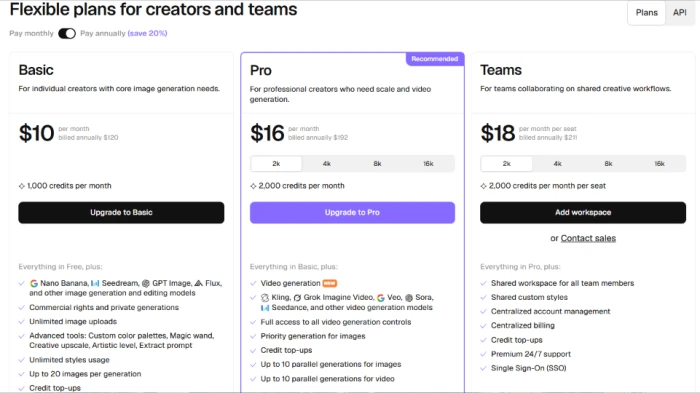
It runs on a freemium model. A free tier sits below the paid plans, which run from Basic at $10 a month to Pro at $16 to Teams at $18 per seat, each billed annually, with credit top-ups sold on top.
What Happened When We Tested It
02 . 7 tests, from vector icons to a four-way high-five
I ran Recraft on its free tier in a desktop browser, generating across icons, vector art, marketing posters, portraits, a product mockup, and a group scene. Every test used model V4.1, and I watched the credit counter fall from 50 into the 30s as I worked. The results split cleanly: some outputs matched or beat what the marketing promised, and a couple of areas exposed rough edges a paying professional would feel.
A real vector, not a raster in disguise
Test 01 . Native vector output
★ Prompt Used
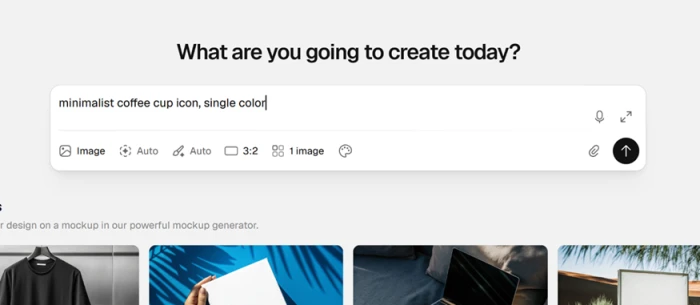
"minimalist coffee cup icon, single color"
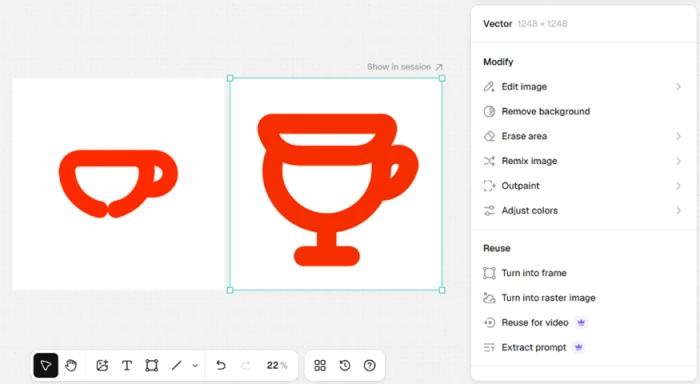
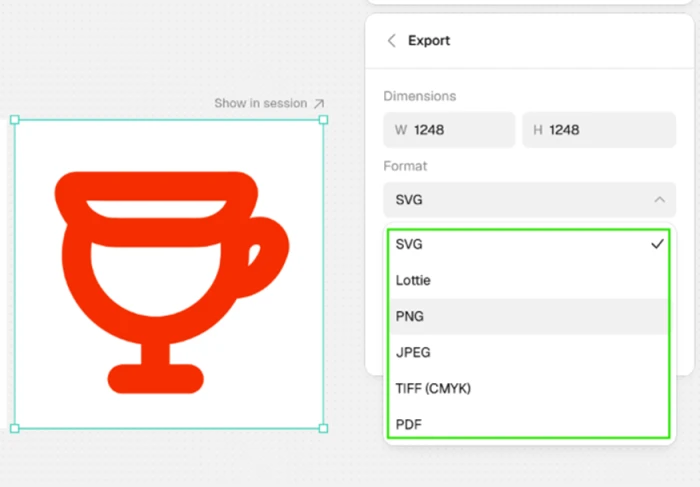
The starting prompt, with image count set to 1 and aspect ratio set to 3:2.Two cups from one prompt. The right one is clean, the left one is misshapen.Export options confirm true SVG output alongside Lottie and PDF.
The evidence: Recraft went straight into a vector generation pass rather than faking it with a raster export. The interesting part was the gap between the two cups it produced from the same prompt in the same run: one crisp and balanced, the other lumpy and thin like a rushed sketch. Generate once and walk away, and you might grab the weaker version with a better one sitting right beside it. The export panel is where the tool earns its name. The output was a genuine vector at 1248 by 1248, downloadable as SVG, Lottie, PDF, and other production formats. That is usable output, not a raster pretending to scale, and for anyone building icon sets or logos it is the feature that justifies the tool.
The settings it quietly ignored
Test 02 . Controls and reliability
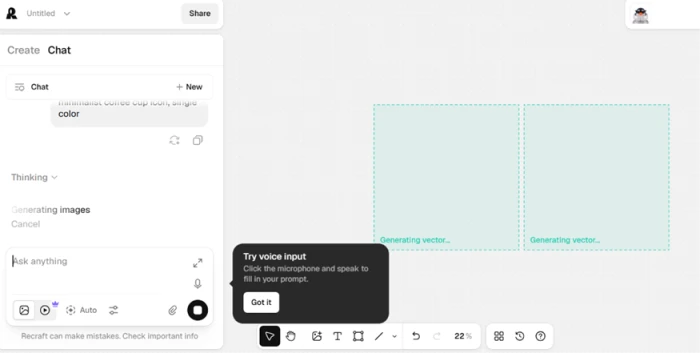
Image count was set to 1, yet two vector tiles generate side by side.
The bug report: Look back at the first screenshot. I set the image count to 1 and the aspect ratio to 3:2. Recraft generated two tiles instead of one, and the final vector came out at 1248 by 1248, a 1:1 square. Both explicit settings were overridden. The image count might be tied to how Chat mode spins up variations, so on its own I would not call that a hard defect. The aspect-ratio mismatch is harder to excuse. I asked for 3:2 and received a square, with no warning that my choice had been dropped. On a free plan burning limited daily credits, spending a generation on the wrong dimensions stings.
Text rendering that held up
Test 03 . In-image text
★ Prompt Used
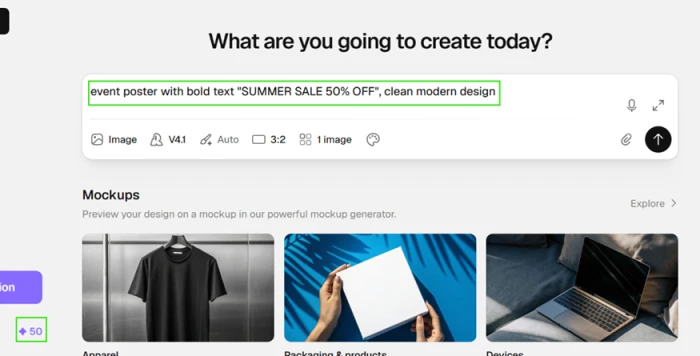
"event poster with bold text SUMMER SALE 50% OFF, clean modern design"
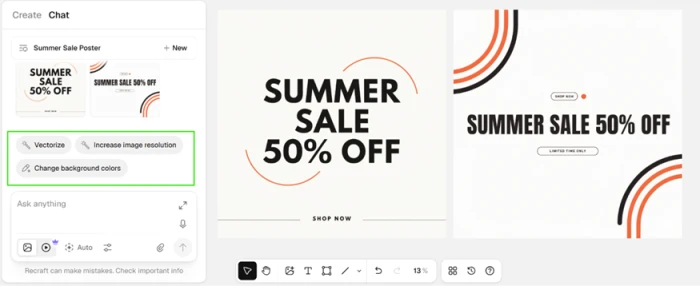
The poster prompt running on model V4.1, with 50 credits showing.Two poster variants, both with correctly spelled text and clean layout.
What stood out: Older reviews flagged text-in-image as a weak spot, so I braced for garbled letters. Both poster variations spelled the phrase correctly with clean, well-placed typography, no dropped characters and no invented letters. I pushed further with longer marketing copy across additional runs and the spelling held up. On V4.1, text rendering reads as a strength rather than the liability it used to be. The left panel also surfaced quick follow-up actions like vectorize, resolution boost, background-color changes, and upscale, which kept the editing loop tight.
People that looked like photographs
Test 04 . Photorealism
★ Prompt Used
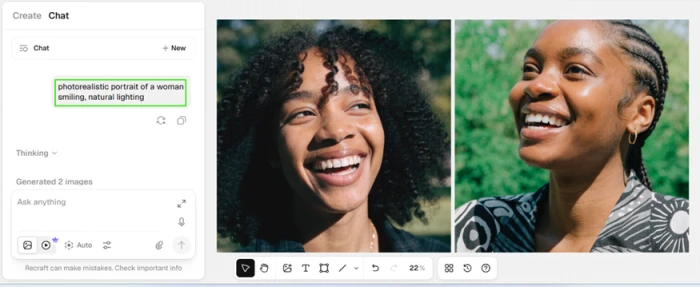
"photorealistic portrait of a woman smiling, natural lighting"
Two portrait outputs that read like real photography.
Beating its reputation: Photorealism is usually listed as a reason to pick another tool, so I expected a plasticky result. What came back looked like real photography. The skin texture read naturally, the light fell off the way it does in a real photo, and the expressions looked convincing across both faces. That directly contradicts the common claim that Recraft cannot handle realistic people. In this testing it handled them well.
A logo that sat on top of the shirt
Test 05 . Product mockup
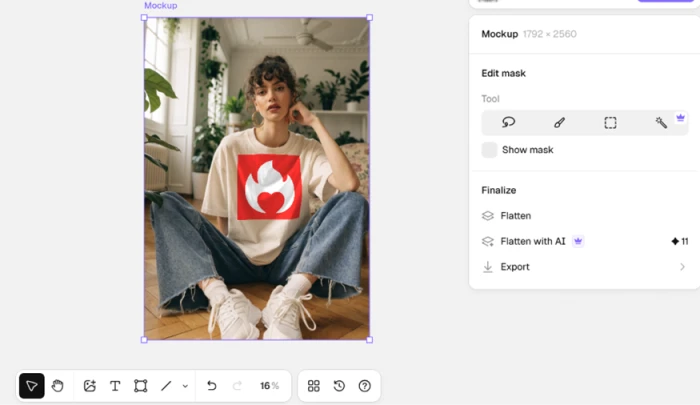
The logo sits flat on the shirt instead of following the fabric folds.
The first honest miss: I placed a flame logo on a t-shirt and the graphic sat flat on the fabric, ignoring the natural folds and shadows of the shirt. It looks pasted on rather than printed, usable for a rough concept but not convincing enough for a polished storefront listing. The Flatten with AI option that might improve this carries a credit cost on the free tier.
Four hands, one tangled knot
Test 06 . Anatomy
★ Prompt Used
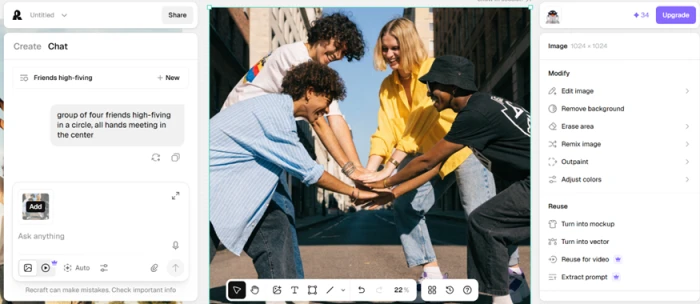
"group of four friends high-fiving in a circle, all hands meeting in the center"
The four hands merge into a tangled mass where fingers cannot be separated.
The clearest failure: The faces and poses came out fine, clothing included. The hands did not. At the center of the frame, the four hands collapse into a knot of merged fingers you cannot count or separate. This is the textbook AI hand problem, and forcing four hands to meet at one point exposed it fast. Anyone generating people interacting with their hands should plan to regenerate or edit.
Where the free tier stops you
Test 07 . Free-tier limits
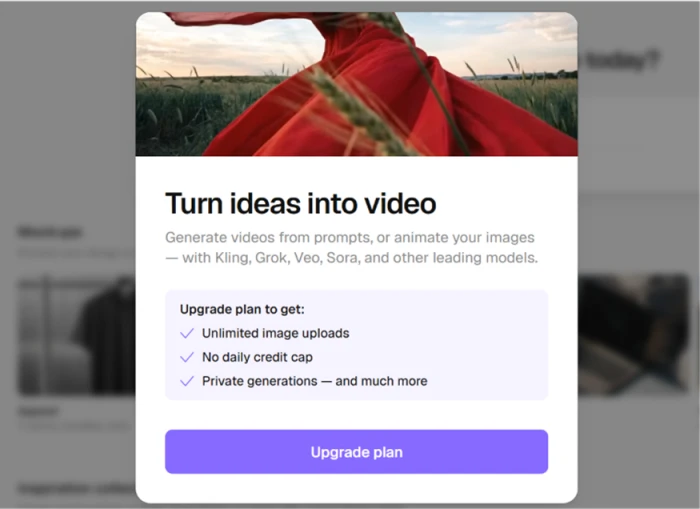
Video sits behind an upgrade wall, which also lists the free-tier restrictions.
Worth noting: Video generation is fenced off entirely. Trying to reach it threw an upgrade prompt naming Kling, Grok, Veo, and Sora as the models behind the paywall. The same panel spelled out the free-tier limits in one place. There are no unlimited image uploads. A daily credit cap applies. Private generations are off, so free-tier work is public by default, which matters for a US audience weighing privacy. Across an afternoon of testing my credits drained fast enough that I rationed the final few generations, and a serious project would hit the daily cap well before finishing.
★
True vector export is the real deal
The strongest thing I validated was the native vector pipeline. Recraft generated the icon as scalable geometry and let me export it as SVG, Lottie, PDF, and other vector formats from the same panel, not a raster file dressed up to look like one. Paired with clean in-image text and portraits that passed for stock photography, this is the reason a design team would choose Recraft over a raster-only generator.
!
Settings drift and a demo-grade free tier
Two things undercut the experience. The tool silently overrode my aspect ratio and image count, so a generation can burn credits on the wrong output with no warning. And the free tier reads as a demo: a daily credit cap, public output, no private mode, and video locked behind Pro. Judge Recraft on a paid plan if privacy or reliable controls matter to your work.
How this review was put together. I tested Recraft on a fresh free account in September 2026, running seven prompts on model V4.1 in a desktop browser and capturing each screen as it surfaced, from results to export panels to upgrade prompts. Pricing and plan features were read from Recraft's own pricing page and cross-checked against recraft.ai, not lifted from a third-party roundup. The behavior described here reflects that single session, without cherry-picking the best of each set.
10-Point Feature Review
03 . Scored on what it did, not what it claims
Feature Scores at a Glance
Native vector output
9.0
In-image text rendering
8.5
Style and brand control
8.0
Base photorealism
7.5
Model and integration breadth
7.0
Editing and export workflow
6.5
Product mockups
5.5
Free tier generosity
5.0
Settings that stick
4.5
Anatomy: hands and counts
4.0
01
Native vector output Standout
This is the whole reason to choose Recraft, and testing confirmed it: the coffee-cup prompt returned scalable geometry exported as a genuine SVG at 1248 by 1248, not a traced raster. It sits at 9.0 rather than a perfect score because quality inside a single run swung, with one clean cup beside one lumpy one. It stays at the top of the range because true, editable vector output is something no raster-only rival offers.
Export formats: SVG, Lottie, PDFNative size: 1248 x 1248
9.0
Excellent
02
In-image text rendering Strong
Recraft spelled SUMMER SALE 50% OFF correctly across both poster variations with clean, well-placed type, and longer marketing copy held up across extra runs. It lands at 8.5 rather than higher because the older reputation for garbled text means it still has to prove itself on dense paragraphs. On the short, punchy copy most posters use, it was reliable.
Misspellings seen: NoneCopy length tested: Headline + body
8.5
Excellent
03
Style and brand control Deep
Beyond a single image, Recraft leans on a Style system: custom color palettes and saved styles that hold a brand look across a whole campaign, which users repeatedly single out as its edge. I confirmed the palette and quick-action controls in the editing panel during testing. It scores 8.0 because the depth is there even though it adds a learning curve for casual users.
Style controls: Palettes + saved stylesConsistency: Brand set focus
8.0
Strong
04
Base photorealism Solid
The portrait prompt returned faces that passed for stock photography, with natural skin texture and believable light falloff across both results. That contradicts the common line that Recraft cannot do realistic people. It sits at 7.5 rather than higher because realism is a secondary mission here and the mockup and group tests showed coherence drops once a scene gets complex.
Portraits: ConvincingComplex scenes: Weaker
7.5
Strong
05
Model and integration breadth Broad
Recraft now routes to a wide roster of external engines for images, including Nano Banana, Seedream, GPT Image, and Flux, plus a native vector engine of its own, and it exposes the line through a developer API. It scores 7.0 because the breadth is real but adds decision overhead, and the newest models sit behind paid tiers rather than the free plan I tested.
Image models: Nano Banana, Flux, moreAPI: Yes
7.0
Broad
06
Editing and export workflow Capable
Quick actions for vectorize, resolution boost, background changes, and upscale sat one click from each result, which kept iteration tight, and export offered several production formats. It lands at 6.5 because helpers such as Flatten with AI cost credits on the free tier, and the canvas rewards learning before it feels fast.
The flame-logo shirt showed the limit plainly: the graphic sat flat on the fabric, ignoring folds and shadows, so it read as pasted on rather than printed. It scores 5.5 because it is fine for a rough concept but not for a storefront listing, and the fix, Flatten with AI, spends more credits.
Realism: Flat overlayGood for: Rough concepts
5.5
Mixed
08
Free tier generosity Thin
The free plan runs on a daily credit cap that emptied fast, from 50 into the 30s across an afternoon, with no private generation and video locked away. It scores 5.0 because those limits push it toward a demo rather than a place to work, and outputs are public by default. Recraft does run free-tier credit experiments, so the exact daily allowance can vary between accounts.
Free credits: Daily cap (about 50/day)Output visibility: Public
5.0
Weak
09
Settings that stick Buggy
This is where the test turned into a bug report. I set image count to 1 and aspect ratio to 3:2, and Recraft returned two tiles at a 1:1 square with no warning that either choice had been dropped. It scores 4.5 because overriding explicit user settings on a metered free plan wastes credits, though the count behavior may tie to how Chat mode spins up variations.
Aspect ratio honored: No (asked 3:2, got 1:1)Image count honored: No
4.5
Weak
10
Anatomy: hands and counts Weak
The four-way high-five was the clearest failure. Faces and poses came out fine, clothing included, but the four hands collapsed into a knot of merged fingers you cannot count or separate. It scores 4.0 because forcing hands to meet at one point broke the model fast, and anyone generating people mid-gesture should plan to regenerate or edit.
Hands at center: MergedFix needed: Regenerate / edit
4.0
Weak
Pros and Cons
04 . What you feel using it day to day
+What Works
True vector output: icons and logos export as real SVG and Lottie files, ready to open in a vector editor.
Text that ships: bold poster copy came out correctly spelled and cleanly placed across variations.
Convincing photorealism: portraits read like stock photography, with natural skin and lighting.
Deep brand control: custom palettes and saved styles keep a look consistent across a whole set.
Tight editing loop: vectorize, upscale, background changes, and resolution boost sit one click from each result.
Broad model roster and API: image and video engines under one roof, exposed for developers to build on.
−What Grates
Settings drift: it overrode both aspect ratio and image count with no warning, wasting a metered generation.
Hands and crowds: four hands meeting in one spot fused into an uncountable knot.
Flat mockups: a logo sat on top of the shirt instead of following its folds and shadows.
Demo-grade free tier: a daily cap, public outputs, no private mode, and video locked away make the free plan feel like a trial.
Pricing Breakdown
05 . Free through Teams, and where the credits bite
Feature
Free$0
Basic$10/mo billed annually
Pro$16/mo billed annuallyRecommended
Teams$18/mo per seat
Credits
Daily cap, public
1,000 / month
2,000 / month
2,000 / month per seat
Leading image models (Nano Banana, Flux, GPT Image)
What you're actually paying: The headline figures are the annual-billing rate, which Recraft discounts by 20 percent against paying month to month, so choosing monthly raises each price. What a plan buys is credits. They are spent per generation, and how many images a batch returns shifts with the model and quality you pick, so Basic's 1,000 monthly credits can mean a few hundred images or more depending on how you generate. Priority credits are a monthly ration that does not roll over, and top-ups, sold separately on Basic and above, never expire and cover the overflow. Pro is the step that unlocks video and parallel generation, and Teams adds shared workspaces, shared styles, centralized billing, and single sign-on for groups. The free tier is the one to watch: the daily cap and public-by-default output make it a place to try Recraft, not to ship from.
Recraft's three paid tiers, shown on the annual billing view.
Pricing checked against Recraft's official pricing page on September 16, 2026. Plans and credit limits shift often, so confirm the current numbers on the official pricing page before you subscribe.
Recraft vs the Top 4 Alternatives
06 . Where it wins and where a rival fits better
RRecraft
IIdeogram
MMidjourney
FFirefly
DDALL·E 3
Native vector (SVG)
Yes, native
No
No
Raster only
No
In-image text
Strong
Best in class
Weak
Passable
Good
Free tier
Yes, public
Yes, slow queue
No
Yes
Yes, in ChatGPT
Developer API
Yes
Yes, per image
None official
Yes
Yes
Best For
Editable vector and brand sets
Text-heavy posters and logos
Photoreal art and style
Commercial-safe Creative Cloud work
Casual prompts inside ChatGPT
Where to land: If the deliverable is an editable logo, an icon set, packaging, or brand artwork you will scale and hand off, Recraft is the one tool here that outputs real vectors, and that is the whole reason to pick it. Reach for Ideogram (7.1 in our testing) when the words inside a poster are the job and you can live with a raster file. Choose Midjourney when the image is pure atmosphere and you want the most refined realism. Firefly earns its place if you already work inside Photoshop and need output you can defend on licensing, and DALL·E 3 is the convenient default for casual prompts inside ChatGPT. Any design team shipping editable brand assets should trial Recraft first.
What Users Are Saying
07 . Real users on the parts we could not test
The sentiment splits by platform. On G2, Recraft averages around 4.7 across several hundred reviews, with designers praising vector quality and brand consistency. Trustpilot tells the opposite story, a score near the bottom across a much smaller set of reviews dominated by billing and refund complaints. Read both before you commit.
The line quality is exceptional even at 100% zoom.
Is Recraft worth it for vector and brand design work?
Use Recraft if you need artwork you can open and edit, the logos, icon sets, packaging, and brand assets that ship as real SVG and Lottie files. In testing it paired that with clean in-image text and portraits that passed for photographs, which makes it the strongest pick here for design teams that scale their work.
Skip Recraft if flawless anatomy or hands-off reliability is the job, since a four-hand scene fused into a knot and the tool overrode our own aspect-ratio and count settings. If words inside the image are your only concern, Ideogram (7.1 in our testing) edges it on pure typography.


Discussion
Join the discussion and share your perspective.