Remaker AI is a browser-based creative suite built around face swap, with a wider toolkit that now covers AI image generation, photo restoration, video face swap, headshot generation, background removal, magic eraser, and upscaling. The thing that sets it apart in the AI image category is the pricing model: no subscription, one-time credit purchases, and credits that never expire. New users get 30 free credits, packs start at $5.99 for 200 credits, and the platform earned a spot on a16z's Top 50 Gen AI Web Products list in 2025. The product is real, the face swap is genuinely category-leading, and the friction sits in two specific places that this review tested directly.
FC
FirmCritics Editorial Team
Published May 29, 2026 · 16 min read · Updated regularly
Remaker AI started life as a face swap tool and built a reputation on getting that one thing right. Over the last two years it expanded into a full browser-based suite. The current line-up covers photo and video face swap, an AI image generator, AI portrait and headshot generators, a tattoo designer, an AI photo editor, an image upscaler, a background remover, a magic eraser, a video enhancer, an AI video generator, and a library of photo effects and templates for short-form content.
Two product decisions define how Remaker feels different from competitors. First, everything runs in the browser. No download, no install, same experience on Windows, Mac, iOS, and Android once signed in. Second, the pricing model. Where Krea, Midjourney, and most rivals run a monthly subscription, Remaker sells credits one-time. Buy a pack, spend the credits when projects come up, hold the balance for a year without using it, and the credits are still there.
a16z included Remaker AI on its Top 50 Gen AI Web Products list for 2025, which is a useful signal of traffic scale and product-market fit. The face-swap workflow specifically is what reviewers consistently rate as best-in-class, and the wider toolkit is built around that core. The friction shows up in two predictable places that the testing section below documents directly.
What Happened When We Tested It
Five tools, real outputs, honest observations
To evaluate Remaker on production work rather than demos, we ran five separate tests across the most-used tools in the suite: photo face swap, the LinkedIn-style headshot generator, video face swap, the old photo restoration effect, and the text-to-image generator. The full source screenshots and outputs from each run are below.
The Dashboard
Onboarding
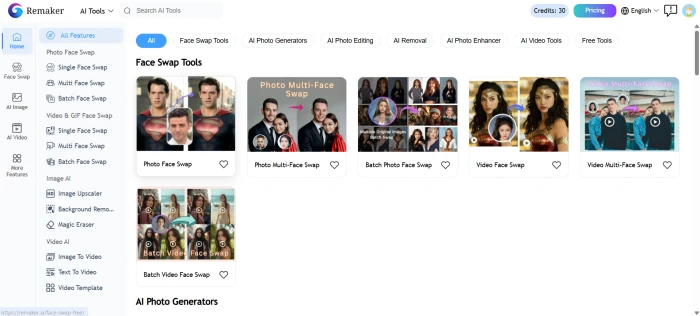
The Remaker AI dashboard, with tool tiles and quick access to face swap, image generation, and the wider suite.
The home view organises the entire toolkit into tiles, which makes the platform much easier to navigate than the per-feature subdomain layouts some competitors use. Signup gives 30 free credits, no card prompt, and the dashboard surfaces credit balance prominently.
Photo Face Swap
Test 01 · The flagship
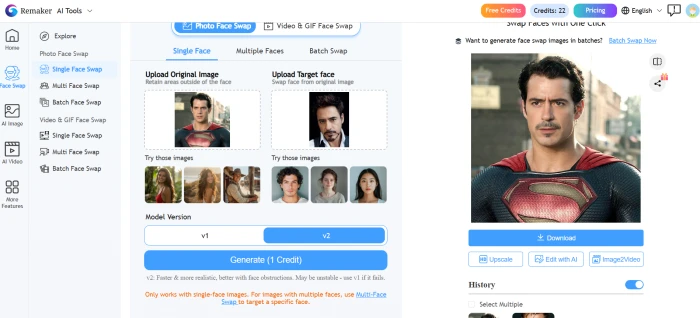
Source image, target image, and result, side by side in the Remaker face swap interface.
Photo face swap is what built Remaker's reputation and the test reflects why. Upload, choose source and target, and the result lands in a few seconds. Identity preservation on the swapped face is clean and the lighting blends with the host image, which is the failure mode that catches many free tools. Credit cost runs 2 to 8 per swap depending on resolution and detail.
LinkedIn Profile Photo Generator
Test 02 · AI Headshots
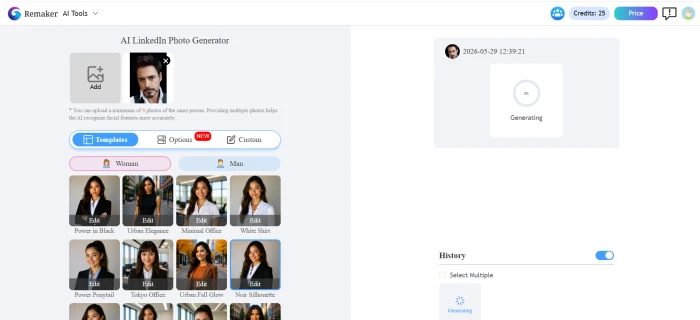
Input: the headshot generator setup with style and background controls.Output: the generated LinkedIn-style headshot.
The headshot generator is one of the strongest dedicated outputs in the suite. The result is a polished, profile-ready image that looks closer to a professionally lit portrait than a typical AI render. Facial identity is preserved well, the background reads as plausible studio light, and the framing is correct for a profile photo at first crop. Worth the credit cost for anyone refreshing a profile without a studio shoot booking.
Video Face Swap
Test 03 · Motion
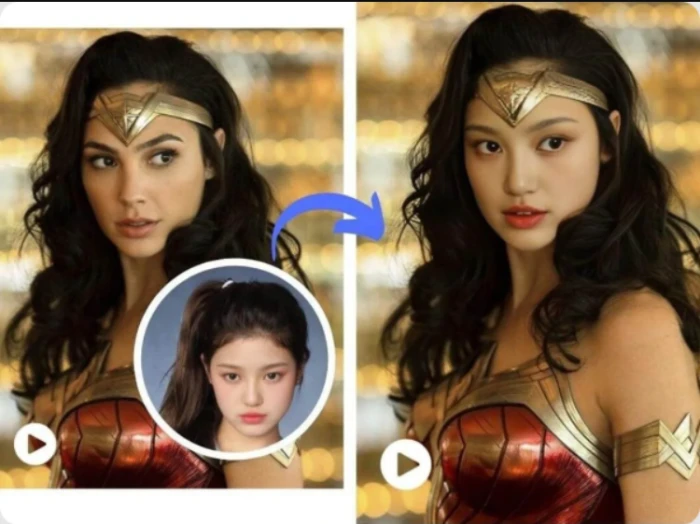
Video face swap test, with the source face, the target clip, and the rendered result in one view.
Video face swap is harder than the photo version because identity and lighting need to stay stable across frames, and Remaker handles short clips well. Credit cost is materially higher than photo swap (typically 11 to 30 credits depending on duration), and the tool is advertised as free but actually requires any credit purchase to unlock as a VIP feature, which several independent reviewers have flagged as misleading.
Old Photo Restoration
Test 04 · Photo effects
Input: the old photo filter upload screen.Output: the restored result from the old photo effect.
The old photo effect sits inside a broader Photo Effects library and produced a clean restoration on the test image, with the kind of colour and detail recovery that family-archive projects actually need. It is not as surgical as a dedicated restoration workflow in Photoshop, but it gets to 80 percent of the result in one click, which is the right trade for the use case.
AI Image Generator
Test 05 · Text to image
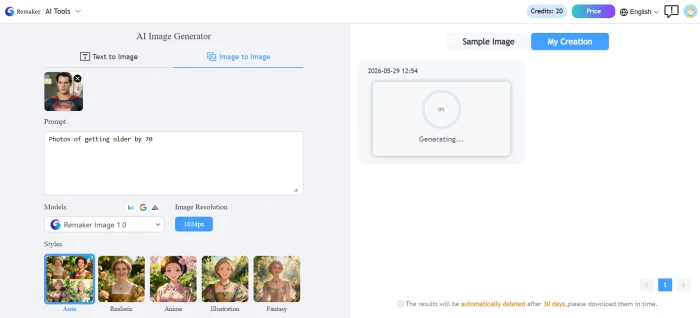
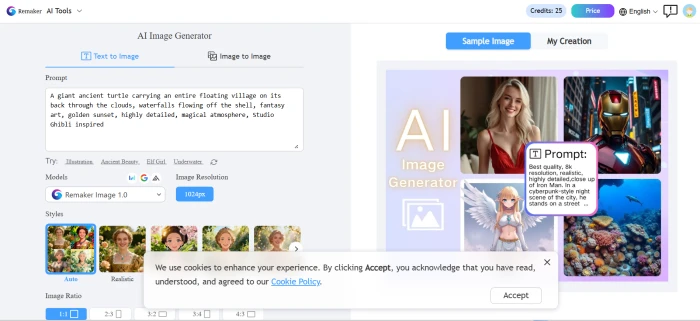
Input: the AI image generator prompt setup.Output: the generated image from the prompt.
The image generator is competent rather than category-leading. Composition, colour, and prompt adherence all hold up. Where Krea or Midjourney would push further on aesthetic distinction, Remaker stays in safe creative territory, which is fine for content used inside marketing collateral rather than as a hero image. A Prompt Generator helper lets users browse styles and attributes rather than write prompts from scratch.
How this review was put together. Each test above used the live Remaker AI product, with screenshots captured from the test runs themselves. Findings were cross-referenced against current Trustpilot, SoftwareSuggest, App Store, and independent reviewer feedback to separate one-off issues from repeated patterns. Scoring weights face swap quality, output consistency, and the pricing structure most heavily, with customer support graded on the consistency of user-reported issues across multiple sources.
Seven Features, Scored
Where Remaker stands across the toolkit
Scores at a Glance
Photo Face Swap
8.8
Headshot Generator
8.5
Photo Effects & Restoration
8.2
Utility Suite
8.0
Video Face Swap
7.8
AI Image Generator
7.5
Customer Support
5.0
Feature-by-feature breakdownScored on a 10-point scale
01
Photo face swap CATEGORY LEADER
Remaker's reputation was built on this and the testing confirms why. Identity preservation on the swapped face is clean, lighting matches the host image, and the result is usable on the first try most of the time. Competing tools either need multiple attempts to get a usable swap or leave visible artifacts at the hairline and jaw, which Remaker mostly avoids. The flagship feature does what it says.
COST: 2 to 8 credits per swapTIME: Seconds per render
8.8
EXCELLENT
02
LinkedIn and headshot generator PRODUCTION-READY
The dedicated headshot generator is one of the cleanest outputs in the suite. Professional framing, studio-style lighting, plausible backgrounds, and good preservation of facial identity. The result reads as a polished portrait rather than a typical generative AI render, which makes it usable for actual profile updates instead of a curiosity. Saves the cost of a studio shoot when refreshing a profile or running a team headshot batch.
OUTPUT: Profile-ready stillsFRAMING: Correct first crop
8.5
STRONG
03
Photo effects and restoration ONE-CLICK
The Photo Effects library covers old photo restoration, colourisation, stylised filters, and trending template effects. On the restoration test, the tool recovered colour and detail to about 80 percent of what a careful Photoshop workflow would produce, in a single click. Not a substitute for serious archival work, but the right tool for the family-photo, social-media, and quick-collateral use cases the platform actually targets.
EFFECTS: Dozens of presetsWORKFLOW: Single click, no layers
8.2
GOOD
04
Utility suite (upscaler, BG remover, magic eraser) SOLID
Background removal, image upscaling to higher resolutions, and object removal via magic eraser are the three workhorses behind any practical photo workflow. Remaker bundles all three at credit-light prices and the quality competes with dedicated single-purpose tools. Edge detection on group photos and complex hair can still drift, which is the standard failure mode for AI background removal in general, not a Remaker-specific weakness.
INCLUDES: BG remover, upscaler, eraserWEAK SPOT: Complex group photo edges
8.0
GOOD
05
Video face swap COMPETENT, COSTLY
Identity stays stable across frames on short clips, which is the bar most video face swap tools fail to clear. Quality holds for a few seconds and degrades on longer cuts, particularly with rapid camera motion. The advertised-as-free framing is the bigger issue: the tool functions only after any credit purchase to unlock VIP status, which means it is not actually a free feature despite the marketing language. Credit cost runs 11 to 30 per render depending on duration.
STRENGTH: Stable on short clipsFRICTION: "Free" requires VIP unlock
7.8
GOOD
06
AI image generator SAFE, NOT DISTINCTIVE
Prompt adherence and composition are reliable, and a Prompt Generator helper offers style attributes and templates for users who do not want to write prompts from scratch. The aesthetic ceiling is lower than Krea, Midjourney, or Ideogram, which makes Remaker the wrong tool when the goal is a distinctive hero image, and the right tool for everyday marketing collateral, social posts, and supporting visuals that need to land quickly without standing out.
HELPER: Prompt Generator libraryBEST FOR: Marketing fill, not hero art
7.5
GOOD
07
Customer support WEAK SPOT
The clearest pattern in Trustpilot reviews and independent write-ups is that support response is slow when billing or technical issues come up. One December 2025 reviewer flagged extended downtime with no clear communication from the team. The product can run for long stretches without ever needing support, which is why many users never notice. When something does go wrong, expect a wait. Email is the only contact channel.
CHANNEL: Email onlyPATTERN: Slow responses on billing/tech
5.0
WEAK
Pricing and the Credit Math
No subscription, credits never expire, costs per action vary
Remaker's pricing model is the single most distinctive thing about the product. Where almost every competitor charges a monthly subscription, Remaker sells credit packs as one-time purchases. The smallest pack costs $5.99 for 200 credits. The largest is $299 for 20,000 credits with the lowest per-credit price. Any pack you buy stays valid forever. No auto-renewal, no surprise charges, no cancellation flow to find. New accounts start with 30 free credits, no card required.
Starter
$5.99
200 credits
Casual
$9.99
~530 credits
Heavy use
$19.99
~1,100 credits
Pro volume
$299
20,000 credits
The catch is that credit cost per action varies by feature and model. A photo face swap typically runs 2 to 8 credits. A photo edit lands in the same range. A video face swap pulls 11 to 30 credits depending on length. Video enhancement scales with duration. So while the dollar cost of a credit pack is fixed and predictable, the monthly run rate depends entirely on which tools get used and how often. A user who mostly does headshots and the occasional photo restoration can stretch the $5.99 starter pack across weeks. A user pushing video face swap or high-volume image generation will burn through the same pack in an afternoon.
Why the pricing model actually matters. The credit pack model removes the failure mode that almost every other AI tool now has: forgetting to cancel before renewal. There is nothing to cancel. Credits sit there until they are used. For the kind of user who needs AI tools twice a month rather than every day, this changes the economics meaningfully. The savings against a typical $9.99 to $14.99 monthly subscription compound quickly if usage is sporadic.
Pros and Cons
Where Remaker earns the score, where it loses points
+What users like
No subscription model, which is rare in this category and removes the cancel-before-renewal trap that defines most AI tool pricing
Credits never expire, so balances roll forward indefinitely instead of disappearing at the end of a billing cycle
Face swap is genuinely best-in-class, with identity and lighting preservation that competitors struggle to match on the first try
Wide toolkit under one login covering image, video, face swap, restoration, upscaling, headshot, and utility tools instead of paying for each separately
30 free credits on signup with no card required, enough for a real test of the platform before any spend
a16z Top 50 recognition and Stripe payment processing suggest a serious operation rather than a fly-by-night clone
−What users dislike
Credit cost per action varies widely between features and models, which makes monthly run-rate hard to predict for new users
Customer support is slow, with multiple Trustpilot reviewers reporting delays or no response on billing and technical issues
Video face swap is advertised as free but requires any credit purchase to unlock VIP status, a framing several independent reviewers flag as misleading
Output consistency drops on complex scenes, particularly group photos, difficult lighting, and rapid video motion
Site downtime has been reported by recent Trustpilot users, with limited communication from the team during outages
AI image generator is competent rather than distinctive, with a lower aesthetic ceiling than Krea, Midjourney, or Ideogram for hero-image work
Remaker AI vs the Alternatives
Five tools on the dimensions that decide it
RRemaker
DDeepswap
VVidnoz
PPixlr
CCanva AI
Score
7.5
7.4
7.2
7.6
8.0
Pricing Model
No sub, credits never expire
Subscription
Subscription
Subscription
Subscription
Starting Price
$5.99 one-time
$9.99/mo
$9.99/mo
$7.99/mo
$14.99/mo
Face Swap
✓ Category leader
✓ Strong
✓ Good
✗
Basic
Video Face Swap
✓
✓
✓
✗
✗
Image Generation
✓ Mid-tier
Limited
✓
✓
✓ Strong
Photo Restoration
✓
✗
✗
Manual tools
Limited
Headshot Generator
✓ Dedicated
✗
Avatar focus
✗
✗
Free Tier
30 credits, no card
3 day free trial
Limited free
Limited free
Limited free
Best For
Sporadic, broad use
Daily face swap
AI video volume
Photo editing
All-in-one design
The clearest pick depends on usage rhythm. For occasional users who reach for AI tools twice a month rather than daily, Remaker's one-time credit model wins on math alone, since even six months of a $9.99/mo subscription costs more than the largest Remaker pack at typical light usage. Deepswap is the right choice for users running face swap as a daily workflow with a predictable subscription cost. Pixlr stays the safer pick if traditional photo editing with AI helpers matters more than dedicated face swap. Canva AI dominates when the requirement is one tool for design, social, decks, and AI generation under a single brand. Vidnoz is the volume video play.
What Real Users Say
Collected from Trustpilot, SoftwareSuggest, and App Store
A user describes Remaker as "highly respectable" in its leading position in the face-swap market, while acknowledging that not every aspect will satisfy every user since needs vary widely across creators.
Jason Zhang
Trustpilot reviewer / Face swap user, Hong Kong
★★★★☆
A verified business reviewer says the platform delivers professional-looking results quickly, that the credit system is straightforward and the dashboard makes usage easy to track, but notes that complex group photo edges and challenging lighting can trip the AI up.
Sheridan W.
SoftwareSuggest verified business reviewer
★★★★☆
An Australian reviewer reports that the site went down for an extended period in December 2025, expressing genuine regret because the upscaler had been working very well, and noting that having only $10 of credits remaining softened the blow.
Farid Mikhail
Trustpilot reviewer / Light credit user, Australia
★★☆☆☆
Apple App Store users consistently highlight "beautiful results" and high-quality performance, with the 4.3-star rating concentrating its praise on the face-swap and headshot outputs, the same two tools that landed strongest in our own testing.
App Store aggregate
iOS users / 4.3-star rating
★★★★☆
Sentiment splits cleanly by what the user touched. Face swap, headshot generation, and the utility suite get steady praise across every review surface. Complaints concentrate on three specific things: support response times, occasional site stability, and the framing of certain "free" features that actually require any credit purchase to unlock. The Trustpilot sample is small (around 10 reviews), so individual data points there carry less weight than the App Store's 4.3-star aggregate or the larger SoftwareSuggest base.
· The Verdict ·
7.5/10
Remaker AI earns the recommendation, especially for anyone tired of monthly subscriptions for tools they use sporadically.
The honest take. Remaker is the cleanest no-subscription option in the AI image and face-swap category, with a flagship feature that delivers and a wider toolkit that holds its own. The credit model removes the "cancel before renewal" failure mode that defines almost every other AI tool's pricing, and the 30 free credits make the first test risk-free. Where the product strains is in two places this review documented: customer support is slow when it is needed, and credit cost per action varies enough that monthly run-rate is harder to predict than a flat subscription would be.
Buy credits if
Why
Face swap is the main need
Category-leading quality, 2 to 8 credits per swap, no recurring cost
AI tool use is sporadic
One $5.99 pack can stretch for weeks on light use, where any subscription wastes money
A LinkedIn refresh is the project
The dedicated headshot generator produces profile-ready output without a studio booking
High-volume daily AI work
A subscription rival like Deepswap or Krea will work out cheaper at sustained volume
Distinctive hero art is the goal
Midjourney, Krea, or Ideogram push the aesthetic ceiling higher for headline visuals
Reliable support matters
Response times on billing or technical issues are the weakest part of the product
I used to rely on this site, but lately it completely fails to generate anything I ask for. Customer support is basically non-existent, total ghost town. I'm done with it and definitely won't be recommending it to anyone.
I know some people still suggest Visro AI if you just want quick free face-swapping, and hey, everyone's needs are different. But honestly? Remaker AI is way more respectable anyway, they're actually leading the market in this space.
Oh, and Visro claims it's free. That's what they say, at least.





Discussion
Join the discussion and share your perspective.
Ashley Taylor
Jun 29, 2026I used to rely on this site, but lately it completely fails to generate anything I ask for. Customer support is basically non-existent, total ghost town. I'm done with it and definitely won't be recommending it to anyone. I know some people still suggest Visro AI if you just want quick free face-swapping, and hey, everyone's needs are different. But honestly? Remaker AI is way more respectable anyway, they're actually leading the market in this space. Oh, and Visro claims it's free. That's what they say, at least.