Replit is the rare AI builder that catches its own mistakes while it works. Halfway through a single unattended build it spotted a zod version mismatch nobody had flagged, then opened package.json and resolved the conflict without being asked. The app it handed back still broke on first use, with a rejected login and a monthly total that refused to load. Suited to people who can read a console log and finish what the Agent starts.
Replit started life in 2016 as a browser-based coding environment and has since rebuilt itself around an AI agent that writes applications for people who do not code. You describe what you want in ordinary English. The Agent scaffolds the frontend, wires a backend, provisions a database, adds a sign-in flow, and publishes the result to a live URL, all inside one browser tab.
The positioning is deliberately broad. Replit's own app store listing addresses founders shipping a first product, designers who want to build without a developer, product managers assembling internal tools, marketers who need campaign dashboards, and students building portfolio work. The company puts its user base at 50 million creators.
Where it differs from most tools in this category is the depth of the surrounding platform. Competing builders hand you a site. Replit hands you an application plus the infrastructure it runs on, which is a larger promise and a larger surface for things to go wrong.
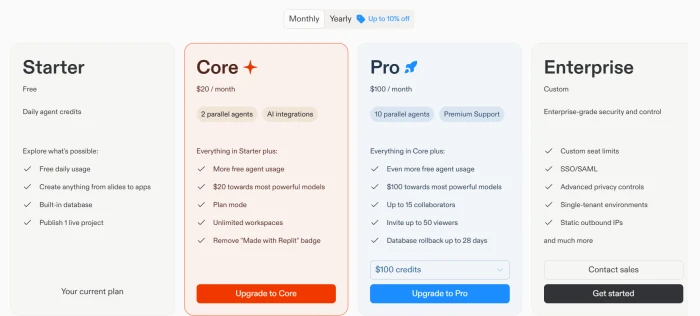
Four plans are on sale. Starter costs nothing, Core lists at $20 a month, Pro at $100 a month, and Enterprise is quoted by sales.
What Happened When We Tested It
02 . 8 tests from first prompt to billing screen
Testing ran on a free Starter account with no credit card attached, deliberately. Most buyers meet Replit this way, and the free tier is where the gap between the demo and the product shows up fastest. One prompt went in. Everything below is what came out of it.
One prompt, then a plan read back in its own words
Test 01 . Prompt intake
★ Prompt Used
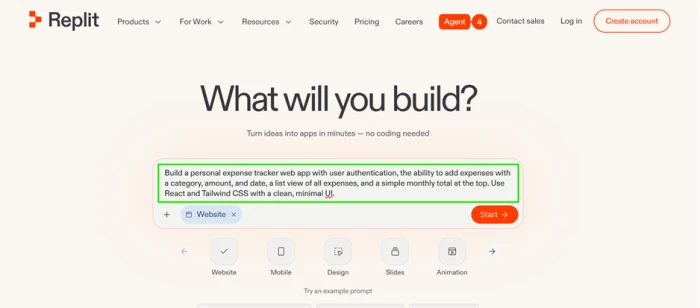
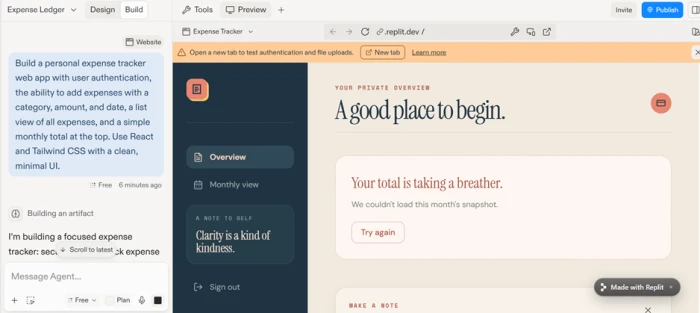
"Build a personal expense tracker with user authentication, expense entry by category and amount, a date field, a running list of entries, and a monthly total at the top. Use React and Tailwind with a minimal interface."
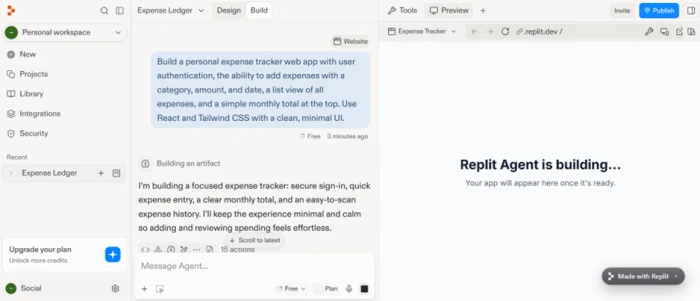
The entire input: one plain-English prompt.The Agent restates the goal before writing any code.
What we observed: Before touching a file, the Agent paraphrased the request back: a focused tracker with secure sign-in, quick entry, a clear monthly total, and a history that scans easily. The Free plan tag sat in the corner from the first second, with a prompt to add credits one click away.
A dependency conflict the Agent found and fixed alone
Test 02 . Error recovery
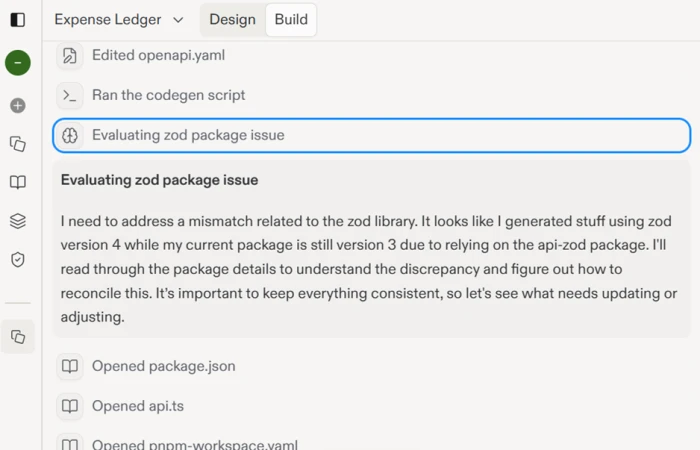
The Agent catches a zod version conflict without being told.
The key finding: Code had been generated against zod version 4 while the installed package was still version 3. Nobody flagged it. The Agent paused mid-build, opened package.json and the affected files, read the version history, and worked the mismatch out on its own. This is the single behaviour that separates Replit from an autocomplete box.
A landing screen with actual design opinions
Test 03 . Visual output
The generated sign-in page, unedited.
What stood out: A confident serif headline reading "Money, uncomplicated." A warm palette. Spacing generous enough to pass for a funded startup's homepage. Nothing in the prompt asked for a headline or a colour direction. Anyone still repeating the line that AI builders only produce grey templates should sit with this screen for a minute.
The sign-in flow rejected a fresh account
Test 04 . Authentication
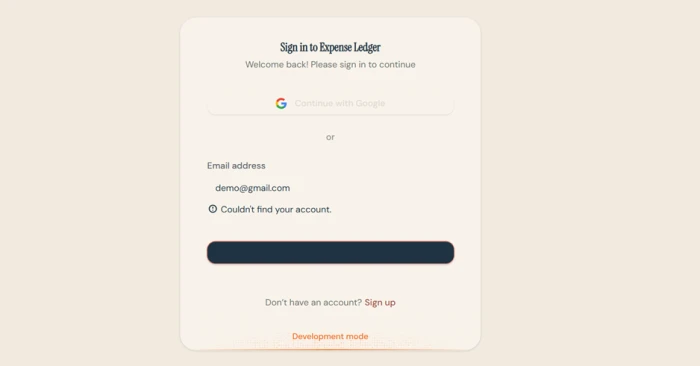
The same flow, broken: a rejected login and an unlabelled button.
Where it lands: An ordinary-looking account came back with "Couldn't find your account." Worse for a screen that had just been praised for its polish, the primary button rendered as a solid dark bar with no visible text. Both problems sat one click past the screen that sells the product.
The headline number never appeared
Test 05 . Core feature
The monthly total fails to load on first run.
The evidence: Once a session did load, the monthly overview returned "Your total is taking a breather. We couldn't load this month's snapshot," followed by a Try again button. The prompt named that number explicitly. It was the one figure the app existed to show, and it was missing on first run.
Editor, database, auth, and deploy in one tab
Test 06 . Workspace
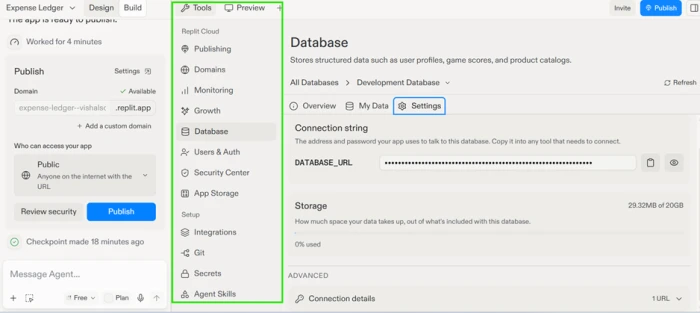
Every layer of the stack reachable without leaving the page.
How it performed: No terminal was opened during the entire session, and no server was configured. The database panel showed a live connection string and current storage usage sitting beside the publish controls. This is the strongest argument for the platform and the reason people stay after the Agent disappoints them.
Free accounts cannot see what they are spending
Test 07 . Cost transparency
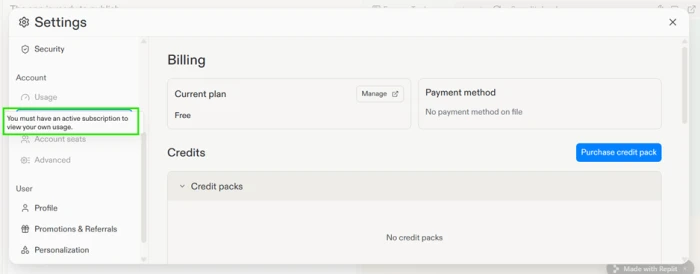
Usage data sits behind a subscription gate.
Under the surface: The Usage tab is greyed out behind the line "You must have an active subscription to view your own usage." Replit's own billing documentation tells users to watch the usage dashboard and set alerts before they exceed their credits. Free accounts cannot follow that advice.
Development-only keys behind a shippable-looking app
Test 08 . Production readiness
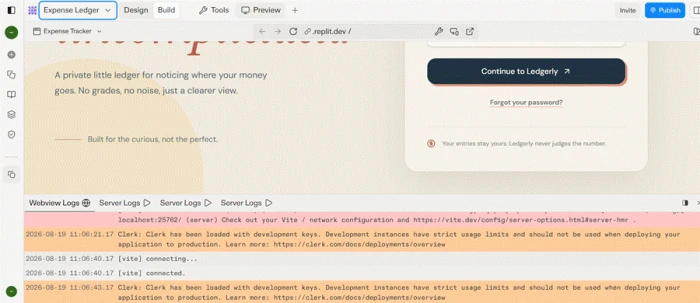
The console warns the app is running on development-only credentials.
The real story: Buried in the console, the authentication layer reported that it had loaded with development keys, alongside a warning that development instances carry strict usage limits and must never reach production. The preview looked finished. Underneath it, the app ran on credentials the tool itself tells you not to ship.
★
Self-correction and design taste in the same unattended run
Two things happened without any human intervention in a single build. The Agent diagnosed a dependency version mismatch it was never told about and repaired it, and it produced a sign-in screen with real typographic character from a prompt that asked only for a minimal interface. Neither behaviour is common in this category, and both came out of the free tier.
!
The gap between the preview and a working product
Login failed. The primary button lost its label. The headline figure errored out, and the console was reporting a production blocker the interface never mentioned. A non-technical buyer looking at the landing screen would reasonably conclude the app was finished. Every one of those problems needs someone who can read a log to fix it, which is exactly the person Replit's marketing says you no longer need.
How this review was put together. One expense tracker was built end to end from a single prompt on a free Starter account in August 2026, with no credit card attached and no manual code edits. The session covered the Agent's planning output, its build log, the generated interface, the running app, the workspace panels, and the account billing screens. Plan names and figures were checked against replit.com/pricing and the billing documentation at docs.replit.com on August 19, 2026, then cross-checked against the in-app upgrade screen on the same day. Competitor scores come from published FirmCritics reviews.
10-Point Feature Review
03 . Scored against what the session actually produced
Feature Scores at a Glance
Prompt comprehension
8.5
Autonomous error recovery
9.0
Generated interface design
8.5
First-run reliability
5.0
Authentication out of the box
5.5
Integrated workspace
8.5
Production readiness
5.0
Cost visibility
5.0
Free tier build ceiling
6.0
Pricing consistency
5.5
Feature-by-feature breakdownWeighted toward build behaviour over account features
01
Prompt comprehension and planning Strength
The restatement covered every element of the prompt and added the scanning behaviour of the entry history, which was implied rather than stated. It stops short of 9.0 because the plan was never offered for editing before the build began on a Starter account, so the first chance to correct a misreading is after the code exists. Above 8.0 because nothing was dropped or invented.
Prompt elements requested: 6Reflected in the plan: 6
8.5
Strong
02
Autonomous error recovery Best in class
Diagnosing a major-version mismatch in a core dependency, inspecting package.json, reading the version history, and resolving it unprompted is behaviour most competitors do not attempt. It sits at 9.0 rather than 9.5 because the same capability failed to surface the broken login and the failed data fetch, both of which shipped into the running app. Recovery works during the build and stops at the door.
A serif headline and a warm palette arrived from a prompt whose only styling instruction was the word minimal. Held below 9.0 by the unlabelled primary button on the login screen, which is a design failure as much as a code one. The taste is real, the quality control across screens is not.
Screens with usable styling: 2 of 3Styling instructions given: 1
8.5
Strong
04
First-run reliability Weak point
Two of the three things a user does first were broken before any modification: signing in and reading the monthly total. It earns 5.0 rather than 4.0 because the app built and deployed without a crash, and the failures were recoverable states rather than a blank page. It cannot reach 6.0 when the named headline feature errors on the first load.
Core flows tested: 3Working unmodified: 1
5.0
Weak
05
Authentication out of the box Weak point
A complete sign-in and sign-up surface arrived without being specified in any detail, which is worth something. The account rejection pushes it well below the 7.0 range. It clears 5.0 because the auth layer was wired to a live provider rather than mocked, so the foundation exists and the failure is a configuration problem rather than an absence.
Auth surface generated: YesLogin succeeded first try: No
5.5
Weak
06
Integrated workspace Strength
Editor, database, secrets, monitoring, and publishing in one tab, with a live connection string visible beside the deploy controls. No terminal was needed at any point. It stops at 8.5 because the usage panel, arguably the most important control in a metered product, is the one panel a free account cannot open.
The console warning about development keys was accurate and specific, which is the only reason this is not lower. The interface gave no equivalent signal. A publish button sat one click away from an app the logs described as unsuitable for production, with nothing in the visual layer connecting the two. Warnings that live only in a log fail the audience Replit is selling to.
Warning surfaced in console: YesWarning surfaced in the UI: No
5.0
Weak
08
Cost visibility for free accounts Weak point
Replit bills by effort, so the cost of a request is unknown until the work is done. Hiding the usage panel from unpaid accounts removes the only tool for learning what that feels like before committing. It holds at 5.0 rather than dropping further because paying users do get spending alerts, hard budget caps, real-time tracking, and a usage dashboard. The gap is entirely on the free side of the line.
Usage panel on Starter: LockedBudget caps on paid plans: Available
5.0
Weak
09
Free tier build ceiling Limitation
Starter runs Lite build only, with Full build, Plan Mode, Connectors, and Kanban task planning all switched off, and published apps capped at one with a 30-day life. It reaches 6.0 because the tier still produced a full-stack app with a database and an auth layer, which several rivals reserve for paid plans. It goes no higher because anything you publish expires.
Published apps allowed: 1Publish window: 30 days
6.0
Mixed
10
Pricing consistency across surfaces Weak point
The in-app upgrade screen and the public pricing page disagreed on the same day about the monthly Core price. They also parted ways on the size of the annual discount and on the wording describing what the credit allowance buys. It stays at 5.5 rather than lower because each surface is internally coherent and the tier structure matches across both. Two official screens quoting a buyer different numbers is still a real cost of entry.
Official surfaces compared: 2Points of disagreement: 3
5.5
Weak
Pros and Cons
04 . What a builder gains and what they inherit
+Worth having
Fixes its own dependency problems: version conflicts get diagnosed and resolved mid-build without you noticing them first
Design output you would not be embarrassed by: typography and colour decisions arrive unasked and mostly land
Confirms the brief before building: the plan comes back in plain language, so misreadings are visible early
Whole stack in one tab: database, secrets, monitoring, and publishing sit beside the editor
Nothing to install: no terminal, no server setup, no local environment to keep alive
−What you inherit
Sign-in can reject valid accounts: the first thing a user does is the thing most likely to fail
Buttons ship without labels: a primary action rendered as a solid bar with no readable text
Named features arrive broken: the one number specified by name errored out on first load
Warnings hide in the log: a blocker serious enough to stop a launch never reaches the interface
Pricing Breakdown
05 . Four tiers, two of them metered
Feature
StarterFree
Replit Core$20/mo, $18 annualMost Popular
Replit Pro$100/mo, $90 annual
Monthly credits included
Daily cap only
$20
$100
Full build mode
✗
✓
✓
Plan Mode
✗
✓
✓
Connectors
✗
✓
✓
Published projects
1, 30-day life
Unlimited
Unlimited
Parallel agents
Not included
2
10
Collaborators
Not included
5
15
Turbo mode
✗
✗
✓
Database rollback window
Not included
Not included
28 days
Remove Replit badge
✗
✓
✓
What you're actually paying: The subscription buys a credit balance, not a usage allowance, and Replit's documentation states that every Agent interaction is billable even when it answers a question without changing a single line of code. Cost scales with how hard the Agent judges a request to be, which you learn after the work is finished rather than before it starts. Third-party model calls made on your behalf are billed at the provider's public API rate and deducted from the same balance.
Replit's two official surfaces did not agree on the day of testing. The upgrade screen inside the product prices Core at $20 a month and takes 10 percent off for yearly billing. The public pricing page listed Core at $25 monthly with $20 billed annually, advertising savings of up to 20 percent. The two also describe the same allowance differently, one calling it $20 towards the most powerful models and the other $25 of monthly credits. Figures in the table above follow the upgrade screen, because that is the surface where money changes hands.
The in-app upgrade screen, captured during testing.
Pricing verified August 19, 2026. Figures on this platform move quickly, so read the official pricing page before you commit.
Replit vs the Top 4 Alternatives
06 . Scored builders in the same category on this site
RReplit
LLovable
FFramer
WWebflow
XWix
Score
6.8
7.6
7.6
7.6
7.8
Band
Mixed Results
Capable Pick
Capable Pick
Capable Pick
Capable Pick
Build approach
Agent writes and hosts a full-stack app
Natural language to React code
Design-first, multi-page generation
Visual builder plus CMS
AI generation with manual editing
Best For
Working software with a database and sign-in behind it
Handing a codebase to a developer afterwards
Marketing sites where the layout carries the work
Content operations that outlive the launch
Small businesses that need the site running unattended
How to read this table: Replit scores lowest here and still builds the most. The four alternatives make websites; Replit makes applications with a backend attached, which is why its failure modes are harsher and its ceiling is higher. If your project ends at a published page, one of the other four will get you there with less to repair. If it needs real users with stored records behind them, Replit is the only entry on this list that attempts the whole job, and the 6.8 reflects what finishing that job costs you.
What Users Are Saying
07 . Five accounts across four platforms
Replit's ratings diverge sharply by venue. Its iOS app holds 4.7 out of 5 across roughly 20,000 ratings, while its Trustpilot profile, now merged from several older listings and carrying more than 1,500 reviews, skews heavily toward billing complaints. The quotes below cover ground the test session did not reach.
"once you exhaust your monthly credits, your live site is taken down"
Cas4u1
On published apps going dark when a balance runs out
Who should hand a project to an agent that debugs itself but ships broken?
Use Replit if you need an application rather than a page, meaning people signing in against a database you own, and you can read a console log well enough to close the gap between a preview that looks finished and software that works.
Skip Replit if your project ends at a published website. Wix scores 7.8 for small businesses that need a site running unattended. Webflow scores 7.6 where content operations matter after launch, and Lovable scores 7.6 if you want generated code a developer can take over.


Discussion
Join the discussion and share your perspective.