Runway runs its own Gen-4.5 and Aleph 2.0 models alongside outside engines like Veo 3.1 and Kling 3.0 in one browser workspace, wrapped in an Agent that pauses for approval before it spends a credit. In testing, a single reference frame carried the same character cleanly from a Brooklyn stoop to a diner counter, the consistency Runway markets hardest. The catch shows up fast. The polished images came from Google's Nano Banana Pro while Runway's own image model stayed locked, and every video model is walled off on the free plan, so it fits creators who want range plus editing in one place and are ready to pay to reach the headline tools.
Runway is an AI generation platform for video, image and audio built by the New York research lab Runway AI. It targets creators, marketers and small studios who want short cinematic clips and stills from text prompts or reference images, without booking a shoot. The pitch is breadth and control inside the browser: text-to-video, image-to-video, character references, and editing tools like inpainting and background removal, all reachable from one canvas.
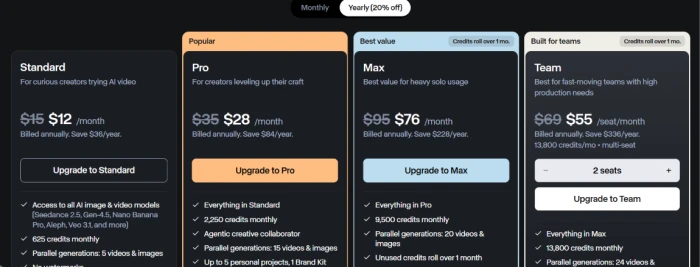
What sets the current version apart is that Runway folds in outside models too. Google's Veo 3.1, Kling 3.0 and Nano Banana Pro sit next to its own Gen-4.5 and Aleph engines, and an Agent can plan a job and route it to whichever model fits. The lineup runs from a free tier through Standard at $12 a month, Pro at $28, Max at $76 on annual billing, then a per-seat Team plan above that. What each plan buys, and where the credits actually go, is the Pricing section below.
What Happened When We Tested It
02 . 7 tests, from first image to the video paywall
The session ran on a free Runway account. The goal was narrow: see how far the free experience goes before the wall, work out which models actually do the generating behind the Agent, and watch where the credit meter really points. The account opened, the Agent introduced itself, and the balance sat in the corner the whole time.
Starting with 500 credits
Test 01 . The balance
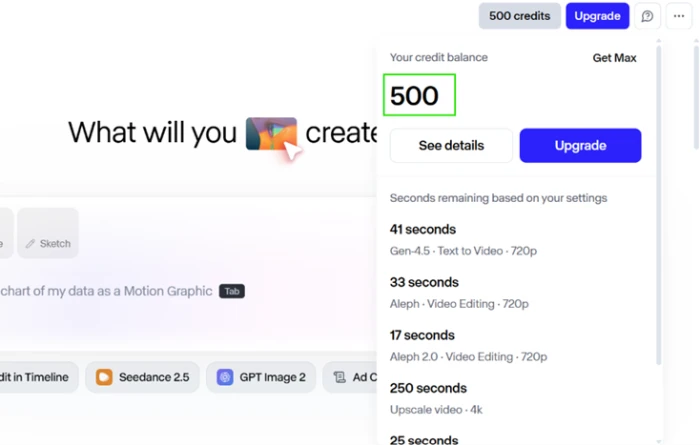
The free account opened with 500 credits and spelled out how little video that covers.
First impression: The panel made the ceiling obvious. At the listed rates the balance bought roughly 41 seconds of Gen-4.5 text-to-video or 33 seconds of Aleph editing. A few clips and the account is spent, and you can see that before you generate a single frame.
A red-haired woman on a Brooklyn stoop
Test 02 . First image
★ Prompt Used
"A young woman with red curly hair and a denim jacket on a Brooklyn brownstone stoop."
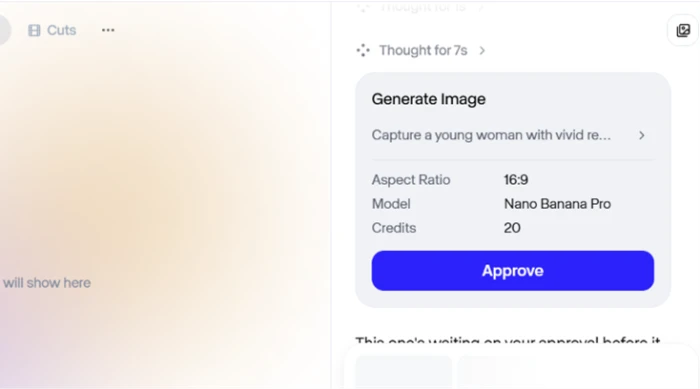
The Agent held the job for approval before spending anything.The result read like a genuine street photograph.
What we observed: The approval step is the useful part. Nothing gets charged until you say go, which spares you the silent burn that plagues a lot of these tools. The image itself looked shot on a real street, not rendered.
Same person, new scene
Test 03 . Consistency
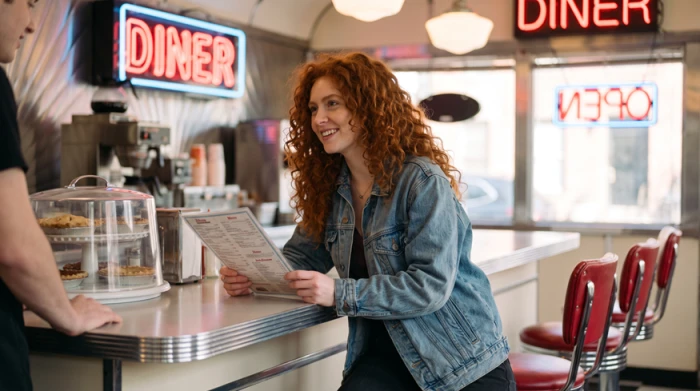
The same character at a diner counter. Face and jacket held steady.
The validation: Consistency is what Runway sells hardest, so I pushed the character into a diner and asked for her ordering at the counter. Her face and clothing carried over without drifting. Two locations, one recognizable person. On that test, it worked.
Who actually makes the image
Test 04 . Model routing
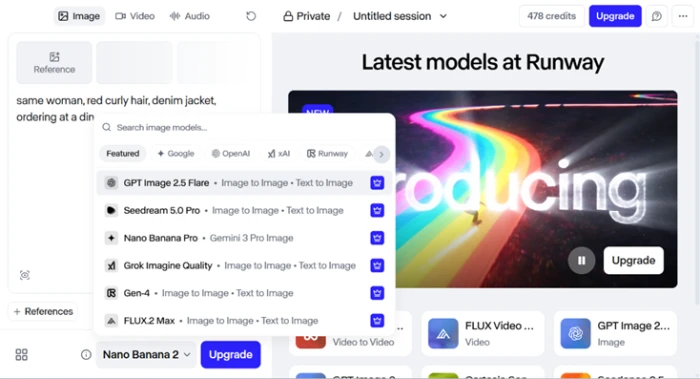
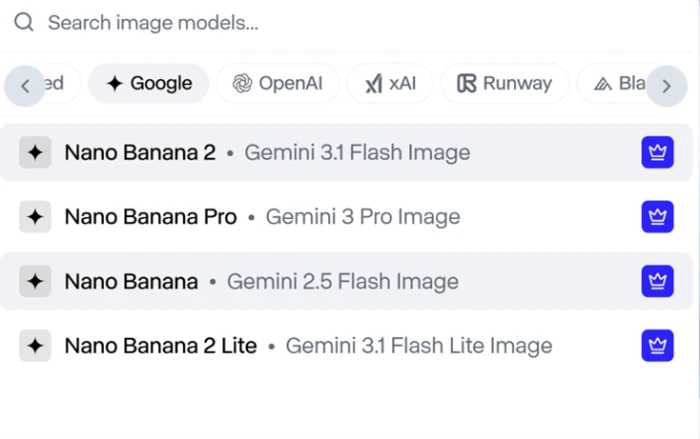
The model picker. My output was coming from Nano Banana Pro, not a Runway model.Google's Nano Banana variants, each flagged for upgrade.
What this shows: Then I looked at what was doing the work. My images came from Nano Banana Pro, which is Google's Gemini 3 Pro Image model running inside Runway. Runway's own Gen-4 image model sat locked behind an upgrade crown in the same list, and the Agent never offered it. The polish was never Runway's model.
Two credits just to talk to it
Test 05 . The meter
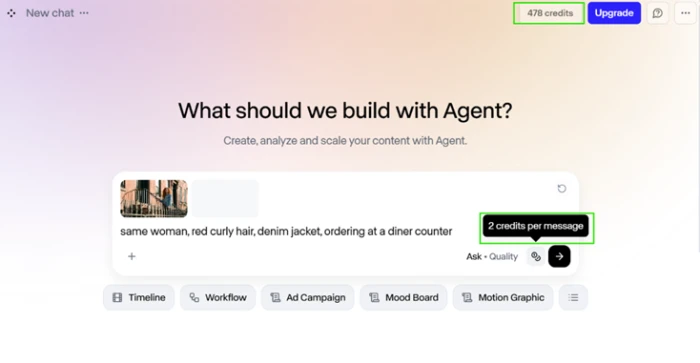
The 2-credits-per-message charge, applied on top of generation.
The signal here: I caught this by watching the number tick down. After the first image, the balance dropped from 500 to 478. The image cost 20, so the missing 2 went somewhere. The Agent charges 2 credits for every message you send, separate from what it generates. Skip the conversational Agent and use the direct tool, and that fee disappears.
Read the menu
Test 06 . Text rendering
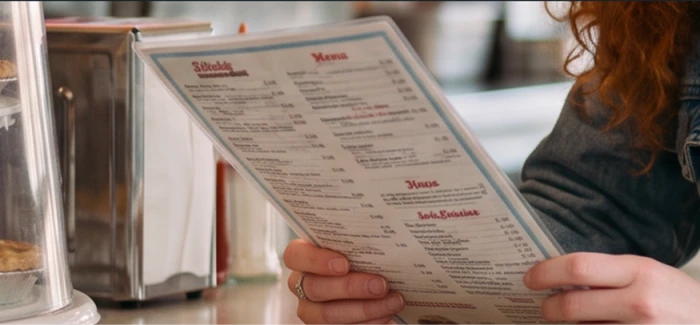
The menu, cropped in. Every printed line dissolves into static.
Where it breaks: The diner shot looks convincing until you try to read anything inside it. Cropping into the menu she is holding, the headings turn to pseudo-letters and the price rows read as noise. This is the text problem current image models still have not solved, and it hides well inside an otherwise sharp frame. The fault is not even Runway's, since the image came out of Google's model.
Every video model crowned
Test 07 . The video wall
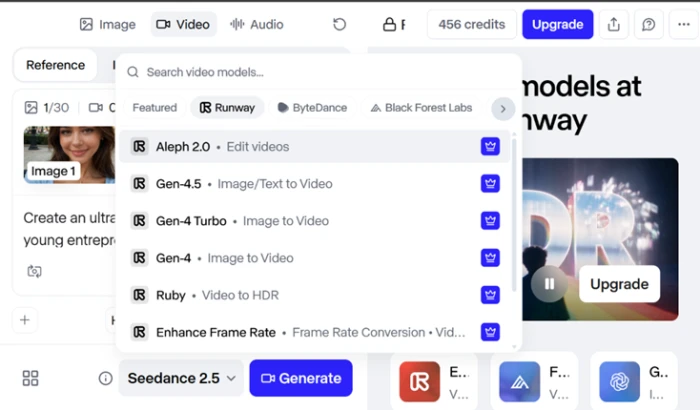
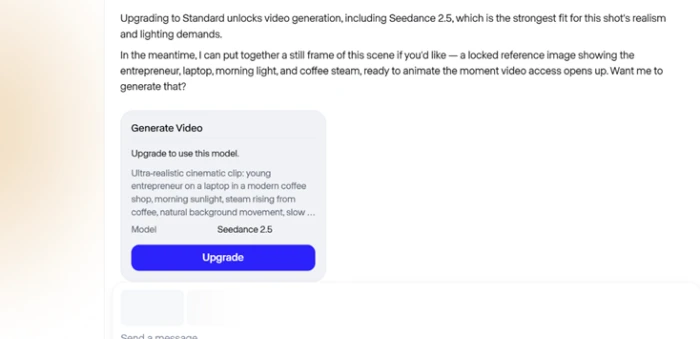
Every Runway video model sat behind the upgrade crown.Clicking generate returned an upgrade wall, not a render.
The takeaway: Video is where the free tier stops pretending. Gen-4.5, Gen-4 Turbo, Gen-4 and Aleph 2.0 were all crowned. I built the full prompt anyway, a cinematic coffee-shop clip with a reference image, capped at 720p and five seconds. Clicking generate returned a paywall instead of a render, with the upgrade starting at $28 a month on annual billing.
★
Same character, two scenes, one reference frame
The stoop portrait and the diner shot kept the same face and denim jacket across a full location change, driven by the reference image the Agent held onto. Identity carryover in a controlled two-shot test was clean, with no obvious drift in features or wardrobe.
!
The free tier renders zero video
Every video model carries an upgrade crown, and a completed 720p prompt returns a paywall at the generate button rather than a clip. A free account can make images all day and never evaluate the headline feature the whole platform is built around.
How this review was put together. The findings come from a hands-on session on a free Runway account in September 2026, covering image generation, character consistency, the Agent's approval and credit behavior, and the video flow up to the paywall. Runway advertises a one-time grant of 125 free credits; this test account opened with 500, a variance Runway's help documentation attributes to per-account allocation. No video output could be judged, since generation is locked without a paid plan. Every price in this article was checked against Runway's official pricing page at runway.com/pricing on the publish date.
10-Point Feature Review
03 . Ten dimensions scored against the session
Feature Scores at a Glance
Image Output Quality
8.5
Model Breadth
9.0
Character Consistency
8.0
Prompt Adherence
8.0
Agent Workflow
7.5
Interface & Onboarding
7.5
Text Rendering
5.5
Model Transparency
5.5
Credit Economics
5.5
Free Tier Value
5.0
Feature-by-feature breakdownScored 5.0 to 9.0 against what the session showed
01
Image Output Quality Standout
The stoop portrait came back looking like a real street photograph and held up at full size. It sits at 8.5 rather than 9.0 because printed text inside any frame collapses, and not below 8.0 because the non-text output was publishable straight out of the box.
Portrait realism: HighFull-frame integrity: Clean
8.5
Strong
02
Model Breadth Standout
One login reaches Gen-4.5, Aleph 2.0 and Gen-4 next to outside engines like Veo 3.1, Kling 3.0, Seedance and Nano Banana Pro. Nothing else in the category lists this many together, which earns the 9.0; it stops short of higher because the best models are locked away from free users.
The same face and denim jacket moved from stoop to diner without drifting, held by the reference frame. It earns 8.0 for clean carryover in a controlled two-scene test, not 8.5, because G2 reviewers report identity slipping across longer sequences I did not run.
Scenes tested: 2Identity carryover: Clean
8.0
Strong
04
Prompt Adherence
Both image prompts returned what was described without repeated wrangling. It holds at 8.0 rather than higher because Trustpilot users repeatedly flag weak adherence on video prompts, which the free tier blocked me from putting to the test.
Image prompts: AccurateVideo prompts: Untestable on free
8.0
Strong
05
Agent Workflow & Approvals
The Agent surfaces an approval card before it commits a generation, which stops the silent burn other tools are known for. It lands at 7.5, not 8.0, because the Agent charges 2 credits just to receive a message, and not 7.0 because the gate genuinely protects your balance.
Approval gate: YesPer-message cost: 2 credits
7.5
Solid
06
Interface & Onboarding
It runs in the browser with no install and gets you to a first image quickly, matching the onboarding praise across G2. It sits at 7.5 because model selection is hidden and the upgrade locks only appear once you hit them, and no lower because the core flow stays smooth.
Setup: No installTime to first image: Minutes
7.5
Solid
07
Text Rendering in Images Weak spot
Crop into any generated menu or sign and the lettering turns to static. It scores 5.5 rather than 5.0 because this is a shared limit of current image models and the frame around it was sharp, and not 6.0 because the failure is total on anything you actually need to read.
Readable text: NoneSurrounding frame: Sharp
5.5
Weak
08
Model Transparency Weak spot
Every image was quietly routed to Google's Nano Banana Pro while Runway's own Gen-4 image model sat locked, and nothing told me until I opened the picker. It holds at 5.5 because the output was still good, and no higher because the default choice is hidden from the user.
A single image ran 20 credits, each message added 2, and Standard and Pro balances reset within a day of billing with no rollover. It earns 5.5, not 5.0, because Max does restore rollover, and not 6.0 because the retry math punishes the iteration this work demands.
Image cost: 20 creditsRollover: Max only
5.5
Weak
10
Free Tier Usefulness Weak spot
Images generate freely, but every video model is crowned for upgrade and the advertised free grant is 125 one-time credits. It sits at 5.0 because you cannot render a single video, and no lower because the image side is genuinely usable for testing ideas.
Free credits: 125 one-timeVideo access: Locked
5.0
Weak
Pros and Cons
04 . What lands and what grates
+Strengths
Photoreal images: portraits come out looking like real street photography, sharp at full frame
One workspace, many models: Gen-4.5, Aleph 2.0 and outside engines like Veo 3.1 and Kling 3.0 sit side by side
Character carryover holds: a reference frame keeps the same face and outfit when you move to a new scene
An approval gate before it spends: the Agent shows a confirmation card before committing a generation
No-install browser flow: quick from sign-in to first image, with a gentle learning curve for the basics
Editing, not just prompting: inpainting, background removal and motion controls live in the same app, per G2 users
−Drawbacks
Text inside images breaks: any menu or sign in a generated frame comes out as unreadable pseudo-letters
Routing is opaque: the Agent defaults to Google's Nano Banana Pro without surfacing which model it picked
Consistency unproven at length: it held across two scenes, but G2 users report characters drifting over longer sequences
Strict moderation: reviewers report ordinary prompts getting flagged and blocked
Failed renders still cost you: users report generations that error out without returning the spent balance
Pricing Breakdown
05 . Where the credits actually go
Feature
Standard$12/mo annual
Pro$28/mo annualPopular
Monthly credits
625
2,250
Parallel generations
5
15
Projects
Up to 3
Up to 5
Brand Kit
✗
✓
Custom voice clone
✗
✓
Runway MCP
✗
✓
Storage
20GB
100GB
What you're actually paying: The $12 and $28 headlines need a yearly commitment. Month to month, the same plans run $15 and $35. The free tier is 125 one-time credits, roughly five seconds of Gen-4.5, and it never refills, so this account's 500 was a per-account bonus, not the norm. The bigger trap is the reset: Standard and Pro credits vanish within a day of your billing date with no rollover, and only Max carries unused credits, for one month. Above them, Max lands at $76 a month and a per-seat Team plan sits at $55 per seat on annual billing on the in-app plan screen. Team math is its own gotcha, since every editor is billed per seat while the workspace shares one fixed credit pool, so ten Pro editors pay ten times the fee for the same 2,250 credits. Budget for attempts too. Failed generations still draw down the balance.
Runway's self-serve tiers on annual billing.
Pricing verified September 19, 2026. Runway revises its plans and credit rates often, so confirm the current numbers on the official pricing page before subscribing.
Runway vs the Top 3 Alternatives
06 . How it stacks up on models and access
RRunway
GGoogle Flow
KKling AI
LLuma
Flagship model
Gen-4.5 & Aleph 2.0
Veo 3.1
Kling 3.0
Dream Machine
Free tier
125 one-time credits
Limited via Google AI
66 credits daily
Limited monthly
Standout
Model range plus editing
Native synced audio
Expressive motion
Fast keyframe loops
Best For
Range and editing in one place
One clean clip with sound
Motion-heavy shorts on a budget
Quick iteration and looping shots
Reading the field: Runway's edge is not a single best model, it is the range under one roof plus the editing tools around generation. If you only need one clean hero clip with sound baked in, Google's Veo 3.1 through Flow gets there more directly. If motion quality matters more than a wide toolset and a lower cost of entry appeals, Kling is the sharper buy. Luma suits fast looping shots and rapid iteration. Reach for Runway when the workflow, not just the render, is the point.
What Users Are Saying
07 . Voices from Trustpilot and G2
The moderation is so strict you can't make most of the videos you actually want to.
Is Runway worth it for creators who want range over a single best model?
Use Runway if you want many models plus real editing tools in one browser workspace, you value the approval gate that stops silent credit burn, and you are ready to pay to unlock video.
Skip Runway if you only need one clean clip with sound, where Google's Veo 3.1 through Flow is more direct, or if strong motion on a tighter budget matters more, where Kling is the sharper buy.



Discussion
Join the discussion and share your perspective.