


What SlidesAI Does
SlidesAI converts raw text into a structured slide deck. You give it a topic, a set of notes, or a longer script, and it breaks the material into titled slides, writes the body copy, and lays everything out so you are not starting from a blank canvas.
The tool positions itself as a fast lane for people who already spend time in Google Slides and PowerPoint. It reads to students turning lecture notes into class decks and to professionals who need a first draft for a meeting without opening a design program. What separates it from a pure one-shot generator is the editing stage that comes after generation: an approvable outline, a full canvas, and a theme library you can flip through. Plans start at a free tier with no card required, climb to a Pro plan pitched at students, and top out at a Premium plan aimed at educators and professionals.
What Happened When We Tested It
I ran SlidesAI the way a first-time user would. One free account, one real brief, and a single pass from the opening prompt to the file on my disk. The topic was a short email marketing summary, and the goal was to see how far the free plan carries you and where the output holds up once it leaves the browser.
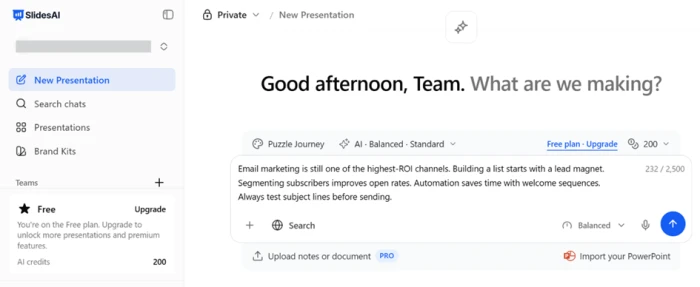
The free plan's single input box
Test 01 . Input"Email marketing is still one of the highest-ROI channels. Building a list starts with a lead magnet. Segmenting subscribers improves open rates. Automation saves time with welcome sequences. Always test subject lines before sending."
Shaping the deck before it builds
Test 02 . Setup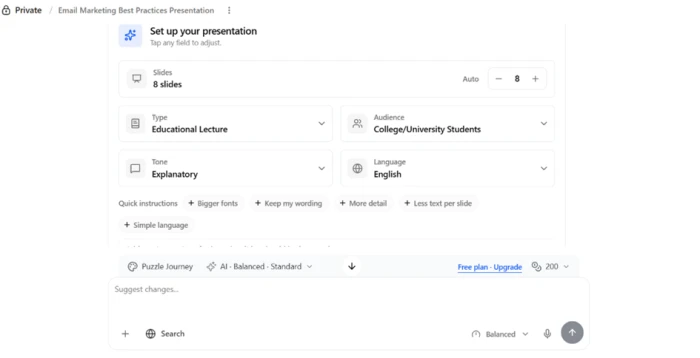
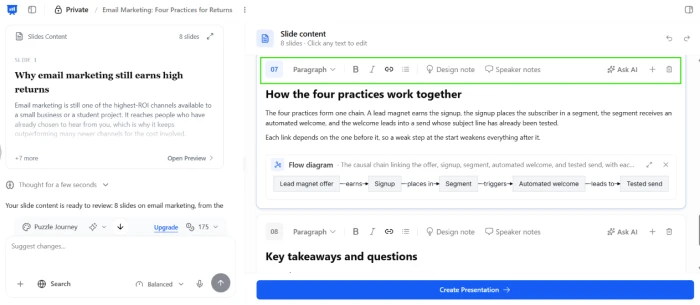
An outline you approve, then editable slides
Test 03 . Generation
Switching the whole deck's look
Test 04 . Themes

Element-level editing and animation
Test 05 . Editor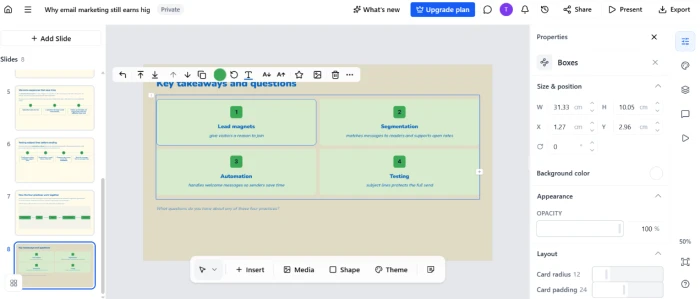

The export window
Test 06 . Export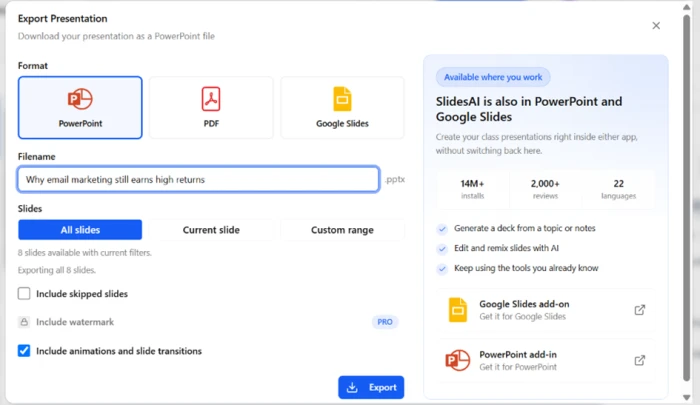
What the downloaded file looked like
Test 07 . Download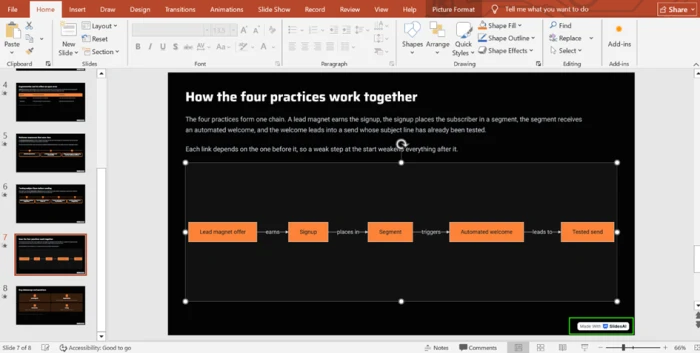
What one deck costs in credits
Test 08 . Credits
The best of SlidesAI is the stretch between the approvable outline and the working canvas. You fix the structure before a single credit is spent on content, then land in an editor where themes swap in one click and each box is a separate element. The auto-built flow diagram was the moment it stopped feeling like a text-to-bullets tool.
Everything that makes the editor good disappears on a free export. The PowerPoint came down as one flattened image per slide with a watermark stamped on top, so the diagram and the individual boxes I had been adjusting could no longer be touched. If you need to keep editing after download, the free output puts that out of reach.
10-Point Feature Review
Pros and Cons
- Approvable outline: you fix titles and order before the deck is written
- True canvas editor: every box and caption is a separate, movable element
- One-click themes: the whole deck restyles, including a strong dark option
- Diagrams from content: it builds a flow graphic, not just bullet lists
- Per-slide speaker notes: each slide gets its own notes and an Ask AI button
- Broad export menu: PowerPoint, Google Slides, PDF, or a custom slide range
- Flattened download: free exports arrive as one image per slide, not editable objects
- Branded output: a Made With SlidesAI watermark sits on the exported file
- Fast credit drain: one deck took 105 credits, roughly two before you run out
- Paste-only input: the 2,500-character cap means trimming any longer source
- Off-topic images: auto-chosen visuals can miss the subject, by user reports
Pricing Breakdown
| Feature | Basic$0 /month | Pro$10 /user/mo, annualStudents | Premium$20.83 /user/mo, annual |
|---|---|---|---|
| AI credits | 200 / month | 30,000 / year | 84,000 / year |
| Character input | 2,500 | 50,000 | 100,000 |
| Create from | Topic or notes | Script, documents, topic or notes | Script, documents, topic or notes |
| Upload PDF & Word | ✗ | ✓ | ✓ |
| AI models | Lite & Balanced | Adds Advanced | Every model, incl Ultra |
| Remove watermark | ✗ | ✓ | ✓ |
The tier math: The per-month figures are annual-billing rates. SlidesAI's page frames the yearly plans as two months free, so paying month to month costs more than the numbers above suggest. There is a second catch in how credits are counted. Basic meters 200 credits every month, while Pro and Premium pool their much larger allowances by the year, so the free tier does not scale down neatly from the paid ones, and a couple of busy days can empty it. Document upload and watermark-free export both begin at Pro, which is the real line between trying SlidesAI and shipping finished work with it.
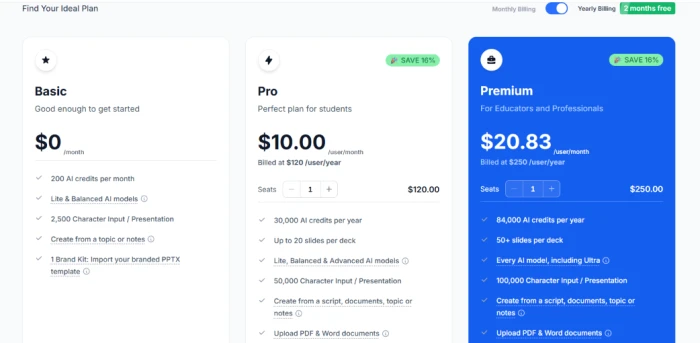
Pricing checked against SlidesAI's official page on November 3, 2026. These rates move, so confirm them on the official pricing page before you subscribe.
SlidesAI vs the Top 3 Alternatives
| SSlidesAI | GGamma | BBeautiful.ai | PPlus AI | |
|---|---|---|---|---|
| Free plan | Yes, watermarked | Yes, 400 credits | No, 14-day trial | No, 7-day trial |
| Free-tier output | Flattened image | Editable export | Trial only | Trial only |
| Works inside | Web, Slides & PowerPoint | Standalone web | Standalone web | Google Slides & PowerPoint |
| Best For | AI structure with a real editor | Web-native decks shared as links | On-brand auto-layout templates | Living inside Slides or PowerPoint |
How to read it: The split comes down to what you keep after generation. SlidesAI and Gamma both offer a free way in, but Gamma hands back a workable export while SlidesAI's free download arrives flattened. Beautiful.ai and Plus AI skip a free tier in favor of a short trial, and Plus AI is the one to shortlist if your decks already live inside Google Slides or PowerPoint, since it edits them in place rather than asking you to leave the suite.
What Users Are Saying
SlidesAI's ratings pull in two directions. It scores well where people rate the generation and the editor, and far lower where they write about billing and getting their money back. The quotes below lean on the angles my own session did not touch, from language support to the cancellation path.
Discussion
Join the discussion and share your perspective.