SmartPostly packs more than twenty AI generators into one browser tab, and its content-calendar tool was the standout in testing: a single topic and a duration returned a differentiated seven-day plan with a labeled post type on every day. Captions and reel scripts came back on-voice and close to ready, though the hashtag tool leans generic. It fits solo creators and small businesses who want fast, platform-specific copy without opening five separate apps.
SmartPostly is a browser-based collection of AI writing tools built around one job: turning a short brief into social-ready text. You pick a tool, enter a topic, set the tone and platform, then generate captions, hooks, bios, taglines, usernames, hashtags, reel scripts, or a full content calendar.
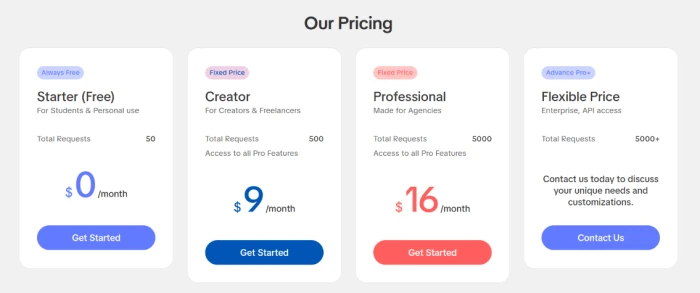
The company positions it as an all-in-one alternative to juggling separate apps, and the tool count keeps growing, with more than twenty generators live today. It targets creators, freelancers, small businesses, and the social media managers running several accounts at once. Four plans run from a free Starter tier through Creator and Professional, up to a contact-only Enterprise option, with the two paid tiers sitting at $9 and $16 a month.
What Happened When We Tested It
02 . 5 tests across captions, calendars, hashtags, scripts, and platform reach
Testing ran on a free SmartPostly account in a browser, with no add-ons enabled. The goal was to see how close each generator got to postable output from a realistic brief, so every tool received a specific scenario rather than a vanilla prompt. Here is what came back, tool by tool.
Caption Generator: a coffee-brand launch
Test 01 . Captions
★ Prompt Used
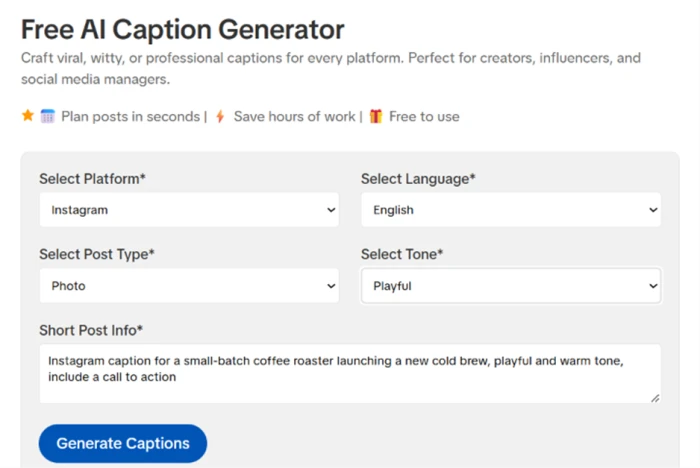
"Instagram caption for a small-batch coffee roaster launching a new cold brew. Playful and warm, with a call to action."
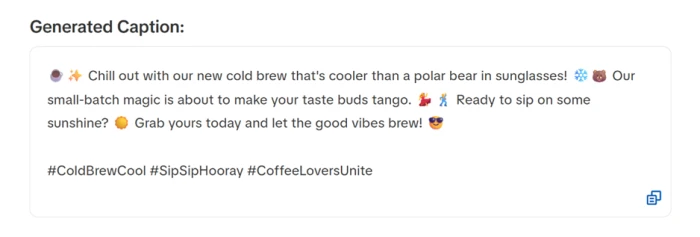
The caption tool's setup: platform, language, post type, and tone before you type a brief.The generated caption, playful and on-brief.
What we observed: The output named the product and worked in the small-batch angle while holding the playful voice, then closed on a clear order prompt. It leaned hard on emojis, so a minimalist brand would trim a few, but the copy was postable with almost no editing.
Content Calendar Generator: a week for a home bakery
Test 02 . Planning
★ Prompt Used
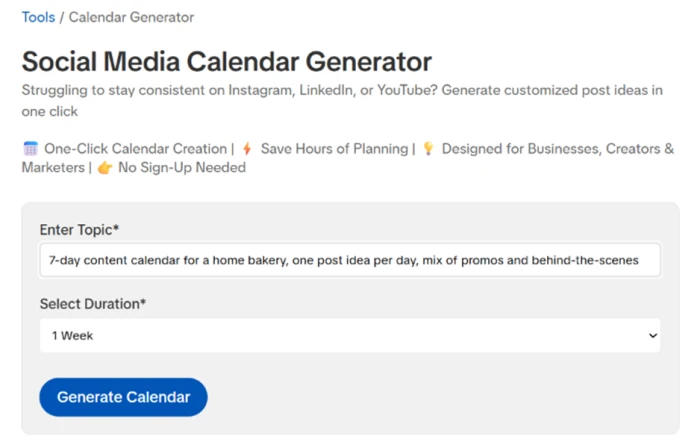
"Seven-day content plan for a home bakery, one post idea per day, mixing promotional and behind-the-scenes content."
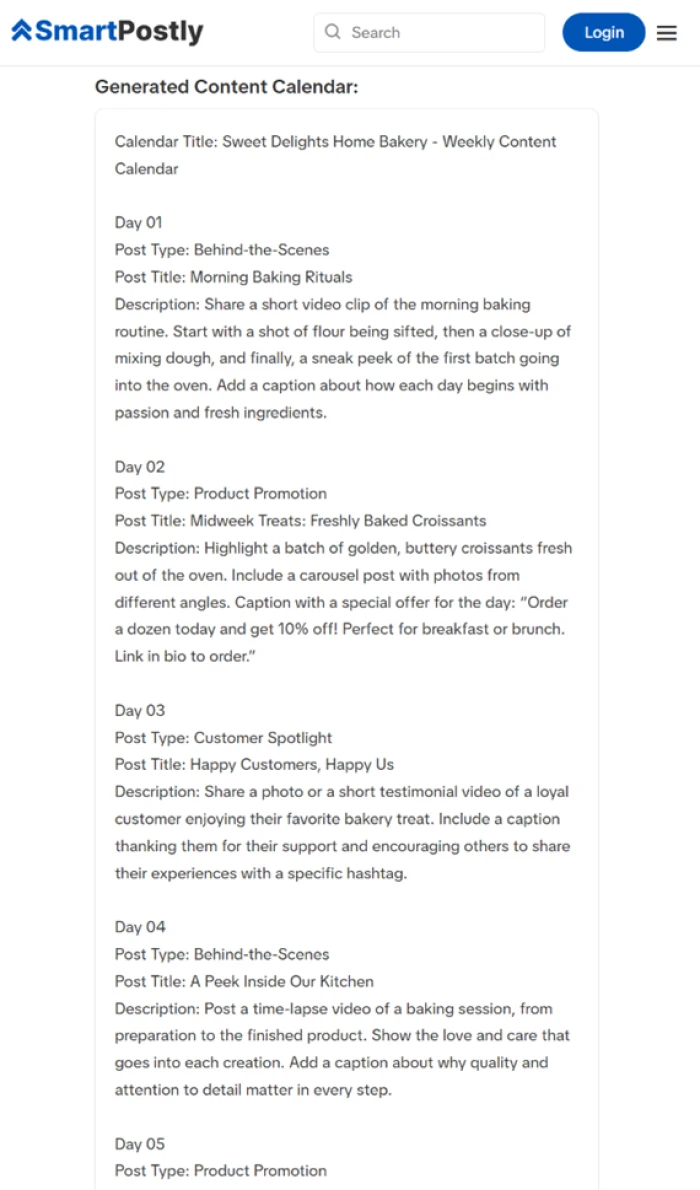
The calendar input keeps it to a topic and a duration.The full seven-day plan, each day with its own post type and brief.
The standout: SmartPostly returned a full week under a "Sweet Delights Home Bakery" banner, and every day carried a labeled post type with its own short description. It alternated behind-the-scenes clips with product promotions and slipped in a customer spotlight, so no two days read alike. For anyone facing a blank planner on Monday, this covers most of a week in one click.
Hashtag Generator: a plain fitness topic
Test 03 . Hashtags
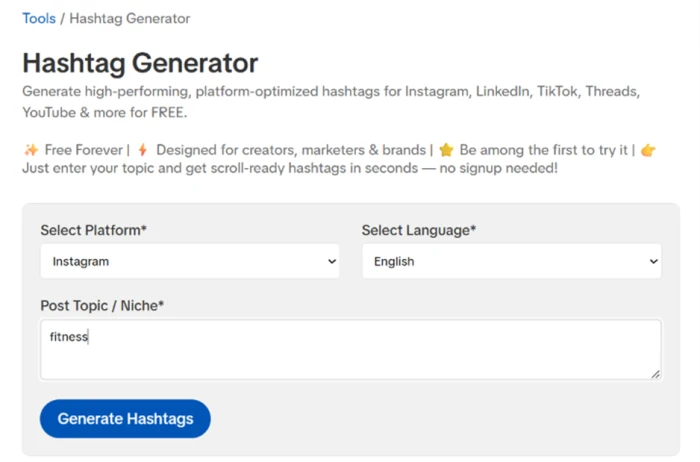
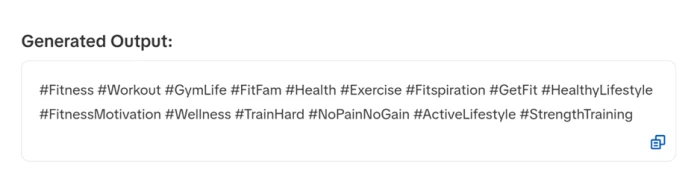
The hashtag tool, given a single word: fitness.Fifteen tags back, most of them broad.
Where it lands: A one-word "fitness" topic returned fifteen tags, nearly all of them broad and heavily used, like #Fitness and #Workout. That is plenty of raw options, but it runs against current advice to post a tighter, more specific set, so the useful move is to hand-pick a few from the pile. Doing that took seconds, though it is work the tool could do for you.
Script Generator: a 30-second sourdough reel
Test 04 . Reel scripts
★ Prompt Used
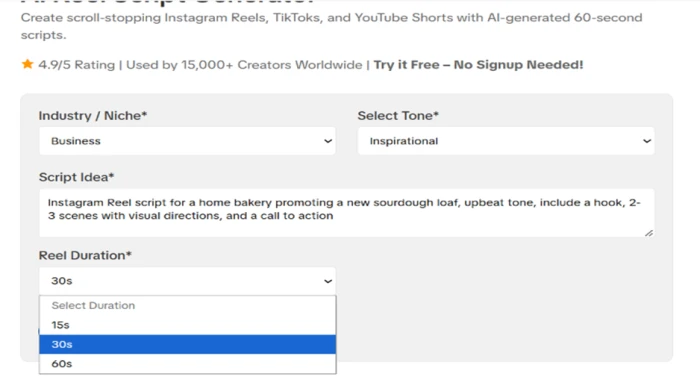
"30-second Instagram Reel script for a bakery promoting a new sourdough loaf. Upbeat, with a hook and visual directions."
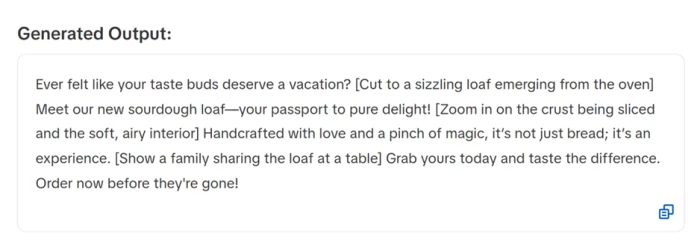
The script tool, with niche and tone selectors and a 30-second duration.The script, opening on a hook with bracketed shot cues.
What clicked: The script opened on a real hook, "Ever felt like your taste buds deserve a vacation?", and threaded bracketed shot cues through the copy, cutting to a loaf leaving the oven and zooming on the crust. It stayed on subject and finished on an order prompt. The cues sit inside one paragraph rather than a formatted shot list, so a creator would break it into scenes first, but the raw material was strong.
Platform reach and the free-tier ceiling
Test 05 . Coverage
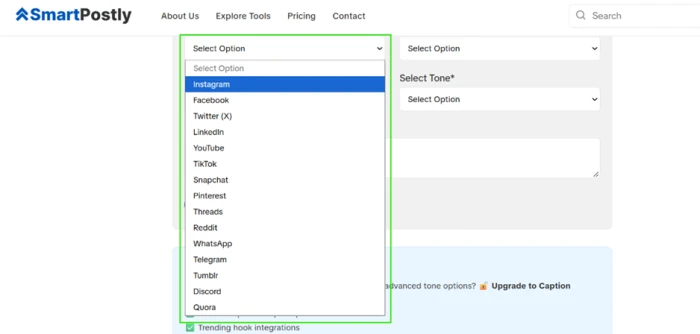
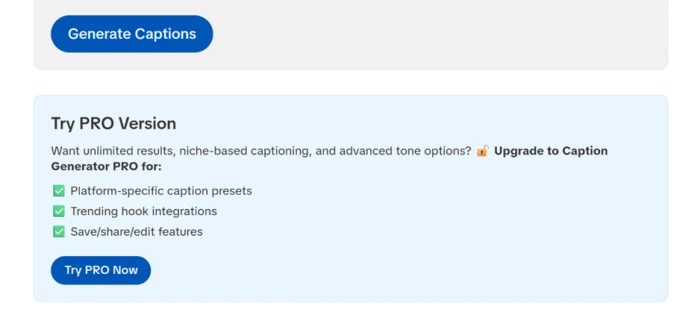
The caption tool's platform menu runs to fifteen destinations.Some tone options and the in-tool editing controls sit behind an upgrade.
Worth noting: The caption tool's platform menu alone lists fifteen destinations, well past the usual big four, with Discord and Quora among them. Some advanced tone options and the in-tool editing and sharing controls are held for the paid plan, so on the free plan you copy each output and paste it where you need it. That suited straightforward testing, but it is friction worth knowing about before you lean on it daily.
★
The calendar and script tools carried the session
The strongest results came from planning and scripting. A single topic and a seven-day window produced a labeled week that alternated behind-the-scenes ideas with straight promotions, and slotted in a customer spotlight too, while the reel-script tool opened on a usable hook with bracketed shot cues already in place. Both needed only light cleanup before use.
!
Hashtags come out broad and crowded
Feed the hashtag tool a plain topic like fitness and it returns fifteen high-volume tags such as #Fitness and #Workout. Current Instagram guidance points the other way, toward a tighter set of three to five specific tags, so you end up pruning the list yourself before posting. The volume is there; the sharpness is not.
How this review was put together. This review is based on hands-on sessions run in September 2026 on SmartPostly's free tier, working through the caption, calendar, hashtag, and script generators with real briefs. Each tool got a specific scenario, from a coffee-roaster launch to a home-bakery week, and the raw outputs above are shown unedited. Pricing was checked against SmartPostly's own page at smartpostly.com/pricing on the day of writing, and competitor prices were read from each vendor's official pricing page the same day. Scores reflect what the tools produced, weighted toward the core generators.
10-Point Feature Review
03 . Ten features, scored on what they produced
Feature Scores at a Glance
Platform Coverage
9.0
Content Calendar
8.5
Caption Generation
8.0
Ease of Use
8.0
Reel Script Generator
7.5
Free-Tier Access
7.5
Tone & Voice Control
7.0
Content Originality
6.5
Output Export & Editing
6.0
Hashtag Generator
5.0
Feature-by-feature breakdownScored on hands-on output, weighted toward the core generators
01
Platform Coverage Standout
Fifteen destinations in the caption tool alone, reaching past Instagram and LinkedIn to Discord and Quora. It loses the last point only because that reach is breadth, not depth: each platform runs on the same engine rather than platform-native tuning.
Destinations: 15Past the big four: Yes
9.0
Excellent
02
Content Calendar Generator Standout
The seven-day bakery plan came back differentiated day to day, each with a labeled post type. Held under 9.0 because it plans content but will not schedule or publish it, leaving the last mile to you.
Output: 7-day planLabeled types: Yes
8.5
Excellent
03
Caption Generation
On-voice, on-brief, and close to postable, with the product and the small-batch angle both worked in. A half-point off for the emoji-heavy default, another for occasional generic phrasing a brand would tighten before publishing.
Editing needed: LightVoice match: Strong
8.0
Strong
04
Ease of Use & Setup
Inputs stay minimal, usually a topic and a dropdown or two, so the first result is seconds away. It sits at 8.0 rather than higher because there is no way to save or organize work in place on the free plan.
Inputs: MinimalLearning curve: None
8.0
Strong
05
Reel Script Generator Standout
A genuine hook and bracketed shot cues put it ahead of most caption-only tools. It stops short of 8.0 because the cues arrive in one paragraph, not a scene-by-scene shot list a creator can film straight from.
Hook: YesShot list: Paragraph only
7.5
Strong
06
Free-Tier Access
The free plan is usable for drafting rather than a locked demo, which earns it a solid mark. It does not go higher because the request allowance is modest and the convenience tools are reserved for paid.
Free requests: 50Card required: No
7.5
Good
07
Tone & Voice Control Limit
Basic tones held well in testing, with playful and upbeat both landing cleanly. The score is capped because the advanced tone range is a paid feature, so free users work from a narrower palette.
Basic tones: IncludedAdvanced tones: Paid
7.0
Good
08
Content Originality Limit
Output is usable but rarely surprising, and both captions and hashtags drifted toward safe, common phrasing. Fine for volume, weaker for a brand chasing a distinct voice.
Freshness: ModerateEdit to stand out: Often
6.5
Fair
09
Output Export & Editing Limit
On the free plan there is no in-tool editing or one-click saving, so refining means copying text into another app first. Functional, but a real workflow tax for anyone using it daily.
In-tool edit: PaidExport: Copy-paste
6.0
Fair
10
Hashtag Generator Weak spot
The weakest tool in the set. Fifteen broad, high-competition tags for a one-word topic, against current advice to run a tighter, more specific mix. Usable only after manual pruning.
Tags returned: 15Niche mix: Low
5.0
Weak
Pros and Cons
04 . What stood out, good and bad
+What works
Standout content calendars: one topic and a duration return a differentiated week with a labeled post type on every day
On-voice captions: a playful, warm brief came back close to ready in the tone selected
Reel scripts with shot cues: the script tool opens on a real hook and threads bracketed camera directions through the copy
Broad platform reach: the caption tool alone targets fifteen destinations, including Discord and Quora
Low-friction setup: inputs stay minimal, usually a topic and a dropdown or two
One workspace: more than twenty generators live in a single browser tab
−What frustrates
Hashtags skew broad: the generator favors high-volume tags over a sharp niche mix
Emoji-heavy captions: cleaner brands will trim decorations before posting
Scripts arrive as one block: shot cues sit inside a paragraph, not a formatted shot list
No publishing: it creates content but will not schedule or post it for you
Copy-and-paste output: you move finished text into your own tools to save or refine it
Pricing Breakdown
05 . Four plans, one real variable
Feature
Creator$9/mo
Professional$16/moFor agencies
Monthly requests
500
5,000
Access to all Pro features
✓
✓
In-tool save, share and edit
✓
✓
Advanced tone options
✓
✓
API access
✗
✗
Built for
Creators & freelancers
Agencies
Where the value sits: The gap between the two paid tiers is volume, not features. Both unlock the same Pro capabilities, so the choice comes down to how many generations you need each month, roughly 500 against 5,000. The plan to scrutinize is the free one, which caps you at 50 requests and locks in-tool editing along with the save-and-share buttons, so free users copy every output out by hand. Full API access lives only on the contact-only Enterprise tier. There is no annual option, so no yearly discount to chase and no renewal spike to watch.
SmartPostly's four plans, from the free Starter tier to a contact-only Enterprise option.
Pricing verified September 22, 2026. Figures come straight from SmartPostly's official pricing page, which is worth a look before you subscribe, since plans shift.
SmartPostly vs the Top 3 Alternatives
06 . How it sits against the tools buyers shortlist
SSmartPostly
BBuffer
CCanva
SSimplified
Starting paid price
$9/mo
$5/channel/mo
$144/yr
$79/mo
Free plan
Yes, 50 requests
Yes, 3 channels
Yes
Trial only
Core job
AI text generators
Scheduling & publishing
Design plus AI copy
Agent-run campaigns
Publishing built in
No
Yes
Yes, planner
Yes
Best For
Fast platform-specific copy
Posting across many accounts
Designing the visual post
Hands-off campaign output
How to choose: The honest split is what you need next to the words. SmartPostly is the cheapest way to mass-produce captions and scripts, but it stops at the text. Buffer is the pick when the bottleneck is getting posts scheduled and out the door, since its AI only drafts captions and does not build calendars or scripts. Canva earns its place when the visual matters as much as the copy, and Simplified suits anyone who would rather brief an agent once and approve a finished campaign than assemble one tool at a time.
What Users Are Saying
07 . Verified reviews from approved platforms
SmartPostly is new enough that verified reviews are thin on the ground. On Trustpilot it holds a small handful of ratings, and the two substantive written reviews sit below. No qualifying user reviews turned up on Reddit, Quora, G2, or the app stores at the time of writing.
SmartPostly does a nice job supporting day-to-day social media activity. The platform is straightforward and doesn't try to overcomplicate things. With a bit more depth in features, it could become even more competitive.
I found this website amazing for social media managers. It really helps me complete my work. Their tools are designed for managing social media, and now I can create my weekly social media calendar in just a few minutes. I can also generate post ideas, scripts, and more. Thank you, team!
A fast content drafter for creators who publish elsewhere
Use SmartPostly if you want quick, platform-specific copy and the occasional week-long calendar, and you are fine moving output into your own posting tools. The calendar and script generators are the strongest reasons to sign up, with captions close behind.
Skip SmartPostly if your bottleneck is publishing rather than writing, where Buffer fits better, or if the visual matters as much as the words, where Canva does more. Its hashtag tool also lags, so heavy hashtag users will look elsewhere.



Discussion
Join the discussion and share your perspective.