Swishy writes an editable motion-graphics scene from a text prompt instead of handing back a locked clip. In our session a detailed brief returned the requested serif, the exact gold hex, a three-second runtime and a 9:16 frame on the first pass, and a kinetic phrase arrived split into separately editable word slots. It fits creators making title cards and social overlays who would rather type a brief than learn After Effects, provided they write specific prompts and treat the credit-based model tiers with care.
Swishy is a browser-based motion designer that turns a written brief into an animated scene: kinetic type, logo reveals, chart animations, UI mockups and social overlays. You describe the shot and pick one of four model tiers, then the app generates scene code that renders inside its editor, where every color, font, duration and line of text stays adjustable after the fact. A template gallery sorted by category (Text, Graphics, Overlays, Logos, Social Media, Charts and more) offers starting points, and any public template can be duplicated and rebuilt as your own.
The product is young. Its changelog records a private release on January 29, 2026 and a public beta on February 2, so the company has been shipping in the open for roughly seven months, adding community templates, an aspect-ratio picker, a larger open view and a multi-scene mode that builds a hook, a problem, a solution and a call to action as separate scenes with their own chat. The pitch targets creators and marketers who post short vertical video and have no interest in keyframes, and the About page positions the whole thing as the After Effects alternative for people who never learned After Effects. Plans run from a free tier through Beginner at $12 a month and Pro at $25 a month on yearly billing.
What Happened When We Tested It
02 . 8 tests covering prompts, editing, export and credits
We tested Swishy on a fresh free account created during the session, in a desktop browser, using the default Mini model for most runs and switching to the credit-based Starter model once. The session covered sign-up, two contrasting prompts, a typography test, template editing, the export dialog and the credit ledger. It surfaced a tool that rewards precise briefs and punishes lazy ones, with one billing behavior a buyer should know about before spending a credit.
Sign-up asks five questions and no card
Test 01 . Onboarding
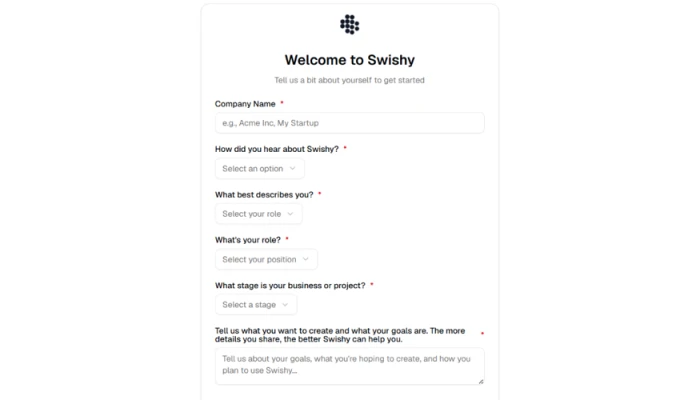
The onboarding form on first launch.
First impression: One form. It wants a company name, how you found the tool, your role, your business stage and a paragraph about what you plan to make, then drops you on the create screen in under a minute. No card and no trial countdown. The questions read like sales qualification rather than setup, and nothing stopped us from typing a single word into the paragraph field and moving on.
A lazy prompt, read as copy
Test 02 . Vague prompt
★ Prompt Used
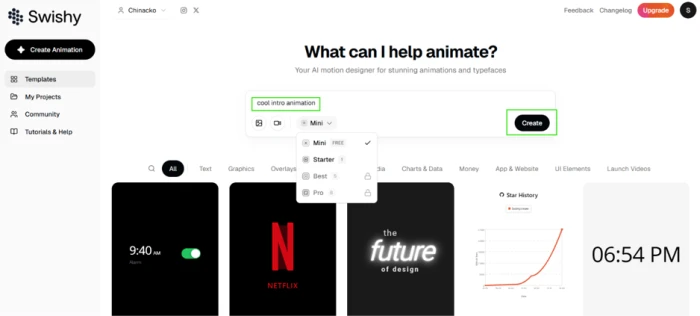
"cool intro animation"
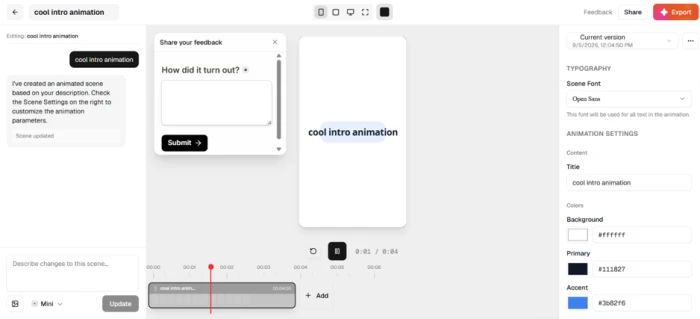
The create bar with the model selector open.A vague prompt produces the prompt itself as on-screen text.
What this shows: Swishy did not treat the three words as a description. It used them as the copy, revealing "cool intro animation" one word at a time across four seconds. The model selector beside the input listed four tiers, Mini through Pro, and the free Mini model handled the run. The lesson lands fast: the prompt bar is a builder, and whatever you type is fair game for the canvas.
Template search matches words, not intent
Test 03 . Discovery
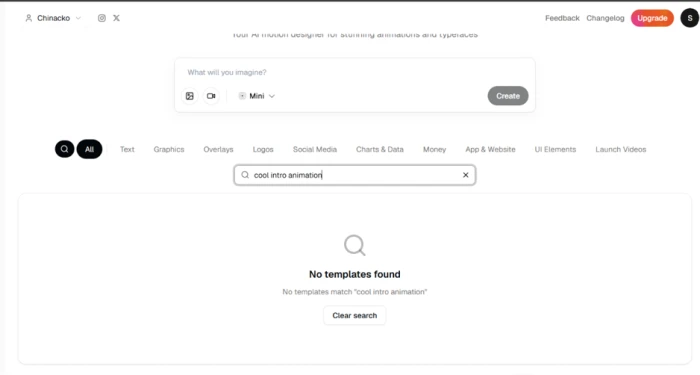
Template search is literal and returned no matches.
Worth noting: The same phrase typed into template search returned nothing. Search matches keywords, so a natural-language query that the generator happily builds from draws a blank in the gallery. Browsing the category tabs is the reliable route, and the gallery matters more than it looks, because a template already close to your idea can be duplicated and edited instead of generated from scratch.
A specific brief, five constraints out of six
Test 04 . Detailed prompt
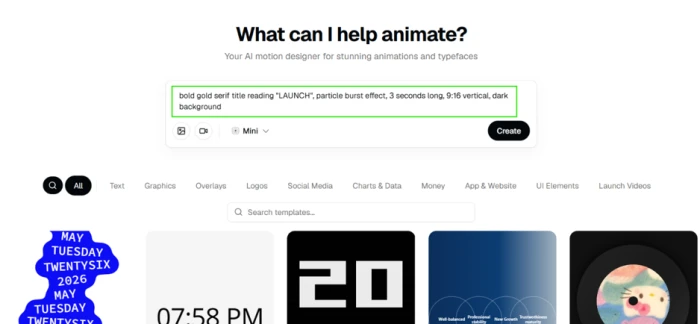
★ Prompt Used
"bold gold serif title reading LAUNCH, particle burst effect, 3 seconds long, 9:16 vertical, dark background"
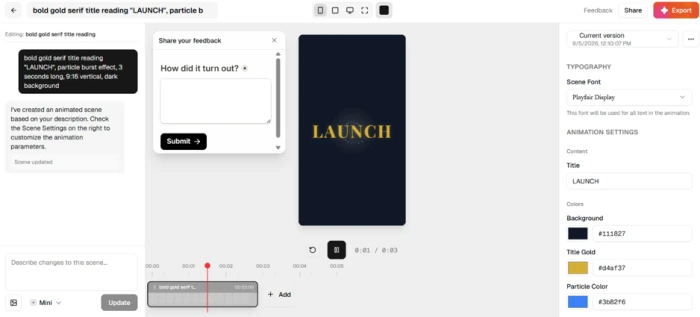
The detailed prompt before generating.The LAUNCH scene matched font, color, text, timing and format.
The evidence: Swishy chose Playfair Display, set LAUNCH in #d4af37 gold, ran three seconds on the nose, framed the shot at 9:16 and kept the background dark. The one miss was the particle burst, which came back in #3b82f6 blue, the same default accent that surfaced in other scenes during the session. Strong on the headline instructions and careless on the small one, which is a single hex field away from fixed.
Kinetic text arrives pre-split
Test 05 . Typography
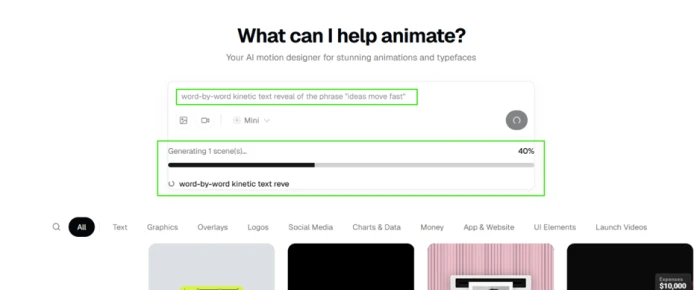
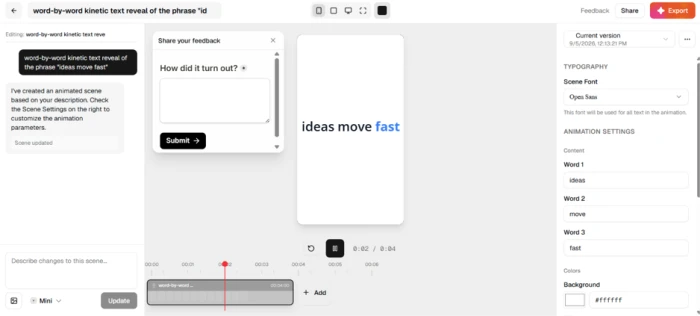
Generation progress for the kinetic text scene.Each word became its own editable field.
What clicked: We asked for a word-by-word kinetic reveal of the phrase "ideas move fast". A progress bar ran, the scene finished in a few seconds, and Swishy had split the phrase into separate word slots and revealed them in sequence, with the final word emphasized in color. It read the structure of the request rather than dropping the phrase in as one block, which is the difference between a clip you can retype and a clip you have to regenerate.
The right-hand panel does the real work
Test 06 . Editing depth
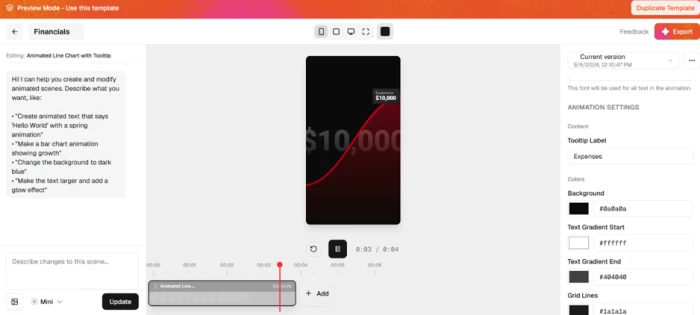
Full parameter controls on a duplicated template.
Where it lands: Every scene carries hex fields for background and accent colors, a font dropdown, a duration slider and a text field per element. We opened the public Financials template, duplicated it and changed its gradient stops and grid lines, then its tooltip label, without a single regeneration. This is where the tool earned trust. Refining is a real option, not a reroll.
Export gates on the free plan
Test 07 . Export limits
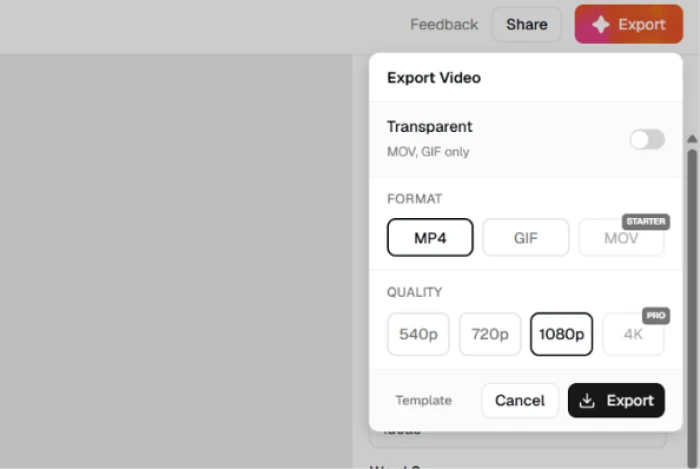
Export options, with tiered formats and quality.The plan modal opened from the locked transparent toggle.
Under the surface: The export dialog offers three formats, MP4 and GIF plus MOV, with quality up to 4K. On the free plan MP4 runs to 1080p, MOV carries a Starter lock, 4K carries a Pro lock, and the transparent toggle opens the plan page when clicked. Transparency only works in MOV or GIF, so a free user who wants a see-through overlay is steered to GIF. The plan page reframed those walls: transparent export and MOV both sit on the entry paid tier, and only 4K, custom fonts, team collaboration and priority support are held back for Pro. One mark in the free plan's favor: our exported MP4s carried no watermark.
Two credits a week, and one gone for nothing
Test 08 . Credit ledger
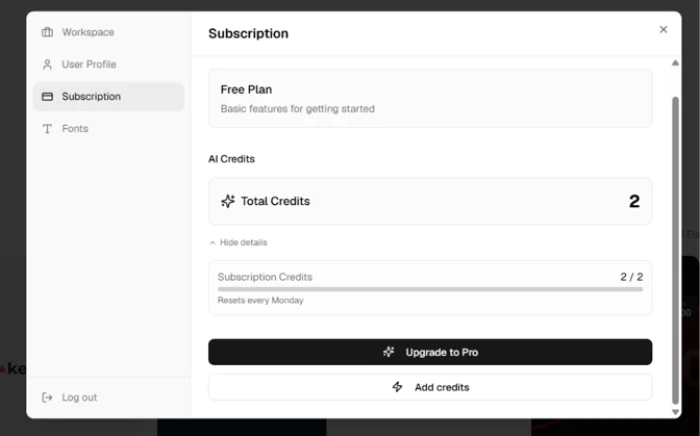
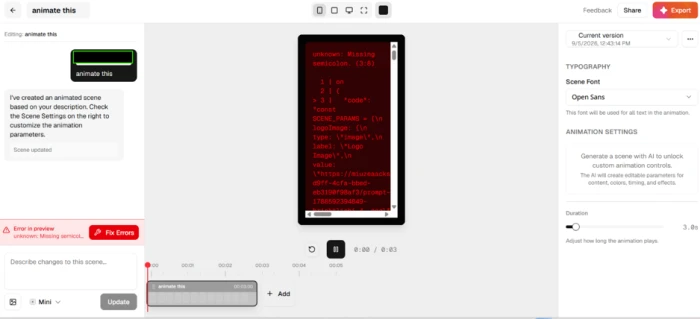
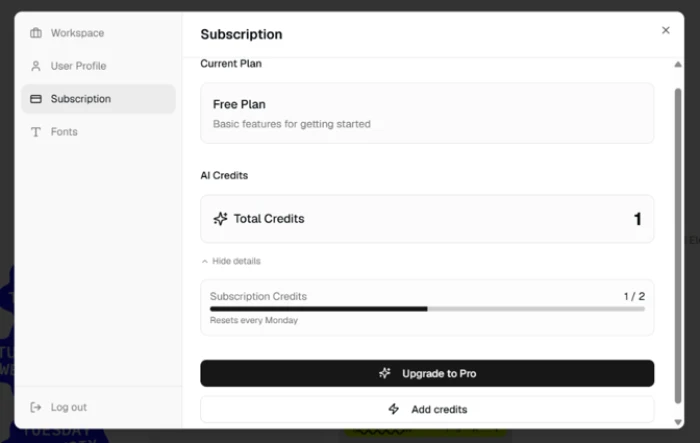
Credit balance untouched after Mini generations.A Starter generation that returned code and an error.One credit gone after the failed Starter run.
The real story: After several Mini runs the counter still read 2 of 2, resetting each Monday, because Mini draws no credits. The weekly pair is for the higher tiers. Starter costs one credit per generation and Best costs five. The top tier costs eight. Switching to Starter produced the worst moment of the session: the preview filled with raw scene code and an error reading "unknown: Missing semicolon (3:8)", next to a Fix Errors button and no output we could use. The counter dropped from 2 to 1 anyway. On a plan that grants two credits a week, a single failure spends half of them. Nothing in the app says that can happen.
★
A precise brief on the free model, then the panel for the last detail
The LAUNCH brief proved the model follows explicit constraints on font, color, text, runtime and frame, and the kinetic test proved it preserves structure as editable pieces. Pair that with hex fields and per-element text controls and the workflow becomes: write the brief with the specifics spelled out and run it on Mini, then fix the one slip by hand. That loop cost zero credits across our entire session.
!
A failed Starter run still costs a credit
Swishy's models write scene code and then render it, so a syntax slip means no preview at all. Our Starter run threw a "Missing semicolon" error and returned code instead of animation. The balance still dropped, with no refund and no message. The company's FAQ says subscription payments are generally non-refundable once credits are issued, which turns the same failure on a paid tier into a billable event you cannot claw back.
How this review was put together. We tested Swishy on September 5, 2026 using a free account created for the session in a desktop browser, running the default Mini model for most generations and the Starter model for one credit-based run. Swishy has no public pricing page (the /pricing route returns a 404), so every figure was read from the in-app upgrade modal at swishy.ai and cross-checked against the plan data shipped in the app's own code. Export rules and refund terms were checked against the official documentation at swishy.gitbook.io/docs. Competitor pricing was verified the same day on each vendor's own plans page.
10-Point Feature Review
03 . Ten features scored 5.0 to 9.0 against the session
Feature Scores at a Glance
Detailed Prompt Fidelity
8.0
Vague Prompt Handling
5.0
Kinetic Typography
8.6
Manual Editing Depth
9.0
Generation Reliability
5.5
Credit Accounting
5.2
Export Formats and Gates
7.0
Free Tier Value
7.4
Template Library and Search
6.4
Onboarding and Speed
7.8
Feature-by-feature breakdownWeighted toward generation and editing; onboarding and templates count half
01
Detailed Prompt Fidelity Honored
Five of six explicit constraints landed on the first pass: the serif face, the hex gold, the wording, the three-second runtime and the vertical frame. The miss on particle color is why this is not 8.5. The fact that nothing needed a second generation is why it is not 7.5.
Constraints honored: 5 of 6Fix required: one hex field
8.0
Strong
02
Vague Prompt Handling Literal
Three loose words became on-screen copy rather than a brief. That is a defensible design choice for a tool that builds rather than searches, but a newcomer who types the way they would into a search box gets a clip of their own prompt with no warning and no suggestion to add detail. A clean render is the argument against 4.5. The absence of any nudge toward a better prompt is the argument against 5.5.
Output: literal text of the promptGuidance offered: none
5.0
Weak
03
Kinetic Typography Structured
The phrase came back as separate word slots revealed in order with a color emphasis on the final word, which is the structure a designer would build by hand. It sits just under the editing score because the emphasis choice was the model's rather than ours, and because custom font uploads are locked to the top plan, so we could not push the typography past the built-in list.
Words as editable slots: yesCustom font upload: Pro plan only
8.6
Strong
04
Manual Editing Depth Top mark
Hex fields, a font dropdown, a duration slider and per-element text on every scene, with an AI chat editor and version history documented on top. Duplicating the Financials template and reworking its gradient and labels took no regeneration. Half a point is withheld for custom fonts being gated, and for a right-hand panel that grows dense on scenes with many elements. Anything lower would undersell the fact that no test in the session forced a reroll.
Per-scene controls: color, font, duration, textVersion history: yes, per docs
9.0
Top
05
Generation Reliability One failure
Every Mini run rendered. The single Starter run did not, returning raw scene code and a syntax error beside a Fix Errors button. One failure in a small sample proves no pattern, so this is not a 5.0, but it hit the model users spend credits on, and the app put code in front of a person who came here to avoid code. The app's own model config routes Starter to Gemini 3 Flash and Best to Claude Sonnet 4.6, with the Pro tier on Gemini 3.1 Pro Preview, so output quality across tiers depends on three different vendors.
Mini runs failed: 0Starter runs failed: 1 of 1
5.5
Weak
06
Credit Accounting No refund
The ledger is honest about balances and prints the reset day under the counter, and the model dropdown shows per-run costs, which is more disclosure than many credit systems manage. It loses ground because a failed run was charged and not returned, and neither the upgrade modal nor the docs mention that possibility. The counter's accuracy earns the 0.2 over a flat 5.0. The FAQ's refund language, which closes the door on getting the credit back, rules out 5.5.
Failed run charged: yesRefund path: none found
5.2
Weak
07
Export Formats and Gates Mixed
The free plan's 1080p MP4 ceiling is enough for social delivery, and the dialog is easy to read with quality settings from Fast up to High. MOV and transparency sit behind the entry paid tier and 4K behind the top one, and the dialog's Starter label does not match the plan page's Beginner name, a small mismatch that will confuse someone. A 7.0 balances a generous free MP4 against gates on the formats a motion designer needs for overlays.
Free MP4 ceiling: 1080pFree formats: MP4, GIF
7.0
Solid
08
Free Tier Value Generous
No card, Mini generations that never touched the counter during our session, and two weekly credits for the paid models. That is enough to build and ship real clips at no cost. The weekly cap on those credits and the GIF-only path to transparency keep it out of the 8s.
Card required: noTransparent path on free: GIF only
7.4
Solid
09
Template Library and Search Browse only
The gallery is broad and community submissions are live. Duplicating a public template hands you a fully editable scene. Search is keyword-only and returned nothing for a phrase the generator handled fine, so discovery relies on tabs. Working duplication earns the 6.4 over a 6.0. A library without semantic search is doing half its job, which rules out a 7.0.
Search type: keyword matchDuplicate public templates: yes
6.4
Mixed
10
Onboarding and Speed Quick
Sign-up to create screen in under a minute with no card, and Mini generations finish in seconds behind a visible progress bar. The five-question form is longer than the product needs, and the mobile banner tells visitors to email themselves a desktop link, which stops it short of an 8.
Sign-up fields: 5Mobile experience: desktop link prompt
7.8
Strong
Pros and Cons
04 . What a user notices first
+What Works
Editable output: every generated scene opens with color, font, duration and text controls
Prompt fidelity: explicit constraints on face, hex, runtime and frame land on the first pass
Kinetic structure: multi-word reveals arrive as separate editable slots
Clean exports: MP4 to 1080p with no watermark
Fast start: no card and straight into the editor
Template duplication: public templates clone into fully editable scenes
−What Hurts
Literal prompt reading: vague briefs become on-screen copy
Failed runs are not refunded: a broken Starter generation still consumed its credit
Code in the preview: an error dumps raw scene code on a product sold as no-code
Default accent creep: unrequested blue appeared where gold was specified
Desktop-first: mobile visitors are told to email themselves a link
Pricing Breakdown
05 . Two paid tiers, yearly toggle on by default
Feature
Free$0 no card
Beginner$12/mo billed yearlyRemoves Most Gates
Pro$25/mo billed yearly
Month-to-month rate
$0
$19
$49
Yearly total
$0
$144
$300
AI credits
2 per week
150 per month
400 per month
Models
Mini, Starter
Mini, Starter, Best
All four, including Pro
MP4 export to 1080p
✓
✓
✓
MOV export
✗
✓
✓
Transparent background
✗
✓
✓
4K quality
✗
✗
✓
Custom fonts
✗
✗
✓
Team collaboration
✗
✗
✓
Priority support
✗
✗
✓
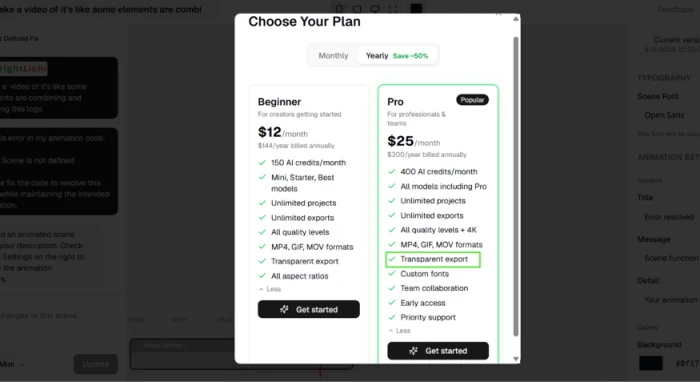
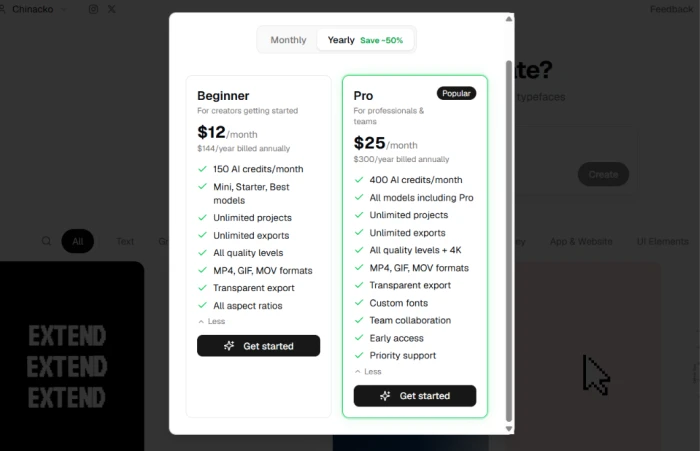
The tier math: The upgrade modal opens with the Yearly toggle already selected, so the $12 and $25 you see first are annual rates, $144 and $300 paid up front. Flip to Monthly and Beginner becomes $19 and Pro $49, which is why older listings quoting those figures are not out of date, just reading the other toggle. Credits are the second axis. Beginner's 150 a month buys 150 Starter runs or 30 runs of the Best model at five credits each, and Pro's 400 stretches to 50 runs of the top model at eight. In-app top-up packs start at 150 credits for $25, the same figure as a month of Pro on yearly billing, and the FAQ says payments are generally non-refundable once credits are issued. Nothing on the plan page mentions that a failed generation still consumes its credit.
The in-app plan modal with the Yearly toggle selected.
Pricing verified September 5, 2026. Swishy has no standalone pricing page, so open the upgrade modal inside the app for current figures before you subscribe.
Swishy vs the Top 3 Alternatives
06 . Prompt-first against timeline and keyframe tools
SSwishy
JJitter
CCanva
AeAfter Effects
Paid entry
$12/mo billed yearly, $19 monthly
$15 per editor/mo billed yearly, $19 monthly
$15/mo billed yearly, $18 monthly
$22.99/mo, annual plan billed monthly
Free tier
Yes, no watermark on MP4
Yes, watermarked, 720p
Yes
No, 14-day refund window instead
How you animate
Text prompt to an editable scene
Timeline with presets and AI Brainstorm
Drag-and-drop editor with AI allowances
Keyframes and compositing
Team seats
Pro plan only
Every plan, priced per editor
Business plan, $25 per user monthly
Teams single app from $37.99 per license
Best For
Fast text-led clips from a written brief
Designers animating Figma layouts
Non-designers already working inside Canva
Frame-level control and VFX
How to choose: Swishy wins when the brief is a sentence and the deliverable is a short text-led clip, because the prompt does the layout and the panel does the polish. Jitter is the pick if you already design in Figma and want a timeline you can scrub, at the same monthly rate. Canva makes sense when the animation is one asset inside a content workflow you already run there. After Effects remains the answer for compositing and frame-level control, at close to twice Swishy's entry price and with the learning curve Swishy exists to avoid.
What Users Are Saying
07 . No verified reviews on record yet
We quote users only from Trustpilot, G2, Reddit, Quora, X, the App Store and Google Play, and only when a direct link to the post exists. For Swishy, that search came up empty on September 5, 2026. The tool has no Trustpilot or G2 listing. It has no mobile app to review. Our Reddit and Quora searches surfaced no threads discussing it, and the only coverage we found sits on directory and affiliate sites that restate the marketing page, which we do not quote.
That silence is consistent with a product this new. We will add user reports here as they appear on the approved platforms.
· The Verdict ·
7.1/10
Do you want to type a brief or drag a keyframe?
Use Swishy if you make short text-led clips for vertical feeds and can write a brief with the face, color, timing and frame spelled out. The payoff is a result you adjust by hand rather than regenerate, and the free Mini model plus the editing panel covered our whole session.
Skip Swishy if you need a scrubbable timeline and Figma import; Jitter is the closer fit there. Skip it too if the job is a full edit with captions and stock footage, where Veed (7.2 on FirmCritics) covers more ground, or if you need frame-level compositing, which remains After Effects territory.

Discussion
Join the discussion and share your perspective.