tensor.art · Operated by ECHO INTERNATIONAL HK LIMITED
Tensor.Art treats models as the product as much as the images, pairing a community library of more than a million checkpoints and LoRAs with a trainer that runs entirely in the browser. In testing, a new free account went from Google signup to a clean FLUX.1-dev render inside two minutes. Then it failed the test power users care about most: an identical seed returned a different image. That combination suits hobbyists building on community models far better than anyone who needs reproducible output.
Tensor.Art is a model sharing platform first and an image generator second. Community members upload checkpoints and LoRA adapters built on bases like Stable Diffusion and FLUX, and everyone else runs those models in the browser on rented cloud GPUs. The company behind it, ECHO INTERNATIONAL HK LIMITED, operates out of Hong Kong and leads its own marketing with the word free.
The target audience is the Stable Diffusion crowd that never bought a graphics card. Anime and character art dominate the site's channels, though the homepage now pushes templates for brand design, photoreal scenes, character creation, and video alongside them. The same account that generates images can train a LoRA on its own dataset, which is the pitch in one sentence: the whole community model workflow, upload to training to generation, without local hardware. Plans split into a free Starter tier and a single Pro subscription, covered in full further down.
What Happened When We Tested It
02 . 6 tests run on a fresh free account
Everything below happened on a brand-new free account, since that is how most people will first meet the platform. Signup through a Google login took under a minute, and the generator opened with the day's free credit allowance already loaded. No card, no trial timer. The session covered first-run quality, seeded re-runs, the model browser, the online trainer, and the gates a free user actually hits.
Signup to First Image
Test 01 . Onboarding
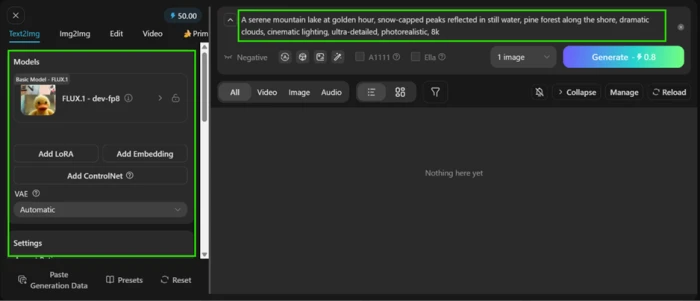
The generator on a fresh free account. The daily credit balance sits at the top-left of the prompt box.First generation. A single detailed prompt on FLUX.1-dev produced a clean result on the first try.
First impression: The layout reads instantly. Prompt box across the top, model panel and settings down the left rail, results streaming into the main pane. A detailed landscape prompt on FLUX.1-dev came back in roughly fifteen seconds, reflections sharp and light believable, without a visible artifact. As a first five minutes, few free tools match it.
Locked Seed, Two Different Images
Test 02 . Reproducibility
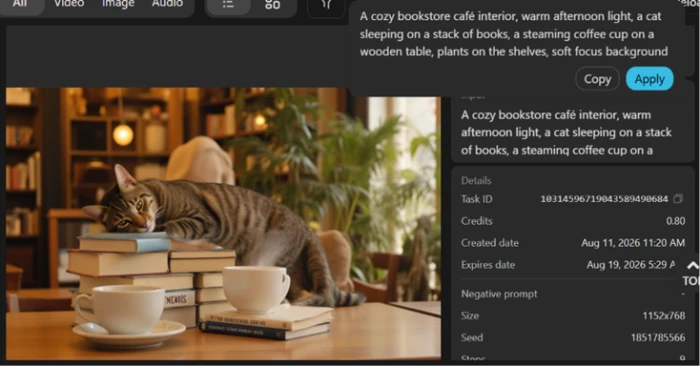
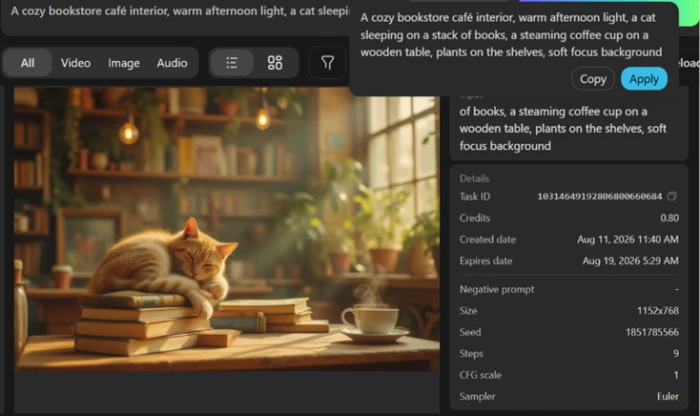
Run one. Seed 1851785566, with every generation parameter visible in the detail panel.Run two. Identical seed and settings, yet a different cat and a different composition.
The key finding: The most common complaint about Tensor.Art is that you cannot reliably recreate an image you have already made, so this test hit it head on. Seed locked to 1851785566, with prompt, model, size, steps, CFG, and sampler all held constant across two runs. One run returned a striped tabby draped over the stack of books. The other returned a ginger cat asleep on it. Every input matched, yet the output changed, on the first real attempt rather than after hours of edge cases. Any workflow that lands one image and then refines it breaks right here.
Browsing the Model Library
Test 03 . Model library
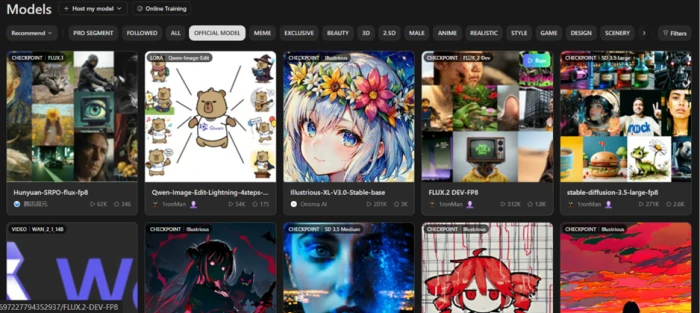
The official model browser, filtered by category. Run counts in the hundreds of thousands are common.
What stood out: This is where the platform lives up to its name. Filtering the browser by category pulls up walls of community checkpoints and LoRAs, several carrying run counts well past 300,000. Those numbers matter more than the raw catalogue size, because a heavily run model has already been stress-tested by the community before you spend a single credit on it.
Training a LoRA in the Browser
Test 04 . LoRA training
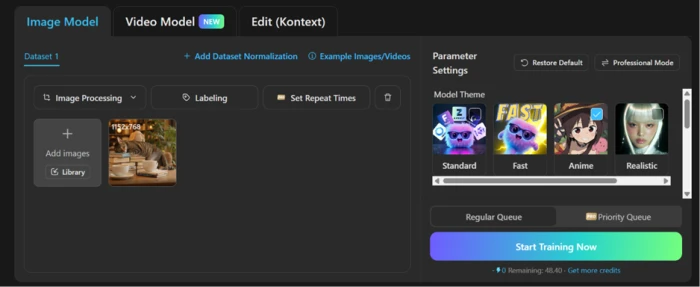
Built-in model training. Dataset upload and theme presets sit alongside the queue options on one screen.
Worth noting: Training sits inside the same account, not behind a separate product. The online panel accepted a small dataset upload and offered theme presets and queue options with no local GPU anywhere in the chain. A priority queue is walled behind Pro, which is fair for a paid speed boost. Elsewhere this workflow usually means a local install or a rented notebook.
The Exclusive Model Wall
Test 05 . Download gates
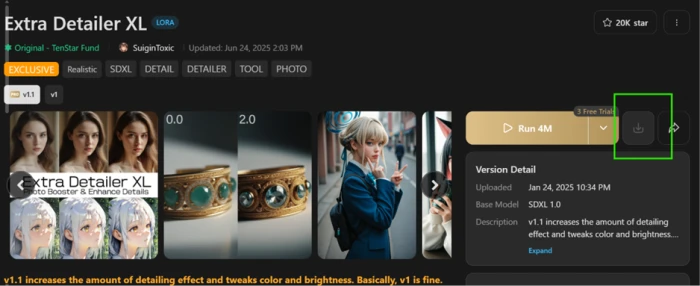
An Exclusive LoRA. The download button is disabled and only a few free trial runs are offered instead.
Under the surface: On the free account, the download button on anything marked Exclusive stayed greyed out, offering a handful of trial runs in place of an actual file. Community reports on r/StableDiffusion say the lock holds even after paying for Pro. If downloading models is your reason for signing up, treat this platform as a place to run models, not to own them.
Credit Resets and Expiring Images
Test 06 . Free-tier limits
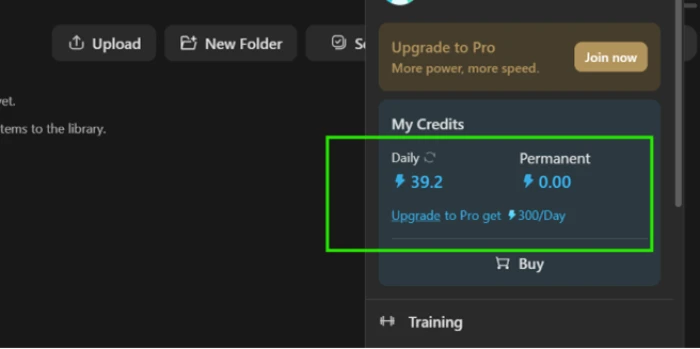
The credit panel. A daily allowance that resets, with Pro raising it to 300 per day.
The takeaway: Two limits hide in plain sight. Daily credits refresh every 24 hours instead of rolling over, so an unspent balance simply vanishes at reset. Generated images also expire about a week after creation unless you pay to extend the history, a detail that only surfaced because one result panel listed an expiry date eight days out. Nothing on the generation screen warns you about either.
★
Free in-browser training on top of the community library
The combination that held up under testing: the same $0 account that browses heavily used community checkpoints can upload a dataset and train its own LoRA, with presets and a queue and no hardware requirement. That pairing is the platform's genuine edge, and it worked exactly as advertised on the first attempt.
!
Expired work cannot be rebuilt
The two weakest findings compound each other. Outputs carry an expiry date, and a locked seed with identical settings does not return the same image. Miss the download window and that exact image is gone for good, because no combination of saved parameters will bring it back.
How this review was put together. All six tests ran on August 11, 2026 on a newly created free account in a desktop browser, covering first-run generation, seeded re-runs, library browsing, and the online trainer. Findings were checked against community threads before scoring. Pricing was verified on the in-app upgrade screen the same day and cross-checked against the official membership announcement at tensor.art/event/proupdate, with the discrepancy between the two surfaces reported in the pricing section.
10-Point Feature Review
03 . Scored 5.0 to 9.0 against hands-on evidence
Feature Scores at a Glance
Model library depth
9.0
Built-in LoRA training
8.5
Generation quality
8.0
Free tier value
7.5
Interface and onboarding
7.5
Video and tool breadth
7.0
Pricing transparency
6.0
Model downloads
5.5
Output storage
5.5
Seed reproducibility
5.0
Feature-by-feature breakdownWeighted toward generation and model workflow over peripherals
01
Model library depth Strength
The catalogue's headline number would mean little on its own, but the browser surfaces community checkpoints with six-figure usage that load straight into the generator. It stops short of a higher mark because quality between uploads swings wildly and curation is left entirely to run counts and likes.
Run counts: 300K+ observedFormats: Checkpoints + LoRAs
9.0
Excellent
02
Built-in LoRA training Strength
Dataset upload and theme presets sat beside the queue controls and worked on a free account, which is rare enough to carry the score this high. It loses half a point to 9.0 territory because the fastest queue is paywalled and the panel offers little guidance on dataset quality before you spend credits.
Hardware needed: NonePriority queue: Pro only
8.5
Excellent
03
Generation quality Strength
A single detailed prompt produced a clean, artifact-free landscape on the first attempt, which earns more than a middling score. One session cannot rule out the peak-hour slowdowns and uneven results users report, though, and the reproducibility failure makes quality harder to bank on, so 8.5 stays out of reach.
First render: ~15 secondsBase model: FLUX.1-dev
8.0
Strong
04
Free tier value
A daily allowance plus library access plus training on a $0 account beats most rivals' free plans, and no card is required. The expiring outputs and the use-it-or-lose-it reset keep it from 8.0, since both quietly tax exactly the casual users the tier is built for.
Card required: NoAllowance rollover: None
7.5
Strong
05
Interface and onboarding
Three zones, no tutorial needed. A first image landed within two minutes of reaching the site. Yet the deeper settings carry no inline explanation, and critical account facts like output expiry never appear where a new user would see them. That gap is the missing half point.
Video generation is included on the free tier alongside images, and the homepage carries a wall of purpose-built tools from character creation to brand design. The score reflects verified presence rather than tested depth, since video sat outside this session, and breadth without depth caps at 7.0 here.
Video on free: YesDepth tested: Images only
7.0
Solid
07
Pricing transparency Friction
The in-app screen itself is clear once opened, which holds this at 6.0 instead of lower. What drags it down is that Tensor.Art's own published membership page and its live checkout disagree on the yearly price, and both dress the figure as a discount against a list price with no evidence anyone pays it.
Official surfaces: 2, conflictingDiscount framing: Permanent
6.0
Mixed
08
Model downloads Friction
Ordinary community models remain runnable and many are downloadable, which keeps this off the floor. The Exclusive tier gate observed in testing, combined with community reports that Pro does not lift it, means a platform named for model hosting scores worse here than a buyer would ever guess.
Exclusive downloads: Blocked on freeAlternative offered: Trial runs
5.5
Weak
09
Output storage Friction
An expiry stamp sitting eight days out on a fresh generation is a hard limit dressed as a detail, and the platform discloses it only inside a result panel. Downloads work fine and history is browsable within the window, which is the only reason this clears 5.0.
Disclosure: Result panel onlyExtension: Paid
5.5
Weak
10
Seed reproducibility Friction
A locked seed with every parameter held constant returned two different images, which fails the core promise of seeded generation. Generation itself never errored and the parameter panel faithfully records everything, even if replaying it changes the result. That alone holds the score at 5.0 instead of lower.
Seeded re-runs: 2Matching outputs: 0
5.0
Weak
Pros and Cons
04 . The user-facing picture
+Where It Delivers
Library scale: community checkpoints and LoRAs at a depth few rivals approach
No-hardware training: LoRA training runs in the browser with presets and a queue
Fast, clean output: a detailed prompt returned an artifact-free image in seconds
Instant start: Google login straight into a working generator, no card
Video included: motion generation sits beside images in the same workspace
−Where It Hurts
No repeatability: locking every parameter still returns a different image
Gated downloads: Exclusive models offer trial runs instead of files
Expiring outputs: generations carry a shelf life most users will miss
Vanishing allowance: unused daily credits reset instead of rolling over
Pricing Breakdown
05 . Verified on the in-app upgrade screen
Feature
Starter$0
Pro$69.90 /year, billed yearlyMost Popular
Daily credits
50
300
Permanent bonus credits
✗
25,000
Image and video generation
✓
✓
Community model library
✓
✓
LoRA training
✓
✓
Priority queue, more concurrent tasks
✗
✓
Exclusive models and tools
✗
1,000+ accessible
Fast generations, no queuing
✗
200 /month
Where the value sits: The yearly figure has moved while the discount framing stayed put. Tensor.Art's own membership announcement page lists yearly Pro at $59.90 after a 50 percent cut from $119.90, yet the live checkout charges ten dollars more and calls it 40 percent off $118.80. Same permanent sale, higher price. Apple's store listing carries the same current yearly rate, so the checkout figure is the one to trust. The 25,000 bonus credits are the quiet centrepiece of the plan, since they never expire while the daily allowance does. Subscriptions renew automatically through your app store account and cancellation must land at least 24 hours before the period ends, and the checkout offers monthly and quarterly toggles for anyone unwilling to commit a year up front.
The in-app upgrade screen, with Starter and Pro side by side on the yearly toggle.
Pricing verified August 11, 2026. The numbers on record have shifted between official surfaces, so confirm the current rate on the official membership page and checkout before paying.
Tensor.Art vs the Top 3 Alternatives
06 . Three rivals with published FirmCritics scores
TTensor.Art
CCivit AI
SSeaArt AI
LLeonardo AI
Score
7.1
7.3
7.3
6.8
Core focus
Model hub, generator, trainer in one
Community model marketplace
Multi-tool creative suite
Production image platform
Model files
Runnable, downloads gated on Exclusive
Open downloads on free tier
On-platform generation
Own-model ecosystem
Best For
Community-model tinkerers without a GPU
Collectors who want the files
Casual all-in-one creation
Teams standardising on one toolchain
Choosing between them: The split is ownership versus convenience. If you want model files on your own drive to run locally, Civit AI is the honest answer and its free tier hands them over. If you never plan to leave the browser, Tensor.Art's trainer and library depth beat SeaArt AI for anyone invested in community models, while SeaArt suits people who want one login for every casual creative task. Leonardo AI plays a different game entirely, trading community chaos for a controlled toolchain that production teams can standardise on.
What Users Are Saying
07 . Six voices from three platforms
If you're prepared to pay, and learn some basics, you'll generate a great number of amazing images. I'm dropping one star because of some pretty dumb bugs that should be caught with even the most basic user testing. Examples- the delete button doesn't work.
Overall Excellent A.I. app and I like that users are encouraged to Like and comment other users' work. But some issues... You're supposed to be granted credits when you comment other users work up to 3 times. But the counter stops at 1 comment and no more credit is given.
After the censorship update the app is borderline unusable. Countless words by themselves have no NSFW context, but are flagged as banned from use in prompts.
They do not allow you to delete your account on your own. There is no button to do so. There is also no contact information to allow you to request a deletion.
A playground for model tinkerers, or your production tool?
Use Tensor.Art if you live inside community models and own no GPU, and you treat every render as a one-off to download on the spot. The free trainer plus the library depth is a pairing nothing else in this category gives away.
Skip Tensor.Art if owning model files matters, since Civit AI (7.3) hands free accounts the actual downloads, or if you need output you can recreate on demand, where SeaArt AI (7.3) covers similar ground with fewer gates.



Discussion
Join the discussion and share your perspective.