

Home / Reviews / AI Research Tools / Toolify AI
Toolify logo
AI Tools Directory Midjourney SREF Library GPTs Directory Web App

Toolify Review

Toolify ranks more than 31,000 AI tools by monthly visits instead of upvotes, with ranking pages cut by category, region, source and revenue, so its lists track what people use, not what launched loudest. Around the catalog sit a Midjourney SREF library and a GPTs directory. It suits anyone who wants the widest sweep of the market before shortlisting, and tool makers who want to be found inside it.

FirmCritics Score
6.9
Mixed Results
Catalog Breadth8.5
Category Depth8.5
Traffic Rankings8.0
Free Tools Verification5.5
Listing Data Accuracy5.0
Visit Toolify → Jump to the Tests
Platform
Web · 10 languages
Categories
459
Ranking Basis
Monthly visits
Free-Tool Buckets
22
Browsing
Free · no account
Paid Listings
48 hrs to go live

What Toolify Does

01 . Overview

More AI tools exist than anyone will ever open, and Toolify's answer is to sort them by how much traffic each one draws. Its ranking pages slice that traffic by month and by region as well as by category, so a hunt for a video generator surfaces the tools people keep visiting.

The catalog is the core. New entries are classified daily by ChatGPT, and each tool gets a page carrying its traffic analytics and category tags. Around it sit a Midjourney SREF and prompt library, a GPTs directory, a free-tools section, an n8n workflow library and a daily AI news feed, mirrored in ten languages.

What Happened When We Tested It

02 . Four tests covering the homepage, a listing, the SREF library and the free filter

Everything below was done without an account, the way a first-time visitor would arrive. One listing was then cross-checked against the vendor's own site to see whether Toolify's data holds up.

The homepage counts its catalog to the unit

Test 01 . First contact

The number comes before the search box. Toolify's hero line states the live catalog total, then adds the detail most directories bury: the lists are "updated daily by ChatGPT." A sponsor credit sits above the headline before anything else loads.
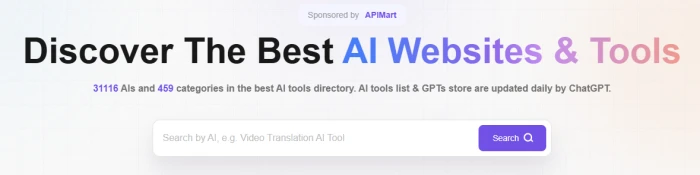
Toolify homepage hero reading Discover The Best AI Websites and Tools, with a line stating 31116 AIs and 459 categories updated daily by ChatGPT, a search box with a purple Search button, and a Sponsored by APIMart label above the headline
The homepage hero on October 19: sponsor strip, live catalog count, search box.
What stood out: The placeholder text ("Search by AI, e.g. Video Translation AI Tool") steers you toward a task phrase over a brand name, which is the right instinct for a catalog this size. The "updated daily" line is the tell for everything downstream. Listing copy and classification both come from a model, which is why the catalog grows daily and also why Test 02 looks the way it does.

One product, two listings, one with the data

Test 02 . Listing page
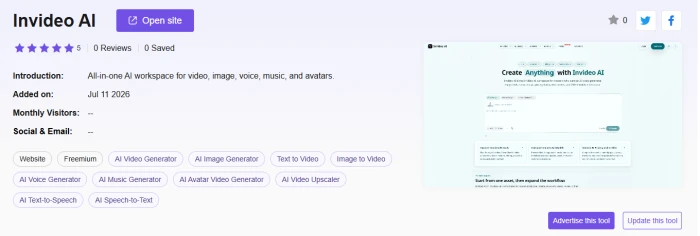
Toolify listing for Invideo AI showing five filled stars beside 0 Reviews and 0 Saved, an Added on date of Jul 11 2026, Monthly Visitors shown as two dashes, a Freemium label, twelve category tags, and Advertise this tool and Update this tool buttons
The Invideo AI listing as captured: a star rating with no reviews behind it and no traffic figures.

Twelve category tags and a Freemium label, then two buttons aimed at the maker, not the visitor: Advertise this tool and Update this tool. What the page lacks is the data Toolify is known for. Monthly Visitors reads as two dashes. There is a reason. Toolify also carries a second listing for the same product at /tool/invideo, added in March 2023, and that older entry holds the 6.6M-visit traffic panel and a pricing block. A visitor landing on the newer page sees none of it.

Five filled stars and a "5" beside "0 Reviews" is a placeholder, not a verdict. The star row on any unreviewed listing is decoration until a count appears beside it.

Copying a Midjourney style code in one click

Test 03 . Prompt library

Image makers chasing a specific look will spend more time here than in the directory. Each card pairs a reference image with its style code and a row of tags, and the copy icon puts "--sref 4215135847" on the clipboard without opening the card.
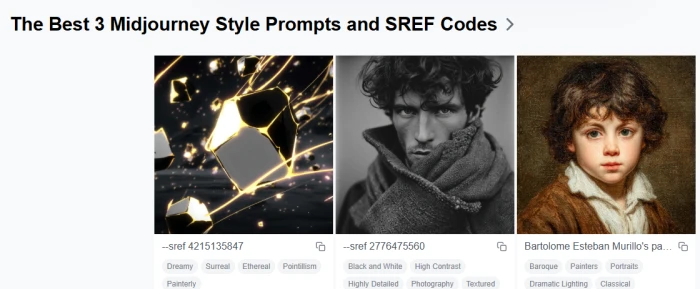
Toolify Midjourney library row titled The Best 3 Midjourney Style Prompts and SREF Codes showing three image cards: sref 4215135847 tagged Dreamy and Pointillism, sref 2776475560 tagged Black and White and Photography, and a Bartolome Esteban Murillo prompt tagged Baroque, each with a copy icon
The top of the SREF library: two style codes and one artist prompt, each tagged and copyable.
What clicked: The tag families do the heavy lifting. Codes are browsable by art genre, medium, perspective, color, atmosphere, movement, culture, lighting, material and format, so "Pointillism" or "Black and White" leads to a wall of related codes instead of one result. The FAQ beneath the grid also answers the question most SREF collections skip: codes need Midjourney v6 or newer (Niji 6 included), and a strong prompt can override the style unless you raise the style weight.

A free-chatbot list that includes a seven-day trial

Test 04 . Free filter

Toolify's pitch for this section is blunt: stop wasting time on fake "free" trials, because every tool here has a real free plan vetted by the team.
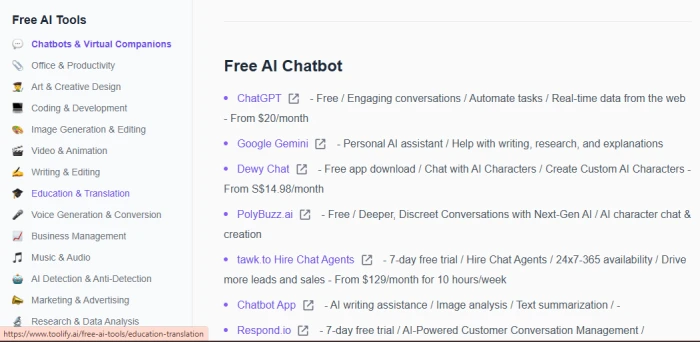
Toolify Free AI Tools page with the Chatbots and Virtual Companions category selected, listing ChatGPT, Google Gemini, Dewy Chat, PolyBuzz.ai, tawk.to Hire Chat Agents, Chatbot App and Respond.io, each with a one-line summary and a starting price
The Free AI Chatbot list, each entry a one-line scope note followed by a starting price.
Where it lands: The vetting is thin. Entry five is tawk.to's chat-agent service on a seven-day trial, which Toolify's own summary prices at $129 a month, inside a list headed free. Dewy Chat's price is left in Singapore dollars. Chatbot App's line ends in a dash where the price should be. Zoom out and the category counts explain it: the Office and Productivity bucket alone claims 24,996 free tools, roughly four in every five listings on the entire site. A "free" tag that broad is a search filter, not a verification.
+
Usage data you can read before you click

Open the older InVideo entry and Toolify lays out 6.6M monthly visits, a 2:16 average session, 5.38 pages per visit, a 39.41% bounce rate, the top five countries and a traffic-source split, all labelled December 2022 to September 2026, desktop only. Pair that with the ranking pages sorted on the same metric and you can check whether a tool with a loud launch has an audience before you sign up for it.

!
Listing data goes stale and nothing flags it

The same InVideo entry carries a pricing block listing a Plus plan at $28 a month and a Generative tier at $96. InVideo's own pricing page, checked on October 19, 2026, now runs on credits: the cheapest plan is Starter at $20 a month and Plus is $60. There is no Generative tier at all. Nothing on the Toolify page dates the block or marks it as unverified; the only hint is a line pointing to InVideo's site. Treat every price and plan on a Toolify listing as a lead to check, never as the answer.

How we tested. Browsing took place on October 19, 2026, on the English toolify.ai site without an account. We worked through the homepage, the Invideo AI listing cross-checked against the older InVideo entry, the Midjourney SREF library and the free chatbot list, then read the listing terms on the official submit page. Catalog and category figures come from Toolify's own homepage, and InVideo's current plans were checked on invideo.io/pricing. This review carries no Toolify pricing table, since the directory is free to browse and listing fees sit outside a reader's buying decision.

10-Point Feature Review

03 . Where the catalog earns its marks and the checking falls short

Two things pull the scores apart. The catalog and its traffic data earn the high marks, while everything that depends on a human checking a listing drags the bottom down. Breadth is not in question. Accuracy is.

Feature Scores at a Glance
Catalog Breadth
8.5
Category Depth
8.5
Traffic Rankings
8.0
Midjourney SREF Library
7.5
Multi-Language Reach
7.5
Search and Navigation
6.5
Listing Copy Quality
6.0
Free Tools Verification
5.5
Ad and Sponsor Density
5.5
Listing Data Accuracy
5.0

Pros and Cons

04 . What helps and what gets in the way
+What works
  • One sweep covers the market, so developers stop juggling Reddit threads and bookmark folders
  • Niche categories are where small tools get found, with makers reporting that a top spot in a subcategory is reachable
  • Position follows usage, which makers trust more than vote-driven lists
−What gets in the way
  • Ads crowd every page, a complaint that repeats across the few public reviews
  • Tools get listed without the maker's consent, with scraped, AI-rewritten descriptions published under their name
  • Density overwhelms casual browsers, who find the menus and sponsor blocks hard to read past
  • Correcting your own listing is a request, not an edit, handled through Toolify's update flow, with no dashboard to edit

Toolify vs the Top 4 Alternatives

05 . Directories a buyer would shortlist
TToolify FFuturepedia AThere's An AI For That TTopAI.tools FFuture Tools
Catalog Size31,100+ in 459 categories4,000+ curated54,494 across 10,805 tasks23,570+ in 120+ categories4,500+ tracked
Ranking BasisMonthly visitsPopularity and editorial picksSaves and trendingPopularity, plus AI task searchVisitor upvotes, 30-day
Reviews on Listings✓ 5-point, login to post✓ Ratings✓ Comments and saves✓ Discussions✗ Upvotes only
Notable ExtraSREF library, traffic panels29 AI courses2.5M-reader newsletter, mini toolsTool playbooks, dealsMatt Wolfe's picks, AI news
Best ForMarket-wide sweeps ranked by usageLearning AI while picking toolsTask search at maximum scaleDescribing a job and getting a shortlistHand-picked tools from one editor

Picking between them: Decide on how much you want pre-filtered. Toolify and There's An AI For That are the two that try to index everything, and the choice between them is the sort order: measured visits on Toolify, saves and task matching on TAAFT. TopAI.tools is the one to try when you can describe the job but not the tool. Futurepedia and Future Tools cut the pile down by hand, which costs coverage and buys trust in what remains.

· The Verdict ·
6.9/10
Should you use Toolify? Here is who it suits.

Use Toolify if you want the widest possible sweep of a category and a traffic panel to separate tools with users from tools with launch hype. Confirm any listing detail on the vendor's site before acting on it, and ignore the stars on an unreviewed page.

Skip Toolify if you need a shortlist you can act on without re-checking every line, or a directory where a person has looked at each entry. Future Tools gives you a 30-day upvote list and an editor's picks from a tracked set of about 4,500 tools, and There's An AI For That matches tools to tasks at a larger scale than Toolify manages.

Verdict BandMixed Results
Tests Run4
Compared To4 Rivals
Features Scored10 Points

Discussion

Join the discussion and share your perspective.