
Most of us decide whether to trust a website in about two seconds. A link arrives, the page loads, and something either feels right or it does not. The problem is that the signals which actually separate a careful, legitimate site from a throwaway one are mostly invisible. How old is the domain? Is the certificate real and current? Does the site quietly send you to a secure connection, or not bother? Those answers exist, but they are scattered across a dozen technical tools that assume you already know what a DNSSEC record is.
UrlTestly is built around that gap. You paste a domain, it runs a batch of independent checks, and it hands back a single trust score with the evidence printed underneath. I spent time running real websites through it to see whether the score holds up, whether the explanations are worth reading, and whether it does anything a plain scanner does not. Here is what I found.
What UrlTestly is
UrlTestly is a free website reputation scanner. There is no account to create, no scan limit to hit, and every report lives at a permanent, shareable link you can bookmark or send on. It takes the technical signals that separate a trustworthy site from a risky one, weighs them into one number from 1 to 100, and shows which checks passed and which raised a concern.
It is careful about what that number is not. The tool states plainly that it is an automated analysis service that does not certify or guarantee any website, and it repeats, on report after report, that a low score is a summary of signals rather than an accusation.
A young, small or quiet website is not the same as a fraudulent one, and UrlTestly says so on every report rather than letting the number speak for itself. That restraint is easy to overlook and genuinely rare.
How I tested UrlTestly
I did not just read the feature list. I ran a handful of sites through UrlTestly the way an ordinary visitor would, timing each scan and reading every signal it returned. The path a test takes is short and the same every time, which is exactly what you want from a tool like this. Here is the full run, start to finish, with the screens from my own testing.
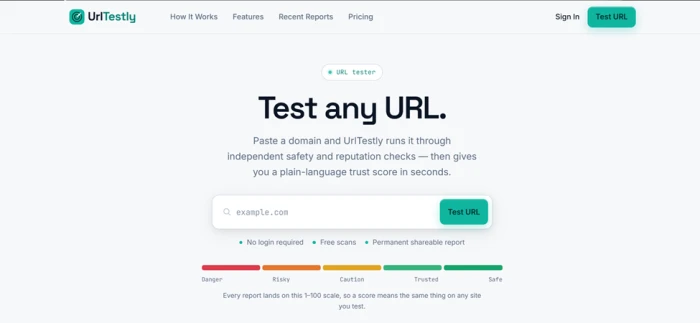
Step 1: Start on the test page
The testing page is a single box under a short, calm promise: paste a domain and get a plain-language trust score in seconds. The whole scale it grades against, from Danger to Safe, sits right there in view, so you know what a result will mean before you even run it. There is nothing to configure and no account to make.
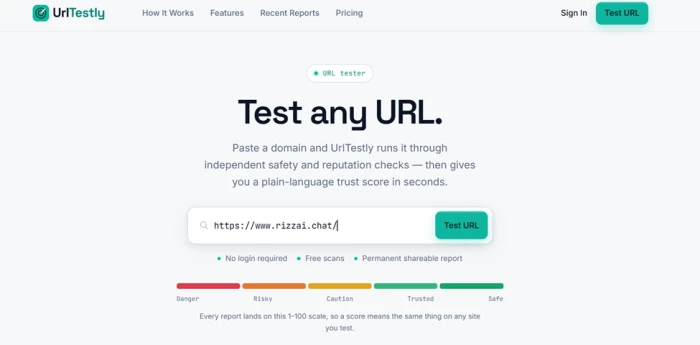
Step 2: Paste the URL you want to check
I dropped in the domain I wanted to check and pressed Test URL. The tool normalizes whatever you paste, so a full link, a domain with www, or a bare domain all resolve to the same clean report. There is only one thing to get right, and it is hard to get wrong.
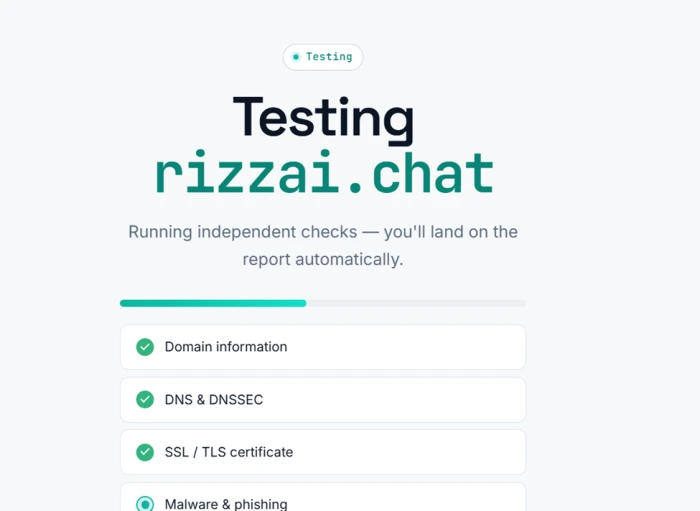
Step 3: Watch the checks run in the open
Instead of a blank spinner, the scan shows its work. A progress bar fills while each check reports as it finishes: domain information, DNS and DNSSEC, the SSL and TLS certificate, malware and phishing, and the rest. Every run I timed landed in under ten seconds.
Step 4: Land on the report and read the signals
When the scan finished, the page moved to the report on its own. You get the score, its band, a short summary in plain English, and every signal listed underneath with a Pass or a Warning and a one-line reason. That last part is where the real value sits, since it lets you judge the finding rather than just the number. I repeated this across several kinds of site, from a well-aged shop to a brand-new domain, and the experience never changed. The consistency is the point: the same checks, the same scale, and the same plain explanations every time, so you learn to trust the process rather than guess at a verdict.
What every scan looks at
UrlTestly runs more than a dozen independent checks on every scan, grouped into a few clear areas. Rather than list raw data, each check becomes a signal with a status you can read. This is the battery it runs, and where each piece of evidence comes from.
| What it checks | What it reads | Source |
|---|---|---|
| Malware and phishing | Known malware, phishing and unwanted-software listings | Google Safe Browsing |
| SSL and TLS security | Certificate validity, issuer, expiry, and whether insecure traffic is sent to HTTPS | Live TLS check |
| Domain age and registration | Creation date, registrar, status, expiry and abuse contact | WHOIS and RDAP |
| DNS and infrastructure | Nameservers, DNSSEC status and resolved hosting location | DNS and IP records |
| Content and essential pages | Page-content safety, and whether contact, about, privacy and terms pages exist | Homepage read |
| Social presence | Linked social profiles | Homepage read |
| Link reputation | Domain rating drawn from the backlink profile | Backlink data (Ahrefs) |
There is a sensible engineering idea underneath this. Every external lookup is isolated, so if one provider is slow or unreachable, that single signal is marked as not checked and the rest of the report is produced as normal. A failing source degrades a report, it does not break it. The domain, DNS and certificate checks run on UrlTestly's own infrastructure, while the malware feed, the backlink rating and the written summary are the parts that reach outside, each walled off from the others. Finished reports are cached for up to seven days so repeat visitors get an instant result, and a fresh scan runs automatically once a report is older than that.
What the score means
Everything rolls up into one number on a 1 to 100 scale, split into five bands. The value of a fixed scale is that a score means the same thing on any site you test, so a 54 reads the same whether it belongs to a casino or a plugin shop.
| Score | Band | What it signals |
|---|---|---|
| 85 to 100 | Safe and Secure | Strongly positive signals, no significant issues found |
| 70 to 84 | Trusted but Verify | Leans positive, a basic verification step is still sensible |
| 55 to 69 | Caution | A mixed picture, some signals worth a closer look |
| 40 to 54 | Risky | Several warning signs were found |
| 1 to 39 | Danger | Multiple serious concerns, proceed carefully |
The site I scanned in the walkthrough, rizzai.chat, landed at 45, in the Risky band. Read the number alone and you might close the tab. Read the signals and a fairer picture appears: no malware or phishing was detected, the SSL certificate was valid, and the real marks against it were a domain only about a year old and no social media presence. A Risky rating there is driven by youth and a thin footprint, the same things that describe plenty of honest new projects. The number tells you to slow down. The signals tell you why, and let you decide whether those reasons matter for what you were about to do. That gap between a score and the truth is the thing UrlTestly is built to close rather than exploit.
What a full report shows
The score and its signals are only the top of a report. Scroll down and each one carries two more blocks of plain facts that most people never think to gather on their own: a registration and infrastructure panel pulled from WHOIS and RDAP, and a technology lookup fingerprinted from the site's own HTML, headers and assets. Together they tell you who registered the domain, where it is hosted, how it is built and what it is quietly loading.
| Registration and infrastructure | Technology and setup |
|---|---|
| Creation date, domain age and registrar | Content management system |
| Domain status, expiry and abuse contact | Web server and CDN |
| DNSSEC status and nameservers | Analytics and tracking tags |
| Resolved hosting country | HSTS, reCAPTCHA and cookie consent |
| SSL certificate and domain rating | Open Graph, Twitter and Schema markup |
On the joyland.ai report, for example, this is where you learn the domain was registered with GoDaddy, hosts in the United States, runs on a Tengine web server with no detected CDN, and loads Google Tag Manager, Google Analytics and the Meta Pixel. None of that needs interpreting by an expert. It is simply laid out so you can see it.
Where a human picks up
This is the part that sets UrlTestly apart from a standard scanner. On some reports there is an Expert review section written by a person who actually opened the site and signed up the way any visitor would. It is not generated from the same signals as the automated scan. It is a human account of what using the site is like.
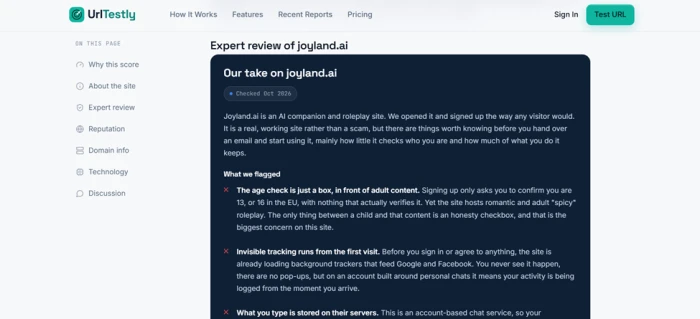
The joyland.ai report is a clear example. The automated scan put it at 46 out of 100, and its signals were specific and mixed.
| Automated check | Result |
|---|---|
| Malware and phishing | Pass, nothing detected |
| SSL certificate | Pass, valid (DigiCert, expiring soon) |
| HTTPS redirect | Warning, not configured |
| DNSSEC | Warning, not enabled |
| Domain age | Pass, about 3.5 years |
| Content safety | Warning, flagged for harassment |
| Social presence | Warning, one Facebook link |
| Domain authority | Pass, rating of 44 out of 100 |
The human review then adds what a scanner cannot see. The reviewer notes that the age check is a single checkbox, confirming you are 13, or 16 in the EU, with nothing that verifies it, sitting in front of romantic and adult roleplay. They flag that background trackers feeding Google and Facebook load before you agree to anything, that messages are stored on the company's servers under your account, and that there are no parental controls, with support running through an email address and a Discord channel rather than a clearly named company.
What makes the review trustworthy is that it also records what checked out. It states that the site loads over HTTPS, that scans found no malware or phishing, and that sign-up and payment behaved normally with no surprise charges, so this is a privacy and age concern rather than a scam. It even credits the site for publishing content rules that ban the worst material outright, including any sexual depiction of minors, and for offering a way to report bad content. The conclusion is a genuine judgment: safe enough for an adult who accepts those trade-offs, and not appropriate for minors or for anyone handing over sensitive personal details. No score on its own could reach that.
What the rest of the web says
The second human-built section gathers scattered third-party opinion into one place, so you are not left trawling forums yourself. For joyland.ai it reads as middling rather than damning, and it is honest about the size of the sample. The site sits around 2.8 out of 5 on Trustpilot, but from only six reviews, and around 2.8 out of 5 across roughly 108 Apple App Store ratings, where the app carries an 18+ rating that is stricter than the 13+ the website asks for at sign-up.
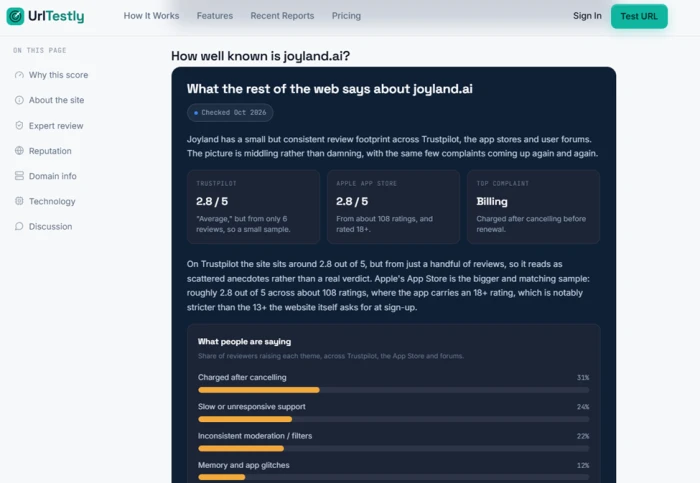
The breakdown of which complaints actually recur is more telling than a single average. Billing is the loudest theme, with charges after cancellation leading, followed by slow support and inconsistent moderation, while a smaller group simply likes the characters. The summary closes with the context that matters most: ownership is unclear, with listings pointing to the United States, Singapore and Anguilla, lookalike sites circulate, and only the genuine domain should be trusted. That is the kind of synthesis that normally takes an afternoon of searching, delivered in a few paragraphs you can actually finish.
Real reports, real range
One scan tells you how a report reads. A handful of them tells you whether the scoring is sensible. UrlTestly keeps a public feed of recently checked sites, and running an eye down it shows the scale behaving the way you would hope: older domains with real backlink authority sit higher, while brand-new sites with no history and a zero domain rating drop into Danger.
| Site | Score | Band | Domain age | Domain rating |
|---|---|---|---|---|
| espacioapk.com | 65 | Caution | 4 years | 27 of 100 |
| ole7.io | 54 | Risky | 4 years | 51 of 100 |
| newsversa.com | 53 | Risky | 11 months | 30 of 100 |
| nvcasinos.be | 40 | Risky | 1 year | 19 of 100 |
| okhatrimaza.day | 30 | Danger | 2 months | 0 of 100 |
| ssrmovies.games | 26 | Danger | Under a month | 0 of 100 |
The pattern is easy to read. The two piracy-style sites at the bottom are days or weeks old with no authority at all, and they land in Danger. The ones in the middle are a mixed bag of age and reputation, and they land in Risky or Caution. Nothing here is a verdict on intent, but the ordering lines up with how cautious a careful person would actually be.
Who it is for
The tool is built for the moment just before you trust a site with something that matters: a password, a card number or an order. That covers a lot of everyday situations. A new shop a friend forwarded. An unfamiliar link in an email. A service you are about to sign up for and hand an email address to. In a few seconds you get a report you can act on, and because it is free and needs no login, there is nothing stopping you from checking first.
Two other groups get real use out of it. Site owners can run their own domain to see how its age, certificate and reputation read to an outsider, and fix anything that is dragging the score down. And anyone helping a less technical friend or relative can send a permanent report link instead of trying to explain DNS records over the phone. The shareable report is quietly one of the most useful parts of the whole thing.
When a scan gets it wrong
Any automated system will sometimes misread a legitimate site, usually a young or quiet one, and UrlTestly is open about that risk instead of hiding it. The human element is not only the expert reviews. It is also a willingness to re-check by hand on request. If a site owner believes a report is wrong, they can use the contact form, and the team says it will re-run the checks and correct confirmed errors, usually within five working days, and that it never charges for corrections, re-reviews or removals.
For anyone running a small business, that policy is reassuring. A low score here is appealable by a person rather than frozen by an algorithm, and there is no paywall sitting between you and a fair second look.
What it costs
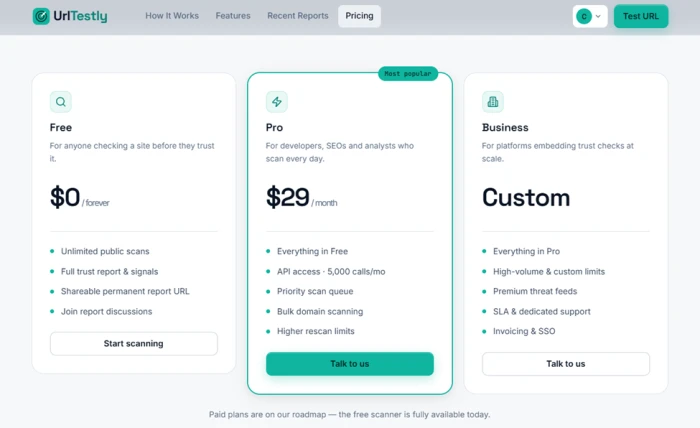
Everything in this review was done on the free tier, which the site says is fully available today. UrlTestly lists three plans: a Free tier at zero cost with unlimited public scans and full reports, a Pro tier at 29 dollars a month aimed at developers and analysts that adds API access, a priority queue and bulk scanning, and a Custom Business tier for platforms embedding checks at scale. The site notes the paid plans are still on its roadmap, so the free scanner is the part you can actually use right now.
Pros and cons
A fair review has to weigh both sides. Most of the cautions below are simply the normal boundaries of any tool in this category, and UrlTestly is unusually upfront about them.
- Free, with no account, no scan limit, and a permanent shareable report every time
- Plain-language scores on a fixed 1 to 100 scale, so a result means the same on any site
- Shows every signal behind the score instead of asking you to trust a number
- Human expert reviews on selected sites catch what a scanner cannot, like a fake age gate
- Honest by design, never claiming 100% safe and treating a low score as a flag, not a verdict
- No-charge corrections and re-reviews if a site is misjudged
- Malware detection leans on a single feed, so a brand-new scam may still pass that check
- The domain rating comes from one backlink source, best read as a rough gauge
- The hands-on expert reviews appear on selected sites, not on every report
- Reputation summaries can rest on small samples, such as six Trustpilot reviews
- Reports are cached for up to seven days, so very recent changes may lag until a rescan
None of the cautions are dealbreakers. What stands out is that UrlTestly volunteers most of them itself, and refuses on principle to ever call a site 100% safe.
The bottom line
UrlTestly does the thing it sets out to do. It turns invisible technical signals into a score an ordinary person can read, and it shows its working rather than asking for faith. The fixed five-band scale makes scores comparable across sites, and the free, no-login, permanently shareable reports lower the friction to almost nothing. On balance it earns a solid 8.6 out of 10.
What lifts it above a routine scanner is the human layer. The expert reviews weigh things a crawler cannot, such as whether an age gate is real or whether tracking starts before you consent. The reputation summaries do the forum-reading for you. And the no-charge path to re-check a misjudged site keeps a person in the loop where it counts. Treat the number as a starting point, read the signals underneath it, and UrlTestly works well as a calm, evidence-first second opinion for the moment before you hand over an email, a card or a password.
Discussion
Join the discussion and share your perspective.