VEED lets you build a complete AI video from a plain text script on a free account that starts at zero credits, then blocks the download behind an upgrade. Its auto-subtitles landed accurately on the first pass, and its translation list runs from Abkhaz to Twi, far past the major-language handful most browser editors ship. It suits social teams and solo creators who localize short-form content fast and mostly work inside the editor.
VEED is a browser-based video editor that has grown into an all-in-one AI content platform. It runs entirely in a browser, with an iOS captions app alongside, and layers AI over a standard timeline: auto-subtitles, translation, AI voice, avatars, noise and background cleanup, and a text-to-video mode it calls Gen-AI Studio. The pitch is video that looks like your brand made it, produced fast, without desktop software or an editing background.
The audience is social teams, marketers, educators, and solo creators who need polished short-form video on a deadline. VEED runs a free tier plus four paid plans. Creator opens at $12 per user each month on yearly billing, Pro sits at $24, and Studio at $39, with a custom Enterprise tier above them. What those plans actually buy is in the pricing section.
What Happened When We Tested It
02 . 9 tests covering subtitles, AI generation, export, and reliability
I ran VEED in the browser on a fresh free account, no card attached. I pushed on the AI subtitle and translation pipeline and the Gen-AI Studio text-to-video mode. Then I tested every point where a finished video has to leave the platform. The session drew a clear line between what VEED lets you build and what it lets you take away.
Auto-subtitles landed on the first try
Test 01 . Subtitles
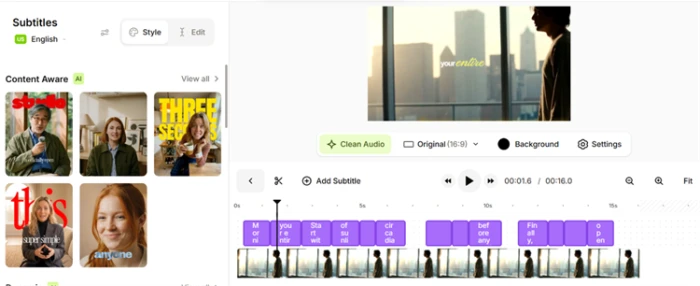
Auto-subtitles with footage-aware caption style suggestions.
What we observed: A talking-head clip came back captioned within seconds, split into short two- and three-word chunks synced to the speech. The row of Content Aware style suggestions read the footage and proposed caption looks matched to the shot rather than one static template for every video.
Clean Audio is a single toggle in the timeline
Test 02 . AI cleanup
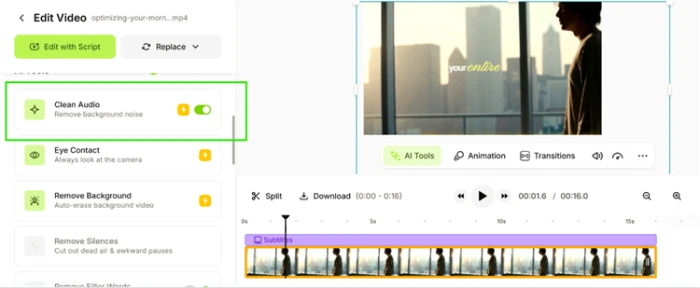
Clean Audio sits inside the AI Tools panel.
The signal here: Clean Audio lives next to Eye Contact and Background Removal in the AI Tools panel. Toggling it cut background noise on the same clip without leaving the timeline or opening a separate window, which is where a lot of browser editors add friction.
Translation runs from Abkhaz to Twi
Test 03 . Translation
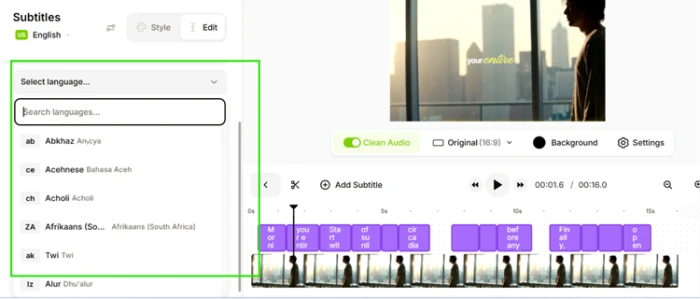
The searchable subtitle language dropdown.
Where it lands: The subtitle language dropdown opened a searchable list running from Abkhaz to Twi. That reaches well past the major-language handful most browser editors ship, and it is the clearest single reason a localization-heavy team would put VEED at the top of a shortlist.
Idea-to-Video turned a plain script into a build
Test 04 . Text-to-video
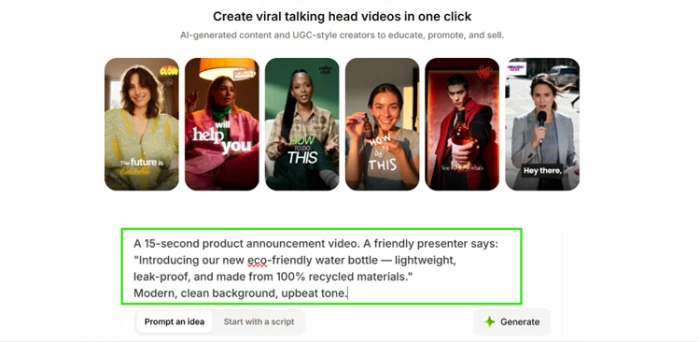
Idea-to-Video accepts a plain text script.
First impression: I dropped in a fifteen-second product script for a fictional water bottle and hit generate. VEED took the plain text and started assembling a video from it, with no storyboard step and no manual scene setup.
The output split into editable scenes, on zero credits
Test 05 . Gen-AI output
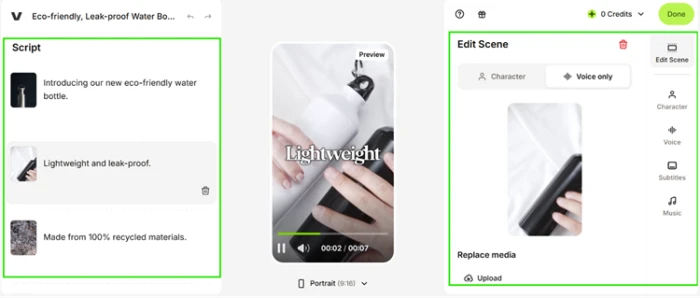
Three editable scenes. The credits counter reads 0.
The key finding: The result split into three separate scenes, each with its own editable character, voice, subtitle style, and music. Playback on the 9:16 preview was clean, and the pacing tracked the script almost line for line. One detail reframed the rest of the test. The credits counter already read 0, and a new account starts there.
Exporting the finished video was blocked
Test 06 . Export gate
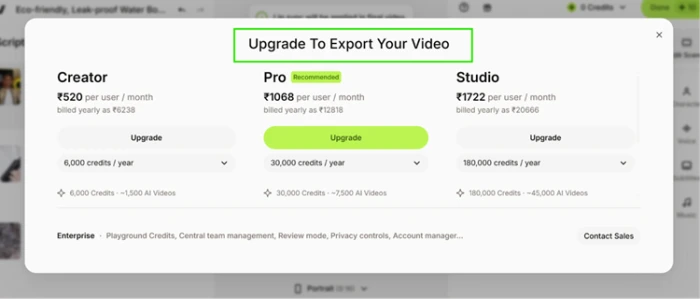
Export of the AI video is blocked behind an upgrade.
What this shows: Trying to export the finished video surfaced an Upgrade To Export Your Video modal listing three paid tiers. Building the whole AI video cost nothing. Getting it off the platform costs a subscription. For a tester outside the US, the modal quoted regional pricing in rupees, from ₹520 per user each month, rather than the dollar figures shown on the public page.
Free downloads carry a large watermark, and removing it costs extra
Test 07 . Watermark
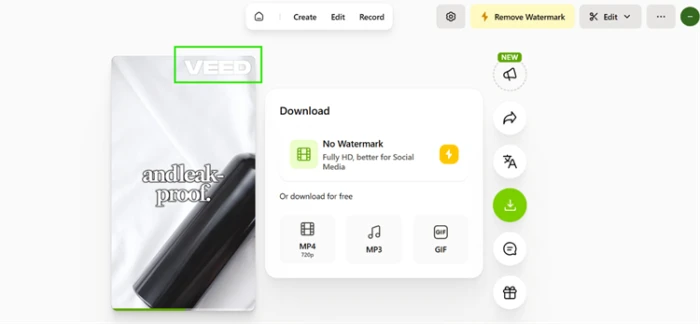
A free download carries a large watermark. Removing it is an add-on.
Worth noting: Switching to a manually edited clip let me download for free, but with a large VEED watermark across the top third of the frame. The Remove Watermark control carried a small lightning-bolt icon. That icon marks a separate credit-based charge on top of whatever plan you hold, not a feature folded into an upgrade.
A longer upload stalled, then failed outright
Test 08 . Upload reliability
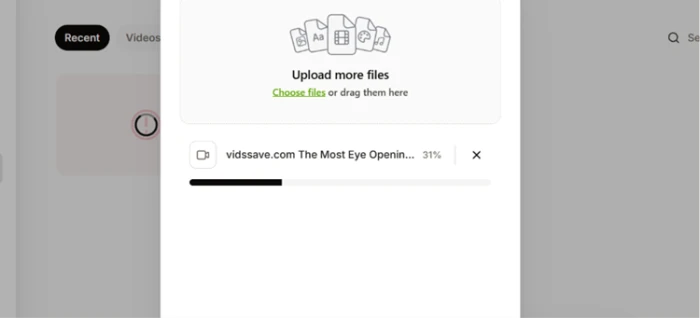
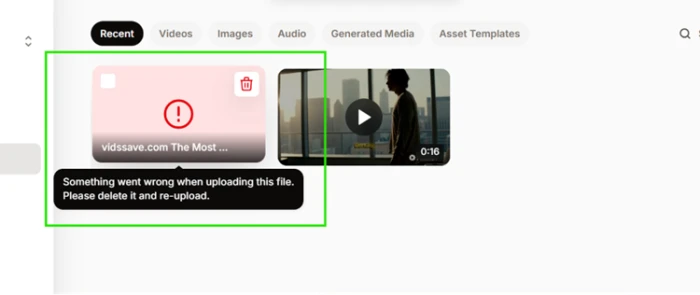
The upload froze at 31 percent for over four minutes.It then failed with a generic error and no retry.
How it performed: A longer file dragged into the asset library sat frozen at 31 percent for more than four minutes, with no progress detail and no time estimate. It failed outright with a generic message telling me to delete the file and re-upload. No cause was given, and there was no retry beyond a manual delete.
AI Clips never opened
Test 09 . AI Clips
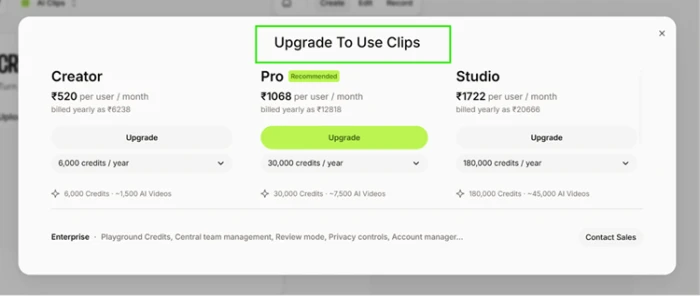
AI Clips is paywalled with no trial run.
The takeaway: AI Clips, the feature that pulls highlight reels out of long-form video, never opened for me. Selecting it triggered an Upgrade To Use Clips modal with the same tiers seen at export. There is no trial run before you pay.
★
The localization pipeline held up end to end
Auto-subtitles, footage-aware styling, and a translation list running from Abkhaz to Twi worked together in one browser session without a second tool. For a team subtitling and translating short-form video at volume, that is the part of VEED worth paying for.
!
The build is free, the output is not
A zero-credit free account generated a complete AI video, then blocked the download. Watermark removal is billed separately. AI Clips is gated too. Nothing usable leaves the platform without paying at least once, and a long upload stalling then failing shows the exit path is also the least reliable.
How this review was put together. I tested VEED in the browser on a fresh free account in August 2026, with no payment method attached, and ran the AI subtitle and translation features and the Gen-AI Studio mode hands-on before hitting the export and upload paths. Pricing was verified the same day against VEED's official pricing page at veed.io/pricing, and the in-app upgrade modal was captured where it differed by region. Scores below weight the core editing and AI features most heavily, with reliability and the export experience graded on what happened in the session.
10-Point Feature Review
03 . Ten features, scored on evidence
Feature Scores at a Glance
Auto-Subtitles
8.5
Ease of Use
8.5
Caption Styling
8.0
Translation Coverage
8.0
AI Cleanup Tools
7.5
Gen-AI Studio
7.5
Free-Tier Value
6.0
Upload Reliability
5.5
AI Clips Access
5.5
Export Experience
5.0
Feature-by-feature breakdownScored 5.0 to 9.0, weighted toward core editing and AI
01
Auto-Subtitles Standout
Captions arrived in seconds on the first pass, chunked and synced to speech. It does not reach 9.0 because accuracy dips on strong accents and multi-speaker crosstalk, and free minutes are capped. It sits above 8.0 because it beat the browser field on clean audio without a manual pass.
First pass: captioned in secondsClear-speech accuracy: ~95% reported
8.5
Strong
02
Ease of Use Standout
Drag in footage and reach a captioned result in minutes, with no learning curve on first use. It falls short of 9.0 because the credit system and export gating add confusion once you go deeper. It clears 8.0 because the first-session output is frictionless.
Learning curve: minimalTo first caption: minutes
8.5
Strong
03
Caption Styling Standout
Content Aware suggestions read the footage, and the styling range covers animated and static presets with control over font, color, and position. It is not 8.5 because the smart looks are presets rather than fully custom. It is not 7.5 because the styling range is the widest in its class.
The searchable list runs past 100 languages, well beyond the usual major-language set. It stops short of 8.5 because output on low-resource languages needs review and translation minutes are capped on paid tiers. It holds above 7.5 because the breadth itself leads the category.
Languages: 100+Quality: consumer-grade
8.0
Strong
05
AI Cleanup Tools
Clean Audio, Eye Contact, and background removal apply inline in one toggle. It is not 8.0 because control is limited to on and off with no fine-tuning. It is not 7.0 because applying cleanup inside the timeline removes real friction versus round-tripping to another tool.
Application: one toggle, in timelineDepth: moderate
7.5
Solid
06
Gen-AI Studio
A script became three editable scenes with clean 9:16 playback. It does not reach 8.0 because the generated video reads as a first draft that needs a manual pass. It clears 7.0 because scene-level editability beats a flat single-clip render you cannot adjust.
Output: editable scenesReadiness: a first draft
7.5
Solid
07
Free-Tier Value Watch
The free plan builds a complete AI video but gates every exit and starts at zero credits. It is not 6.5 because nothing usable leaves without paying. It is not 5.5 because the build environment itself is unusually complete for a free tier.
Build on free: fullUsable export on free: none
6.0
Mixed
08
Upload Reliability Watch
A longer file stalled at 31 percent for over four minutes and then failed with a generic error and no retry. Users report the same lag and render failures on long, element-heavy projects. It is not 6.0 because the failure was total with no recovery path. It is not 5.0 because shorter clips uploaded and processed cleanly.
Long file: stalled then failedRetry: manual delete only
5.5
Weak
09
AI Clips Access Watch
The highlight-reel feature is gated with no trial, so it cannot be validated on a free account. The score reflects the access model, not the output. It is not 6.0 because zero free access blocks any hands-on check. It is not 5.0 because the underlying feature is documented and functional on paid tiers.
Free access: noneTrial: not offered
5.5
Weak
10
Export Experience Watch
AI-video export is blocked, a free manual export is watermarked, and watermark removal is a separate credit charge marked with a lightning bolt. This is the weakest, most confusing part of the product. It is not 5.5 because the add-on layers cost on top of a paid plan. It is not 4.5 because a watermarked free download does at least exist.
AI export: paid onlyWatermark removal: separate charge
5.0
Weak
Pros and Cons
04 . What stood out, both ways
+Where it earns its place
First-pass captions: auto-subtitles arrive accurate, chunked, and synced to speech
Footage-aware styling: caption suggestions read the shot instead of offering one static look
Deep language list: translation reaches far past the usual major-language handful
Inline AI cleanup: Clean Audio, Eye Contact, and background removal apply without leaving the timeline
Low barrier: drag in footage and reach a captioned result in minutes
Editable generation: Idea-to-Video breaks a script into separately editable scenes with their own voice and music
−Where it frustrates
Upload failures: a longer file stalled, then failed with a generic, unactionable error
Heavy-project lag: browser performance and render reliability slip on longer, element-heavy timelines
Accent drift: subtitle accuracy dips with strong accents, fast speech, and crosstalk
Oversized watermark: the default mark covers the top third of the frame
Draft-grade output: Gen-AI Studio video usually needs a manual editing pass before it is publish-ready
Pricing Breakdown
05 . Four tiers, and where the value gates sit
Feature
Creator$12 /user/mo
Pro$24 /user/moRecommended
Studio$39 /user/mo
Credits per year
6,000
30,000
180,000
Approx AI videos
~1,500
~7,500
~45,000
No watermark
✓
✓
✓
Translate to 50+ languages
✗
✓
✓
Multiple brand kits
✗
✓
✓
Custom templates
✗
✗
✓
AI voice per year
—
144 hr
960 hr
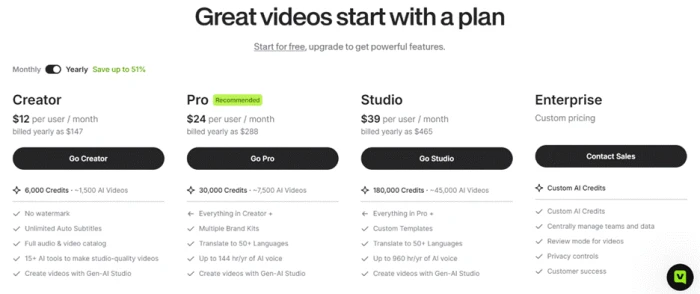
The tier math: These are the yearly-billed rates. Monthly billing costs more, which is where VEED's up-to-51-percent yearly saving comes from. Two gates matter more than the headline price. Credits are an annual pool that resets at renewal rather than rolling over, so heavy AI users can burn through Pro's allowance and still lose the remainder. And translation, one of VEED's flagship features, is absent from Creator, so localization work only begins at Pro. The in-app upgrade screen also shows regional pricing in rupees for testers outside the US, from ₹520 per user each month, not the dollar figures above.
VEED's four tiers on the yearly toggle.
Pricing verified August 12, 2026 against VEED's official pricing page. Rates shift with region and billing cycle, so confirm the current numbers on the official pricing page before subscribing.
VEED vs the Top 3 Alternatives
06 . How it stacks against the usual shortlist
VVEED
DDescript
KKapwing
CCapCut
Format
Browser + iOS
Desktop + web
Browser
Mobile-first
AI text-to-video
Yes, Gen-AI Studio
No, edits recordings
Basic draft
Template-driven
Standout
Subtitles + translation breadth
Transcript-first editing
Collaborative repurposing
Free short-form + templates
Best For
Social teams localizing fast
Podcasts and spoken content
Teams making many variants
Mobile TikTok and Reels creators
How to choose: Pick VEED if your work is subtitle- and translation-heavy short-form video and you want a captioned result fast in the browser. If your content is speech-led, Descript's transcript-first editing fits the way you actually cut podcasts and talking-head video. Kapwing is the closer match when a team turns one source video into many branded variants together. CapCut is the better free option if you edit on mobile and lean on trend templates.
What Users Are Saying
07 . Verified reviews from approved platforms
VEED's reviews split along a clear line: praise for subtitles and speed, frustration with reliability and billing. It holds 4.0 on Trustpilot across more than 3,000 reviews and 4.6 on G2. The four below surface angles the hands-on session did not reach.
Sometimes a video fails during export even after everything looks fine in the editor.
Jason A.
On reliability with complex, element-heavy projects
Use VEED if your work is subtitle- and translation-heavy short-form video, you want a finished captioned clip in minutes, and you stay inside the editor rather than exporting constantly. The auto-subtitle and localization pipeline is the strongest reason to pay.
Skip VEED if you need reliable exports of long, element-heavy projects, or your work is avatar- and generation-led, where HeyGen scored 8.7 in our testing. For free, watermark-light short-form on mobile, CapCut covers most of the same ground.

Discussion
Join the discussion and share your perspective.