

Home / Reviews / AI Video Generator / Vidnoz AI
Logo
AI Video Generator Avatars & TTS

Vidnoz AI Review

aiapp.vidnoz.com · Vidnoz AI Video Platform

Vidnoz backs its avatar video pitch with a genuinely deep library of 1,800+ AI avatars and 3,200+ templates, plus a capable scene editor that loads in the browser. The catch is the word free. A brand-new signed-up account lands with 0 credits and 0 free previews, unable to render a single clip without buying in. It suits anyone who will pay for avatar video at volume, not anyone hoping the homepage's free promise holds.

Reviewer Score
6.7
/10
Mixed Results
Capable engine,
broken free promise
Avatar Library9.0
Editor Capability8.0
Stock Footage8.0
Free Preview Access5.0
Free Tier Honesty5.0
Type
Browser-based no install
AI Avatars
1,800+ on free tier
Templates
3,200+ browsable
Free Credits After Claim
0 on new account
Entry Paid Plan
$19.99 /mo yearly
Free Export Cap
720p 3 min max

What Vidnoz AI Does

01 . Overview

Vidnoz AI is a browser-based video platform built around talking AI avatars. You pick an avatar, type a script, choose a voice, and the tool generates a presenter-style clip, with text-to-video, voice cloning, video translation, and a set of image tools attached around that core. The marketing leans hard on scale, counting past 1,800 avatars and 3,200 templates, and on access, promising videos "10x Faster & Free" with no credit card.

It targets marketers and educators on small teams who want presenter videos without a camera or a studio crew. The positioning is a freemium funnel: browse a huge library at no cost, then pay once you want to render and export. Where that funnel actually draws its line between free and paid is the whole question, and it is the one this review set out to answer.

What Happened When We Tested It

02 . 8 tests covering the free promise, the editor, and the AI tools

We signed up with a fresh email and took the homepage promise at face value, tracking every point where the word free stopped matching what the account could actually do. Then we pushed the editor and the free photo tools to see what the engine is capable of once you are inside.

The promise on the homepage

Test 01 . Sign-up

Vidnoz homepage headline reading Create Engaging AI Videos 10x Faster and Free, with 1900+ avatars, 2800+ templates, and a no credit card required note
The homepage promise, before sign-up.
First impression: The homepage opens with "Create Engaging AI Videos, 10x Faster & Free" and backs it with avatar and template counts, plus "No credit card required" under the main button. We signed up with a fresh email to test that claim directly rather than trust the headline.

Claiming the daily credits

Test 02 . Credit claim

Vidnoz popup congratulating the user on free daily credits, with body text reading The daily credits (= s) are valid for 24 hours and an unfilled template variable
The claim popup, with an unfilled credit number.
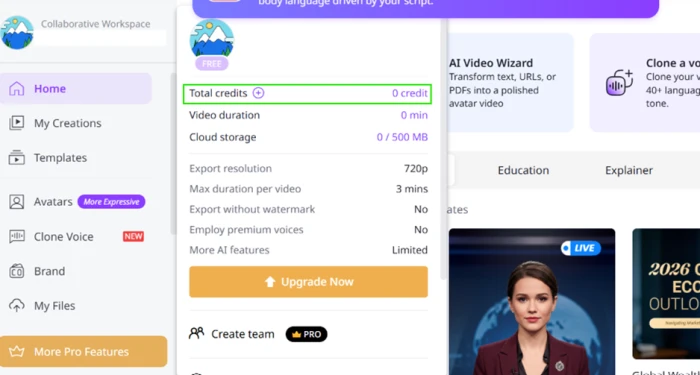
Vidnoz plan summary showing a balance of 0 credits and 0 minutes of video, with free tier limits of 720p export, 3 minutes per video, no watermark removal and no premium voices
Balance after claiming: 0 credits, 0 minutes.
What we observed: A popup congratulated us on free credits, but its body text read "The daily credits (= s) are valid for 24 hours." That "(= s)" is an unfilled variable, so the number never loaded. We clicked Claim Your Free Credits, and the balance afterward was 0 credits and 0 minutes. The claim button changed nothing.

Inside the dashboard

Test 03 . Dashboard
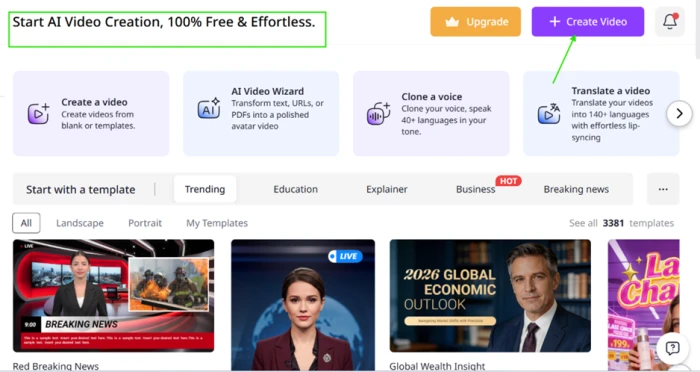
Vidnoz dashboard header reading Start AI Video Creation 100% Free and Effortless, with four entry cards and a template browser counting 3381 templates
The dashboard, with a deep but browse-only template library.
Where it lands: The header repeats the line "Start AI Video Creation, 100% Free & Effortless." Four entry cards sit under it for creating a video, the AI Video Wizard, cloning a voice, and translating a video, and the template browser counts 3,381 templates across Education, Explainer, Business and Breaking news tabs. Browsing is free and the library is genuinely deep.

Opening the video editor

Test 04 . Preview wall
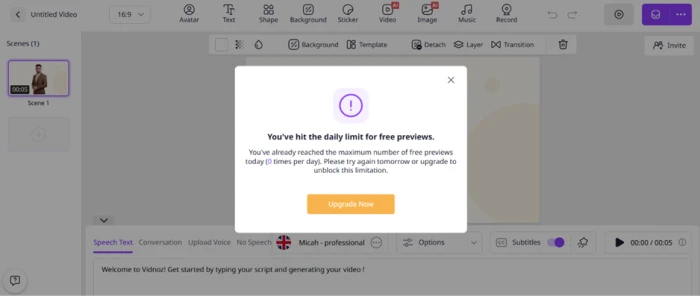
Vidnoz modal reading You've hit the daily limit for free previews, with the limit printed as 0 times per day on a brand new account
Pressing Play on the sample scene: 0 free previews.
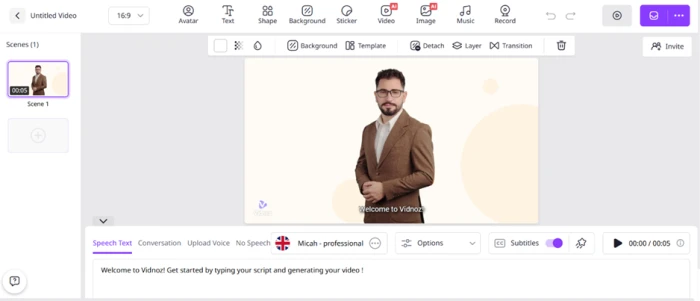
Vidnoz editor toolbar with Avatar, Text, Shape, Background, Sticker, AI Video, AI Image, Music and Record options, a UK-flagged default voice named Micah, and a faint Vidnoz watermark bottom-left
The editor toolbar, with a UK default voice and a canvas watermark.
The signal here: The editor loaded a 5-second welcome scene. Pressing Play returned a modal: "You've hit the daily limit for free previews," printed as 0 times per day on a brand-new account. Preview is paid, so a free user cannot hear a voice or check lip-sync on even the sample clip. The editor itself is capable, with a full toolbar, though the default voice is UK-flagged and a faint watermark already sits on the canvas.

Stock footage and uploads

Test 05 . Media library
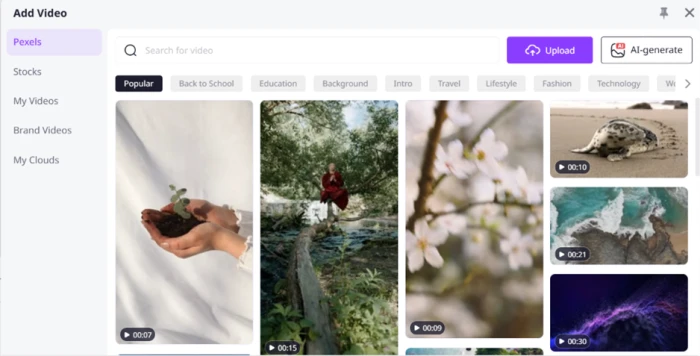
Vidnoz Add Video panel drawing from Pexels and a Stocks library, with category chips for Back to School, Education, Travel, Fashion and Technology, plus Upload and AI-generate options
The Add Video panel, sourcing Pexels and Vidnoz stock.
What clicked: The Add Video panel pulls from Pexels plus Vidnoz's own Stocks library, with category chips and an Upload button beside an AI-generate option. This part worked without credits. Bring your own footage or reach for royalty-free b-roll and the editor accepts it, which is the one creation step that stayed open on a zero-credit account.

Text to video test

Test 06 . Generation
★ Prompt Used

"Create a cinematic 10-second video with stunning visuals, smooth camera movements, realistic lighting, and high-quality details."
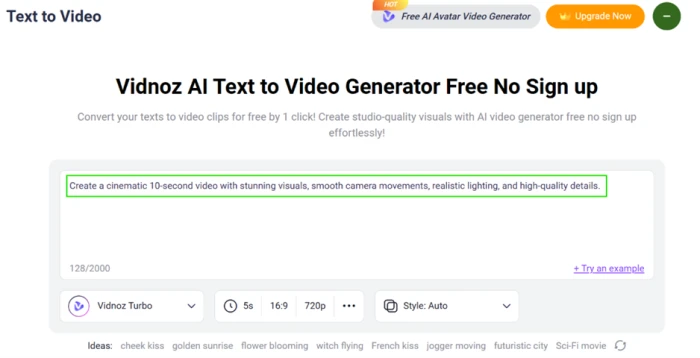
Vidnoz Text to Video page headed Free No Sign up, with default settings of Vidnoz Turbo, 5 seconds, 16:9 and 720p
The Text to Video page, capped at 5-second 720p clips.
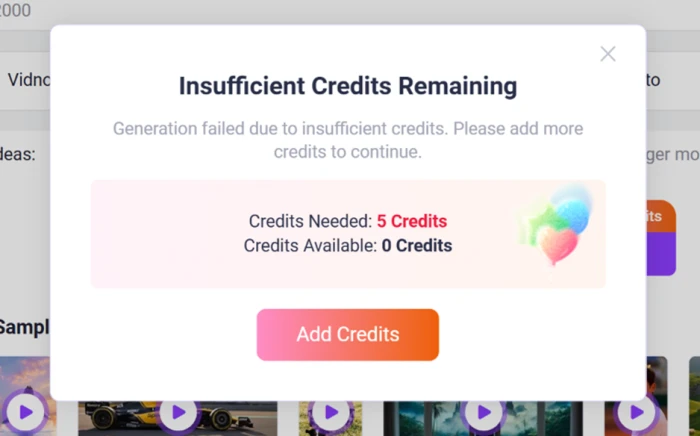
Vidnoz popup reading Insufficient Credits Remaining, Credits Needed 5, Credits Available 0, with an Add Credits button routing to a purchase page
Generation blocked: 5 credits needed, 0 available.
The real story: The page is headed "Free No Sign up," yet our prompt stopped at "Insufficient Credits Remaining. Credits Needed: 5. Credits Available: 0." The Add Credits button routes to a purchase page, not a plan upgrade. A page titled free cannot produce one clip for a signed-up free account, and it caps output at 5 seconds at 720p whatever the prompt asks for.

AI Image Describer

Test 07 . Photo tools
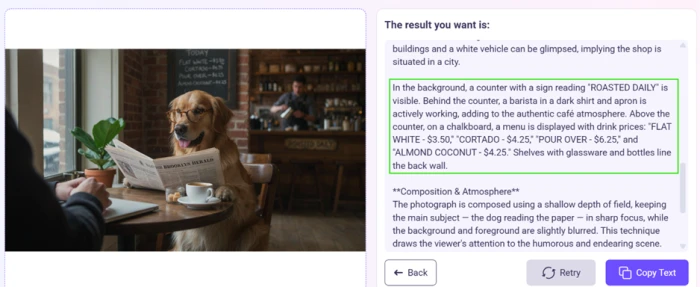
Vidnoz AI Image Describer output for a photo of a golden retriever reading a newspaper in a cafe, identifying the ROASTED DAILY sign, the barista, the masthead, and chalkboard prices
The AI Image Describer reading a cafe photo.
What stood out: This was the first free photo tool to return a usable result. On a photo of a golden retriever reading a newspaper in a cafe, it caught the "ROASTED DAILY" sign, the barista, the masthead, and the shallow depth of field. It also reported chalkboard prices that are illegible in the source, so some specifics are guessed. Fine for drafting alt text, but check any numbers it reports.

Background remover

Test 08 . Before and after

Original photo: a woman holding a mug at a cafe table, with the table and background intact
Before: the original upload.
Background removed: the same woman and mug cut out onto a transparent backdrop, with a soft halo near loose hair and a grey smear where the table edge remained
After: background removed by Vidnoz.
How it performed: The cut around the face, sweater, hands and mug is clean, and the knit texture survived without jagged edges. Two flaws show at full size: a soft halo around the loose hair on the right, and a grey smear where the table edge was only partly removed. The output works for a social post or a product card after a crop. It needs manual touch-up before it goes near print.
★
The free photo tools and media library actually deliver

The parts that held up on a zero-credit account were the ones around the edges: a deep browsable template and avatar library, a working Pexels and stock panel that accepts uploads, a usable AI Image Describer, and a background remover good enough for web after a crop. The engine is real. The gate is the problem.

!
Free means browse, not create

A signed-up free account claimed credits and received 0, then hit a 0-per-day cap on previews and a 5-credit wall on the first generation. You cannot preview the sample scene or render one clip without paying, and you cannot even hear a voice first. The "No credit card required" and "100% Free" lines describe browsing, not video output.

How this review was put together. We ran eight hands-on tests in October 2026 on a newly created free Vidnoz account: the homepage claim, the credit claim popup, the dashboard, the editor preview wall, the stock and upload panel, a text-to-video generation attempt, the AI Image Describer, and the background remover. Pricing was verified the same month from Vidnoz's own in-app plan screen. Competitor prices were checked on each vendor's official pricing page on the day of writing.

10-Point Feature Review

03 . Scored against what the free account actually did
Feature Scores at a Glance
Avatar and template library
9.0
Editor capability
8.0
Stock footage and uploads
8.0
Background remover
7.5
AI Image Describer
7.0
Voice selection and defaults
6.5
Free output watermark
6.0
Text to video free access
5.5
Free preview access
5.0
Free tier honesty
5.0

Pros and Cons

04 . What stood out, good and bad
+What works
  • Capable scene editor: a full toolbar for avatars, text, backgrounds, music and recording, closer to a real editor than a wizard.
  • Media panel that just works: Pexels plus stock footage, with your own uploads accepted even on a zero-credit account.
  • Usable image describer: reads a scene's structure and signage well enough to draft alt text and captions.
  • Web-ready background cutouts: clean subject edges with knit texture intact, fine for social after a quick crop.
−What frustrates
  • Free credits that are not there: claiming them left the balance at 0, with an unfilled number in the popup.
  • Cannot render a single clip free: the first generation demanded credits the account never had.
  • Watermarked free output: a Vidnoz mark sits on the canvas, with removal locked behind payment.
  • US-unfriendly voice default: the editor opens on a UK-flagged voice, so you switch accents by hand.

Pricing Breakdown

05 . Four tiers, and what the credits actually buy
Feature Free$0 Starter$19.99/mo yearly Business$56.99/mo yearlyMost Popular EnterpriseCustom
Video credits 0 after claim 450 / month Custom credits
Max video length 3 mins 60 mins Custom duration
AI avatars 1,600+ 1,700+ 1,700+
Voices 890+ 2,680+ 2,680+
Video export 720p 1080p 1080p
Monthly price (billed monthly) Free $26.99 Let's Talk

What you're actually paying: The paid tiers are priced per credit, and that is where the two plans diverge. Starter works out to roughly $0.044 a credit, while Business lands near $0.063, so Business costs more per credit, not less, in exchange for twice the monthly pool and a credit slider that climbs to 2,700. The yearly prices shown are the headline, carrying a 25% cut off the monthly rate, so the real monthly commitment is $26.99 and $74.99 once the discount lapses. The Free column is the sharpest line item: its credit allowance after claiming was zero, so every number in that column other than the libraries is theoretical until you pay.
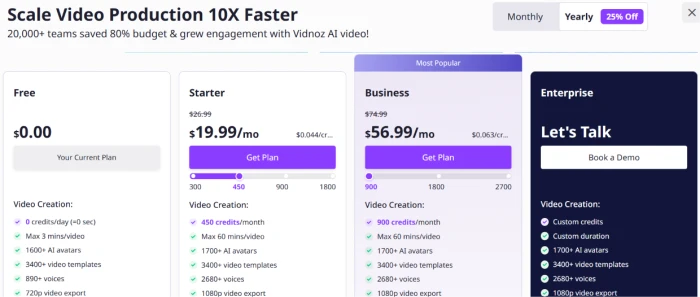
Vidnoz pricing screen with Free at $0, Starter at $19.99 per month, Business at $56.99 per month marked Most Popular, and Enterprise as Let's Talk, on the yearly billing toggle
Vidnoz's four tiers on the yearly billing view.

Pricing verified October 26, 2026 from the in-app plan screen. Vidnoz runs frequent discounts, so confirm the live rate on the official pricing page before you buy.

Vidnoz AI vs the Top 3 Alternatives

06 . How it stacks against the avatar video tools buyers shortlist
VVidnoz HHeyGen SSynthesia PPictory
Free tierBrowse only, 0 render credits3 videos/moYes, 500 credits/moTrial only
Entry paid plan$19.99/mo yearly$24/mo yearly$29/mo$25/mo yearly
Avatar library1,800+700+240+Script to video, no avatars
Core strengthLibrary size and low entry priceRealistic avatars and lip-syncEnterprise polish and governanceTurning articles into video
Best ForVolume avatar video on a tight budgetLifelike talking-head clipsCorporate training at scaleBlog-to-video repurposing

How to choose: Vidnoz wins on library size and the lowest entry price of the group, so it fits anyone who needs many avatar videos and will actually subscribe. If avatar realism is the deciding factor, HeyGen's talking heads read more lifelike. Synthesia is the choice for corporate training that needs governance and a polished template system, while Pictory ignores avatars entirely and turns written articles into narrated video, a different job altogether.

What Users Are Saying

07 . Pulled from Trustpilot, the praise and the complaints
The lip synch and facial expressions were very good.
Vividente
On avatar quality and easy cancellation
★★★★★
trustpilot.com
The lip sync is solid, and the customization feels effortless.
Franz Kindel
On building talking avatar videos
★★★★★
trustpilot.com
Its basically comes out flawlessly.
Jesse Florica
On the AI clothing switcher
★★★★★
trustpilot.com
Before you could just buy credits as needed, now you need to do a subscription plan.
Hakan Ceran
On the shift to subscription billing
★★☆☆☆
trustpilot.com
You'll never know if the personal photos you upload are safe or if they might be leaked.
MYJJPP JP
On uploading personal photos
★★☆☆☆
trustpilot.com
My payment fails every time. I tried several cards from different banks.
Steven Hicks
On trying to upgrade
★☆☆☆☆
trustpilot.com
· The Verdict ·
6.7/10
Is Vidnoz AI worth it past the free wall?

Use Vidnoz if you plan to pay for avatar video and want the largest library at the lowest entry price in the group, and you can live with per-credit billing that favors the cheaper tier.

Skip Vidnoz if you actually need a working free tier, where Synthesia's 500 monthly credits or HeyGen's three free videos let you test before paying, or if avatar realism matters most, where HeyGen reads more lifelike.

Category RankMixed Results
Compared To3 Alternatives
Entry Price$19.99/mo
Free TierBrowse only

Discussion

Join the discussion and share your perspective.