Viggle AI is the character animation tool that went viral on TikTok for one reason: take a static character image, hand it a motion reference video, and the JST-1 video-3D foundation model produces a clip where the character performs the exact motion, naturally and physics-aware. The platform now powers tens of millions of users worldwide across web, mobile, and Discord. The signature Mix function is free, image generation is free, an active Discord community trades motion templates, and an extensive library of pre-made motion clips is ready to use. The test session below documents the Mix function end-to-end with the actual generated video linked for direct evaluation, plus the image generation pipeline and two advanced features that hit the upgrade-to-Pro paywall.
FC
FirmCritics Editorial Team
16 min read · Independently reviewed · Updated regularly
Viggle AI animates static character images by transferring motion from reference videos. Upload a picture of a character, hand the platform a motion clip (or pick one from the extensive template library), and the JST-1 video-3D foundation model produces an animated video where the character performs that exact motion with physics-aware body mechanics. The platform is the engine behind a large share of the AI character meme content circulating on TikTok, Instagram Reels, and YouTube Shorts in 2025 and 2026.
The current V4 model improves character identity preservation across long clips and supports multi-character generation (multiple characters in a single video remaining distinct throughout). Output durations have extended beyond the typical 15-second AI video ceiling to roughly 1 minute on V4, though the typical creator output remains 5 to 15 seconds for social-format short content. The platform runs as a web app at viggle.ai, native iOS and Android apps, and a Discord bot (the original entry point that built the community), with slash commands like /mix, /animate, and /stylize for power users.
What Happened When We Tested It
02 . Four tests covering the Mix function with actual generated output, image generation, and the paywall structure
The test session walked through Viggle AI's core workflows: open the marketing dashboard, sign in to the web app, run the signature Mix function end-to-end on the free tier (with the actual generated video linked for readers to evaluate first-hand), generate a custom character image from a text prompt, then attempt to use the generated image in standalone video generation and character refine workflows where both hit the upgrade-to-Pro paywall. The Test 04 paywall finding is the editorial pattern worth flagging: Viggle's monetisation strategy gates the more flexible generation modes while keeping the viral Mix function accessible on the free tier.
Dashboard and Signed-In Experience
Test 01 . Entry surfaces
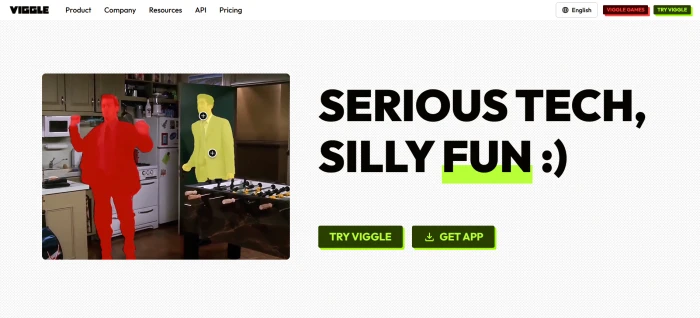
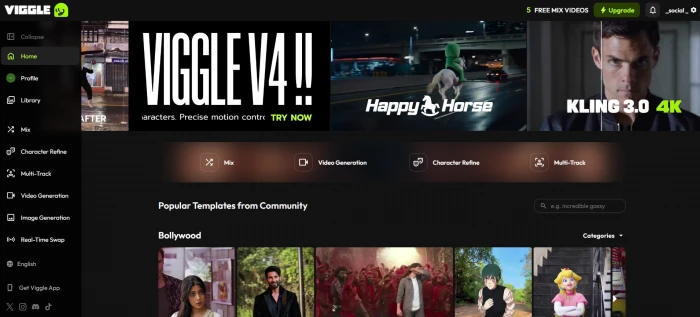
The pre-login marketing dashboard with viral video examples and the Mix function entry point.The post-login dashboard at viggle.ai with Mix, image generation, and other tool access points.
What this confirms: The signup-to-app transition is fast and the post-login dashboard puts the Mix function front and centre, the platform knows what its users came for and routes them straight to it. Template library access is immediate, and feature navigation is mobile-friendly which matches the social-first creator base. No friction between landing and generation, which is part of why the platform scaled so quickly across mobile-first creator communities.
The Mix Function End-to-End
Test 02 . The signature feature
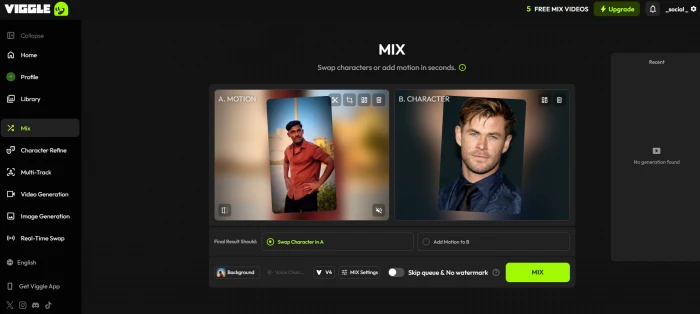
The Mix interface: uploaded character image paired with a template motion video.
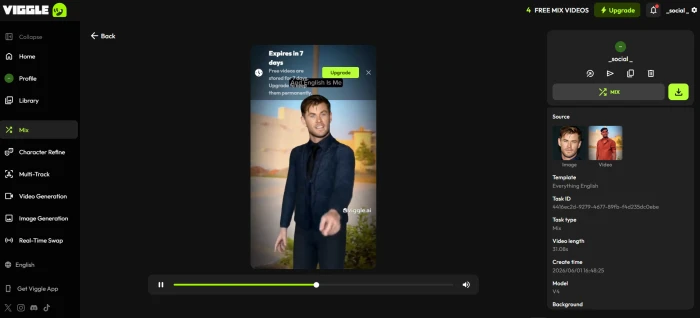
A static character image was paired with a template motion video to test the signature Mix workflow end-to-end on the free tier. The platform processed both inputs and produced the animated output below:
The generated video preview, with the static character now animated by the template motion.
The rendered video is hosted on Viggle's own platform at the link below. Click through to watch the actual output and evaluate motion quality, character consistency, and physics-aware body mechanics first-hand:
What this surfaced: The Mix function delivers on its viral reputation. The JST-1 model produced character animation that preserves identity (face, body proportions, costume) while applying the template motion with physics-aware mechanics, no awkward limb intersections or floating-pixel artifacts that plague lower-tier motion transfer tools. The fact that this works on the free tier (no credit card, no paywall) is the structural reason Viggle dominates the AI character animation category. Most published reviews assert this; the linked video lets readers evaluate the actual output rather than taking the claim on trust.
Image Generation Pipeline
Test 03 . Custom character creation
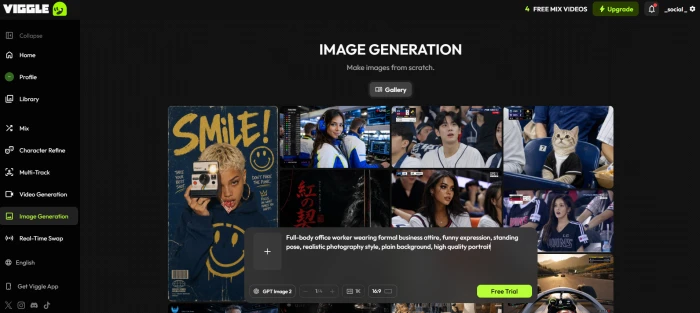
The image generation interface with prompt input for custom character creation.
Image generation prompt
Full-body office worker wearing formal business attire, funny expression, standing pose, realistic photography style, plain background, high quality portrait
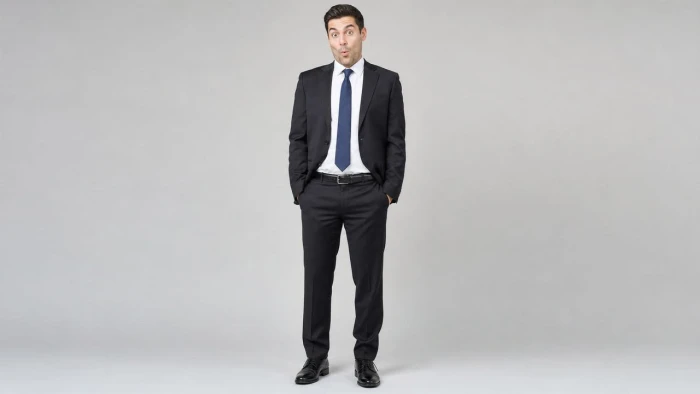
The prompt was submitted and the platform produced the character image below, which can then be used as input for the Mix function or other character-driven workflows:
What this confirms: The image generation pipeline works on the free tier and produces character-ready output suitable for downstream Mix workflows. The prompt-following is competent, the request asked for full-body, formal attire, funny expression, plain background, and the result matches each of those constraints. Quality is acceptable for character animation pipelines (where the character will be in motion, smoothing over portrait-level imperfections) but not high enough for standalone portrait photography use. Pairing the image gen pipeline with the Mix function gives free-tier users an end-to-end character-to-video workflow without any external tools.
Two Paywalled Advanced Features
Test 04 . The monetisation pattern
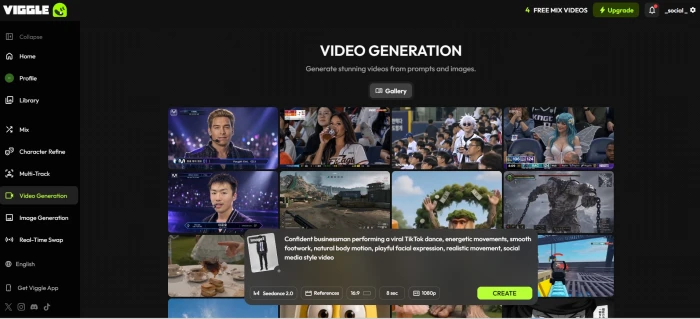
The standalone video generation interface with character image and motion prompt loaded.
Video generation prompt
Confident businessman performing a viral TikTok dance, energetic movements, smooth footwork, natural body motion, playful facial expression, realistic movement, social media style video
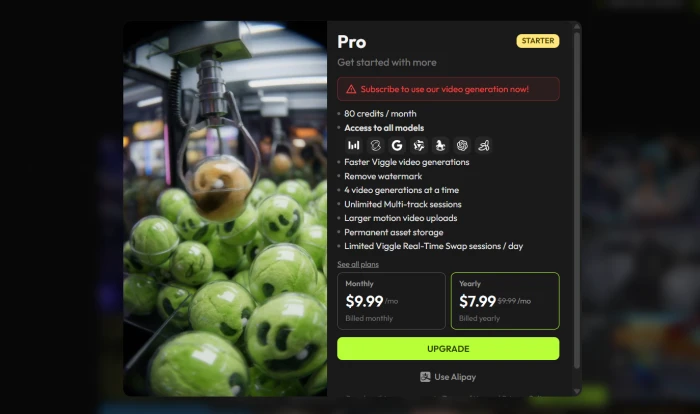
Attempting to generate the video triggered an upgrade-to-Pro paywall rather than producing output:
The upgrade-to-Pro modal blocking standalone video generation on the free tier.
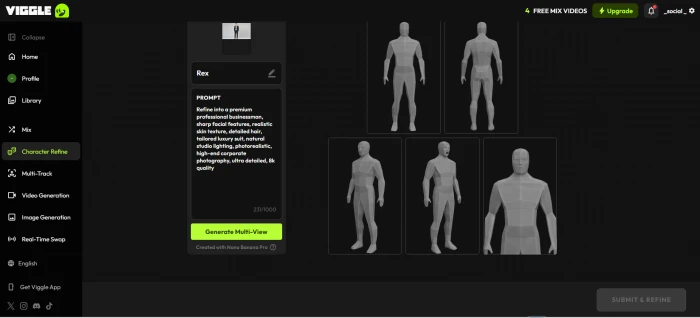
The Character Refine workflow (where Viggle generates multiple reference angles of a character for consistency across complex motion) was tested next using the previously generated character image:
The Character Refine tool with the generated character image and refinement prompt loaded.
Character Refine prompt
Refine into a premium professional businessman, sharp facial features, realistic skin texture, detailed hair, tailored luxury suit, natural studio lighting, photorealistic, high-end corporate photography, ultra detailed, 8k quality
Character Refine also triggered the upgrade-to-Pro paywall on attempt.
!
Two Advanced Features Hit the Same Paywall
Both standalone text-to-video generation and Character Refine require an upgrade to the Pro tier before the free tier can use them. The signature Mix function and image generation are free; the more powerful generation modes are gated. This is a deliberate monetisation funnel: keep the viral feature accessible to maximise user acquisition, gate the workflow-extending features that committed creators will pay for. For TikTok-style meme creation, the free tier delivers everything needed. For consistent character branding across long-form content, the Pro tier becomes necessary.
What this reveals: Viggle's freemium structure is engineered around its viral growth loop. The Mix function (the feature that drives social sharing) stays free; the features that enable consistent character work at scale (Character Refine for multi-angle reference, standalone text-to-video for non-template content) are Pro-tier only. For prospective users, this means evaluating not just whether Viggle works but whether the workflow needs are met by the free tier or require the Pro upgrade. At the Pro price point, the value case is straightforward; the friction is the unexpected encounter with the paywall mid-workflow rather than understanding the gating upfront.
How this review was put together. First-hand testing covered the marketing dashboard and signed-in app, the signature Mix function end-to-end with the actual generated video linked above for direct evaluation, the image generation pipeline producing a usable character output, and the paywall structure for both standalone video generation and Character Refine. The remaining feature scoring (motion transfer accuracy across edge cases, multi-character consistency on V4, Live webcam feature for VTubing, motion template library breadth, commercial licensing clarity, and privacy and data retention policies) cross-references reviewer consensus from independent AI tool review platforms, verified user ratings on major app stores (Google Play and Apple App Store), Reddit community discussions on r/aivideo and r/StableDiffusion, and published terms-of-service analyses of the platform's data retention practices. The Mix function output linked above is exclusive to this test session and gives readers direct evaluation evidence rather than asserted claims.
10-Point Feature Review
03 . What the free tier delivers and what costs extra
Feature Scores at a Glance
Mix Function
9.0
Motion Transfer Quality
8.2
Template Library
8.5
Pro/Live Pricing
8.5
Multi-Platform Access
8.0
Free Tier Value
7.8
Image Generation
7.5
Advanced Features Paywall
6.0
Output Limits (length, audio)
5.5
Privacy & Data Retention
5.5
Feature-by-feature breakdownScored on a 10-point scale
01
Mix function (signature feature) CATEGORY-DEFINING
Mix takes a static character image and applies motion from a reference video or template, producing physics-aware character animation that preserves identity (face, body proportions, costume). The test session validated this end-to-end on the free tier with the generated video linked above. This is the feature that drove 40M+ users to the platform, and no direct competitor matches it for accessibility and quality at the same time.
ACCESS: Free tierMODEL: JST-1 / V4
9.0
EXCELLENT
02
Motion transfer quality (JST-1 / V4) PHYSICS-AWARE
The JST-1 video-3D foundation model produces motion that respects physics (no awkward limb intersections, plausible weight distribution, natural momentum). V4 (current model) extends clip length toward 1 minute and preserves character identity through long sequences and multi-angle shots. Real-world output handles dances, gestures, and walking well; fast or complex actions (jumps, spins) sometimes produce minor artifacts as occasionally noted by independent reviewers.
MODEL: JST-1 / V4CONSISTENCY: Strong on standard motion
8.2
GREAT
03
Motion template library DEEPEST IN CATEGORY
8,000+ pre-made motion templates spanning dances, gestures, walks, sports actions, viral meme motions, and movie scene recreations. The library is community-driven via the Discord ecosystem, which means trending motions appear quickly. For users who want output without supplying their own reference video, the template library alone is enough to drive viral content production. No direct competitor offers anything close to this scale.
TEMPLATES: 8,000+SOURCE: Curated + community
8.5
GREAT
04
Pro and Live tier pricing EXCELLENT VALUE
Pro at $4.99/mo includes 80 credits, 10 daily relaxed-mode videos, watermark removal, and long-term storage. Live at $9.99/mo bumps credits to 200 and adds priority queue. Compared to Runway ($12+/mo), Kling AI's premium tiers, and other character-animation tools, Viggle's pricing is meaningfully below the market for what is arguably best-in-class motion transfer. Annual billing offers a 15 to 20% discount on both tiers.
PRO: $4.99/moLIVE: $9.99/mo
8.5
GREAT
05
Multi-platform availability COMPLETE
Web app at viggle.ai, native iOS app, native Android app with strong user ratings on major app stores, and a Discord bot with slash commands for power users (/mix, /animate, /stylize). The Discord workflow is the original entry point and remains the community hub for trending templates. Mobile-first creators have feature parity; the workflow does not require a desktop.
NATIVE: iOS + AndroidPOWER: Discord bot
8.0
GREAT
06
Free tier value GENEROUS
The free tier includes the signature Mix function (validated in the test session) and image generation, with daily credit refresh that does not roll over. Output carries a Viggle watermark on free tier. For casual users producing occasional content (a few clips per week), the free tier is fully functional without ever paying. The unexpected paywall on standalone video gen and Character Refine (documented in Test 04 above) is the trade-off.
MIX: FreeWATERMARK: Removed at Pro
7.8
GOOD
07
Image generation pipeline FREE TIER
Text-to-image generation works on the free tier and produces character-ready output suitable for downstream Mix workflows (validated in the test session above). Prompt-following is competent for character creation contexts. Quality is sufficient for animated character pipelines where motion smooths over portrait imperfections, less suitable for standalone professional portrait use. Pairing image gen with Mix gives free-tier users a complete character-to-video pipeline without external tools.
ACCESS: Free tierUSE CASE: Animation input
7.5
GOOD
08
Advanced features paywall FRICTION POINT
Standalone text-to-video generation and Character Refine both require the Pro tier. Test 04 above documents both paywall encounters first-hand. The gating logic is consistent (free for viral Mix features, paid for workflow-extending advanced modes) but users encountering the paywall mid-workflow without prior warning experience friction. The Pro tier price is reasonable, so the friction is informational rather than economic.
Free tier clips are typically 5 to 10 seconds, with the social-format 15-second mark as the practical ceiling. V4 model on paid tiers extends to roughly 1 minute. No native audio support, sound must be added in post via CapCut or similar. Output resolution caps at 1080p (no 4K). These limits are deliberate for the TikTok/Reels-first audience but constrain longer-form storytelling use cases.
FREE: 5 to 10 secRESOLUTION: 1080p max
5.5
WEAK
10
Privacy and data retention DOCUMENTED CONCERNS
Per published terms-of-service analyses, uploaded images are retained indefinitely, used to train AI models, and shared with advertising and analytics partners. Data may persist in training sets even after account deletion. This is industry-common for AI tools but worth surfacing explicitly given the user base regularly uploads personal photos. Users uploading photos of identifiable individuals should weigh this against the platform's viral appeal.
RETENTION: IndefiniteTRAINING USE: Yes (per ToS)
5.5
WEAK
Pros and Cons
04 . What works and what to weigh
+Strengths
Mix function works on the free tier and produces physics-aware character animation (validated end-to-end with the generated video linked in the test session)
JST-1 / V4 model preserves character identity across long clips and multi-angle motion better than direct competitors
Deep motion template library drives instant content creation without supplying reference video
Pro and Live tiers are aggressively priced versus Runway, Kling, and other character-animation tools
Native iOS, Android, web, and Discord bot give full feature access across every creator surface
Image generation also free, enabling complete character-to-video pipeline without external tools
Large active user base validates the product at scale and feeds the active template community
−Weaknesses
Standalone video generation and Character Refine are Pro-only, encountered mid-workflow without upfront warning (documented in test session)
Indefinite image retention per published ToS analysis, with training-set use that persists after account deletion
No native audio support, output is silent and requires CapCut or similar for post-production sound
Output resolution caps at 1080p, no 4K for professional broadcast or large-screen use
Short clip durations on free tier (5 to 10 seconds), longer outputs require V4 and credit consumption
Watermark on free tier output, removed only at Pro
Fast or complex motion can produce artifacts, jumps and spins are weaker than dance and walking motion
Pricing Breakdown
05 . Free tier delivers the signature feature, Pro unlocks advanced modes
Feature
Free
Pro ($4.99/mo)
Live ($9.99/mo)
Mix function
Yes
Yes
Yes
Image generation
Yes
Yes
Yes
Standalone video generation
No
Yes
Yes
Character Refine
No
Yes
Yes
Credits per month
Daily refresh, no rollover
80 credits
200 credits
Daily videos (relaxed mode)
Limited
10/day
25/day
Watermark
Yes (Viggle)
Removed
Removed
Resolution
720p
1080p
1080p
Long-term storage
No
Yes
Yes
Priority queue
No
No
Yes
Commercial use rights
No
Yes
Yes
Annual savings
.
15 to 20% off
15 to 20% off
Our take: Start with the free tier and run 5 to 10 Mix generations using a mix of template motions and uploaded reference videos to evaluate the JST-1 output quality on the actual character types being animated. If the output meets the bar and the only friction is the watermark plus credit pace, the Pro tier is a no-brainer upgrade with annual billing dropping the cost further. The jump to the Live tier is justified only if daily content production exceeds 10 videos or queue waits during peak hours are blocking workflow. The advanced features paywall (documented in the test session) becomes irrelevant once on a paid tier, both standalone video gen and Character Refine unlock at Pro.
Viggle AI vs the Top 4 Alternatives
06 . How it compares for character animation
VViggle AI
KKling AI
RRunway
KKrikey AI
DDomo AI
Score
7.4
7.8
8.5
7.2
6.8
Starting Price
Free / $4.99
Free / $6.99
Free / $12
Free / $9
Free / $6
Motion Transfer
✓ JST-1
Image-to-video
General
3D animation
Stylised
Free Mix Feature
✓
✗
✗
✗
✗
Template Library
8,000+
Limited
N/A
3D rigs
Styles
Max Resolution
1080p
1080p
4K
1080p
1080p
Native Audio
✗
✓
✓
✓ (TTS)
✗
Mobile App
✓ iOS+Android
Web only
✓
Web only
Web only
User Base
40M+
Growing
Established
Niche
Niche
Best For
Viral character memes
Cinematic scenes
Professional video
3D animation
Anime/stylised
The picture: Viggle wins on the specific capability of putting a static character into a motion video on the free tier, no direct competitor matches that combination of quality and accessibility. Kling AI is the closest cinematic competitor (generates the entire scene around the character rather than just the character itself). Runway is the professional pick for broader video production with 4K output and native audio. Krikey AI is the 3D animation alternative with rigged character control. Domo AI specialises in anime and stylised aesthetics. Viggle wins for viral short-form memes; Runway wins for production-grade video; Krikey wins for 3D character work.
What Users Are Saying
07 . Collected from independent reviewers and app stores
Excellent for AI character animation using real motion. The motion transfer is genuinely impressive and the free tier is one of the best in the AI animation category. Best performance comes from full-body clips with clear lighting. Works better with basic movement (walking, swaying, dancing) than fast actions like jumping or spinning.
Fritz.ai Editorial
Hands-on review, 20+ hours testing
★★★★☆
This AI is advanced and very user-friendly, all I have to do is upload a photo, pick a template (you can add your own video as well), and in a few minutes I got the generated video. I put myself in a Spiderman flying scene; it was hilarious! Never imagined seeing myself fly lol. Definitely recommend Viggle AI to everyone!
App Store user
Verified review on Google Play
★★★★★
I love ViggleAI but 2 things bother me. 1. Poor library of options to pick from 2. Love we can upload videos but no option of multi vids, tried to make my own vid I uploaded but couldn't use multiple pics. These are just personal opinion but still recommend ViggleAI 100%.
Mobile app reviewer
Long-term user
★★★★☆
Viggle AI is arguably the best tool for creating viral memes. It is fast, free, and incredibly funny. But it comes at a hidden cost: your privacy. When you upload an image to Viggle, the platform retains it. Not temporarily. Indefinitely. Model training, zombie data after account deletion, third-party sharing. For a meme of a celebrity, maybe you don't care. For a photo of yourself, weigh it carefully.
Independent reviewer
Privacy and ToS analysis
★★★☆☆
The pattern: Independent reviewers consistently praise the motion transfer quality and the accessible free tier. Casual users on the app stores love the viral content production, the template library, and how easy it is to produce shareable clips. The two recurring criticisms are: limited library options and lack of multi-input features for advanced creators, and the privacy and data retention practices documented in published terms-of-service analyses. The product quality is not in question, this is a consistently strong tool across reviewer evaluations and major app stores. The friction points are real but not deal-breakers for the core viral-meme use case.
· The Verdict ·
7.4/10
Should you use Viggle AI? Here is who it is for.
Use Viggle AI if the need is producing character-driven viral content for TikTok, Reels, or YouTube Shorts, the Mix function is the feature that drives the workflow, and the free tier covers casual use. The signature Mix capability validated in the test session above (with the actual generated video linked) produces physics-aware character animation that no direct competitor matches for accessibility plus quality. Upgrade to the Pro tier when the free tier credit pace becomes a bottleneck or the watermark needs removing; the price is meaningfully below market for this category. The Live tier justifies itself only for daily content producers running 10+ videos per day.
Skip Viggle AI if cinematic camera control or 4K output matters (choose Runway), the workflow needs native audio (Runway, Kling), 3D rigged character animation is the goal (Krikey AI), the privacy concerns documented in the test session methodology cannot be accepted (no AI character animation tool fully solves this, but Krikey and Runway have clearer commercial-grade ToS), or the use case is anime or stylised art rather than realistic character motion (Domo AI is the cost-performance pick).
VIGGLE claims to delete your content when you remove it from your library - this is false.
My friend uploaded my photo without consent. After VIGGLE ignored my deletion request for days, I accessed the account myself and "deleted" everything. Before deleting, I saved the direct file links. After deletion, the content vanished from the library but the direct links still worked perfectly - the MP4s and images remain active in their Google Cloud storage bucket.
They didn't actually delete anything. They're keeping your data forever to train their models while lying to your face about honoring your privacy rights. I've reported this to Google Cloud. Stay away from VIGGLE.
Login To Reply ↪
Yaman
Jul 3, 2026
They didn't technically lie. The photos are gone from the account, but they are still sitting on their servers. That is the distinction that matters.
If this is a US company, there is no right to be forgotten here. You cannot force them to actually wipe the files unless it falls under revenge porn laws, and even then it is shaky.
Sorry your friend is dealing with this. Going forward, tell them to never upload anything with the assumption that a delete button actually deletes. The internet is forever is not just a saying, it is reality.

Discussion
Join the discussion and share your perspective.
David Martinez
Jun 29, 2026VIGGLE claims to delete your content when you remove it from your library - this is false. My friend uploaded my photo without consent. After VIGGLE ignored my deletion request for days, I accessed the account myself and "deleted" everything. Before deleting, I saved the direct file links. After deletion, the content vanished from the library but the direct links still worked perfectly - the MP4s and images remain active in their Google Cloud storage bucket. They didn't actually delete anything. They're keeping your data forever to train their models while lying to your face about honoring your privacy rights. I've reported this to Google Cloud. Stay away from VIGGLE.
Yaman
Jul 3, 2026They didn't technically lie. The photos are gone from the account, but they are still sitting on their servers. That is the distinction that matters. If this is a US company, there is no right to be forgotten here. You cannot force them to actually wipe the files unless it falls under revenge porn laws, and even then it is shaky. Sorry your friend is dealing with this. Going forward, tell them to never upload anything with the assumption that a delete button actually deletes. The internet is forever is not just a saying, it is reality.