Home / Reviews / AI Video Generator / Wan AI
Wan logo
AI Video Generator Image Generation

Wan Review

wan.video · Alibaba's Wan 3.0 Omni model

Wan is Alibaba's hosted creative platform built on the Wan 3.0 Omni model, pairing text-to-video with still-image generation in one credit-based workspace. Its pitch is reach at a low entry price: multimodal references and native audio, with clips that stretch to 30 seconds on paid tiers. It aims at solo creators and small teams who want cinematic AI footage without a premium subscription behind it.

Reviewer Score
7.2
/10
Capable Pick
Fast, accurate renders.
A free tier that runs thin.
Prompt Accuracy8.5
Render Speed8.5
Community Gallery8.0
Credit Value6.0
Free Clip Length5.0
Type
Web app video + image
Model
Wan 3.0 Omni
Free Credits
6 per day, check-in
Free Clip
480p 2 sec default
Max Length
30 sec paid tiers
Entry Plan
$5/mo Pro, billed yearly

What Wan Does

01 . Overview

Wan is the hosted front end for Alibaba's Wan model family, now running on the 3.0 Omni release. The platform turns a prompt or a reference image into short video, and it generates still images from the same credit balance. Sign-in goes through a Google account, and a daily check-in drops a small pool of free credits into the workspace for anyone sampling the models before paying.

Alibaba aims Wan at the premium end of AI video rather than the budget corner its price suggests. The Omni model accepts several reference types at once and can hold a subject across a longer clip than most earlier open releases managed, generating native audio alongside the footage on paid tiers. The target user is the creator who wants cinematic output and an easy start, not a studio-grade control surface. Membership spans a free tier and two paid memberships, with the paid plans opening at a few dollars a month.

What Happened When We Tested It

02 . 5 tests covering video, images, editing and credit burn

Testing ran on a fresh free account, signed in with Google, starting from the 6 credits the daily check-in provides. Every job in the session used the default free settings the platform assigns, which meant 480p output and very short durations. The aim was to see what a non-paying user actually gets before the credit meter forces a decision.

Prompt accuracy: the red coat clip

Test 01 . Text to video
★ Prompt Used

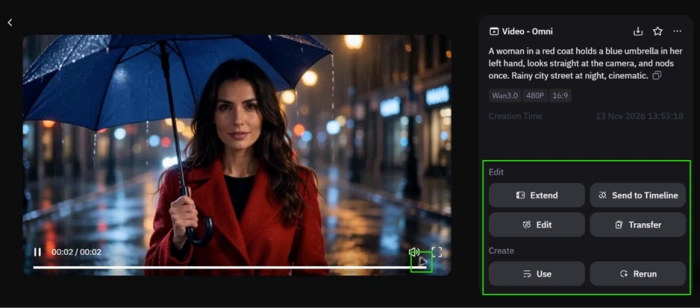
"A woman in a red coat holds a blue umbrella in her left hand, looks straight at the camera, and nods once. Rainy city street at night, cinematic."

The red-coat prompt typed into the Wan 3.0 Omni box, set to 480P and 2 seconds, with a 6-credit balance top right
The prompt entered in the Wan 3.0 Omni box, set to 480p and 2 seconds, with 6 credits showing top right.
The Wan video job rendering, paused at 11 percent progress
The job paused at 11 percent before finishing. Free jobs default to 480p at 2 seconds.
The finished Wan clip of the woman in the red coat, with a Wan watermark beside the player and Extend and Edit buttons on the right
The finished clip. The Wan watermark sits by the player, and the Extend and Edit buttons spend extra credits.
What stood out: The Omni model placed every element the prompt named, including the red coat, the blue umbrella in the correct hand, direct eye contact, and a rain-soaked street with soft light behind the subject. The job cost 4 credits and finished in under a minute.

Image generation: the coffee flask batch

Test 02 . Text to image
★ Prompt Used

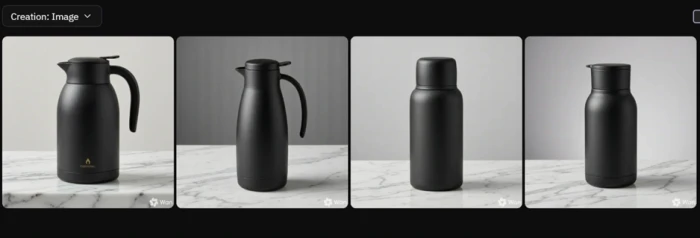
"Product shot of a matte black coffee flask on marble, studio lighting, photorealistic."

The coffee flask image prompt in the Wan Generate box, with a members-only Generate without credits toggle above it
The image prompt in the Generate box. The Generate without credits toggle above it is locked to members.
Four matte black coffee flask images generated from a single Wan prompt, each carrying a Wan watermark
Four flask images from a single prompt, each carrying the Wan watermark.
The key finding: One run returned four images for 2 credits, and the quality held for a product mockup. There is no way to request a single image, so every run spends credits on a batch of four whether the extras are wanted or not.

Editing draws on the same meter

Test 03 . Box Select
The Wan Box Select editor open on a flask image, with tools to erase, replace, reposition or resize parts of the image
The Box Select editor can erase, replace, reposition or resize parts of an image.
Where it lands: Opening the Box Select tool to adjust one image asked for credits the session had already spent on the video and the image batch. Editing sits behind the same meter as generation, so corrections compete with new work for a shrinking balance.

The community gallery earns its place

Test 04 . Prompt library

A public Wan community post showing its complete prompt on display next to a download button
A public community post with its full prompt on display and a download button.
Worth noting: The gallery shows public creations with the complete prompt attached, and the result downloads. It costs nothing, and reading how other people structure longer prompts is a practical way to spend fewer credits on trial and error.

Where the free credits went

Test 05 . Credit burn
The Wan credit log for the session showing the 6-credit check-in, 4 credits for the video, and 2 for the image run, ending at zero
The credit log for the session. The check-in added 6, the video took 4, and the image run took 2.
The real story: By the end of a single session the balance read zero. Six credits in, a 480p video out at 4 and one image batch at 2, and the day's free allowance was gone. That caps a free user at roughly one short video and one set of images before the next check-in or a payment.
★
Prompt fidelity at speed

The strongest result was accuracy under load. A detailed prompt rendered with the right garment, the right hand, the right eyeline and a convincing night street, in under a minute and for 4 credits. Adherence to a specific brief is where Wan earned its keep in this session.

!
Every real action spends credits

Generation and editing both draw from the same small daily pool, and a forced batch of four images drains it faster, with no single-image option to slow the burn. A free user hits zero inside one sitting, and the Generate without credits queue that would soften that is reserved for members.

How this review was put together. Testing ran in November 2026 on a free Wan account, signed in with Google and limited to the daily check-in credits. The session covered one text-to-video job, one image batch, the Box Select editor, and the community gallery, all at the free tier's default 480p settings. Pricing was verified against the membership plans shown inside the Wan app and on the official site at wan.video. Figures for competing tools came from each vendor's own pricing page on the day of writing.

10-Point Feature Review

03 . Ten signals, scored against what the session showed
Feature Scores at a Glance
Prompt accuracy
8.5
Render speed
8.5
Onboarding
8.0
Community gallery
8.0
Image quality
7.5
Editing tools
7.0
Output control
6.5
Credit value
6.0
Free watermark
5.5
Free clip length
5.0

Pros and Cons

04 . What the hands-on session surfaced
+What works
  • Prompt adherence: detailed briefs land with the right objects, placement and eyeline.
  • Fast turnaround: a finished clip in under a minute keeps iteration moving.
  • One workspace for both: video and still images share a single interface.
  • Capable editor: Box Select erases, replaces, repositions and resizes regions, not just crops.
  • Multimodal references: the Omni model takes several reference types to steer a shot.
−What grates
  • Forced batches: image runs always return four, never one.
  • Short default clips: the standard clip length leaves little room for real motion.
  • Editing runs through generation: fixes go through the model pass, not a quick manual tweak.

Pricing Breakdown

05 . Free, Pro and Premium, billed yearly or monthly
Feature Free$0 /mo Pro$5 /mo, yearly Premium$20 /mo, yearlyTop Tier
Monthly credits 6/day only 300
Concurrent videos 1 3
Concurrent images 1 3
Watermark-free output ✗ ✓
1080p video ✗ ✓
10 to 30 second clips ✗ ✓
Image styles 6 All
Daily check-in credits ✓ ✓

What you're actually paying: The billing cycle is the number to watch. Pro and Premium both advertise their headline rate on annual billing, so the $5 and $20 figures double to $10 and $40 for anyone paying month to month. The free tier is a demo rather than a plan, with credits that exist only to sample the paid models and reset to zero each night. The meaningful step is free to Pro, where the watermark disappears and output unlocks 1080p at the longer clip lengths the model is built for. Premium is a volume play, quadrupling the monthly grant and pushing concurrent video jobs to eight, which only matters to someone running a steady production line.
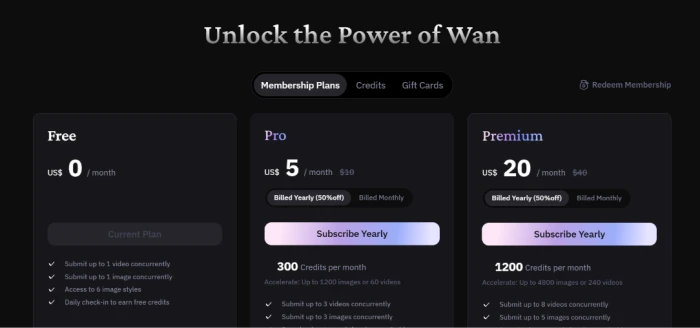
The Wan membership plans screen showing Free, Pro and Premium tiers with their prices and credit allowances
The membership plans as shown in the Wan app, from Free through Premium.

Pricing verified November 14, 2026. Plans shift often, so confirm the current terms on the official pricing page before subscribing.

Wan vs the Top 3 Alternatives

06 . How it sits against Runway, Pika and Luma
WWan RRunway PPika LLuma
Entry price, monthly$10/mo$15/mo$10/mo$30/mo
ScopeVideo + imageVideo, image, editVideo-firstVideo + image
Best ForLow-cost multimodal outputPro control and team pipelinesFast, stylised short clipsCinematic image-to-video

Where each one fits: Price is the clearest line between them. Wan's monthly rate matches Pika and sits under Runway and Luma, and its annual plan drops to $5 a month, the lowest entry in this group by a wide margin. Runway is the pick for anyone who needs frame-level control and a team workflow, and it charges for that depth. Pika trades range for speed and stylised output. Luma leans into polished image-to-video motion at the top of this group's pricing. Wan's argument is reach for the money, putting multimodal input and native audio at a rate the others reach only on their stripped entry tiers.

· The Verdict ·
7.2/10
A low-cost multimodal generator with a thin free tier

Use Wan if you want accurate text-to-video and quick renders at the lowest entry price in the category, and you are ready to move to Pro to clear the watermark and the two-second ceiling.

Skip Wan if you need frame-level control and production consistency, where Runway at $15 a month is the stronger tool, or if polished cinematic motion is the priority, where Luma at $30 a month leads.

Category RankCapable Pick
Compared To3 Alternatives
Entry Price$5/mo
Free TierYes, 6/day

Discussion

Join the discussion and share your perspective.