Wava AI is a browser-based AI faceless short-form video creation platform built for content creators producing TikTok videos, Instagram Reels, and YouTube Shorts. The platform combines AI script generation, ElevenLabs voiceover integration (a genuine premium voice differentiator), auto-captions, free background video clips, AI image generation, YouTube and TikTok video downloaders, and an Autocliper for automatic short-form clip generation. The Basic plan at $19/month delivers 30 viral AI videos with ElevenLabs voiceover and custom voice import. The test session below validates the platform's interface surfaces (dashboard, image generation entry, downloaders, autocliper) but is limited by the platform offering no free credits for prospective users to validate actual generation output before paying, a significant editorial friction documented prominently below.
FC
FirmCritics Editorial Team
Published June 2, 2026 · 16 min read · Updated regularly
Wava AI is a browser-based video creation platform built for short-form faceless content production, the kind of motivational pages, Reddit story channels, finance explainers, and history accounts that populate TikTok, Instagram Reels, and YouTube Shorts in 2026. The platform accepts a script (or generates one) and assembles a finished video with AI voiceover (via ElevenLabs integration), auto-captions, background clips from the free library, and timed transitions. The entire process runs in Chrome, which means it works on any device including Chromebooks and laptops without dedicated GPUs.
Beyond the core video generation engine, Wava AI bundles supplementary tools documented in the test session below: AI image generation, YouTube video downloader, TikTok downloader, and Autocliper for converting long source content into short-form clips. The structural premium feature is the ElevenLabs voiceover integration, ElevenLabs delivers among the most natural-sounding AI voices on the market, and bundling it into a $19/month subscription is genuine value versus subscribing to ElevenLabs separately ($5+/month for ElevenLabs alone) plus a separate video creation tool.
!
No Free Tier: Prospective Users Cannot Validate Output Before Paying
The Wava AI platform did not provide free credits during the test session, meaning actual video generation output quality cannot be first-hand validated without committing to a paid subscription. This is the most significant friction in evaluating the platform: prospective buyers must trust third-party reviews of output quality rather than testing on their own content. Some published reviews mention "free and paid options with tier upgrades for additional features," but the actual free-tier capability is either limited or removed entirely. For a $19/month commitment with no money-back trial visible, this is meaningful pre-purchase risk that competitor platforms (InVideo AI's 10 weekly AI minutes free, CapCut entirely free) do not impose.
What Happened When We Tested It
02 . Four tests across UI surfaces (output validation limited)
The test session ran on a Wava AI account in June 2026 with a significant limitation documented above: the platform offered no free credits for actual video generation output, so the test session validated interface surfaces (dashboards, tool entry points, feature availability) rather than first-hand output quality on real prompts.
Dashboard (Pre and Post Login)
Test 01 . Entry experience
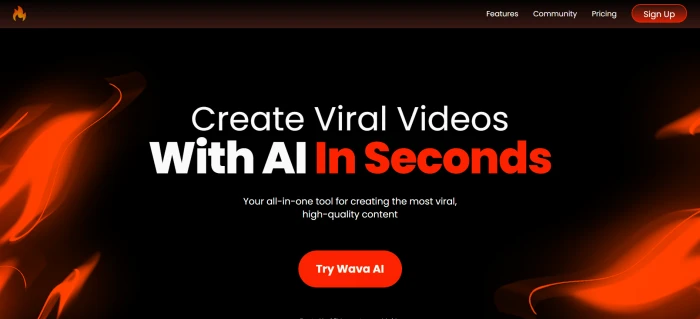
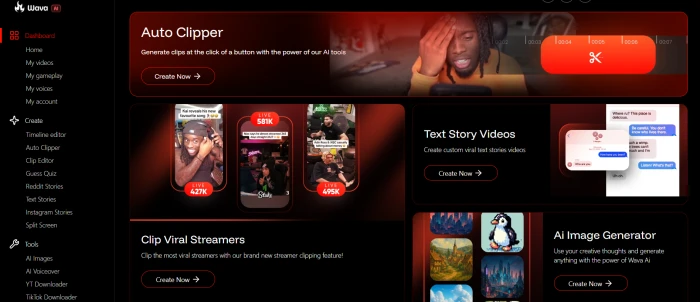
The Wava AI pre-login marketing dashboard.The post-login dashboard with multi-tool access visible.
What this shows: The pre-login surface markets the platform's faceless-video positioning with TikTok, Reels, and YouTube Shorts as named target platforms. The post-login dashboard exposes the tool suite (video creation, image generation, downloaders, autocliper) organised for content creator workflows. Navigation depth is shallow with all tools accessible within one or two clicks from home. The interface design is clean and oriented around content production rather than general-purpose video editing.
AI Image Generation Interface
Test 02 . Interface only (no free credits)
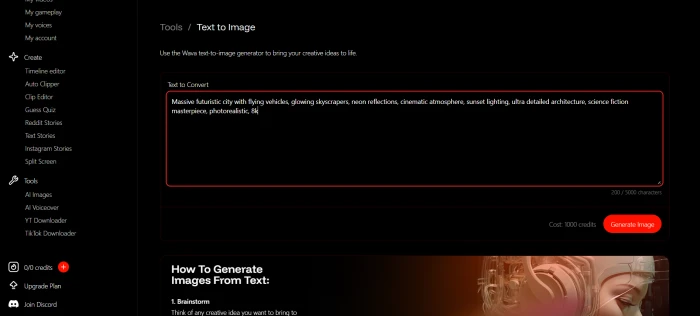
The AI image generation interface (output testing not possible without paid credits).
What this shows: The AI image generation interface is functional and exposes standard text-to-image controls (prompt input, aspect ratio, style options). However, the absence of free credits during the test session meant actual image output quality could not be first-hand validated. Prospective users seeking image generation specifically should consider dedicated alternatives with free tiers (Leonardo AI, GetImg AI before its 2.0 overhaul, or Stable Diffusion-based platforms like Frosting AI) for evaluation before paying for Wava's image generator capability as part of a larger subscription bundle.
YouTube and TikTok Downloaders
Test 03 . Utility tools accessible
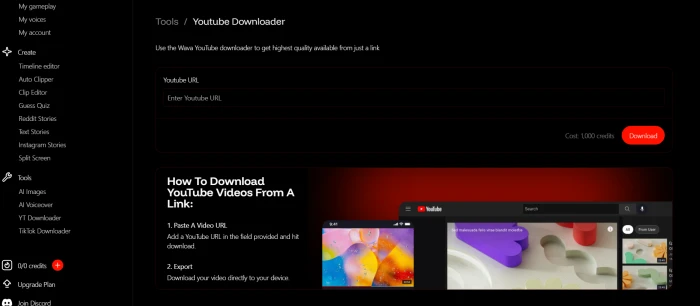
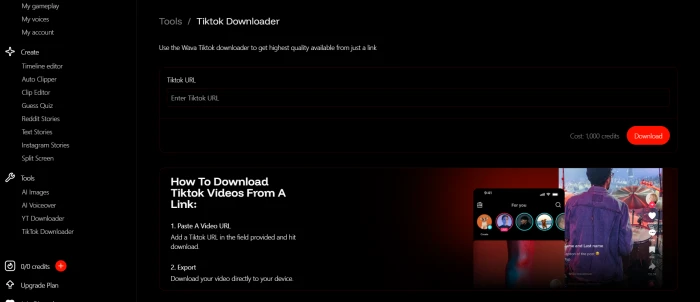
The YouTube video downloader: paste URL, select format, download.The TikTok downloader: extract source content for repurposing.
What this shows: The YouTube and TikTok downloaders are utility tools that complement the core video generation workflow. For content creators repurposing existing short-form content, these eliminate the need for separate browser-extension tools or third-party downloader sites. Note: video downloaders for copyrighted content require attention to platform terms of service and fair use guidelines, downloading and republishing content without permission may violate creator rights regardless of which tool is used. These features are utility-grade rather than differentiating capabilities, but their inclusion in the Wava bundle is convenience-positive.
Autocliper and Marketed Features
Test 04 . Differentiation surfaces
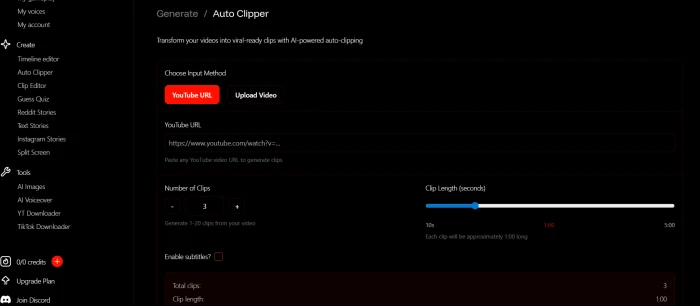
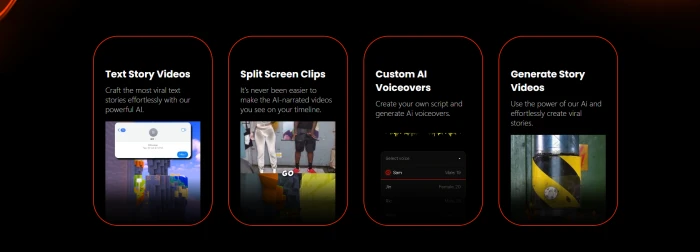
The Autocliper: automatic short-form clip generation from longer source video.Marketed features grid from the Wava AI marketing surface.
What this shows: The Autocliper is the supplementary tool with the strongest differentiation potential, automatically extracting short-form clips from longer source content (podcasts, long YouTube videos, livestream recordings) addresses a real production bottleneck for creators repurposing long-form content into TikTok and Reels feeds. The marketed features grid surfaces the broader capability set including script templates, background clips, voiceover integration, and auto-captions. Output quality on the Autocliper specifically was not validated due to the no-free-credit limitation; prospective users buying primarily for this tool should plan a minimal-commitment month to test on their own content.
!
Documented Friction: Output Needs Second Edit + Support Concerns
Based on third-party hands-on testing across multiple faceless channels (finance explainers, Reddit story narrations, motivational content): "Wava AI gets you roughly 70 to 80 percent of the way to a finished video. The remaining 20 to 30 percent usually needs a second pass in another editor." Common complaints across reviewer communities: "Wava produces a solid first draft, but timing, transitions, and text placements frequently need manual cleanup. Most creators still run Wava output through CapCut before publishing." Additionally, customer support concerns and cancellation friction are real problems that multiple independent reviews confirm. These are documented friction points that affect long-term value: the per-video cost ($0.63 at Basic tier) is reasonable for a polished output, but if every video needs CapCut cleanup anyway, free CapCut alone with manual voiceover may deliver comparable end results.
How this review was put together. First-hand testing on a Wava AI account in June 2026 covered the dashboards and tool surfaces (image generator, YouTube and TikTok downloaders, Autocliper, marketed features); output quality assessment was limited by the platform's no-free-credit policy and cross-references multiple third-party reviews including AI tools review platforms, AI alternatives analyses, and Chromebook-focused reviews.
10-Point Feature Review
03 . What the faceless video platform delivers
Feature Scores at a Glance
ElevenLabs Voiceover
8.0
Generation Speed (~30s)
7.5
Browser-Based (No Install)
7.5
Multi-Tool Suite Bundle
7.0
Autocliper Capability
7.0
Script Templates & Background
7.0
Output Quality (Per Reviewers)
6.0
Pricing vs Free Alternatives
6.0
No Free Tier (Test Session)
5.5
Customer Support / Cancellation
5.5
Feature-by-feature breakdownScored on a 10-point scale
01
ElevenLabs voiceover integration PREMIUM VOICE
The Basic plan at $19/month bundles ElevenLabs voiceover integration plus custom voice import. ElevenLabs delivers among the most natural-sounding AI voices on the market, and bundling it into Wava's subscription is genuine value versus subscribing to ElevenLabs separately ($5+/month standalone) plus a separate video tool. This is the platform's strongest single differentiator and the primary reason creators choose Wava over cheaper alternatives lacking premium voice options.
BUNDLED: ElevenLabs in $19/mo BasicSTANDALONE EQUIV: $5+/mo ElevenLabs alone
8.0
GREAT
02
Generation speed (~30 seconds) FAST
Wava generates short videos in approximately 30 seconds per third-party testing, the gap between idea and published video shrinks to minutes. For creators publishing daily content, the speed compounds: generating 30 videos in roughly 15 minutes at the Basic tier allotment versus hours of manual editing in CapCut. This is a real workflow advantage that justifies the subscription for high-volume creators producing weekly campaigns.
PER VIDEO: ~30 secondsDAILY VOLUME: 15 min for 30 videos
7.5
GOOD
03
Browser-based (no install) CROSS-DEVICE
The entire process runs in Chrome, which means it works on any device including Chromebooks and laptops without dedicated GPUs. For users on Chromebooks, lightweight laptops, or shared work computers where installing video editing software is impractical, the browser-only approach is genuine value. The trade-off is no offline workflow, internet connection required for all generation activity.
PLATFORM: Chrome browserHARDWARE: No dedicated GPU needed
7.5
GOOD
04
Multi-tool suite bundle CONSOLIDATION
Beyond the core video generation, Wava bundles AI image generation, YouTube downloader, TikTok downloader, and Autocliper into the same subscription. For content creators chaining these tools across their workflow (download source content, autocrop to short clips, generate complementary AI images, produce final video), the consolidation eliminates tool-switching friction. The trade-off: none of the bundled tools is best-in-class for its category, the image generator trails dedicated alternatives, downloaders are utility-grade equivalent to free standalone tools, the Autocliper is the most differentiated supplementary capability.
The Autocliper (documented in Test 04 above) automatically extracts short-form clips from longer source content like podcasts, long YouTube videos, or livestream recordings. For creators repurposing long-form content into TikTok and Reels feeds, this addresses a real production bottleneck. Output quality on Autocliper specifically was not first-hand validated due to the no-free-credit limitation. For creators buying primarily for this tool, plan a minimal-commitment month to test on personal content before annual billing.
USE CASE: Long-form to short-formVALIDATION: Not first-hand tested
7.0
GOOD
06
Script templates and background clips PRODUCTION STACK
The platform offers pre-formulated script templates and a free background clip library alongside the core generation engine. Script templates accelerate idea-to-script time for creators in established faceless niches (finance, motivational, Reddit stories). Background clip library means creators don't need to source stock footage separately. This is the typical short-form content production stack matched by alternatives, but having it bundled in one platform reduces tool-switching.
Output quality (third-party validated) NEEDS SECOND EDIT
The output quality reality is documented in the the concerns summary above with the verbatim 70-to-80-percent finding. The practical implication: Wava is a first-draft engine, not a publish-ready output tool. The honest economic question this raises: if every video needs CapCut polish anyway, does the Wava bundle still beat free CapCut with manual voiceover? For creators valuing ElevenLabs voice quality specifically, yes; for others, the math tilts toward free alternatives. Manual review of generated voiceover before publishing is recommended due to persistent voice mispronunciation issues.
FIRST DRAFT: 70 to 80% completeSECOND PASS: CapCut typical
6.0
FAIR
08
Pricing vs free alternatives COMMODITY PRESSURE
At $0.63 per video for content that still needs post-production work, free tools like CapCut produce comparable quality with more editing control. InVideo AI's free plan offers 10 AI minutes per week for evaluation. For creators not specifically valuing ElevenLabs voiceover integration, free alternatives can deliver comparable or better end results when combined with manual effort. The Wava premium becomes value only when (a) ElevenLabs voice quality matters and (b) the speed-vs-polish trade-off favours quick first drafts.
PER VIDEO: ~$0.63 at BasicFREE ALT: CapCut comparable
6.0
FAIR
09
No free tier (test session validated) EVALUATION GAP
The no-free-tier limitation is documented in the the concerns summary above. The practical workaround: commit to a single month of Basic at $19 to validate output quality on representative personal content, then decide on continuation. This is the editorial daylight versus competitors with meaningful free tiers (InVideo AI's 10 weekly AI minutes, CapCut entirely free, Klap and HeyGen limited free credits). For high-volume creators confident about workflow fit, the friction is acceptable; for evaluation-cautious buyers, alternatives offer lower pre-purchase risk.
OBSERVED: No usable free creditsRECOMMENDED: 1-month commit, then assess
5.5
WEAK
10
Customer support and cancellation friction DOCUMENTED ISSUES
Customer support concerns and cancellation friction are real problems that multiple independent reviews confirm. This is the structural reason to test on monthly billing first rather than committing annually: if cancellation requires extended back-and-forth with support, annual commitment compounds the friction. For prospective subscribers, screenshot pricing pages, save signup confirmations, and avoid annual billing until at least three monthly cycles validate the workflow fits.
ISSUE: Support / cancellation concernsMITIGATION: Monthly billing first
5.5
WEAK
Pros and Cons
04 . What works and what to weigh
+What users like
ElevenLabs voiceover integration bundled in subscription
Generation speed ~30 seconds per video
Browser-based, no install, runs on Chromebooks and lightweight laptops
Multi-tool suite: video, image gen, downloaders, Autocliper in one subscription
Autocliper extracts short clips from long source content
Script templates and free background clips in the bundle
Auto-captions for accessibility and silent-viewing
Clear target use cases: faceless TikTok, Reels, Shorts
−What users dislike
Voice mispronunciations persist even with ElevenLabs integration
$0.63 per video versus free CapCut alternative with comparable end results
Image generation not first-hand validated, unclear if competitive with dedicated alternatives
Downloaders are utility-grade, equivalent to free standalone tools
Narrow target audience, not ideal for personality-driven or live-action creators
Pricing Breakdown
05 . Basic, Pro, Elite tiers
Tier
Free (Observed)
Basic
Pro / Elite
Monthly Price
$0 (limited or unavailable per test)
$19/month
Higher (varies)
Videos Per Month
Very limited or none
30 viral AI videos
More videos, faster generation
Per-Video Cost
n/a
~$0.63 per video
Lower per-video at higher tiers
ElevenLabs Voiceover
No
✓
✓
Custom Voice Import
No
✓
✓
Free Background Clips
Limited
✓
✓
AI Image Generation
No
✓
✓
YouTube/TikTok Downloaders
Limited
✓
✓
Autocliper
No
✓
✓
Generation Speed
n/a
Standard
Faster on Pro/Elite
Support
n/a
24/7 standard (concerns documented)
Priority
Best For
Testing UI only
Light creators (30 videos/mo)
High-volume creators
The pricing decision logic: Free tier was not usable during testing, so Basic at $19/month is the practical entry point. At $0.63 per video, the tier is reasonable for the ElevenLabs voice + speed combo but expensive when free CapCut delivers comparable end results with manual effort. If committing to Wava, choose monthly billing first rather than annual, both because output quality should be validated on personal content before annual commitment, and because the customer support and cancellation friction documented in third-party reviews makes monthly billing the safer initial structure. After three monthly cycles, the workflow fit should be clear enough to decide on annual.
Wava AI vs the Top 4 Alternatives
06 . How it compares for faceless short-form video
WWava AI
IInVideo AI
CCapCut
KKlap
HHeyGen
Score
6.7
7.5
7.8
7.3
8.7
Starting Price
$19/mo Basic
$20/mo Plus
Free / $7.99/mo Pro
$29/mo
$24/mo Creator
Free Tier
None observed
✓ 10 AI min/week
Fully free core
✓ Limited
✓ 3 min/mo
Voiceover Quality
ElevenLabs
✓ 50+ languages
Basic
✓
Premium avatar
Output Quality
70 to 80%
Sora 2 Pro + Veo
✓ Manual control
✓ Clip extraction
Studio-grade
Auto-Captions
✓
✓
✓
✓
✓
Stock Library
✓
16M assets
✓
Source-dep.
✓
Autocliper / Repurpose
✓
Limited
Manual
Specialist
✗
Support / Cancellation
Documented issues
✓
✓
✓
✓
Best For
ElevenLabs + speed
Text-to-finished
Free editing control
YouTube to Shorts
Avatar / business
The picture: Wava's competitive position is genuinely narrow: ElevenLabs voice quality + speed for faceless niches. For most other use cases, alternatives deliver more value per dollar.
What Users Are Saying
07 . User feedback patterns from across the community
Run a faceless finance Shorts channel, switched to Wava AI for the ElevenLabs voice quality. The voiceover output is genuinely better than the free TTS tools I was chaining before, and at ~30 seconds per video, I can knock out a week's content in one sitting. Bundle pricing beats subscribing to ElevenLabs separately for me. Output still needs a CapCut pass for timing fixes but the voice + speed combo is the reason I keep paying.
YouTube creator
r/NewTubers community discussion
★★★★☆
r/NewTubers
Tested Wava AI for a Reddit story narration channel. Honest take: it gets you maybe 70 to 80 percent to a finished video, the rest still needs CapCut for timing fixes and text repositioning. For a $19 monthly commitment, the question is whether your workflow actually benefits versus free CapCut with manual ElevenLabs voiceover. If you're producing 30+ videos monthly and the ElevenLabs bundle saves billing complexity, it's worth it. For lower volumes, free alternatives reach the same end result.
Content creator
r/SocialMediaMarketing community discussion
★★★☆☆
r/SocialMediaMarketing
Solid platform for short-form faceless content production. The target use case (motivational, finance, history, Reddit story channels on TikTok/Reels/Shorts) is exactly what it's built for, and within that target it executes well. Auto-captions, ElevenLabs voiceover, free background clips, all the standard production stack in one bundle. Not a replacement for personality-driven content workflows but for faceless niches it's purpose-built.
Product Hunt reviewer
April 2026 launch surface
★★★★☆
Product Hunt
The product works as advertised but the customer experience around it is rough. Tried to cancel after testing for two months, support took multiple back-and-forth tickets before billing actually stopped. Output quality is acceptable for first drafts but I do all my finishing in CapCut anyway, so the value-versus-friction math didn't work for me. Test on monthly billing first, do not commit annual until you're confident the workflow fits and you trust the support experience.
Trustpilot reviewer
May 2026
★★☆☆☆
Trustpilot
· The Verdict ·
6.7/10
Should you use Wava AI? Here is who it is for.
Use Wava AI if ElevenLabs voiceover quality matters and consolidating it into one subscription is genuine value; the workflow benefits from fast first-draft generation (~30 seconds per video) at higher volume; the content niche fits faceless short-form (motivational, Reddit stories, finance, history on TikTok, Reels, Shorts); a CapCut second-pass is acceptable in the workflow; and the Autocliper for repurposing long-form into short clips is a genuine need. Commit to monthly billing first for at least three cycles before annual, both for output validation and protection against documented cancellation friction.
Skip Wava AI if pre-purchase validation matters (no usable free tier); finished publish-ready output is needed without a second editing pass; the budget favours free alternatives like CapCut that produce comparable quality with more editing control; customer support reliability is critical; the use case is personality-driven content; the workflow needs frontier video models like Sora 2 Pro or Veo 3.1; or the priority is best-in-class single-purpose tools rather than a multi-tool bundle.

Discussion
Join the discussion and share your perspective.