
What Webflow Does
Webflow is a visual website builder plus CMS platform positioning itself around design-first no-code development with AI generation capabilities. The platform combines hands-on validated AI Site Builder generating full 4-page websites from natural language prompts, three build paths at platform entry (AI Site Builder for prompt-based generation, template for design starting points, blank site for full-control builds), full-featured editor with left tool panel for element addition plus right AI panel for described changes to selected elements, multi-screen live preview across desktop, tablet, and mobile device sizes, comprehensive CMS dashboard for content management, and apps and integrations ecosystem including a custom app creator for teams needing platform-specific extensions.
The platform targets professional web designers, agencies building client sites, in-house marketing teams managing content-heavy sites, and businesses wanting visual design control without direct HTML and CSS coding. Pricing operates on a dual-axis model: Workspace plans (team collaboration and building) plus Site plans (per-website hosting and publishing). Workspace pricing offers two tabs at $0 free Starter across both plus Core at $19/month yearly (in-house teams) or Freelancer at $16/month (solo operators), then Growth at $49/month (in-house) or Agency at $35/month (freelancers and agencies), and Enterprise custom for scale. Yearly billing saves up to 33% versus monthly. Publishing a live site with custom domain requires a separate Site plan starting at $15/month Basic or $25/month Premium.
What Happened When We Tested It
The July 2026 test session covered homepage positioning, post-login build path selection, AI Site Builder with a specific Urban Brew coffee shop prompt returning a full 4-page auto-generated website with editable structure, multi-page preview and continue-building workflow, editor dashboard with left tool panel plus right AI panel for described changes, multi-screen live preview across desktop plus tablet plus mobile, CMS dashboard for content management, and apps and integrations ecosystem including custom app creation. Full 4-page website generation from natural language prompt with editable auto-structure and page preview is strongest concrete evidence in this assessment.
Homepage: Visual Website Builder Positioning
Test 01 . Platform entry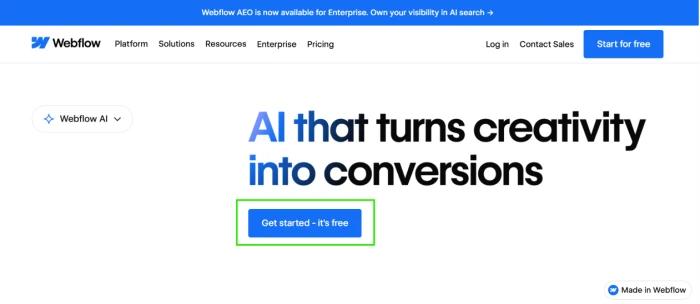
Post-Login: 3 Build Paths
Test 02 . Onboarding choice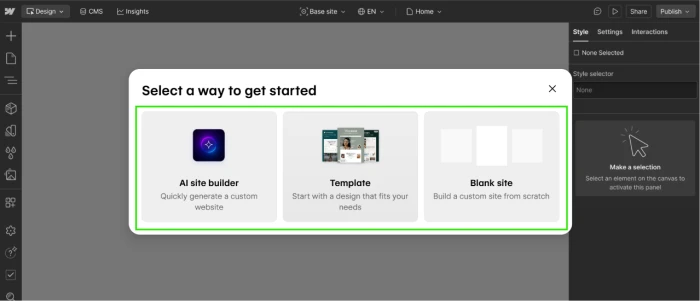
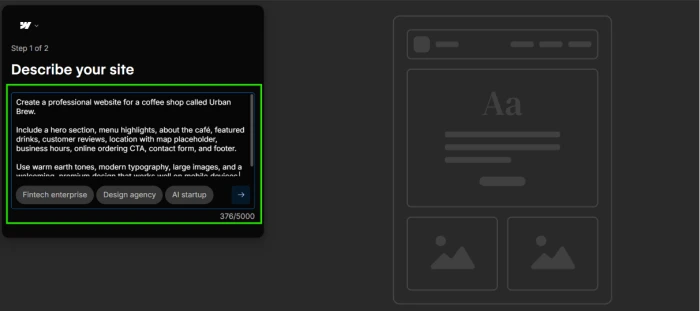
AI Site Builder: Urban Brew Coffee Shop Generation
Test 03 . AI generation validation"Create a professional website for a coffee shop called Urban Brew. Include a hero section, menu highlights, about the cafe, featured drinks, customer reviews, location with map placeholder, business hours, online ordering CTA, contact form, and footer. Use warm earth tones, modern typography, large images, and a welcoming, premium design that works well on mobile devices."
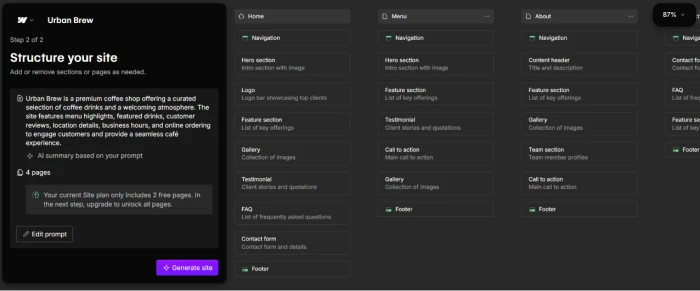
4-Page Website: Preview + Continue Building
Test 04 . Multi-page output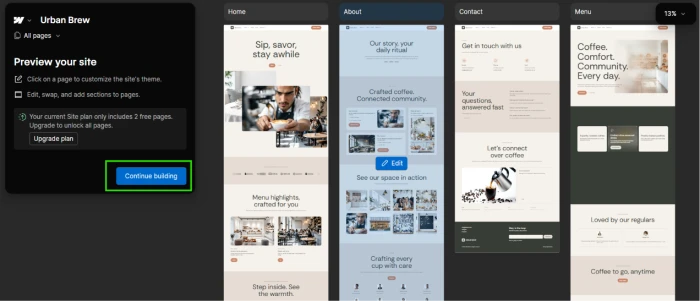
Editor Dashboard: Tools Panel + AI Change Panel
Test 05 . Editor interface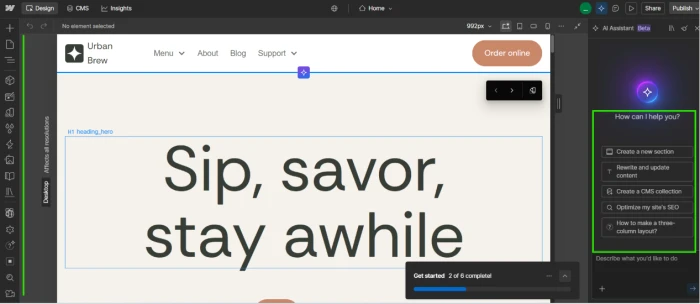
Multi-Screen Live Preview
Test 06 . Responsive preview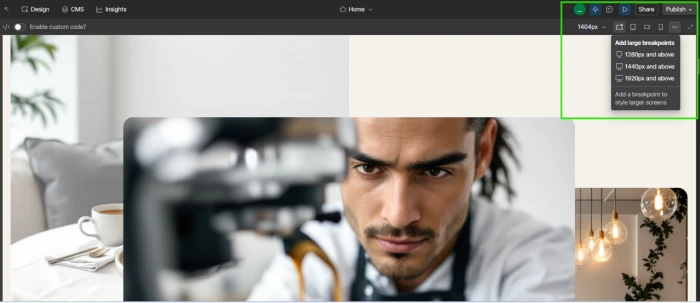
CMS Dashboard
Test 07 . Content management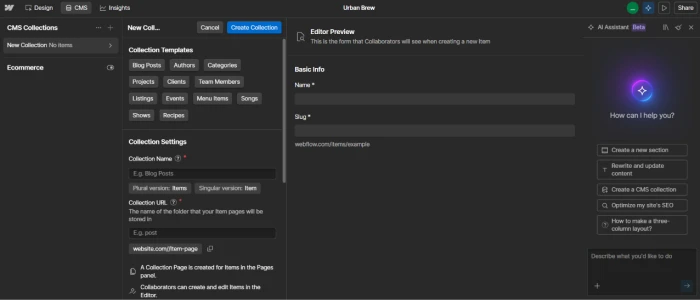
Apps & Integrations + Custom App Creator
Test 08 . Ecosystem extension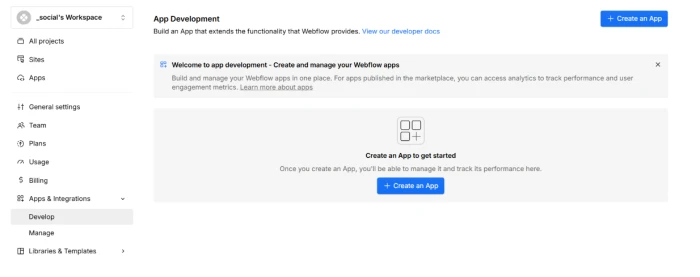
Webflow's structural value combines hands-on validated AI Site Builder generating 4-page websites from natural language prompts with editable auto-structure step, three build paths at platform entry (AI Builder plus template plus blank), full editor with left tool panel plus canvas plus right AI change panel for hybrid manual and prompt-based editing, multi-screen live preview across desktop plus tablet plus mobile, comprehensive CMS dashboard for structured content collections, apps and integrations marketplace plus custom app creator for teams needing platform-specific extensions, and dual-tab Workspace pricing serving both in-house teams (Core $19/mo, Growth $49/mo) and freelancers plus agencies (Freelancer $16/mo, Agency $35/mo) with free Starter tier on both tabs. Yearly billing saves up to 33% versus monthly.
Webflow pricing operates on a dual-axis model where Workspace plans (team collaboration) are separate from Site plans (per-website hosting and publishing). Free Starter Workspace supports building but publishing to custom domain requires a Site plan starting at $15/month Basic or $25/month Premium (per third-party sources following May 2026 restructure). Per-seat fees add up ($15-$39/month per additional Full Seat beyond the 1 included in each Workspace tier). AI credits are included in Workspace plans as of 2026 but power users may exceed included pools. Learning curve is steeper than template-first competitors (Wix, Squarespace) where design freedom is more constrained but easier to grasp; Webflow's CSS-aware canvas rewards designers with grid or flexbox familiarity. Vendor lock-in exists on lower tiers where code export is limited to paid Workspace tiers.
10-Point Feature Review
Pros and Cons
- AI Site Builder validated hands-on: 4-page Urban Brew coffee shop site generated from 59-word natural language prompt with editable structure step
- 3 build paths at entry: AI Site Builder plus template plus blank site accommodating different comfort levels
- Editor with AI change panel: hybrid manual plus AI-described editing on single canvas
- Multi-screen live preview: simultaneous desktop plus tablet plus mobile responsive design verification
- Comprehensive CMS dashboard: structured content collections with schema definition for content-heavy sites
- Apps ecosystem plus custom app creator: marketplace integrations plus platform-specific extension building
- Dual-tab Workspace pricing: separate structure for in-house teams and freelancers plus agencies with tailored features
- Free Starter tier on both tabs: 2 webflow.io staging sites plus 50 CMS items for meaningful evaluation
- Yearly billing saves up to 33%: significant discount for committed regular use
- AI credits included in 2026 Workspace plans: no separate AI subscription for basic generation
- Dual-axis pricing complexity: Workspace plans plus Site plans plus per-seat fees plus add-ons layered on top
- Site plans required for publishing: custom domain needs $15/month Basic or $25/month Premium separate from Workspace
- Per-seat fees add up: $15-$39/month per additional Full Seat beyond 1 included per tier
- Learning curve steeper than template builders: CSS-aware canvas rewards designers, tougher for non-designers
- Vendor lock-in on lower tiers: code export limited to paid Workspace tiers
- AI credit pools finite: power users may exceed included pool and need $20/month top-up for 2,000 extra credits
- 2026 pricing restructure: recent changes (May 2026) mean third-party pricing sources may be outdated
Pricing Breakdown
| Feature | Starter$0/month | Core$19/mo yearly (in-house)Most Popular | Growth$49/mo yearly (in-house) | EnterpriseCustom contact us |
|---|---|---|---|---|
| Positioning | Getting started + learning | Enhanced staging capabilities | Unlimited staging + collaboration | Scalable custom solution |
| webflow.io Staging Sites | 2 sites | 10 sites | Unlimited | Enterprise scale |
| Pages per Staged Site | 2 pages | 300 pages | 300 pages | Unlimited |
| CMS Items per Staged Site | 50 items | 50 items | 50 items | Enterprise scale |
| Full Seats Included | 1 seat | 1 seat | 1 seat | Enterprise seats |
| Custom Code on Staged Sites | ✗ | ✓ | ✓ | ✓ |
| Advanced Collaboration + SLA | ✗ | ✗ | Standard | Guaranteed SLA + SSO |
| Best For | Free evaluation + learning | In-house teams + staging depth | Growing teams + unlimited staging | Enterprise scale + security |
The pricing reality: Webflow operates a dual-axis pricing model with real complexity that the headline price does not capture. Workspace plans (team collaboration and building) offer two tabs: In-house teams runs Starter Free / Core $19/mo yearly / Growth $49/mo yearly / Enterprise custom; Freelancers & Agencies runs Starter Free / Freelancer $16/mo yearly / Agency $35/mo yearly. On top of Workspace, publishing a live site to custom domain requires a separate Site plan (Starter Free with webflow.io subdomain / Basic $15/mo yearly / Premium $25/mo yearly per third-party sources following May 2026 restructure that merged CMS and Business into Premium). Per-seat fees add $15-$39/month for each additional Full Seat beyond the 1 included per Workspace tier. AI credits are baked into Workspace plans as of 2026 but power users exceeding pool need $20/month top-up for 2,000 extra credits. Yearly billing saves up to 33% versus monthly. Realistic monthly cost for a 3-person in-house team publishing one live site: Core Workspace $19 plus 2 additional Full Seats $78 plus Premium Site plan $25 equals approximately $122/month yearly. Verify current pricing on the official Webflow pricing page.
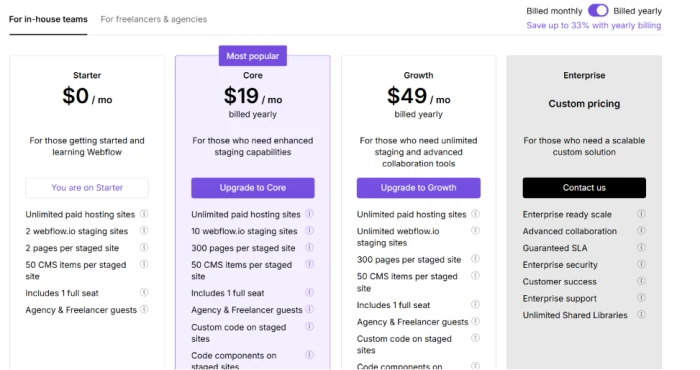
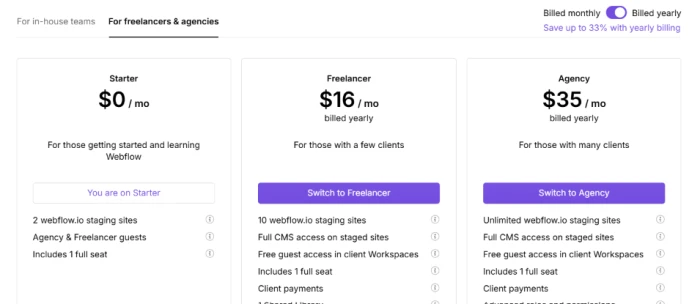
Pricing verified official page on July 22, 2026. Site plans required separately for publishing live sites with custom domains. Verify current pricing and Site plan structure on the Webflow pricing page.
Webflow vs the Top 4 Alternatives
| WWebflow | FFramer | SSquarespace | WWix | WWordPress | |
|---|---|---|---|---|---|
| Score | 7.6 | 7.6 | 8.0 | 7.8 | 7.5 |
| AI Site Generation | 4-page validated | Multi-page validated | ✓ AI features | ✓ Wix ADI | Plugins |
| Editor Model | CSS-aware + AI panel | Design canvas + AI | Section-based | ✓ Drag-drop | ✓ Block editor |
| CMS Depth | Structured collections | ✓ 1-20 collections by tier | ✓ Native | ✓ Native | Category leader |
| Apps + Integrations | Marketplace + custom app | ✓ Plugins | ✓ Extensions | Wix App Market | 60,000+ plugins |
| Learning Curve | Designer-oriented | Design tool literacy | ✓ Beginner-friendly | ✓ Beginner-friendly | Technical for advanced |
| Free Tier | ✓ Starter (subdomain) | ✓ Free (subdomain) | ✗ Trial only | ✓ Free (ads) | ✓ WP.com free |
| Entry Paid | $19/mo Core + Site plan | $10/mo Basic | $16/mo Personal | $17/mo Light | Free / hosting varies |
| Best For | Design-first CMS sites + agencies + custom apps | Portfolios + landing pages + AI-first design | Polished small-business sites + creators | Broad templates + AI + e-commerce | Content-heavy + plugin flexibility |
The picture: Squarespace leads on polished beginner-friendly experience and creator-oriented templates. Wix leads on broad template variety plus Wix ADI AI plus native e-commerce. WordPress leads on plugin ecosystem depth (60,000+ plugins) and content management flexibility. Framer is Webflow's most direct competitor in design-first no-code visual builder category with strong AI generation and simpler pricing. Webflow differentiates through comprehensive CMS depth plus apps marketplace with custom app creator plus dual-tab Workspace pricing (in-house teams and agencies) plus May 2026 AI credits baked into all Workspaces, meaningful for agencies building recurring client sites and in-house teams needing structured content collections plus custom integrations without moving to separate CMS tools.
Discussion
Join the discussion and share your perspective.