WeVideo is a browser-based video editor aimed at classrooms and teams, with screen recording, a shared timeline and a stock library that run on a locked-down school Chromebook. I signed up to make one short test clip. Over two days and two attempts, the trial never let me reach the editor.
01 . 5 tests across two days, from sign-up to the paywall
The plan was to do the one thing any video editor has to allow: sign up, open the editor and export a short test clip. I ran it twice, on two separate days, on a free trial started through the normal sign-up form. Here is what each step actually produced.
Sign-up, then an instant sign-out
Test 01 . Account creation
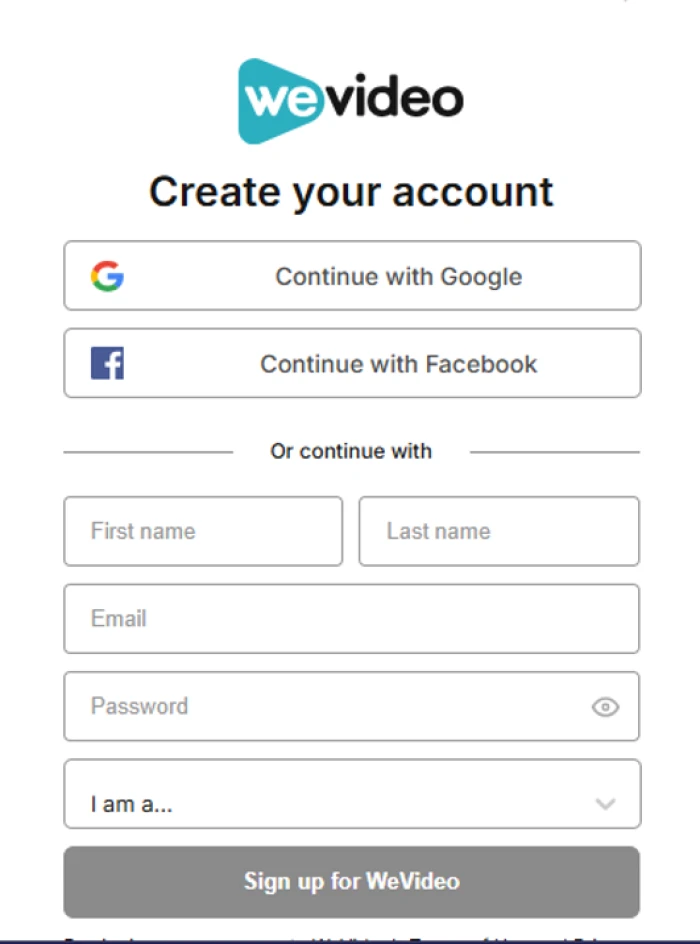
The sign-up form offers Google, Facebook or manual registration.
First impression: The form itself is quick and clear, with social sign-in and an "I am a…" drop-down that routes you toward personal, business or education plans. Then, before I reached the editor, the session logged me out on its own. I had not clicked log out. Day one ended with no project opened.
Day two: the trial was already over
Test 02 . Trial window
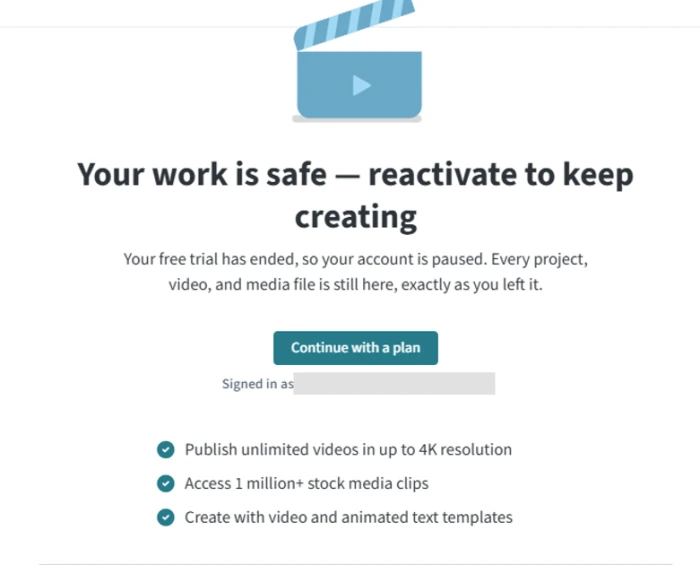
The screen shown on day two: trial ended, account paused.
The real story: I signed back in the next day and got a full-page wall: "Your work is safe, reactivate to keep creating." The trial had expired after roughly a day, the account was paused, and the only button was "Continue with a plan." The message promises your work is saved, but there was no work to save, because the editor was never usable.
The only path forward was checkout
Test 03 . Paywall
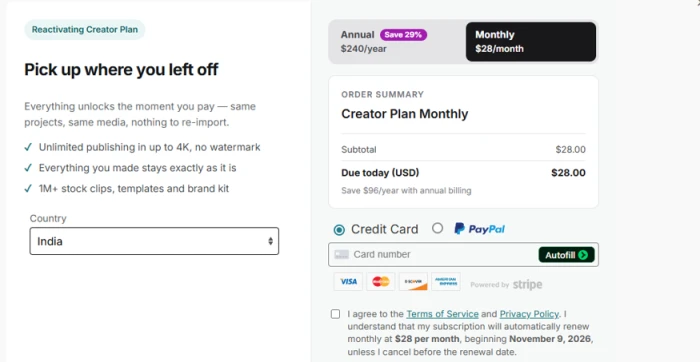
The "Reactivating Creator Plan" checkout at $28 a month.
Credit where due: The checkout is honest. The Creator plan showed $28 a month or $240 a year marked "Save 29%," auto-renewal was spelled out next to the consent box with the 9 November renewal date named, and both Stripe cards and PayPal were offered. What soured it was being asked to commit $28 a month before making a single video, with no cheaper option or free tier surfaced.
Education pricing, up close
Test 04 . Education plans
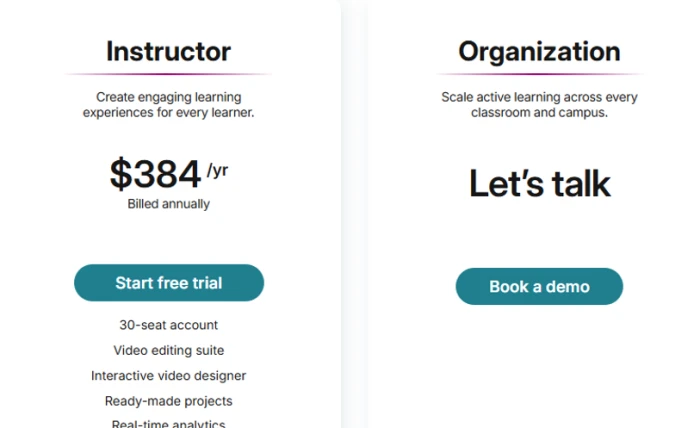
The Instructor and Organization education tiers.
Where it lands: Instructor is a 30-seat account at $384 a year, billed annually, with the editor, an interactive-video designer, ready-made projects and real-time analytics. That works out to about $12.80 per seat for the year, which is fair, but it is annual-only and it still routes new teachers through the same free trial that failed me twice. Organization pricing hides behind "Let's talk" and a demo.
A broad feature list I never got to use
Test 05 . Feature set
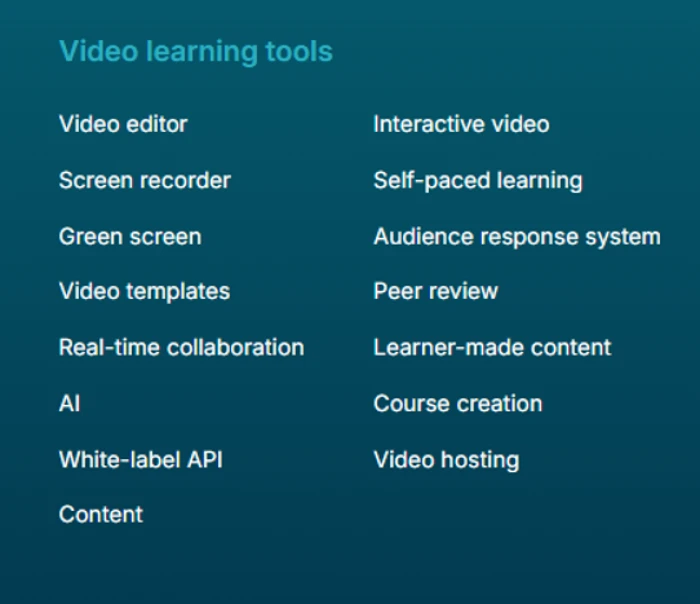
WeVideo's full "video learning tools" lineup.
Worth noting: On paper this is one of the widest toolsets among browser editors: recorder, green screen, templates, interactive video, peer review, course creation and hosting in one place. The catch is that none of it could be confirmed. The day-one sign-out and the day-two lockout meant I never reached the editor, so every tool here stays theoretical.
★
The sign-up and the checkout are the honest parts
Two things held up. Registration is fast and uncluttered, and the reactivation checkout discloses its $28 monthly rate, the 9 November renewal date and the payment options without any dark patterns. If the rest of the trial matched this, WeVideo would be an easy recommendation. It did not.
!
The trial ended before a single video could be made
Across two days I produced nothing. Day one was lost to an automatic sign-out before the editor loaded. By day two the trial had expired after about a day, and the account was paused behind the $28-a-month Creator page. A trial exists to let someone evaluate the product, and this one never allowed the core task to begin. For anyone who wants to test before paying, that is the whole ballgame.
How this review was put together. I tested WeVideo on 8 October 2026 and again on 9 October 2026, on a free trial created through the standard sign-up form with no payment method entered. The goal each day was to open the editor and export one short clip. The plan prices cited here are read directly from the in-app reactivation checkout and the education pricing screen captured during testing. Because the editor never opened, its tools are assessed from WeVideo's own feature list and from published user reviews, not from hands-on use, and that limit is noted wherever it applies.
10-Point Feature Review
02 . Scored on the tested experience, not the brochure
Feature Scores at a Glance
Sign-up flow
8.0
Feature breadth (on paper)
7.0
Education fit
6.0
Pricing clarity
5.0
Editor experience
4.5
Value for money
3.5
Rendering and export
3.0
Billing transparency
2.5
Trial reliability
2.0
Time to first video
1.5
Feature-by-feature breakdownScored 1.5 to 8.0, weighted toward the trial experience
01
Sign-up flow Strong
Registration is the high point. Social sign-in, a plain name-and-email form and a quick user-type question got me an account in under a minute. It earns 8.0 rather than higher because the session signed me out immediately afterward, so even the one part that worked handed straight off to the part that did not.
Options: Google, Facebook, emailTime: under 1 min
8.0
Strong
02
Feature breadth on paper Strong
The advertised toolset is unusually wide for a browser editor, covering recording, green screen, interactive video, peer review, course creation and hosting. It holds at 7.0, not higher, precisely because none of it could be verified in testing, and a feature list is a promise until the editor opens.
Tools listed: 15+Verified: none
7.0
Strong
03
Education fit
The 30-seat Instructor account, a shared editor and classroom collaboration make the education angle genuine, and school reviewers rate it well. It sits at 6.0 because the tier is annual-only at $384 and still gates new teachers behind the same trial that failed twice, so committing a class to it carries real risk.
Instructor: 30 seats, $384/yrBilling: annual only
6.0
Mixed
04
Pricing clarity
The checkout discloses the $28 monthly rate, the renewal date and the payment options in plain words, which is the clear part. It lands at 5.0 because the trial pushes you straight to that Creator plan with no cheaper option shown and no way to keep testing first, so the funnel, not the disclosure, is the weak spot.
Checkout: transparentOptions shown: one plan
5.0
Mixed
05
Editor experience Weak
I could not open it, so this leans on published reviews, where the editor is repeatedly called dated and messy for newcomers, with glitchy transitions. It rates 4.5 because the same reviewers still ship real work in it, so it functions, it just frustrates. Unverified in my own hands.
Source: G2, CapterraTheme: dated UI
4.5
Weak
06
Value for money Weak
Being pushed to a $28-a-month commitment before exporting anything is poor value by definition, and reviewers echo it, with one on G2 calling the pricing "horrible and ridiculous." It scores 3.5 rather than lower because the education seat rate, about $12.80 per seat for the year, is genuinely defensible.
Trial output: zero videosSolo entry: $28/mo
3.5
Weak
07
Rendering and export Weak
A consistent complaint across G2 and Trustpilot is slow processing and exports that stall or fail, with one reviewer waiting "for ages" on a two-minute clip and another blocked from exporting at all. It gets 3.0 because the pattern is strong and specific, though I could not reproduce it myself.
Complaint rate: highSymptom: slow or failed export
3.0
Weak
08
Billing transparency Weak
The checkout page is clear, but Trustpilot fills with the opposite experience: charges after cancellation, a no-refund stance and billing with little notice. It rates 2.5 because the disclosure at point of sale is good, yet the lived billing record that follows is among the worst marks in the reviews.
At checkout: disclosedAfter: refund disputes
2.5
Weak
09
Trial reliability Weak
An unrequested sign-out on day one and a trial that expired after about a day on day two make this the core failure. It scores 2.0, just above the floor, only because the account and its promise of saved work still existed on return, so nothing was destroyed, merely locked.
Day 1: auto sign-outDay 2: trial expired
2.0
Weak
10
Time to first video Weak
The single metric that matters most for an editor, and it never happened. Two days, two attempts, zero clips exported. It scores 1.5 because there is no partial credit here: a video tool that does not let you make a video has failed its one job, and the weighting reflects that.
Videos made: 0Attempts: 2
1.5
Weak
Pros and Cons
03 . Drawn from verified reviews on G2, Capterra and Trustpilot
+What works
Classroom-easy: teachers on Capterra repeat that students can make a video on day one with no training
Runs on a Chromebook: browser-based with Google Drive integration, so locked-down school machines handle it with nothing to install
Deep built-in library: reviewers single out the large bank of stock clips, music and images as a reason they stay
Live student collaboration: one G2 reviewer calls real-time co-editing on a shared project "invaluable" for a class
Responsive to teachers: educators report that feature requests sent as feedback got acted on quickly
−What frustrates
Slow or failed exports: G2 reviewers describe waiting "for ages" on a two-minute clip, and one could not export a finished project at all
A dated editor: multiple reviewers call the interface old-feeling and messy for beginners, with transitions that glitch
Thin audio editing: one long-time user flags the near-total absence of real audio controls
Refund and cancellation disputes: Trustpilot is full of users reporting charges after they cancelled and a flat no-refund stance
Pushy upsells: free-tier users say the paid features are shoved in their face constantly while editing
Pricing Breakdown
04 . The plan the trial sells, and the education tiers
Plan
Creator Monthly$28/mo
Creator Annual$240/yrSave 29%
Instructor$384/yr
OrganizationCustomquote
Billing cycle
Monthly
Annual
Annual
Custom
Seats
1
1
30
30+
Effective per month
$28
~$20
~$1.07 / seat
By quote
Best for
Trial-to-paid solo use
A committed solo creator
A single class
A school or district
What you are actually paying: the trial funnels straight into Creator, which includes unlimited publishing up to 4K with no watermark, the million-clip stock library, templates and a brand kit. Monthly is $28; the $240 annual rate is the same plan at a 29% discount, roughly $20 a month, and it auto-renews on the date shown at checkout unless cancelled. There is no cheaper paid option surfaced during reactivation, so the real choice at that moment is $28 a month or nothing.
Education is priced per seat and billed once a year. Instructor is a 30-seat account at $384, which lands near $12.80 per seat for the year, a genuinely low number if a whole class uses it. The catch is the annual commitment and the fact that teachers still enter through the same trial that broke in testing. Organization pricing is not published at all: it sits behind "Let's talk" and a booked demo, normal for district sales but a wall for quick comparison.
Prices read from WeVideo's in-app reactivation checkout and education pricing screen on 9 October 2026. WeVideo changes plans often, so confirm the current rate on the official pricing page before you buy.
WeVideo vs the Top 3 Alternatives
05 . Browser editors that let you start for free
WWeVideo
CClipchamp
CcCapCut
CvCanva
Platform
Browser
Browser, Windows
Browser, app
Browser, app
Free to start
Trial, expired in test
Yes, free
Yes, free
Yes, free
Export without paying
Not reached
Yes
Yes
Yes
Best For
Classrooms and teams
Quick Windows edits
Short-form social video
Brand and social combined
How to choose: the free-to-start row is the whole point. WeVideo's trial expired in about a day without an export, while Clipchamp, CapCut and Canva each let me picture making and downloading a clip without a card. A Windows user who wants a fast trim reaches for Clipchamp; someone cutting vertical clips for TikTok or Reels is better served by CapCut; a team already building graphics keeps video in the same place with Canva. Competitor free access is stable but their paid tiers change, so confirm on each vendor's site before upgrading.
What Users Are Saying
06 . Where the ratings split hard
WeVideo's scores diverge by platform in a way worth knowing. On G2 and Capterra, where reviewers skew toward educators and verified business users, it holds around 4.6 out of 5. On Trustpilot, where individual consumers land, it sits at 2.9 out of 5 across 657 reviews, dragged down by billing disputes. The quotes below cover the editor, the exports and the billing, the parts my own trial never reached.
Very, very slow to process videos. You have to wait for ages to complete editing for a simple 2 minute video.
Consider WeVideo if you are a teacher or school that can get a guided demo or an extended trial straight from WeVideo before paying. The education feature set is broad and real, classroom reviews are warm, and the $12.80-per-seat Instructor price is fair once you are actually in.
Be careful if you are a solo creator who wants to try the editor before committing to $28 a month. Start a project the moment you sign up, and contact support fast if you get logged out or the trial ends early. If you just want to make a clip today without a card, Clipchamp is free with a Microsoft account and CapCut has a genuine free tier, either of which sidesteps the wall I hit.


Discussion
Join the discussion and share your perspective.