Most AI writing tools want to draft for you. Wordtune works the other way round, taking a sentence you already wrote and handing back a stack of distinct rewrites with the changed words picked out. Its summarizer condensed a long article into accurate bullets and colour-mapped each one back to the passage it came from, which few rewrite-first tools even attempt. The fit is anyone whose bottleneck is phrasing rather than the blank page.
Wordtune comes from AI21 Labs, and it treats writing as an editing problem rather than a generation problem. You hand it a sentence you already wrote. It hands back several ways of saying the same thing, with the words it changed marked inside each option so you can see exactly what moved. That framing is what separates it from the drafting assistants it usually gets shelved beside.
The target reader is someone who knows what they want to say and keeps landing on the wrong version of it. Non-native English speakers. People writing client email under deadline. Students tightening a paragraph that reads like three paragraphs. Wordtune runs in the browser as a standalone editor and as extensions for Chrome and Edge. An iOS app sits alongside them, so the suggestion panel follows the writing instead of asking the writing to come to it.
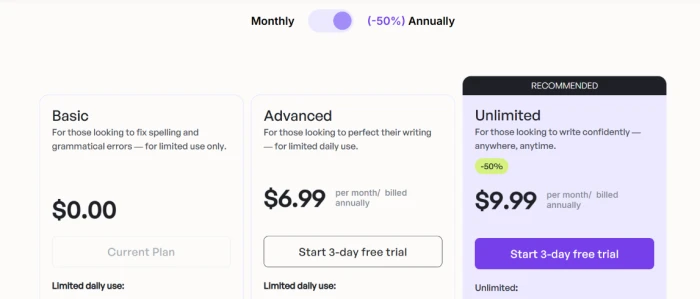
Three consumer plans sit on the pricing page. Basic costs nothing. Advanced runs $6.99 a month on annual billing and Unlimited runs $9.99, with the caveats attached to those figures covered further down.
What Happened When We Tested It
02 . 6 tests across the editor and the generative panel
Testing ran on a free Basic account on September 1, 2026, in the web editor, with no trial started and no card attached at any point. That constraint turned out to be the useful part. The free tier draws a hard line straight through the middle of this product, and six tasks were enough to find exactly where it falls.
Rewriting a sentence with a tense error buried in it
Test 01 . Rewrite engine
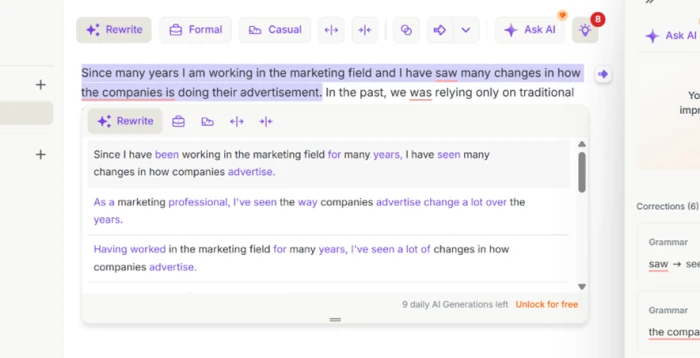
The Rewrite dropdown returning multiple phrasings for one flawed sentence.
What stood out: The suggestions differed from each other rather than reshuffling one phrasing across four rows. A tense error reading "I have saw" was corrected inside every option, and the clumsy structure around it came back rebuilt. Picking the best line took about a second, which is the whole point of a tool like this.
Running one passage through Formal and then Casual
Test 02 . Tone control
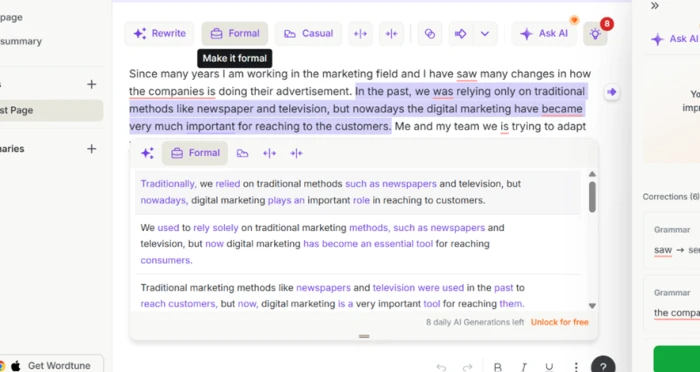
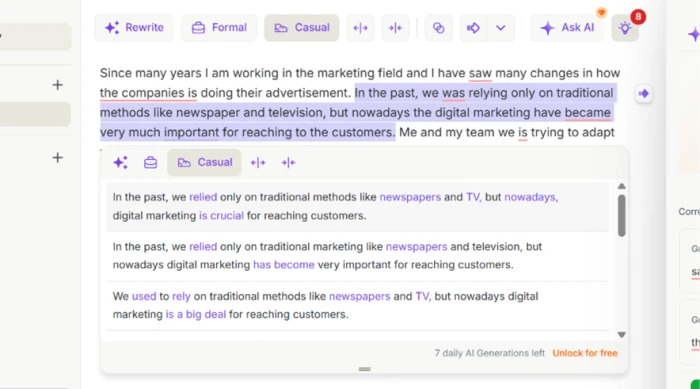
Formal mode reworking the passage into measured professional phrasing.Casual mode loosening the same sentence into everyday language.
The evidence: Formal produced "digital marketing plays an important role in reaching consumers." Casual produced "digital marketing is a big deal." Identical claim, two genuinely different registers, one click between them. For anyone moving between a work email and a group chat, this is the feature that earns its keep.
Condensing a long article and tracing the bullets back
Test 03 . Summarization
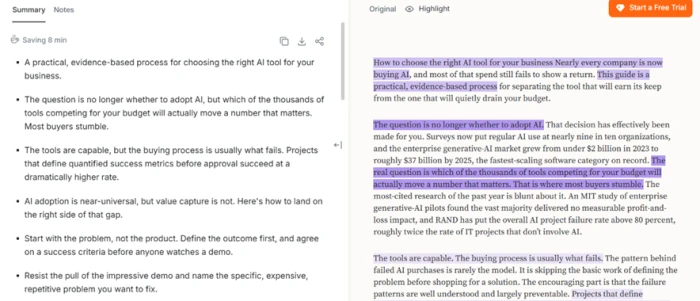
Bullets on the left, colour-mapped to the source passages on the right.
What this confirms: Nothing in the bullets was invented and the condensation held tight against the source. A small marker above the summary claimed eight minutes saved. Plenty of rewrite-first competitors skip summarizing altogether, so this is the feature doing work its category peers cannot.
Asking for a 500-word article from a standing start
Test 04 . Generation gate
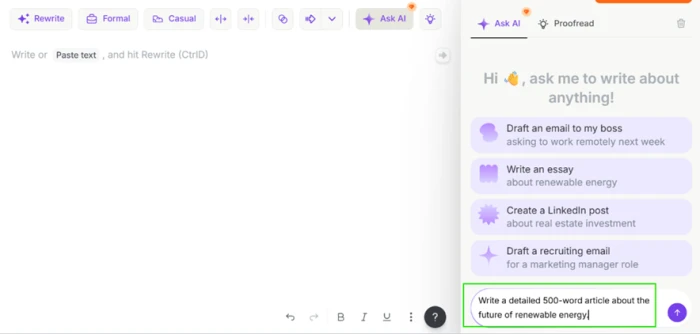
★ Prompt Used
"Write a 500-word article about renewable energy."
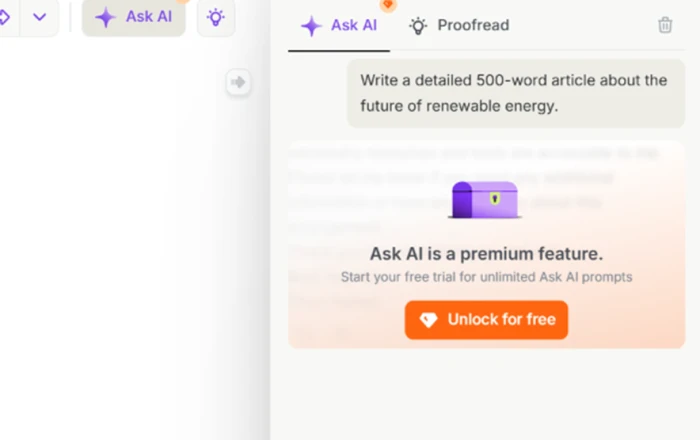
Entering the generation prompt into the Ask AI panel.The upgrade prompt that appeared instead of a draft.
Where it lands: Instead of a thin draft, a wall. This is a business-model limit and not a quality failure, but the practical result is that the output cannot be judged at all without handing over a card first. Anyone planning to use Wordtune as a content generator needs to register that before signing up.
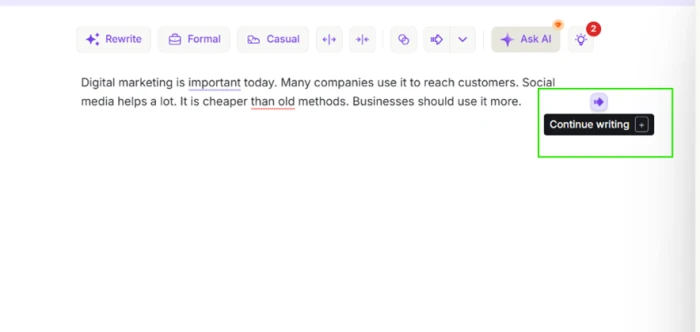
Expanding a thin paragraph of bare marketing claims
Test 05 . Contextual expansion
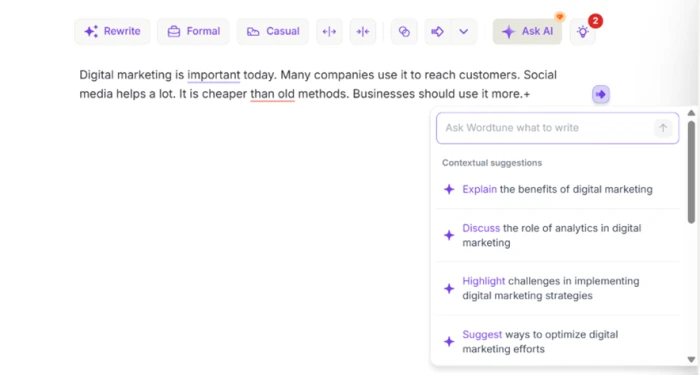
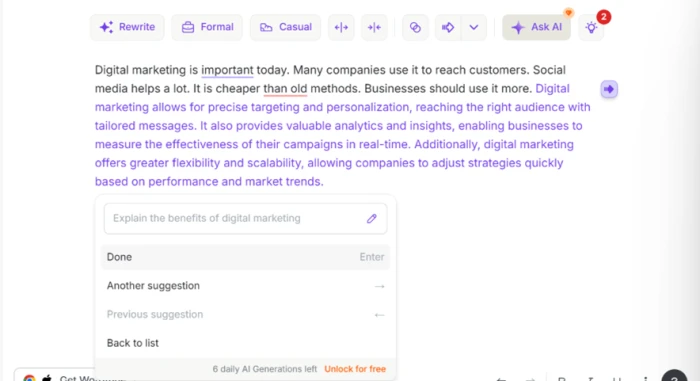
Triggering Continue Writing at the end of a thin paragraph.Contextual directions offered before anything gets written.
Under the surface: Continue Writing was available on the free plan, and before generating a word it offered a menu of angles to take, including explaining the benefits or discussing implementation challenges. Choosing a direction first beats a blind "write more" button by a wide margin.
Reading what Continue Writing actually produced
Test 06 . Output substance
The expansion Wordtune generated from the thin paragraph.
The real story: The prose was fluent and it stayed on topic. No grammar problems in it either. It also said nothing. Precise targeting. Valuable analytics. Greater flexibility. All defensible and none of it specific. Nobody finishes that paragraph knowing something they could not have guessed at the start of it.
★
The editing half of the product works without paying anything
Four of the six tests ran to completion on a Basic account with no card attached. The rewrite dropdown produced usable alternatives. So did the tone toggle and the summarizer. The expansion menu ran without complaint as well. A free user gets a real tool here rather than a demo that stops at the first interesting click.
!
The plans page and the app disagree about free AI generations
Wordtune's own plans page lists AI generations under the Basic tier's daily limits. In the app, the request came back as an upgrade prompt. Whether that is a bug or an unannounced change, a buyer reading the pricing page is being told they can test something the product will not let them test.
How this review was put together. Six tasks were run through Wordtune on September 1, 2026, using a free Basic account in the web editor at app.wordtune.com. No trial was started and no payment method was attached at any stage, so every observation above reflects what a new user sees on day one. Plan names and figures were checked the same day against the official pricing page at wordtune.com/plans and against the in-app purchase screen. Those two official surfaces did not match, and the pricing section deals with the gap.
10-Point Feature Review
03 . Scored against what the session actually produced
Feature Scores at a Glance
Rewrite quality
8.5
Tone control
8.0
Summarization
8.0
Edit legibility
7.5
Expansion steering
7.5
Platform coverage
7.5
Grammar depth
6.5
Generated substance
5.5
Account support
5.5
Free tier generation
5.0
Feature-by-feature breakdownWeighted toward core editing over peripheral features
01
Rewrite quality Strongest
Several alternatives came back for one flawed sentence and none of them were reshuffles of a single phrasing. The tense correction carried through every option without being asked for. It sits below 9.0 because the rewrites stay strictly inside the sentence you handed over. Nothing reaches out to fix the paragraph around it.
Scope: Sentence levelFree daily cap: 10 rewrites
8.5
Excellent
02
Tone control Validated
Formal and Casual returned measurably different registers from identical input, not a formality dial that swaps two adjectives. It stops short of 8.5 because the toggle offers two poles with nothing between them, so a passage that needs to sound approachable but not chatty has to be edited by hand afterwards.
Modes tested: 2Clicks to switch: 1
8.0
Strong
03
Summarization Differentiator
Bullets were accurate against the source and each one mapped by colour back to the passage it condensed, which makes checking the summary faster than rereading the article. Held at 8.0 rather than higher because the free allocation is three summaries a month, so the feature proves itself and then stops being available.
Invented claims: None foundFree monthly cap: 3
8.0
Strong
04
Edit legibility
Changed words are highlighted inside each suggestion, so accepting an edit does not require rereading the whole line to find what moved. Not 8.0 because the highlight marks which words changed without indicating why any of them changed, so a writer using this daily learns nothing from it over time.
Diff view: Inline highlightExplanations: Not shown
7.5
Good
05
Expansion steering Smart default
Continue Writing presents a menu of directions before generating, which means the writer picks the angle instead of accepting one guess. It earns 7.5 rather than 8.0 because the angles offered read as generic to marketing copy in general and did not appear drawn from anything particular in the paragraph on screen.
Directions offered: MultipleFree plan access: Available
7.5
Good
06
Platform coverage
The official site offers a web editor alongside extensions for Chrome and Edge. An iOS app sits beside those, so the panel turns up inside whatever box the writing is happening in. Held to 7.5 because no Android app appears anywhere in the official download list, which rules the tool out for a large slice of mobile writers.
Listed surfaces: 4Android: Not listed
7.5
Good
07
Grammar depth Uneven
The obvious tense error was caught and fixed, though it was fixed as a side effect of rewriting rather than by a dedicated correctness pass. App Store reviewers describe the checker missing mistakes and leaning on passive constructions. 6.5 reflects output that reads smooth more reliably than it reads correct.
Errors caught in test: TenseCorrection path: Via rewrite
6.5
Mixed
08
Generated substance Weak
The expansion was fluent and it stayed on topic. It also carried no examples and no figures. Every added sentence restated a claim the paragraph had already made in different words. 5.5 rather than 5.0 because the output still functions as scaffolding a writer can overwrite, which is more than a blank cursor offers.
Specific details added: NoneGrammar errors: None
5.5
Weak
09
Account support Recurring complaint
Reviewers on two separate platforms describe support routed through a bot before any human replies. Duplicate charges surface repeatedly in App Store reviews. 5.5 rather than lower because the help centre is reachable and the support address is published. The company answers most public complaints rather than letting them sit.
Platforms reporting: 2Phone line: None published
5.5
Weak
10
Free tier generation Blocked
Ask AI returned an upgrade prompt where a draft should have been, which makes the generative half of the product impossible to assess before committing a payment method. This sits at the floor of the review because a buyer is being asked to purchase the exact capability they are prevented from sampling.
Free generations produced: 0Trial: 3 days, card first
5.0
Poor
Pros and Cons
04 . What a daily user will notice first
+What works
Genuinely different options: one dropdown returns distinct phrasings instead of four near-identical rows
Visible edits: changed words are marked inside each suggestion, so choosing is fast
Real register shift: formal and casual outputs read as different voices, not synonym swaps
Traceable summaries: every bullet maps back to the passage it condensed
Direction before drafting: expansion offers angles to pick from before it writes anything
Follows the writing: the panel appears in the browser and on iPhone rather than in a separate tab
−What grates
Hollow expansions: added text reads fluently and carries no specifics a reader could use
Correctness is incidental: grammar gets fixed as a by-product of rewriting, not by a dedicated pass
Sentence-level ceiling: it sharpens lines you wrote and will not restructure a document
No Android app: mobile coverage stops at iPhone
Support runs through a bot: reaching a person about an account problem takes persistence
Pricing Breakdown
05 . Three consumer plans, two official price lists
Feature
Basic$0.00 forever
Advanced$6.99 /mo, billed annually
Unlimited$9.99 /mo, billed annuallyRecommended
Rewrites and AI suggestions
10 per day
30 per day
Unlimited
AI summarizations
3 per month
15 per month
Unlimited
Spelling corrections
Unlimited
Unlimited
Unlimited
Grammar checks
Unlimited
Unlimited
Unlimited
AI recommendations
✗
Unlimited
Unlimited
Vocabulary enhancements
✗
✗
✓
Clarity improvements
✗
✗
✓
Fluency increases
✗
✗
✓
Premium support
✗
✗
✓
Free trial
✗
3 days
3 days
The tier math: Wordtune's two official surfaces did not agree on the day of writing. The table above carries the figures shown on the in-app purchase screen. The public plans page showed those same numbers struck through with lower ones underneath, a promotional layer that the app itself was not applying. Both are official, so a buyer's cost depends on which door they walk through.
Three other details matter more than the headline rate. Neither static surface publishes a month-to-month price, so anyone unwilling to commit for a year has to reach checkout before finding out what flexibility costs. The trial runs three days and requires payment details before it starts, and Wordtune states plainly that it does not issue refunds, which puts the burden of cancelling squarely on the calendar rather than on customer service. Students and non-profit staff with a qualifying email address are eligible for 30% off, though only by contacting support directly, and nothing in the checkout flow mentions it.
The three consumer plans as the in-app purchase screen presents them.
Pricing verified September 1, 2026. Promotions and regional rates shift often, so confirm the current numbers on the official pricing page before subscribing.
Wordtune vs the Top 3 Alternatives
06 . Competitor figures taken from each vendor's own pricing page
WWordtune
GGrammarly
QQuillBot
PProWritingAid
Free tier limit
10 rewrites daily
100 AI prompts monthly
Free plan available
500 word cap
Entry paid rate
$6.99 monthly, annual
$12 listed for Pro
$19.95 monthly
$30 monthly
Annual commitment
Rate shown is annual
Not stated on page
$99.95 per year
$120 per year
Lifetime option
No
No
No
$399 one-time
Plagiarism checking
No
Included on Pro
Included on Premium
Sold separately
Team style controls
No
Style guide and brand tone
Team plan available
Custom style guide
Best For
Fixing phrasing sentence by sentence
Keeping many writers in one voice
Academic work needing citations
Manuscript-length structural editing
Where to land: If the bottleneck is phrasing, Wordtune answers it more directly than the other three, because rewriting is the product here rather than a feature bolted onto a correctness checker. Grammarly becomes the pick the moment more than one person writes for the same brand, since nothing in Wordtune enforces a house style. QuillBot suits academic work where originality checking and citation formatting need to live in the same subscription. ProWritingAid is aimed at problems a sentence tool cannot see, and its lifetime licence is the only escape from renewals in this group.
What Users Are Saying
07 . Six reviews from the App Store and Trustpilot
I love wordtune but sometimes it doesn't catch grammar mistakes.
Is a sentence-level editor enough for the writing you actually do?
Use Wordtune if your drafts arrive complete but clumsy and the problem is phrasing rather than the blank page. The summarizer is a second real reason to subscribe if long documents land in your inbox weekly.
Skip Wordtune if you need something that drafts from nothing, because that half is closed to free users and cannot be sampled before payment. Grammarly handles document-scale rewriting with team style controls. ProWritingAid goes deeper on manuscripts. Any general-purpose assistant will out-draft Wordtune past a paragraph.

Discussion
Join the discussion and share your perspective.