
Why can you remember the one good idea from Tuesday's call, but not a single thing about who agreed to own it, when it was due, or what the counter-argument was?
That gap, between the conversation happening and the conversation being useful later, is the exact problem people are trying to solve when they go looking for an AI note taker. Most of us are not bad at listening. We are bad at listening and typing and thinking at the same time, and then reconstructing all of it from memory an hour later.
The category has grown loud. Search "best AI note taker" and you will find the same five logos reshuffled across a hundred near-identical lists, usually with pricing that was accurate two product updates ago. This guide does something narrower and more useful. It covers seven tools that genuinely earn a place in 2026, explains the real differences in how they work rather than parroting feature checklists, and tells you plainly who each one is wrong for. Pricing here was confirmed against vendor pages in October 2026. Because these tools change plans often, treat every figure as a starting point and reconfirm before you pay.
One thing to settle first: "AI note taker" quietly means two different products. One kind sits in your meetings and turns speech into summaries and action items. The other kind lives in your documents and helps you organize what you already wrote. This guide covers both, because the person searching usually has not decided which they need yet.
Quick comparison at a glance
Use this to narrow the field, then read the sections below for the tool that fits. Prices are entry paid tiers unless noted; most of these also have a free plan.
| Tool | Best for | Capture style | Starting paid price | Free plan |
|---|---|---|---|---|
| Fireflies.ai | Teams needing search across every call | Meeting bot | $10 / user / mo | Yes, limited |
| Fathom | Solo users who want a strong free tier | Bot + bot-free beta | $15 / user / mo | Yes, generous |
| Otter.ai | Live transcription and collaboration | Meeting bot | ~$8.33 / user / mo | Yes, 300 min |
| Granola | Quiet, bot-free personal notes | Local, no bot | $14 / user / mo | Yes, limited |
| tl;dv | Sharing video clips and highlights | Meeting bot | ~$18 / user / mo | Yes |
| Avoma | Sales and revenue intelligence | Meeting bot | $19 / user / mo | Limited |
| Notion AI | Teams already living inside Notion | In-workspace | $20 / member / mo | Trial only |
How these seven were chosen?
Three questions did most of the sorting. They are worth borrowing even if you ignore every recommendation here.
Where does your important talking happen? A tool that only joins scheduled video calls is useless for the hallway conversation or the client lunch. Capture method matters more than summary quality.
Who reads the notes afterward? A solo founder and a 40-person sales org want opposite things. One needs quiet and speed; the other needs admin controls, CRM sync, and coaching data.
What breaks first for you? A summary built on a misheard name or the wrong speaker label is worse than no summary, because you trust it. Accuracy on the things you cannot easily re-check is the quiet dealbreaker.
The 7 Best AI Note Takers in 2026
1. Fireflies.ai
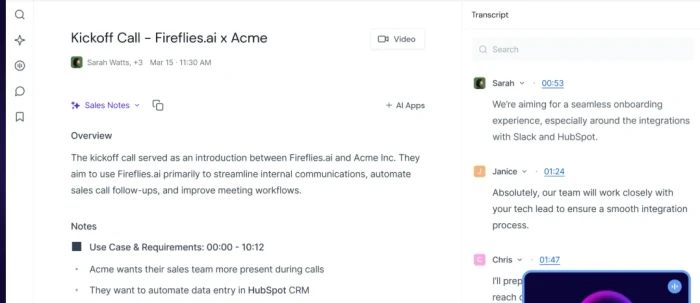
Fireflies is the tool most people mean when they picture an AI note taker: a bot joins your Zoom, Meet, or Teams call, records it, transcribes it, and hands back a summary with action items. What separates it from the pack is not the capture, which is table stakes now, but what happens to all those transcripts afterward. Everything lands in one searchable library, and its AI assistant, AskFred, lets you query across the whole archive rather than one meeting at a time.
Where it stands out
- Cross-meeting search that actually scales. If you want to know every time a client mentioned budget over six months, this is the tool that answers quickly.
- Broad integration surface, with CRM sync on Business-tier plans and above, which is where team rollouts usually live.
- Conversation analytics, like talk-time ratios and topic trackers, that sales and ops teams actually use.
Where it frustrates
The catch is the credit system. Advanced AI features, AskFred included, run on a separate pool of AI credits that paid plans allocate in limited amounts (roughly 20 to 50 depending on tier). Lean on the AI heavily and you can hit the wall mid-month, after which those features pause until you buy more. Several reviewers flag this as an unexpected cost that the headline per-seat price hides. CRM integration is also gated to higher tiers, so the cheap plan is cheaper than it looks on paper.
Pricing
Free ($0), Pro at $10/user/month, Business at $19/user/month, and Enterprise at $39/user/month, all on annual billing. HIPAA compliance and SSO are Enterprise-only. The free tier gives you transcription but withholds AI summaries, so it works for a trial, not a workflow.
Pick Fireflies if a searchable team knowledge base matters more than the meeting feeling un-recorded. Skip it if you want AI summaries without watching a credit meter.
2. Fathom
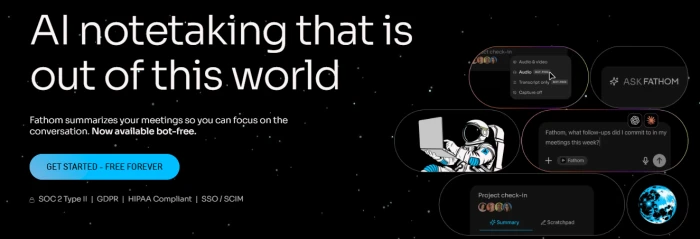
Fathom built its reputation on a free plan that is genuinely hard to beat: unlimited recordings, unlimited transcription, and unlimited storage, with no asterisk on the number of meetings. For a solo professional taking a handful of external calls a month, it can function as a permanent free tool rather than a trial that expires the moment you depend on it.
Where it stands out
- The free plan removes the usual anxiety about running out of minutes or hitting a meeting cap on recording and transcription.
- Clean, fast summaries with action items and follow-up emails, aimed at people who want the conversation handled without fiddling with settings.
- Bot-free capture arrived in 2026. As of Fathom's late-August update, bot-free video capture went live for Zoom on Mac, meaning the meeting no longer needs a visible bot in the attendee list.
Where it frustrates
The free plan tightened in 2026. Advanced AI summaries are now capped to the first several calls per month; past that, free users fall back to a general template. Anyone running more than one AI-summarized meeting a week will outgrow free faster than they used to. Fathom is also not built as a sales-intelligence platform, so rep-level analytics, deal scoring, and forecasting are not its territory. The bot-free and video features are still rolling out by platform, so check whether your setup (Windows, non-Zoom) is covered yet.
Pricing
Free, then Premium around $15 to $16/user/month on annual billing, a Team tier in the high-teens per user, and Business around $25/user/month annually. Numbers shift; the free plan is the real draw and the reason Fathom belongs near the top of any 2026 list.
Pick Fathom if you are one person who wants a capable note taker for $0 and will upgrade only when you genuinely outgrow it. Skip it if you need deep sales analytics or full Windows bot-free support today.
3. Otter.ai
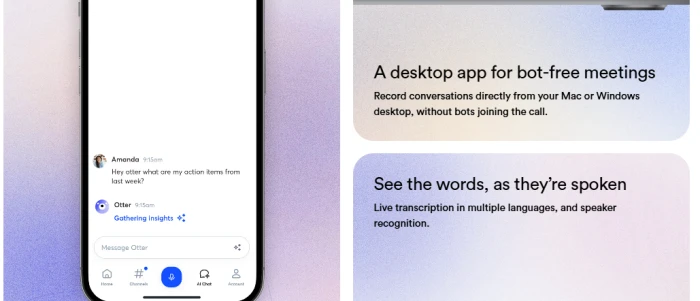
Otter is the familiar name, and familiarity is part of the pitch. Where Fathom and Fireflies hand you a polished summary after the call, Otter's center of gravity is the live transcript: text streaming on screen as people speak, with real-time collaborative editing and comments. If the searchable transcript itself is the product you care about, rather than just the summary on top of it, Otter is the natural pick.
Where it stands out
- Strong real-time captions and a polished mobile app, which also make it one of the better choices for in-person meetings, not just video calls.
- Collaborative transcripts that multiple people can highlight and comment on while the meeting is still running.
- A 300-minute monthly free tier, more generous for live transcription than most rivals, plus AI chat over your transcript archive on paid plans.
Where it frustrates
Otter's value is shaped by minute caps and reduced allocations that vary by plan, and some of its most interesting capabilities (OtterPilot for Sales, video capture, API access) sit behind Enterprise. AI chat is metered per user per month. A few reviewers also note that summary quality, while fine, is not its strongest feature; the live transcript is. If you only ever read the summary, you are paying for the part of Otter you do not use.
Pricing
Free with 300 transcription minutes a month, a Pro tier starting around $8.33/user/month on annual billing, a Business plan near $20/user/month, and custom Enterprise pricing. Otter sits at the affordable end for individuals who mainly want transcription.
Pick Otter if you want to watch the words appear live and work on the transcript as a team. Skip it if the summary is all you ever open, or if you need the sales features without paying Enterprise.
4. Granola
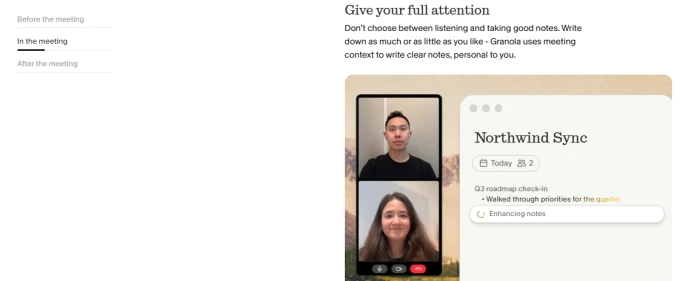
Granola starts from a different philosophy. Instead of sending a bot into the meeting, it runs quietly on your machine, listens locally, and enhances the notes you type yourself. You jot down the three things you actually care about; Granola fills in the context, structure, and detail around them after the call. The output reads like notes a thoughtful person wrote, not a transcript a machine formatted. No one in the meeting sees a "[Your name]'s notetaker" entry in the attendee list, because there is no bot.
Where it stands out
- Bot-free and discreet, which matters for sensitive conversations, external calls, and anyone who finds visible recording bots awkward.
- It augments your own thinking rather than replacing it, so the notes stay anchored to what you decided was important.
- Cross-meeting AI chat and, as of early 2026, MCP integration that connects Granola to Claude, ChatGPT, and other AI tools so your meeting context can flow into them.
Where it frustrates
Granola does not save the audio recording; once a call is transcribed, the source audio is gone, which is a feature for privacy and a limitation if you ever need to re-listen. It has no CRM integration, and because it captures from your device, it does not work the way a bot does for phone calls or Chromebooks. It is deliberately a note taker, not a meeting-intelligence platform, and it bills monthly rather than offering a big annual discount.
Pricing
A free plan with limited history, and a Business plan at $14/user/month that includes a competitive set of integrations (Notion, Slack, HubSpot, Zapier, MCP, and a personal API) at a price below Otter's and Fathom's business tiers. Granola raised a large Series C in 2026, so it is well funded and moving fast.
Pick Granola if you already take decent notes by hand and want them quietly made excellent, with no bot in the room. Skip it if you need the raw audio kept, CRM sync, or phone-call capture.
5. tl;dv
Most note takers treat video as a byproduct. tl;dv treats it as the point. It records and transcribes Zoom, Google Meet, and Microsoft Teams calls, then makes it genuinely easy to clip a 30-second moment, reel together the highlights, and ship them to the people who needed to be in the room but were not. If your problem is less "I forgot what was said" and more "I need to show my team exactly what the customer said at minute 14," tl;dv is built for that.
Where it stands out
- Clip-and-share reels and highlight moments that turn a long call into something a busy colleague will actually watch.
- A live transcript in the same window as the meeting, plus automatic per-person summaries shipped after the call.
- The capable free plan with unlimited recordings and transcripts, which is rare for a video-first tool.
Where it frustrates
The video-reel strength is also a narrowing: if you never share clips, you are paying for a workflow you do not use, and a text-first tool may serve you better and cheaper. Its deepest features point toward sales and customer teams, so a solo user outside that world gets less from the upper tiers. As with every tool here, the exact free-plan limits move, so confirm current clip and history caps before building a habit around them.
Pricing
Free plan available, with paid tiers starting around $18/user/month. The free tier is strong enough to evaluate the clip workflow properly before you commit.
Pick tl;dv if sharing the exact moment matters more than the written summary. Skip it if you never clip video and just want clean text notes.
6. Avoma
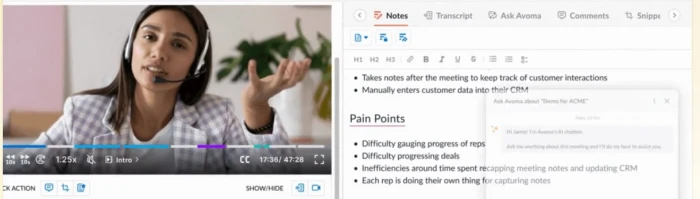
Avoma is the one on this list that is less a note taker and more a meeting-intelligence platform that happens to take excellent notes. It captures and transcribes calls like the others, but its reason to exist is what comes after: organizing a conversation into structured categories a sales leader cares about (business needs, pain points, competitors mentioned, next steps), then rolling that into coaching data and pipeline insight across the whole team.
Where it stands out
- Topic-aware notes that sort a call into meaningful buckets rather than one undifferentiated summary, which is a real time-saver for anyone reviewing many conversations.
- Conversation and revenue intelligence, including coaching, scorecards, and deal insight, built for customer-facing teams.
- Granular permissions so the right people see the right meeting data, which matters once you are past a handful of users.
Where it frustrates
All of that depth is overkill, and overpriced, for an individual who just wants their meetings summarized. The learning curve and the per-seat cost both assume you are deploying it as a team. If you are not running sales calls or coaching reps, most of what you pay for will sit idle.
Pricing
The AI Meeting Assistant tier starts around $19/user/month (lower on annual billing), with higher conversation-intelligence tiers and custom Enterprise pricing above it. It is priced as a growth-team tool, and that is who should buy it.
Pick Avoma if you lead a sales or customer team and want notes, coaching, and pipeline insight in one place. Skip it if you are a solo user; you will pay for a platform to get a note taker.
7. Notion AI
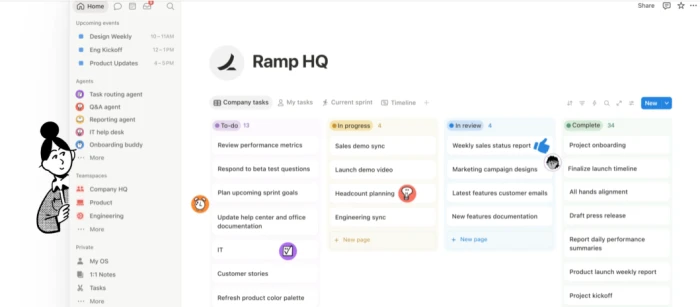
The other six tools bring your meeting notes to you. Notion AI does the opposite: it brings AI to the place your notes, docs, wikis, and projects already live. Its 2026 meeting-notes feature records and summarizes calls, then drops the result straight into your Notion workspace, where it inherits the structure, databases, and permissions you already built. For teams that have standardized on Notion, that lack of a separate note silo is the whole value proposition.
Where it stands out
- Notes land directly inside Notion pages, databases, and projects, so there is no second app to check and nothing to copy-paste across.
- AI that answers across your entire workspace, drafts content, and now pulls in connected apps like Slack and Google Drive.
- Speaker identification, in-meeting AI chat, and a 2026 API that lets other tools query meeting metadata, summaries, and transcripts with the right permissions.
Where it frustrates
Notion AI is only as organized as your workspace. A messy Notion produces messy answers. The bigger change in 2026 is pricing: the old standalone AI add-on is gone for new buyers, and meeting notes now require a Business or Enterprise workspace, which pushes the real cost up. And if your team does not already live in Notion, adopting the whole platform just to get a note taker is the tail wagging the dog.
Pricing
AI is bundled into the Business plan at roughly $20/member/month on annual billing; the previous $8-to-$10 standalone AI add-on is no longer sold to new customers. The math only works if you are already paying for Notion.
Pick Notion AI if your documents and projects already live in Notion and you want notes to land there automatically. Skip it if Notion is not already your home base.
Side-by-side feature breakdown
The quick table near the top sorts by price and fit. This one sorts by the decisions that actually trip people up: how capture works, whether audio is kept, and where the notes end up.
| Tool | Bot-free option | Keeps audio | Cross-meeting AI search | Core strength |
|---|---|---|---|---|
| Fireflies.ai | No | Yes | Yes (AskFred) | Searchable team archive |
| Fathom | Partial (Zoom/Mac beta) | Yes | Yes (Ask Fathom) | Best free tier |
| Otter.ai | No | Yes | Yes (metered) | Live collaborative transcript |
| Granola | Yes (no bot) | No | Yes | Quiet, human-feeling notes |
| tl;dv | No | Yes | Yes | Video clips and highlights |
| Avoma | No | Yes | Yes | Sales and revenue intelligence |
| Notion AI | In-workspace | Varies | Yes (workspace-wide) | Notes inside your Notion |
Capabilities shift with product updates; verify the specific feature you depend on before committing.
How to choose the right one for you?
Skip the feature-count comparison. Answer these instead, in order, and the field narrows itself.
Start with where you talk, not what you want
If your most important conversations are scheduled video calls, almost everything here works. If they happen in person, over the phone, or on a Chromebook, your list shrinks fast. Otter handles in-person well; Granola captures locally but struggles with phone calls; most bot-based tools simply cannot join a conversation that has no meeting link.
Then decide how visible you want to be
A recording bot appearing in the attendee list changes how people talk, and in some client or legal contexts it is a non-starter. If discretion matters, Granola's bot-free approach or Fathom's emerging bot-free capture should move to the top. If nobody minds a bot, you have more options and often better summaries.
Match the tool to the team size
Solo or tiny team on a budget: Fathom's free plan or Otter's free tier. One person who wants polish without a bot: Granola. A growing sales org: Avoma or Fireflies. A company already standardized on Notion: Notion AI, almost by default. A team that shares a lot of video internally: tl;dv.
Protect against the quiet failure
The error you will not catch is the one that looks confident and is wrong: a misattributed quote, a hallucinated action item, the wrong person assigned a task. Before you trust any of these at scale, run a few real meetings through them and check the summary against what you remember. The tool that gets names and speakers right on your actual calls beats the one with the longer feature list.
The bottom line
The best AI note taker in 2026 is not the one with the most features or the loudest marketing. It is the one that captures the conversations you actually have, in a way the people in them are comfortable with, and puts the notes where you will actually look for them later. Start with your answer to those three questions, where you talk, how visible you want to be, and who reads the notes, and the seven tools here sort themselves into exactly one that fits. Run it on a few real meetings before you pay. The transcript that gets the names right is worth more than any feature list.
Comments
Join the discussion and share your perspective.