
HeyGen and Hypernatural AI solve two different video problems. HeyGen builds talking-avatar videos, where a realistic digital presenter reads your script in 175-plus languages with accurate lip-sync. Hypernatural turns a script or blog post into a faceless short-form video using AI stock footage and narration, the kind of clip that fills a TikTok or YouTube Shorts feed.
Need a presenter on screen for training, sales decks, customer onboarding, or localized marketing? HeyGen is the better choice. Producing faceless social video at volume and want a mobile app to make it on? Hypernatural fits your workflow better.
We tested both platforms hands-on for our standalone reviews, generated real videos in each, and linked those outputs so you can judge quality yourself. HeyGen earned 8.7 out of 10; Hypernatural earned 7.3. The scores tell part of the story. The right tool depends on the kind of video you actually make.
Quick Verdict
Here is the short answer. HeyGen is the stronger overall product and the clear winner for any video with a presenter on screen. Hypernatural is the better-value pick for faceless short-form content, especially if you work from a phone. Neither tool replaces the other, because they are built for different outputs.
| Category | Winner |
|---|---|
| AI Avatars / Presenters | HeyGen |
| Faceless Storytelling Videos | Hypernatural |
| YouTube Shorts & Faceless Channels | Hypernatural |
| Training & Onboarding Videos | HeyGen |
| Language Translation & Localization | HeyGen |
| Mobile Creation | Hypernatural |
| Lip-Sync Realism | HeyGen |
| Visual Style Variety | Hypernatural |
| Entry Price | Hypernatural |
| Ease of Use | Tie |
If your work spans both presenter videos and faceless clips, plenty of teams run both tools side by side rather than forcing one to do everything.
What Is HeyGen?
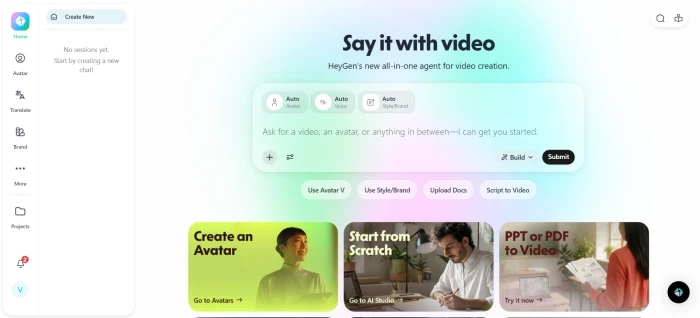
HeyGen is an AI video platform out of Los Angeles that converts written scripts into videos starring realistic AI avatars. You type the words, and a digital presenter speaks them with synchronized lip movements in more than 175 languages. The avatars blink, shift their weight, and breathe between sentences, the detail that separates HeyGen from stiffer talking-head tools.
The platform covers the full production path. You can start from one of 170-plus stock avatars, upload a single photo to turn it into a talking presenter, or record a two-minute webcam clip to train a custom avatar of yourself in under five minutes. A library of 200-plus templates organized by use case gives marketing, sales, and training teams a quick starting point. After a video renders, a multi-track editing timeline lets you adjust scenes and insert B-roll instead of dropping you at a download button.
HeyGen is built for businesses. Marketing teams use it for product and ad videos, learning-and-development departments use it for training and onboarding, and global teams use it to localize one video into dozens of languages without reshooting. Commercial rights come with every paid tier, and the platform carries SOC 2 Type II certification with model-training opt-out on by default. We tested how those business use cases actually perform in practice in our hands-on HeyGen review.
What Is Hypernatural AI?
Hypernatural AI is a short-form video platform built for social feeds. It takes a script, blog post, podcast transcript, or raw idea and turns it into a finished vertical video using AI-generated visuals and narration. The output is the faceless format that dominates TikTok, Instagram Reels, YouTube Shorts, and LinkedIn.
The engine pulls from a 2-million-clip AI stock video library and auto-matches footage to your script as it generates. More than 200 visual style templates span anime, corporate explainer, cinematic, and documentary aesthetics, so your videos do not all look identical. Paid tiers add 40-plus premium AI narrators with tone and pacing controls, custom character generation from a prompt or reference image, automatic B-roll, and editable captions baked in.
The standout is mobile. Native iOS and Android apps let creators script, generate, and publish from a phone, which almost no competitor in this category offers. That makes Hypernatural a fit for solo creators, influencers, and podcasters who repurpose written or audio content into video at high volume and often work on the go. We tested that mobile workflow and the free tier in practice in our full Hypernatural AI review.

How We Tested Both Tools
This comparison is grounded in hands-on testing rather than recycled spec sheets. For each platform we created real videos and saved the outputs, so the quality claims are verifiable.
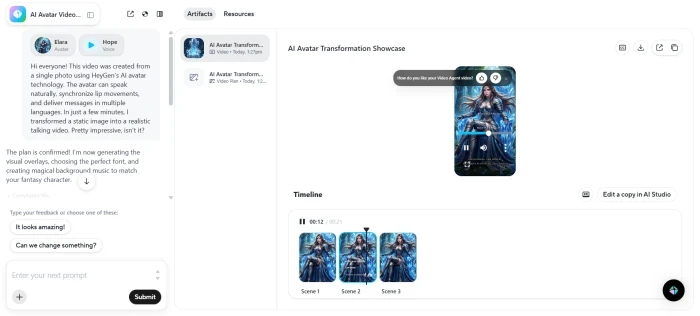
On HeyGen, we uploaded a single portrait photo, paired it with a short script, and let the platform generate a talking-avatar video. The render finished inside the documented two to three minute window, and the post-render editing timeline appeared with full scene controls. The lip-sync held up, which matches HeyGen’s category-leading 9.4 out of 10 score for sync accuracy in our review. The generated video is hosted on HeyGen’s own platform and linked from the review for anyone who wants to inspect the result.
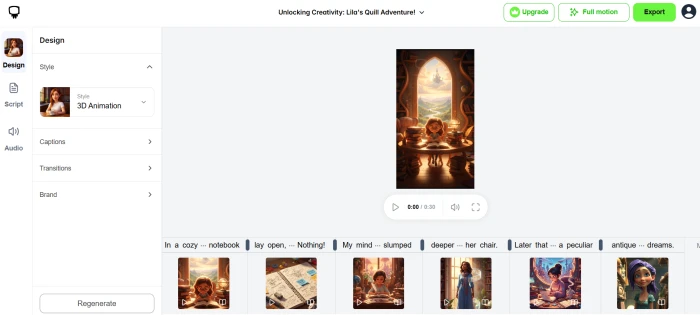
On Hypernatural, we ran a script through the stock-creation workflow on the free tier and produced a complete, publicly shareable video with stock visuals and standard narration. We also tested character generation from a detailed anime-hero prompt, and the engine returned a coherent character with the requested armor styling, fantasy backdrop, and cinematic lighting.
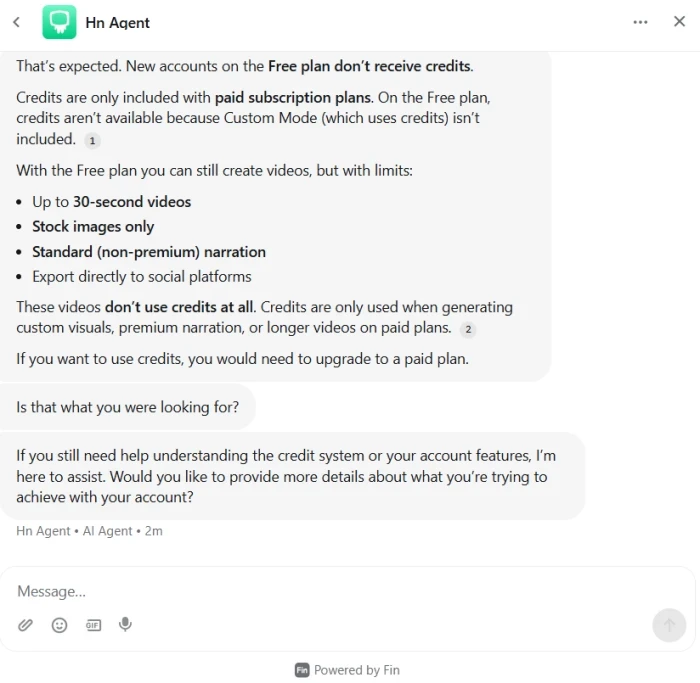
One finding is worth flagging before you sign up for Hypernatural. Several third-party sites still advertise “75 or 100 free lifetime credits” for new accounts. When we tested a fresh free-tier account, zero credits were issued. Hypernatural’s own support agent confirmed that free accounts receive no credits and that credits only arrive with paid plans. The free tier still creates 30-second stock videos, but the advertised credits are not part of it.
Feature Comparison
The two platforms overlap on the basics and diverge sharply on specialties. The table below lines up the features that matter most before you commit.
| Feature | HeyGen | Hypernatural AI |
|---|---|---|
| AI Avatars / Presenters | Best in class (170+) | Limited |
| AI Voices / Narration | Voice cloning, 175+ langs | 40+ premium narrators |
| Script to Video | Yes | Yes |
| AI Stock Footage Library | Limited | 2M+ AI clips |
| Visual Style Variety | Avatar-focused | 200+ style templates |
| Character Generation | Via avatars | Yes (prompt or image) |
| Character Consistency | Strong | Strong |
| Video Translation / Dubbing | Excellent (175+ langs) | Limited |
| Editing Timeline | Multi-track | Scene-based |
| Auto Captions | Yes | Yes |
| Mobile App | No | iOS + Android |
| Max Video Length | 30 min (60 on Business) | Unlimited (paid) |
| Commercial Rights | All paid tiers | Paid tiers |
| Compliance | SOC 2 Type II | Not published |
HeyGen owns the presenter and localization columns. Hypernatural owns stock variety and mobile. The capabilities they share, script-to-video and auto-captions, both work well on either platform.
Ease of Use
Both tools are beginner-friendly, but the steps differ because the outputs differ.
Creating a video in HeyGen starts with picking an avatar or uploading a photo. You type or paste your script, choose a voice and language, and add scenes or templates if the video needs more than one shot. Hit generate, wait a few minutes, and refine the result on the editing timeline before exporting. New users reach a first finished video in under ten minutes, which our test session confirmed.
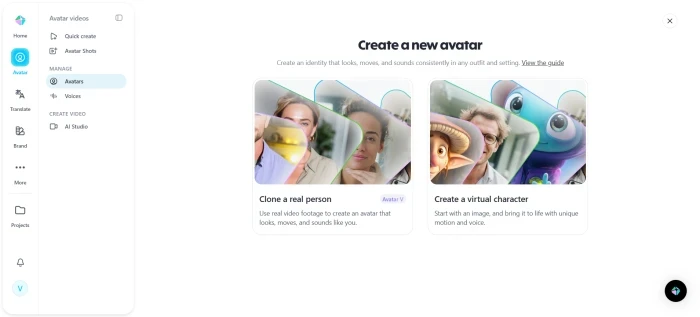
Creating a video in Hypernatural starts with an input, whether a script or a blog URL. You pick a visual style, the engine drafts the scenes and matches stock footage automatically, and you choose a narrator. From there you tweak scenes, captions, and music in the editor, then export straight to a social platform. The mobile apps run the same flow from a phone.

The honest verdict on ease of use is a tie. HeyGen’s interface is cleaner for single-presenter videos. Hypernatural’s automation does more of the scene-building for you. Which one feels easier depends on whether you are making a presenter video or a faceless montage.
Video Quality Comparison
Quality splits along the same line as everything else: presenter realism against faceless production polish.
Avatar quality is HeyGen’s headline strength. Its avatars are rated number one in the category for lip-sync, and the realism holds across European and East Asian languages, with only minor slippage on certain Arabic phonemes and Vietnamese tones. Hypernatural offers character generation, but its characters are stylized creations for scenes rather than photorealistic presenters, so the two are not directly comparable.
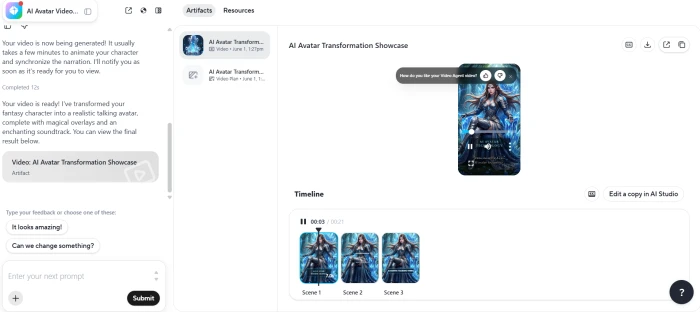
Voice quality is strong on both. HeyGen’s voice cloning preserves accents well from a 60-second sample, though its emotional range is narrower than a dedicated voice tool. Hypernatural’s 40-plus premium narrators handle tone and pacing well enough to carry a short-form video without sounding robotic.
Visual consistency favors Hypernatural for scene-driven content, since its 200-plus styles and 2-million-clip library keep a faceless video visually varied across projects. HeyGen’s visual world is centered on the avatar and the background behind it.
Editing flexibility is close. Both give you a timeline to adjust scenes after generation. HeyGen leans toward scene and voice control; Hypernatural leans toward style, caption, and B-roll control.
Export quality goes to HeyGen on the high end. It reaches 4K on its Business tier, while free and entry plans cap at 720p to 1080p. Hypernatural exports are tuned for social resolutions rather than 4K mastering.
Pricing Comparison
Pricing is where the two tools look most different. Hypernatural is cheaper to start. HeyGen costs more but bundles presenter technology that Hypernatural does not have.
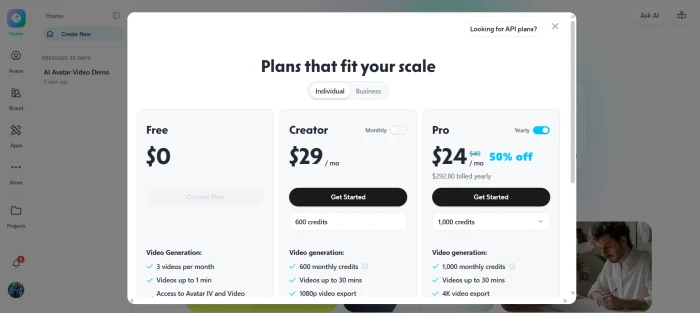
HeyGen pricing in June 2026
| Plan | Price | Key Inclusions |
|---|---|---|
| Free | $0 | 3 videos/mo, watermark, 720p |
| Creator | $29/mo ($14 annual) | Unlimited videos, 200 credits/mo, 1080p, no watermark, voice cloning |
| Pro | from $49/mo ($24 annual) | 4K export, higher credit allocation, translation editing |
| Business | $149/mo + $20/seat | 4K, 60-min videos, team workspace, SCORM, integrations |
| Enterprise | Custom | Unlimited video, full API, SSO, dedicated support |
Hypernatural AI pricing in June 2026 (tiers have shifted several times, so confirm on the pricing page before buying)
| Plan | Price | Key Inclusions |
|---|---|---|
| Free | $0 | 30-sec videos, stock only, standard narration, watermark |
| Creator | $12 to $19/mo | ~500 credits, custom characters, no watermark, unlimited length |
| Pro | $22 to $28/mo | 1,500 credits, 12 custom characters, 40+ narrators, 10-hr transcription |
| Ultimate | $48 to $99/mo | 8,000 credits, 48 custom characters, 40+ narrators |
| Enterprise | Custom | Production services, dedicated account support |
Hypernatural’s $12 to $19 entry point is the lowest serious starting price between the two, and annual billing trims another 20 percent. For a solo creator pushing out faceless clips, that is hard to beat.
HeyGen’s $29 Creator plan costs more, but you are paying for the avatar engine, voice cloning, and 175-plus-language dubbing that no Hypernatural tier includes. Watch HeyGen’s credit system, though. Premium avatar video burns roughly 20 credits per minute, so Creator’s 200 monthly credits cover only about ten minutes of premium output, and credits do not roll over. Hypernatural runs on credits too, and several users note that small edits eat into the balance faster than expected.
The plain math: for faceless social video on a budget, Hypernatural wins on price. If you need a presenter or real localization, HeyGen’s higher price buys a capability Hypernatural cannot match at any tier.
HeyGen vs Hypernatural for YouTube
YouTube is where Hypernatural pulls clearly ahead, and it is a bigger deciding factor than most comparisons admit.
Faceless YouTube channels run on exactly the format Hypernatural produces: scripted narration over AI-matched stock footage, generated fast and at volume. The 2-million-clip library and 200-plus styles keep a channel’s videos from looking repetitive, and the mobile apps let creators publish between other tasks. For history explainers, list videos, motivational content, or any niche where the creator stays off camera, Hypernatural is the natural tool.
Shorts follow the same logic. Hypernatural’s vertical-first output and direct social export are built for the Shorts and Reels pipeline. HeyGen can make a short clip, but you would be putting an avatar on screen, which only helps if your channel concept calls for a presenter.
Educational content can go either way. A faceless explainer with stock visuals suits Hypernatural. A course or tutorial with a consistent on-screen instructor suits HeyGen, especially when you want the same presenter across dozens of localized versions.
Winner for YouTube: Hypernatural, unless your channel is built around a talking presenter.

HeyGen vs Hypernatural for Marketing
Marketing flips the result. HeyGen is a stronger marketing tool for most business use cases.
Product demos and explainer videos benefit from a presenter who walks viewers through the value, and HeyGen’s avatars do that in any language without booking a studio or an actor. Sales teams use the same approach for personalized outreach videos and pitch follow-ups, where a familiar face lifts response rates.
Customer onboarding and training are HeyGen’s home turf. A single script becomes a polished walkthrough, and the same content localizes into 175-plus languages for global rollouts, which is why learning teams migrate to it from older tools. Commercial rights on every paid tier mean the output is cleared for ads and client work.

Hypernatural still has a marketing lane. For top-of-funnel social ads, brand awareness clips, and faceless promotional content that lives on TikTok or Reels, its fast faceless production is efficient and cheap. It just does not cover the presenter-led demo and training work that drives most business-to-business marketing video.
Winner for marketing: HeyGen, with Hypernatural as the budget option for faceless social ads.
Pros and Cons
HeyGen Pros
- Best-in-class lip-sync and avatar realism, rated number one in the category
- Custom avatar trained from a two-minute webcam clip in under five minutes
- 175-plus languages with strong accent preservation for dubbing
- Full commercial rights on every paid tier, plus SOC 2 Type II compliance
- Post-render editing timeline with scene-level control
HeyGen Cons
- Higher entry price at $29 per month
- Premium credits deplete fast and do not roll over
- 4K export locked to the Business tier
- No mobile app
- Limited gesture and emotion controls on avatars
Hypernatural Pros
- Lowest serious entry price, starting around $12 to $19 per month
- 2-million-clip AI stock library plus 200-plus visual styles
- Native iOS and Android apps, rare in this category
- Fast faceless script-to-video with auto B-roll and captions
- Direct export to social platforms
Hypernatural Cons
- “Free lifetime credits” marketing does not match the actual free tier
- Pricing has changed multiple times, making cost planning harder
- No photorealistic talking-presenter avatars
- Limited video translation compared with HeyGen
- Credits get consumed quickly on small edits
Final Verdict
The decision comes down to one question: does your video need a face on screen?
Choose HeyGen if you create training or onboarding videos, run multilingual marketing, need a realistic presenter for sales and demos, or want studio-grade localization without reshooting. It is the higher-priced tool, but nothing Hypernatural offers replaces its avatar engine. Start on the free plan to test lip-sync quality, move to Creator at $29 to remove the watermark, and step up to Business when you need 4K or a second seat.
Choose Hypernatural if you produce faceless YouTube or short-form social video, want the lowest entry price, create from your phone, or value a deep stock library and a wide range of visual styles. Confirm the current pricing before you buy, and treat any “free lifetime credits” claim as outdated. The Creator tier around $12 to $19 is the practical starting point once you have tested the free tier’s limits.
Comments
Join the discussion and share your perspective.