
Two AI video tools keep landing in the same search results, yet they were built for different creators. Hypernatural AI turns scripts and ideas into short-form social clips using a 2-million-clip stock library. AutoDraft AI runs a full 2D animation pipeline aimed at YouTube monetisation. The right pick depends on the kind of channel you want to grow, not on which one lists more features.
Both promise faster video without a production crew, and both sit in the affordable tier, which is why creators line them up against each other before paying for either. This guide skips the spec-sheet routine and answers the question creators actually search for: across faceless content, automated production, and YouTube videos, which tool earns the subscription? The short version sits in the table below. The rest of the page works through the exact scenarios where each tool pulls ahead.
Quick answer
If you only read one section, read this one.
| Use case | Better tool |
|---|---|
| Faceless animated YouTube videos | AutoDraft AI |
| Short-form social clips (Reels, Shorts, TikTok) | Hypernatural AI |
| Hands-off, prompt-to-render automation | AutoDraft AI |
| Visual style range and editing control | Hypernatural AI |
| Lowest starting price | AutoDraft AI ($10/mo) |
| Creating on a phone | Hypernatural AI |
Want a faceless animated YouTube channel produced from a single prompt? AutoDraft AI. Want polished short-form clips with deep style control across social platforms? Hypernatural AI.
What Hypernatural AI does
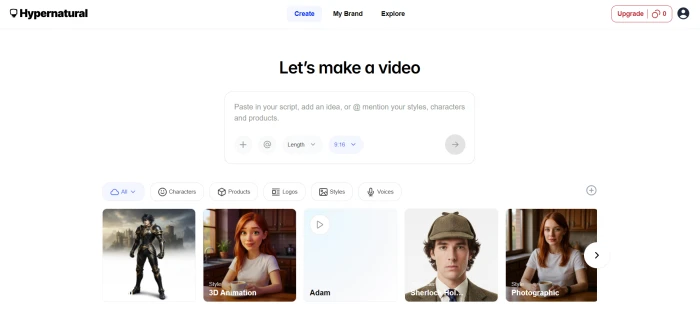
Hypernatural AI is a short-form video platform from Hypernatural Systems, Inc. Feed it a script, a blog post, or a rough idea and it returns a finished vertical video sized for TikTok, Reels, YouTube Shorts, or LinkedIn.
The creators who get the most from it are marketers repurposing written content into clips, social-first solo accounts, and podcasters slicing episodes into highlights. The draw is the pairing of a 2-million-clip AI stock library with more than 200 visual style templates, so two videos on the same topic rarely look the same.
The workflow runs end to end inside one product. Script entry feeds the stock matcher, narration generates from a library of 40-plus premium voices on paid tiers, captions apply on their own, and a B-Roll engine drops in supporting footage. Native iOS and Android apps let creators build on a phone, which almost no competitor offers.
It is a weaker fit for long, narrated YouTube films, where output stays short and stock-driven.
One caveat to flag before signup.
The 'free lifetime credits' line that shows up on several third-party pages does not match a real free account. Hypernatural's own support agent confirmed new free accounts receive zero credits. You can still create 30-second stock videos at no cost, but custom visuals and premium narration require a paid plan. For a complete breakdown of pricing, credits, and the support clarification, see our Hypernatural AI review.
What AutoDraft AI does
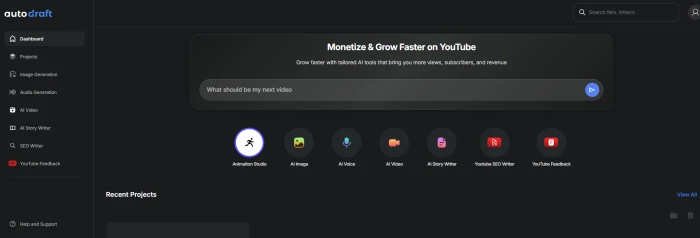
AutoDraft AI takes the opposite route. Built by Allbots Technologies, an Indian SaaS company, it is a 2D animation suite aimed squarely at YouTube creators who want to monetise animated content without hiring an animator or learning After Effects.
The signature piece is the Story Writer. Type a four-word prompt such as 'a story about a smart lion' and it returns a structured scene outline, then expands that outline into a production-ready script. In hands-on testing, that single prompt produced a 455-second script (7 minutes 35 seconds) across four scenes, with scene descriptions, narrator lines, character dialogue, and per-line timing tags baked in.
That structure carries the whole workflow. Scene descriptions become background prompts, narration becomes voiceover audio, and the timing tags drive the animation. AI characters, AI backgrounds, emotion-aware voiceovers, background music, and an animation editor all share one workspace, and output renders up to 4K.
It is the wrong tool for live-action footage or 3D work, both of which fall outside its 2D scope.
The free tier is tight. New accounts get 20 credits, enough to test the Story Writer and one more tool before the meter hits zero. The platform is web-only, with no desktop or mobile app. Our full AutoDraft AI review breaks down the Story Writer output line by line.
Four scenarios that decide it
Feature counts do not pick the right tool for a channel. These four situations do.
Scenario 1: Building a faceless YouTube channel
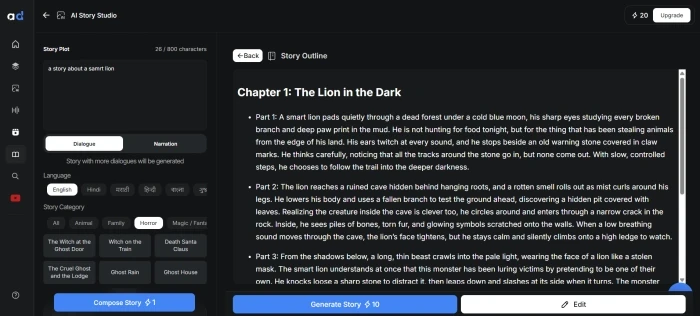
For animated story channels (kids stories, fables, nursery rhymes, explainer content), AutoDraft is purpose-built. The entire pipeline assumes you are producing narrated animated videos for YouTube. One prompt becomes a multi-scene script with timing, and the same workspace carries it to a 4K render with no tool-switching. For a monetising channel, that single path from prompt to render is the difference between publishing weekly and publishing rarely.
Hypernatural can publish to YouTube too, but its strength is short vertical clips rather than multi-minute animated stories. Its free videos top out at 30 seconds and lean on stock footage instead of original animated characters.
Winner: AutoDraft AI for long-form faceless animation. If your faceless content is short stock-driven clips, Hypernatural is the better fit.
Scenario 2: Marketing and brand videos
Hypernatural takes this one. The 200+ visual styles, editable captions, and an editing dashboard give marketers control over how a clip looks and reads, which matters when a video has to sit inside brand guidelines. Brand teams reusing one identity across dozens of clips benefit from the template system, which keeps fonts and pacing aligned without rebuilding each video from scratch.
AutoDraft outputs animated 2D, which suits storytelling channels more than corporate or product promos. A SaaS explainer or a brand spot usually wants the style range and polish Hypernatural delivers.
Winner: Hypernatural AI.
Scenario 3: Hands-off automation
AutoDraft is the more automated of the two by design. The handoff between writing, characters, voice, and animation happens inside one workspace with almost no manual conversion. Feed it a prompt and the script arrives ready for the next stage, so a creator can think in story ideas instead of production steps.
Hypernatural automates the social-clip workflow well, but custom characters and premium narration need setup and paid credits, so how hands-off it feels depends on the tier you are paying for.
Winner: AutoDraft AI.
Scenario 4: Visual control and output polish
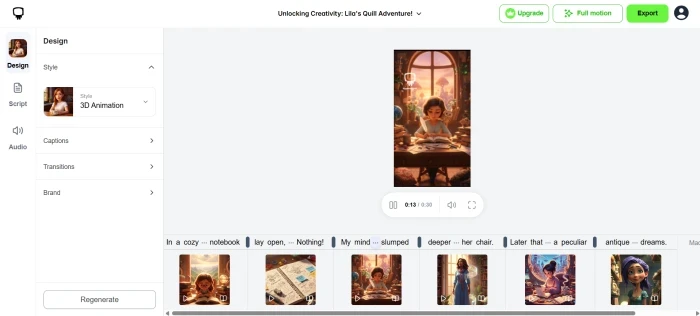
Hypernatural gives creators more say over the final look. 200+ styles plus an editing dashboard let you refine scenes, swap visuals, and adjust captions before export. Editing control rated high in our testing.
AutoDraft holds a consistent style across an entire video, since its background generator keeps one look from scene to scene. The creative range is narrower though: 2D animation only, with no live-action and no 3D. It trades breadth for consistency.
Winner: Hypernatural AI for range and control, AutoDraft for style consistency inside a single animated video.
Feature comparison at a glance
The table covers the dimensions creators ask about most. Read it alongside the scenarios above, since a single row rarely decides the pick on its own.
| Feature | Hypernatural AI | AutoDraft AI |
|---|---|---|
| Core output | Short-form social video (TikTok, Reels, Shorts, LinkedIn) | 2D animated YouTube video |
| Built by | Hypernatural Systems, Inc. | Allbots Technologies (India) |
| Text-to-video | Yes | Yes, via the Story Writer |
| Automation level | Medium | High |
| Editing control | High | Medium |
| Faceless animated YouTube fit | Medium | High |
| Marketing / brand video fit | High | Medium |
| Visual style range | 200+ style templates | 2D animation styles |
| Stock library | 2M AI clips | Not stock-based, generates animation |
| Voiceover | 40+ premium voices (paid) | Hundreds of presets with emotion |
| Character generation | Prompt or reference image | 2D characters + custom model training |
| Mobile app | iOS + Android | Web only |
| Max video length | 30s free, longer on paid | Multi-minute (455s in testing) |
| Output resolution | Social-optimised | Up to 4K |
| Free tier | 30s stock videos, no credits issued | 20 credits one-time |
| Starting price | $12/mo Creator (varies) | $10/mo (about INR 833) |
| FirmCritics score | 7.3 / 10 | 7.8 / 10 |
Scripts, voices, and characters compared
Both tools generate the building blocks of a video. They emphasise different pieces.
Scripts. AutoDraft leads here. Its Story Writer produces a full narrative with embedded timing, built to drive animation. Hypernatural accepts a script or a blog post and matches visuals to it, but it does not write multi-scene stories with per-line timing tags the way AutoDraft does.
Voiceovers. AutoDraft ships hundreds of emotion-aware presets that respond to script tone, which removes the cost of a hired voice actor on most projects. Hypernatural offers 40-plus premium narrators on paid tiers and standard narration on the free tier. Both are strong. AutoDraft's emotion handling is tuned for story narration, while Hypernatural's premium voices target social clips.
Characters. Hypernatural generates a character from a text prompt or a reference image and carries it across scenes for consistency. AutoDraft creates 2D animated characters with expressions and lip-sync, plus custom model training for a recurring cast across episodes. For an episodic animated series, AutoDraft's recurring-character training is the bigger draw. For a one-off character that slots into a social video, Hypernatural is quicker.
Captions and B-Roll. Hypernatural auto-applies editable captions and auto-inserts B-Roll, which matters because most social video plays on mute. AutoDraft puts its energy into the animation itself rather than caption overlays, since narrated stories carry the message through voice and visuals.
Marketing copy. AutoDraft also bundles an SEO Writer that turns a title and a brief into video descriptions, blog summaries, or social copy. As a companion to the animation output it is handy; as a standalone SEO platform it is competent rather than category-leading. Hypernatural has no equivalent writing tool, since its job ends at the video.
Learning curve and setup
Time to first video splits the two. Hypernatural keeps navigation shallow. Sign-in to a new video is one click, and the free tier does not lock the creation flow, so a first clip takes minutes rather than an afternoon. For a creator who wants something published today, that low friction is a real advantage on its own.
AutoDraft asks for more patience. The full suite carries a genuine learning curve, especially for anyone with no animation background, and the credit system takes a month or so to read accurately across different features. Reviewers flag both points consistently. The payoff is a deeper pipeline that produces a complete animated video, but the ramp is steeper than Hypernatural's, and the tight free trial means most of that learning happens on a paid month.
Which is better for faceless YouTube automation in 2026?
For faceless YouTube content built on animation, AutoDraft AI is the stronger automation engine in 2026. The Story Writer alone removes the two slowest jobs on an animated channel: scripting and structure. A four-word idea returns a timed, multi-scene script, and the rest of the suite turns that script into a rendered video without leaving the workspace. For a creator publishing on a schedule, that front-loaded structure is what keeps a backlog moving.
Hypernatural answers a different version of faceless. If a channel runs on short vertical clips assembled from stock footage with voiceover and captions, its automation and 200+ styles get a clip out the door quickly. For multi-minute narrated animation, it was not built for the job.
The honest split: faceless animated storytelling goes to AutoDraft, faceless short-form social goes to Hypernatural. The word 'faceless' covers both, which is exactly why these two tools keep colliding in search results while serving different creators.
The clean distinction
Strip away the overlap and each tool sits in a clear lane. Hypernatural AI is a style-rich short-form video generator: deep stock library, wide template range, mobile-first, tuned for social platforms. AutoDraft AI is an automation-first animation pipeline: one prompt to a finished animated YouTube video, built around the Story Writer and a connected production flow.
Keep that distinction straight and the choice gets easy. A creator chasing TikTok and Reels volume reaches for Hypernatural. A creator building an animated YouTube library reaches for AutoDraft.
Pricing: what you actually pay
Both tools start cheap and gate their best features behind paid plans.
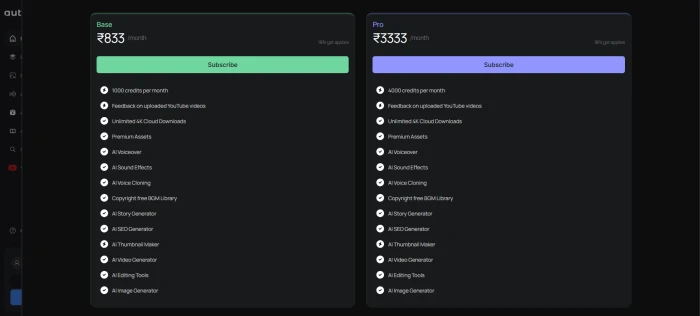
AutoDraft is the lower entry point at roughly $10 per month (about INR 833) for the Pro plan, which unlocks full feature access, watermark-free output, and 4K rendering. Credits refill monthly. The 20-credit free trial is too small to test the full pipeline, so budget one paid month to evaluate it properly.
Hypernatural's Creator tier starts around $12 to $15 per month, with Pro at $22 to $28 and Ultimate higher still. Pricing has shifted several times across 2025 and 2026, so check the live page before committing. Annual billing cuts 22%. The free tier makes 30-second stock videos but issues no credits, which catches out anyone arriving from a 'free credits' affiliate page.
On price alone, AutoDraft wins the entry tier. On free-tier usefulness, neither is generous: Hypernatural lets you make a real if limited video for free, while AutoDraft's 20 credits run dry before the animation pipeline gets a fair test. For a creator testing seriously, the practical move is to spend the $10 on one AutoDraft month and use Hypernatural's free 30-second export to gauge its style range before upgrading.
Who should pick which
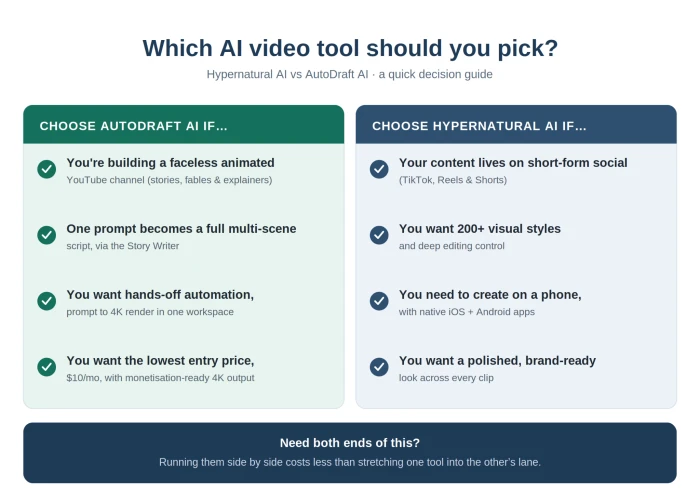
Pick AutoDraft AI if you are building a faceless animated YouTube channel (kids stories, fables, educational animation, explainer content). The Story Writer and the connected pipeline do the heavy lifting, the $10 entry price is the lowest in the animation category, and the 4K output is monetisation-ready. Plan for a paid month, since the free credits will not show you the full workflow.
Pick Hypernatural AI if your content lives on short-form social and you want range in how it looks. The 200+ styles and 2-million-clip library, plus native mobile apps, fit creators producing volumes for TikTok and Reels. Treat the 'free lifetime credits' claim as outdated before you sign up, and budget for the Creator tier where the real workflow begins.
A creator who needs both ends of this (long animated YouTube videos and short social cutdowns) will get more out of running the two side by side than forcing one tool into the other's lane. They were built for different jobs, and paying for both still costs less than the hours lost stretching the wrong one.
Comments
Join the discussion and share your perspective.