
AI image and video generators are showing up in classrooms, group chats, and school hallways faster than most parents can keep track of. One name now circulating among teenagers is Unlucid AI, a browser-based tool that isn't a household name yet but is spreading fast because of one specific promise almost no other AI tool makes out loud.
That promise is freedom from restrictions.
Unlucid AI turns text prompts and photos into images and short animated videos. No app download, no real barrier to entry, and a marketing pitch built around being “uncensored.” That single word changes the entire conversation for anyone responsible for a child's screen time. This guide goes through the platform's homepage, its policies, its actual interface, and what independent reviewers and forum users have already reported, to answer one question directly: is this safe for a child to use?
The short answer, covered in full below, is no. Here's the evidence behind that answer, section by section.
What Unlucid AI Actually Is
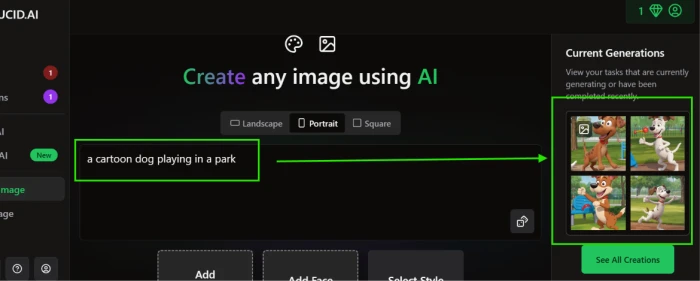
Understanding what the platform actually does matters before judging whether it's safe. Unlucid AI is not a chatbot and it does not have AI companions or characters to talk to. It is a creative tool built around three functions: generating images from text, editing existing photos, and animating still images into short video clips using preset effects.
Everything runs in a browser. There is nothing to install, and no account is required to start using it. That low barrier is part of why it spreads so fast among teenagers. There's no app store age rating standing between a curious kid and a finished image.
The platform is built on diffusion model technology, the same general approach behind tools like Stable Diffusion. In plain terms, it starts with digital noise and gradually shapes it into a picture that matches what was typed in, refining the result step by step. The company hasn't published which exact model it runs underneath, which is a detail worth noting later when we get to transparency.
The Core Features
- Image Generator: turns a written prompt into an original image, in styles ranging from realistic to anime
- Image Editor: removes objects from photos, swaps backgrounds, or changes outfits and details using a brush or automatic selection
- Effects AI: uploads a photo and applies one of 15-plus motion presets, such as Dance or Squish
- Text-to-Video: generates a short video clip directly from a written description, no source photo needed
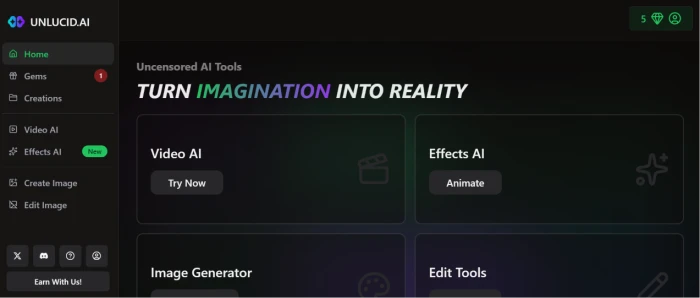
The platform runs on a credit system called Gems. New users get a small free daily allowance, and paid packs start around $8.99. That detail matters later, because the free allowance is generous enough for a child to test the platform fully before any payment method ever needs to be involved.
So who is this actually built for? Reviews describe the user base as hobbyists and meme creators, plus people frustrated by the content filters on bigger platforms like Midjourney or Canva AI. Teenagers fall easily inside that description. Nothing about the marketing targets children specifically, but nothing blocks them either, which brings us to the real question.
Is Unlucid AI Safe for Kids? The Short Answer
No.
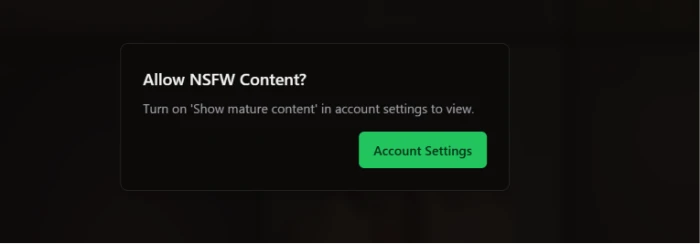
The platform markets itself as having fewer content restrictions than mainstream AI tools, and that alone would be reason for caution. But the deciding factor is something more concrete: Unlucid AI has a built-in setting called “Show mature content,” found inside account settings, that unlocks NSFW material with a single click. There is no age check, no parental PIN, and no verification step in front of that toggle. Mature content is blurred by default, but “blurred by default” is not a safety feature when the unlock is one tap away inside a settings menu any user can reach.
That detail settles the question. A platform that ships an adult-content switch with zero guardrails around it is not a platform built with children in mind, regardless of how the rest of the interface looks.
What Parents Should Know Before Allowing Their Child to Use It
This breaks down into the things that actually matter before any parent hands over a login.
Age Requirements
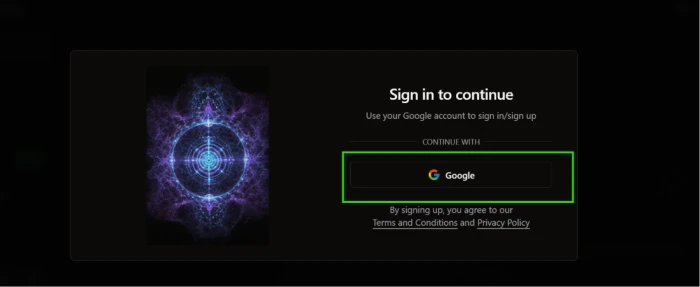
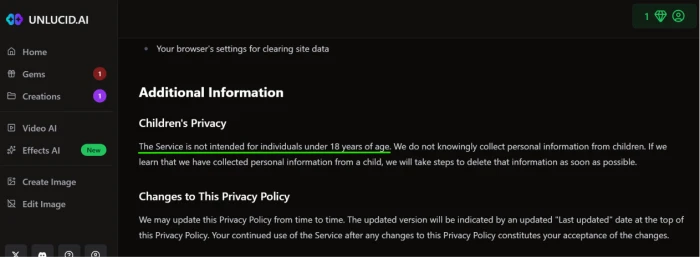
Looking for a published minimum age and a parental consent requirement on the platform turns up nothing. Independent reviews of Unlucid AI do not mention an enforced age gate, and the sign-up flow does not appear to verify age in any meaningful way. There is no birthdate check that would stop a ten-year-old from typing in a fake year and proceeding.
Practically, this means age enforcement falls entirely on you, not the platform.
Content Moderation and Parental Controls
The platform does apply some baseline filtering; it is not a free-for-all with zero limits by default. But its stated identity is built around having far fewer restrictions than competitors for “surreal, fantasy, mature, or experimental” content, and that looser baseline sits behind a single switch.
That switch is the “Show mature content” option in account settings, which exists specifically to unlock NSFW material that is otherwise blurred. There's no parental lock on it, no age confirmation step, and no separate permission tier for a guardian account. Any user who finds the settings page can turn it on. Searching the platform and its documentation turns up no parental control feature of any kind: no content restriction tied to a child profile, no usage report sent to a guardian, no PIN-protected setting anyone but the account holder can change.
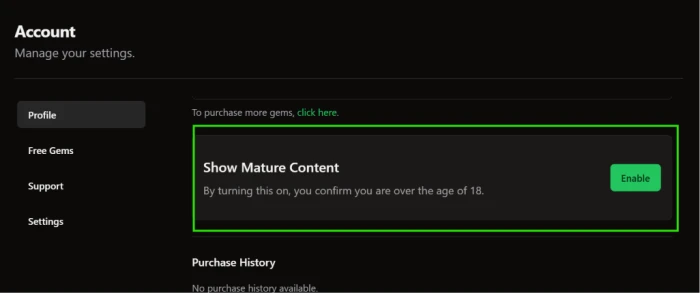
That absence is what makes the difference between a platform parents can reasonably allow with some supervision and one that should be avoided outright. A tool can have imperfect moderation and still be workable if a parent can lock down the gaps. This one offers no lock to use.
Privacy and Personal Data
Several independent reviews flag the same issue from different angles. One review notes that Scamadviser gives the domain a low trust score, citing limited company transparency and hidden WHOIS data, meaning the people who own and run the platform are not easy to identify. Another reviewer who tested the platform for a week called the privacy policy vague and the account suspension process opaque, with no visible customer support to resolve issues.
There's also a copycat domain in circulation: unlucid.info advertises “completely free, unlimited” access that contradicts how the real platform's pricing actually works. That kind of confusion is exactly the territory where a child, searching for the app on their own, ends up somewhere they shouldn't be.
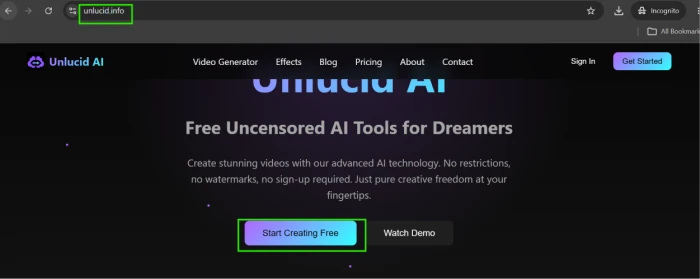
None of this confirms data is being misused. It does confirm that the company has not earned the kind of transparency that would justify trusting it with a child's photos.
Trust and Company Transparency
This deserves its own callout because it shapes everything else on this list. A platform that won't say who owns it, doesn't publish a clear data policy, and has a copycat domain spreading false pricing claims in its name is not automatically a scam. Plenty of small, legitimate startups look exactly like this in their early years. But “not automatically a scam” is a low bar, and it's not the bar that should be cleared before a child's photo goes anywhere near a server.

Treat the unverified ownership as a fixed fact rather than a detail that might clear up later. Assume the company will not respond quickly if something goes wrong with an account, because reviewers already reported exactly that happening to other users.
AI Can Produce Incorrect or Unexpected Information
Every AI image and video tool shares this limitation, and Unlucid AI is no exception. Prompts can return distorted faces, biased or stereotyped depictions, or results that look nothing like what was asked for. A child who treats the output as factual or representative needs to understand, before they start, that the tool is guessing based on patterns, not understanding their request the way a person would.
Pros and Cons for Families
Laying these out side by side makes the gap clearer than any single paragraph could. A list of risks alone sounds alarming. A list of benefits alone sounds naive. Seeing both together is closer to how the decision actually gets weighed.
| Pros | Cons |
|---|---|
| Encourages creativity through image and video generation | One-click NSFW toggle with no age or parental gate |
| No download needed, runs in any browser | No parental control feature of any kind |
| Free daily credits before any payment is required | Low company transparency, flagged trust score |
| Simple, beginner-friendly interface | No visible age verification at sign-up |
| Useful for genuine art and editing projects | Output errors, bias, or unexpected results are common |
Safety Features That Exist (and the Ones That Don't)
The pros and cons table above mentions a missing parental control feature in passing. Here's the fuller picture behind each safety feature, listed individually instead of bundled into a vague “safety overview,” because specifics matter more than reassurance.
- Content filters: present, but loosely applied compared to competitors, by the platform's own description of itself
- Parental controls: none found, no child profile, no guardian-managed account, no PIN-protected setting
- NSFW toggle: present, unlocked with one click in account settings, no age or identity check required
- Reporting tools: not documented in any review found; no visible in-app reporting flow
- Account security: standard sign-up exists, but reviewers report suspensions happening without clear explanation
- Privacy controls: minimal, with a privacy policy multiple reviewers describe as vague
Risk by Age Group
A flat “not safe” verdict still benefits from a closer look at how the risk shifts as children get older, since the reasoning differs by age even when the conclusion doesn't.
Children Under 13
At this age, reading ability and critical thinking are still developing, and a child this young is the least equipped to evaluate whether a generated image crossed a line, let alone navigate a settings menu that unlocks adult content in one tap. There's no age check stopping them from creating an account in the first place.
Photo uploads are the bigger concern here. A young child does not understand what unclear data handling means in practice, and shouldn't be expected to. Use by a child under 13, supervised or not, carries real risk given the NSFW toggle alone.
Teenagers
Teens bring sharper judgment but also more curiosity about exactly the content the platform's looser filters allow through, and the mature-content toggle removes the one barrier that might otherwise slow that curiosity down. AI dependence for schoolwork is a separate concern; one reviewer mentioned a high school art teacher who had already caught students submitting AI-generated pieces as their own original work.
Misinformation risk applies here too. A teenager generating an image to illustrate a school project needs to know the result is invented, not researched, no matter how realistic it looks.
Even with a teenager mature enough to understand these risks, the platform itself offers nothing to back that maturity up. There's no setting a parent can lock, no profile a parent can manage, and no usage report a parent can review. The safety has to come entirely from outside the app, which is the same structural problem driving the recommendation in the next section.
Where Unlucid AI Genuinely Helps
It would be unfair to spend the bulk of this guide on risk and never mention what the tool is actually good for, since that's the whole reason it appeals to kids in the first place.
- Brainstorming visual ideas for a story, a school project, or a personal art piece
- Fast, low-pressure entry into digital art for someone with zero design background
- Animating a single photo into something playful for a presentation or a short video
- Practicing how to describe an idea precisely, since vague prompts produce vague results
Used with the right boundaries, this could be a legitimate creative outlet. The generation and editing features themselves aren't the danger. The complete absence of guardrails around how those features get used is, and that absence is the deciding factor for a children's safety recommendation.
Why Supervision Alone Doesn't Fix This
It's tempting to assume the usual advice applies here: sit with the child, set rules, keep the device in a shared space. Those steps help with most apps. They don't fully solve the problem with this one, because the platform's biggest risk isn't behavioral, it's structural. The NSFW toggle exists at the account level, available the moment a session starts, with nothing built in to stop a child from clicking it the one time a parent isn't looking over their shoulder.
Supervision reduces risk. It doesn't replace a missing safeguard, and a platform that needs a parent present for every single session because it has no internal safety mechanism of its own is not a platform that earns a recommendation, even a cautious one.
Compare that to platforms that build parental controls into the product itself: content restrictions tied to a child or teen profile, usage limits a parent sets remotely, and an account structure where a guardian, not the child, controls what gets unlocked. Look specifically for that kind of control before choosing any AI creative tool for a child, rather than relying on promises in a privacy policy or a content filter that can be switched off in one click.
Who This Platform Is and Isn't Built For
Reasonable Fit
- Adults exploring creative or hobbyist image and video projects
- Users who have reviewed the privacy policy and are comfortable with the platform's limited transparency
Not a Reasonable Fit
- Children of any age, given the absence of parental controls and the one-click NSFW toggle
- Teenagers using the platform unsupervised, since no setting prevents them from reaching mature content on their own
- Any household looking for an AI creative tool with built-in safeguards rather than ones a parent has to manually enforce
Final Verdict
Is Unlucid AI safe for kids? No.
The image and animation tools are genuinely creative and easy to use, and the platform isn't built with malicious intent. But it was not built with children in mind either. It pairs a marketing identity centered on fewer restrictions with a one-click NSFW toggle that has no parental gate, no age check, and no guardian-managed setting behind it. That combination, on its own, is enough to rule it out.
There's no real necessity here either. Unlucid AI is a niche image and video generator, not a tool with unique educational or creative value a child can't find somewhere else. Platforms exist that offer the same kind of creative outlet alongside actual parental controls: profile-based restrictions, usage limits a guardian manages, and no adult-content switch sitting unprotected in account settings. That's the category worth looking in instead.
The deciding factor was never the platform's intent. It's the missing safeguard, and right now, that safeguard doesn't exist.
Comments
Join the discussion and share your perspective.