
The question that started this
A client asked me something simple last month. They needed 400 product images and 20 short video clips every month, and they wanted to know which Krea plan to buy.
I opened Krea's pricing page expecting a five-minute answer.
The page gives you six tiers and a currency called compute units. What it does not give you is a price per image, which was the only number my client cared about. So I pulled every published figure Krea has across four of its pages, including two support documents nobody reads, and built the spreadsheet myself.
Four findings came out of it that I have not seen written anywhere else:
- Krea's three individual plans charge an identical rate for compute. Upgrading from Basic to Max buys you nothing on unit price.
- Krea's own flagship image model costs 29 times less inside the app than the same model costs through Krea's own API.
- The refund policy carries a usage threshold that one Veo 3 clip exceeds. On your first afternoon.
- Krea's support docs contradict Krea's pricing page on four separate numbers. Then they contradict themselves on a fifth.
Everything below is that spreadsheet, written out, with the arithmetic shown so you can check it against the live site.
1. The sticker prices
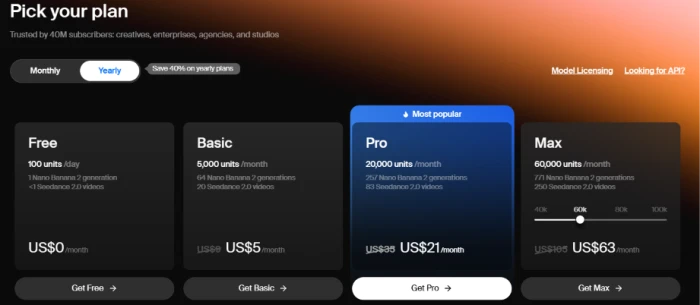
Krea's pricing page loads with Yearly already switched on. That matters. The large number you see is the annual rate. The struck-through number beside it is what you pay month to month.
Here is every tier at both billing cycles.
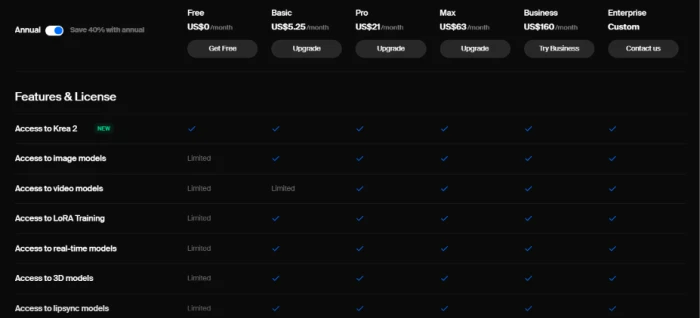
| Plan | Monthly | Annual (per mo) | Discount | Compute units |
|---|---|---|---|---|
| Free | $0 | $0 | n/a | 100 per day |
| Basic | $8.75 | $5.25 | 40% | 5,000 per month |
| Pro | $35 | $21 | 40% | 20,000 per month |
| Max | $105 | $63 | 40% | 60,000 (slider: 40k to 100k) |
| Business | $200 | $160 | 20% | 80,000 (slider: 20k to 1.5M) |
| Enterprise | Custom | Custom | n/a | Custom |
One housekeeping note before we go further. The plan card rounds Basic to US$5. The comparison table further down the same page reports $5.25. I have used $5.25 throughout, because that is the figure the 40% discount reconciles against at $8.75 monthly.
You may have already spotted the red number in that table. Hold that thought until section 4, where the Business plan gets its own reckoning.
2. The number that stopped me
I did the obvious thing next and divided each price by its unit allowance, to get a cost per 1,000 compute units.
| Plan | Annual, per 1,000 units | Monthly, per 1,000 units |
|---|---|---|
| Basic | $1.05 | $1.75 |
| Pro | $1.05 | $1.75 |
| Max | $1.05 | $1.75 |
| Business | $2.00 | $2.50 |
The three individual plans return an identical figure. Not approximately identical. The same number, to the cent, across a twelvefold range in plan size.
| Every SaaS instinct you have says the bigger plan should discount the unit. Krea's does not. What Max gives you over Basic is concurrency and access, priced as features rather than as volume. |
|---|
This changes what the upgrade decision even is. You are never buying cheaper compute on Krea. You are buying permission to run more things at once and permission to touch better models, and the compute rides along at a flat rate underneath.
Business is the exception, and it costs almost double per unit. Section 4 deals with it.
Which left me with the question the pricing page refuses to answer.
3. What a compute unit actually buys
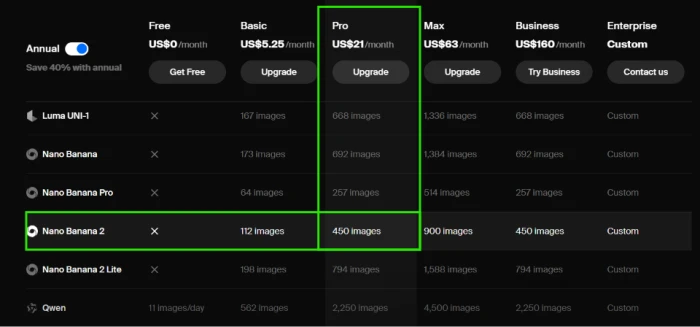
To turn units into money I needed to know how many units each model burns. Krea publishes this, but indirectly. Its comparison table lists how many generations each plan yields per model. Divide the plan's units by that figure and the unit cost of a single generation falls out.
Here is the Pro plan as the reference: 20,000 units, $21 per month on annual billing.
| Model | Generations on Pro | Units each | Cost each |
|---|---|---|---|
| Z Image | 20,689 | 0.97 | $0.001 |
| Krea 2 (any variant) | 10,000 | 2 | $0.0021 |
| Edit | 6,666 | 3 | $0.0032 |
| Flux | 6,000 | 3.3 | $0.0035 |
| Krea 1 | 3,600 | 5.6 | $0.0058 |
| Enhancer | 2,500 | 8 | $0.0084 |
| Seedream 4 | 900 | 22 | $0.023 |
| Nano Banana 2 | 450 | 44 | $0.047 |
| 3D model | 400 | 50 | $0.053 |
| Nano Banana Pro | 257 | 78 | $0.082 |
| Runway Gen-4 (video) | 108 | 185 | $0.19 |
| Seedance 2.0 | 83 | 241 | $0.25 |
| Veo 3 Fast | 54 | 370 | $0.39 |
| Kling 3.0 | 53 | 377 | $0.40 |
| Veo 3 | 27 | 741 | $0.78 |
| LoRA training | 21 | 952 | $1.00 |
| Kling 2.0 | 19 | 1,053 | $1.11 |
The spread is the story. A Krea 2 image costs a fifth of a cent. A Veo 3 clip costs 78 cents. That is a 370x gap inside a single currency, which is why "20,000 units" tells you nothing at all until you know what you intend to generate with them.
Two rows in that table do more work than the rest, and both come back later. Krea 2 at 2 units is the cheapest serious image model on the platform, and section 5 explains why Krea can afford that. Veo 3 at 741 units is the most expensive thing a normal subscriber will ever click, and section 7 explains why that specific number should worry you.
A labelling problem worth knowing about
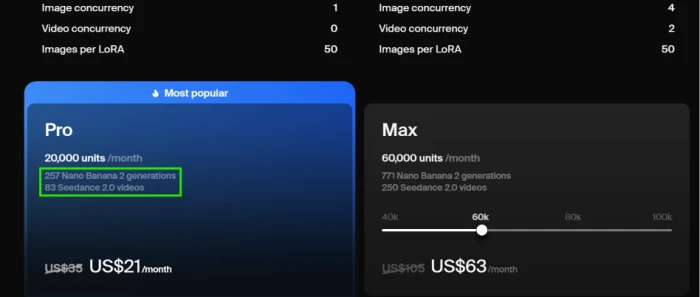
Krea's Pro card advertises "257 Nano Banana 2 generations." The comparison table on the same page says Nano Banana 2 yields 450 generations on Pro, and that 257 is the figure for Nano Banana Pro, a different and pricier model.
I think the card is mislabelled, and here is the check. Krea's API prices Nano Banana 2 from $0.08 and Nano Banana Pro from $0.15, a ratio of 1.88. The comparison table's ratio between those two models is 1.75. Those track each other. The card's number does not track either.
If the table is right, Krea is understating its own Nano Banana 2 capacity by 43% on the headline card that most people read. Test it in ten seconds: generate one Nano Banana 2 image and watch the unit counter. If it moves 44, the table wins.
4. The plans, one at a time
With the unit table above, each tier can be read for what it withholds rather than what it advertises.
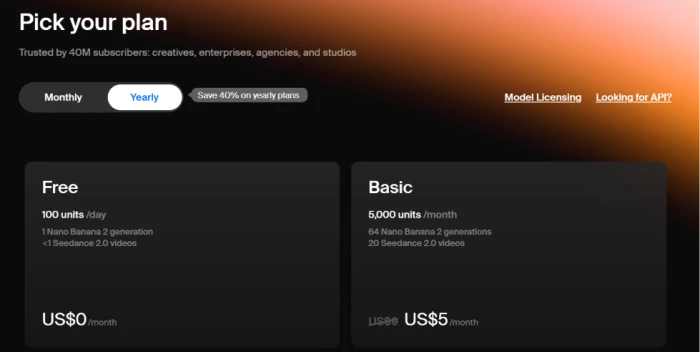
Free: 100 units a day, and a hard ceiling
100 units per day does not accumulate into 3,000 units per month. Each day resets to 100.
Run that against section 3. Seedance 2.0 costs 241 units. Your daily allowance is 100. You cannot generate a single frontier video clip on the free tier, no matter how patiently you wait.
Krea knows this. The free plan card says "<1 Seedance 2.0 videos" in Krea's own copy.
What Free does hand you:
- Roughly 50 Krea 2 images per day, at 2 units each
- 2 LTX-2 video clips per day
- 1 LoRA training per day
- Upscaling capped at 2K resolution
No commercial license, which rules out client work entirely.
Basic: $5.25, and the Veo 3 wall
The commercial license arrives here, and for a freelancer that alone justifies $5.25 a month.
The catch is in the video column. Krea's feature grid marks Basic's video access as "Limited", which reads like a soft cap. It is a hard exclusion. Basic gets Veo 3 Fast at 13 clips per month. Basic gets zero access to Veo 3 and zero access to Veo 3.1.
If Google's flagship video model is in your plan, Basic will not get you there at any volume.
Pro: $21, and the tier most people should stop at
20,000 units. Every video model unlocks. Concurrency lifts to 8 images and 4 videos at once.
Pro carries Krea's "Most popular" badge and the badge is earned. At $21 on annual billing you get 10,000 Krea 2 images, or 83 Seedance 2.0 clips, or 27 Veo 3 clips, or any blend of those.
Max: $63, and the only real reason to buy it
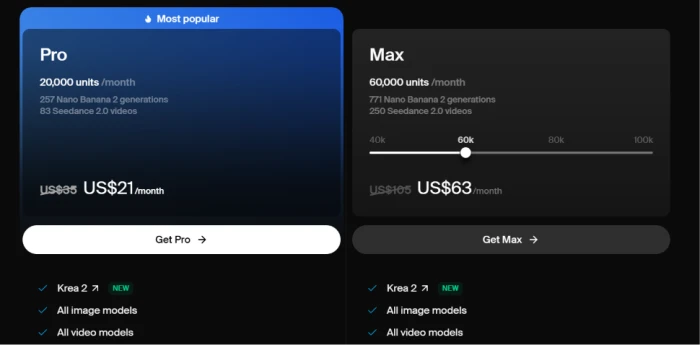
60,000 units by default, on a slider that runs 40,000 to 100,000. Same $1.05 per 1,000 units as Basic, as established in section 2. So what is the $42 premium over Pro actually buying?
Two things:
- Concurrency goes unlimited, up from Pro's 8 images and 4 videos
- LoRA training jumps from 50 images per model to 2,000
The LoRA ceiling is the real gate. 50 images is a style LoRA. 2,000 images is a product catalogue or a consistent character. If you train models for clients, Max is where the platform starts working, and no quantity of Pro top-ups will move that ceiling.
Business: 50 seats, and a broken promise
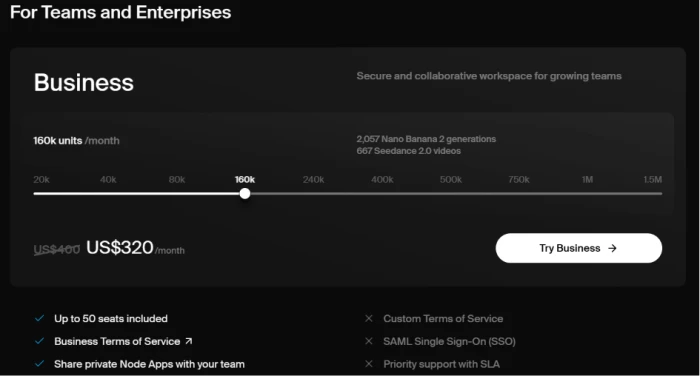
Business is team-priced rather than seat-priced. One flat fee covers up to 50 members. For a ten-person studio that is a strong deal on paper.
Now look at the discount.
The banner across the top of Krea's pricing page reads "Save 40% on yearly plans." Pro goes $35 to $21, which is 40%. Max goes $105 to $63, which is 40%. Business at 160,000 units goes $400 to $320.
| That is 20%. The headline promise does not apply to the plan that costs the most. |
|---|
I doubt this is deliberate. Business is a sliding-scale product and the discount looks hard-coded per tier rather than calculated. The effect on your budget is identical either way.
The unit price tells the same story. Business compute runs $2.00 per 1,000 on annual billing against Max's $1.05. Set both plans to the same 80,000 units and the gap is plain.
| At 80,000 units | Max | Business |
|---|---|---|
| Annual price per month | $84 | $160 |
| Seats | 1 | Up to 50 |
| SAML single sign-on | No | Yes |
| Audit logs and spend limits | No | Yes |
| Indemnification | No | Yes |
You are paying $76 a month for the admin layer at that volume. Scale it up and the arithmetic gets harder to ignore. Four Max seats at 100,000 units each gives your team 400,000 units for $420 a month. Business at 400,000 units costs $800.
$380 a month for SSO and a shared workspace. Worth it for a compliance-bound agency. Difficult to justify for four people who already trust each other.
Enterprise: custom, and one concrete detail
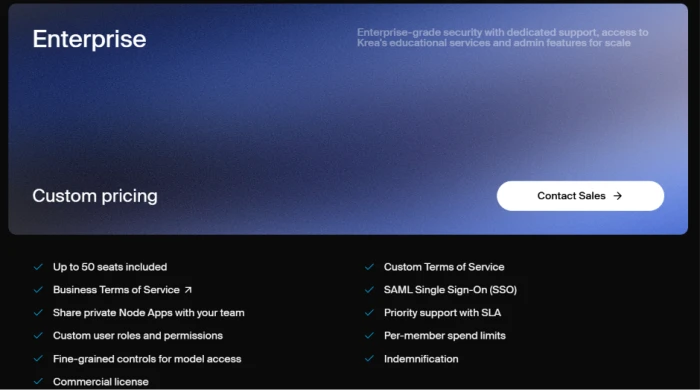
Everything Business carries, plus custom terms and negotiated volume. No public price. The one hard number worth knowing is that Enterprise raises the LoRA image ceiling from Max's 2,000 to custom, and section 6 explains who gets pushed here whether they wanted to be or not.
5. The API is a separate bill, and the gap is enormous
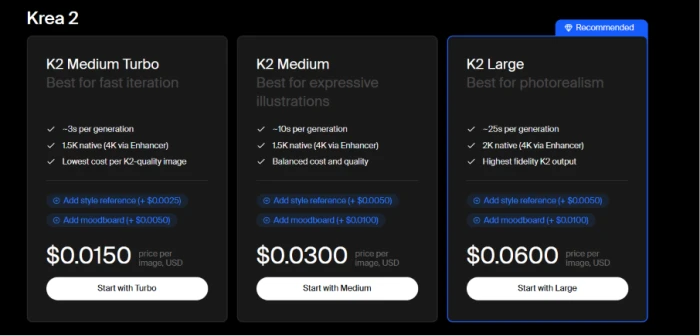
Krea's API page states this in a box near the top, and I want to repeat it because subscribers miss it constantly: your Pro or Max subscription covers the Krea app only. API access is billed independently, in dollars rather than units.
That reads like a footnote. Run the numbers and it becomes the most revealing fact on the entire site.
Inside the app, all three Krea 2 variants cost 2 units per image, as section 3 established. Through the API, they do not.
| Krea 2 variant | API, per image | In-app, per image (Pro annual) | API multiple |
|---|---|---|---|
| K2 Turbo | $0.0150 | $0.0021 | 7x |
| K2 Medium | $0.0300 | $0.0021 | 14x |
| K2 Large | $0.0600 | $0.0021 | 29x |
Two things fall out of that table.
Always pick K2 Large inside the app
It costs the same 2 units as Turbo. The API charges four times more for it, which tells you Krea considers Large four times more expensive to serve. In the app you get that difference for nothing. There is no reason to choose Turbo unless you specifically need the 3-second render over Large's 25 seconds.
Krea subsidises its own models and resells everyone else's near cost
Run the same comparison across a model Krea does not own and the pattern snaps into focus.
| Model | Owner | API price | In-app (Pro annual) | API multiple |
|---|---|---|---|---|
| Krea 2 Large | Krea | $0.0600 | $0.0021 | 29x |
| Nano Banana 2 | $0.08 | $0.047 | 1.7x | |
| Nano Banana Pro | $0.15 | $0.082 | 1.8x |
Krea pays Google for every Nano Banana call, so the in-app price sits just below the API price and the margin is thin. Krea pays itself for Krea 2, so it can hand you 10,000 images for $21 and lose nothing.
| This is the single most useful budgeting rule on the platform: build your volume work on Krea 2 and treat the third-party models as a garnish. |
|---|
6. Model licensing: $1,000 a month, per model

Separate from the app and separate from the API, Krea licenses its model weights for self-hosting.
Maker costs $1,000 per month per model. Read that unit twice.
What Maker includes:
- Full weights and code, downloadable immediately
- Fine-tuning and LoRA rights
- Up to 10,000 images per month
- 1 domain and 10 licensed users
And then the line that decides everything, taken from Krea's own tier description: Maker is meant for internal and marketing visuals, and is explicitly "Not for client or downstream use."
That clause eliminates every agency reading this page. Krea's own worked example makes it sting more. Its three-step guide suggests you train on K2 Raw and run on K2 Turbo, and it notes that each is its own license. Two models, $2,000 a month, before you have served a single client image that you are contractually forbidden from serving.
Agencies go to Enterprise. That is precisely where the clause is engineered to send them.
7. The refund threshold nobody mentions at checkout
Here is the finding I did not go looking for. It sits in a support document two clicks off the pricing page, and I only found it because I was chasing something else.
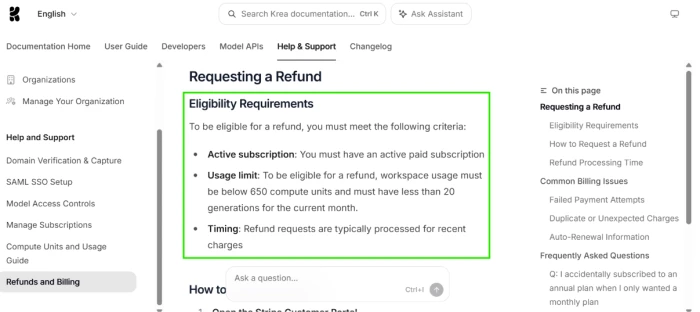
Krea's refund policy requires an active paid subscription, plus two usage conditions:
- Workspace usage below 650 compute units for the current month
- Fewer than 20 generations for the current month
Now put 650 units beside the cost table from section 3.
| What you do on day one | Units burned | Refund still available? |
|---|---|---|
| 1 Veo 3 clip | 741 | No |
| 1 Kling 2.0 clip | 1,053 | No |
| 3 Seedance 2.0 clips | 723 | No |
| 2 Seedance 2.0 clips | 482 | Yes, 168 units to spare |
| 20 Krea 2 images | 40 | You hit the 20-generation cap instead |
| One Veo 3 clip ends your refund eligibility. Not ten. One. It costs 741 units against a 650-unit ceiling, so the first time you test the model Krea was advertising to you, your money stops being refundable. |
|---|
I want to be fair here, because the threshold has an obvious and legitimate purpose. Without a line somewhere, anyone could burn 20,000 units and ask for their $21 back, every month, forever. Every subscription business needs that line.
The problem is not the threshold. It is that nobody tells you where it sits.
It is absent from the pricing page. It is absent from the checkout flow. It lives in a support document called "Refunds and Billing" that you would only ever open after you already wanted your money back, which is roughly the worst possible moment to learn the rule.
The second issue is that the line is drawn against consumption rather than intent. Somebody who spends four minutes testing Veo 3 and concludes Krea is wrong for them is treated exactly like somebody who worked the platform for three weeks.
The practical rule
If you want your refund option to survive your trial, test on Krea 2 images and stay under 20 generations until you have made up your mind. Do not touch a frontier video model until you are certain.
The mechanics, once you do qualify, are clean. Cancel through the Stripe portal from your billing page and the system checks eligibility automatically, then offers the refund inside the cancellation flow. You email nobody. Processing takes 5 to 10 business days.
8. What subscribers actually say
Krea sits at 3.3 out of 5 across roughly 117 Trustpilot reviews. In January 2026 that score was around 2.7. It has climbed, and the reason is more interesting than the number.
I want to show you four reviews, because the pattern inside them is sharper than any average.
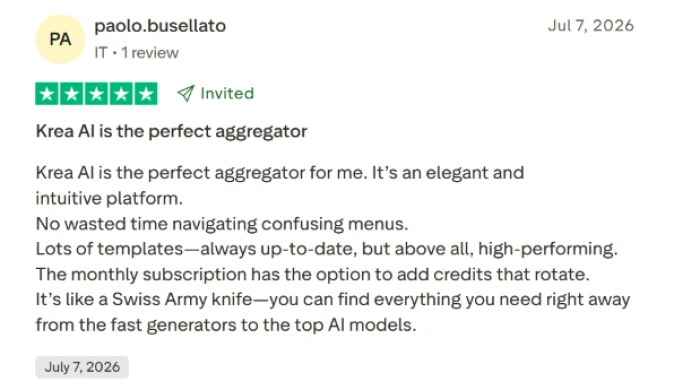
Paolo calls Krea an aggregator and a Swiss Army knife. He praises the interface and mentions that the subscription lets you add rotating credits. Note the tag beside his rating: Invited.
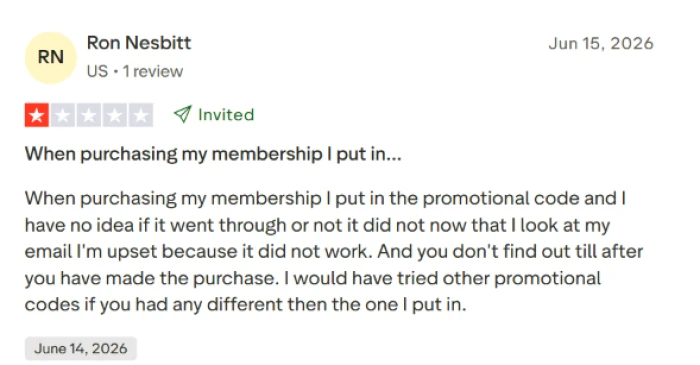
Ron's complaint is a promotional code that silently failed, with no confirmation either way until after the charge had already gone through.
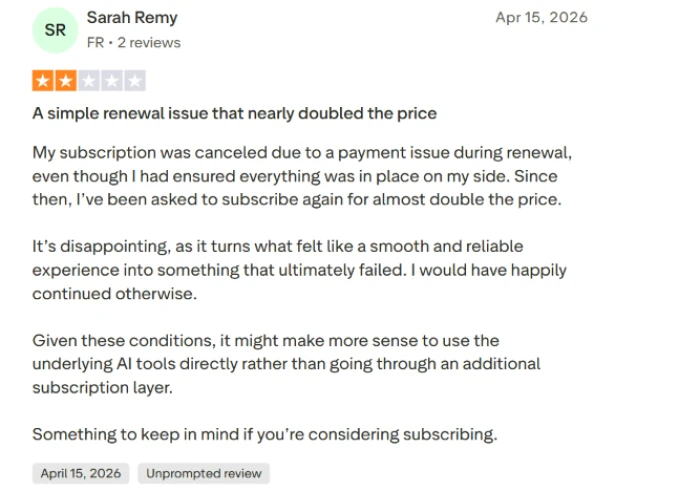
Sarah's subscription lapsed over a payment issue at renewal, and re-subscribing quoted her close to double what she had been paying. Her conclusion was to skip the middle layer and use the underlying models directly.
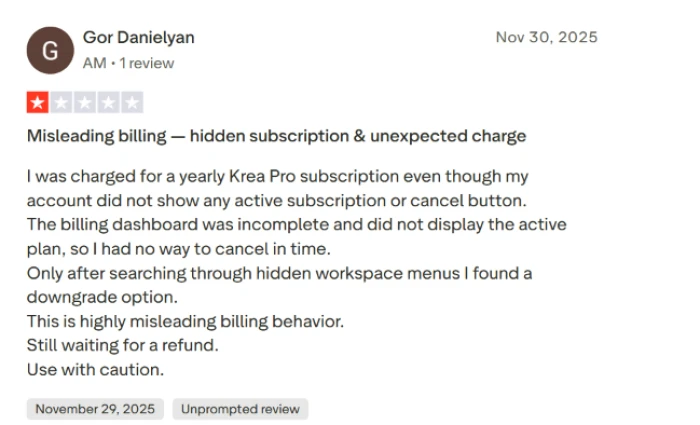
Gor was charged for an annual Pro subscription while his billing dashboard displayed no active plan and no cancel button. He found the downgrade option only after digging through workspace menus.
The pattern is in the tags
Look at what each group is about.
The two Invited reviews are about the product. One person loves the interface, one person hit a broken promo code.
Both Unprompted reviews are about billing.
| People who go to Trustpilot on their own initiative go there about money. Invited reviews arrive in your inbox and catch you in whatever mood your last session left you in. |
|---|
It also explains the climb from 2.7 to 3.3. Krea started inviting reviews. That is a legitimate thing to do and most SaaS companies do it, and it means the aggregate score is now measuring a different population than the one it measured in January.
9. So which plan should you buy?
Back to my client. 400 product images and 20 video clips a month.
400 Krea 2 images at 2 units each comes to 800 units. 20 Seedance 2.0 clips at 241 units each comes to 4,820. Their monthly total is 5,620 units.
Basic gives 5,000. They would run dry in the last week of every single month. Pro gives 20,000 for $21 on annual billing, and if they ever swap Seedance for Veo 3 the same job costs 15,620 units and still fits inside the plan.
Pro. $21 a month. The question took me three hours and the answer took ten seconds once the units table from section 3 existed.
Here is everyone else.
| If you are | Buy | Because |
|---|---|---|
| Testing the platform | Free, on Krea 2 only | Stay under 20 generations and your refund survives (section 7) |
| Making images, no client work | Free | 50 Krea 2 images a day covers a hobby |
| Freelancing on images | Basic, $5.25 | The commercial license arrives at this tier |
| Touching video at all | Pro, $21 | Veo 3 and Veo 3.1 do not exist below Pro |
| Training LoRAs for clients | Max, $63 | 2,000 images per model against Pro's 50 |
| Running a 4-person studio | 4x Max at 100k | $420 against Business's $800 for the same 400k units |
| Needing SSO or audit logs | Business, $160 | Nothing below it has them |
| Building software on Krea | The API, not a plan | Your subscription does not cover a single API call |
| Self-hosting for client work | Enterprise licensing | Maker forbids client and downstream use |
How I checked all of this
Every price and every generation count in this article comes from Krea's own published pages, read on 16 July 2026. The per-unit figures are my arithmetic, derived by dividing each plan's advertised price by its advertised unit allowance, and each plan's unit allowance by its advertised generation count per model.
Krea ships pricing changes often. The findings in sections 7 and 8 in particular describe things Krea may correct after publication, which would be a good outcome. If you are reading this well after the update date above, verify against the live page before you act on it.
Comments
Join the discussion and share your perspective.