
I signed up for both PixVerse AI and Hypernatural AI in the same week, expecting one to win outright.
That is not what happened.
By day three I realized I was comparing a race car against a delivery van. Both move fast. They were built for different roads. PixVerse turns a single image or a short prompt into a stylized clip with real cinematic motion. Hypernatural turns a written script into a finished short-form video with narration and captions already baked in.
So the honest answer to “which is better” depends on what you are trying to make. This comparison comes from hands-on use, not spec sheets, and I will show you where each one pulled ahead.
Here is the short version before we go deep.
| Choose PixVerse if | Choose Hypernatural if |
|---|---|
| You want stylized clips with cinematic motion | You publish Shorts or Reels every week |
| You work image-to-video | You want script-to-video in one pass |
| You want frame-level creative control | You want narration and captions done for you |
I paid for both. Let me walk you through what that money actually bought.
PixVerse AI vs Hypernatural AI: the quick comparison
This table is the fast scan. Every row gets unpacked further down, so treat it as a map rather than the whole trip.
| PixVerse | Hypernatural | |
|---|---|---|
| Best for | Stylized clips with motion | Script-to-video short-form |
| Core engine | Generative clip model | Story-to-video editor |
| Ease of use | Simple prompt box | Guided script workflow |
| Video quality | Strong on stylized shots | Strong on full narrative |
| Editing tools | Light | Full timeline editor |
| Templates / styles | Viral effect templates | 200+ style templates |
| Voiceover / narration | Lip-sync focus | 40+ premium narrators |
| Image-to-video | Yes, a core strength | Limited |
| Text-to-video | Yes, short clips | Yes, full videos |
| Speed | Near real-time on light settings | Minutes per full video |
| Export quality | Up to 1080p, 4K upscale (paid) | HD exports (paid) |
| Watermark (free tier) | Yes | Yes |
| Free plan | 90 + 60 daily credits | 100 lifetime credits |
| Starting paid price | $10/mo (Standard) | $29/mo (Starter) |
| Commercial use | Paid plans | Paid plans |
| My overall score | 7.8 / 10 | 8.4 / 10 |
I will unpack every row below, starting with the one idea that reframed the whole test for me.
The realization that reframed my test
PixVerse is a generative clip engine. You feed it a prompt or a still image, and it renders a short piece of motion, usually five seconds, sometimes extendable.
Hypernatural is closer to an editor with a brain. You give it a script or even a rough idea, and it assembles a complete short video. It writes scenes, pulls or generates B-roll, adds a narrator, and drops in captions.
That single difference explains almost every result that follows. When I judged PixVerse on “did it make a beautiful five-second shot,” it shone. When I judged Hypernatural on “did it hand me a postable ninety-second video,” it shone. Forcing them onto identical scorecards would have been unfair to both, so I scored each feature on its own merits and told you plainly when a category is not that tool’s job at all.
Keep that race car and delivery van picture in mind. It comes back in the pricing round and again in the final verdict.
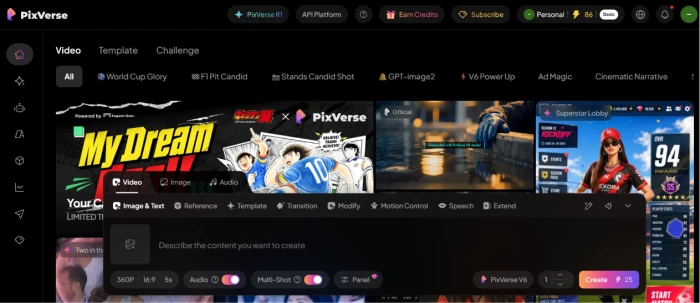
What is PixVerse AI?
PixVerse AI is a full-stack AI video platform built on its own video models. Its whole personality is speed and style.
It fits creators making stylized social clips and quick effect videos like the viral hug or muscle transformations. Anime and 3D looks are where it feels most at home.
What it does well:
- Image-to-video is the headline feature. Upload a still, describe the motion, get a clip with camera moves.
- Stylized output looks clean, partly because stylization hides the small errors that wreck realistic footage.
- Near real-time generation on lighter settings, so ideation feels quick.
Where it frustrated me:
- Photorealism is shaky. Realistic human motion exposes warping and artifacts.
- You pay for attempts, not results. Expect two to five generations per usable clip.
- There is no real timeline editor, so stitching clips into a video happens somewhere else.
What is Hypernatural AI?
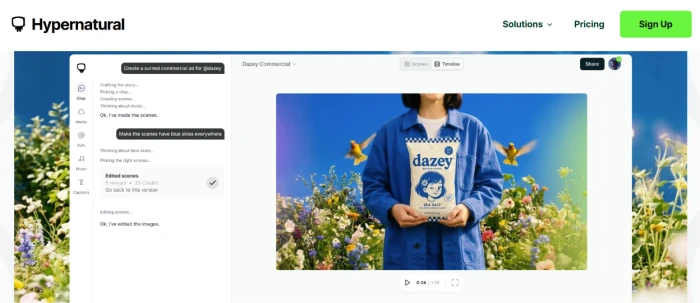
Hypernatural AI is an end-to-end AI video editor for storytellers. You start with words and end with a finished video.
It suits marketers, podcasters repurposing episodes, faceless Shorts creators, and small teams shipping weekly video.
What it does well:
- Script-to-video in a single pass, with scenes generated straight from your text.
- More than 40 premium AI narrators plus auto-generated captions.
- Over 200 style templates and reusable characters that stay consistent across scenes.
Where it fell short:
- It is not built for high-end brand films or complex visual effects.
- Output leans on assembled visuals, so a single hero shot trails a dedicated clip model.
- Prompt skill still matters. Vague inputs produce vague scenes.
Feature by feature: where each one earned its keep
I kept every round short and ended it with my pick. Where a tool does not genuinely compete, I said so instead of inventing a winner.
Ease of use
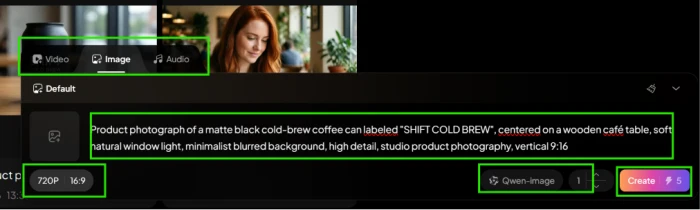
PixVerse is a prompt box: pick a model, hit generate, wait. A first clip takes under a minute of setup. Hypernatural walks you from script to style to narrator, which adds steps, though each one is labeled and hard to get lost in.
My pick: PixVerse for a first clip in seconds; Hypernatural for going blank-page-to-finished-video without opening a separate editor.
AI video quality
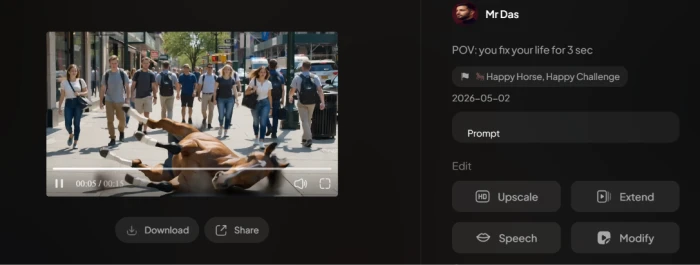
This one splits by job. PixVerse produced sharper single shots on stylized prompts. Hypernatural produced more coherent full videos where scene-to-scene flow carried the piece. PixVerse still stumbles on photoreal humans, so I stopped asking it for those.
My pick: PixVerse for the hero shot, Hypernatural for the full story.
Editing
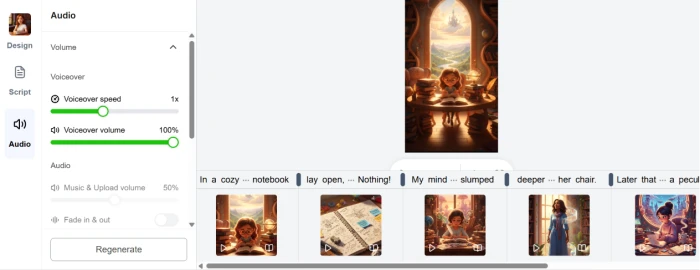
Not a fair fight. Hypernatural has a real timeline where you edit scenes, style captions, adjust music levels, and reorder shots. PixVerse keeps editing light and expects you to assemble elsewhere.
My pick: Hypernatural, clearly.
Templates and styles
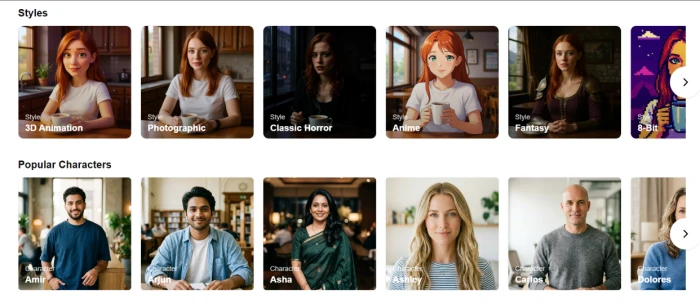
PixVerse leans into viral effect templates that chase trends. Hypernatural ships more than 200 visual style templates plus reusable characters, which matters if you want a consistent look across a series.
My pick: Hypernatural for range, PixVerse for trend effects.
Voiceovers and narration
PixVerse points its audio work at lip-sync and character performance rather than a big narrator library. Hypernatural offers more than 40 premium narrators with auto captions, and you can upload your own audio too.
My pick: Hypernatural.
Image-to-video
This is PixVerse’s signature. Upload a still, add motion cues, and you get camera moves that feel intentional. Hypernatural can use uploaded images inside a project, but it is not designed to animate one still into a hero clip.
My pick: PixVerse, no contest.
Text and script to video
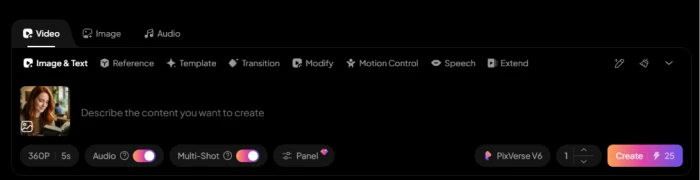
PixVerse turns a line of text into a short clip. Hypernatural turns a full script into a full video, scenes and narration included. Recall the different-jobs idea from earlier: this row is that idea in miniature.
My pick: PixVerse for a single shot from a sentence, Hypernatural for a whole video from a script.
Speed
PixVerse can hit near real-time on light settings, which is part of why it feels playful. Hypernatural takes a few minutes to build a full video, fair given how much it assembles in one go.
My pick: PixVerse per clip; Hypernatural per finished video, since one pass replaces a manual edit.
Pricing
Now the money. All figures below reflect each company’s official pricing pages and are accurate as of July 6, 2026. Both platforms adjust pricing often, and PixVerse in particular changes it more than most, so confirm on the official page before you subscribe.
PixVerse consumer plans:
| Plan | Price | What you get |
|---|---|---|
| Basic (free) | $0 | 90 signup credits plus 60 daily credits, watermark, low resolution |
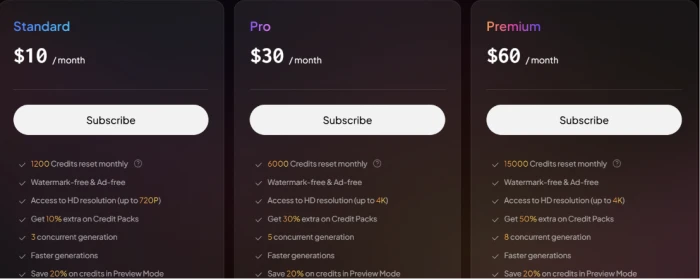
| Standard | $10/mo | 1,200 monthly credits, up to 720p, 3 concurrent generations |
| Pro | $30/mo | 6,000 credits, 1080p with 4K upscale, 5 concurrent generations |
| Premium | $60/mo | 15,000 credits, 8 concurrent generations, watermark-free |
| Ultra | $199/mo | Maximum credits and priority generation ($149/mo billed annually) |
PixVerse also runs a separate developer API system on its platform site, starting near $100/month. That is a different product from the consumer app, so do not mix the two when you budget.
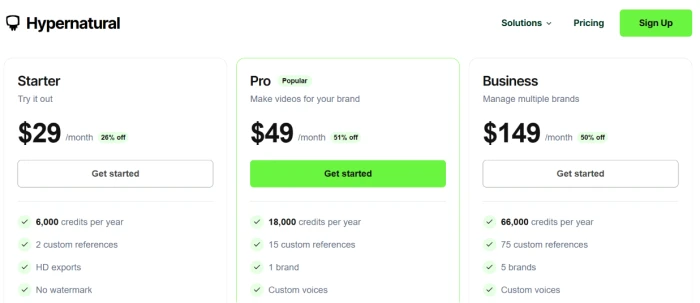
Hypernatural plans (billed annually):
| Plan | Price | Credits/year | Custom references | Other notable |
|---|---|---|---|---|
| Starter ("Try it out") | $29/mo (26% off) | 6,000 | 2 | HD exports, no watermark |
| Pro ("Popular") | $49/mo (51% off) | 18,000 | 15 | 1 brand, custom voices |
| Business ("Manage multiple brands") | $149/mo (50% off) | 66,000 | 75 | 5 brands, custom voices |
Here is the value read that the sticker prices hide. PixVerse charges for raw generation attempts, so heavy iteration burns credits fast, and your real cost per clip depends on how many retries you need. Hypernatural charges toward finished videos, and unused credits roll over on paid plans, which makes monthly spend easier to predict.
My pick on value: Hypernatural for predictable output, PixVerse for cheap experimentation at the entry tier.
Free plan
PixVerse gives you roughly one watermarked video a day from its daily credit refill, which is generous for slow testing over weeks. Hypernatural gives you about five short watermarked videos total from lifetime credits, capped at 30 seconds each.
My pick: PixVerse, because the daily refill lets you keep experimenting long after Hypernatural’s lifetime credits run dry.
Commercial licensing
Both grant commercial rights on paid plans and watermark the free tier. Read each plan’s terms before client work, since usage limits differ by tier.
My pick: Even.
How they actually performed for me
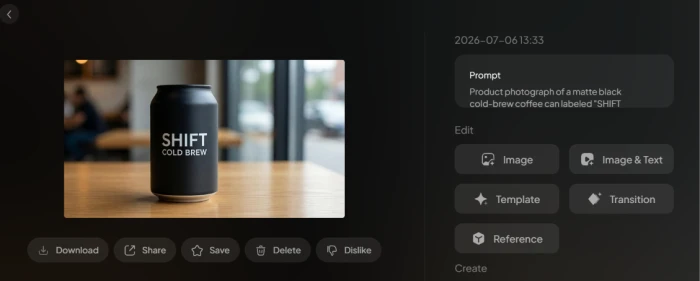
I ran the same brief through both tools: a 30-second promo for a made-up cold-brew coffee brand. Same idea, two different roads to a finished video.
With PixVerse I started image-to-video. I uploaded a product photo and prompted a slow push-in with steam rising off the can. The first render looked sharp. The next two drifted, and the label warped into nonsense. It took four generations to land one clean five-second shot, which matched the “attempts, not results” pattern I had read about and then lived. When I switched to a stylized, neon-lit take, it nailed the look on the second try.
Then I hit the wall. I had four good clips and no video. There was no timeline to stitch them together or add a voice-over.
So I moved to Hypernatural. I pasted a short script. It generated scenes, picked B-roll, added a narrator I chose from the premium list, and captioned the whole thing in one pass. The first full cut was about 80 percent there. I swapped two scenes, dropped the music level, added an end card, and exported. Active time was under fifteen minutes.
What surprised me most: the two tools were stronger together than either was alone. I generated hero shots in PixVerse, uploaded them into a Hypernatural project, and let Hypernatural handle narration and assembly. That pairing beat both single-tool attempts and cost less than one freelance edit.
My personal scorecard
Here is how I scored each round out of ten, based on how the tools behaved during that coffee-brand test and a week of daily use.
| Category | PixVerse | Hypernatural |
|---|---|---|
| Ease of use | 9 | 8 |
| Video quality (per shot) | 9 | 7 |
| Full-video output | 6 | 10 |
| Editing tools | 5 | 9 |
| Templates and styles | 8 | 9 |
| Narration and captions | 6 | 10 |
| Image-to-video | 10 | 5 |
| Script-to-video | 7 | 10 |
| Speed | 9 | 8 |
| Value for money | 8 | 9 |
| Free plan | 9 | 7 |
| Average | 7.8 | 8.4 |
The averages sit close on purpose. Hypernatural edges ahead for anyone who needs a finished video, while PixVerse owns the rounds that involve making a single striking clip.
Pros and cons at a glance
PixVerse
| Pros | Cons |
|---|---|
| Best-in-class image-to-video | Weak on photorealism |
| Near real-time on light settings | You pay per attempt; retries burn credits |
| Strong stylized and anime output | No real editor for assembly |
| Generous daily free credits | 720p ceiling on the entry plan |
Hypernatural
| Pros | Cons |
|---|---|
| Script to finished video in one pass | Not for high-end VFX or brand films |
| Full timeline editor with captions and music | Free plan capped at 30 seconds |
| More than 40 premium narrators | Single hero shots trail a clip model |
| Credits roll over on paid plans | Best value needs an annual commitment |
Which tool fits which creator
This maps the picks above onto real roles, so you can jump to your row.
| You are a | Go with |
|---|---|
| Beginner making a first clip | PixVerse |
| Marketer shipping weekly promos | Hypernatural |
| Agency juggling client brands | Hypernatural (Business) |
| YouTuber doing faceless Shorts | Hypernatural |
| TikTok creator chasing effect trends | PixVerse |
| Instagram creator posting Reels | Hypernatural |
| Small business on a budget | Hypernatural (Creator) |
| Designer animating still images | PixVerse |
| Educator turning notes into videos | Hypernatural |
| Podcast host repurposing episodes | Hypernatural |
Final verdict
No fence-sitting. Here are the specific calls.
- Best overall for finished short-form video: Hypernatural, by a nose, because it hands you a postable video in one pass.
- Best for stylized, cinematic clips: PixVerse, on the strength of its image-to-video.
- Best for daily Shorts: Hypernatural.
- Best value: Hypernatural on paid tiers, since credits roll over and one render replaces a manual edit.
- Best free plan for tinkering: PixVerse, thanks to the daily credit refill.
- Best for a pro assembling a real video: Hypernatural.
The smartest setup I found was refusing to pick one. I kept PixVerse for hero shots and let Hypernatural narrate and assemble them, and that pairing cost less than a single freelance video edit. If you can only fund one tool this month, buy the one that matches the job on your desk right now: a clip, or a video.
Comments
Join the discussion and share your perspective.