
Viggle built its name on free. The Mix videos that flooded TikTok and the celebrity dance memes that followed: most of that came off the free plan, no card required. So when I opened Viggle's pricing page and saw four tiers, a monthly credit count, and a row of premium model logos, I had one question. If the famous part is free, what exactly am I paying for?
I went through the plans and the credits to find out. This is what I learned.
I will start with the one distinction that makes Viggle's pricing make sense, then walk the four plans and what each costs, show what the free tier actually covers, explain what credits buy and where they run out, and close with three real cost scenarios so you can place yourself on the right plan.
Every number here comes off Viggle's live pricing page, which is the figure to trust if it differs from what you see, since Viggle has changed its plan prices before.
The split that makes Viggle's pricing make sense
Most tools run on one currency. Viggle runs on two, and once you see them, the pricing page stops looking crowded.
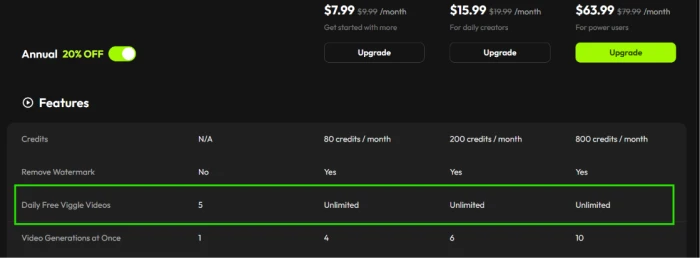
The first is your daily free video allowance. The signature Mix feature, the one that animates a still character with a motion clip, draws from this. On Free you get 5 a day. On every paid plan it goes unlimited.
The second is monthly credits. These are a separate pool, and they pay for the premium models: Google's Veo, Kling, Seedance, and the rest. Credits do not touch your daily Mix videos, and your daily Mix videos do not touch your credits.
So the mental model is simple. Your plan decides how many of the premium model runs you get (credits) and how freely you can use the viral Mix feature (daily videos). I will lean on that split through the rest of this piece, starting with the plans themselves.
The four plans and what they cost
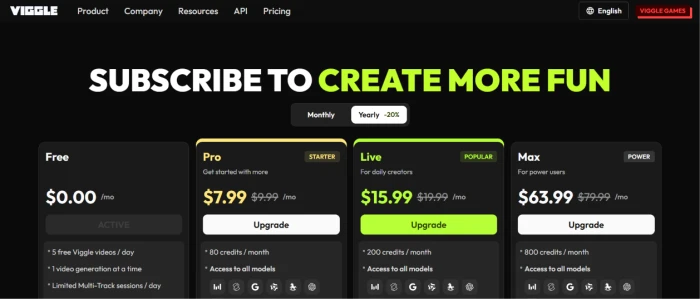
Viggle sells four tiers: Free, Pro, Live, and Max. Each step up raises your monthly credits and lifts your usage limits, removing friction like the watermark and the queue.
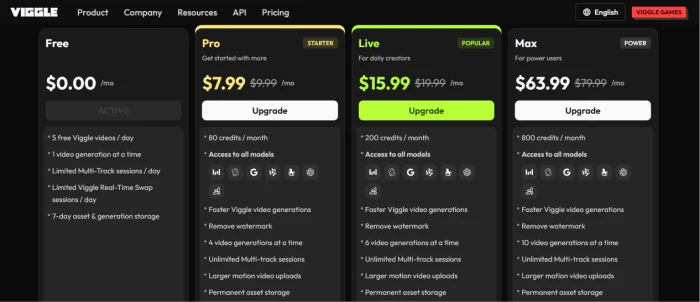
Free stays free forever. You get 5 Mix videos a day, one generation running at a time, a watermark on your output, and 7-day storage before your assets clear. It is built to let the viral feature spread rather than to power a production pipeline.
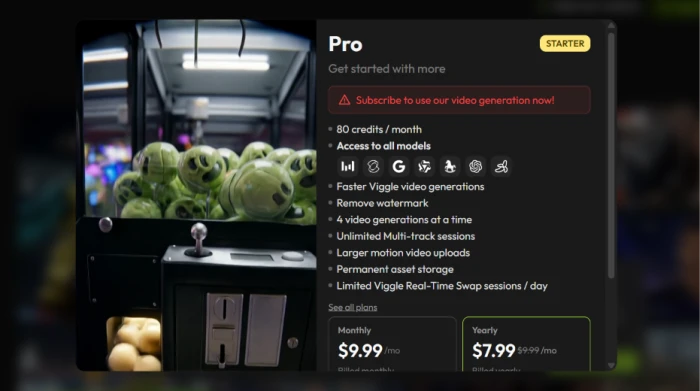
Pro is the entry paid plan. It carries 80 credits a month, drops the watermark, runs 4 generations at once, makes Mix videos unlimited, and stores your assets permanently. Viggle labels it the starter tier.
Live is the one Viggle marks as popular, aimed at daily creators. It lifts credits to 200 and bumps you to 6 generations at once. It also opens up roughly 400 minutes of Real-Time Swap, the live face-swap mode that streamers and VTubers use.
Max is the power tier. It carries 800 credits a month and runs 10 generations at once. The Real-Time Swap cap comes off entirely.
Every paid plan has a monthly price and a cheaper yearly rate, billed up front, at a 20% discount. The table lays them side by side.
| Plan | Monthly | Billed yearly (per mo) | Credits / mo |
|---|---|---|---|
| Free | $0 | $0 | None (5 videos/day) |
| Pro | $9.99 | $7.99 | 80 |
| Live | $19.99 | $15.99 | 200 |
| Max | $79.99 | $63.99 | 800 |
One thing to keep in mind. Viggle has run lower prices in the past, so if a screenshot or an older review quotes a cheaper Pro or Live, check the live page before you judge the cost. Whatever shows at checkout is the real number.
What the free plan actually gives you
The free plan is more generous than most, and it is worth knowing its edges before you decide you need to pay.
You get the signature Mix feature with 5 videos a day, plus image generation. You also get the template library that the community keeps stocked with trending motions. For a lot of people making the occasional meme, that is the whole product.
The limits show up in a few places. Your output carries a Viggle watermark, and you can only run one generation at a time, so a busy session means waiting. Your assets also clear after 7 days, so anything you want to keep has to come off the platform.
The free plan caps the heavier tools too. Multi-Track sessions are limited per day, and Real-Time Swap is capped at a few minutes, which is enough to test the feature but too short to stream on. As I will cover next, the credit pool is what changes that.
What credits actually buy
Here is where the second currency earns its place. Credits are what you spend to run Viggle's premium models, the external engines bolted onto the platform.
Viggle includes a roster of them on every paid plan:
- Veo 3.1, Google's flagship text-to-video model.
- Kling 3.0, built for cinematic, full-scene generation.
- Seedance 2.0 Fast, the quicker option for lower-cost runs.
- Nano Banana Pro and GPT Image 2, the image-generation models.
Wan 2.7 and Happy Horse round out the list. The catch is that Viggle does not publish a per-model price. Its own FAQ says only that each model has its own credit cost and that the cost varies by model and feature. So a single Veo run and a single Seedance run pull different amounts from the same monthly pool, and the page leaves you to find the exact rate inside the app.
This is the one real soft spot in Viggle's pricing transparency. You know how many credits you get. You do not know, from the pricing page alone, how far they go.

The limits that scale with your plan
Credits are not the only thing that grows as you move up. The usage limits matter as much for some creators, especially anyone working at volume or going live.
| Feature | Free | Pro | Live | Max |
|---|---|---|---|---|
| Daily free Mix videos | 5 | Unlimited | Unlimited | Unlimited |
| Video generations at once | 1 | 4 | 6 | 10 |
| Watermark removed | No | Yes | Yes | Yes |
| Real-Time Swap | 5 min | 30 min | 400 min | Unlimited |
| Asset storage | 7 days | Unlimited | Unlimited | Unlimited |
Two rows are worth dwelling on. The generations-at-once count decides how fast you can work, since Max lets you fire off 10 jobs in parallel while Free makes you run them one by one. And Real-Time Swap, the live face-swap mode, jumps from a 5-minute taste on Free to no cap on Max, which is the difference between testing the feature and streaming a full session on it.
What's free and what sits behind the paywall
Viggle's free tier is wide, but it has a clear wall, and it is worth knowing where that wall is before you hit it mid-project.
The viral core stays free. Mix and image generation both run on the free plan, which is the deliberate engine of Viggle's growth: keep the shareable feature open so the memes spread, then convert the people who want more.
The wall sits at the more advanced modes. Standalone text-to-video, where you generate a clip from a prompt without a template, and Character Refine, which builds multiple reference angles of a character for consistency, both require a paid plan. Our hands-on Viggle AI review ran straight into that paywall mid-workflow, and it is the part most new users do not see coming, since nothing warns you until you try to generate.
The price to cross that wall is low, so the friction is less about money and more about surprise. Once you are on any paid plan, both modes open up.
What you actually pay: three real scenarios
Plans on a page stay abstract. Here are three creators and what Viggle would cost each of them.
- The meme maker. You post the occasional character clip for fun, using templates and the odd uploaded motion video. The free plan covers it: your 5 daily Mix videos, with image generation and the template library behind them, all at $0. You live with the watermark and the 7-day storage, and you never reach for credits.
- The daily creator. You publish short character videos most days and want them clean and quick. Live at $19.99 a month, or $15.99 on the annual plan, fits the shape of that work: unlimited Mix videos, no watermark, 6 generations at once, 200 credits for the premium models when a clip needs Veo or Kling, and enough Real-Time Swap to stream.
- The power user or streamer. You lean on premium-model generations daily and refine characters for a consistent brand. You also stream long live sessions. Max at $79.99 a month, or $63.99 annually, is the only tier that keeps up, with 800 credits, 10 parallel generations, and uncapped Real-Time Swap. If your work leans hard on Veo or Kling, even 800 credits is a budget you watch, since the priciest models eat the pool fastest.
The pattern across all three is the same one I started with. The free plan covers the viral feature, and what you pay for is everything around it: the premium models through credits and the headroom through higher limits. So before you upgrade, sort your need into those two buckets. If you mostly want Mix without a watermark and faster turnaround, a lower tier is plenty. If premium models are central to the work, count on credits being the thing you run out of first, and size your plan to that.
The bottom line
Viggle's pricing is fair, and it is honest about the thing that matters most: the feature that made it famous is free outright, not a trial that expires. If memes and short character clips are the goal, you may never pay a cent.
My read after going through it: most people who outgrow Free should land on Live rather than Pro, because the jump from 80 to 200 credits and the unlimited Real-Time Swap headroom is worth the difference, while Pro's 80 credits disappear fast the moment premium models enter the picture. Max is for the few running those models or streaming every day. The number that decides your real cost is the credit pace, since that is where Viggle keeps its pricing quiet and where the spending actually happens.
Comments
Join the discussion and share your perspective.