
I opened two browser tabs one morning with a simple plan. Run the same kind of work through Pica AI and Leonardo AI, then name a winner.
The plan fell apart within an hour, and the reason turned out to be the most useful thing I learned.
These two tools answer different questions. Pica AI starts with a photo of you and reshapes it into a headshot, a stylized portrait, a face swap, or a restored old photo. Leonardo AI starts with a sentence and builds an original image from scratch, then hands you editing controls a designer would recognize. Asking which one is better is a bit like asking whether a portrait studio beats a paint set. The honest answer depends on what you walked in to make.
So I shifted the goal. Instead of forcing a single champion, I tested the narrow overlap where both can do the job, then mapped where each one pulls away. By the end you will know which tool fits your work and what each costs as of June 2026, with the rough edges flagged along the way. Here is the short version first.
Quick verdict
Pick Pica AI if your raw material is your own face and you want flattering results in a couple of clicks, think LinkedIn headshots or face-swap clips. Pick Leonardo AI if you want to generate original art, product shots, concept pieces, or marketing visuals from a written prompt, with control over models and fine edits. They can both produce a stylized portrait, which is the one patch of ground where a real comparison is possible, and I tested that patch closely below.
Pica AI vs Leonardo AI at a Glance
Here is the whole comparison on one screen. I unpack the important rows in the sections that follow.
| Pica AI | Leonardo AI | |
|---|---|---|
| Best for | Headshots and face swaps from your own photos | Original images and design work from text prompts |
| Primary input | A photo of you | A written prompt |
| Ease of use | Minimal, beginner-friendly | Moderate, deeper once you explore |
| AI models | Hidden style presets | Phoenix, Lucid line, plus third-party models |
| Image focus | Recognizable, flattering portraits | Wide range, prompt-driven realism and art |
| Editing tools | Crop and resize, light adjustments | AI Canvas: inpainting, outpainting, masking, upscaling |
| Prompt accuracy | Limited, preset-led | Strong on Phoenix |
| Free plan | About 4 credits per day | 150 tokens per day (~25 images) |
| Paid plans (from) | About $9.99/mo (some listings $4.99) | About $12/mo, or ~$10 billed annually |
| Commercial use | Allowed, including basic free features | Full rights on paid; licensed on free |
| Mobile support | Mobile-friendly for selfies | Web-first |
| API | Not available | Yes, production API |
| My rating: portraits | 4.3 / 5 | 3.6 / 5 |
| My rating: prompt-to-image | 3.2 / 5 | 4.6 / 5 |
The next two sections explain what each tool actually is before I put them head to head.
What Is Pica AI?
Pica AI, the product at pica-ai.com, is built around photos you already have. Upload a selfie and it returns a professional-looking headshot. Drop in a portrait and it restyles your face into something painterly or cinematic. Feed it two images and it swaps a face from one onto another, in stills or short video.
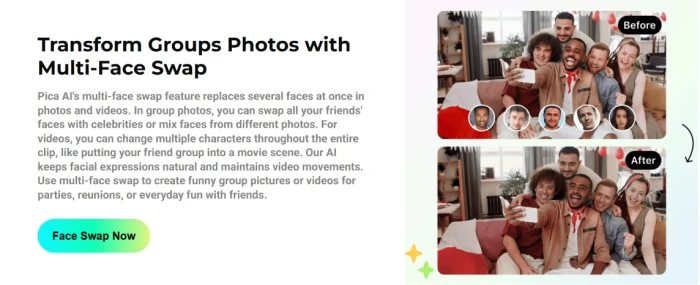
Its calling card is the AI headshot generator, the feature that pulls most people in for profile pictures without a studio booking. Reviewers who tested it over several days found the headshots natural-looking, with believable skin and proportions that stay recognizably you. Face swapping is the other pillar, including a multi-face mode that replaces several faces in one group photo.
There is a text-to-image side too. A related Pica AI art generator turns prompts into stylized looks such as anime or cartoon and brings sketches to a finished state. It leans stylized rather than photoreal, and it sits closer to a fun avatar maker than a production design tool.
Two groups get the most out of it: job seekers who need a clean profile photo, and creators making face-swap clips. A third audience, people who want a nice portrait without touching a prompt box, lands here happily too.
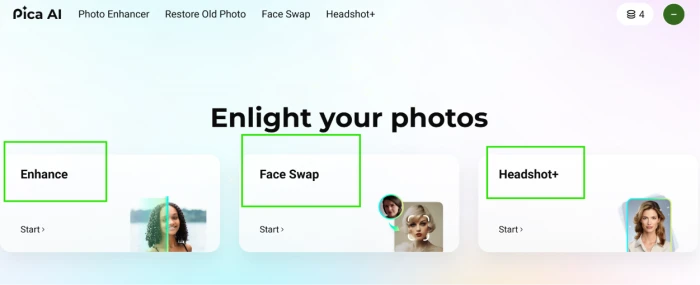
The limits show up the moment you want precision. Several reviewers noted that changing a specific detail, a different expression, a new background, a swapped outfit, or another camera angle, usually means regenerating rather than fine-tuning. You also hand your face to a server, which raises a consent and privacy question I treat seriously in the licensing section, because face-swap law is tightening.
What Is Leonardo AI?
Leonardo AI works the other way around. You type a description and it generates an image that did not exist a moment earlier.
Behind the prompt box sits a shelf of models. Leonardo runs its own families, Phoenix and the Lucid line, tuned for prompt adherence and realistic texture. It also lets you reach third-party models like Flux.2 through one interface, so you are not paying for several subscriptions at once. For people who want a consistent look across a set, it supports training custom models on your own images.
The editing is where it stops feeling like a toy. The AI Canvas gives you inpainting and outpainting, with masking and erase tools on top. Inpainting repaints part of an image. Outpainting extends the frame past its original edge. Built-in upscaling then pushes resolution for print or large screens. There is also a Motion feature that animates a still into a clip of roughly four seconds, plus a production API for developers who want to wire generation into their own apps.
Game developers get a specific bonus: Leonardo can output texture maps such as albedo and normal passes, the kind used in engines like Unity or Unreal. That is a niche most consumer image tools ignore.
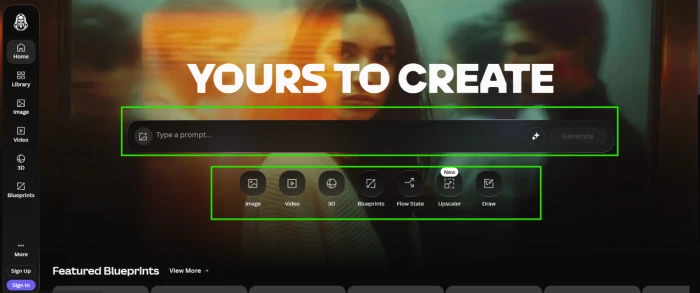
Designers, illustrators, marketers, and game developers are the core audience, anyone who needs original images and wants to control them. There is a learning curve, and the token system can feel like a meter running: heavier models and extra features burn tokens faster, so a daily free allowance can vanish in a few high-resolution batches. I put real numbers on that in the pricing section.
Detailed Feature Comparison
With both tools introduced, here is how they line up on the things that decide daily use. I split it into the areas people ask about most.
Image Quality
This is the first place the different-jobs point bites. Pica is judged on how it treats a face you give it. Leonardo is judged on what it invents from a sentence.
On portraits, Pica's strength is keeping you looking like you. Skin tone stays believable and proportions hold, which is exactly what a headshot needs. Push it toward a heavily stylized look and the quality gets patchier.
Leonardo's strength is range. Its Phoenix model is tuned for high-fidelity output and stronger prompt adherence, and it handles realistic textures and on-image text better than older models. Ask for a moody product shot or a fantasy scene and it produces detail that Pica's art mode does not attempt.
AI Models and Creative Flexibility
Pica keeps the model choice mostly hidden. You pick a style preset and go, which is friendly for beginners and limiting if you want to steer.
Leonardo exposes the engine room. You choose models, adjust settings, and train your own. The trade is complexity for control, and I describe how that complexity feels in the ease-of-use section below.
AI Editing Tools
Here the gap is wide. Pica's editing is light: crop and resize, plus a few basic adjustments to a generated image. For most face-swap or headshot work, that is enough.
Leonardo's AI Canvas is a different category. Inpainting repaints a region you mask. Outpainting grows the picture beyond its border. The erase tool clears mistakes without a full restart. Stack upscaling on top and the workflow starts to resemble a design suite rather than a generator.
User Interface and Ease of Use
Speed to first result favors Pica by a wide margin. Upload a selfie, pick a style, wait a moment, done. There is almost nothing to learn.
Leonardo asks more of you up front. The dashboard puts generation, the canvas, training, and model settings in a sidebar, and reviewers call the interface simple to start but deep once you dig in. It runs in a browser with no Discord required, which already makes it friendlier than some rivals. Plan on an afternoon to feel comfortable.
If your patience for software is thin, Pica wins this round outright.
Performance and Speed
Both return results quickly on simple jobs. Pica's face tasks usually finish in seconds. Leonardo's standard generations are fast too, though its speed depends on the model and your plan: free and lower tiers share a queue, while paid tiers get priority and run more jobs at once.
The catch with Leonardo is consistency under load. During busy periods, free generations wait longer because they run at lower priority. Pica does not expose that machinery, so it feels steady, partly because it is doing a narrower task.
Pricing and Value
This is the section I promised to come back to, and it is where you should not trust a year-old blog post, including this one once it ages. Prices move. I checked these in June 2026, and you should confirm both official pages before paying. Leonardo also renamed its tiers recently, so match the price to the plan on the page rather than the name.
| Tier | Pica AI | Leonardo AI |
|---|---|---|
| Free | ~4 credits per day | 150 tokens per day (~25 images) |
| Entry paid | from ~$9.99/mo | ~$12/mo (~$10 annually), ~8,500 tokens |
| Mid paid | higher individual tier | ~$24/mo, ~25,000 tokens |
| Top paid | enterprise pricing | ~$48/mo, ~60,000 tokens |
| Token rollover | not applicable | yes, on paid plans |
For portrait or face-swap output, Pica's low entry price and daily free credits make it cheap to try. Leonardo costs more but does more per dollar once you use the models and editing, and its 150 free daily tokens stretch far for casual work before you commit. One honest warning: a single Leonardo image runs about 4 to 6 tokens on a standard model and 10 to 15 with heavier settings, so the free tier shrinks fast when you chase quality.
Commercial Licensing
Read this before you publish anything for money, because the ownership rules differ in a way that matters.
Leonardo gives paid subscribers full ownership and commercial rights to what they create. Free-tier users get a royalty-free license to use images commercially, but Leonardo keeps the rights, and free generations stay public in the community gallery unless your plan allows private creation. Free is fine for testing, riskier for client work you need to keep quiet.
Pica states that its art and swaps can be used commercially, including on the basic free features. The bigger issue with Pica is not the license text. It is consent. A face swap uses someone's likeness, and laws around AI-generated content and deepfakes are getting stricter where the result misleads or impersonates a real person. Only swap faces you have permission to use, and keep sensitive photos off any upload form.
Side-by-Side Test Results
This is the part I rebuilt after my one-champion plan collapsed. You cannot run a marketing-banner prompt through a headshot tool, so I tested the two on the only fair ground: tasks where their abilities overlap, plus two tasks where one tool simply cannot follow. Same inputs, same day.
Test 1: Stylized portrait from a selfie
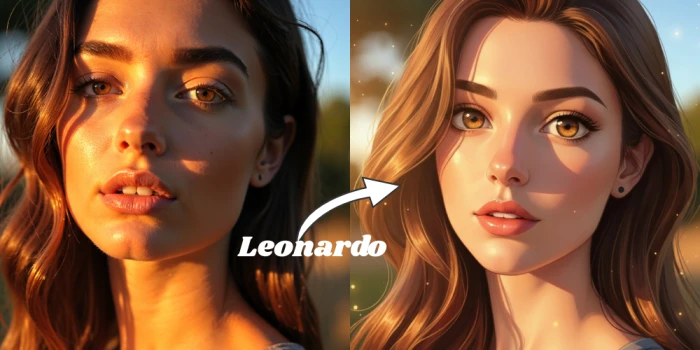
I gave both a single clear selfie and asked for a cinematic portrait. Pica kept my face recognizable and applied the style cleanly. Leonardo produced a more dramatic, art-directed image, but matching my actual likeness needed an image-to-image setup and extra tweaking. Pica for fidelity to you, Leonardo for creative reach.

Test 2: Anime avatar
Same selfie, anime style. Pica was fast and on-style with its avatar presets. Leonardo gave sharper control over pose and scene, at the cost of a few more steps.
Test 3: Original product shot from text only
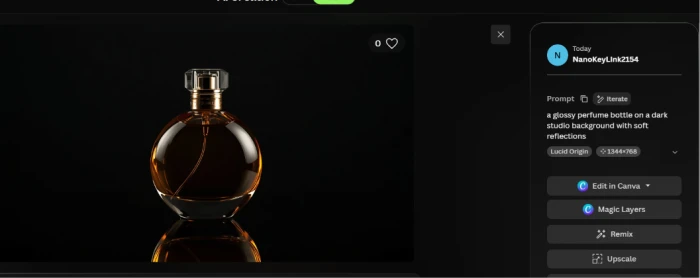
Prompt: a glossy perfume bottle on a dark studio background with soft reflections. Pica had no real path here, since it expects a photo to transform rather than a blank-slate prompt. Leonardo generated a usable product visual from the sentence alone. This is Leonardo's home turf.
Test 4: Group face swap
I handed Pica a group photo plus the source faces. Its multi-face mode swapped several faces in one pass, mostly natural except for one person turned sideways. Leonardo is not designed to swap a face into an existing group photo, so this one belongs to Pica.
Across the four tests the overlap is real but narrow. On portraits both can perform, with Pica favoring likeness and Leonardo favoring direction. Outside portraits they barely compete, which is the whole reason the verdict below splits by use case.
Pros and Cons
Pica AI
Strengths:
- Headshots that keep you recognizable, ready for a profile in minutes.
- Multi-face swap that handles group photos in a single pass.
- A low entry price and daily free credits for testing.
- Almost no learning curve.
Weaknesses:
- Thin editing, so fixing a detail usually means regenerating.
- Stylized and prompt-based art falls short of a dedicated generator.
- You upload your face to a server, with the consent questions that brings.
- No real developer API for automation.
Leonardo AI
Strengths:
- Original images from text with strong prompt adherence on Phoenix.
- A deep editing canvas with inpainting and outpainting, plus spot fixes.
- Custom model training for a consistent style.
- Texture-map output that game developers can drop straight into an engine.
- A production API and a free tier generous enough to evaluate seriously.
Weaknesses:
- The interface and feature set may take some time to learn, especially for new users.
- High-resolution images and advanced settings consume more tokens, which can limit the number of generations available.
- On the free plan, image generations are public, and generation times may be slower during periods of high demand.
- Users looking for simple, one-click image generation may find the extensive feature set more than they need.
Which Tool Should You Choose?
The right pick depends on who you are, so here is my call for six common cases, building on the tests and pricing above.
Best for Beginners
Pica AI. The shortest path from selfie to something you would actually post, with nothing to configure.
Best for Professional Designers
Leonardo AI. The canvas editing and model control match a real production workflow, and the licensing terms protect client work on paid plans.
Best for Social Media Creators
A split decision. For face-swap clips and avatar content, Pica is faster. For original thumbnails and branded visuals, Leonardo wins. Plenty of creators end up keeping both.
Best for Marketing Teams
Leonardo AI. Generating product shots and campaign visuals from prompts, with private generations and commercial rights on paid tiers, suits a team better than a portrait tool does.
Best for Game Developers
Leonardo AI, with little contest. The texture-map output and custom training point straight at this audience, and Pica offers nothing equivalent.
Best Value for Money
It depends on the job. For portraits on a budget, Pica's entry price is hard to beat. For anyone using models and editing daily, Leonardo returns more per dollar despite the higher sticker price, the point I made back in the pricing section.
Final Verdict
I came in looking for one winner and left with a sharper question: what are you making?
If the answer starts with a photo of a face, Pica AI is the faster, cheaper, friendlier choice, as long as you respect consent when swapping. If the answer starts with a sentence and a creative goal, Leonardo AI gives you model choice, a real editing canvas, ownership terms built for paid work, and room to grow into.
The one mistake to avoid is buying the tool that markets best and discovering it was built for someone else's job. Match the tool to the work. Test both on the free tiers this week, and let your own results settle it.
Comments
Join the discussion and share your perspective.