
I needed two things in the same week. A clean headshot for my LinkedIn profile, and a few face-swap clips for a side project I run. Every roundup I opened pushed the same two names at me: Pica AI and Remaker AI.
Their homepages looked almost interchangeable: matching promises and near-identical sample images. So I stopped reading other people's opinions and signed up for both.
I put the same photos through each tool, on the same afternoon, and wrote down what actually came out. This is the full account of that test. By the end you'll know which tool fits your situation, instead of just which one has the slicker landing page.
One thing up front. These are not the same kind of product, even though they market themselves like twins. That gap is the whole story, and it starts to show the moment you look past the homepage.
My quick verdict (for the impatient)
Here's the short version. I defend every one of these calls in the sections that follow, so treat this as the map before the argument.
- Best for a professional headshot: Pica AI. It was built around this job, and the outputs looked ready for a real profile.
- Best all-in-one toolkit: Remaker AI. Face swap is its headline, but it bundles image generation, background removal, video tools, and a dozen smaller utilities into one dashboard.
- Best free plan for casual swaps: close, but Remaker edges it. Sign-up credits plus daily check-in credits gave me more room to experiment before paying.
- Best for phone-first users: Pica AI, because it has a real iOS app. I come back to why that matters, and to a warning about Remaker's mobile situation, further down.
- Best value for a one-off project: Remaker AI. Its credits never expire, so a single purchase suits people whose work comes in bursts.
- Best value for weekly editing: Pica AI's monthly plan, if headshots and swaps are your main use.
If none of those match you exactly, the section on who each tool is for breaks it down more.
How I tested
Here's the setup, so you can judge my results. I used the same source portrait for every face swap, a well-lit photo of myself, and the same target images across both tools. For headshots I uploaded an identical batch of selfies to each. I ran everything on free plans first to see what you get without paying, then bought the smallest paid option on each side to test the walls you hit. I checked pricing directly on both official sites in July 2026, and I'll flag now that credit systems change often, so confirm before you buy.
Pica AI and Remaker AI at a glance
Before the deep dive, here's the overview I wish I'd had on day one.
| Feature | Pica AI | Remaker AI |
|---|---|---|
| Best known for | AI headshots and face swaps | Face swaps plus a full AI toolkit |
| Platform | Web and a native iOS app | Web browser (no official native app) |
| Free plan | Roughly 4 to 8 daily credits, watermark on free swaps | 30 sign-up credits, then 5 to 10 daily |
| Pricing model | Monthly or annual subscription | One-time credit packs, no subscription |
| Text-to-image generation | No | Yes |
| Enhance and restore | Yes, via its sister app Artguru | Yes, built in |
| Ease of use | Clean and simple | Powerful but busy |
| Company base | Hong Kong (Wegital) | Singapore (Zingdeck) |
What each tool is actually built for
The homepages hide the most important fact about these two tools, so let me put it plainly. They are built for different people.
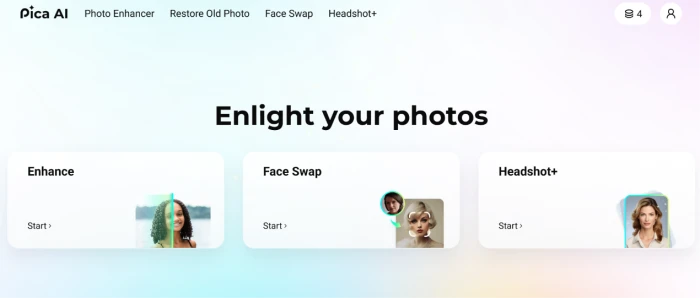
Pica AI is a focused product. Its core is AI headshots and face swapping, and it layers photo enhancement and old-photo restoration on top. There's a catch with those last two. Clicking enhance or restore inside Pica now hands you off to Artguru, a sister app from the same team. Pica does not generate images from text prompts. If you arrive expecting a Midjourney-style tool where you type a sentence and get a painting, it isn't that.
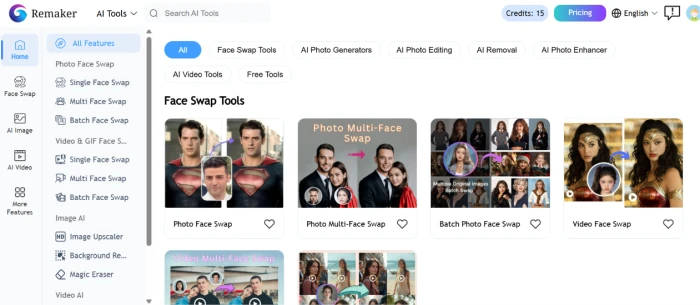
Remaker AI went the other direction. Face swap is the front door, but once you're inside, the dashboard is stacked: text-to-image generation, background removal, an object remover, image upscaling, a headshot generator, video generation, a meme maker, tattoo previews, photo-to-anime, and more. It's closer to a workshop full of power tools than a single specialist.
So the useful question to ask yourself is simple. Do you want a tidy tool that does two jobs well, or a crowded workshop that does twenty jobs at varying quality? That framing shaped everything I noticed next, and the first place it showed up was the one feature both tools were clearly designed to win. Face swapping.
Face swapping: the fight both tools pick
This is the head-to-head that matters most, because it's the job both products chase directly. I tested three swap types on each, so let me take them in order.
Single-face swaps
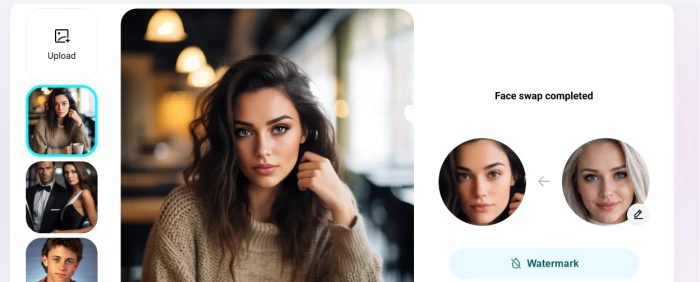
Both tools nailed the basic case. I uploaded one source face and one target photo, hit generate, and had a result in seconds on each platform. On Pica, my jawline and expression stayed recognizable. On Remaker, the V2 engine, its newer and slower option, produced cleaner blending around the hairline than its faster V1 engine did. For a single meme or a quick 'what would I look like here' image, you'd be happy with either.
Multiple-face swaps
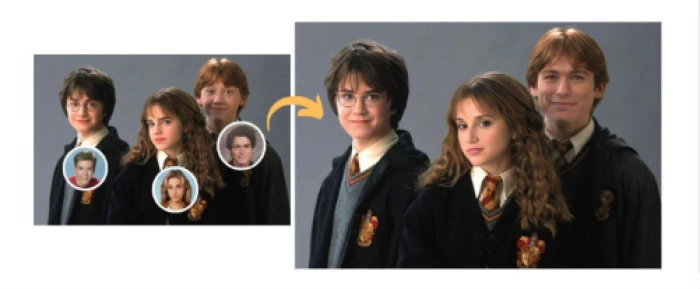
Group photos are where things got interesting. Remaker detected every face in the frame automatically and let me assign a different target to each person, which saved real time on a six-person shot. Pica handled multi-face swaps too, up to five faces, and let me upload my own template images rather than forcing me to pick from presets. That template freedom is a Pica advantage the marketing pages tend to bury.
Video face swaps
Video is where the paths split. Pica swaps faces in video on both free and paid tiers, with free video swaps carrying a watermark, and it detects up to five faces in a clip. Remaker locks video face swap behind its VIP status, meaning you have to buy at least one credit pack before you can touch it. Once I paid, Remaker's video swaps were fast and clean. If free video swapping matters to you, Pica is the one that lets you try before paying, a point I'll tie back to at pricing.
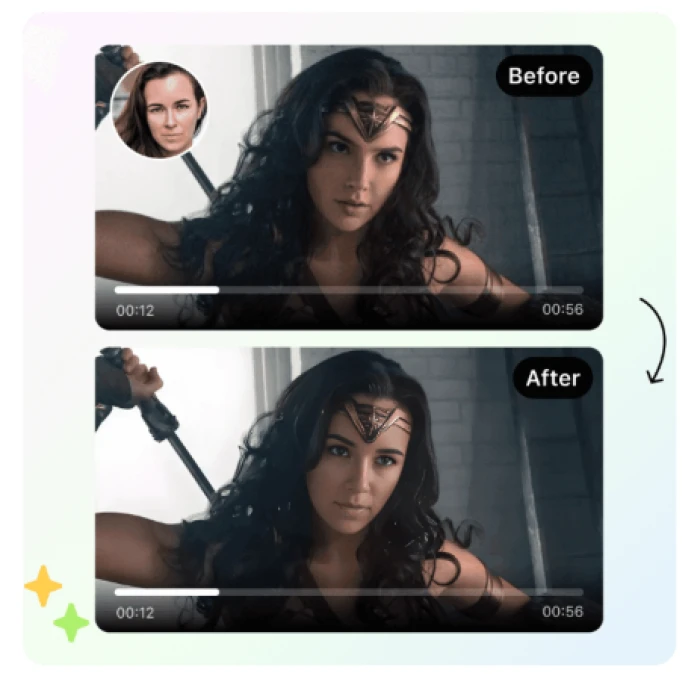
Realism and speed
On raw realism, the two were close enough that I'd call it a draw for casual use. Both preserve lighting and expression well on clear, front-facing photos, and both wobble on heavily shadowed or side-angle shots. Image speed was comparable too, landing in the few-seconds range. The honest tiebreaker sits outside the swap itself, in everything around it, which the next sections cover.
| Swap type | Pica AI | Remaker AI |
|---|---|---|
| Single face | Fast, stays recognizable | Fast, V2 blends cleaner |
| Multiple faces | Up to 5, custom templates | Auto-detect, per-face targets |
| Video face swap | Free and paid, watermark on free | VIP only, paid |
| Image speed | Seconds | Seconds |
Headshots: where the two split apart
Remember the split I described a couple of sections back, the focused tool against the crowded workshop? Headshots are where you feel it most.

Pica's headshot generator is the feature it's proudest of, and the results showed why. I uploaded a batch of ordinary selfies taken under different lighting, picked a few styles, and about an hour later got back portraits with realistic skin tones, recognizable proportions, clean backgrounds, and no obvious AI artifacts. Several were good enough to sit on a real LinkedIn profile without edits. The workflow asks for six to thirty photos of yourself, so it's more involved than a one-click swap, but the payoff earned it.
Where Pica frustrated me was control. If I wanted a different expression or a specific background color, there weren't many dials to turn, and in most cases I had to regenerate rather than fine-tune. For casual use that's fine. For a perfectionist it grates.
Remaker has a headshot generator too, but it sits in a long list of tools rather than at the center of the product, and it shows. My Remaker headshots were usable for a profile picture, though they leaned more 'AI portrait' than 'studio photo,' and the tool clearly isn't the reason most people come to the platform. If a polished professional headshot is your main goal, Pica is the pick, and this is the single clearest reason to choose it.
Everything else Remaker piles on
Face swapping is a tie and headshots go to Pica, so breadth is where Remaker pulls ahead, and it's a wide margin.
I already listed Remaker's toolset, so I won't repeat all of it. These are the ones I actually used and rated:
- Text-to-image generation: type a prompt, get up to four images, with a choice of models for realistic or stylized looks. Pica has no equivalent, so if generating images from scratch is on your list, this alone decides it.
- Background and object removal: both worked in a click, handy for cleaning up product shots or tidying a portrait before a swap.
- Image upscaling: Remaker does this in-house. Pica does it too, but routes you to Artguru, as I mentioned earlier.
- Video generation and enhancement: Remaker turns stills into short clips and pushes footage toward 4K. This is well beyond anything Pica attempts.
The prompt i used to generate image from remaker ai is:
“A photorealistic portrait of a 22-year-old woman with natural features, soft brown eyes, subtle freckles, and shoulder-length dark hair, wearing a simple white linen shirt. She is standing in a sunlit meadow during golden hour, with a gentle smile and relaxed posture. Captured using a full-frame DSLR with an 85mm f/1.8 lens, shallow depth of field, cinematic lighting, ultra-detailed skin texture, realistic hair strands, natural color grading, HDR, 8K resolution, documentary photography style, highly realistic, no excessive retouching ”
and the result image is:

The trade-off for all this range is focus. Some of these tools are excellent. Others are average. You won't know which until you spend credits testing them. Reviews of Remaker's own image generator, for instance, run hot and cold, with some users praising the realistic models and others frustrated by garbled text in outputs. Breadth buys you options. It doesn't guarantee quality on every one, which is the tax you pay for a workshop this size.
Speed and the daily workflow
Numbers aside, the two tools feel different to use, and that feeling adds up over a week.
Pica's interface is calm. A few main tools sit across the top, you pick one, you upload, you wait a few seconds. I never felt lost.
Remaker's dashboard is the opposite. It's powerful and packed, with tools split into generators and editors, plus a long 'more features' overflow. One reviewer I read called the homepage busy and slightly overwhelming, and I agree, though the clutter is the price of having everything in one place. Once you learn where things live, it's efficient. The first twenty minutes are a hunt.
For the jobs I ran most, image swaps and single edits, both returned results in seconds. Video and headshots take longer on both sides, which is expected given the work involved. Neither tool made me wait in a way that felt broken.
What each one costs
Pricing is where the two philosophies show up in your wallet, and it pays to get exact. I pulled these figures from each tool's official pricing page in July 2026.
Pica AI runs on a subscription.

| Plan | Price | Key inclusions |
|---|---|---|
| Free | $0 | Around 4 to 8 daily credits, images saved 24h, 1K resolution, watermark on free swaps |
| Monthly (most popular) | $9.99 / month | Monthly credits, no watermark, HD to 4K, iPhone app access, fast processing |
| Annual | $59.99 / year (25% off) | Same premium features, billed yearly |
Remaker AI drops subscriptions entirely and sells credit packs you buy once.

| Option | Price | Notes |
|---|---|---|
| Free | $0 | 30 credits on sign-up, 5 to 10 daily via check-ins, watermark-free exports |
| Starter pack | $5.99 | 200 credits |
| Popular pack | $9.99 | 530 credits |
| Large pack | up to $299 | 20,000 credits |
| Credit validity | n/a | Purchased credits never expire |
The practical difference is about rhythm as much as price. Pica's subscription rewards steady, weekly use. Remaker's never-expiring credits reward people whose projects arrive in waves, since you buy once and spend slowly. Two things I hit are worth calling out. Pica puts watermarks on free-tier swaps, while Remaker advertises watermark-free exports even on free credits. And Remaker's video face swap still requires buying at least one pack, as I flagged earlier. Prices and credit amounts shift often on both sites, so treat these as a July 2026 snapshot and confirm before paying.
Devices, the mobile app trap, and your photos

I promised earlier to explain the mobile situation, and it earns a full stop of its own, because this is where I almost got burned.
Pica AI has an app. You can use it in a browser or download it from the App Store, where it carries a 3.8-star rating across many reviews, and the app hands you extra free credits plus multi-device sync. For phone-first users, that's a real convenience.
Remaker AI is browser-based. Its official site works on desktop and mobile browsers, and Remaker's own marketing says it runs on Windows, Mac, iOS, and Android, but the key phrase is 'in a browser.' There is no official Remaker native app. The 'Remaker' apps you'll find in the app stores are third-party, and reviewers have paid for them expecting the real thing, only to learn the actual Remaker.ai works through a browser with no official mobile app. Go the app route and you can end up paying a copycat. Stick to remaker.ai in your browser.
On privacy, both delete uploaded photos on a timer. Pica states swapped photos are removed within 24 hours. Remaker's face swap tools say uploads and results are deleted within 48 hours. Both process payments through Stripe and say they don't store card details. For casual creative work that's a reasonable baseline, though anyone handling sensitive images should read each privacy policy in full before uploading.
So which should you pick?
Back at the top I gave you my picks. Now that you've seen the testing, here's the reasoning gathered in one place, sorted by what you actually need.
Pick Pica AI if a professional headshot is your priority. It's the tool built for that job, the outputs looked profile-ready, and the iOS app makes it easy to do from your phone. It's also the safer pick for casual face-swappers who want a clean, simple tool and don't mind a subscription or a watermark on free swaps.
Pick Remaker AI if you want range. Face swap is its strong front door, and behind it sits a toolkit spanning image generation, background work, and video that Pica simply doesn't offer. The never-expiring credits make it the smarter buy for anyone whose work comes in bursts, and its free tier gave me the most room to experiment.
The title of this piece asks which AI image editor is better in 2026. After putting the same photos through both, my answer is that neither wins outright, because they aren't chasing the same crown. Pica is the better specialist. Remaker is the better generalist. Match the tool to the job in front of you: headshots and a phone-first workflow point to Pica, while a broad creative workload on desktop points to Remaker. Buy the one that fits the work you're doing this month, and you'll have picked right.
Comments
Join the discussion and share your perspective.